

Artifact Repositories and the Release Process: Feeds, Container Image Tags, Hotfix Flow and Support Policy
In container registries a tag is a moving pointer by default, so tag images with the version and the commit SHA, mark their source with OCI labels and deploy by digest. On the Bookstore API we show the same tag pointing to two different images, the SDK's OCI labels and digest output, a 1.x hotfix cherry-picked onto a release branch and the trap of the publishing workflow missing from that branch, and cover artifact repository options, release cadence and a support policy template.
Version note: The examples in this post were run with .NET 10 (SDK 10.0.402, with the SDK's container support), Docker 29, registry:3 (a local container registry), Git 2.54, commit-and-tag-version 13.3 and actionlint 1.7.12. The deploy workflow was validated with actionlint and the commands of its image step were run against the local registry; it was not run on GitHub.
Guess First
We push the API of Bookstore, the online bookstore used as the shared example across this site's series, straight to a registry with the .NET SDK's container support. Two tags were produced for version 2026.11.3, and the registry says the 2026.11.3 tag points to a digest:
$ dotnet publish src/Bookstore.Api -c Release -t:PublishContainer \
    -p:ContainerRegistry=localhost:18500 -p:ContainerRuntimeIdentifier=linux-x64 \
    -p:Version=2026.11.3 '-p:ContainerImageTags="2026.11.3;2026.11.3-ea85740"'
  Pushed image 'bookstore/api:2026.11.3, 2026.11.3-ea85740' to registry 'localhost:18500'.
$ curl -sI -H "Accept: application/vnd.docker.distribution.manifest.v2+json" \
    http://localhost:18500/v2/bookstore/api/manifests/2026.11.3 | grep -i digest
Docker-Content-Digest: sha256:5d24bbdebb03bfbfb681f8a2f7377e71f96373a4f17c03b50eb8aef01f689af4
An hour later Emre publishes the same version with the same tags once more, to add the source repository information to the image. The code did not change. Does the registry reject the second push? If it accepts it, does 2026.11.3 point to the same image? What does a production node get when it pulls the image again?
$ dotnet publish src/Bookstore.Api -c Release -t:PublishContainer -p:PublishRepositoryUrl=true \
    -p:ContainerRegistry=localhost:18500 -p:ContainerRuntimeIdentifier=linux-x64 \
    -p:Version=2026.11.3 '-p:ContainerImageTags="2026.11.3;2026.11.3-ea85740"'
  Pushed image 'bookstore/api:2026.11.3, 2026.11.3-ea85740' to registry 'localhost:18500'.
$ curl -sI -H "Accept: application/vnd.docker.distribution.manifest.v2+json" \
    http://localhost:18500/v2/bookstore/api/manifests/2026.11.3 | grep -i digest
Docker-Content-Digest: sha256:2df0d157b4e04321632347dca58550aca792aa248a397076b9e0c07da392edd8
The registry did not object, and the tag now points to a different digest. The code is the same but the image is not: the SDK writes the creation time into the image, and this second build added one more label. Unlike NuGet and npm, in most container registries a tag is a moving pointer by default. In the last post of the series we look at where artifacts live, how images are tagged and deployed, the hotfix flow, and the support policy that ties all of this to users.
Artifact Repository Options
We covered the build once, deploy many idea in the "Build Once, Deploy Many: Artifacts, Versioning and Immutable Packages" post of the CI/CD Fundamentals series: a package built once goes to every environment unchanged. That package needs an address. Bookstore has four kinds of artifacts: a NuGet package (Contracts), an npm package (@bookstore/ui), a container image (the API) and the web app's static files. There are three kinds of places to keep them:
| Option | Formats | When it fits |
|---|---|---|
| GitHub Packages | npm, NuGet, Maven, RubyGems, containers (ghcr.io) | Code and CI already on GitHub; permissions come from the repository |
| Azure Artifacts | NuGet, npm, Maven, Python, Cargo, Universal Packages | Teams on Azure DevOps; prerelease/release separation with feed views |
| General-purpose repository manager | Almost all, depending on the product | Several CI and source systems, need to host on your own infrastructure |
Three features matter more than formats. The first is proxy/cache: the internal feed taking nuget.org or npmjs as an upstream and keeping the packages it downloads. The build keeps working even if a package is removed from the external registry or the registry is unreachable, and every external package in use has a recorded copy. The second is retention: how many versions to keep and for how long. Pre-release packages and images built from feature branches should be deleted quickly, release versions kept for as long as they are supported. The third is access control: who can read and who can publish. In the previous two posts we took publishing rights away from people and gave them to workflows; the same principle applies to internal feeds. We will cover managing Azure Artifacts feeds in detail in the upcoming Azure DevOps Pipelines series.
Container Image Tags and OCI Labels
For Bookstore we ran a local OCI registry:
docker run -d --name relseries-registry -p 127.0.0.1:18500:5000 registry:3The API project carries the image name and repository information itself; the registry, platform and tags come from the command line:
<Project Sdk="Microsoft.NET.Sdk.Web">

  <PropertyGroup>
    <TargetFramework>net10.0</TargetFramework>
    <!-- CalVer: CI overrides this with -p:Version=YYYY.M.BUILD -->
    <VersionPrefix>0.0.0</VersionPrefix>
    <VersionSuffix>dev</VersionSuffix>
    <!-- Container image: dotnet publish -t:PublishContainer -->
    <ContainerRepository>bookstore/api</ContainerRepository>
    <PublishRepositoryUrl>true</PublishRepositoryUrl>
  </PropertyGroup>
  ...
The tag scheme continues the decisions of the earlier posts: the CalVer version (2026.11.3) for people, and the version plus the short commit SHA (2026.11.3-ea85740) for an exact match. The value of the second tag is that it tells you which build is which when two different builds are made with the same version number.
The image itself should also say where it came from. The OCI image specification has predefined label keys for this: org.opencontainers.image.version, revision, source, created and others. The .NET SDK fills them in on its own; for source and revision the project needs PublishRepositoryUrl turned on. That was exactly the difference between the two pushes in the guess section: the first had no such property and the image got no commit information. The second image's labels (split into lines for readability):
$ docker image inspect localhost:18500/bookstore/api:2026.11.3-ea85740 --format '{{json .Config.Labels}}'
{
    "net.dot.runtime.majorminor": "10.0",
    "net.dot.sdk.version": "10.0.402",
    "org.opencontainers.artifact.created": "2026-11-14T04:25:33.5559480Z",
    "org.opencontainers.image.authors": "Bookstore.Api",
    "org.opencontainers.image.base.digest": "sha256:05acd0ca475e2130832bab441d28a7dd31041129bad28eac7928151fd73cd2c5",
    "org.opencontainers.image.base.name": "mcr.microsoft.com/dotnet/aspnet:10.0",
    "org.opencontainers.image.created": "2026-11-14T04:25:33.5559480Z",
    "org.opencontainers.image.revision": "ea857409ab0c3f007bb524e96b67599d6ebb5770",
    "org.opencontainers.image.source": "https://github.com/example/bookstore",
    "org.opencontainers.image.version": "2026.11.3"
}
With these labels you can go from an image you see in a registry or a cluster straight to the commit and the repository; the base image's name and digest are recorded too, which makes it easier to find affected images when a base image vulnerability is announced. When you run the image, the /version endpoint from the second post gives the same information from the running application:
$ docker run -d -p 18080:8080 localhost:18500/bookstore/api:2026.11.3-ea85740
$ curl -s http://localhost:18080/version
{"version":"2026.11.3","commit":"ea857409ab0c3f007bb524e96b67599d6ebb5770","assemblyVersion":"2026.11.3.0","fileVersion":"2026.11.3.0","runtime":".NET 10.0.15"}
Deploying by Digest, and the Problem with latest
Because a tag can move, what you deploy should be identified by digest rather than tag. A digest is the hash of the image manifest; if the content changes, the digest changes, and the same digest is always the same image. The first image from the guess section is still in the registry under its digest after losing the tag:
$ docker pull localhost:18500/bookstore/api@sha256:5d24bbdebb03bfbfb681f8a2f7377e71f96373a4f17c03b50eb8aef01f689af4
$ docker image inspect localhost:18500/bookstore/api@sha256:5d24bbdebb03bfbfb681f8a2f7377e71f96373a4f17c03b50eb8aef01f689af4 \
    --format '{{index .Config.Labels "org.opencontainers.image.version"}} revision={{index .Config.Labels "org.opencontainers.image.revision"}}'
2026.11.3 revision=
Even though the tag now points to another image, the image pulled by digest is the first build itself: version 2026.11.3, empty revision label. If the production manifest says bookstore/api@sha256:5d24…, someone pushing the same tag again does not change the running system.
latest is the extreme case of this problem. As we noted in the CI/CD Fundamentals series, latest is not a version but a marker of whoever pushed last; a system using latest in production has no name for the "previous version" to roll back to, and two nodes can run different code at the same time. Most registries let you make tags immutable (for example tag immutability in Amazon ECR, repository or image locks in Azure Container Registry, immutable tag rules in Harbor); turning this on for release tags makes the situation from the guess section impossible.
The SDK exposes the digest of the image it produced as an MSBuild property. To capture it in CI and pass it to later jobs:
$ dotnet publish src/Bookstore.Api -c Release -t:PublishContainer \
    -p:ContainerRegistry=localhost:18500 -p:ContainerRuntimeIdentifier=linux-x64 \
    -p:Version=2026.11.4 '-p:ContainerImageTags="2026.11.4;2026.11.4-5c67033"' \
    -getProperty:GeneratedContainerDigest
sha256:52b191c1c5de96bf9b71313525eb1baecc097b8f732c862ad1d1d0c22939ce15
The Bookstore API's release workflow passes this value unchanged to the staging and production jobs:
name: deploy-api

on:
  push:
    tags: ['app/v*']

permissions:
  contents: read

jobs:
  image:
    runs-on: ubuntu-latest
    permissions:
      contents: read
      packages: write
    outputs:
      version: ${{ steps.version.outputs.version }}
      digest: ${{ steps.publish.outputs.digest }}
    steps:
      - uses: actions/checkout@v7
      - uses: actions/setup-dotnet@v6
        with:
          global-json-file: global.json
      - uses: docker/login-action@v3
        with:
          registry: ghcr.io
          username: ${{ github.actor }}
          password: ${{ secrets.GITHUB_TOKEN }}

      - name: Compute version
        id: version
        run: echo "version=${GITHUB_REF_NAME#app/v}" >> "$GITHUB_OUTPUT"

      # Tags: 2026.11.4 and 2026.11.4-<short sha>; the digest is what we deploy
      - name: Build and push the image
        id: publish
        env:
          VERSION: ${{ steps.version.outputs.version }}
          REGISTRY: ghcr.io
          REPOSITORY: example/bookstore-api
        run: |
          digest=$(dotnet publish src/Bookstore.Api -c Release -t:PublishContainer \
            -p:ContainerRegistry="$REGISTRY" -p:ContainerRepository="$REPOSITORY" \
            -p:ContainerRuntimeIdentifier=linux-x64 -p:Version="$VERSION" \
            "-p:ContainerImageTags=\"$VERSION;$VERSION-${GITHUB_SHA::7}\"" \
            -getProperty:GeneratedContainerDigest)
          echo "digest=$digest" >> "$GITHUB_OUTPUT"

  deploy-staging:
    needs: image
    runs-on: ubuntu-latest
    environment:
      name: staging
      url: https://staging.bookstore.example.com
    steps:
      - name: Deploy by digest
        env:
          IMAGE: ghcr.io/example/bookstore-api@${{ needs.image.outputs.digest }}
          VERSION: ${{ needs.image.outputs.version }}
        run: echo "Deploying $IMAGE ($VERSION) to staging"

  deploy-production:
    needs: [image, deploy-staging]
    runs-on: ubuntu-latest
    environment:
      name: production
      url: https://bookstore.example.com
    steps:
      - name: Deploy by digest
        env:
          IMAGE: ghcr.io/example/bookstore-api@${{ needs.image.outputs.digest }}
          VERSION: ${{ needs.image.outputs.version }}
        run: echo "Deploying $IMAGE ($VERSION) to production"
Both environments get the same digest; the image tested on staging is the very image that goes to production. Each job is bound to a GitHub environment; GitHub writes every deployment into the environment's history and shows the url field next to it. Adding an approval rule to the production environment gates the same digest on a human approval after staging. The deploy steps in this post only print what would be deployed; we covered the real deployment mechanics in the deploy posts of the GitHub Actions series. We ran the image step's commands with the same variables against the local registry; the workflow was validated with actionlint and not run on GitHub.
Release Cadence: Continuous Deployment and Release Trains
How often to release is also a release policy decision. There are two extremes. With continuous deployment, every change that reaches main can go to production as soon as it passes the tests; that is the goal for the Bookstore API and web app, which is why the build number in their CalVer is a plain counter. With a release train, releases ship on a fixed schedule (for example every two weeks); changes that make the train get into that release, the rest wait for the next one. Mobile apps, software installed at enterprise customers, and packages whose users have to plan their upgrades are closer to this model. Separating deploy from release, shipping code to production and turning the feature on later with a feature flag, brings the two models closer; we covered that in the "Deploy vs Release" post of the Deployment Strategies series.
Without measuring, you cannot tell which model works. The DORA metrics we covered in the "Measuring and Speeding Up a Pipeline" post of the CI/CD Fundamentals series, deployment frequency, lead time for changes, change failure rate and time to restore service, are computed from exactly the records we set up in this post: deployment history, tags and commits.
The Hotfix Flow and Supporting Two Majors at Once
Bookstore.Contracts is on 2.x, but some institutional clients still use 1.x, and our support policy promises six months of security fixes for 1.x. On main we made a fix that always prints the currency in upper case and released it as 2.1.1. To bring the same fix to 1.x users, we open a release branch from the last 1.x tag and cherry-pick the commit:
$ git switch -c release/1.x contracts/v1.1.0
$ git cherry-pick -x d41a79f
Auto-merging src/Bookstore.Contracts/Money.cs
CONFLICT (content): Merge conflict in src/Bookstore.Contracts/Money.cs
error: could not apply d41a79f... fix(contracts): print currency code in upper case
The conflict is not unexpected: between 1.1.0 and main, XML documentation was added to Money.cs, and the lines around the cherry-picked change are no longer the same. The further release branches drift from main, the harder backports get; that is the real cost of supporting two majors at once. In the "Git cherry-pick: Moving a Single Commit to Another Branch" post of the Git & GitHub series we saw how to resolve conflicts and that -x adds a "cherry picked from" line to the commit message; that line is the record of which fix moved to which branch. We resolve the conflict by taking only the ToUpperInvariant change and cut the release:
$ git add src/Bookstore.Contracts/Money.cs
$ git cherry-pick --continue
$ npx commit-and-tag-version
✔ outputting changes to src/Bookstore.Contracts/CHANGELOG.md
✔ committing src/Bookstore.Contracts/CHANGELOG.md
✔ tagging release contracts/v1.1.1
ℹ Run `git push --follow-tags origin release/1.x` to publish
$ dotnet pack src/Bookstore.Contracts -c Release -o artifacts
  Successfully created package 'artifacts/Bookstore.Contracts.1.1.1.nupkg'.
$ git log --oneline --graph --all
* 921c9ce (HEAD -> release/1.x, tag: contracts/v1.1.1) chore(release): contracts 1.1.1
* 0a45a59 fix(contracts): print currency code in upper case
| * 5c67033 (tag: contracts/v2.1.1, main) chore(release): contracts 2.1.1
| * d41a79f fix(contracts): print currency code in upper case
| * af1af57 build(api): container image settings
| ...
| * fecbe9d (tag: contracts/v2.0.0) chore(release): contracts 2.0.0
| * 4bb4dfc feat(contracts)!: remove BookDto.Price
|/
* 1e561ba (tag: contracts/v1.1.0) chore(release): contracts 1.1.0
commit-and-tag-version found the right version on the release branch: the last tag reachable from the branch is contracts/v1.1.0, the fix is a fix, the result is 1.1.1. MinVer built the package as 1.1.1 from the tag too. But there is one more trap:
$ git ls-tree --name-only contracts/v1.1.1 .github/workflows/
.github/workflows/contracts-ci.yml
.github/workflows/release-app.yml
The release branch was opened from a commit before the publishing workflow was added. When the contracts/v1.1.1 tag is pushed, GitHub looks at the workflow files in the commit the tag points to; there is no publish-contracts.yml there, so nothing is published and nothing fails either. Every supported release branch has to carry the publishing pipeline too: backport the workflow to the branch, or trigger publishing from a workflow_dispatch on main with the tag to publish as a parameter. On the npm side there is one extra step: if you publish a new patch of an old major with the latest tag, users' default installation drops from 2.x to 1.x; patches of an old major should go out under a separate dist-tag such as v1-lts.
A Record of "What Shipped, and When?"
The pieces we have built since the start of the series together answer this question in both directions:
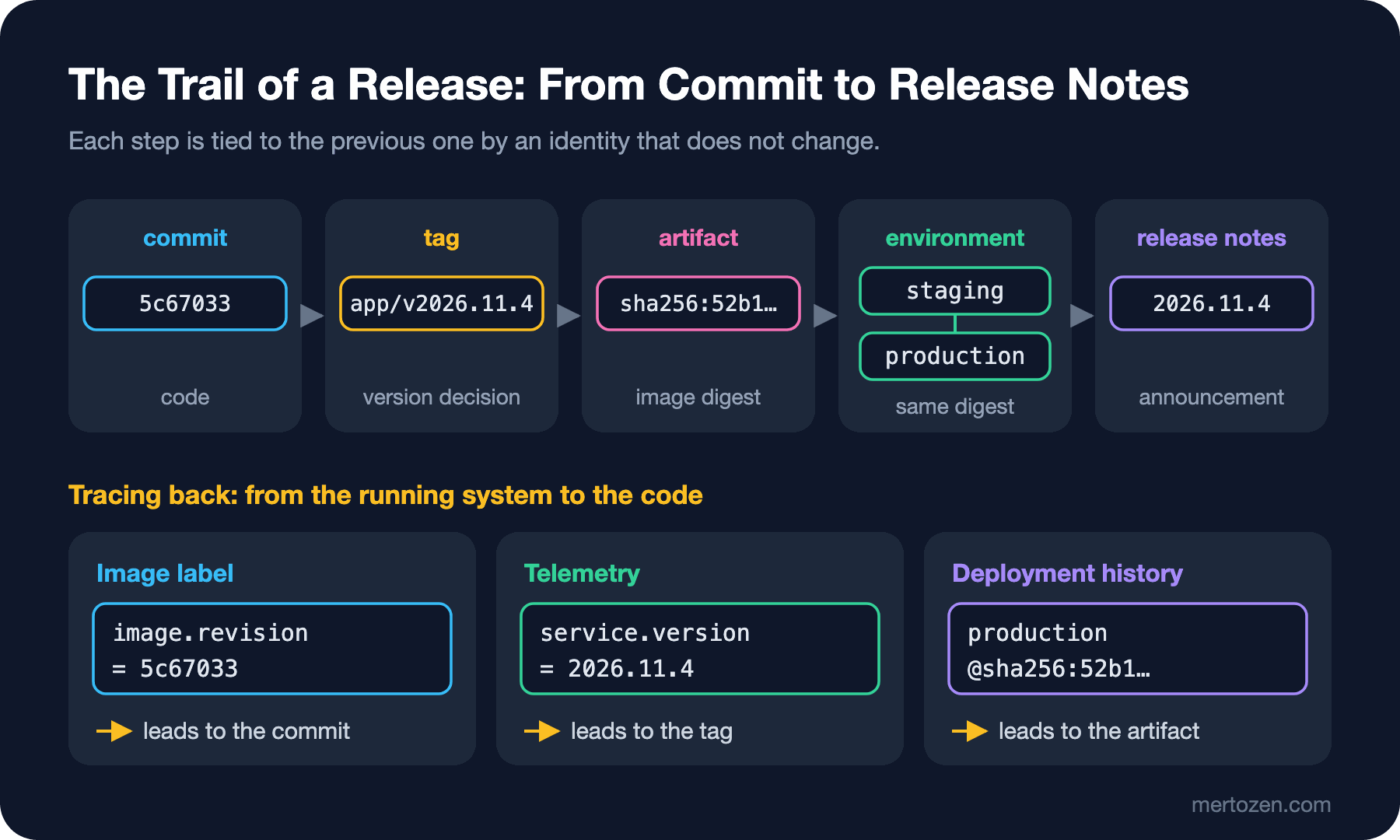
Forward: a commit becomes a version decision through a tag; an artifact is built from the tag once and goes to the environments by its digest; the release notes announce the version to users. Backward: when you see an error in production, service.version in telemetry takes you to the tag, the environment's deployment history to the digest, and the image's revision label to the commit. As long as every link in the chain carries an identity that does not change, "which change brought this bug?" is a matter of reading, not guessing. When one link moves, for example when production uses the latest tag, the chain breaks there.
Support Policy
A version number lets users plan only if there is a written support policy behind it; we saw that in the first post when reading the .NET and Angular policies. SUPPORT.md in the Bookstore repository:
# Support policy

| Component | Line | Status | What it gets | Until |
|---|---|---|---|---|
| Bookstore.Contracts | 2.x | Active | features, bug fixes, security fixes | six months after 3.0.0 ships |
| Bookstore.Contracts | 1.x | Security fixes only | security fixes | 2027-05-14 |
| @bookstore/ui | 1.x | Active | features, bug fixes, security fixes | six months after 2.0.0 ships |
| Bookstore.Api, bookstore-web | latest release | Active | everything, rolling forward | not applicable |

## Rules

- A new major starts a six-month security-only window for the previous major.
- Security fixes ship to every line that is still supported; the release notes list the affected versions.
- End of support is announced in the release notes and on the package page at least three months ahead.
- Packages target the supported .NET LTS and Angular versions; dropping a target framework or an Angular major is a major release.
The template is short but answers four questions: which release lines are supported, what each line gets (everything, or only security fixes), until when, and when end of support is announced. The last rule ties your dependencies' policies to your own: when .NET 10 support ends on November 14, 2028, Contracts dropping net10.0 will be a major, which will produce the next row in the table. Link the policy from the package README, the nuget.org and npmjs pages and the release notes; users should not have to search for it.
In Production
Make release tags immutable. Turn on immutability for release tags in your container registry; development tags (branch names, PR numbers) can keep moving but should be deleted quickly by retention.
Use digests in deployment manifests and write the tag next to them for people. The bookstore/api:2026.11.3@sha256:… form is both readable and exact; if the registry tag changes, the digest wins.
Align the retention policy with the support policy. If retention deletes the image or package of a supported version, rebuilding the state before a hotfix becomes impossible. Write "artifacts of every supported version are kept" into the retention settings.
Keep a list of release branches and their owners. Which branch carries which major, when it closes and who does the backports belongs in SUPPORT.md or the release notes; otherwise a security fix can land on main while the old line is forgotten.
Common Pitfalls
Using latest or only a version tag in production. As we saw in the guess section, the same tag can point to two different images; what you deploy should be a digest.
Not putting source information into the image. An image without revision and source labels cannot answer "what is this?" in the registry. Turn on PublishRepositoryUrl in the .NET SDK; if you use a Dockerfile, add the same labels with build arguments.
Making a hotfix only on the release branch. If the fix does not reach main, the bug comes back in the next release. Main first, then cherry-pick to the old lines; if you had to do it the other way round, move the fix from the release branch to main the same day.
Forgetting the publishing pipeline on the release branch. A branch opened from an old commit does not contain workflows added later; the tag is created, nothing is published and nobody notices.
Not writing a support policy, or writing one and not announcing it. If users do not know when 1.x ends, they do not plan the move; a security vulnerability arriving on the last day forces everyone into an urgent major upgrade at the same time.
A Small Experiment
★☆☆ Push the API image to the local registry twice with the same tag and compare the two digests. Why are they different although the code did not change? Look at the org.opencontainers.image.created label.
★★☆ Backport the publishing workflow to the release/1.x branch and verify with git describe that the baseline is 1.1.0 when it is triggered by the contracts/v1.1.1 tag. If the same tag were published from a workflow_dispatch on main, what would you have to change in the workflow?
★★★ Write a SUPPORT.md for your own team: release lines, the fixes each line gets, end dates, and how the support dates of the runtimes you depend on (.NET, Angular, Node.js) affect your policy. Then check whether the retention setting of your registry contradicts this policy.
This post completes the series. We started from what a version number says; we carried the version into the build and the running application, derived it from Git, turned it into a CHANGELOG and release notes, published NuGet and npm packages validated and without keys, and finally tied artifacts, the hotfix flow and the support policy into a single chain. Checking the links of that chain one by one in your own project is how you get to answer "what shipped, and when?" in minutes.