

Uzak Sunucu Yönetimi: SSH Tabanlı Remoting, Invoke-Command, Session'lar ve Credential'ı Script'e Gömmemek

PowerShell remoting'de Invoke-Command'dan dönen object'ler serialize edilmiş kopyalardır: property'ler gelir, method'lar gelmez; uzaktaki işi script bloğunun içinde yap. SSH tabanlı remoting, $using:, session'lar, ikinci hop, SecretManagement ile vault'tan secret okumak ve Bookstore.Api'yi iki sunucuya sırayla deploy eden, ilk hatada duran bir rollout script'i.
Sürüm notu: Bu yazıdaki örnekler PowerShell 7.6.10 (LTS) ve PowerShell 7.7.0 ile, Ubuntu 24.04 ve OpenSSH çalışan iki Linux container'ında denenmiştir; SecretManagement 1.1.2 ve SecretStore 1.0.6 kullanıldı. WinRM, Windows'taki OpenSSH kurulumu, JEA (Just Enough Administration; kullanıcıya yalnız belirli komutları çalıştırma yetkisi veren kısıtlı endpoint) ve Azure Key Vault kısmı Microsoft Learn dokümanlarından aktarıldı, çalıştırılmadı.
Önce Tahmin Et
Sitedeki serilerin ortak örnek uygulaması Bookstore'un (bir online kitapçı) API'si iki sunucuda çalışıyor: web1 ve web2. Deploy öncesinde web2'deki dll'in bir kopyasını almak istiyorsun ve Get-Item'ı uzak sunucuda çalıştırıyorsun:
$dll = Invoke-Command -HostName web2 -UserName user -ScriptBlock { Get-Item -Path ~/site/Bookstore.Api.dll }
'{0} {1:N0} bytes' -f $dll.Name, $dll.Length
$dll.CopyTo('/tmp/copy.dll')
Dosyanın adı ve boyutu ekrana gelir mi? CopyTo dosyayı nereye kopyalar: web2'deki /tmp'ye mi, senin makinene mi?
Önceki yazıdaki deploy script'i tek sunucuda çalışıyordu. Bu yazıda aynı script'i SSH (şifreli uzak bağlantı protokolü) üzerinden PowerShell remoting ile iki sunucuya sırayla uyguluyoruz. Yolda Invoke-Command'ı, session'ları, $using:'i, uzaktan dönen object'lerin neden farklı olduğunu, Copy-Item -ToSession'ı ve credential'ları script'e gömmeden kullanmayı göreceğiz.
WinRM mi SSH mi?
PowerShell remoting'in iki taşıma yolu var. WinRM, Windows PowerShell'den beri gelen ve domain içindeki Windows sunucularında hâlâ en yaygın olan yol. SSH tabanlı remoting PowerShell 6 ile geldi ve Windows, Linux ve macOS arasında aynı şekilde çalışıyor:
| Konu | WinRM | SSH |
|---|---|---|
| Parametreler | -ComputerName, -Credential | -HostName, -UserName, -KeyFilePath |
| Port | 5985 (HTTP), 5986 (HTTPS) | 22 |
| Kimlik doğrulama | Domain'de Kerberos, dışında NTLM (Windows'un eski challenge-response kimlik doğrulaması) ya da sertifika | SSH anahtarı ya da parola; işi SSH yapar |
| Platform | Windows | Windows, Linux, macOS |
| Endpoint ayarı ve JEA | Var | Yok |
| İkinci hop | Kerberos delegation gerekir | Uzaktaki makinede de anahtar gerekir |
Dokümana göre SSH remoting, uzak makinede PowerShell'i bir SSH subsystem'i olarak başlatıyor; kimlik doğrulamayı tamamen SSH'a bırakıyor ve endpoint configuration ile JEA desteklemiyor. Sunucu tarafında gereken tek şey sshd_config'e bir subsystem satırı:
# Linux sunuculardaki /etc/ssh/sshd_config.d/pwsh.conf (lab)
PasswordAuthentication no
PubkeyAuthentication yes
Subsystem powershell /usr/bin/pwsh -sshs -NoLogo

# Windows'ta %ProgramData%\ssh\sshd_config (dokümandan, çalıştırılmadı): boşluk yüzünden 8.3 path
PubkeyAuthentication yes
Subsystem powershell c:/progra~1/powershell/7/pwsh.exe -sshs
Lab'da iki Ubuntu container'ı var: web1 ve web2. Kimlik doğrulama yalnız anahtarla, parola kapalı. Komutları web1 adını da taşıyan ilk container'dan çalıştırıyorum, yani web1 bağlantısı aynı makineye SSH ile geri dönüyor. Windows'ta OpenSSH Server, Windows Server 2019 ve Windows 10 1809'dan beri bir Windows özelliği olarak kurulabiliyor; dokümandaki 8.3 kısa path'i, OpenSSH'ın subsystem path'indeki boşlukla ilgili bir hatası yüzünden gerekiyor (çalıştırılmadı).
Invoke-Command ve $using:
Invoke-Command, script bloğunu verilen her sunucuda paralel çalıştırır ve sonuçları toplar. Her sonuca hangi sunucudan geldiğini söyleyen PSComputerName eklenir:
PS> $servers = 'web1', 'web2'
PS> Invoke-Command -HostName $servers -UserName user -ScriptBlock { [pscustomobject]@{ Pwsh = $PSVersionTable.PSVersion.ToString(); Health = (Invoke-RestMethod -Uri http://127.0.0.1:5082/health).status } } | Select-Object PSComputerName, Pwsh, Health

PSComputerName Pwsh   Health
-------------- ----   ------
web1           7.6.10 Healthy
web2           7.6.10 Healthy
İki sunucuya aynı anda bağlanıp PowerShell sürümünü ve her sunucunun kendi health endpoint'ini sordu. Sonuçların sırası garanti değil: aynı komutu PowerShell 7.7 ile çalıştırdığımda web2 önce geldi. Sıra önemliyse PSComputerName'e göre sırala.
Script bloğu uzak makinede çalıştığı için yerel variable'ları görmez. Üçüncü yazıda ForEach-Object -Parallel için gördüğümüz $using: burada da aynı işi yapıyor:
PS> $timeoutSec = 3
PS> Invoke-Command -HostName web2 -UserName user -ScriptBlock { "with using: $using:timeoutSec, without: [$timeoutSec]" }
with using: 3, without: []
$using:timeoutSec değeri bloğa taşıdı; düz $timeoutSec uzak tarafta boş. Değer kopyalanarak gider: uzak tarafta değiştirmek yerel variable'ı değiştirmez.
Uzaktan Dönen Object'ler: Deserialized
Tahminin cevabı:
PS> $dll = Invoke-Command -HostName web2 -UserName user -ScriptBlock { Get-Item -Path ~/site/Bookstore.Api.dll }
PS> $dll.pstypenames[0]
Deserialized.System.IO.FileInfo
PS> '{0} {1:N0} bytes' -f $dll.Name, $dll.Length
Bookstore.Api.dll 16,896 bytes
PS> $dll.CopyTo('/tmp/copy.dll')
InvalidOperation: Method invocation failed because [Deserialized.System.IO.FileInfo] does not contain a method named 'CopyTo'.
PS> $dll | Get-Member -MemberType Method | Select-Object -ExpandProperty Name
GetType
ToString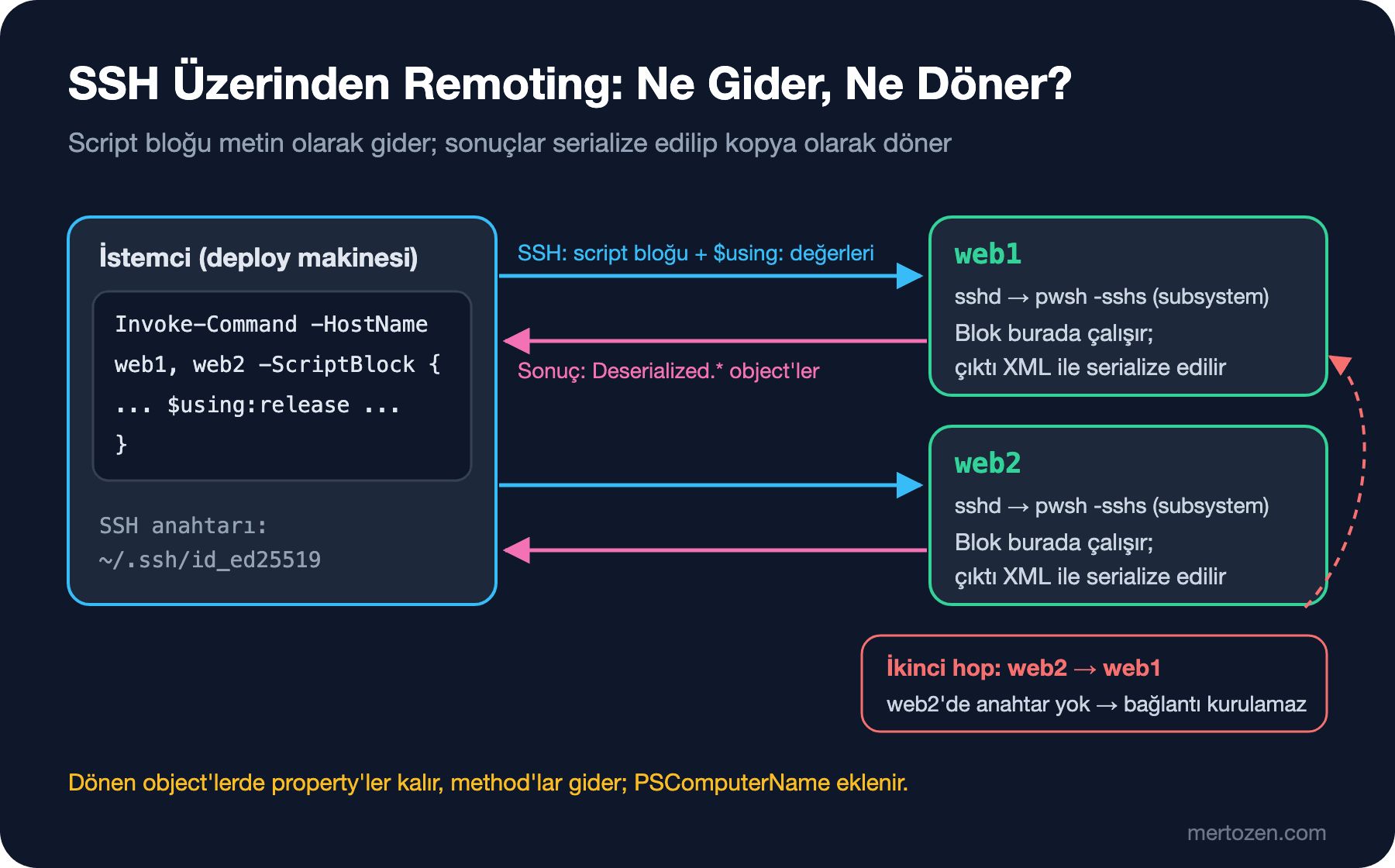
Ad ve boyut geldi, ama CopyTo hiçbir yere kopyalamadı. Uzak tarafta Get-Item gerçek bir FileInfo döndürdü; bu object XML olarak serialize edilip bağlantı üzerinden geldi ve senin tarafında property değerlerini taşıyan bir kopya olarak yeniden kuruldu. Tip adı Deserialized.System.IO.FileInfo, kalan method'lar yalnız GetType ve ToString. Bu kopya, dosyanın web2'deki o anki durumunun bir fotoğrafı; uzaktaki dosyaya bağlı değil. Uzak object üzerinde bir işlem yapacaksan, işlemi script bloğunun içinde yap ve yalnız sonucu döndür. Önceki yazıda IISAdministration'ın -UseWindowsPowerShell ile kullanıldığında method'suz object döndürdüğünü söylemiştik; sebep aynı, o da arka planda bir remoting session'ı kullanıyor.
Session'lar ve İkinci Hop
Her Invoke-Command -HostName yeni bir SSH bağlantısı açıp kapatır. Aynı sunucuya birkaç komut göndereceksen bir session aç ve tekrar kullan; session'daki variable'lar komutlar arasında kalır:
PS> $sessions = New-PSSession -HostName web1, web2 -UserName user
PS> $sessions | Format-Table Id, Name, ComputerName, Transport, State

Id Name      ComputerName Transport  State
-- ----      ------------ ---------  -----
 4 Runspace1 web1         SSH       Opened
 3 Runspace2 web2         SSH       Opened
PS> Invoke-Command -Session $sessions -ScriptBlock { $deployCount++; "deploy count: $deployCount" }
deploy count: 1
deploy count: 1
PS> Invoke-Command -Session $sessions -ScriptBlock { $deployCount++; "deploy count: $deployCount" }
deploy count: 2
deploy count: 2
PS> $web2 = $sessions | Where-Object ComputerName -eq web2
PS> Invoke-Command -Session $web2 -ScriptBlock { Invoke-Command -HostName web1 -ScriptBlock { 'second hop' } }
OpenError: [web1] The SSH client session has ended with error message: The SSH transport process has abruptly terminated causing this remote session to break.
PS> Invoke-Command -Session $web2 -ScriptBlock { $message = ssh -o BatchMode=yes web1 true 2>&1; "ssh exit code $LASTEXITCODE`: $message" }
ssh exit code 255: Host key verification failed.
PS> Remove-PSSession -Session $sessions
Session'lar açık kaldığı için $deployCount iki çağrı arasında korundu. $sessions listesindeki sıra da bağlantıların açılma sırasına göre değişiyor; belirli bir sunucuyu indeksle değil, ComputerName'e göre seç. İşin bitince Remove-PSSession ile kapat, yoksa uzakta bir pwsh process'i açık kalır.
Son iki komut ikinci hop sorununu gösteriyor: web2'deki session'dan web1'e bağlanmak istedik. PowerShell'in mesajı yalnız SSH sürecinin beklenmedik şekilde kapandığını söylüyor; aynı bağlantıyı ssh ile denemek asıl sebebi gösterdi: web2 web1'in host key'ini tanımıyor ve web2'de bir private key de yok. WinRM'de aynı sorun Kerberos'un kimlik bilgisini ikinci makineye taşımamasından doğuyor ve dokümanda CredSSP, Kerberos constrained delegation ya da JEA gibi seçeneklerle anlatılıyor (çalıştırılmadı). En iyi çözüm çoğu zaman ikinci hop'a hiç ihtiyaç duymamak: dosyayı ikinci makineden çekmek yerine istemciden iki makineye ayrı ayrı gönder.
Credential'ı Script'e Gömmemek: SecretManagement
SSH anahtarı sunucuya bağlanmayı çözüyor, ama deploy'un başka secret'lara da ihtiyacı var: migration bundle'ın connection string'i, API'nin admin token'ı. Bunları script'e ya da komut satırına yazmamak için Microsoft'un SecretManagement module'ü, farklı secret store'lara aynı cmdlet'lerle (Get-Secret, Set-Secret) erişmeyi sağlıyor. SecretStore ise yerel makinede şifreli bir vault. Lab'da yalnız bu iş için bir test vault'u:
PS> Reset-SecretStore -Authentication None -Interaction None -Force
WARNING: !!This operation completely removes all SecretStore module secrets and resets configuration settings to new values!!
PS> Register-SecretVault -Name BookstoreLab -ModuleName Microsoft.PowerShell.SecretStore -DefaultVault
PS> Set-Secret -Name BookstoreDbConnection -Secret 'Data Source=/home/user/data/bookstore.db'
PS> Get-SecretInfo | Format-Table Name, Type, VaultName

Name                    Type VaultName
----                    ---- ---------
BookstoreDbConnection String BookstoreLab
PS> $connection = Get-Secret -Name BookstoreDbConnection
PS> $connection
System.Security.SecureString
PS> $connection.GetType().Name
SecureString
PS> (Get-Secret -Name BookstoreDbConnection -AsPlainText).Length
40
PS> Get-SecretStoreConfiguration

      Scope Authentication PasswordTimeout Interaction
      ----- -------------- --------------- -----------
CurrentUser           None             900        None
Get-Secret string secret'ları varsayılan olarak SecureString döndürüyor; düz metin gerektiğinde -AsPlainText ile açıkça istiyorsun. Lab'da vault'u -Authentication None ile kurdum, yani vault'u açmak için parola sorulmuyor; bu yalnız test için. Microsoft Learn'deki otomasyon rehberi vault'u bir parolayla koruyor ve parolayı Windows'ta DPAPI (Windows'un kullanıcıya bağlı veri şifreleme API'si) ile şifrelenmiş bir dosyadan ya da CI sisteminin secret'larından alıp Unlock-SecretStore ile açıyor. Aynı sayfada önemli bir not var: PowerShell ekibi Secret module'lerini "feature complete" saydı, yeni geliştirme yapılmıyor, yalnız güvenlik ve kritik hata düzeltmeleri geliyor ve kod repository'si arşivlendi. Son sürümler 1.1.2 ve 1.0.6.
Ekip içinde paylaşılan secret'lar için yerel vault yerine bir extension vault kullanılır. Az.KeyVault 3.3.0'dan beri SecretManagement extension'ı içeriyor; Register-SecretVault -ModuleName Az.KeyVault -VaultParameters @{ AZKVaultName = '...'; SubscriptionId = '...' } ile kaydedilen bir Key Vault'tan aynı Get-Secret ile okunuyor (çalıştırılmadı). Secret store'ların karşılaştırması ve rotation, Configuration ve Secret Management serisinde.
Get-Credential etkileşimli kullanımda parola sorar ve bir PSCredential döndürür; WinRM'de -Credential'a bu object verilir. Script'te parolayı düz metin olarak ConvertTo-SecureString -AsPlainText'e yazmak, parolayı script'e gömmekle aynı şey.
Bookstore: İki Sunucuya Sırayla Deploy
Rollout script'i sunucuları sırayla dolaşıyor: session açıyor, script'leri, module'ü ve paketi Copy-Item -ToSession ile kopyalıyor, önceki yazıdaki Deploy-BookstoreApi.ps1'i orada çalıştırıyor ve exit code'una bakıyor. Bir sunucu başarısız olursa duruyor, kalan sunuculara dokunmuyor. Migration bundle yalnız ilk sunucuda çalışıyor, connection string vault'tan geliyor ve uzak tarafa $using: ile gidiyor:
#!/usr/bin/env pwsh
#Requires -Version 7.6
#Requires -Modules Microsoft.PowerShell.SecretManagement

[CmdletBinding()]
param(
    [Parameter(Mandatory)]
    [string[]] $ComputerName,

    [Parameter(Mandatory)]
    [string] $UserName,

    [Parameter(Mandatory)]
    [string] $SitePath,

    [ValidatePattern('^https?://')]
    [string] $HealthUrl = 'http://127.0.0.1:5080',

    [string] $PackagePath = (Join-Path -Path (Split-Path -Path $PSScriptRoot -Parent) -ChildPath 'artifacts', 'api'),

    [string] $MigrationBundle
)

Set-StrictMode -Version Latest
$ErrorActionPreference = 'Stop'

$root = Split-Path -Path $PSScriptRoot -Parent
$release = 'bookstore-{0:yyyyMMdd-HHmmss}' -f [datetime]::UtcNow
$connection = Get-Secret -Name BookstoreDbConnection -AsPlainText

for ($i = 0; $i -lt $ComputerName.Count; $i++) {
    $server = $ComputerName[$i]
    Write-Information "=== $server ($($i + 1)/$($ComputerName.Count))" -InformationAction Continue
    $session = New-PSSession -HostName $server -UserName $UserName
    try {
        # Sunucuda yeni bir release klasörü; path düz bir string olarak döner
        $remoteDir = Invoke-Command -Session $session -ScriptBlock {
            (New-Item -Path (Join-Path -Path ([System.IO.Path]::GetTempPath()) -ChildPath $using:release) -ItemType Directory).FullName
        }
        Copy-Item -Path (Join-Path -Path $root -ChildPath 'scripts'), (Join-Path -Path $root -ChildPath 'modules') -Destination $remoteDir -ToSession $session -Recurse
        Copy-Item -Path $PackagePath -Destination "$remoteDir/package" -ToSession $session -Recurse
        $runMigrations = $MigrationBundle -and $i -eq 0
        if ($runMigrations) {
            Copy-Item -Path $MigrationBundle -Destination "$remoteDir/efbundle" -ToSession $session
        }

        $exitCode = Invoke-Command -Session $session -ScriptBlock {
            $deploy = @{
                PackagePath = "$using:remoteDir/package"
                SitePath    = $using:SitePath
                HealthUrl   = $using:HealthUrl
                BackupPath  = Join-Path -Path (Split-Path -Path $using:SitePath -Parent) -ChildPath 'bookstore-backups'
            }
            if ($using:runMigrations) {
                $deploy.MigrationBundle = "$using:remoteDir/efbundle"
                # Copy-Item -ToSession, Linux'ta çalıştırma iznini (executable bit) korumaz
                if (-not $IsWindows) { chmod +x $deploy.MigrationBundle }
                $env:BOOKSTORE_DB_CONNECTION = $using:connection
            }
            & "$using:remoteDir/scripts/Deploy-BookstoreApi.ps1" @deploy | ForEach-Object { "    $_" }
            $LASTEXITCODE
        } | ForEach-Object {
            # String'ler ilerleme satırı, int ise deploy script'inin exit code'u
            if ($_ -is [int]) { $_ } else { Write-Information "[$server]$_" -InformationAction Continue }
        }
        if ($exitCode -ne 0) { throw "Deploy failed on $server (exit code $exitCode); the remaining servers were not touched." }
    }
    finally {
        Remove-PSSession -Session $session
    }
}
Write-Output "Rollout OK: $($ComputerName -join ', ')"
Deploy script'inin exit ile verdiği kod, uzak session'da $LASTEXITCODE'a yazılıyor ve bloğun son değeri olarak geri dönüyor. Bu yüzden deploy script'inin sonuna, başarılı yolda da bir exit 0 ekledim; yoksa web2'de hiç native komut çalışmadığı için $LASTEXITCODE boş kalıyor ve rollout bunu hata sayıyor (exit'siz bir script'le ayrıca denedim). İlerleme satırları information stream'den geliyor, sonuca karışmıyor. İlk çalıştırma, chmod satırı henüz yokken:
$ pwsh -NoProfile -Command './scripts/Invoke-BookstoreRollout.ps1 -ComputerName web1, web2 -UserName user -SitePath /home/user/site -HealthUrl http://127.0.0.1:5082 -MigrationBundle ./artifacts/efbundle'; echo "exit=$?"
=== web1 (1/2)
[web1]    ==> backup: bookstore-20261115-061926.zip
[web1]    ==> app_offline.htm written
[web1]    ==> copied 9 files
[web1]    ==> migrations
[web1]    FAILED at step 'migrate': Program 'efbundle' failed to run: An error occurred trying to start process '/tmp/bookstore-20261115-061924/efbundle' with working directory '/home/user'. No such file or directoryAt /tmp/bookstore-20261115-061924/scripts/Deploy-BookstoreApi.ps1:91 char:9
+         & $MigrationBundle --connection $env:BOOKSTORE_DB_CONNECTION
+         ~~~~~~~~~~~~~~~~~~~~~~~~~~~~~~~~~~~~~~~~~~~~~~~~~~~~~~~~~~~~.
[web1]    Restored /home/user/site from bookstore-20261115-061926.zip
Exception: /home/user/bookstore/scripts/Invoke-BookstoreRollout.ps1:92
Line |
  92 |  … de -ne 0) { throw "Deploy failed on $server (exit code $exitCode); th …
     |                ~~~~~~~~~~~~~~~~~~~~~~~~~~~~~~~~~~~~~~~~~~~~~~~~~~~~~~~~~
     | Deploy failed on web1 (exit code 1); the remaining servers were not
     | touched.
exit=1
Bu da gerçek bir ders: Copy-Item -ToSession, Linux'ta dosyanın çalıştırma iznini korumadı ve migration bundle başlatılamadı. Deploy script'i dosyaları yedekten geri yükledi, rollout web1'de durdu ve web2'ye hiç dokunulmadı. Windows'ta .exe için böyle bir izin yok; Linux sunucular için chmod satırını ekleyince:
$ pwsh -NoProfile -Command './scripts/Invoke-BookstoreRollout.ps1 -ComputerName web1, web2 -UserName user -SitePath /home/user/site -HealthUrl http://127.0.0.1:5082 -MigrationBundle ./artifacts/efbundle'; echo "exit=$?"
=== web1 (1/2)
[web1]    ==> backup: bookstore-20261115-061941.zip
[web1]    ==> app_offline.htm written
[web1]    ==> copied 9 files
[web1]    ==> migrations
[web1]    Acquiring an exclusive lock for migration application. See https://aka.ms/efcore-docs-migrations-lock for more information if this takes too long.
[web1]    Applying migration '20261115060804_Initial'.
[web1]    Done.
[web1]    ==> app_offline.htm removed
    health attempt 1: HTTP 200 Healthy
[web1]    Deploy OK
=== web2 (2/2)
[web2]    ==> backup: bookstore-20261115-061942.zip
[web2]    ==> app_offline.htm written
[web2]    ==> copied 9 files
[web2]    ==> app_offline.htm removed
    health attempt 1: HTTP 200 Healthy
[web2]    Deploy OK
Rollout OK: web1, web2
exit=0
Migration yalnız web1'de çalıştı, iki sunucu sırayla güncellendi ve her biri kendi health check'inden geçti. Gerçek bir ortamda her sunucuyu deploy'dan önce load balancer'dan çıkarıp sonra geri almak gerekiyor; Deployment Stratejileri serisinin "Rolling Deployment" yazısındaki akışın PowerShell hâli bu.
Üretimde Dikkat
Deploy için ayrı bir hesap ve ayrı bir anahtar kullan. Anahtar yalnız deploy makinesinde ya da CI'ın secret store'unda olsun, sunuculardaki authorized_keys'te yalnız bu hesap için tanımlı olsun. Kişisel hesabınla deploy etmek, kimin neyi değiştirdiğini log'dan ayırmayı imkânsız yapar.
Host key'leri önceden doğrula. İlk bağlantıdaki "authenticity of host" sorusu CI'da cevaplanamaz; sunucuların host key'lerini known_hosts'a bilinçli olarak ekle. Doğrulamayı kapatmak (StrictHostKeyChecking no) bağlantıyı başka bir makineye yönlendiren birine karşı korumayı da kapatır.
Remoting sonuçlarını küçük tut. Her dönen object serialize edilip ağdan geçiyor; binlerce dosyanın Get-ChildItem sonucunu istemciye çekmek yerine sayımı, filtrelemeyi ve özeti uzak tarafta yapıp yalnız sonucu döndür.
Sık Düşülen Tuzaklar
pwsh -File ile array parametresi. Rollout'u bash'ten -File ile ve virgüllü bir sunucu listesiyle çağırınca:
$ pwsh -NoProfile -File ./scripts/Invoke-BookstoreRollout.ps1 -ComputerName web1,web2 -UserName user -SitePath /home/user/site -HealthUrl http://127.0.0.1:5082 -MigrationBundle ./artifacts/efbundle; echo "exit=$?"
=== web1,web2 (1/1)
New-PSSession: /home/user/bookstore/scripts/Invoke-BookstoreRollout.ps1:62
Line |
  62 |      $session = New-PSSession -HostName $server -UserName $UserName
     |                 ~~~~~~~~~~~~~~~~~~~~~~~~~~~~~~~~~~~~~~~~~~~~~~~~~~~
     | One or more computer names are not valid. If you are trying to pass a
     | URI, use the -ConnectionUri parameter, or pass URI objects instead of
     | strings.
exit=1
about_Pwsh'ın da belirttiği gibi -File, array bekleyen parametreleri desteklemiyor: web1,web2 tek bir string olarak geldi. Bu yüzden yukarıdaki çalıştırmalarda -Command kullandım; diğer seçenek parametreyi virgülden script içinde ayırmak.
Deserialized object üzerinde method çağırmak. Uzaktan dönen object'in method'ları yoktur ve object, uzaktaki şeyin değil, onun o anki kopyasının temsilcisidir. Değişikliği script bloğunun içinde yap.
Script bloğunda $using:'i unutmak. Yerel bir variable uzak tarafta $null'dır ve hata vermez; Remove-Item -Path "$folder/*" gibi bir satırda bu, beklenenden çok farklı bir path'e dönüşebilir. Uzak bloklarda Set-StrictMode -Version Latest da kullanabilirsin.
Küçük Bir Deneme
★☆☆ Invoke-Command -HostName web1, web2 ile iki sunucudaki ~/site klasörünün toplam boyutunu döndür. Önce Get-ChildItem sonucunun tamamını istemciye çek ve topla, sonra toplamı uzakta hesapla. Dönen veri miktarını Measure-Command ile karşılaştır.
★★☆ Rollout script'ine bir -WhatIf desteği ekle: her sunucu için deploy script'ini -WhatIf ile çalıştırsın ve hiçbir şey kopyalamasın. Önceki yazıdaki module tuzağını hatırla: uzak script'e -WhatIf'i nasıl geçireceksin?
★★★ İki sunucudan biri health check'ten geçemezse, daha önce başarıyla güncellenmiş sunucuyu da önceki sürüme döndüren bir -RollbackOnFailure switch'i ekle. Deploy script'inin yedekleri sunucuda nerede, rollback için hangi bilgiyi saklaman gerekiyor?
Bu script'ler artık sunuculara dokunuyor; bir hata ciddi sonuç doğurur. Serinin son yazısında hepsini test altına alıyoruz: Pester 6 ile unit test ve mock, PSScriptAnalyzer kuralları, GitHub Actions'ta Windows ve Ubuntu runner'larında aynı script'ler ve Windows PowerShell 5.1'den 7.x'e taşımak.