

Strangler Fig and Canary with YARP: Incremental Migration from a Legacy App and Weighted Traffic
In YARP, a strangler fig starts with a host-bound catch-all route to the old app, and every migrated page gets a more specific route; for a canary, two clusters and a small step that moves the request with ReassignProxyRequest are enough. On Bookstore's old site we change the route table phase by phase, measure a sticky 10% canary and roll back in 645 ms with a config reload.
Version note: The code in this post was built and run with .NET 10 and Yarp.ReverseProxy 2.3.
Guess First
You add a catch-all route to Bookstore.Gateway so it can stand in front of the old site, an ASP.NET MVC 5 app: /{**catch-all}, Order: 1000, targeting the old app. The Angular pages from post 05 are served by the same gateway with MapFallbackToFile. If you forget to set Hosts on the catch-all route, what happens to the Angular page at http://localhost:5300/books/9780441172719? The fallbacks have the lowest priority, the YARP route has 1000. Which one wins?
Second question: you open a 10% canary for the cart page. When a thousand different visitors send one request each, about a hundred see the new version. How many times does a user who sends ten requests in a row from the same browser see the new version?
The Strangler Fig in YARP: Catch-All and Order
The idea in Martin Fowler's article, first titled Strangler Application and later renamed Strangler Fig Application, is simple: instead of rewriting the old system in one go, put a layer in front of it and move behavior to the new system piece by piece. In the Microservices series' post on going from a monolith to microservices we covered the architecture side of this approach, branch by abstraction and parallel runs. In the ASP.NET Core MVC and Razor Pages series' post on migrating from MVC 5, we put the new ASP.NET Core app itself in front of the old one and used MapForwarder as a fallback. In this post the front layer is the gateway that already runs for Bookstore, the online bookstore used as the shared example across this site's series.
Here's the scenario: Bookstore's old public site www.bookstore.test is an ASP.NET MVC 5 app. We move its pages one by one to a new ASP.NET Core app, Bookstore.Web. Instead of a real MVC 5 project, the repo has a small ASP.NET Core app (Bookstore.Legacy, :5304) that returns the same kind of HTML on the same URLs, so the example runs without .NET Framework. Both apps put an X-Served-By header on their responses, which tells us who answered.
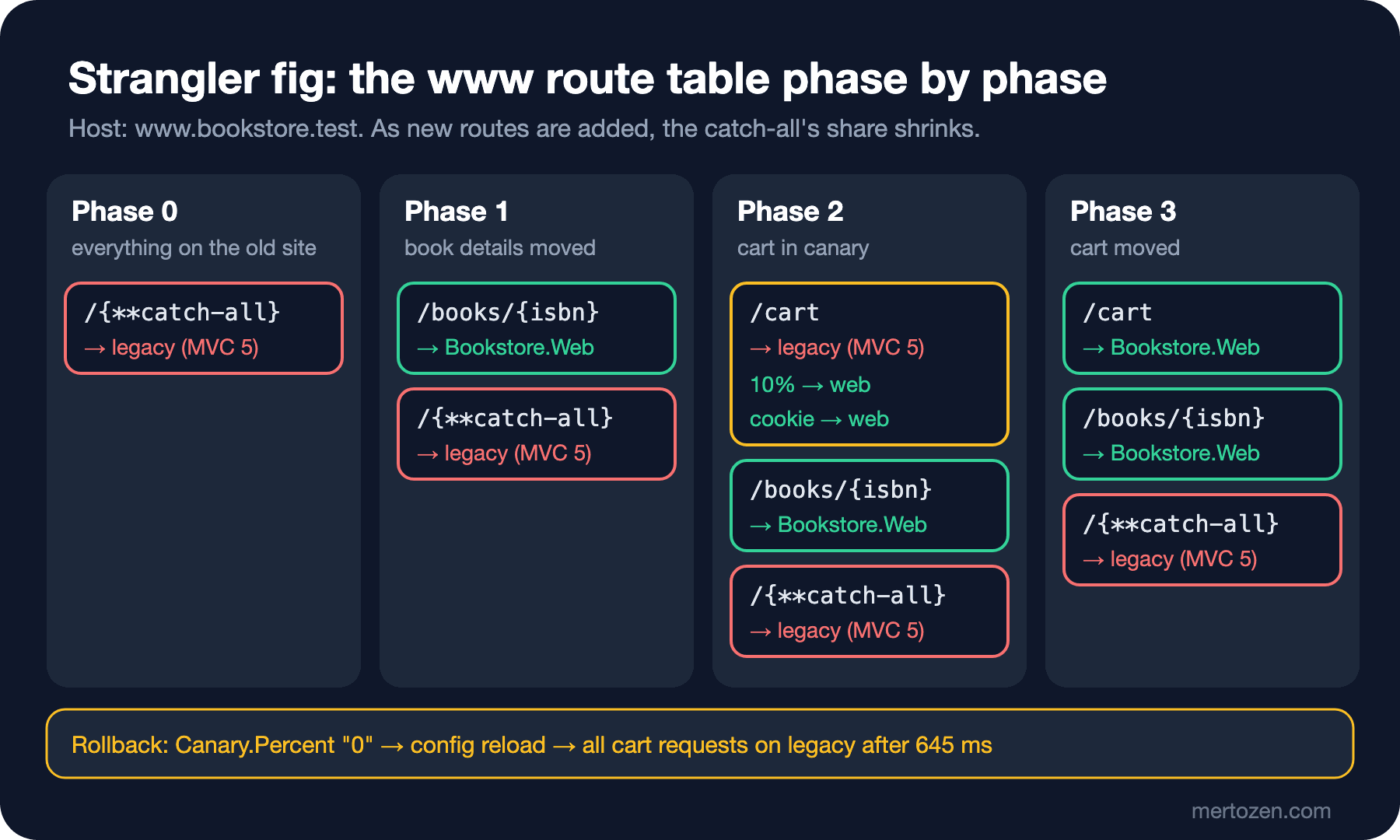
In phase 0 the gateway changes nothing; every request for www goes to the old site. To keep the output short, I wrote each request on one line as path, status code, X-Served-By and the start of the body:
"www-legacy": {
  "ClusterId": "legacy",
  "AuthorizationPolicy": "Anonymous",
  "Order": 1000,
  "Match": {
    "Path": "/{**catch-all}",
    "Hosts": [ "www.bookstore.test" ]
  }
}
curl --resolve www.bookstore.test:5300:127.0.0.1 http://www.bookstore.test:5300/cart
/ 200 legacy <h1>Home (legacy MVC 5)</h1>
/books 200 legacy <h1>Books (legacy MVC 5)</h1>
/books/9780441172719 200 legacy <h1>Book 9780441172719 (legacy MVC 5)</h1>
/cart 200 legacy <h1>Cart (legacy MVC 5)</h1>
/account/login 200 legacy <h1>Log in (legacy MVC 5)</h1>--resolve makes curl resolve www.bookstore.test to the local machine; to try it in a browser, add a line to your hosts file. The value of this step isn't zero change: the moment you point DNS at the gateway, the old site behaves the same, but you now see every request in the gateway's log with its route and status code. There's no better place to measure traffic before the migration.
Three settings on the route are deliberate. AuthorizationPolicy: "Anonymous", because the fallback policy from post 04 requires an identity; the old site manages its own login and the gateway doesn't need to know about it. Order: 1000, so the catch-all is always evaluated after the migrated routes (default Order 0). The trap in post 02 was the opposite: the catch-all stayed at Order 0 while the other routes got a positive Order, and the catch-all swallowed everything. Hosts is the answer to "Guess First". When I removed it, this was the result on localhost:
/                               HTTP/1.1 200 OK Content-Type: text/html X-Served-By: legacy
/books/9780441172719            HTTP/1.1 200 OK Content-Type: text/html X-Served-By: legacy
/api/v1/books/9780441172719     HTTP/1.1 200 OK Content-Type: application/json; charset=utf-8
/api/v2/books                   HTTP/1.1 404 Not Found X-Served-By: legacy
The Angular page now comes from the old site, and the /api 404 fallback from post 05 is out of play too. The reason is that endpoint selection looks at Order first: MapFallback and MapFallbackToFile sit at the very end with int.MaxValue, and 1000 comes before them. The specific routes (/api/v1/books/**) weren't affected because they're at Order 0. If one gateway serves several sites, bind every catch-all route to a host.
The First Move: The Book Page
In phase 1 the book detail page moves to Bookstore.Web. Bookstore.Web is a Razor Pages app; we assume the page itself was migrated as in the MVC series' migration post. The only change in the gateway is one more entry in the route table:
"www-books": {
  "ClusterId": "web",
  "AuthorizationPolicy": "Anonymous",
  "Match": {
    "Path": "/books/{isbn}",
    "Hosts": [ "www.bookstore.test" ]
  }
}
I saved the file and tried it without restarting the gateway:
info: Yarp.ReverseProxy.Configuration.ConfigProvider.ConfigurationConfigProvider[1]
      Loading proxy data from config.

/books                     200 legacy <h1>Books (legacy MVC 5)</h1>
/books/9780441172719       200 web <h1>Book 9780441172719 (Bookstore.Web)</h1>
/cart                      200 legacy <h1>Cart (legacy MVC 5)</h1>
The list page /books is still on the old site, the detail pages are on the new app. Choosing a small unit of migration is deliberate: the detail page is the most visited page, but it holds no state. The goal of the first move is to exercise the infrastructure (deploy, logs, measurement, rollback); starting with a risky page makes that learning expensive.
Session and Identity: The Part the Gateway Can't Solve
The cart page is different. On the MVC 5 side the cart usually lives in Session["Cart"], and the user is recognized by a Forms Authentication cookie. The gateway makes both apps appear on the same domain, so cookies reach both sides; but ASP.NET Core can't read that session or that authentication cookie. The remote app features of System.Web adapters exist for this: the new app can ask the old app for session and identity data. We covered the setup, together with how to move libraries that use HttpContext.Current, in the MVC series' migration post, so we don't repeat it here.
There's an architecture choice at this point. The first option is the structure Microsoft's migration docs recommend: the new ASP.NET Core app stands in front and forwards everything not yet migrated to the old one with MapForwarder. There's no extra app and System.Web adapters run in the same app, but the routing decision lives in code: every move is a deploy. The second option is the one in this post: a separate gateway in front, with the route table in configuration. You run one more app, but moves, canaries and rollbacks happen through config changes, without deploying the new app. With several old apps or several new services, the second option is more comfortable; if you're moving a single monolith to a single new app, the first is enough.
Canary: Two Clusters and ReassignProxyRequest
Instead of moving the cart outright, we first open it to 10% of visitors. YARP has no built-in setting for weighted routing. There are two ways. The first is to put the old and new addresses in the same cluster as destinations and write an ILoadBalancingPolicy that picks by weight; we wrote our own policy in post 03. But then two different apps share one cluster's health check, HTTP settings and log line, and you have to work out which request went to which version from the destination ID. The second is the approach YARP's documentation shows for A/B testing: two separate clusters, and a step in the proxy pipeline that moves the request to the other cluster. We chose the second:
"www-cart": {
  "ClusterId": "legacy",
  "AuthorizationPolicy": "Anonymous",
  "Match": {
    "Path": "/cart",
    "Hosts": [ "www.bookstore.test" ]
  },
  "Metadata": {
    "Canary.ClusterId": "web",
    "Canary.Percent": "10"
  }
}
public static IReverseProxyApplicationBuilder UseCanary(this IReverseProxyApplicationBuilder proxyPipeline)
{
proxyPipeline.Use((context, next) =>
{
IReadOnlyDictionary<string, string>? metadata = context.GetReverseProxyFeature().Route.Config.Metadata;
if (metadata is not null
&& metadata.TryGetValue(ClusterKey, out string? canaryClusterId)
&& metadata.TryGetValue(PercentKey, out string? percentText)
&& int.TryParse(percentText, CultureInfo.InvariantCulture, out int percent)
&& GetOrAssignBucket(context) < percent
&& context.RequestServices.GetRequiredService<IProxyStateLookup>().TryGetCluster(canaryClusterId, out ClusterState? canary))
{
context.ReassignProxyRequest(canary);
}
return next();
});
return proxyPipeline;
}
private static int GetOrAssignBucket(HttpContext context)
{
if (int.TryParse(context.Request.Cookies[BucketCookie], CultureInfo.InvariantCulture, out int bucket) && bucket is >= 0 and < 100)
{
return bucket;
}
// a visitor lands in a 0-99 bucket once and stays there thanks to the cookie
bucket = Random.Shared.Next(100);
context.Response.Cookies.Append(BucketCookie, bucket.ToString(CultureInfo.InvariantCulture), new CookieOptions
{
HttpOnly = true,
IsEssential = true,
SameSite = SameSiteMode.Lax,
MaxAge = TimeSpan.FromDays(30),
});
return bucket;
}proxyPipeline.UseCanary() sits at the very start of the pipeline, before the logging step and before UseLoadBalancing(). ReassignProxyRequest replaces the cluster and the available destination list in IReverseProxyFeature; load balancing, health checks and the forwarder then work with the new cluster. The cluster in the log line now shows the real target as well. The visitor's bucket lives in a cookie, because a canary also requires that users don't flip between versions as they reload pages. The measurement, a thousand different visitors (a thousand requests without cookies) and ten requests from one visitor:
# a thousand new visitors
for i in $(seq 1 1000); do curl -s -o /dev/null -D - --resolve www.bookstore.test:5300:127.0.0.1 \
  http://www.bookstore.test:5300/cart | grep -i "^x-served-by"; done | sort | uniq -c
 899 X-Served-By: legacy
 101 X-Served-By: web

# the same visitor, 10 requests with a cookie jar
  10 X-Served-By: legacy
bookstore-bucket=13

Set-Cookie: bookstore-bucket=77; max-age=2592000; path=/; samesite=lax; httponly
The answer to the second question: the user with bucket 13 saw the old cart on all ten requests. With a bucket below 10 they'd have seen the new one on all ten. This cookie-based approach has a limit too: a user coming from another browser lands in a new bucket. For signed-in users, deriving the bucket from a hash of the user ID gives a consistent result across devices as well.
A second route lets testers and the team see the new cart regardless of the percentage. Its header match works on the Cookie header in Contains mode, and because it's more specific it's picked before www-cart:
"www-cart-preview": {
  "ClusterId": "web",
  "AuthorizationPolicy": "Anonymous",
  "Match": {
    "Path": "/cart",
    "Hosts": [ "www.bookstore.test" ],
    "Headers": [
      { "Name": "Cookie", "Values": [ "bookstore-canary=on" ], "Mode": "Contains" }
    ]
  }
}
/cart 200 web <h1>Cart (Bookstore.Web)</h1>Contains is a substring search; a cookie like xbookstore-canary=on also matches. It's good enough for a preview gate, but it isn't an authorization check. Which metrics drive a canary's growth, the step plan and automated analysis were covered in the Deployment Strategies series' post on canary releases; here we only look at how traffic is split.
Rollback, Feature Flags and Parallel Runs
A canary's value is noticing something wrong with a small audience and rolling back quickly. The percentage lives in route metadata, and the metadata lives in configuration, so rollback is a file change. While a visitor with bucket 3 was seeing the new cart, I set Canary.Percent to "0" and sent a request every 50 ms:
/cart                      200 web <h1>Cart (Bookstore.Web)</h1>
legacy after 645 ms
/cart                      200 legacy <h1>Cart (legacy MVC 5)</h1>
No restart, no deploy; 645 ms after the config changed, the same visitor was back on the old cart. In production this would be the database provider we wrote in post 02, or a configuration service, rather than a file; the logic is the same. If the gateway runs on several instances, each instance sees the change in its own time, so for a few seconds two instances may apply different percentages.
Canary.Percent is really a feature flag. In the Deployment Strategies series' post on feature flags we used Microsoft.FeatureManagement with percentage and targeting filters. You could have the UseCanary step ask a feature flag for the same decision: rules such as percentages, user groups or per-institution rollout are managed in the flag system, and the gateway only asks "is this on for this request?". The metadata approach in this post is enough for a single number; once the rules multiply, moving to a flag system is the better choice.
To see whether both sides really behave the same during a migration, the gateway's log is a good source. Since post 01 we've logged route, cluster, destination and status for every request; after the canary measurement I counted the log:
grep -o "Route www-cart -> cluster [a-z]*" gateway.log | sort | uniq -c
 910 Route www-cart -> cluster legacy
 101 Route www-cart -> cluster web

grep "Forwarded to" gateway.log | sed -E 's/.*Forwarded to ([a-z0-9-]+).*status ([0-9]+).*/\1 \2/' | sort | uniq -c
 917 legacy 200
   1 legacy 404
 103 web 200
There are no 5xx responses on either side; the single 404 on legacy is the /main.js I tried in phase 0. Comparing status codes and durations per cluster shows whether the new version got worse; comparing the response contents needs a parallel run that also sends a copy of side-effect-free GET traffic to the new side and compares the results. Why that's dangerous for requests with side effects was covered in the Microservices series' strangler post. If all is well, phase 3 changes the route's target instead of the percentage and removes the preview route:
/                          200 legacy <h1>Home (legacy MVC 5)</h1>
/books                     200 legacy <h1>Books (legacy MVC 5)</h1>
/books/9780441172719       200 web <h1>Book 9780441172719 (Bookstore.Web)</h1>
/cart                      200 web <h1>Cart (Bookstore.Web)</h1>
/account/login             200 legacy <h1>Log in (legacy MVC 5)</h1>
Production Notes
Define when the strangler is done. Traffic on the catch-all route should shrink over time; track request counts per route as a metric and regularly list which URLs make up the traffic still going to the old site. The last five percent left unmigrated are usually the hardest pages, and they can delay switching off the old app for years.
Before putting the gateway in front of DNS, make sure the old site reads forwarded headers correctly. The old app now sees the gateway's IP instead of the client's; if there are IP-based logs, rate limits or geographic rules, it needs to read X-Forwarded-For. We covered the settings on the ASP.NET Core side in the Web Servers and Hosting series' post on forwarded headers; on the MVC 5 side you have to add that code yourself.
During a canary, make sure the two versions don't write the same data in different shapes. If a user adds an item to the cart on the new version and then sees an empty cart on the old version after their bucket changes, the problem isn't in the gateway but in the data. That's why session sharing, or a shared cart service, must be solved before the canary.
Changing Canary.Percent shouldn't be something anyone can do. If the route table lives in a database, audit changes and record who changed the percentage and when; write rollback as a runbook step and practice it.
Common Pitfalls
First, not giving the catch-all route a host. As shown above, it silently swallows the fallbacks of another site on the same gateway.
Second, leaving the catch-all's Order without thought. It must be larger than the migrated routes and smaller than the fallbacks; mistakes in either direction are silent and only show up as the wrong app answering.
Third, running a canary by rolling the dice on every request. The user sees the new version on one page and the old one on the next; bugs can't be reproduced and metrics get mixed. Pick the bucket once and keep it.
Fourth, moving a stateful page without thinking about the session. For pages like the cart, both apps seeing the same data must come before the route change.
Fifth, never testing rollback. Measure that config reload really works, how many seconds it takes and how it behaves across instances before something goes wrong.
A Small Experiment
★☆☆ Raise Canary.Percent on www-cart from 10 to 50 and repeat the thousand-visitor measurement. Then send ten requests with your own cookie jar; if your bucket is below 50, did you start seeing the new cart?
★★☆ Derive the bucket from a hash of the signed-in user's sub claim instead of a cookie; keep the cookie for anonymous visitors. Using the DevToken tool from post 04, show that two different users always see the same version from two different "browsers" (separate cookie jars).
★★★ Write a simple parallel run for /books/{isbn}: the request is answered by the old site, the same GET request is also sent to the web cluster in the background, and a warning is logged if the two status codes differ. Show by measurement that the user's wait time doesn't grow and that requests with side effects (POST) aren't copied.
The gateway now wraps the old site, splits traffic and can roll back within seconds. In the next post we move on to running the gateway in production: telemetry and how a trace passes through the gateway with OpenTelemetry, a load test that measures how much latency the gateway adds, the container image, and what running multiple instances brings.