

Reverse Proxy, API Gateway and YARP: When YARP and When Nginx or a Managed Gateway?
YARP is a reverse proxy library that lets you write your gateway as your own ASP.NET Core app; pick it when the gateway needs code-driven logic, while Nginx or an ingress fits static rules and a managed gateway fits subscriptions and a developer portal. We build Bookstore.Gateway with LoadFromConfig and MapReverseProxy and use real logs to separate the route, cluster and destination model, a gateway 404 from a backend 404, and a 502.
Version note: The code in this post was built and run with .NET 10 and Yarp.ReverseProxy 2.3.
Guess First
You have three apps: a Catalog service on localhost:5301, an Ordering service on localhost:5302, and a gateway built with YARP, Microsoft's reverse proxy library for .NET, sitting in front of both on localhost:5300. The gateway has only two routes: /api/catalog/{**rest} and /api/orders/{**rest}. You send three requests:
curl -i http://localhost:5300/api/catalog/books/0000
curl -i http://localhost:5300/api/inventory
# with the Ordering service stopped:
curl -i http://localhost:5300/api/orders
Guess the status code of each. More importantly: which answer comes from the gateway itself, and which comes from a backend? Even if the first two return the same code, there is a big difference between them, and you can't see it without looking at the gateway logs. We'll look at the answers with real output halfway through the post.
What a Reverse Proxy Does and What an API Gateway Adds
A reverse proxy is the intermediate server clients talk to instead of the real servers. The client knows one address; the proxy forwards the request to the right app behind it and carries the response back. We met this layer in the first post of the Web Servers and Hosting series, when we followed an HTTP request on its way to the app. What matters here are three jobs a reverse proxy does:
- TLS termination: the HTTPS connection ends at the proxy, certificates are managed in one place, and the services behind it don't deal with decryption. You don't have to configure TLS separately in every service.
- Connection abstraction: the client-to-proxy connection and the proxy-to-backend connection are independent. The client can open short HTTP/1.1 connections while the proxy uses pooled, long-lived connections to the backends, and it can upgrade or downgrade the HTTP version.
- Control over the URL space: the URLs you expose are separated from the services' internal addresses. When you move the Catalog service to another machine or split it in two, the
/api/catalog/booksthe client knows stays the same.
An API gateway adds API-specific work on top of that: authenticating at the front door, rate limiting, response caching, header and path rewriting, aggregation endpoints that combine responses from several services, and versioning. Every gateway is a reverse proxy, but not every reverse proxy is a gateway. We covered the concept itself, the BFF distinction, and the point where a gateway turns into an all-knowing bottleneck in the Microservices series post on API Gateway and Backend for Frontend. This series shows how to build that concept concretely in .NET.
YARP Is a Library, Not a Product
Don't think of YARP as a ready-made server you download and configure with a file, like Nginx. YARP is a NuGet package: Yarp.ReverseProxy. Your gateway becomes an ordinary ASP.NET Core app that you write. It runs on Kestrel and uses the same DI container, the same logging, and the same authentication, authorization, rate limiting and output cache middleware. The proxy behavior itself is just endpoints added to ASP.NET Core routing.
That choice has two consequences. The good side: you write any behavior you want in the gateway in C#. Your own load balancing policy, a route table read from a database, a middleware that picks the target per request, all done in a familiar language with a debugger. The other side: that app is now your app. You patch it, deploy it, scale it and monitor it. You don't get the admin panel, developer portal or API key management that a packaged product offers.
On the day I wrote this (November 14, 2026), the latest stable version on NuGet is 2.3.0, published on February 27, 2025. According to its release notes it supports .NET 8 and later; with this release the repo moved from the microsoft organization to the dotnet organization and the documentation moved to Microsoft Learn. All examples in this series run on .NET 10 with 2.3.0.
The Decision: YARP, Nginx, Envoy or a Managed Gateway?
Before writing code, let's ask the real question: do you need this at all? The table below summarizes when I pick each of the four options I run into most:
| Option | Where it fits best | Extending it | Watch out for |
|---|---|---|---|
| YARP | A .NET team that needs code-driven logic in the gateway: dynamic routes, custom load balancing, aggregation, BFF | C#, ASP.NET Core middleware, your own config provider | You run it; no built-in portal or API key management |
| Nginx | Static rules, TLS termination, static files, one or a few upstreams | Config file; modules or scripts for advanced logic | The config gets hard to read as rules grow |
| Envoy, Kubernetes Gateway API | A shared edge on Kubernetes run by a platform team | Dynamic config API, Gateway API HTTPRoute resources | Learning cost for app teams; not extended with .NET code |
| Managed API gateway: Azure API Management, Amazon API Gateway | Public APIs that need subscriptions, quotas and a developer portal | The provider's policy language and plugins | Cost, provider lock-in, an extra network hop |
We set up Nginx in front of ASP.NET Core in the Nginx post of the Web Servers and Hosting series, and covered Ingress and the Gateway API in the Kubernetes series post on external traffic. These options aren't mutually exclusive. A setup I see often: a cloud load balancer or an ingress terminates TLS at the front, and behind it a YARP gateway does app-specific routing and identity checks.
The cases where YARP is unnecessary are clear too. If you have a single API and IIS, Nginx or an ingress already sits in front of it, adding another .NET process only adds a hop and a deployment unit. If your rules are static (this path goes to that address, nothing more) and you'll never write code, Nginx or an ingress does the same job with fewer moving parts. YARP's real value shows up when the gateway needs app knowledge and code to make its decisions.
The First Gateway: Bookstore.Gateway
In this series Bookstore, the online bookstore used as the shared example across this site's series, runs its Catalog and Ordering modules as separate processes: Bookstore.Catalog.Api and Bookstore.Ordering.Api. We'll do the real split in the upcoming series on building microservices with .NET; here two small Minimal APIs are enough, because our topic is the door in front of them. The folder layout:
Bookstore.slnx
Directory.Build.props        // net10.0, Nullable, ImplicitUsings
Directory.Packages.props     // package versions in one place
src/Bookstore.Gateway/       // :5300
src/Bookstore.Catalog.Api/   // :5301
src/Bookstore.Ordering.Api/  // :5302
We keep package versions in one file with central package management. The gateway project's csproj is a single reference:
<!-- Directory.Packages.props -->
<Project>
  <PropertyGroup>
    <ManagePackageVersionsCentrally>true</ManagePackageVersionsCentrally>
  </PropertyGroup>
  <ItemGroup>
    <PackageVersion Include="Yarp.ReverseProxy" Version="2.3.0" />
  </ItemGroup>
</Project>

<!-- src/Bookstore.Gateway/Bookstore.Gateway.csproj -->
<Project Sdk="Microsoft.NET.Sdk.Web">

  <ItemGroup>
    <PackageReference Include="Yarp.ReverseProxy" />
  </ItemGroup>

</Project>
The gateway's Program.cs is YARP at its shortest:
var builder = WebApplication.CreateBuilder(args);

builder.Services.AddReverseProxy()
    .LoadFromConfig(builder.Configuration.GetSection("ReverseProxy"));

var app = builder.Build();

app.MapGet("/gateway/ping", () => "pong");
app.MapReverseProxy();

app.Run();
AddReverseProxy() registers YARP's services in DI, LoadFromConfig reads route and cluster definitions from the ReverseProxy section of configuration, and MapReverseProxy() adds those definitions to ASP.NET Core routing as endpoints. I put the /gateway/ping line there on purpose: YARP routes live side by side with your own endpoints in the same routing table. The BFF in post 05 builds on exactly that.
The real definition lives in appsettings.json:
"ReverseProxy": {
  "Routes": {
    "catalog": {
      "ClusterId": "catalog",
      "Match": {
        "Path": "/api/catalog/{**rest}"
      }
    },
    "orders": {
      "ClusterId": "ordering",
      "Match": {
        "Path": "/api/orders/{**rest}"
      }
    }
  },
  "Clusters": {
    "catalog": {
      "Destinations": {
        "catalog-1": { "Address": "http://localhost:5301/" }
      }
    },
    "ordering": {
      "Destinations": {
        "ordering-1": { "Address": "http://localhost:5302/" }
      }
    }
  }
}
The Catalog side is a deliberately plain Minimal API. Four books sit in memory, and the endpoints listen on the same path as the external URL:
Book[] books =
[
    new("9780441172719", "Dune", "Frank Herbert", 420.00m),
    new("9780141439587", "Emma", "Jane Austen", 185.50m),
    new("9780547928227", "The Hobbit", "J. R. R. Tolkien", 310.00m),
    new("9780141439549", "Middlemarch", "George Eliot", 265.00m),
];

app.MapGet("/api/catalog/books", () => books);

app.MapGet("/api/catalog/books/{isbn}", (string isbn) =>
    books.FirstOrDefault(b => b.Isbn == isbn) is { } book
        ? Results.Ok(book)
        : Results.NotFound());
The matching paths aren't a coincidence. By default YARP forwards the incoming path unchanged: /api/catalog/books arriving at the gateway goes to Catalog as /api/catalog/books too. Separating the external URL from the internal one is the job of transforms and the topic of the next post. Let's run the three projects in separate terminals and ask the gateway (if you use Windows PowerShell 5.1, type curl.exe instead of curl):
dotnet run --project src/Bookstore.Catalog.Api
dotnet run --project src/Bookstore.Ordering.Api
dotnet run --project src/Bookstore.Gateway

curl -i http://localhost:5300/api/orders/1001
HTTP/1.1 200 OK
Content-Type: application/json; charset=utf-8
Date: Sat, 14 Nov 2026 10:25:42 GMT
Server: Kestrel
Transfer-Encoding: chunked

{"id":1001,"customerEmail":"ada@example.com","total":605.50,"status":"Shipped"}
Route, Cluster, Destination
YARP's whole model rests on these three concepts, and for the rest of the series we'll add everything on top of them:
- Route: the answer to "which requests?". The
Matchsection defines conditions on path, host, HTTP method, headers and query parameters. A route also carries aClusterIdand route-level policies: authorization, rate limiting, timeout, CORS, output cache. - Cluster: the answer to "where and how?". It holds one or more destinations, the load balancing policy, health check settings, session affinity, and the settings of the
HttpClientthat talks to the backends. - Destination: a single address inside a cluster. Three instances of the same service are three destinations in one cluster.
Routes and clusters are many-to-one: many routes can point at the same cluster. Later, for example, /api/v1/books and /api/catalog/** will both use the same Catalog cluster. The order in which routes are tried comes from ASP.NET Core routing's precedence rules: more specific paths win, and when needed you give a route an Order, where the lower value wins. We'll see how that ordering can backfire in post 02.
How a Request Flows Through YARP
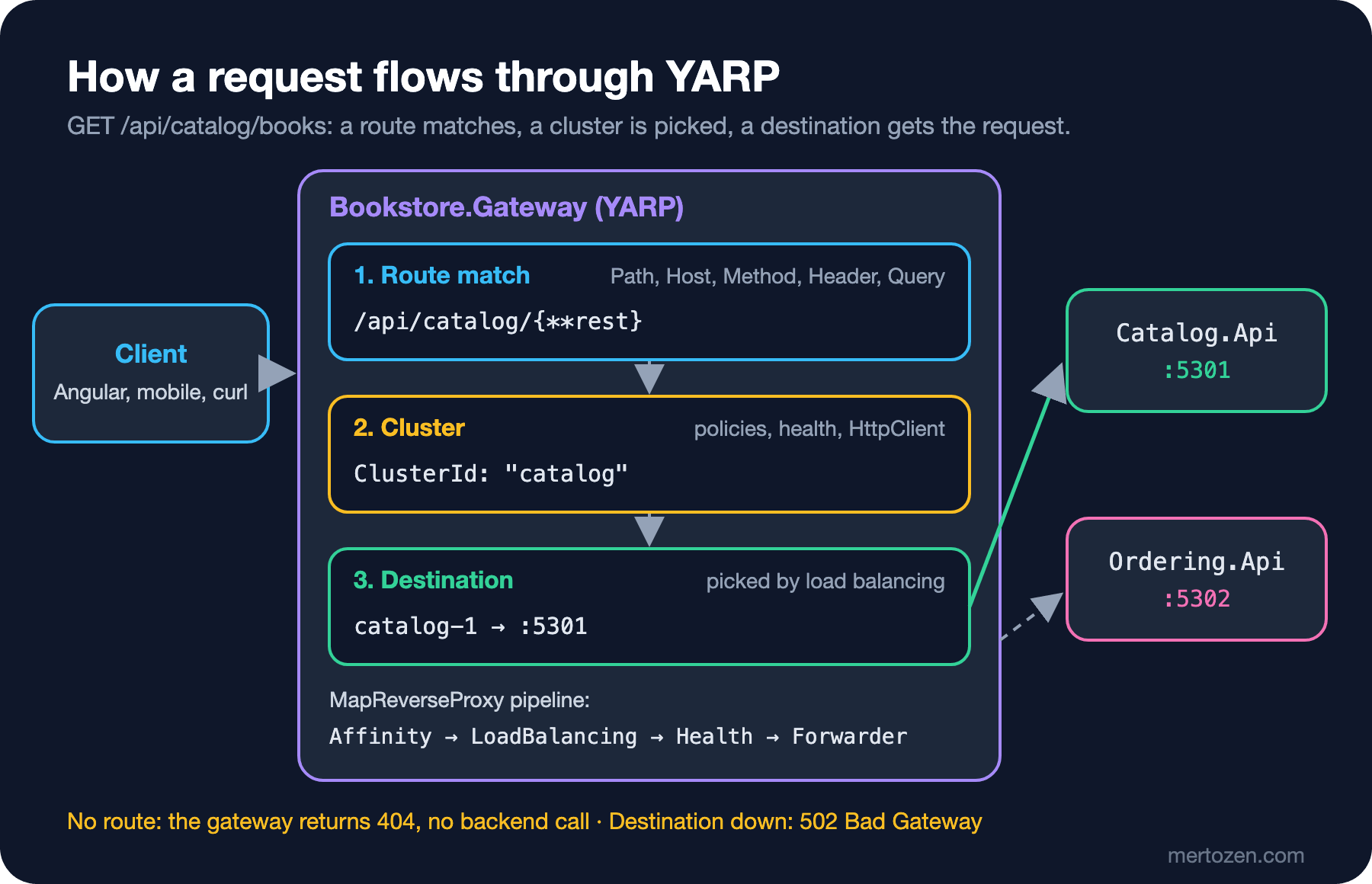
When a request reaches the gateway it first goes through the normal ASP.NET Core middleware, then routing matches a YARP route. On a match, YARP's own small pipeline runs. The parameterless MapReverseProxy() puts session affinity, load balancing and passive health checks into that pipeline, in that order; at the end sits the forwarder that actually sends the request. YARP's source code spells out this default order. You can build the same pipeline yourself and add a step:
using Yarp.ReverseProxy.Model;

app.MapReverseProxy(proxyPipeline =>
{
    proxyPipeline.Use(async (context, next) =>
    {
        IReverseProxyFeature proxy = context.GetReverseProxyFeature();
        ILogger logger = context.RequestServices
            .GetRequiredService<ILoggerFactory>()
            .CreateLogger("Bookstore.Gateway");

        logger.LogInformation(
            "Route {RouteId} -> cluster {ClusterId}, {Count} available destination(s)",
            proxy.Route.Config.RouteId,
            proxy.Cluster.Config.ClusterId,
            proxy.AvailableDestinations.Count);

        await next();

        logger.LogInformation(
            "Forwarded to {DestinationId}, status {StatusCode}",
            proxy.ProxiedDestination?.DestinationId,
            context.Response.StatusCode);
    });
    // with this overload we add the default steps ourselves
    proxyPipeline.UseSessionAffinity();
    proxyPipeline.UseLoadBalancing();
    proxyPipeline.UsePassiveHealthChecks();
});
IReverseProxyFeature carries the route, the cluster, the list of available destinations YARP picked for this request, and finally the destination the request was sent to. When you use this overload, the three default steps aren't added for you; forget them and load balancing and passive health checks are silently off. Now let's send the first request from "Guess First" and read the gateway log:
curl -s -o /dev/null -w "%{http_code}\n" http://localhost:5300/api/catalog/books/0000
404

info: Bookstore.Gateway[0]
      Route catalog -> cluster catalog, 1 available destination(s)
info: Yarp.ReverseProxy.Forwarder.HttpForwarder[9]
      Proxying to http://localhost:5301/api/catalog/books/0000 HTTP/2 RequestVersionOrLower
info: Yarp.ReverseProxy.Forwarder.HttpForwarder[56]
      Received HTTP/1.1 response 404.
info: Bookstore.Gateway[0]
      Forwarded to catalog-1, status 404
This 404 comes from the backend: the route matched, the request went to Catalog, and Catalog couldn't find that ISBN. Notice HTTP/2 RequestVersionOrLower in the log too. By default YARP tries HTTP/2 to the backend, but over plain HTTP the HTTP/2 negotiation needs TLS, so the connection falls back to HTTP/1.1. We'll change this in the cluster's HttpRequest section in post 03.
The second request is /api/inventory, which matches no route:
curl -i http://localhost:5300/api/inventory
HTTP/1.1 404 Not Found
Content-Length: 0
Date: Sat, 14 Nov 2026 10:25:41 GMT
Server: Kestrel
The status code is 404 again, but this time the gateway log has neither the route line nor a Proxying to line. No endpoint matched, so ASP.NET Core itself answered and no backend was called. When a "we're getting 404s" complaint comes in production, this is the first thing to check: did the request die in the gateway, or did the backend not find it?
For the third request I stopped the Ordering service:
curl -i http://localhost:5300/api/orders
HTTP/1.1 502 Bad Gateway
Content-Length: 0
Date: Sat, 14 Nov 2026 10:25:49 GMT
Server: Kestrel

warn: Yarp.ReverseProxy.Forwarder.HttpForwarder[48]
      Request: An error was encountered before receiving a response.
      System.Net.Http.HttpRequestException: Connection refused (localhost:5302)
The route matched and a destination was picked, but the connection couldn't be made. YARP reports it to the client as 502 Bad Gateway and logs the error kind (Request, an error before any response arrived). The body is empty; what the client sees is your call.
Production Notes
The gateway is the single door in front of all your services, so its problems become everyone's problems. Set up three things from day one. First, don't run the gateway as a single instance; run at least two with a load balancer in front. YARP itself is stateless, but the rate limit counters and output cache we'll add later are kept per instance; we'll discuss that in post 07. Second, the Proxying to and Received ... response lines you saw above are written at Information level for every request. Under heavy traffic that becomes the biggest source of noise in your logging system; it's better to raise the Yarp category to Warning and get per-request data from access logs or metrics. Third, give the gateway its own health endpoint and measure it separately from the backends' health; if the gateway is up but everything behind it is down, the load balancer doesn't need to know, but you do.
Then there's measurement. The gateway adds a network hop and some processing time to every request. You should know that from measurement, not guesswork; in post 07 we'll compare latency with and without the gateway using a load test.
Common Pitfalls
The first pitfall is using the MapReverseProxy overload and forgetting to add the default steps. The pipeline compiles and requests go through, but you only notice that load balancing isn't working once you add more destinations and put it under load.
The second is forgetting that the path is forwarded as is. If you define a route for /api/catalog/books at the gateway and assume Catalog listens on /books, every request returns 404 and the log only tells you the backend returned 404. You can see the exact URL the gateway sent to the backend in the Proxying to line; that's the first place to look.
The third is treating the gateway as a place for business logic. Once order total checks, stock rules or campaign calculations move into the gateway, you get a "god gateway": every service change needs a gateway deployment. The gateway does cross-cutting work such as routing, identity and traffic rules; domain decisions stay in the services.
The fourth is leaving cluster addresses as localhost and putting the gateway in a container. Inside a container, localhost is the container itself; we'll change addresses per environment with a config filter in post 02 and discover them dynamically with service discovery in post 03.
A Small Experiment
★☆☆ Without removing the /gateway/ping endpoint, add a route under ReverseProxy:Routes with a "Path": "/gateway/{**rest}" match that goes to the Ordering cluster. Does curl http://localhost:5300/gateway/ping still return pong? Explain the answer with ASP.NET Core routing's precedence rules.
★★☆ Send a request while the Ordering service is down and note the forwarder error kind in the log. Then start Ordering and try again right away. Did you have to restart the gateway? Think about why not in terms of the connection pool.
★★★ Change the middleware we added to the pipeline so it logs at Warning when the response is 5xx and at Debug otherwise, and raise the Yarp category to Warning. That way the gateway log stays almost empty under normal traffic, while errors show up with route, cluster and destination information.
For now our routes only look at the path, and the external and internal URLs are the same. In the next post we'll enrich route matches with host, method, headers and query; use transforms to send /api/v1/books to Catalog as /books; and change the route table without restarting the app.