

Angular BFF and Aggregation with YARP: Running Proxy Routes Side by Side with Your Own Endpoints
Because YARP routes are normal endpoints, you can serve Angular files, aggregation endpoints and proxy routes from one app on a single origin without CORS; the parts to watch are fallbacks, the timeout budget and second traffic paths. With real output from Bookstore we show a book page endpoint that calls Catalog, Inventory and Ordering in parallel, partial failure, an HttpClient that uses YARP's health data, and an IHttpForwarder that picks a target per institution.
Version note: The code in this post was built and run with .NET 10, Yarp.ReverseProxy 2.3, Microsoft.Extensions.ServiceDiscovery 10.11 and Angular 22.2 (TypeScript 6.0).
Guess First
Bookstore.Gateway has three Catalog instances, and the active health check we set up in post 03 probes them every 5 seconds. Now we add an endpoint of our own inside the gateway: an aggregation endpoint for the book page that calls Catalog, Inventory and Ordering in parallel and returns a single response. This endpoint reaches Catalog with a plain HttpClient that reads the address list from configuration through service discovery.
You stop catalog-2 and wait for the health check to notice. Then you request the same book six times through the proxy route and six times through the aggregation endpoint. All six proxy requests return 200. How many of the aggregation requests return 200? We see the answer, with real output, halfway through the post.
Proxy Routes and Your Own Endpoints in the Same App
In this post we build a BFF for the Angular client of Bookstore, the online bookstore used as the shared example across this site's series. What a BFF is, when you need one and at what point it turns into a general-purpose API was covered in the Microservices series' post on API Gateway and Backend for Frontend. The question here is practical: how do we build one in a single ASP.NET Core app with YARP?
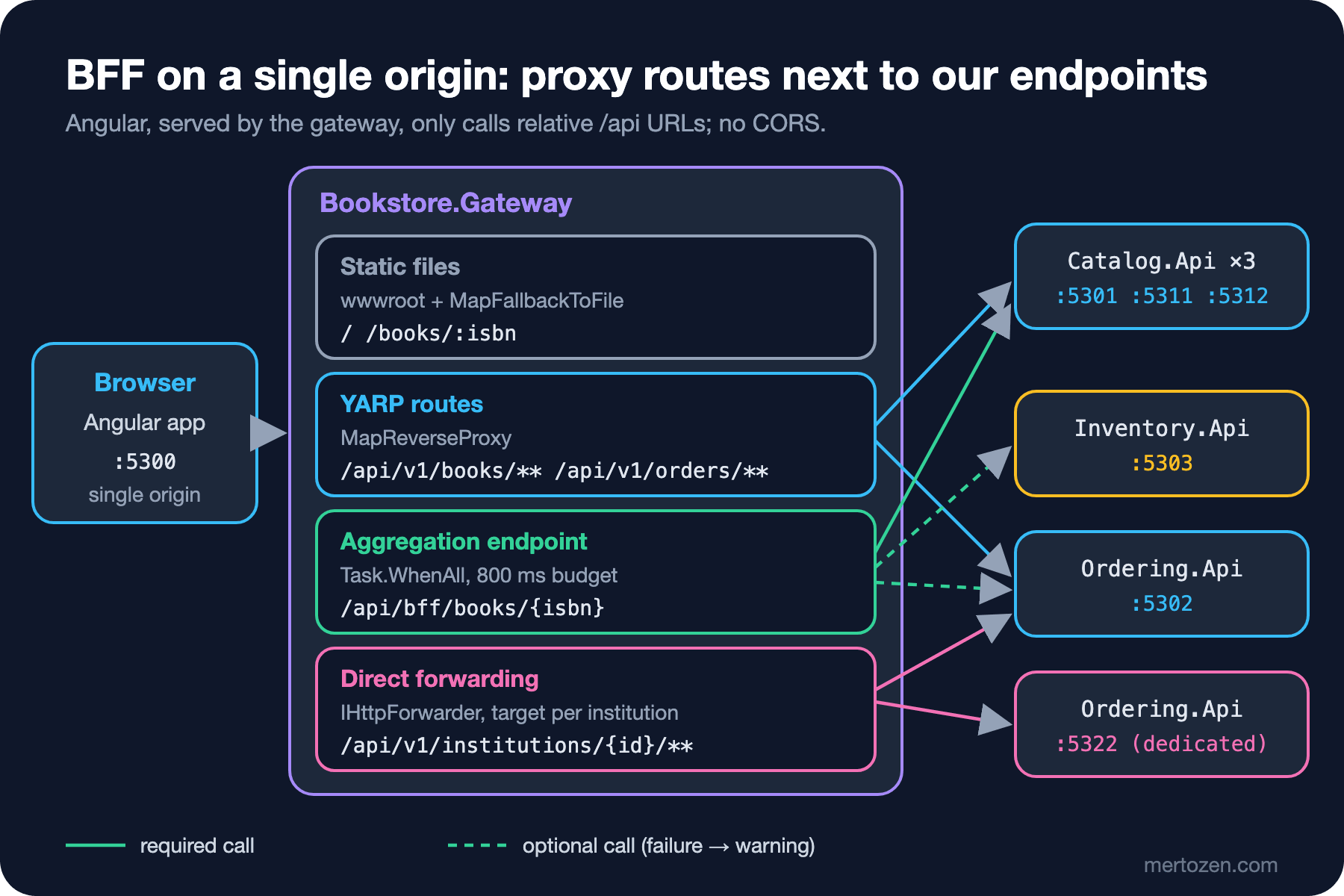
This is where YARP being a library helps most. MapReverseProxy() adds routes as normal endpoints, and you can put Minimal API endpoints, static files and fallbacks next to them. They all live in the same routing table and go through the same middleware. Here is Bookstore.Gateway at the end of this post:
var app = builder.Build();

// Angular's build output (wwwroot) is served from the same origin as /api: no CORS needed
app.UseDefaultFiles();
app.UseStaticFiles();

app.UseAuthentication();
app.UseRateLimiter();
app.UseAuthorization();
app.UseRequestTimeouts();
app.UseOutputCache();

app.MapGet("/gateway/ping", () => "pong").AllowAnonymous();
app.MapBookDetails();
app.MapInstitutionForwarding();

app.MapReverseProxy(proxyPipeline => { /* the pipeline from posts 01-04 */ });

// unknown /api URLs get 404, not index.html; every other URL is an Angular route
app.MapFallback("/api/{**path}", () => Results.NotFound()).AllowAnonymous();
app.MapFallbackToFile("index.html").AllowAnonymous();

app.Run();
The routes don't overlap: the proxy routes are /api/v1/books/** and /api/v1/orders/**, aggregation is /api/bff/books/{isbn}, direct forwarding is /api/v1/institutions/{institutionId}/**. If they did overlap, ASP.NET Core's endpoint precedence would decide: Order first, then the more specific pattern. The catch-all trap from post 02 applies here too. The UseCors() call and the bookstore-web CORS policy we added in post 04 are gone in this post. Angular now gets the page and the API from the same address, so the browser has nothing left to ask.
Serving Angular from the Same Origin
The Angular project lives in web/bookstore-web in the repo; it was created with Angular 22.2 and uses TypeScript 6.0, which Angular requires. The page and the app structure belong to the Angular series. Two settings matter to us. First, have ng build write its output straight into the gateway's wwwroot folder:
"build": {
  "builder": "@angular/build:application",
  "options": {
    "browser": "src/main.ts",
    "outputPath": {
      "base": "../../src/Bookstore.Gateway/wwwroot",
      "browser": ""
    }
  }
},
"serve": {
  "builder": "@angular/build:dev-server",
  "options": {
    "proxyConfig": "proxy.conf.json"
  }
}
The "browser": "" setting puts the files directly in wwwroot instead of a wwwroot/browser subfolder. Second, keep a single origin during development with ng serve as well. Angular's dev server forwards requests that start with /api to the gateway:
{
  "/api": {
    "target": "http://localhost:5300",
    "secure": false
  }
}
cd web/bookstore-web
npm install
npx ng build
Output location: .../src/Bookstore.Gateway/wwwroot
# while ng serve is running
curl http://localhost:4200/api/bff/books/9780547928227
{"isbn":"9780547928227","title":"The Hobbit","author":"J. R. R. Tolkien","price":310.00,"available":6,"purchasedBefore":null,"warnings":[]}On the Angular side the URLs are relative. Whether the page comes from ng serve on 4200 or from the gateway on 5300, the same code works:
export class BookDetails {
  readonly isbn = input.required<string>();

  // relative URL: the same gateway serves this app and /api, no CORS
  protected readonly book = httpResource<BookDetailsView>(() => `/api/bff/books/${this.isbn()}`);
}
httpResource is a stable API in Angular 22; it opens an HTTP request bound to a signal and repeats it when isbn changes. I started the gateway and opened the page with Playwright's Chromium; this was the text on the page:
http://localhost:5300/books/9780441172719 => Dune | Frank Herbert · 420 TRY | 13 in stockBefore this worked I hit two errors, both from the SPA fallback. In my first attempt the MapFallbackToFile("index.html") line had no .AllowAnonymous(), and this was the result:
/ 401
/books/9780441172719 401
/main-4UR26WGJ.js 200
The JavaScript file loads but the page itself is 401. The cause is the fallback authorization policy we set in post 04: every endpoint without an AuthorizationPolicy requires an identity, and MapFallbackToFile is an endpoint. The static file middleware is not an endpoint, which is why the JavaScript file isn't affected. Every endpoint an anonymous user must reach needs AllowAnonymous(); that explicitness is exactly the safety the fallback policy buys us.
The second error is sneakier. Without the /api/{**path} fallback, a mistyped API URL got this response:
/api/v2/books (token) 200 text/htmlAngular's HttpClient gets a 200, expects JSON, tries to parse HTML, and the error shows up as a parse error far away from the real cause. That's why every unmatched request under /api has an explicit 404 fallback. Both fallbacks have the same Order value (the lowest priority); /api/{**path} wins because it's the more specific pattern.
The Aggregation Endpoint: The Book Page
The book page needs data from three services: the book itself from Catalog, stock from Inventory, and "have you bought this book before?" from Ordering. Inventory is a new service added in this post: Bookstore.Inventory.Api on :5303 keeps stock per warehouse with StockItem and Warehouse records. Instead of the browser making three requests, the gateway offers one endpoint:
public static IEndpointRouteBuilder MapBookDetails(this IEndpointRouteBuilder app)
{
    app.MapGet("/api/bff/books/{isbn}", GetAsync)
        .AllowAnonymous()
        .WithRequestTimeout(TrafficPolicies.CatalogRead);
    return app;
}

private static async Task<IResult> GetAsync(
    string isbn, HttpContext context, IHttpClientFactory http, ILoggerFactory loggers, CancellationToken ct)
{
    using CancellationTokenSource optional = CancellationTokenSource.CreateLinkedTokenSource(ct);
    optional.CancelAfter(OptionalBudget);

    // token passthrough: Ordering validates the same token itself (post 04)
    AuthenticationHeaderValue? bearer =
        AuthenticationHeaderValue.TryParse(context.Request.Headers[HeaderNames.Authorization], out AuthenticationHeaderValue? parsed)
            ? parsed
            : null;
    bool signedIn = context.User.Identity?.IsAuthenticated == true;

    Task<DownstreamResult<CatalogBook>> book = DownstreamCall.GetAsync<CatalogBook>(
        http.CreateClient(BffClients.Catalog), $"/books/{isbn}", null, ct);
    Task<DownstreamResult<StockLevel>> stock = DownstreamCall.GetAsync<StockLevel>(
        http.CreateClient(BffClients.Inventory), $"/stock/{isbn}", null, optional.Token);
    Task<DownstreamResult<Purchase>> purchase = signedIn
        ? DownstreamCall.GetAsync<Purchase>(http.CreateClient(BffClients.Ordering), $"/orders/purchases/{isbn}", bearer, optional.Token)
        : Task.FromResult(new DownstreamResult<Purchase>(default, null, "anonymous", 0));

    await Task.WhenAll(book, stock, purchase);

    // Catalog is required: without the book there is no page
    if (book.Result.Status == HttpStatusCode.NotFound)
    {
        return Results.NotFound();
    }
    if (book.Result.Value is not { } b)
    {
        return Results.Problem(statusCode: StatusCodes.Status502BadGateway, title: "Catalog is unavailable");
    }

    List<string> warnings = [];
    if (stock.Result.Error is { } stockError)
    {
        warnings.Add($"stock-unavailable: {stockError}");
    }
    if (signedIn && purchase.Result.Error is { } purchaseError)
    {
        warnings.Add($"purchase-history-unavailable: {purchaseError}");
    }

    return Results.Ok(new BookDetailsView(
        b.Isbn, b.Title, b.Author, b.Price,
        stock.Result.Value?.Available,
        purchase.Result.Value?.PurchasedBefore,
        warnings));
}
I removed the logging line from the listing to keep it short; in the repo every call's duration and result is logged on one line. DownstreamCall.GetAsync never throws for a downstream problem; it returns the value, the status code, the error kind and the elapsed time in a record. The endpoint decides which failure breaks the page. The endpoint itself is AllowAnonymous(): anonymous users should see the book page too. Ordering is only called when the user is signed in, and the incoming Authorization header is passed along as is, the token passthrough from post 04. Three responses:
# no token
{"isbn":"9780441172719","title":"Dune","author":"Frank Herbert","price":420.00,"available":13,"purchasedBefore":null,"warnings":[]}
# Ada and Alan, same book (Emma)
{"isbn":"9780141439587","title":"Emma","author":"Jane Austen","price":185.50,"available":0,"purchasedBefore":true,"warnings":[]}
{"isbn":"9780141439587","title":"Emma","author":"Jane Austen","price":185.50,"available":0,"purchasedBefore":false,"warnings":[]}

      Book 9780141439587: catalog 5 ms ok, inventory 3 ms ok, ordering 53 ms ok
purchasedBefore has three values: true, false and null. null means "I don't know": either the user isn't signed in or Ordering couldn't answer. The same rule applies to available: 0 means "out of stock", null means "no stock information". If you don't put this distinction in the view model, every book looks sold out when Inventory goes down, and sales stop. Which field is required isn't a technical decision; it's a product decision for the team that owns the page. In Bookstore there is no page without the book, but there is a page without stock.
Where does the token live?
In this post Angular sends a bearer token as in post 04, and the gateway validates it. In a real SPA BFF it's safer for the token never to reach the browser: the user signs in to the BFF with OpenID Connect, the BFF keeps a cookie session and adds the access token on the server to requests going to the API. We built that whole architecture with YARP, including anti-CSRF measures and token refresh, in the Authentication and Authorization series' post on the BFF pattern for SPAs. When you move to that setup, only the token's source changes; the routing, aggregation and direct forwarding in this post stay the same. In the aggregation endpoint you forward the token from the session instead of the incoming header.
Partial Failure and a Timeout Budget
In the Microservices series' BFF example, Inventory returned 503 quickly, so the total time didn't change, and the post ended with a warning: had Inventory hung without answering, the BFF would have hung too. Here we actually try both cases. First I stopped Inventory, then restarted it with a 3 second delay:
# Inventory stopped
{"isbn":"9780441172719",...,"available":null,"purchasedBefore":true,"warnings":["stock-unavailable: ConnectionError"]}  200 0.016679s
# Inventory answers in 3 seconds
{"isbn":"9780441172719",...,"available":null,"purchasedBefore":true,"warnings":["stock-unavailable: timeout"]}  200 0.807893s

      Book 9780441172719: catalog 1 ms ok, inventory 14 ms ConnectionError, ordering 5 ms ok
      Book 9780441172719: catalog 2 ms ok, inventory 805 ms timeout, ordering 1 ms ok
A stopped service is a cheap failure: the connection is refused right away. A slow service is expensive: without a budget, the page would have waited 3 seconds. I set the budget at two levels. Optional calls (Inventory, Ordering) are limited by a linked CancellationTokenSource of 800 ms. The required call (Catalog) is outside that budget; its limit is the catalog-read request timeout policy attached to the endpoint, the 2 seconds from post 04. When I also stopped Ordering, both warnings came back and the time still stayed around 800 ms:
{"isbn":"9780441172719",...,"available":null,"purchasedBefore":null,"warnings":["stock-unavailable: timeout","purchase-history-unavailable: ConnectionError"]} 200 0.805972sIn that case the Angular page shows the book and writes "Stock information is unavailable right now." on the stock line. I deliberately didn't use retries, circuit breakers or hedging here. Retrying within 800 ms usually just puts a second load on the slow service. How to make those decisions and how to set them up with Microsoft.Extensions.Http.Resilience is the topic of the upcoming External Service Integration and Resilience series.
Picking the Aggregation Target with YARP's Health Data
Now for the answer to "Guess First". In the first version all three HttpClients were resolved by .NET service discovery, with three addresses under Services:catalog:http. I stopped catalog-2 and waited for the health check to mark it:
== BFF
502 200 200 502 200 200
== proxy route
200 200 200 200 200 200
The proxy route is fine because YARP removed catalog-2 from the list based on the health check. The aggregation endpoint, however, got a 502 on every third request. Service discovery's configuration provider hands out the address list and picks one in turn; it doesn't know whether that address is healthy. There are two load balancers inside the same app, and one of them is blind.
For the fix I used what YARP already knows. IProxyStateLookup is available from dependency injection and gives the cluster's current state, including the destination list filtered by health checks. A small DelegatingHandler rewrites the request's address to a destination picked from that list:
// sends the request to a destination that YARP currently considers available,
// so the BFF uses the same health check results as the proxy routes
public sealed class ClusterDestinationHandler(IProxyStateLookup proxyState, string clusterId) : DelegatingHandler
{
    protected override Task<HttpResponseMessage> SendAsync(HttpRequestMessage request, CancellationToken cancellationToken)
    {
        if (!proxyState.TryGetCluster(clusterId, out ClusterState? cluster))
        {
            throw new InvalidOperationException($"Cluster '{clusterId}' is not configured.");
        }

        IReadOnlyList<DestinationState> available = cluster.DestinationsState.AvailableDestinations;
        if (available.Count == 0)
        {
            throw new HttpRequestException(HttpRequestError.ConnectionError, $"Cluster '{clusterId}' has no available destination.");
        }

        DestinationState destination = available[Random.Shared.Next(available.Count)];
        request.RequestUri = new Uri(new Uri(destination.Model.Config.Address), request.RequestUri!.PathAndQuery);
        return base.SendAsync(request, cancellationToken);
    }
}
// Catalog has three instances: pick one of the YARP cluster's available destinations
services.AddHttpClient(Catalog, client => client.BaseAddress = new Uri("http://catalog"))
.AddHttpMessageHandler(sp => new ClusterDestinationHandler(sp.GetRequiredService<IProxyStateLookup>(), "catalog"));
// single instance services: "http://inventory" is resolved from Services:inventory:http
foreach (string name in (string[])[Inventory, Ordering])
{
services.AddHttpClient(name, client => client.BaseAddress = new Uri($"http://{name}"))
.AddServiceDiscovery();
}== BFF
200 200 200 200 200 200 200 200 200 200 200 200Know this handler's limits too. The choice is random; the cluster's PreferSameZone policy doesn't run here because the load balancing middleware only exists in the proxy pipeline. These calls don't feed YARP's passive health check either. AvailableDestinations follows the cluster's HealthyOrPanic setting: if all destinations are unhealthy, it returns all of them. And the health check takes time to notice; with the settings from post 03 that's two failed probes, up to 10 seconds. You still need a timeout, and possibly a retry, for that window.
Direct Forwarding with IHttpForwarder: A Target per Institution
Bookstore's institutional customers (schools, libraries, companies) place bulk orders. A large institution, say inst-42, runs on its own Ordering instance; the others share one. Which institution goes where lives in configuration; the list can grow, and we don't want to write a route and a cluster per institution. Route config falls short here because the target is chosen at request time from the institution ID in the path. IHttpForwarder, which skips YARP's route, cluster, load balancing and health check layers and only does "forward this request to this address", exists for exactly this:
// one invoker for the app's lifetime; HttpMessageInvoker, not HttpClient, so responses stream unbuffered
HttpMessageInvoker httpClient = new(new SocketsHttpHandler
{
    UseProxy = false,
    AllowAutoRedirect = false,
    AutomaticDecompression = DecompressionMethods.None,
    UseCookies = false,
    EnableMultipleHttp2Connections = true,
    ActivityHeadersPropagator = new ReverseProxyPropagator(DistributedContextPropagator.Current),
    ConnectTimeout = TimeSpan.FromSeconds(15),
});
ForwarderRequestConfig requestConfig = new() { ActivityTimeout = TimeSpan.FromSeconds(30) };

// direct forwarding does not run AddTransforms; the internal header rule is applied here again
HttpTransformer transformer = app.ServiceProvider.GetRequiredService<ITransformBuilder>()
    .Create(context => InternalHeaderTransforms.Add(context, "institutions")
        .AddPathRemovePrefix("/api/v1"));

app.Map("/api/v1/institutions/{institutionId}/{**rest}", async (
    HttpContext context, string institutionId, IHttpForwarder forwarder, IConfiguration configuration) =>
{
    // large institutions have a dedicated Ordering instance; everyone else shares one
    string destination = configuration[$"Institutions:Dedicated:{institutionId}"]
        ?? configuration["Institutions:Shared"]!;

    ForwarderError error = await forwarder.SendAsync(context, destination, httpClient, requestConfig, transformer);
    if (error != ForwarderError.None)
    {
        context.RequestServices.GetRequiredService<ILoggerFactory>()
            .CreateLogger("Bookstore.Gateway.Forwarding")
            .LogWarning("Institution {InstitutionId} -> {Destination} failed: {Error}", institutionId, destination, error);
    }
}).RequireAuthorization(GatewayAuthentication.InstitutionBuyerPolicy);
The SocketsHttpHandler settings match the recommendations in YARP's direct forwarding docs: the proxy itself shouldn't keep cookies, follow redirects or decompress responses; those are the client's job. IHttpForwarder is already registered by AddReverseProxy(). Because the endpoint is a Minimal API endpoint, attaching a policy with RequireAuthorization works the same way. With Grace's token in the InstitutionBuyer role, while also trying to look like Alan:
curl -H "Authorization: Bearer $BUY" -H "X-Bookstore-User-Id: alan" http://localhost:5300/api/v1/institutions/inst-42/orders
{"institutionId":"inst-42","instance":"ordering-dedicated","userIdHeader":"grace"}  200
curl -H "Authorization: Bearer $BUY" -H "X-Bookstore-User-Id: alan" http://localhost:5300/api/v1/institutions/inst-7/orders
{"institutionId":"inst-7","instance":"ordering","userIdHeader":"grace"}  200

ada: 403
anon: 401
# with the dedicated instance stopped
502
      Institution inst-42 -> http://localhost:5322/ failed: Request
inst-42 went to its own instance, inst-7 to the shared one. When the target is down, the forwarder writes 502 and returns ForwarderError.Request; logging it and changing the response if needed is up to you. The gateway doesn't check whether the institution belongs to this user; that rule belongs to Ordering.
The transformer line is the real lesson of this section. In my first attempt the transformer only had AddPathRemovePrefix("/api/v1"), and this is the header Ordering received:
{"institutionId":"inst-42","instance":"ordering-dedicated","userIdHeader":"alan"} 200The rule we wrote in post 02, "only the gateway sets headers with the X-Bookstore- prefix", was tied to routes through AddTransforms. Direct forwarding doesn't use routes, so that callback never ran and the client's alan went through as is. To keep the rule in one place, I split InternalHeaderTransforms into an Add method that both routes and direct forwarding can call. When you add a second traffic path to a gateway, test separately that every security rule from the first path also runs on this one.
Production Notes
Monitor aggregation endpoints differently from proxy routes. On a proxy route one status code maps to one backend; in aggregation, a 200 response may carry two warnings. Count warnings as metrics (for example the number of stock-unavailable) and log each downstream call's duration separately; the one-line log above exists for that. If the page's p95 goes above the optional budget (800 ms), the problem is in Catalog.
Choose budgets by measuring. 800 ms should be a few times Inventory's normal p99; otherwise you'll produce warnings on a normal day too. The required call's timeout should also be shorter than the longest acceptable page time.
Serving static files from the gateway is practical at small and medium scale. As traffic grows, a common step is to put the Angular files on a CDN and leave only /api on the gateway; then the origins split again and you need to rethink CORS, or a single origin through the CDN. index.html must not be cached, while hashed JavaScript files should be cached for a long time.
Direct forwarding has none of YARP's health checks, load balancing or passive health features. If the dedicated instance goes down, every request from that institution gets 502. If an institution needs several instances, it's better to pick a cluster for it with IProxyStateLookup and hand it to the proxy pipeline with context.ReassignProxyRequest; we'll use that approach for canary releases in post 06.
Common Pitfalls
First, turning the BFF into a small monolith. The aggregation endpoint combines and shapes data; it doesn't calculate discounts or reserve stock. Every business rule that starts with "let's do this in the BFF, it's faster" will either be copied when a second client (mobile) arrives, or turn the BFF into a general-purpose API.
Second, treating optional data as required. An exception from any call inside Task.WhenAll turns the whole page into a 500. Catch each call's failure separately and decide deliberately which failure breaks the page.
Third, mixing up "unknown" and "zero". A view model with int instead of int? shows every book as out of stock when Inventory goes down.
Fourth, letting the SPA fallback swallow /api. Unmatched API requests get 200 and HTML; the error appears as a JSON parse error.
Fifth, forgetting the gateway's second traffic path. Direct forwarding, your own endpoints and proxy routes don't share the same security rules; stripping internal headers and authorization must be set up for each path.
When Not to Use It
For an Angular app that talks to a single backend, a separate BFF layer is usually unnecessary: serving Angular from that backend, or developing with the ng serve proxy, gives the same result. Aggregation isn't needed for every screen either. If a screen makes two independent calls, the browser can make them in parallel; a BFF only adds value when there's a concrete reason such as the number of round trips, mobile network latency, or downstream services not being exposed. If the gateway's aggregation endpoints pass ten or twenty and each belongs to the owner of a different screen, consider moving the BFF into its own app and leaving only edge work to the gateway.
A Small Experiment
★☆☆ Start Inventory with --Inventory:ResponseDelayMs=700 and request the book page ten times. How many came back with a warning? Lower the budget from 800 ms to 500 ms and compare; write in your own words how you'd pick the right budget.
★★☆ Add which instance Catalog answered from to the aggregation response (read the X-Catalog-Instance header). Stop catalog-2: how many requests fail in the 10 seconds before the health check marks it? Change ClusterDestinationHandler to try another destination once on failure, and measure the difference.
★★★ Write a version of /api/v1/institutions/{institutionId}/** that uses a cluster per institution instead of direct forwarding: define a cluster like ordering-inst-42 for each institution in Institutions:Dedicated, and in the proxy pipeline route the request to that cluster with IProxyStateLookup.TryGetCluster and context.ReassignProxyRequest. Compare what the health check does in both versions when the dedicated instance goes down.
The gateway is now both a proxy and a BFF for Angular. In the next post we use the same tools to move away from an old app step by step: we change the route table in stages with the strangler fig, send a percentage of traffic to a new version with ReassignProxyRequest, and roll back instantly with a config reload.