

From One Server to Millions of Users: Vertical and Horizontal Scaling and the Stateless Tier
The precondition for scaling the application tier horizontally is being stateless: session, the Data Protection key ring, IMemoryCache, local files and scheduled jobs must move outside the instance. In a real two-instance experiment moving session to Redis alone fixes nothing, because session and authentication cookies are encrypted with Data Protection keys; once the key ring is shared too and SetApplicationName is set, the two servers behave like one application.
Version note: The code in this post was built and run with C# 14 and .NET 10; the example ran with the Microsoft.Extensions.Caching.StackExchangeRedis and Microsoft.AspNetCore.DataProtection.StackExchangeRedis 10.0.14 packages against Redis 7.
Guess First
After campaign day the Bookstore team makes a second decision: two application instances instead of one, with a load balancer in front that hands out requests in turn. It gets deployed and complaints start reaching the support team: users see the "please sign in" page one click after signing in, and books added to the cart keep appearing and disappearing.
Someone on the team finds the cause right away: session is kept in memory, and each instance has its own memory. As a fix they move session to Redis. Guess: after moving it to Redis, do users stay signed in, and is the cart consistent now?
Vertical Scaling: Grow the Machine First
In the previous post, "Back-of-the-Envelope Estimation: QPS, Storage, Bandwidth and Availability Math", we found in requests per second (QPS, queries per second) where a single server stops being enough. When you get there you have two roads. Vertical scaling (scale up) means giving the same machine more CPU (Central Processing Unit), more memory and faster disks. Horizontal scaling (scale out) means increasing the number of machines doing the same job.
The biggest advantage of vertical scaling is that the code does not change at all. The application stays a single process, session can stay in memory, database transactions live on one server. In the cloud, resizing a VM (virtual machine) takes a few minutes. Don't underestimate it: for many years databases scaled almost only this way, and today a single powerful SQL (Structured Query Language) Server carries the whole load of most mid-sized companies.
The cost shows up in three places. There is a ceiling: there is nothing bigger than the biggest machine, and as you approach the ceiling the price rises faster than linearly. A single machine is a single point of failure: when it goes down or restarts, the system is completely down; the parallel component gain from the previous post's availability math does not exist here. And growing the machine usually needs a restart, which means planned downtime.
A practical rule: go horizontal early in the application tier, and go as far as you can vertically in the database. Duplicating application servers is cheap and reversible; duplicating a database (replicas, sharding) is expensive and hard. The precondition is a stateless application tier.
Horizontal Scaling and the Stateless Tier
In a stateless application tier any instance can serve any request, because everything that must be remembered between requests lives outside the instance, in a shared place. That is what lets the load balancer send a request to whichever instance it likes, and lets instances be added and removed at will.
"No state" does not mean the application keeps no data; it means the data is not in the instance's memory or on its disk. In an ASP.NET Core application the typical state that stays tied to an instance is:
- Session: the default
AddDistributedMemoryCachekeeps session data in the instance's memory. - The Data Protection key ring: the authentication cookie, the session cookie, antiforgery tokens and TempData are encrypted with these keys.
IMemoryCache: each instance has its own cache; data you invalidate on one instance stays stale on the other.- Files written to local disk: a cover image the user uploaded exists only on the instance that received it.
- In-memory counters: the ASP.NET Core rate limiter keeps its counter per instance, so with three instances the limit effectively triples.
- Scheduled jobs running on every instance: the "empty abandoned carts" job at 03:00 runs three times on three instances.
Every line of this list has a "move it outside" counterpart: a distributed cache (Redis), shared key storage, object storage (blobs), a shared counter (this series' post "Designing Rate Limiting: Token Bucket, Sliding Window and a Distributed Rate Limiter"), jobs that run on a single instance or take a lock. Here we look at the first two, which are the opening problem itself.
Experiment: Two Servers, One User
Let's reproduce the problem in a single console application by starting two separate ASP.NET Core applications in the same process. Each runs from a different content root, as if deployed to a different folder, and in place of the load balancer an HttpClient sends requests to the two ports in turn. The application can be set up in three modes:
if (mode == "shared")
    builder.Services.AddDataProtection()
        .PersistKeysToStackExchangeRedis(redis!, "Bookstore:DataProtection-Keys")
        .SetApplicationName("Bookstore.Web");
else // equivalent of the default: each server has its own key ring
    builder.Services.AddDataProtection().PersistKeysToFileSystem(new DirectoryInfo(Path.Combine(contentRoot, "keys")));

if (mode == "local")
    builder.Services.AddDistributedMemoryCache();
else
    builder.Services.AddStackExchangeRedisCache(o => o.ConnectionMultiplexerFactory = () => Task.FromResult<IConnectionMultiplexer>(redis!));

builder.Services.AddSession();
builder.Services.AddAuthentication(CookieAuthenticationDefaults.AuthenticationScheme).AddCookie();
local mode is the default state of two instances: each keeps its own key ring on its own disk (ASP.NET Core stores keys in a local folder of the machine by default) and session in its own memory. redis-session mode is the opening team's fix: session in Redis, key ring still local. In shared mode both live in Redis. The endpoints are simple: sign in, ask who you are, add a book to the cart, show the cart.
app.MapGet("/login", async (HttpContext ctx) =>
{
    ClaimsIdentity identity = new([new Claim(ClaimTypes.Name, "ada")], CookieAuthenticationDefaults.AuthenticationScheme);
    await ctx.SignInAsync(new ClaimsPrincipal(identity));
    return $"{name}: signed in as ada";
});
app.MapGet("/me", (HttpContext ctx) => $"{name}: user = {ctx.User.Identity?.Name ?? "anonymous"}");
app.MapGet("/cart/add/{bookId:int}", (int bookId, HttpContext ctx) =>
{
    string cart = ctx.Session.GetString("cart") is { Length: > 0 } items ? $"{items},{bookId}" : $"{bookId}";
    ctx.Session.SetString("cart", cart);
    return $"{name}: cart = [{cart}]";
});
app.MapGet("/cart", (HttpContext ctx) => $"{name}: cart = [{ctx.Session.GetString("cart")}]");
// send requests to the two servers in turn, like a round robin load balancer would
CookieContainer cookies = new();
using HttpClient client = new(new HttpClientHandler { CookieContainer = cookies });
string[] plan = ["5101/login", "5102/me", "5101/cart/add/42", "5102/cart/add/7", "5101/cart"];
Console.WriteLine($"== mode: {mode}");
foreach (string step in plan)
{
string body = await client.GetStringAsync($"http://localhost:{step}");
Console.WriteLine($"GET :{step,-16} -> {body}");
}The real output of the three modes:
== mode: local
GET :5101/login       -> server-a: signed in as ada
GET :5102/me          -> server-b: user = anonymous
GET :5101/cart/add/42 -> server-a: cart = [42]
GET :5102/cart/add/7  -> server-b: cart = [7]
GET :5101/cart        -> server-a: cart = []
== mode: redis-session
GET :5101/login       -> server-a: signed in as ada
GET :5102/me          -> server-b: user = anonymous
GET :5101/cart/add/42 -> server-a: cart = [42]
GET :5102/cart/add/7  -> server-b: cart = [7]
GET :5101/cart        -> server-a: cart = []
== mode: shared
GET :5101/login       -> server-a: signed in as ada
GET :5102/me          -> server-b: user = ada
GET :5101/cart/add/42 -> server-a: cart = [42]
GET :5102/cart/add/7  -> server-b: cart = [42,7]
GET :5101/cart        -> server-a: cart = [42,7]
In local mode the expected happened: Ada signed in on server-a and server-b did not recognise her. The cart is even more interesting: server-b could not read server-a's session cookie, so it started a new session and wrote its own cookie to the browser; on the last request server-a in turn could not read server-b's cookie and the cart came back empty. Book 42 disappeared even on the server that added it.
The answer to the opening guess is in the second block: moving session to Redis fixed nothing; the output is identical line by line to the first block. The reason is not where the session data lives but how the session cookie is read. ASP.NET Core's session documentation says it plainly: the session cookie is encrypted with IDataProtector, and Data Protection must be configured properly for it to be read on every machine. server-b cannot decrypt a cookie encrypted with server-a's key and never reaches the session id inside it; the data sits in Redis but nobody can find it. The authentication cookie cannot be decrypted for the same reason. Only in the third mode, with the key ring shared too, do the two servers behave like a single application.
Sharing the Data Protection Keys
ASP.NET Core Data Protection looks at two things to decrypt a payload: the keys in the key ring and the application discriminator. According to the "Configure ASP.NET Core Data Protection" page on Microsoft Learn, the system isolates apps from each other based on their content root paths, even if they share the same physical key repository. So there are two conditions: the keys must be in a shared place, and the two instances must give the same name with SetApplicationName. In a container the application's path is the same in every instance, so the second condition can be met by accident; on VMs or slots deployed to different folders it is not. Setting the name explicitly means not relying on that accident.
The options for where the keys live: Redis (PersistKeysToStackExchangeRedis), Azure Blob Storage, a shared file system, or a database through Entity Framework Core (EF Core) (PersistKeysToDbContext). Don't skip two details. First, keys must be protected at rest: keys written as plain XML (Extensible Markup Language) to Redis or a file let anyone with access forge cookies; they need to be encrypted with Azure Key Vault, an X.509 certificate or, on Windows, DPAPI (Windows Data Protection Application Programming Interface). Second, the key store is now a critical dependency: wiping or rebuilding Redis signs every user out. Key security is covered in detail in the OWASP (Open Worldwide Application Security Project) series post "OWASP A04: Cryptographic Failures (2) — Password Storage, Data Protection and Secret Management".
A small note on session too: ASP.NET Core's session provider loads data from the distributed cache synchronously if GetString or SetString is used without calling LoadAsync first; the documentation says this incurs a performance penalty at scale. With session in Redis every request is a network round trip; in a real project keep what you put in session small, and consider keeping the cart in the database or in its own Redis key instead of session.
Why Sticky Sessions Are Not the Real Fix
The first shortcut that comes to mind is telling the load balancer "always send the same user to the same instance": sticky sessions (session affinity). Azure App Service does this by default with an ARR (Application Request Routing) affinity cookie, and the ASP.NET Core documentation even lists it as an option for in-memory session; right after, it adds that it affects scalability and complicates updates, and that the better way is a distributed cache.
Sticky sessions don't remove the state, they lock it to an instance. When that instance is taken down for a deployment or crashes, the carts of all its users are gone. Existing users don't move to a newly added instance, so load spreads unevenly. Load balancing algorithms and the cost of affinity are the topic of the series' next post; what to remember here is that a stateless tier makes sticky sessions unnecessary.
Architecture Evolution: Six Steps from One Box to Many Regions
The stateless tier is only one of the steps a growing system goes through. The "Scale from zero to millions of users" chapter of Alex Xu's System Design Interview walks this road step by step; adapted to Bookstore it looks like this:
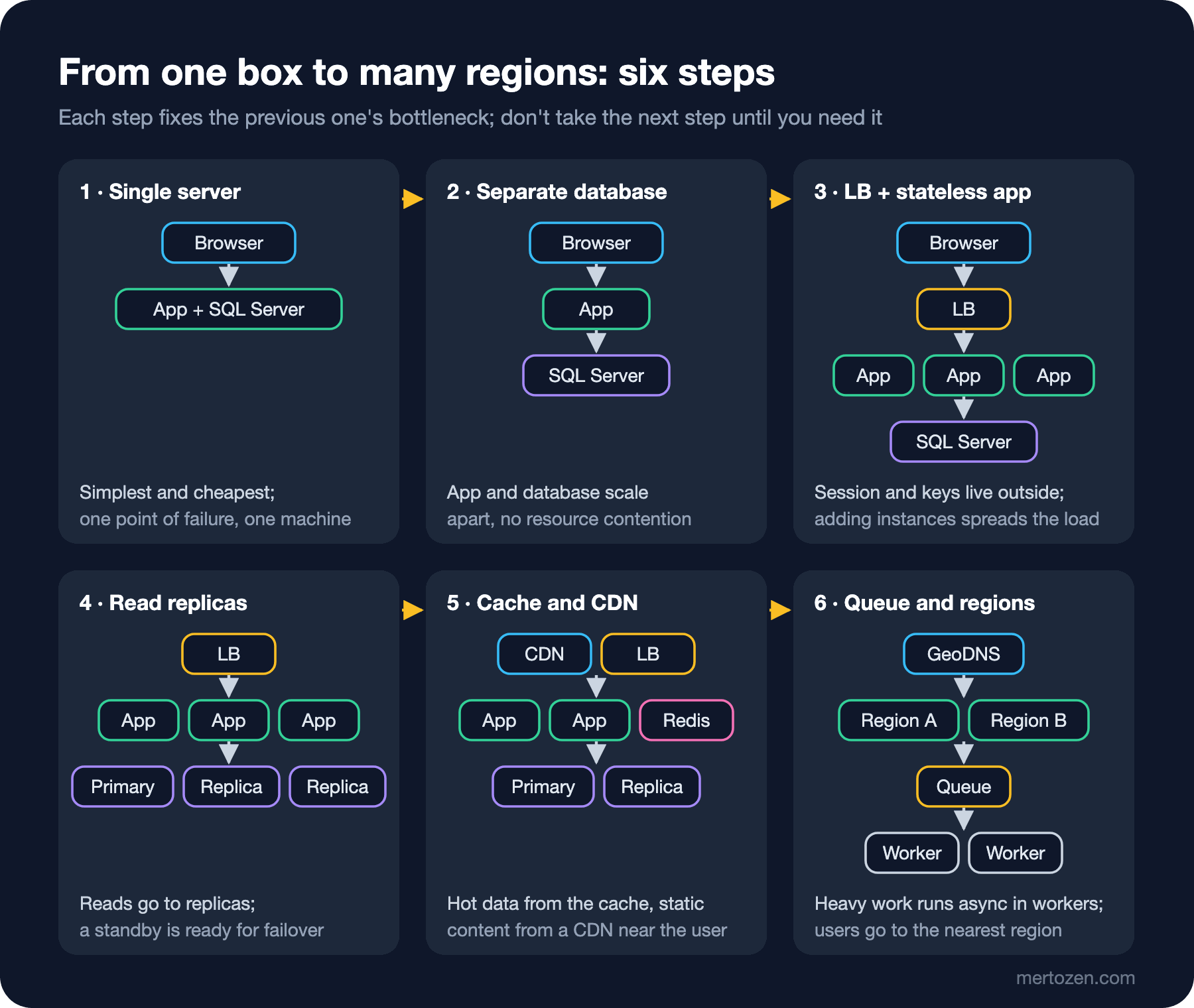
In the first step the application and the database are on the same machine; this is the cheapest and simplest form, but the two compete for the same CPU and memory and the machine is a single point of failure. The second step moves the database to a separate server: now they scale separately, and the database machine can be grown vertically. The third step is several stateless instances behind a load balancer; the topic of this post. What you gain here is not only capacity but availability: when one instance goes down, the others carry on.
The fourth step is database replication: writes go to the primary, reads to the replicas, and if the primary goes down a replica can take its place. The cost is replication lag; the topic of this series' post "Scaling the Data Layer: Replication, Sharding and SQL vs NoSQL". The fifth step is a cache and a CDN (Content Delivery Network): frequently read data comes from a cache like Redis, images and static files from a CDN close to the user, and most reads that used to reach the database disappear. In the sixth step heavy work that can wait (invoice PDFs, e-mails) goes to workers through a queue, and the system spreads over several regions, with GeoDNS sending users to the nearest one.
Don't memorise the order, memorise the reason: each step fixes the bottleneck of the previous step and brings new complexity. With Bookstore's current numbers (200 requests per second on catalog search, 120 orders a minute) steps three and five are enough; multiple regions are on Bookstore's "not for now" list.
Common Pitfalls
Moving session to Redis and forgetting the key ring. The second output above is exactly this: the data is shared, but nobody can read it.
Keeping keys inside the container. When the container is recreated on every deployment the key ring is regenerated too; every deployment signs every user out, even in a single-instance system.
Assuming IMemoryCache is shared. After a price change one instance shows the new price, another the old one; you need to get cache invalidation to every instance or use a short TTL (time to live).
Running scheduled jobs on every instance. The complaint "the daily report e-mail arrived three times" after scaling out is the symptom; move the job to a separate worker or behind a lock.
Underestimating vertical scaling. If your application gets 200 requests per second and one server handles that comfortably, the reason for a second instance is availability, not capacity; decide knowing that.
When Not to Use It
In a single-instance internal application that can tolerate short downtime (an admin panel, a reporting tool), horizontal scaling and a shared key store bring an unnecessary dependency; Redis itself is a component that can go down. In the database, don't move to sharding before you reach the end of vertical scaling; unlike duplicating the application tier, splitting a database is very expensive to undo. Some servers have to be stateful: a chat server holding WebSocket connections cannot move the connection itself outside; scaling those is a separate problem, covered in the series' post "System Design Case Study: Chat and Notification System".
A Small Experiment
★☆☆ In shared mode delete the SetApplicationName line and run again. What happens even though both servers use the same Redis key ring? Explain why with the content root.
★★☆ Add an /price/{bookId} endpoint that uses IMemoryCache and a /price/{bookId}/set endpoint that updates the price. Update the price on server-a and read it from server-b. Fix the problem in two different ways and compare their costs.
★★★ Keep the key ring in a SQL Server table instead of Redis (PersistKeysToDbContext) and protect the keys at rest with an X.509 certificate (ProtectKeysWithCertificate). Which error do you see if the certificate is missing on one of the two instances?
Two-instance Bookstore now works correctly, but we never talked about the load balancer in front: should it hand out requests in turn, send them to the least busy instance, and how does it notice an instance slowing down? In the next post we look at load balancing, from the L4 (Layer 4) vs L7 (Layer 7) difference to health checks and the cost of sticky sessions.