

Designing Rate Limiting: Token Bucket, Sliding Window and a Distributed Rate Limiter
A single rate limit needs its counter in a single place: ASP.NET Core's built-in limiter keeps counters in each instance's memory, so three instances triple the limit; the fix is an atomic counter in the gateway or in Redis. A comparison of five algorithms, a distributed sliding window limiter with Redis and Lua with real output, 429, Retry-After, the IETF RateLimit header draft and the DoS risk of partition keys.
Version note: The code in this post was built and run with C# 14 and .NET 10; the Redis examples ran against Redis 7.4 with StackExchange.Redis 3.4.
Guess First
Bookstore's ordering API (Application Programming Interface) runs as three instances behind a load balancer. A bookshop chain integration sends hundreds of orders a minute, and the team puts a limit of 100 requests per minute on that client using ASP.NET Core's built-in rate limiter: AddFixedWindowLimiter, PermitLimit = 100, Window = 1 minute. It ships, and everything looks right in testing.
Two questions. If the client sends 600 requests in one minute and the load balancer spreads them evenly across the three instances, how many get through? And even with a single instance, if the client sends 100 requests at second 59.9 and another 100 at second 60.1, how many are accepted within 0.2 seconds?
What Rate Limiting Protects, and Where It Lives
Rate limiting caps how many requests a client can make in a given period. It solves three different problems, and knowing which one you're solving is half the design. The first is resource protection: one client's runaway script shouldn't be able to saturate the database. The second is fairness: a free-tier user shouldn't eat a paying customer's capacity. The third is abuse: password guessing on the login endpoint and code scanning on the coupon endpoint should be slowed down. The Web Security series covers the OWASP (Open Worldwide Application Security Project) Top 10, and its post "OWASP A06: Insecure Design — Business Logic Flaws, Race Conditions and Rate Limiting" covered the third one from a security angle; here we look at the same mechanism from a scale angle.
Rate limiting doesn't live in one place; it's layered. On the outside, a CDN (Content Delivery Network) or WAF (Web Application Firewall) puts a coarse per-IP (Internet Protocol) limit in place and stops most of a DDoS (Distributed Denial of Service) attack before it reaches the application. The API gateway enforces the limits that carry business rules, per API key or per user: "free plan 60 per minute, enterprise plan 1,000 per minute". Inside the application, endpoint-specific limits remain: a concurrency limit on a heavy reporting endpoint, a per-account attempt limit on login. Stripe's 2017 post "Scaling your API with rate limiters" (Paul Tarjan) is a good example of this layering: a per-user request rate limiter using token bucket, a per-user concurrent request limiter, and behind them two load shedders that reserve part of the fleet for critical requests. Load shedding is the next post's topic; rate limiting says "this client wants too much", load shedding says "I'm too busy".
The limit's key is a design decision too. For authenticated traffic, the user or API key is the right key; an IP address counts every employee in an office behind NAT (Network Address Translation) as one client, and a botnet as thousands.
Five Algorithms
The rate limiter chapter of Alex Xu's System Design Interview (Vol. 1, 2020) lists five algorithms. Each answers "how many requests came in the last T?" at a different cost in memory and accuracy.
Token bucket: The bucket holds at most N tokens, refills at a fixed rate, and each request spends a token. With a full bucket the client can burst briefly; over the long run its rate can't exceed the refill rate. It keeps two numbers per client (token count and last refill time). Stripe and most cloud APIs use it.
Leaky bucket: Requests enter a queue that drains at a fixed rate. The output rate is smooth and allows no bursts; when the queue is full, the request is rejected. It's a classic for shaping network traffic; it's rarer in APIs because the user experiences it as waiting.
Fixed window: Time is split into one-minute windows with a counter per window. It's the cheapest: one INCR and a TTL (Time To Live). The price is paid at window edges: a burst at the end of one window adds to a burst at the start of the next.
Sliding log: Every request's timestamp is stored and those within the last T are counted. It's exact but costs memory proportional to request count per client; a client allowed 1,000 requests a minute means 1,000 timestamps.
Sliding window counter: It approximates the sliding log with the fixed window's two counters. The current window's count is added to the share of the previous window's count that still falls inside the last T: previous × (remaining share) + current. Cloudflare described this approach in its 2017 post "Counting things, a lot of different things" and measured that on about 400 million requests from 270,000 distinct sources only 0.003% were wrongly allowed or rate limited. Its assumption is that requests in the previous window were spread evenly across it.
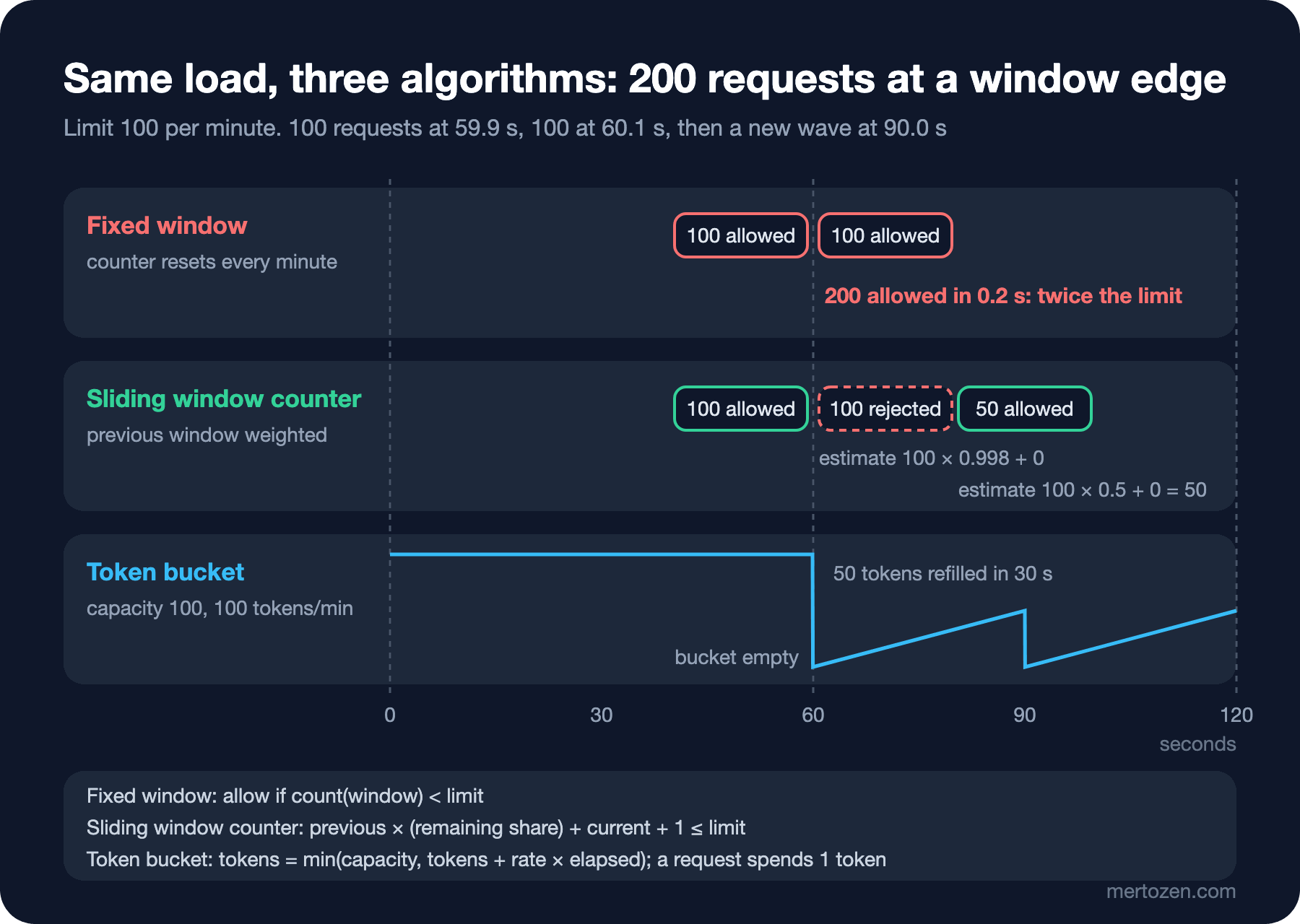
The load in the figure is the answer to the second Guess First question. Fixed window accepts 200 requests in 0.2 seconds, twice the limit at the window edge. At second 60.1 the sliding window counter still counts the previous window at almost full weight (0.998), so it rejects the second wave; at second 90 the previous window's weight has dropped to 0.5, which makes room for 50 requests. For the same limit the token bucket behaves similarly: the full bucket covers 100 requests, then refills at 100 tokens per minute.
.NET ships four of these: System.Threading.RateLimiting has TokenBucketRateLimiter, FixedWindowRateLimiter, SlidingWindowRateLimiter and ConcurrencyLimiter, which limits the number of concurrent requests. The ASP.NET Core Web API series post "What's New in ASP.NET Core with .NET 7: MapGroup, TypedResults, Rate Limiting and Output Caching" showed how to wire them up as middleware. One detail: .NET's sliding window isn't Cloudflare's weighted estimate; it splits the window into SegmentsPerWindow segments and gives back the requests of the segment that expires. The more segments, the closer it gets to a sliding log.
Three Instances, Three Times the Limit
The answer to the first Guess First question is spelled out on Microsoft Learn's rate limiting page: the middleware keeps its counters in each instance's own memory, and in a multi-instance app the effective limit is the configured limit times the instance count. That also applies to GlobalLimiter: "global" covers all requests to that instance, not to the whole app. I tried the same setup with three separate limiters, imitating the load balancer's round robin distribution:
// Three API instances, each with its own in-memory limiter: 100 requests/minute
FixedWindowRateLimiter[] local = [.. Enumerable.Range(0, 3).Select(_ => new FixedWindowRateLimiter(
    new FixedWindowRateLimiterOptions { PermitLimit = 100, Window = TimeSpan.FromMinutes(1), QueueLimit = 0 }))];
int localAccepted = 0;
for (int i = 0; i < 600; i++)
{
    using RateLimitLease lease = local[i % 3].AttemptAcquire();
    if (lease.IsAcquired) localAccepted++;
}
Console.WriteLine($"in-memory, 3 instances : {localAccepted} of 600 accepted");
in-memory, 3 instances : 300 of 600 acceptedThe client that agreed to 100 per minute got 300 requests through. With autoscaling it gets stranger: as instance count grows, so does the limit, so protection loosens as load rises. Pinning each client to one instance with sticky sessions looks like it fixes the count, but it brings all the costs we discussed in this series' "Load Balancing: L4 vs L7, Algorithms, Health Checks and Sticky Sessions" post (L4 and L7 being layers 4 and 7 of the network model: transport and application), and the counter resets when the instance restarts. If you want a single limit, the counter has to live in a single place: either in the gateway all traffic passes through, or in a store the instances share.
A Shared Store: Redis and an Atomic Script
Redis is almost the default choice for that shared store: it runs in memory, answers in under a millisecond, and has TTLs and atomic commands. Atomicity isn't decoration here. If reading the counter and incrementing it when it's below the limit are two separate commands, two concurrent requests read the same value and both pass. I tried that naive version first: three instances, the same Redis, 600 parallel requests, each doing GET and then INCR.
// Non-atomic GET then INCR: other requests slip in between read and write
long count = (long?)await d.StringGetAsync("naive:{user:ada}") ?? 0;
if (count < 100)
{
    await d.StringIncrementAsync("naive:{user:ada}");
    Interlocked.Increment(ref naive);
}
redis GET+INCR (naive) : 415 of 600 accepted (parallel)Limit 100, accepted 415; on the second run, 432. The number changes on every run because this is a race condition. The fix is to read, decide and write in a single Lua script: Redis runs nothing else while a script is executing. A limiter that keeps the sliding window counter in a single hash key:
public sealed record RateLimitDecision(bool Allowed, int Remaining, TimeSpan RetryAfter);

public sealed class RedisSlidingWindowLimiter(IDatabase db, int limit, TimeSpan window)
{
    // Single hash key per partition: start, cur, prev. Atomic because Redis runs the whole script at once.
    private const string Script = """
        local limit  = tonumber(ARGV[1])
        local window = tonumber(ARGV[2])
        local now    = tonumber(ARGV[3])
        if now < 0 then
          local t = redis.call('TIME')
          now = tonumber(t[1]) * 1000 + math.floor(tonumber(t[2]) / 1000)
        end
        local start = now - (now % window)
        local s = redis.call('HMGET', KEYS[1], 'start', 'cur', 'prev')
        local oldStart = tonumber(s[1]) or start
        local cur  = tonumber(s[2]) or 0
        local prev = tonumber(s[3]) or 0
        if start == oldStart + window then
          prev = cur; cur = 0
        elseif start ~= oldStart then
          prev = 0; cur = 0
        end
        local elapsed  = now - start
        local estimate = prev * (window - elapsed) / window + cur
        if estimate + 1 > limit then
          local wait
          if cur + 1 <= limit and prev > 0 then
            wait = window - elapsed - (limit - cur - 1) * window / prev
          else
            wait = (window - elapsed) + window * (1 - (limit - 1) / math.max(cur, 1))
          end
          redis.call('HSET', KEYS[1], 'start', start, 'cur', cur, 'prev', prev)
          redis.call('PEXPIRE', KEYS[1], window * 2)
          return {0, 0, math.max(1, math.ceil(wait))}
        end
        cur = cur + 1
        redis.call('HSET', KEYS[1], 'start', start, 'cur', cur, 'prev', prev)
        redis.call('PEXPIRE', KEYS[1], window * 2)
        return {1, math.floor(limit - estimate - 1), 0}
        """;

    // nowMs < 0: use the Redis server clock (production). A fixed value only makes the demo deterministic.
    public async Task<RateLimitDecision> TryAcquireAsync(string partitionKey, long nowMs = -1)
    {
        RedisResult result = await db.ScriptEvaluateAsync(Script,
            [new RedisKey($"rl:{{{partitionKey}}}")],
            [limit, (long)window.TotalMilliseconds, nowMs]);
        RedisResult[] r = (RedisResult[])result!;
        return new RateLimitDecision((int)r[0] == 1, (int)r[1], TimeSpan.FromMilliseconds((long)r[2]));
    }
}
There are three design decisions in it. Time comes from Redis's TIME command, because clock drift between the three instances changes which window a counter lands in; one clock, the store's. The counters live in a single hash key whose name uses braces (rl:{user:ada}): Redis's documentation asks that every key a script touches be passed through KEYS, and in Redis Cluster the part inside the braces (the hash tag) decides which slot the key lands in. And the key deletes itself after two windows (PEXPIRE), so a client that never comes back leaves no garbage in Redis.
I ran the same three instances again, this time with their own Redis connections and in parallel, then the window edge scenario with time passed as a parameter:
RedisSlidingWindowLimiter[] shared = [.. muxes.Select(m =>
    new RedisSlidingWindowLimiter(m.GetDatabase(), 100, TimeSpan.FromMinutes(1)))];
RateLimitDecision[] decisions = await Task.WhenAll(Enumerable.Range(0, 600)
    .Select(i => shared[i % 3].TryAcquireAsync("user:ada")));
Console.WriteLine($"redis, 3 instances     : {decisions.Count(d => d.Allowed)} of 600 accepted (parallel)");
in-memory, 3 instances : 300 of 600 accepted
redis, 3 instances : 100 of 600 accepted (parallel)
redis GET+INCR (naive) : 415 of 600 accepted (parallel)
boundary burst, fixed : 200 of 200 accepted within 0.2 s
boundary burst, sliding: 100 of 200 accepted, first Retry-After 500 ms
at 90.0 s, sliding : 50 more accepted (previous window weighted 0.5)With a shared, atomic counter the three instances let exactly 100 requests through. At the window edge the INCR-based fixed window allowed 200 while the sliding window counter stopped at 100 and told the first rejected request to try again in 500 ms: by then the previous window's weight has dropped enough to open one slot.
Let's write down the cost too. Every request now makes a round trip to Redis; within the same data center that's usually under a millisecond, but the limiter is now a dependency on the critical path. Decide in advance what happens when Redis is unreachable. Fail open (let the request through) is right for most APIs, because the rate limiter going down shouldn't turn into the whole API going down; where abuse is expensive, like login or an endpoint that sends an SMS (Short Message Service), fail closed (reject) or a local fallback limiter is safer. At very high traffic there's a middle road as well: each instance spends small quotas from a local token bucket and goes to Redis only when its quota runs out. It gives up a little precision and removes most of the round trips.
429, Retry-After and RateLimit Headers
The response to a rejected request is part of the contract. HTTP (Hypertext Transfer Protocol) 429 Too Many Requests was defined by RFC (Request for Comments) 6585; the Retry-After header (RFC 9110) tells the client when to try again, in seconds or as a date. ASP.NET Core's built-in middleware returns 503 for a rejected request by default; switching to 429 with RejectionStatusCode and writing the lease's MetadataName.RetryAfter into the header in OnRejected is up to you. I wired our own limiter in with an endpoint filter:
// Known API keys only: the partition key never comes straight from the request
Dictionary<string, string> apiKeys = new() { ["key-ada-123"] = "client:ada" };

app.MapPost("/orders", () => Results.Accepted())
   .AddEndpointFilter(async (ctx, next) =>
   {
       HttpContext http = ctx.HttpContext;
       if (!apiKeys.TryGetValue(http.Request.Headers["X-Api-Key"].ToString(), out string? client))
           return Results.Unauthorized();

       RateLimitDecision d = await http.RequestServices
           .GetRequiredService<RedisSlidingWindowLimiter>().TryAcquireAsync(client);
       http.Response.Headers["RateLimit-Policy"] = "\"orders\";q=5;w=60";
       http.Response.Headers["RateLimit"] = $"\"orders\";r={d.Remaining}";
       if (d.Allowed)
           return await next(ctx);

       int seconds = (int)Math.Ceiling(d.RetryAfter.TotalSeconds);
       http.Response.Headers.RetryAfter = seconds.ToString();
       return Results.Problem(statusCode: StatusCodes.Status429TooManyRequests,
           title: "Too many requests", detail: $"Retry after {seconds} s.");
   });
The limit is 5 per minute. Six requests, and the full response to the sixth:
$ for i in 1 2 3 4 5 6; do curl -s -o /dev/null -w "%{http_code} " -X POST -H "X-Api-Key: key-ada-123" http://localhost:5391/orders; done
202 202 202 202 202 429

$ curl -si -X POST -H "X-Api-Key: key-ada-123" http://localhost:5391/orders
HTTP/1.1 429 Too Many Requests
Content-Type: application/problem+json
Date: Sun, 08 Nov 2026 00:56:12 GMT
Server: Kestrel
Retry-After: 59
Transfer-Encoding: chunked
RateLimit-Policy: "orders";q=5;w=60
RateLimit: "orders";r=0

{"title":"Too many requests","status":429,"detail":"Retry after 59 s."}
The RateLimit-Policy and RateLimit headers come from a draft by the IETF's (Internet Engineering Task Force) working group on HTTP APIs (httpapi): draft-ietf-httpapi-ratelimit-headers-11, dated May 2026 and still an Internet-Draft, not an RFC. The policy header states the quota (q) and the window (w), RateLimit the remaining quota (r). The draft has changed shape over the years; you'll still see the older RateLimit-Limit, RateLimit-Remaining, RateLimit-Reset trio and the common X-RateLimit-* headers in many APIs. If you use them, state the draft version in your documentation and ask clients to rely primarily on Retry-After; that one is standard.
A good 429 has a client side too. The client should read Retry-After and, without it, wait with exponential backoff and jitter; programming a client to retry a 429 immediately turns the limiter into a load generator. That's the main material of the next post.
Partition Keys and the DoS Risk
Microsoft Learn's page carries an explicit warning: creating partitions from user input makes the app vulnerable to DoS (Denial of Service) attacks. There are two reasons. The first is memory: each distinct key creates a limiter (or a key in Redis); an attacker who puts a random X-Api-Key on every request creates millions of partitions and none of them ever hits its limit. The second is spoofed identity: partitioning by IP address lets an attacker be as many "different clients" as they like when the source address can be forged.
That's why the filter above first matches the API key against a known list and uses the matched client identity as the partition key, not the request itself; an unknown key gets a 401 without ever reaching the limiter. For unauthenticated traffic the right tool is a coarse IP limit plus DDoS protection at the edge; for authenticated traffic, the user or tenant identity.
Common Pitfalls
Mistaking a per-instance counter for a global limit
Even the built-in middleware's GlobalLimiter is per instance. With autoscaling, the limit loosens as load grows.
Reading and writing with separate commands
Under parallel traffic, GET then INCR blows through the limit; 415 instead of 100 above. Decision and increment must be a single atomic step: a Lua script, or a decision based on INCR's return value.
Trusting the instances' clocks
If each instance computes windows with its own clock, the same request can land in two different windows. Take time from the store.
Making Redis a single point of failure
If the API goes down when Redis does, the rate limiter has become a risk instead of a protection. Decide fail open or fail closed per endpoint and put a timeout on the call.
Retrying a 429 immediately as if it were a transient error
Aggressive client retries wear out the limiter itself, not the system behind it. Respect Retry-After.
A Small Experiment
★☆☆ Run RedisSlidingWindowLimiter by hand with the window starting at 0: with 70 requests at second 30, how many requests are allowed at second 75? Verify your math by passing nowMs to the script.
★★☆ Write a Redis-based token bucket with the same interface: keep tokens and ts in the hash and add tokens for the elapsed time on each request. In the window edge scenario, is the result the same as the sliding window counter's?
★★★ Design a local fallback limiter that kicks in when Redis is unreachable: how do you pick the local limit when you don't know the instance count? Would you choose fail open or fail closed for the login endpoint, and for the catalog endpoint?
Rate limiting defends against a client that asks for too much. But what if the problem isn't the client but a dependency we call, and the payment service slows down or stops answering? In the next post we look at reliability patterns: timeouts, retries, backoff and jitter, circuit breakers and load shedding.