

Users, Groups and Connection Lifecycle in SignalR: Sending Messages from Anywhere with IHubContext
Clients.User reaches all of a user's tabs, while group membership belongs to the connection and is lost on reconnect. IUserIdProvider, Caller/Others/OthersInGroup, the unexpected ordering of OnConnectedAsync and OnDisconnectedAsync, counter-based presence in Redis, and sending notifications from an endpoint, a BackgroundService and a consumer with IHubContext.
Version note: The code in this post was built and run with .NET 10, Redis 8.2 and StackExchange.Redis 3.4.31.
Guess First
Ada keeps Bookstore open on both her laptop and her phone; two separate SignalR connections. The tab on the laptop has joined the group for order 42. The server sends a message with Clients.User("ada"): how many connections does it reach? Then the laptop's Wi-Fi drops for a moment and SignalR reconnects. When the server sends a note with Clients.Group("order-42"), does the laptop receive it?
The answer to the second question is the cause of the bug most often reported in production as "notifications sometimes don't arrive". In this post we look at who a message goes to, when a connection is born and dies, and how to send messages from anywhere on the server, using a real multi-client test.
Who Is the User? IUserIdProvider
SignalR has three kinds of address: the connection (connection id), the user (user id) and the group. A connection id is generated anew for every connection; a user id comes from authentication. We leave the details of authentication (JWT (JSON Web Token), the access_token query string) to the next post and use a handler, specific to this post, that fakes identity: it builds claims from the ?user=ada&role=warehouse query parameters. Never use anything like this in production; the point is to show how identity flows into SignalR.
Claim[] claims =
[
    new(ClaimTypes.NameIdentifier, $"u-{user}"),
    new("customer_id", user),
    new(ClaimTypes.Role, Request.Query["role"].ToString() is { Length: > 0 } role ? role : "customer")
];
By default SignalR takes the user id from the ClaimTypes.NameIdentifier claim, which would be u-ada here. In our system, however, order events carry the customer number and we want to send based on it. IUserIdProvider is the way to change that:
public sealed class CustomerIdUserIdProvider : IUserIdProvider
{
    // the default is the NameIdentifier claim; we address users by customer_id with Clients.User("ada")
    public string? GetUserId(HubConnectionContext connection) =>
        connection.User.FindFirst("customer_id")?.Value;
}

builder.Services.AddSingleton<IUserIdProvider, CustomerIdUserIdProvider>();
This method is called once per connection, while the connection is established, and its result becomes Context.UserIdentifier. Which claim you pick matters: pick a value that can change (such as an email address) and when the user changes their email you cannot find their old connections under the new id. Use a stable, unique id.
Clients.User, Group, Caller and Others
[Authorize]
public sealed class NotificationHub(PresenceTracker presence, ILogger<NotificationHub> logger)
    : Hub<INotificationClient>
{
    public override async Task OnConnectedAsync()
    {
        string userId = Context.UserIdentifier!;
        if (Context.User!.IsInRole("warehouse"))
        {
            await Groups.AddToGroupAsync(Context.ConnectionId, "warehouse");
        }

        int connections = await presence.ConnectedAsync(userId);
        logger.LogInformation("{User} connected ({ConnectionId}), open connections: {Count}",
            userId, Context.ConnectionId, connections);
        if (connections == 1)
        {
            await Clients.Others.UserOnline(userId);
        }

        await base.OnConnectedAsync();
    }

    public override async Task OnDisconnectedAsync(Exception? exception)
    {
        string userId = Context.UserIdentifier!;
        int connections = await presence.DisconnectedAsync(userId);
        logger.LogInformation("{User} disconnected ({ConnectionId}), open connections: {Count}, error: {Error}",
            userId, Context.ConnectionId, connections, exception?.Message ?? "none");
        if (connections == 0)
        {
            await Clients.Others.UserOffline(userId);
        }

        await base.OnDisconnectedAsync(exception);
    }

    public Task WatchOrder(int orderId) =>
        Groups.AddToGroupAsync(Context.ConnectionId, $"order-{orderId}");

    public Task UnwatchOrder(int orderId) =>
        Groups.RemoveFromGroupAsync(Context.ConnectionId, $"order-{orderId}");

    public Task SendNote(int orderId, string text) =>
        Clients.OthersInGroup($"order-{orderId}").OrderNote(orderId, Context.UserIdentifier!, text);
}
The options on Clients: All is everyone, Caller the calling connection, Others everyone except the caller, User(id) all connections of that user, Users(ids) several users, Group(name) all connections in the group, OthersInGroup(name) everyone in the group except the caller, plus AllExcept(connectionIds) and Client(connectionId). There are no lists of groups, users or connections; SignalR does not answer "who is in this group?". If you need such a list, you keep it yourself.
For the test I opened three clients on Node 24: Ada's laptop and phone (?user=ada) and Grace, a warehouse worker (?user=grace&role=warehouse). Ada's laptop and Grace watch order 42. The first part of the output:
grace      <- UserOnline("ada")
presence: {"grace":1,"ada":2}
-- grace sends a note to order 42
ada/laptop <- OrderNote(42, "grace", "Packing now")
-- POST /orders/42/ship?customerId=ada
ada/laptop <- OrderShipped(42, "TRK-42-001")
ada/laptop <- OrderStatusChanged(42, "Shipped")
ada/phone  <- OrderShipped(42, "TRK-42-001")
grace      <- OrderStatusChanged(42, "Shipped")
The answer to the first opening question: Clients.User("ada") reached both connections (OrderShipped arrived on both the laptop and the phone). A user is a person, a connection is a tab or a device. OrderStatusChanged, on the other hand, was sent to the group; the group contains only Ada's laptop and Grace, so the phone did not receive it. Because Grace's note went out with OthersInGroup, Grace did not receive her own note.
A detail: the UserOnline("ada") sent to Grace arrived only once, because we send it when the counter is 1, i.e. on Ada's first connection. Also remember that Clients.Others means "except this connection", not "except this user"; if the laptop connects while Ada's phone is open, the phone gets the "Ada is online" message too.
The Connection Lifecycle: OnConnectedAsync and OnDisconnectedAsync
The server log shows the connection side of the same test:
info: Bookstore.Realtime.NotificationHub[0]
      grace connected (IdXGEg0LC_K0BfbIl2cvSw), open connections: 1
info: Bookstore.Realtime.NotificationHub[0]
      ada connected (gj9G5JBr15L7TrlU4Tea9w), open connections: 1
info: Bookstore.Realtime.NotificationHub[0]
      ada connected (NlMf5lv_Ckje2OrePMoJSg), open connections: 2
info: Bookstore.Realtime.OrderShippedConsumer[0]
      Order 42 shipped, notified ada
info: Bookstore.Realtime.NotificationHub[0]
      ada connected (lQYAclDbQDhyStG8A42zTg), open connections: 2
info: Bookstore.Realtime.NotificationHub[0]
      ada disconnected (gj9G5JBr15L7TrlU4Tea9w), open connections: 1, error: none
info: Bookstore.Realtime.NotificationHub[0]
      ada disconnected (NlMf5lv_Ckje2OrePMoJSg), open connections: 1, error: none
info: Bookstore.Realtime.NotificationHub[0]
      ada disconnected (lQYAclDbQDhyStG8A42zTg), open connections: 0, error: none
Look at the fifth entry. The test script closed the laptop connection with stop() and immediately reopened it with start(). On the server, the new connection's OnConnectedAsync ran before the old connection's OnDisconnectedAsync. stop() completing on the client does not mean the server has finished cleaning up that connection. Had we kept presence as an "online/offline" boolean, the sequence would be: the new connection writes "online", then the old connection writes "offline", and Ada appears offline even though she has an open connection. Because we use a counter, the result is correct: it went up to 2 and back down to 1.
The exception parameter of OnDisconnectedAsync tells you how the connection ended: null if the client closed politely, set if the network dropped or something failed on the server. The second case means "the user may come back"; allowing a few seconds of tolerance instead of saying "offline" immediately prevents green dots blinking on screen.
When a connection closes, SignalR removes it from every group by itself; you do not need to call RemoveFromGroupAsync in OnDisconnectedAsync.
Groups Are Not Persistent
The rest of the test, after the laptop reconnected:
-- ada/laptop reconnects (stop + start)
grace      <- OrderNote(42, "support", "Courier picked it up")
The answer to the second opening question: no. Group membership belongs to the connection, and the connection id changes on reconnect (lQYAc... instead of gj9G5... in the log). The new connection is not a member of any group; only Grace received the support team's note. The client's automatic reconnection (withAutomaticReconnect, which we will see in a later post) also produces a new connection id.
There are two ways to solve this. The first is on the client: rejoin the watched groups with WatchOrder in the onreconnected callback. The second is on the server: keep group memberships per user somewhere persistent and rebuild them in OnConnectedAsync (like warehouse workers automatically joining the warehouse group on every connection). The rule: a group is a temporary subscription tied to a connection; the real source of anything that must persist lives somewhere else.
Presence: Keeping Online Tracking in Redis
public sealed class PresenceTracker(IConnectionMultiplexer redis)
{
    private const string OnlineKey = "bookstore:presence";

    // decrement and delete at zero: both steps in one atomic script
    private const string DecrementScript = """
        local count = redis.call('HINCRBY', KEYS[1], ARGV[1], -1)
        if count <= 0 then redis.call('HDEL', KEYS[1], ARGV[1]) end
        return count
        """;

    public async Task<int> ConnectedAsync(string userId) =>
        (int)await redis.GetDatabase().HashIncrementAsync(OnlineKey, userId);

    public async Task<int> DisconnectedAsync(string userId)
    {
        RedisResult result = await redis.GetDatabase().ScriptEvaluateAsync(DecrementScript, [OnlineKey], [userId]);
        return Math.Max((int)result, 0);
    }

    public async Task<Dictionary<string, int>> GetOnlineAsync() =>
        (await redis.GetDatabase().HashGetAllAsync(OnlineKey))
            .ToDictionary(e => e.Name.ToString(), e => (int)e.Value);
}
Why keep presence in Redis rather than in memory? Because the moment you add a second server, an in-memory dictionary only knows about users connected to that server. A single hash in Redis counts connections across all servers. HINCRBY is atomic; on the decrement side, if "decrement, delete if it reached zero" were two separate commands, a connection arriving in between could leave the counter wrong, so we do it in one atomic step with a Lua script. The last part of the test:
-- ada closes the phone tab, then the laptop
presence: {"grace":1,"ada":1}
grace      <- UserOffline("ada")
When the phone closed, Ada was still online (1 connection); when the laptop closed too, UserOffline went to Grace and Ada's entry was deleted from the hash in Redis.
This design has a known weakness: if the server process crashes, OnDisconnectedAsync never runs and the counters for connections on that server stay in Redis forever. In production it is sturdier to keep counters in separate per-server keys, have every server periodically extend its key's TTL (Time To Live), and let a crashed server's key delete itself when it expires.
Sending Messages from Anywhere on the Server with IHubContext
In a real application most messages do not start in the hub but elsewhere: an HTTP (Hypertext Transfer Protocol) endpoint, a background job, a message queue consumer. They all use the same tool: IHubContext, obtained through DI (Dependency Injection).
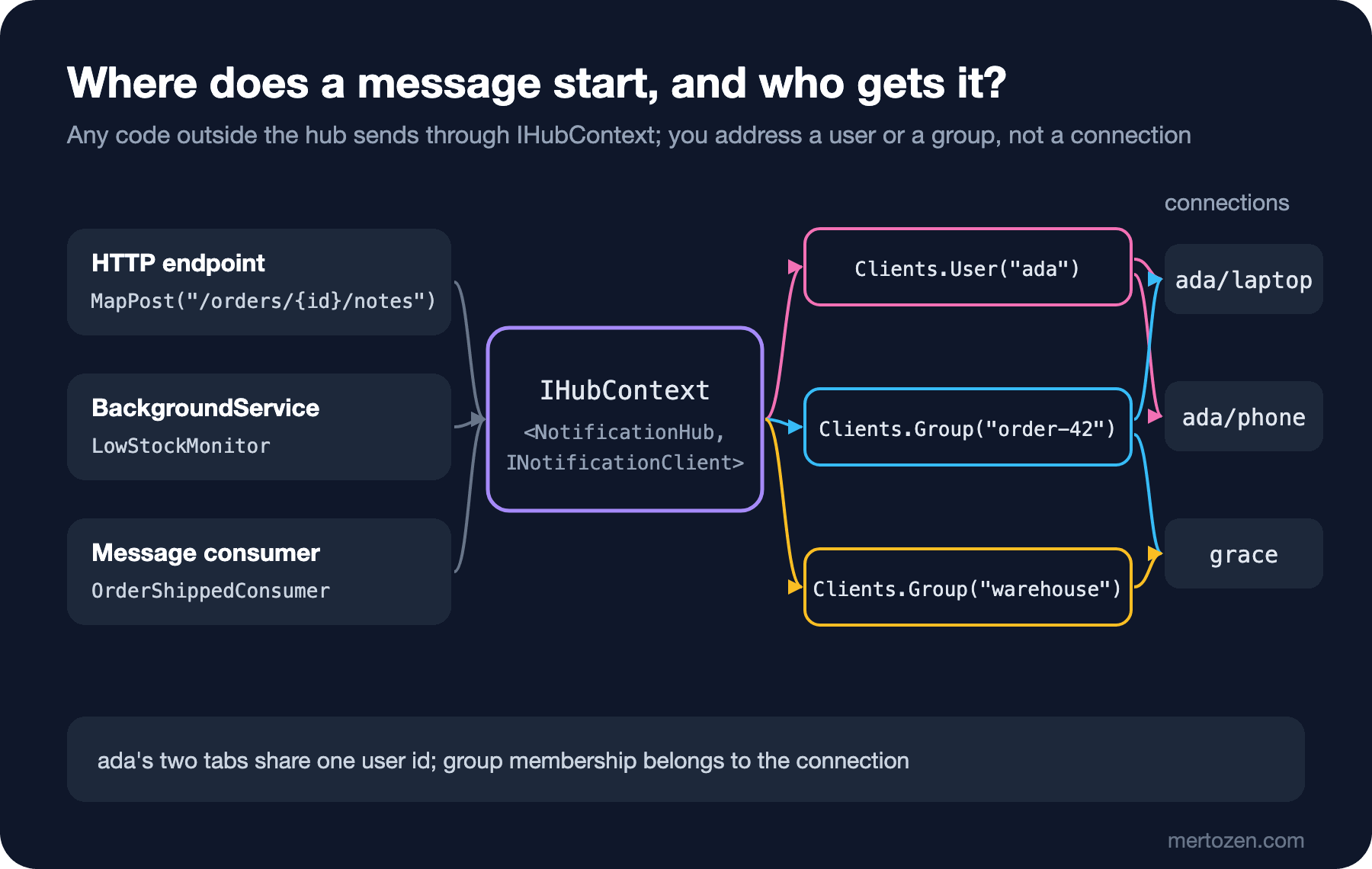
// 1) from an HTTP endpoint: IHubContext directly
app.MapPost("/orders/{id:int}/notes", async (int id, OrderNoteRequest note, IHubContext<NotificationHub, INotificationClient> hub) =>
{
    await hub.Clients.Group($"order-{id}").OrderNote(id, "support", note.Text);
    return TypedResults.Accepted((string?)null);
});

// 2) publish an event and let the consumer notify through IHubContext
app.MapPost("/orders/{id:int}/ship", async (int id, string customerId, Channel<OrderShipped> bus) =>
{
    await bus.Writer.WriteAsync(new OrderShipped(id, customerId, $"TRK-{id}-001"));
    return TypedResults.Accepted((string?)null);
});
public sealed class OrderShippedConsumer(
Channel<OrderShipped> bus,
IHubContext<NotificationHub, INotificationClient> hub,
ILogger<OrderShippedConsumer> logger) : BackgroundService
{
protected override async Task ExecuteAsync(CancellationToken stoppingToken)
{
await foreach (OrderShipped message in bus.Reader.ReadAllAsync(stoppingToken))
{
// to all of the customer's tabs/devices
await hub.Clients.User(message.CustomerId).OrderShipped(message.OrderId, message.TrackingNumber);
// to everyone watching the order (customer support included)
await hub.Clients.Group($"order-{message.OrderId}").OrderStatusChanged(message.OrderId, "Shipped");
logger.LogInformation("Order {OrderId} shipped, notified {Customer}", message.OrderId, message.CustomerId);
}
}
}
public sealed class LowStockMonitor(IHubContext<NotificationHub, INotificationClient> hub) : BackgroundService
{
protected override async Task ExecuteAsync(CancellationToken stoppingToken)
{
int remaining = 5;
using PeriodicTimer timer = new(TimeSpan.FromSeconds(2));
while (await timer.WaitForNextTickAsync(stoppingToken) && remaining > 0)
{
remaining--;
if (remaining < 3)
{
await hub.Clients.Group("warehouse").LowStock("Clean Code", remaining);
}
}
}
}To keep the example self-contained we used a Channel<OrderShipped> instead of a broker; the shape of the consumer is the same with a RabbitMQ or Kafka consumer: receive the message, decide who it goes to, send it with IHubContext. We cover the broker side in the upcoming Working with Message Queues series, and BackgroundService itself in the second post of the Background Jobs series. The stock alert went only to the warehouse group; Ada's connections never saw it:
grace      <- LowStock("Clean Code", 2)
grace      <- LowStock("Clean Code", 1)
grace      <- LowStock("Clean Code", 0)
The difference between IHubContext and the hub: inside the hub there is a Context (who called, which connection); in IHubContext there is not. That is why IHubContext has no Caller or Others; you always give the address explicitly. IHubContext is registered as a singleton and can be injected anywhere.
Production Notes
Sending does not mean "delivered". When Clients.User("ada").OrderShipped(...) is awaited, the message has been written to the send queues of Ada's current connections; if Ada has no connections at all, nothing happens and you get no error either. If an important notification must not be missed while the user is offline, write it to the database, show a notification list on screen, and use SignalR only as a "there is something new" signal.
You make up the group names and SignalR does not validate them. If a client calls WatchOrder(43), it joins the group of someone else's order; making sure a user can only join the group of their own order (resource-based authorization) is the topic of the next post.
On the scale side: Clients.User and Clients.Group look at the in-memory connection list on a single server. When you add a second server and Ada's phone is connected to the other one, it does not get the message. We moved presence to Redis but not sending; the solution for that (the Redis backplane) is in the eighth post of the series.
Common Pitfalls
Storing the connection id as if it were a user id. It changes on every reconnect; Clients.User exists for sending to a user.
Assuming group membership survives a reconnect. The new connection is in no group; rejoin in onreconnected or in OnConnectedAsync.
Keeping presence as a boolean. Multiple tabs and the unexpected order of OnConnectedAsync/OnDisconnectedAsync make a user look offline while connected; use a counter.
Keeping presence in memory. It works on one server and sees half the picture on the second.
Taking Clients.Others to mean "except the user's other devices". It only excludes the calling connection.
Sending a notification that must reach the user only through SignalR. A message to an offline user is silently lost.
A Small Experiment
★☆☆ Remove CustomerIdUserIdProvider and run the test again. Why does Clients.User("ada") no longer reach any connection? Which id would you have to send with to reach them?
★★☆ Keep the order numbers a user watches in a Redis set (bookstore:watch:{userId}) and rejoin the group for every order in that set in OnConnectedAsync. Verify that after the "laptop reconnects" step in the test, the note reaches the laptop too.
★★★ Split presence into per-server keys (bookstore:presence:{serverId}), and have every server extend its own key's TTL to 30 seconds every 10 seconds. Kill the server with kill -9 and verify that users appear offline 30 seconds later.
In the next post we make identity real: authentication with JWT in SignalR, why WebSocket cannot send headers and the access_token query string, policies at hub and method level, letting a user join only their own group, and what happens when the token expires.