

Real-time Options: Polling, Long Polling, Server-Sent Events, WebSocket and SignalR — Which One When?
Use SSE for one-way notifications, WebSocket or SignalR for two-way low latency, and polling for rarely changing data. We build the same order status feature five ways and measure latency, request count and memory per connection; plus a decision table, where WebTransport stands, and why not everything should be real-time.
Version note: The code in this post was built and run with .NET 10 and Microsoft.AspNetCore.SignalR.Client 10.0.14.
Guess First
An order in Bookstore changes status five times in 15 seconds: Received, Packed, Shipped, OutForDelivery, Delivered. Five different clients watch the same order. One asks every 2 seconds (polling), one keeps its question open and waits for the answer (long polling), one keeps a single HTTP (Hypertext Transfer Protocol) response open (SSE, Server-Sent Events), one has opened a WebSocket, and the last one uses SignalR. How many milliseconds late, on average, do you think 2-second polling sees those five changes? How many HTTP requests does long polling send? And most importantly: which one is "the best"?
We will see the answers halfway through the post, from a real measurement. Without spoiling it: the answer to "which is best" does not live in the technique, it lives in what your feature needs.
A Shared Scenario: Order Status
To compare the five techniques fairly, let's wire them all to the same source. A small store that holds the status, a Version that increases on every change, and a TaskCompletionSource so we can say "wait for the next change":
public sealed record OrderStatusChanged(int OrderId, string Status, int Version, DateTimeOffset ChangedAt);

public sealed class OrderStatusStore
{
    private readonly Lock _gate = new();
    private OrderStatusChanged _current = new(42, "Created", 0, DateTimeOffset.UtcNow);
    private TaskCompletionSource<OrderStatusChanged> _next = NewSignal();

    public OrderStatusChanged Current
    {
        get { lock (_gate) { return _current; } }
    }

    public void Publish(string status)
    {
        TaskCompletionSource<OrderStatusChanged> toComplete;
        OrderStatusChanged change;
        lock (_gate)
        {
            change = new OrderStatusChanged(42, status, _current.Version + 1, DateTimeOffset.UtcNow);
            _current = change;
            toComplete = _next;
            _next = NewSignal();
        }
        toComplete.SetResult(change);
    }

    public async Task<OrderStatusChanged?> WaitForChangeAsync(int knownVersion, TimeSpan timeout, CancellationToken cancellationToken)
    {
        Task<OrderStatusChanged> next;
        lock (_gate)
        {
            if (_current.Version > knownVersion)
            {
                return _current;
            }
            next = _next.Task;
        }

        try
        {
            return await next.WaitAsync(timeout, cancellationToken);
        }
        catch (TimeoutException)
        {
            return null;
        }
    }

    private static TaskCompletionSource<OrderStatusChanged> NewSignal() =>
        new(TaskCreationOptions.RunContinuationsAsynchronously);
}
Two details matter. We call SetResult outside the lock and use RunContinuationsAsynchronously; otherwise the continuations of every waiting client start running synchronously on the thread that holds the lock. The second is knownVersion: when a client says "I have seen version 2" and it missed a change in between, we return without waiting. This small version number is the core of both SSE's Last-Event-ID and SignalR's stateful reconnect later on: you cannot make up for a missed message without knowing where the client left off.
A BackgroundService (the building block from the second post of the Background Jobs series) is triggered with POST /orders/42/simulate and moves to the next status every 3 seconds.
Polling: The Simplest One
app.MapGet("/orders/{id:int}/status", (int id, OrderStatusStore store) =>
    TypedResults.Ok(store.Current));
$ curl -s -i http://localhost:17601/orders/42/status
HTTP/1.1 200 OK
Content-Type: application/json; charset=utf-8
Date: Sun, 08 Nov 2026 01:55:18 GMT
Server: Kestrel
Transfer-Encoding: chunked
{"orderId":42,"status":"Delivered","version":5,"changedAt":"2026-11-08T01:55:13.695524+00:00"}Nothing new on the server; it is an ordinary endpoint. The client calls it on a timer. That is also polling's strength: it can be cached, it works with load balancers and proxies without any fuss, and even if the server restarts, the client simply carries on with the next round. There is no such thing as connection state.
The cost cuts both ways. Shorten the interval and the number of wasted requests goes up; if 10,000 users ask every 2 seconds, the server handles 5,000 requests per second and most of them say "nothing changed". Lengthen the interval and latency goes up: a change is noticed half an interval late on average and a full interval late in the worst case. One more detail: with ETag and If-None-Match you can say "return 304 if nothing changed", so the body does not travel, but the request still does.
Long Polling: Holding the Response
app.MapGet("/orders/{id:int}/status/long-poll", async Task<IResult> (
    int id, int version, OrderStatusStore store, CancellationToken cancellationToken) =>
{
    OrderStatusChanged? next = await store.WaitForChangeAsync(version, TimeSpan.FromSeconds(25), cancellationToken);
    return next is null ? TypedResults.NoContent() : TypedResults.Ok(next);
});
The client sends the version it knows. If there is something new, the response returns immediately; otherwise the server holds the request for up to 25 seconds. As soon as a change arrives the response goes out and the client opens a new request right away. If nothing happens:
$ time curl -s -i "http://localhost:17601/orders/42/status/long-poll?version=5"
HTTP/1.1 204 No Content
Date: Sun, 08 Nov 2026 01:55:43 GMT
Server: Kestrel

curl -s -i "http://localhost:17601/orders/42/status/long-poll?version=5"  0.00s user 0.00s system 0% cpu 25.008 total
Why 25 seconds? Because proxies in between cut an idle request after a while: Nginx's proxy_read_timeout defaults to 60 seconds, and so does the idle timeout of the AWS (Amazon Web Services) Application Load Balancer. If you close it before they do, the client gets a deliberate 204 instead of a "504 Gateway Timeout". The CancellationToken parameter matters too: if the client closes the page, the wait is cancelled and the server does not hold it for 25 pointless seconds.
Because long polling is plain HTTP, it works everywhere; even SignalR falls back to it as a last resort when WebSocket and SSE are unavailable. Its weakness is a new request after every message, which means new headers, authentication again, and a short "blind spot" between messages at busy moments.
Server-Sent Events: A One-Way Stream
app.MapGet("/orders/{id:int}/status/stream", (int id, OrderStatusStore store, CancellationToken cancellationToken) =>
    TypedResults.ServerSentEvents(store.WatchAsync(cancellationToken), eventType: "status"));
public async IAsyncEnumerable<OrderStatusChanged> WatchAsync([EnumeratorCancellation] CancellationToken cancellationToken)
{
int version = Current.Version;
while (!cancellationToken.IsCancellationRequested)
{
OrderStatusChanged? change = await WaitForChangeAsync(version, Timeout.InfiniteTimeSpan, cancellationToken);
if (change is null)
{
continue;
}
version = change.Version;
yield return change;
}
}SSE is a never-ending HTTP response with the text/event-stream content type that browsers talk to directly through the EventSource API (Application Programming Interface). Its format is defined in the WHATWG (Web Hypertext Application Technology Working Group) HTML (HyperText Markup Language) standard: event:, data:, id: and retry: lines, with a blank line at the end of each event. We introduced .NET 10's TypedResults.ServerSentEvents in the ".NET 10 What's New" post of the ASP.NET Core Web API series. Here we only look at it from the point of view of choosing; the third post of this series covers resuming with Last-Event-ID and the proxy pitfalls in depth.
My favourite thing about SSE is automatic reconnection in the browser: if the connection drops, EventSource reconnects on its own and sends the last id it saw in a header. Its limit is direction: server to client. If the client wants to say something, it sends a separate HTTP request. For notifications, progress bars, live scores, or an AI (Artificial Intelligence) answer streaming token by token, this is not a gap; those jobs are one-way anyway.
WebSocket: A Two-Way Channel
app.UseWebSockets();

app.Map("/ws/orders/{id:int}", async (int id, HttpContext context, OrderStatusStore store) =>
{
    if (!context.WebSockets.IsWebSocketRequest)
    {
        context.Response.StatusCode = StatusCodes.Status400BadRequest;
        return;
    }

    using WebSocket socket = await context.WebSockets.AcceptWebSocketAsync();
    await foreach (OrderStatusChanged change in store.WatchAsync(context.RequestAborted))
    {
        byte[] payload = JsonSerializer.SerializeToUtf8Bytes(change, JsonSerializerOptions.Web);
        await socket.SendAsync(payload, WebSocketMessageType.Text, endOfMessage: true, context.RequestAborted);
    }
});
WebSocket is a separate protocol defined by RFC (Request for Comments) 6455. The connection starts as an HTTP request (Upgrade: websocket); once the server returns 101 Switching Protocols, both sides can send frames whenever they like over the same TCP (Transmission Control Protocol) connection. Latency is the lowest, there is no header overhead, and binary data travels naturally.
But notice what is missing from the code above: there is no message format (we picked JSON (JavaScript Object Notation), but that is our decision), no reconnection when it drops, no "send to all of this user's tabs", no keep-alive settings, and SendAsync cannot be called from two places at once. You will write all of that yourself. The second post of this series does exactly that, and by the end you see with your own eyes why most teams move to SignalR.
SignalR: A Framework on Top
public sealed class OrderHub : Hub
{
    public Task WatchOrder(int orderId) =>
        Groups.AddToGroupAsync(Context.ConnectionId, $"order-{orderId}");
}

// Program.cs
builder.Services.AddSignalR();
app.MapHub<OrderHub>("/hubs/orders");

// in the simulator, after every change
await hub.Clients.Group("order-42").SendAsync("StatusChanged", store.Current, stoppingToken);
SignalR is not a transport; it is an RPC (Remote Procedure Call) framework that uses WebSocket, SSE and long polling as transports. The client first asks the negotiate endpoint:
$ curl -s -X POST "http://localhost:17601/hubs/orders/negotiate?negotiateVersion=1"
{"negotiateVersion":1,"connectionId":"yX3XQ-1mLl-Td12WNgsucQ","connectionToken":"NrpzGoy0tYkwOJKUJwnCAQ","availableTransports":[{"transport":"WebSockets","transferFormats":["Text","Binary"]},{"transport":"ServerSentEvents","transferFormats":["Text"]},{"transport":"LongPolling","transferFormats":["Text","Binary"]}]}
The server offers all three transports; the client tries WebSocket, SSE and long polling in that order and stays on the first one that works. On top of that come hub methods, groups, sending per user, automatic reconnect, the JSON or MessagePack protocol, and sending messages from anywhere in the application through IHubContext. The cost: the client needs the @microsoft/signalr library (you cannot talk to it with a plain EventSource or WebSocket), multiple servers require sticky sessions or a backplane, and it has its own protocol.
Side by Side: Measurement and a Decision Table
I started the five clients at the same time in one .NET console application, triggered the simulation and waited 18 seconds. For every change I measured the difference between its ChangedAt time on the server and the moment it reached the client (client and server on the same machine, so no clock skew):
Polling (2 s)    HTTP requests:   9  changes: 5  avg delay:     894 ms  worst:   1497 ms
Long polling     HTTP requests:   5  changes: 5  avg delay:       1 ms  worst:      1 ms
SSE              HTTP requests:   1  changes: 5  avg delay:       1 ms  worst:      1 ms
WebSocket        HTTP requests:   1  changes: 5  avg delay:       1 ms  worst:      1 ms
SignalR          HTTP requests:   2  changes: 5  avg delay:       1 ms  worst:      3 ms
The answer to the opening question: 2-second polling saw the changes 894 ms late on average, and 4 of its 9 requests were wasted. Long polling sent 5 requests for 5 changes, and its latency matches the other three "push" techniques. SignalR's 2 requests are negotiate and the WebSocket upgrade. Because we measured on a local machine, the 1 ms figures exclude network latency; on a real network the same round trip is added to all of them and the gap between them stays the same.
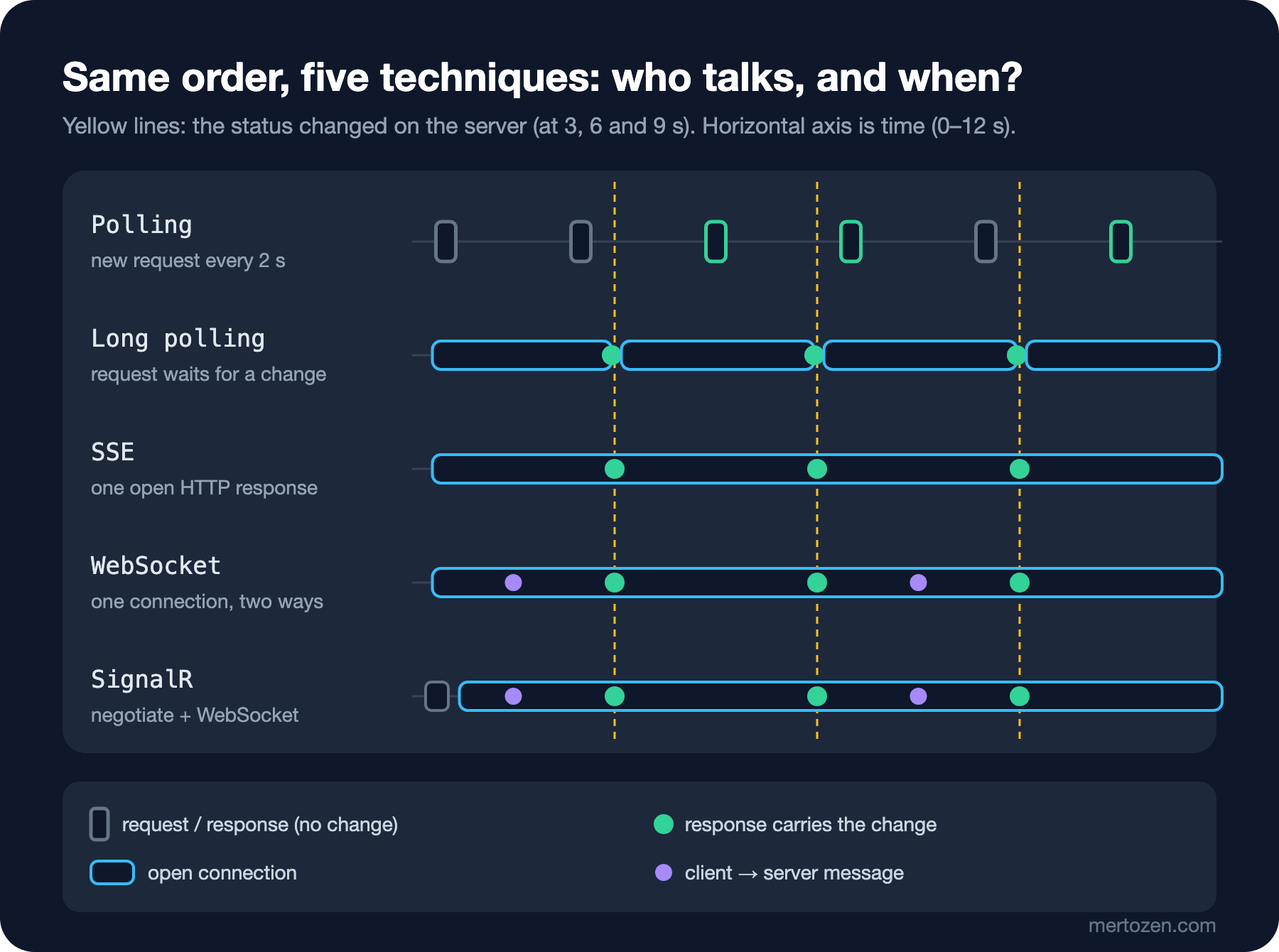
The figure shows the difference: with polling there is a gap between a change and the response that carries it, with long polling every change closes one request and opens another, and in the other three a single connection stays open. The decision table:
| Need | First choice | Why |
|---|---|---|
| Data that changes once a minute, a few seconds of delay is fine | Polling | Stateless, cacheable, does not touch infrastructure at all |
| Server-to-client notifications, progress percentage, AI token stream | SSE | Plain HTTP, automatic reconnect in the browser, resume where it left off |
| Two-way, low latency, binary or a custom protocol | WebSocket | One connection, two directions, very small per-frame overhead |
| Chat, live board, per-user and per-group sending, .NET backend | SignalR | Groups, users, reconnect, transport fallback out of the box |
| Behind a corporate proxy that WebSocket and SSE cannot get through | Long polling | Plain HTTP that works everywhere |
One candidate missing from the table: WebTransport. It is built on HTTP/3 and QUIC (a transport protocol running over UDP, the User Datagram Protocol), and it can send multiple streams and unordered datagrams. According to MDN (MDN Web Docs), the browser API has been Baseline since March 2026. On the Kestrel side it is still a preview: it needs EnablePreviewFeatures and an experimental runtime switch, and SignalR does not use it as a transport. Not for production today, but worth watching.
Production Notes
The shared cost of the push techniques is that the connection is persistent. A classic HTTP request stays on the server for a few milliseconds and leaves; an SSE, WebSocket or SignalR connection stays open until the user closes the tab. I measured it: I started the same server as a Release build and opened first 2,000 raw WebSockets, then, in a separate run, 2,000 SignalR connections, and looked at the physical memory of the server process (ps -o rss):
ws before= 98144 after=128512
signalr before= 98304 after=160272
The values are in KB. 2,000 idle WebSockets added about 30 MB, and the same number of SignalR connections added about 62 MB; roughly 15 and 31 KB per connection. SignalR's extra comes from the connection context, pipe buffers and hub protocol state it keeps for every connection. These numbers move with the GC (garbage collector) state at the moment, so they are not an exact cost; but as an order of magnitude you can think "100,000 concurrent users means a few GB of memory and 100,000 open sockets". On top of that come the operating system's file descriptor limits and the load balancer's connection limits.
The practical rule that follows: making everything real-time is a bad idea. For screens the user refreshes themselves, such as the order list page, reports or the catalog, opening a persistent connection brings memory, sockets, load balancer configuration and monitoring overhead without giving the user anything. Save real-time for places where the answer to "does the user lose something if they don't see this change within a second?" is yes: the payment result, shipping status, chat, an item going out of stock.
Then there is scale: once there is more than one server, every push technique runs into the question "which server is this user connected to?". Polling never asks it. We tackle that in the eighth post of the series with the Redis backplane and Azure SignalR Service.
Common Pitfalls
Making SignalR the default choice. Setting up a hub, a client library, sticky sessions and a backplane for a one-way progress percentage is heavier than necessary. SSE is enough for most notification scenarios and has zero dependencies in the browser.
Not putting a timeout on long polling. If the server holds the request indefinitely, a proxy in between silently cuts it, and the client hangs on a request that never receives a change. Set a duration on the server that is shorter than the proxy's idle timeout.
Polling without a version number. If the client only asks "what is the latest status?", it never sees the middle change when two changes happen between polls. In our measurement polling caught Packed and Shipped in different rounds, but with a slightly longer interval it would have missed one. If the intermediate steps matter, the client must be able to say "give me everything after this version".
Assuming WebSocket is protected by CORS (Cross-Origin Resource Sharing). The browser does not send a preflight for a WebSocket request; you must check the Origin header on the server yourself. Details in the second post of the series.
Treating real-time as the source of data. A push channel is a notification path; it can drop and messages can be missed. When the client connects or reconnects, it should always fetch the current state with an ordinary HTTP request, and push messages should be changes on top of that.
A Small Experiment
★☆☆ Lower the polling interval from 2 seconds to 500 ms and repeat the measurement. How did the average delay and the request count change? Calculate the requests per second for 10,000 users.
★★☆ Add a ?timeout=5 parameter to the long polling endpoint instead of the fixed wait and request a version with no changes. Verify with a log line that you get a 204 after 5 seconds, and that the server-side CancellationToken fires when the client closes the connection early.
★★★ Change the simulator to advance every 300 ms instead of 3 seconds. Which techniques saw all five changes? How would you make up for the intermediate states polling missed by using the version number?
In the next post we start with the lowest-level tool in the table, raw WebSocket: UseWebSockets, the receive loop, fragmented messages, the close handshake, a connection registry, and connecting from Angular with RxJS webSocket().