

Product Structured Data: Product Snippet or Merchant Listing? Product, Offer and Book for a Book Page
If the product can be bought on the page, merchant listing rules apply: an Offer is required and the price must be above zero; if not, it's a product snippet. On Bookstore's book page we co-type Product with Book, produce price and stock from the same object as the visible page, mark up the sale price and its end, and pin it all down with xUnit tests.
Version note: This post is based on Google Search Central's Product, Merchant listing, Product snippet and Product variant documentation as of 15 November 2026 and on schema.org 30.1; the code was built and run with .NET 10 (SDK 10.0.404), xUnit v3 4.0, AngleSharp 1.10 and Microsoft.Extensions.TimeProvider.Testing 11.0.
Guess First
Bookstore, the online bookstore used as the shared example across this site's series, sells the paperback edition of Dune for 450 TL, and this week a campaign brought it down to 360 TL. The book page's JSON-LD writes the catalog price, 450; the page shows 360. The hardcover edition is sold out, but the same markup code marks it InStock too. Someone on the team says "price and stock go to Google through a feed anyway, the number in the markup doesn't matter". Question: what kind of page is this in Google's eyes, and what do these two mistakes cost?
This is the first post in which the series moves to the store side. First we separate the two experiences Google defines for product pages, then we build the markup of Bookstore's book page so that price and stock come from the same source as the visible page, and pin it down with tests.
Two Experiences: Product Snippet and Merchant Listing
Google's Product documentation splits product markup into two classes and asks you to decide which rules to follow by looking at what the page is. Product snippets are for pages where visitors can't buy the product directly: an editorial review or a comparison. Merchant listings are for pages where they can buy it from you; they can carry more detailed product information such as shipping, returns and variants.
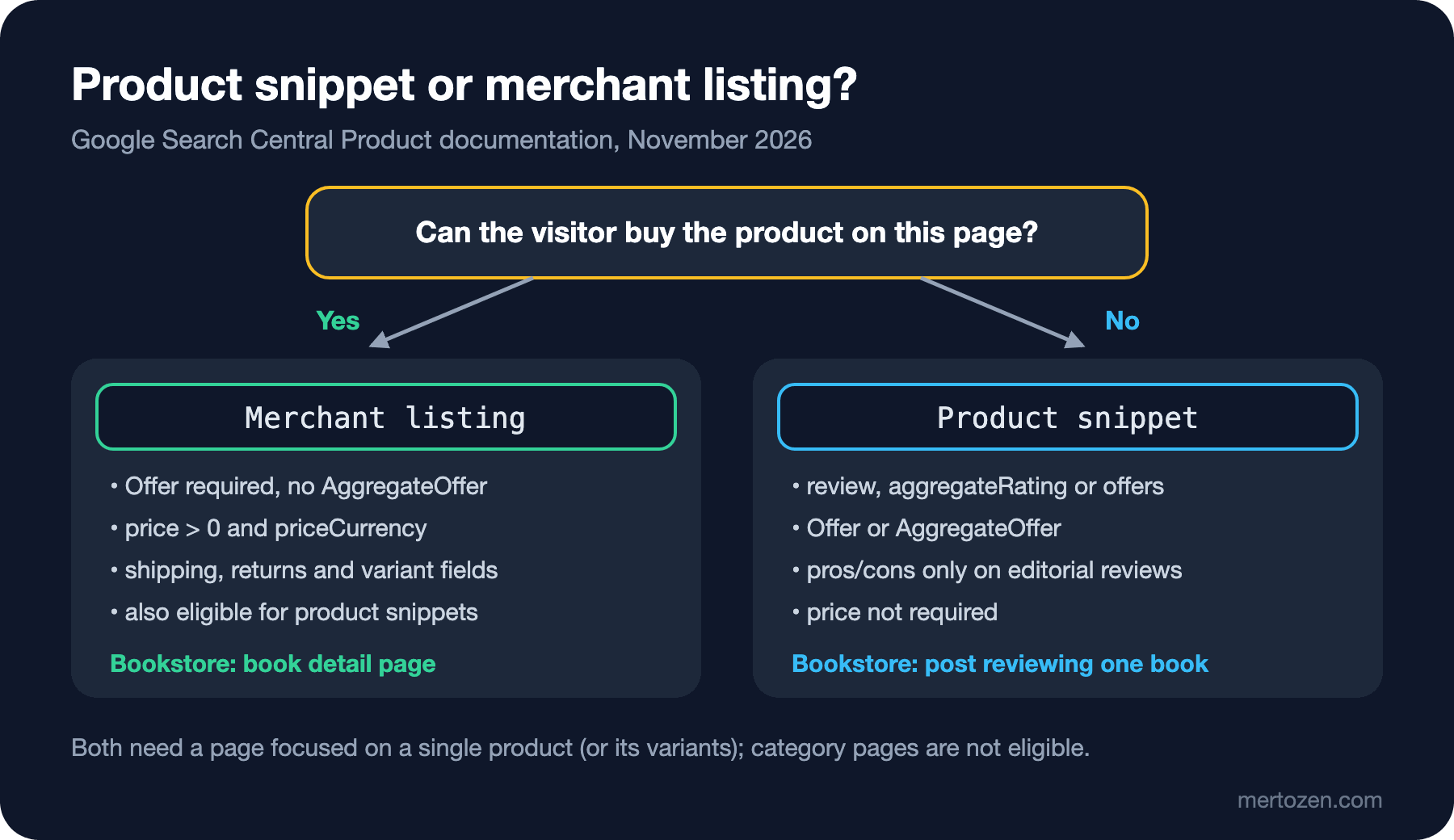
The required fields differ. A product snippet needs name and one of review, aggregateRating or offers; both Offer and AggregateOffer are accepted as the offer. A merchant listing needs an Offer, because you have to be the seller: the price must be greater than zero, the currency must be given as a three-letter code, and image is required too. According to Google, adding the required merchant listing properties generally makes the page eligible for product snippets as well. The reverse doesn't hold: a page that links to other sites can't be eligible for merchant listings.
Both share one boundary: the page must focus on a single product or on variants of the same product. A category page such as "science fiction books" is not a specific product. For Bookstore the meaning is simple: the book detail page belongs to merchant listings, and a blog post reviewing a single book belongs to product snippets.
This section is based on the official documentation.
The Book Page: Product and Book Together
A book is both a product for sale and a publication. In schema.org, properties such as isbn, bookFormat and numberOfPages live on the Book type, while offers is on the Product side. Google's merchant listing documentation resolves this explicitly: isbn is valid only on Book, ISBN-13 gives the best results, and Book should be co-typed with Product. That way the properties of both types can be used on the same node. The EN version of Bookstore's Dune page produces this node; on the TR page only name, description and url switch to the Turkish version:
{
  "@type": [
    "Product",
    "Book"
  ],
  "@id": "https://bookstore.example/books/dune-paperback#product",
  "name": "Dune (Paperback)",
  "description": "The English paperback edition of the science fiction classic set on the desert planet Arrakis.",
  "image": [
    "https://bookstore.example/images/books/dune-paperback-1x1.jpg",
    "https://bookstore.example/images/books/dune-paperback-4x3.jpg",
    "https://bookstore.example/images/books/dune-paperback-16x9.jpg"
  ],
  "isbn": "9780000000019",
  "sku": "9780000000019",
  "author": {
    "@type": "Person",
    "name": "Frank Herbert"
  },
  "bookFormat": "https://schema.org/Paperback",
  "numberOfPages": 704,
  "inLanguage": "en",
  "offers": {
    "@type": "Offer",
    "url": "https://bookstore.example/en/books/dune-paperback",
    "price": 360.00,
    "priceCurrency": "TRY",
    "availability": "https://schema.org/InStock",
    "itemCondition": "https://schema.org/NewCondition",
    "seller": {
      "@id": "https://bookstore.example/#organization"
    },
    "priceSpecification": {
      "@type": "UnitPriceSpecification",
      "priceType": "https://schema.org/StrikethroughPrice",
      "price": 450.00,
      "priceCurrency": "TRY"
    },
    "validFrom": "2026-11-10T00:00:00+03:00",
    "validThrough": "2026-11-30T23:59:59+03:00"
  }
}
Note a few details. @type is an array; the "most specific type" rule from the second post is resolved with a multiple type here because two types are needed at once. The ISBN is also used as the sku, because Bookstore keeps the stock record of each edition by ISBN; Google wants sku to contain no whitespace and to be a single value. price is a number, not a string, and its decimal separator is a dot; the currency is the code for the Turkish lira, TRY. seller links to the Organization node from the third post of the series with @id. The images come in the three aspect ratios Google recommends (1x1, 4x3, 16x9).
The Price Must Come from One Place
The mistake in the opening was that the markup read the price from the catalog while the page read it from the campaign calculation. Google's general guidelines require the markup to be a true representation of the page content, and the merchant listing documentation says Google may try to verify product data before showing it. Code that calculates twice will eventually produce two different numbers. The fix is to calculate the price once and hand the same object to both the page and the markup:
using System.Globalization;

namespace Bookstore.Web.Catalog;

// The single price object that both the visible page and the JSON-LD read
public sealed record PriceQuote(
    decimal Price,
    decimal? StrikethroughPrice,
    DateTimeOffset? SaleStartsAt,
    DateTimeOffset? SaleEndsAt,
    string Currency = "TRY");

public sealed class PricingService(BookCatalog catalog, TimeProvider time)
{
    public PriceQuote Quote(BookEdition book)
    {
        DateTimeOffset now = time.GetUtcNow();
        Campaign? campaign = catalog.Campaigns.FirstOrDefault(c =>
            c.Isbn == book.Isbn && c.StartsAt <= now && now <= c.EndsAt);

        return campaign is null
            ? new PriceQuote(book.ListPrice, null, null, null)
            : new PriceQuote(campaign.Price, book.ListPrice, campaign.StartsAt, campaign.EndsAt);
    }

    public static string Format(decimal amount, string lang) => lang == "en"
        ? $"TRY {amount.ToString("N2", CultureInfo.GetCultureInfo("en-US"))}"
        : $"{amount.ToString("N2", CultureInfo.GetCultureInfo("tr-TR"))} TL";
}
PriceQuote carries everything the page needs to know about the price: the current price, the struck-through old price if there is one, and the campaign window. The clock is read from TimeProvider, so in a test we can move time forward and try the moment the campaign ends. The page model calculates a single PriceQuote and gives the same value to both:
public IActionResult OnGet(string slug)
{
    BookEdition? book = catalog.FindBySlug(slug);
    if (book is null)
    {
        return NotFound();
    }

    Book = book;
    Quote = pricing.Quote(book);   // one quote for the page and the markup
    Lang = Request.Path.StartsWithSegments("/en") ? "en" : "tr";

    ViewData["Lang"] = Lang;
    ViewData["Title"] = $"{book.Title} ({BookTexts.FormatName(book.Format, Lang)})";
    ViewData["JsonLd"] = new SiteGraph("https://bookstore.example").Book(book, Quote, Lang);
    return Page();
}
The visible price goes through the same Format method:
<p class="price">
    <span class="price-now">@PricingService.Format(quote.Price, lang)</span>
    @if (quote.StrikethroughPrice is { } regular)
    {
        <s class="price-was">@PricingService.Format(regular, lang)</s>
        <span class="sale-ends">@BookTexts.SaleEnds(lang): <time datetime="@quote.SaleEndsAt!.Value.ToString("O")">@quote.SaleEndsAt.Value.ToString("yyyy-MM-dd HH:mm")</time></span>
    }
</p>
Format only produces the text written on screen: 360,00 TL in TR, TRY 360.00 in EN. The price in the markup is serialized as a decimal, and System.Text.Json writes 360.00 regardless of culture. Code that puts the price into JSON by string concatenation easily produces "360,00" on a server running in a Turkish culture; Google's review and price documentation asks for a dot as the decimal separator.
The Code That Builds the Markup
We added a method for the book page to SiteGraph. The nodes are typed records as in the earlier posts; what's new is the two-typed BookProductNode and the Offer:
public sealed record BookProductNode(
    [property: JsonPropertyName("@id"), JsonPropertyOrder(-1)] string Id,
    [property: JsonPropertyName("name")] string Name,
    [property: JsonPropertyName("description")] string Description,
    [property: JsonPropertyName("image")] IReadOnlyList<string> Image,
    [property: JsonPropertyName("isbn")] string Isbn,
    [property: JsonPropertyName("sku")] string Sku,
    [property: JsonPropertyName("author")] NamedNode Author,
    [property: JsonPropertyName("bookFormat")] string BookFormat,
    [property: JsonPropertyName("numberOfPages")] int NumberOfPages,
    [property: JsonPropertyName("inLanguage")] string InLanguage,
    [property: JsonPropertyName("offers")] OfferNode Offers)
{
    [JsonPropertyName("@type"), JsonPropertyOrder(-2)]
    public IReadOnlyList<string> Type => ["Product", "Book"];
}
public JsonLdDocument Book(BookEdition book, PriceQuote quote, string lang)
{
string url = PageUrl(lang, $"/books/{book.Slug}");
var offer = new OfferNode(
Url: url,
Price: quote.Price,
PriceCurrency: quote.Currency,
Availability: book.StockQuantity > 0 ? "https://schema.org/InStock" : "https://schema.org/OutOfStock",
ItemCondition: "https://schema.org/NewCondition",
Seller: new IdRef(OrganizationId),
// a sale exists only while a campaign runs: old price + sale window
PriceSpecification: quote.StrikethroughPrice is { } regular
? new UnitPriceSpecificationNode("https://schema.org/StrikethroughPrice", regular, quote.Currency)
: null,
ValidFrom: quote.SaleStartsAt,
ValidThrough: quote.SaleEndsAt);
var product = new BookProductNode(
Id: ProductId(book),
Name: $"{book.Title} ({BookTexts.FormatName(book.Format, lang)})",
Description: book.Description.Get(lang),
Image: [.. book.ImagePaths.Select(path => $"{baseUrl}{path}")],
Isbn: book.Isbn,
Sku: book.Isbn,
Author: new NamedNode("Person", book.AuthorName),
BookFormat: $"https://schema.org/{book.Format}",
NumberOfPages: book.NumberOfPages,
InLanguage: book.InLanguage,
Offers: offer);
var breadcrumb = new BreadcrumbListNode($"{url}#breadcrumb",
[
new(1, BookTexts.Books(lang), PageUrl(lang, "/books")),
new(2, BookTexts.CategoryName(book.Category, lang), PageUrl(lang, $"/books/category/{book.Category}")),
new(3, product.Name, null),
]);
return new([product, breadcrumb, Organization(), WebSite()]);
}availability is derived directly from the stock quantity; the hardcover edition has zero stock, so its offer looks like this:
{
  "@type": "Offer",
  "url": "https://bookstore.example/books/dune-hardcover",
  "price": 890.00,
  "priceCurrency": "TRY",
  "availability": "https://schema.org/OutOfStock",
  "itemCondition": "https://schema.org/NewCondition",
  "seller": {
    "@id": "https://bookstore.example/#organization"
  }
}
The "Add to cart" button doesn't appear for an edition that is out of stock either. Google defines ten values for availability (BackOrder, PreOrder, SoldOut…) and accepts only one per offer. Bookstore's stock model knows two states for now; when pre-orders are added, PreOrder will be produced in the same place. The @id is language-independent (/books/dune-paperback#product) while url points to the page in the visitor's language; the same approach as the Person node in the third post.
Sale Price and End Date
Google understands a discounted price not through a separate property but through the relation between two prices. The offer's price is the active price; a second UnitPriceSpecification with priceType set to https://schema.org/StrikethroughPrice carries the old price. The active price gets no priceType. For a transition period Google also accepts ListPrice.
For the campaign's duration, Google added a "Sale duration" section to the merchant listing documentation on 7 July 2026. The start is given with validFrom, the end with validThrough or priceValidUntil; it recommends giving both, keeping the start no later than the end, and writing full date-times with a time zone. If the active price is on the Offer, these dates go on the Offer too. Bookstore's campaign ends on 30 November at 23:59 (+03:00), and the markup carries exactly that.
What happens after the end matters more. If priceValidUntil points to a past date, Google writes that the listing may not be displayed. In Bookstore these dates come from PriceQuote, so the moment the campaign ends both the struck-through price and the dates drop out of the markup; unless the page stays in a cache, no stale date is published.
Hardcover and Paperback: Variants or Separate Products?
Dune has two editions, and the first idea is to gather both on one page with Google's product variant markup: a ProductGroup with two Product nodes under hasVariant. Google has supported this structure since February 2024; each variant needs a unique ID such as sku or gtin, and the group needs a productGroupID. But for variesBy, which says what the variants differ by, Google lists only six properties: color, size, suggestedAge, suggestedGender, material and pattern. bookFormat is not on the list.
Bookstore has two options:
- Each edition on its own page with its own
Product+Booknode: the ISBN already identifies the edition, and each page has a single price and stock level; the downside is that switching editions goes through two separate URLs. - One page with a
ProductGroup: valid schema.org and a single page for the visitor, but it can't be expressed with thevariesByvalues Google supports; Google also wants each variant to be preselectable with a distinct URL (a query parameter).
Bookstore picks the first: one edition, one ISBN, one page. Google's Book actions documentation draws the same line: there a "work" is the book itself and an "edition" is the concrete copy with an ISBN.
Book actions itself is not a feature triggered by markup. It lets readers buy or borrow a book from the search result, works with a data feed and, according to Google, is limited to providers with a wide selection of books; to take part you fill out an interest form, which doesn't guarantee participation. It is not the subject of this series.
This section is based on the official documentation.
Pinning It Down with Tests
The JsonLdPage helper from the fifth post always assumed @type was a string; with ["Product", "Book"], GetString() throws an exception. A small change is enough:
public JsonElement Single(string type) => Assert.Single(Nodes, n => HasType(n, type));

// "@type" is a string or, for co-typed nodes such as ["Product", "Book"], an array
public static bool HasType(JsonElement node, string type)
{
    JsonElement value = node.GetProperty("@type");
    return value.ValueKind == JsonValueKind.Array
        ? value.EnumerateArray().Any(t => t.GetString() == type)
        : value.GetString() == type;
}
The tests give WebApplicationFactory a fake clock, so they can fetch the same page while the campaign runs and after it ends:
private static readonly DateTimeOffset DuringSale = new(2026, 11, 15, 12, 0, 0, TimeSpan.FromHours(3));
private static readonly DateTimeOffset AfterSale = new(2026, 12, 1, 0, 0, 0, TimeSpan.FromHours(3));

private HttpClient ClientAt(DateTimeOffset now) =>
    factory.WithWebHostBuilder(builder => builder.ConfigureServices(services =>
        services.AddSingleton<TimeProvider>(new FakeTimeProvider(now)))).CreateClient();

[Theory]
[InlineData("/books/dune-paperback", "tr")]
[InlineData("/en/books/dune-paperback", "en")]
[InlineData("/books/dune-hardcover", "tr")]
public async Task Product_markup_matches_the_visible_page(string path, string lang)
{
    JsonLdPage page = await JsonLdPage.LoadAsync(ClientAt(DuringSale), path);
    JsonElement product = page.Single("Product");
    JsonElement offer = product.GetProperty("offers");

    Assert.True(JsonLdPage.HasType(product, "Book"), "isbn is only valid when Product is co-typed with Book");
    Assert.Equal(page.Document.QuerySelector("h1")!.TextContent, product.GetProperty("name").GetString());

    string isbn = product.GetProperty("isbn").GetString()!;
    Assert.True(Isbn.IsValid13(isbn), $"bad ISBN-13 check digit: {isbn}");
    Assert.Equal(page.Document.QuerySelector(".isbn span")!.TextContent, isbn);

    // merchant listings need an Offer with a price above zero
    decimal price = offer.GetProperty("price").GetDecimal();
    Assert.True(price > 0, "merchant listings require price > 0");
    Assert.Equal("TRY", offer.GetProperty("priceCurrency").GetString());
    Assert.Equal(page.Document.QuerySelector(".price-now")!.TextContent, PricingService.Format(price, lang));

    bool inStock = offer.GetProperty("availability").GetString() == "https://schema.org/InStock";
    Assert.Equal(inStock, page.Document.QuerySelector("form button") is not null);
    Assert.True(page.HasNode(offer.GetProperty("seller").GetProperty("@id").GetString()!), "dangling seller @id");
    Assert.All(product.GetProperty("image").EnumerateArray(), image => Assert.StartsWith("https://", image.GetString()));
}
The first test checks, in every language and for every edition, that the markup is consistent with the visible page: is the name the same as the h1, is the ISBN's check digit right and does it match the page, is the price greater than zero and equal to the text on screen, does the stock state agree with the "Add to cart" button, does seller resolve to a node on the same page. The other two tests try the campaign's on and off states: while it runs the struck-through price must be greater than the active price; once it ends both priceSpecification and validThrough must disappear.
$ dotnet test --project Bookstore.Web.Tests
Test run summary: Passed!
  total: 13
  failed: 0
  succeeded: 9
  skipped: 4
Let's put the opening mistake back: Price: book.ListPrice instead of Price: quote.Price in SiteGraph:
failed Bookstore.Web.Tests.BookProductTests.Product_markup_matches_the_visible_page(path: "/books/dune-paperback", lang: "tr") (63ms)
  Assert.Equal() Failure: Strings differ
             ↓ (pos 0)
  Expected: "360,00 TL"
  Actual:   "450,00 TL"
             ↑ (pos 0)
Test run summary: Failed!
  total: 13
  failed: 3
  succeeded: 6
  skipped: 4
The same change also fails on the EN page (TRY 450.00 instead of TRY 360.00) and in the campaign test. The hardcover row passes because it has no campaign; the bug only shows where the two sources diverge.
Production Notes
Put Product markup in the initial HTML. Google recommends that merchants optimizing for all kinds of shopping results provide the markup in the initial HTML, and writes that JavaScript-generated Product markup can make shopping crawls less frequent and less reliable, which can be a problem for fast-changing data such as price and availability. Bookstore's Razor pages already do this. In the Angular client bookstore-web the same rule applies with SSR: the signal that feeds the price to the template and the one that feeds the JSON-LD service must be the same, and the script must be written once on the server, as in the second post.
Use a separate URL per currency. Google asks for a distinct URL per currency if you sell a product in several currencies. Bookstore's EN page also sells in TL; converting the price to another currency on the EN page would be a separate URL decision.
If you cache the page, keep its lifetime in line with campaign and stock changes. Even when the markup itself is right, a 10-minute output cache publishes the old price and the old validThrough for 10 minutes after the campaign ends.
Merchant Center feeds are not the subject of this series, but know the relation: Google says eligibility is widest when both markup and a feed are provided and that some experiences combine the two. If there is a feed, both must state the same price.
Common Pitfalls
Leaving an out-of-stock product as InStock. Writing the markup with a constant that ignores stock is the most common mistake; visitors see "in stock" in the search result for a product they can't add to the cart.
Putting a price into the markup that isn't on the page. A coupon discount applied in the cart, or a member price, is not written as the active price if the page doesn't show it. Google has a separate structure for member prices (validForMemberTier).
Using AggregateOffer for variants. Google defines AggregateOffer for a product sold by several merchants and states plainly that it must not be used to describe a set of variants; merchant listings accept only Offer anyway.
Writing isbn on a plain Product. In schema.org the only domain of isbn, bookFormat and numberOfPages is Book; without the Book type these properties are in the wrong place.
Thinking Book actions is switched on by markup. Adding a ReadAction to your book page doesn't enable the feature; it needs a feed and Google's approval.
A Small Experiment
★☆☆ Add a third edition with a stock of 3 to BookCatalog and use LimitedAvailability for availability so that the page shows "only 3 left". Which line of the test has to change for the new state?
★★☆ Add the state before a campaign starts to PriceQuote: if the campaign hasn't started yet, no discount should appear on the page or in the markup. Show it with a test whose FakeTimeProvider is set to 9 November.
★★★ Write a second page that marks up both editions of Dune on one page with a ProductGroup, compare the two versions in the Schema Markup Validator and the Rich Results Test as in the fifth post, and note how Google shows the variants without variesBy.
The book page now describes its price and stock honestly; what's missing is what readers think. In the next post we cover book reviews and the average rating: whose reviews count, how the rating is calculated, and where Google's self-serving review rule stops Bookstore.