

Running Work Outside the Request: Choosing Between Fire-and-Forget, BackgroundService, Hangfire and Quartz.NET
Work started with Task.Run inside a controller loses its DbContext when the request scope ends, swallows its exception silently and dies halfway through a deploy; it has to be handed to something the host manages. Five questions drive the choice: can the work be lost on restart, is it scheduled, do you need retries and a dashboard, how many instances run; the answers point to BackgroundService, Hangfire, Quartz.NET or a platform scheduler.
Version note: The code in this post was built and run with .NET 10 and Entity Framework Core (EF Core) 10.0.14 (SQLite provider).
Guess First
In Bookstore, the customer gets an email when an order is confirmed. Because the email service is slow, a developer "sped up" the endpoint: the work is pushed to the background with Task.Run and the endpoint returns 202 Accepted right away. The code compiles, and in testing the email even seems to go out. In production, some customers never get an email and the logs contain not a single error line.
What happens when you send a request to the endpoint below? Does the email go out, and if it doesn't, does anything land in the log? Also think about this: if the app is deployed to a new version in the meantime, what happens to the email that is on its way?
app.MapPost("/v1/orders/{id:int}/confirm", (int id, BookstoreDbContext db, IEmailSender email) =>
{
    _ = Task.Run(async () =>
    {
        await Task.Delay(200);
        Order order = await db.Orders.SingleAsync(o => o.Id == id);
        await email.SendAsync(order.CustomerEmail, $"Order #{order.Id} confirmed");
    });
    return Results.Accepted();
});
Why Does Task.Run in a Controller Get Lost?
The BookstoreDbContext in the endpoint's parameters belongs to the request scope. ASP.NET Core opens a DI (Dependency Injection) scope for every request and disposes the scope, along with its scoped services, once the response is written. The lambda inside Task.Run runs 200 ms later; by then the request is long over and the DbContext has been disposed. This is the background side of the lifetime rule from the ASP.NET Core Web API (Application Programming Interface) series post "Dependency Injection in ASP.NET Core: Lifetimes and the Captive Dependency Trap": handing a scoped object to code that outlives its scope.
The second part is the sneaky one. Nobody waits on the Task returned by _ = Task.Run(...). An exception thrown inside stays inside the Task; since nobody awaits it, it is logged nowhere. Here is the log of the request I sent to the /v1 endpoint in a real run:
04:56:29.660 info: Microsoft.AspNetCore.Hosting.Diagnostics[1] Request starting HTTP/1.1 POST http://127.0.0.1:17111/v1/orders/42/confirm - - -
04:56:29.697 info: Microsoft.AspNetCore.Http.Result.AcceptedResult[1] Setting HTTP status code 202.
04:56:29.700 info: Microsoft.AspNetCore.Hosting.Diagnostics[2] Request finished HTTP/1.1 POST http://127.0.0.1:17111/v1/orders/42/confirm - 202 0 - 39.9260ms
It returned 202 and that was it. No email and no error. The /v2 endpoint, which wraps the same code in a try/catch and logs the exception, shows what happens behind the scenes:
04:56:30.734 info: Microsoft.AspNetCore.Hosting.Diagnostics[2] Request finished HTTP/1.1 POST http://127.0.0.1:17111/v2/orders/42/confirm - 202 0 - 3.4767ms
04:56:30.946 fail: Program[0] Confirmation email for order 42 failed System.ObjectDisposedException: Cannot access a disposed context instance. A common cause of this error is disposing a context instance that was resolved from dependency injection and then later trying to use the same context instance elsewhere in your application. [...] Object name: 'BookstoreDbContext'.
We covered the mechanics in the C# Async series post "C# async void and Fire-and-Forget: Lost Exceptions": the exception of an unobserved Task at best ends up in the TaskScheduler.UnobservedTaskException event, and only when the garbage collector collects the Task. That is why you can't find the answer to "why didn't the email go out" in the production logs.
You can fix the scope problem by opening a new scope with IServiceScopeFactory, and you can make the exception visible with try/catch. The third problem, however, isn't solved in code.
Work Cut Off in the Middle of a Deploy
The /v3 endpoint simulates producing and sending an invoice PDF (Portable Document Format): the work takes 10 seconds. One second after sending the request I sent the process SIGTERM (terminate signal), the same signal Kubernetes sends when it shuts a pod down:
04:56:32.791 info: Microsoft.AspNetCore.Hosting.Diagnostics[2] Request finished HTTP/1.1 POST http://127.0.0.1:17111/v3/orders/42/confirm - 202 0 - 0.2445ms
04:56:32.791 info: Program[0] Generating invoice PDF for order 42
04:56:33.804 info: Microsoft.Hosting.Lifetime[0] Application is shutting down...
The "Invoice for order 42 sent" line never came. While shutting down, the host waits only for the work it knows about: it stops hosted services and lets Kestrel finish open requests. Work started with Task.Run isn't on the host's list; when the process exits, the work on the thread pool goes with it. For a team that deploys ten times a day, that means losing everything "in flight" ten times a day.
All three problems have the same root: the work is started without a clear owner. The fix points the same way: hand the work to something whose lifecycle the host manages.
Handing the Work to the Host: Channel and BackgroundService
The smallest correct step is for the endpoint to only write "this needs doing" to a queue and for a BackgroundService, which the host starts and stops, to do the work:
builder.Services.AddDbContext<BookstoreDbContext>(o => o.UseSqlite("Data Source=bookstore.db"));
builder.Services.AddScoped<IEmailSender, LogEmailSender>();
builder.Services.AddSingleton(Channel.CreateBounded<OrderConfirmed>(100));
builder.Services.AddHostedService<OrderEmailWorker>();

// ...

app.MapPost("/v4/orders/{id:int}/confirm", async (int id, Channel<OrderConfirmed> queue, CancellationToken ct) =>
{
    await queue.Writer.WriteAsync(new OrderConfirmed(id), ct);
    return Results.Accepted();
});
public sealed record OrderConfirmed(int OrderId);
public sealed class OrderEmailWorker(
Channel<OrderConfirmed> queue,
IServiceScopeFactory scopeFactory,
ILogger<OrderEmailWorker> logger) : BackgroundService
{
protected override async Task ExecuteAsync(CancellationToken stoppingToken)
{
await foreach (OrderConfirmed message in queue.Reader.ReadAllAsync(stoppingToken))
{
try
{
// each job in its own scope: the DbContext belongs to this job, not to the request
await using AsyncServiceScope scope = scopeFactory.CreateAsyncScope();
var db = scope.ServiceProvider.GetRequiredService<BookstoreDbContext>();
var email = scope.ServiceProvider.GetRequiredService<IEmailSender>();
Order order = await db.Orders.SingleAsync(o => o.Id == message.OrderId, stoppingToken);
await email.SendAsync(order.CustomerEmail, $"Order #{order.Id} confirmed", stoppingToken);
}
catch (Exception ex) when (ex is not OperationCanceledException)
{
logger.LogError(ex, "Confirmation email for order {OrderId} failed", message.OrderId);
}
}
}
}When I sent a request to the /v4 endpoint, the log was:
04:56:31.766 info: Microsoft.AspNetCore.Hosting.Diagnostics[2] Request finished HTTP/1.1 POST http://127.0.0.1:17111/v4/orders/42/confirm - 202 0 - 0.6945ms
04:56:32.039 info: Bookstore.Api.LogEmailSender[0] Email to ada@example.com: Order #42 confirmed
The differences look small, but each one closes a problem. The worker opens its own scope per job; the DbContext now belongs to the job, not to the request. The exception is caught and logged and doesn't take the worker down. When the host shuts down, stoppingToken is cancelled and the worker gets a chance to finish what it's doing and exit. We'll build the BackgroundService lifecycle and shutdown time in detail in the second post of the series, and the bounded queue with backpressure in the third.
One thing didn't change, though: the queue still lives in the process's memory. If the process crashes or gets deployed, the emails in the queue are lost again. Sometimes that's acceptable and sometimes it isn't. And that is exactly the first question that decides which tool you pick.
The Decision Axes: Five Questions
The "Hangfire or Quartz" question usually starts in the wrong place. First ask the work itself five questions:
Durability: what happens if the work is lost on a restart or deploy? An "added to cart" analytics event can be lost; an order confirmation email or a stock order sent to a supplier can't. Work that can't be lost must live in a database or a broker, not in the process's memory.
Scheduling: is the work triggered by an event (an order was confirmed) or by the clock (every night at 03:00, every 5 minutes)? Clock-triggered work brings cron expressions, time zones and the question of "what happens to a run missed while the app was down".
Retry: should the work be retried on a transient error (the supplier API returned 503), how many times and how far apart? You can write retries yourself, but if retries must survive a process restart, the attempt count has to be stored somewhere too.
Multiple instances: if the API runs with three replicas, the BackgroundService in each replica produces the nightly report three times. If scheduled work must run once across the cluster, you need coordination.
Visibility: is there someone who wants to see failed jobs, re-trigger them by hand and watch how much the queue grows? If so, you need a dashboard and job history.
Based on these questions, the options split like this:
| Option | Durability | Scheduling | Retry | Multiple instances | Dashboard |
|---|---|---|---|---|---|
Task.Run (fire-and-forget) | None | None | None | None | None |
BackgroundService + Channel | None (in memory) | You write it (PeriodicTimer, Cronos) | You write it | You add a distributed lock | None |
| Hangfire | Yes (SQL Server, PostgreSQL…) | Cron, delayed jobs | Yes (10 attempts by default) | Through storage | Yes |
| Quartz.NET 4 | Yes (ADO.NET JobStore) | Cron, calendars, RFC (Request for Comments) 5545 rules | Yes (retry policy, 4.0+) | Clustering | Yes (4.x) |
| Platform scheduler | The platform keeps it | Cron | Platform setting | Single-run guarantee in the platform | The platform's tools |
The Options: BackgroundService, Hangfire, Quartz.NET, TickerQ and Coravel
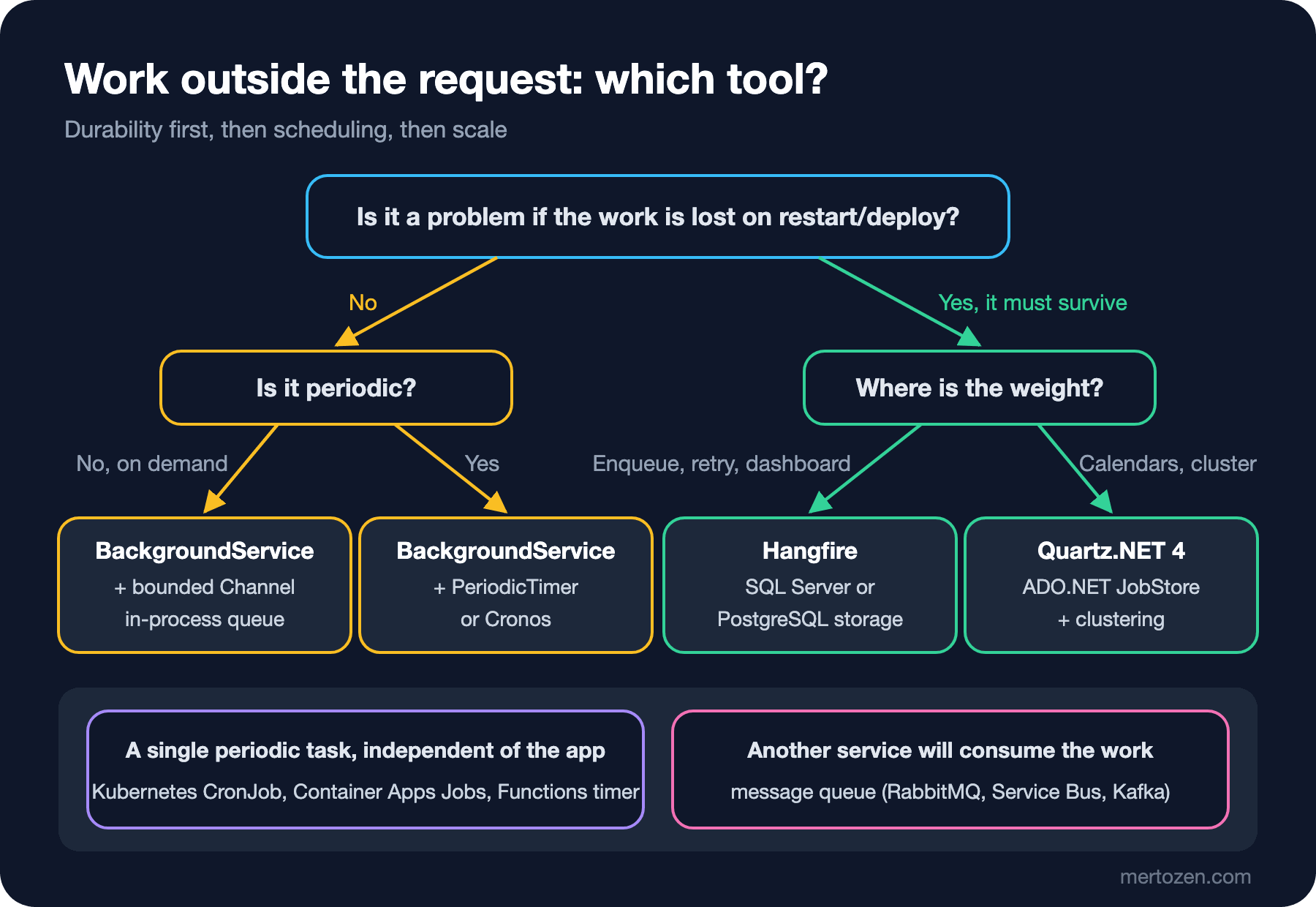
BackgroundService is part of .NET's own hosting infrastructure; no extra package. If the work can be lost, or something else (a message queue, an outbox table) already provides durability, this is the right starting point. A Channel is enough for triggered work, and PeriodicTimer for periodic work, or the Cronos library if you need cron. That is also why the series starts here: Hangfire and Quartz.NET themselves run as hosted services in the end.
At the heart of Hangfire is a record that says "run this method with these arguments". With BackgroundJob.Enqueue(() => ...) you write a method call to storage, the Hangfire server picks it up and runs it, retries it at growing intervals if it fails and shows everything on the dashboard. Fire-and-forget, delayed, recurring and continuation jobs are all variations of the same model. The core package is licensed under LGPL (GNU Lesser General Public License) 3.0 and is free for commercial use; features such as Redis storage and batches are in the paid Pro package. Details in the fifth post.
At the heart of Quartz.NET is scheduling: the job (what to do) and the trigger (when) are separate objects; one job can have several triggers, calendars can exclude holidays, and the misfire (missed run) behavior can be chosen per trigger. Version 4.0, released in September 2026, is a major release: it targets only net10.0, DI and hosting support moved into the core package, and a dashboard and an HTTP (Hypertext Transfer Protocol) API arrived. The latest version at the time of writing is 4.7.2. We'll set it up in the sixth post.
A rough rule: if most of your work is "do this in the background, retry if it fails", Hangfire's enqueue model does more with less code. If most of it is complex scheduling rules, calendars and running exactly once in a cluster, Quartz.NET's model fits more naturally.
There are two smaller alternatives. Coravel (6.0.2) offers scheduling in code with a fluent syntax and an in-memory queue; practical for small single-instance apps that don't need durability. TickerQ (11.5.x on NuGet) offers persistence with EF Core, MongoDB or Redis, job chains and a dashboard; its license is source-available, and according to its README companies with annual revenue below 5 million dollars can use the Community plan for free. This series doesn't dedicate separate posts to either.
Platform Schedulers: Moving the Job Out of the App
Sometimes the best background job is one that isn't in the app at all. For work that runs once a night and shares no state with the API (say, a SQL (Structured Query Language) script that cleans up old carts), a Kubernetes CronJob, Azure Container Apps Jobs or an Azure Functions timer trigger can be simpler: the platform takes care of scheduling, single runs and logs, and you only write a console app that does the work.
This has a cost too: the job's code is deployed as a separate artifact, it doesn't share the app's DI container and configuration, and for work measured in seconds, starting a container costs more than the work itself. The details of Kubernetes CronJob belong to the upcoming Kubernetes and Cloud Fundamentals series; here, just the decision criterion: if the work leans heavily on the app's domain code and DI, keep it in the app; if it is independent and infrequent, give it to the platform.
There's also the case where the work isn't really a job but a message. If the email service, the invoicing service and the analytics service will each react when an order is confirmed, that is an "OrderConfirmed" event, and it belongs in a message queue. We cover this distinction as a concept in the Messaging and Event-Driven Architecture series, and as .NET code in the upcoming Working with Message Queues series.
In Production
Whatever tool you pick, measure three things in production. First, queue depth: if jobs are written to the queue faster than they are processed, you don't have enough workers. Second, job duration: once a recurring job's p95 duration gets close to its interval, runs start to overlap. Third, the time of the last successful run: a job that never fails but never runs is more dangerous than a failing one, because it raises no alarm. We'll build all three with health checks and OpenTelemetry in the tenth post of the series.
Your deploy strategy affects the choice too. During a rolling update, the old and new versions run side by side for a few minutes. With a durable job store, the new version may process a job the old version queued; if you changed a method signature, that becomes a problem. In the fifth post we'll see the real error message for this on Hangfire.
Common Pitfalls
Handing a scoped service from the request to background code. DbContext, HttpContext and everything tied to the request become invalid once the response is written; background work must open its own scope and take only simple values such as ids.
Ignoring the returned Task. _ = Task.Run(...) swallows the exception silently; no log, no metric, no alarm. If you write fire-and-forget, at least log with try/catch, but the real fix is to hand the work to something that owns it.
Assuming an in-memory queue is durable. A queue built with Channel empties on restart. If the answer to "is it a problem if it's lost" is "yes", an in-memory solution isn't enough.
Forgetting about multiple instances. A scheduled BackgroundService developed on one machine and deployed to three replicas does its work three times. We'll solve this with a distributed lock in the eighth post.
Picking the tool by habit rather than by the work. Setting up a Quartz cluster for every periodic task is as wrong as writing Task.Run for every job that must not be lost; ask the five questions again for every new job.
A Small Experiment
★☆☆ Run the /v1 endpoint and add TaskScheduler.UnobservedTaskException += (_, e) => Console.WriteLine(e.Exception.Message); at the top of Program.cs. When does the message show up? Add an endpoint that calls GC.Collect() and GC.WaitForPendingFinalizers() and try again after a few requests.
★★☆ Add a 3-second delay to email sending in OrderEmailWorker, send five requests and send SIGTERM to the process right after. How many emails go out, and what happens to the ones left in the queue?
★★★ Put three background tasks from your own project into a table against the five questions: durability, scheduling, retry, multiple instances, visibility. Which of them sit in the wrong place with today's solution?
In the next post we take apart the structure underneath this one: the lifecycle of IHostedService and BackgroundService, graceful shutdown, ShutdownTimeout, and the breaking change in .NET 10 that alters how ExecuteAsync behaves.