

IHostedService and BackgroundService in .NET: Lifecycle, Graceful Shutdown and the .NET 10 Behavior Change
In .NET 10 the whole of BackgroundService.ExecuteAsync runs in the background; code before the first await no longer blocks startup, and code that must run early moves to StartAsync or IHostedLifecycleService. On shutdown the host cancels stoppingToken and gives all stopping work a default 30-second ShutdownTimeout; work that ignores the token is cut off at the end of that window without even a log line.
Version note: The code in this post was built and run with .NET 10; the .NET 8 comparisons were run with the same project's net8.0 target on the .NET 8.0.25 runtime.
Guess First
Bookstore's sales report service warms a cache at startup, and does so with a call that takes 3 seconds synchronously, before the first await. Kestrel is listening for HTTP (Hypertext Transfer Protocol) requests in the same app.
public sealed class SlowStartReportService(ILogger<SlowStartReportService> logger) : BackgroundService
{
    protected override async Task ExecuteAsync(CancellationToken stoppingToken)
    {
        logger.LogInformation("ExecuteAsync entered, warming cache synchronously");
        Thread.Sleep(3000); // synchronous, blocking work before the first await
        logger.LogInformation("cache warmed");
        await Task.Delay(Timeout.Infinite, stoppingToken).ContinueWith(_ => { });
        logger.LogInformation("ExecuteAsync leaving");
    }
}
Two questions. When the app runs on .NET 8 and on .NET 10, when does the "Application started" line appear: right away, or 3 seconds later? Second: if another service ignores stoppingToken and produces a report that takes 20 seconds, and ShutdownTimeout is set to 5 seconds, does the report finish when the process receives SIGTERM (terminate signal)?
IHostedService and BackgroundService: The Contract
.NET's Generic Host, ASP.NET Core included, starts every IHostedService in the DI (Dependency Injection) container when it starts and stops them when it shuts down. The contract is just two methods: StartAsync(CancellationToken) and StopAsync(CancellationToken). The host doesn't say "started" until the StartAsync calls finish; by default it starts services in registration order, without moving to the next one before the previous StartAsync completes. That's why StartAsync should be short. In the ASP.NET Core Web API (Application Programming Interface) series post "Program.cs and the Hosting Model in ASP.NET Core: WebApplication and Environments" we saw how the host is built; here we look at the background work living inside it.
BackgroundService is the abstract form of this contract written for long-running work. You only write ExecuteAsync(CancellationToken stoppingToken); the returned Task represents the whole lifetime of the service. StartAsync starts that method and returns without waiting, and StopAsync cancels stoppingToken and waits for ExecuteAsync to finish. How long it waits is decided by the host's shutdown budget.
IHostedLifecycleService, which came with .NET 8, adds four more hooks around these two steps: StartingAsync, StartedAsync, StoppingAsync and StoppedAsync. To see the order, I wrote a service that logs all of them:
public sealed class LifecycleProbe(ILogger<LifecycleProbe> logger) : IHostedLifecycleService
{
    public Task StartingAsync(CancellationToken ct) { logger.LogInformation("StartingAsync"); return Task.CompletedTask; }
    public Task StartAsync(CancellationToken ct) { logger.LogInformation("StartAsync"); return Task.CompletedTask; }
    public Task StartedAsync(CancellationToken ct) { logger.LogInformation("StartedAsync"); return Task.CompletedTask; }
    public Task StoppingAsync(CancellationToken ct) { logger.LogInformation("StoppingAsync"); return Task.CompletedTask; }
    public Task StopAsync(CancellationToken ct) { logger.LogInformation("StopAsync"); return Task.CompletedTask; }
    public Task StoppedAsync(CancellationToken ct) { logger.LogInformation("StoppedAsync"); return Task.CompletedTask; }
}
Startup and Shutdown Order
I registered LifecycleProbe and the SlowStartReportService from the start of the post in this order, ran the app on .NET 10 and sent SIGTERM after 5 seconds:
builder.Services.AddHostedService<LifecycleProbe>();
builder.Services.AddHostedService<SlowStartReportService>();
04:54:47.274 info: Bookstore.Jobs.LifecycleProbe[0] StartingAsync
04:54:47.287 info: Bookstore.Jobs.LifecycleProbe[0] StartAsync
04:54:47.288 info: Bookstore.Jobs.SlowStartReportService[0] ExecuteAsync entered, warming cache synchronously
04:54:47.297 info: Microsoft.Hosting.Lifetime[14] Now listening on: http://127.0.0.1:17110
04:54:47.297 info: Bookstore.Jobs.LifecycleProbe[0] StartedAsync
04:54:47.297 info: Microsoft.Hosting.Lifetime[0] Application started. Press Ctrl+C to shut down.
04:54:50.290 info: Bookstore.Jobs.SlowStartReportService[0] cache warmed
04:54:52.157 info: Microsoft.Hosting.Lifetime[0] Application is shutting down...
04:54:52.157 info: Bookstore.Jobs.LifecycleProbe[0] StoppingAsync
04:54:52.160 info: Bookstore.Jobs.SlowStartReportService[0] ExecuteAsync leaving
04:54:52.160 info: Bookstore.Jobs.LifecycleProbe[0] StopAsync
04:54:52.160 info: Bookstore.Jobs.LifecycleProbe[0] StoppedAsyncThe order is: first every service's StartingAsync, then the StartAsync calls, then Kestrel starts listening, then the StartedAsync calls and finally "Application started". Shutdown goes the other way: StoppingAsync, then the StopAsync calls in reverse registration order, so the later-registered SlowStartReportService stopped first ("ExecuteAsync leaving"), then LifecycleProbe, and finally StoppedAsync.
The .NET 10 Behavior Change: All of ExecuteAsync in the Background
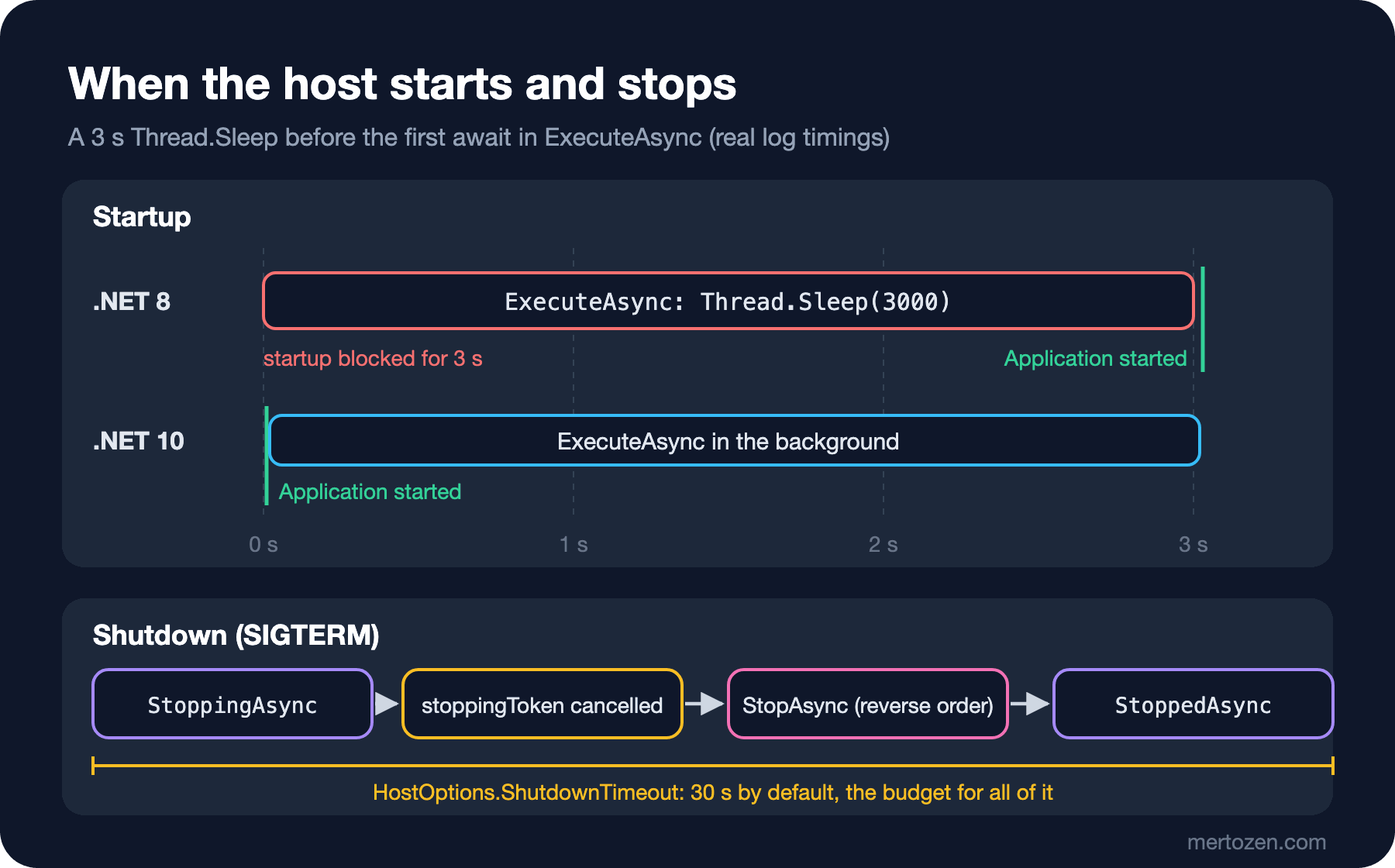
Look at the log above again: "ExecuteAsync entered" at 47.288, "Application started" at 47.297 and "cache warmed" 3 seconds later at 50.290. So Thread.Sleep(3000) didn't block startup at all. Running the same project with the net8.0 target:
04:54:52.269 info: Bookstore.Jobs.LifecycleProbe[0] StartingAsync
04:54:52.286 info: Bookstore.Jobs.LifecycleProbe[0] StartAsync
04:54:52.286 info: Bookstore.Jobs.SlowStartReportService[0] ExecuteAsync entered, warming cache synchronously
04:54:55.293 info: Bookstore.Jobs.SlowStartReportService[0] cache warmed
04:54:55.313 info: Microsoft.Hosting.Lifetime[14] Now listening on: http://127.0.0.1:17110
04:54:55.314 info: Bookstore.Jobs.LifecycleProbe[0] StartedAsync
04:54:55.314 info: Microsoft.Hosting.Lifetime[0] Application started. Press Ctrl+C to shut down.
On .NET 8, "Now listening" and "Application started" were 3 seconds late. The reason is that the old BackgroundService.StartAsync called ExecuteAsync directly: the synchronous part of the method up to its first await ran on the host's startup thread. A synchronous database call, a .Result, or just a long loop starting without an await held up the whole app's startup; worse, very few people knew it.
With .NET 10, BackgroundService runs the whole of ExecuteAsync in the background. The breaking change note on Microsoft Learn states the reason plainly: the old behavior was a common pitfall that didn't meet user expectations. It is a behavioral change; whether the code compiles doesn't change, only its timing.
So what if you have code that really must block startup (for example, Kestrel must not start taking requests before a migration is applied)? The breaking change note suggests four ways: put the code in the constructor, override StartAsync and do the work before base.StartAsync, use an IHostedLifecycleService hook such as StartingAsync, or write an IHostedService directly instead of BackgroundService. The most readable is the second:
public sealed class CatalogIndexService(ICatalogIndex index) : BackgroundService
{
    public override async Task StartAsync(CancellationToken cancellationToken)
    {
        // code here still blocks startup: other services and Kestrel wait
        await index.LoadSnapshotAsync(cancellationToken);
        await base.StartAsync(cancellationToken);
    }

    protected override async Task ExecuteAsync(CancellationToken stoppingToken)
    {
        // on .NET 10 all of this runs in the background
        using PeriodicTimer timer = new(TimeSpan.FromMinutes(1));
        while (await timer.WaitForNextTickAsync(stoppingToken))
            await index.RefreshAsync(stoppingToken);
    }
}
When I tried it with a snapshot load that takes 1.5 seconds, Kestrel didn't start listening until the snapshot was loaded:
05:42:07.607 info: Bookstore.Jobs.FakeCatalogIndex[0] snapshot loaded
05:42:07.651 info: Microsoft.Hosting.Lifetime[14] Now listening on: http://127.0.0.1:17110
05:42:07.651 info: Microsoft.Hosting.Lifetime[0] Application started. Press Ctrl+C to shut down.
The change has one more side effect: an exception thrown before the first await of ExecuteAsync escaped from StartAsync on .NET 8 and kept the host from starting at all; on .NET 10 it is caught in the background and is subject to the BackgroundServiceExceptionBehavior rule we'll see below. We'll compare the real output of this in the last post of the series, when we talk about version migrations.
HostOptions: The Shutdown Budget and Error Behavior
HostOptions decides how the host behaves. To see the defaults for yourself:
var o = new HostOptions();
Console.WriteLine($"ShutdownTimeout={o.ShutdownTimeout}, StartupTimeout={o.StartupTimeout}, " +
    $"BackgroundServiceExceptionBehavior={o.BackgroundServiceExceptionBehavior}, " +
    $"ServicesStartConcurrently={o.ServicesStartConcurrently}, ServicesStopConcurrently={o.ServicesStopConcurrently}");

// ShutdownTimeout=00:00:30, StartupTimeout=-00:00:00.0010000, BackgroundServiceExceptionBehavior=StopHost, ServicesStartConcurrently=False, ServicesStopConcurrently=False
Three values matter in particular. ShutdownTimeout is 30 seconds, and it's the budget for the whole shutdown, not for a single service; the API documentation notes that the StoppingAsync and StoppedAsync hooks are inside this window too. ServicesStartConcurrently and ServicesStopConcurrently are off by default: services start and stop one after another. If you turn them on, a slow StartAsync doesn't hold the others back, but if you have code that relies on order (first the cache, then the service that uses it), that guarantee is gone too.
BackgroundServiceExceptionBehavior defaults to StopHost. I tried it with a stock sync service that throws on its second run:
public sealed class CrashingService(ILogger<CrashingService> logger) : BackgroundService
{
    protected override async Task ExecuteAsync(CancellationToken stoppingToken)
    {
        int run = 0;
        while (!stoppingToken.IsCancellationRequested)
        {
            run++;
            logger.LogInformation("Stock sync run {Run}", run);
            if (run == 2)
                throw new InvalidOperationException("Supplier API returned 500");
            await Task.Delay(500, stoppingToken);
        }
    }
}
04:55:04.080 info: Bookstore.Jobs.CrashingService[0] Stock sync run 1
04:55:04.093 info: Microsoft.Hosting.Lifetime[0] Application started. Press Ctrl+C to shut down.
04:55:04.595 info: Bookstore.Jobs.CrashingService[0] Stock sync run 2
04:55:04.604 fail: Microsoft.Extensions.Hosting.Internal.Host[9] BackgroundService failed System.InvalidOperationException: Supplier API returned 500 at Bookstore.Jobs.CrashingService.ExecuteAsync(CancellationToken stoppingToken) [...]
04:55:04.604 crit: Microsoft.Extensions.Hosting.Internal.Host[10] The HostOptions.BackgroundServiceExceptionBehavior is configured to StopHost. A BackgroundService has thrown an unhandled exception, and the IHost instance is stopping. To avoid this behavior, configure this to Ignore; however the BackgroundService will not be restarted. [...]
04:55:04.604 info: Microsoft.Hosting.Lifetime[0] Application is shutting down...
RunAsync returned, exit code 0One service's unhandled exception shut down the whole app, including the API answering HTTP requests. On top of that, the process exit code is 0: as far as Kubernetes or systemd can tell, the app shut down "successfully". The Ignore option keeps the host up, but as the log message itself says, the service isn't restarted; you end up with an API whose background work has silently stopped. The right answer is usually neither: protect each run of the loop with its own try/catch and let an exception out only when the situation truly can't be recovered. With .NET 11, RunAsync and StopAsync throw in this scenario, so the process exits with a non-zero code.
Graceful Shutdown: Carrying stoppingToken All the Way Down
The second question from the start. I lowered ShutdownTimeout to 5 seconds and wrote a service that ignores the token:
builder.Services.Configure<HostOptions>(o => o.ShutdownTimeout = TimeSpan.FromSeconds(5));
builder.Services.AddHostedService<StubbornService>();

public sealed class StubbornService(ILogger<StubbornService> logger) : BackgroundService
{
    protected override async Task ExecuteAsync(CancellationToken stoppingToken)
    {
        logger.LogInformation("Nightly report started");
        await Task.Delay(TimeSpan.FromSeconds(20)); // stoppingToken is not passed on
        logger.LogInformation("Nightly report finished");
    }
}
04:55:27.666 info: Bookstore.Jobs.StubbornService[0] Nightly report started
04:55:27.679 info: Microsoft.Hosting.Lifetime[0] Application started. Press Ctrl+C to shut down.
04:55:30.507 info: Microsoft.Hosting.Lifetime[0] Application is shutting down...
04:55:35.512 RunAsync returned, exit code 0SIGTERM arrived at 30.507, the host waited exactly 5 seconds and RunAsync returned at 35.512. "Nightly report finished" was never written; the host didn't log a warning either. The report was left half done, and the only thing telling you is a log line that isn't there.
The fix is to carry stoppingToken down to the lowest layer of the work: into Task.Delay, HttpClient calls and Entity Framework Core (EF Core) queries. It's the same thing we did for requests in the ASP.NET Core Web API series post "Async/Await and CancellationToken in ASP.NET Core: Carrying Cancellation All the Way to the Database"; here the host's shutdown takes the place of the request. Leaving the unfinished part of the work restartable when the token is cancelled is a separate design topic; we'll do it with checkpoints for long batch jobs in the ninth post.
There's a budget on the Kubernetes side too. When a pod is deleted, the kubelet first runs the preStop hook if there is one, then sends SIGTERM to the container, and kills it with SIGKILL (kill signal) once terminationGracePeriodSeconds (30 seconds by default) runs out; the time spent in preStop comes out of that budget as well. The app's ShutdownTimeout must fit inside it. Since both defaults are 30 seconds, in a pod that waits a few seconds in preStop the host is killed before its own window ends. For long-running work, either raise terminationGracePeriodSeconds or split the work into short pieces.
Consuming Scoped Services: Each Run in Its Own Scope
Hosted services are registered as singletons. What happens if you put a scoped service (a repository, a DbContext) in the constructor? In the Development environment, scope validation is on, so the host never starts:
builder.Services.AddScoped<OrderRepository>();
builder.Services.AddHostedService<CaptiveReminderService>();

public sealed class CaptiveReminderService(OrderRepository repository, ILogger<CaptiveReminderService> logger)
    : BackgroundService
{
    protected override Task ExecuteAsync(CancellationToken stoppingToken)
    {
        logger.LogInformation("Using repository #{Id}", repository.InstanceId);
        return Task.CompletedTask;
    }
}
Unhandled exception. System.AggregateException: Some services are not able to be constructed (Error while validating the service descriptor 'ServiceType: Microsoft.Extensions.Hosting.IHostedService Lifetime: Singleton ImplementationType: Bookstore.Jobs.CaptiveReminderService': Cannot consume scoped service 'Bookstore.Jobs.OrderRepository' from singleton 'Microsoft.Extensions.Hosting.IHostedService'.)In Production, validation is off by default and the app starts; this time the scoped object is trapped inside a singleton and lives as long as the app does. For a DbContext, that means an ever-growing change tracker and a non-thread-safe object being shared. That's exactly the topic of the ASP.NET Core Web API series post "Dependency Injection in ASP.NET Core: Lifetimes and the Captive Dependency Trap".
The right way is to inject IServiceScopeFactory and open a new scope on every iteration:
public sealed class PendingOrderReminderService(
    IServiceScopeFactory scopeFactory,
    ILogger<PendingOrderReminderService> logger) : BackgroundService
{
    protected override async Task ExecuteAsync(CancellationToken stoppingToken)
    {
        using PeriodicTimer timer = new(TimeSpan.FromSeconds(1));
        while (await timer.WaitForNextTickAsync(stoppingToken))
        {
            // each run has its own scope: scoped services such as DbContext are disposed when the run ends
            await using AsyncServiceScope scope = scopeFactory.CreateAsyncScope();
            OrderRepository repository = scope.ServiceProvider.GetRequiredService<OrderRepository>();
            int pending = await repository.CountPendingAsync(stoppingToken);
            logger.LogInformation("Repository #{Id}: {Pending} pending orders", repository.InstanceId, pending);
        }
    }
}
04:55:51.306 info: Bookstore.Jobs.PendingOrderReminderService[0] Repository #1: 3 pending orders
OrderRepository #1 disposed
04:55:52.306 info: Bookstore.Jobs.PendingOrderReminderService[0] Repository #2: 3 pending orders
OrderRepository #2 disposed
04:55:53.306 info: Bookstore.Jobs.PendingOrderReminderService[0] Repository #3: 3 pending orders
OrderRepository #3 disposed
04:55:53.666 info: Microsoft.Hosting.Lifetime[0] Application is shutting down...Each run got a new OrderRepository, disposed when the run ended. Opening the scope per run matters; a single scope for the whole ExecuteAsync only moves the captive dependency one level down.
In Production
Measure shutdown. Extract the time between "Application is shutting down" and the actual process exit during deploys from your logs; if it regularly hits ShutdownTimeout, some service isn't carrying the token. Leaving a log line such as "stopped after N items" at the exit of every ExecuteAsync loop lets you find interrupted work later.
Don't trust the exit code. On .NET 10, when a BackgroundService crashes, the host stops but the process exits with 0; the orchestrator may take it for a normal shutdown. If the container needs restarting, tie the liveness probe to this service's health, or, until the .NET 11 behavior arrives, check the state after RunAsync and set Environment.ExitCode yourself.
Watch startup time. After moving to .NET 10, startup may look faster because some work is no longer waited on; but that work is still running, and the first requests may arrive before it's ready. Express readiness with a readiness probe; the health check basics are in the ASP.NET Core Web API series post "Health Checks in ASP.NET Core Web API: Liveness, Readiness and Database Checks".
Common Pitfalls
An unhandled exception inside ExecuteAsync. With the default StopHost, an error in a single background task takes the whole API down. Wrap every iteration in try/catch; keep OperationCanceledException separate as the shutdown signal.
A while (true) loop that never waits. A loop with no await, or one that only awaits Tasks that complete immediately, pins a thread at one hundred percent CPU (Central Processing Unit) and never sees cancellation. Use PeriodicTimer or a Task.Delay with the token for periodic work.
Work that hangs in StopAsync. If you override StopAsync and wait for something without a token inside it, that service eats the whole shutdown budget and the services that should stop after it never get their turn.
Relying on ordering after moving to .NET 10. Code written assuming "the first line of this service runs at startup" now runs in the background; if another service assumes that work is done, you get a race condition.
A Small Experiment
★☆☆ Register LifecycleProbe twice under different names and run with ServicesStartConcurrently = true. How does the log order change?
★★☆ In StubbornService, pass stoppingToken to Task.Delay and write "report cancelled at step N" inside catch (OperationCanceledException). How long does shutdown take after SIGTERM?
★★★ Run CrashingService with the Ignore behavior and write a health check endpoint served after the service crashes: it should return Unhealthy if the service's last successful run is older than 3 seconds. How would you wire this to a Kubernetes liveness probe?
In the next post we move this foundation into a Worker Service: a process separate from the API, an in-process job queue with Channel, backpressure that returns 503 when it's full, periodic work with PeriodicTimer, and hosting under a Windows Service or systemd.