

What Is Redis Beyond a Cache? The In-Memory Data Structure Server, Use Cases and Licensing
Redis is an in-memory server that keeps data structures, from strings to streams, under keys and runs commands one at a time on a single main thread; that is why every command is atomic and why one long command makes everyone wait. With real measurements: a 105 ms KEYS stalling another client's PING, 100,000 INCRs without a lock, server time versus round trip, a map of uses beyond caching, where Redis is a poor fit, the licensing history and how Valkey differs.
Version note: The examples in this post were run with Redis 8.10.3 (the official redis:8 Docker image), Valkey 9.1.3, .NET 10 and StackExchange.Redis 3.4.35.
Guess First
In the Redis instance behind Bookstore, the online bookstore used as the shared example across this site's series, every book's view counter lives in its own key: bookstore:book:{id}:views. The catalogue has grown to a million keys. One day a teammate wants to know how many books have a counter, writes a small script and sends KEYS bookstore:book:* to the production Redis. At the same time the API instances are serving normal traffic.
Let's simulate this with two separate connections: instance-a sends a PING every 10 ms and measures it, while ops-script runs KEYS one second in.
// Two separate multiplexers = two separate application instances.
await using ConnectionMultiplexer instanceA = await ConnectionMultiplexer.ConnectAsync(connectionString + ",name=instance-a");
// KEYS is an admin command for StackExchange.Redis 3.x; instance B is an "ops script"
await using ConnectionMultiplexer instanceB = await ConnectionMultiplexer.ConnectAsync(connectionString + ",name=ops-script,allowAdmin=true");
IDatabase dbA = instanceA.GetDatabase();
IDatabase dbB = instanceB.GetDatabase();

List<double> pings = [];
Task pinger = Task.Run(async () =>
{
    for (int i = 0; i < 300; i++)
    {
        TimeSpan rtt = await dbA.PingAsync();
        pings.Add(rtt.TotalMilliseconds);
        await Task.Delay(10);
    }
});

await Task.Delay(1000);
Stopwatch sw = Stopwatch.StartNew();
RedisResult keys = await dbB.ExecuteAsync("KEYS", "bookstore:book:*");
Console.WriteLine($"instance B: KEYS returned {keys.Length:N0} keys in {sw.ElapsedMilliseconds:N0} ms");
Does KEYS slow down only the script, or do the PINGs from instance-a suffer too? And if they do, by how much?
docker run -d --name bookstore-redis -p 127.0.0.1:6379:6379 redis:8
dotnet run --project src/Bookstore.RedisLab -- seed-keys 1000000
dotnet run --project src/Bookstore.RedisLab -- keys-vs-ping
1,000,000 keys written in 1,339 ms
instance B: KEYS returned 1,000,000 keys in 471 ms
instance A: 300 PINGs, median 0.64 ms, p99 3.32 ms, max 102.58 msThe median PING took 0.64 ms, but one of them took 102 ms. Redis itself tells us where that number comes from. SLOWLOG records commands that exceed a threshold, together with how long they ran on the server:
docker exec bookstore-redis redis-cli SLOWLOG GET 14
1794650692
105261
KEYS
bookstore:book:*
172.17.0.1:59812
ops-script
2The third line is the duration in microseconds: KEYS ran for 105 ms on the server. The longest PING from instance-a took 102 ms. That is no coincidence. The PING arrived on a different connection, but Redis has a single main thread that executes commands, and for those 105 ms it was busy walking a million keys. The PING waited its turn. The rest of the 471 ms the script saw was spent moving a million key names over the network and parsing them on the client; that part did not keep the server busy. This post starts from that observation: the data model, single-threaded execution and the atomicity it gives you, where latency comes from, what Redis is used for beyond caching, where it is a poor fit, and the licensing question everyone has been talking about since 2024.
Keys and Data Structures: the Redis Data Model
If you know Redis as "a cache that stores strings", you have seen half of the model. Everything in Redis lives under a key, but the value is not limited to a string; it can be a data structure: a hash, list, set, sorted set, stream, and, since Redis 8, JSON, time series, probabilistic structures and vector sets. Commands are organised by structure: INCR works on strings, HSET on hashes, LPUSH on lists. Instead of reading the value, sending it to the client and writing it back, the server applies the operation to the structure in place.
127.0.0.1:6379> SET bookstore:book:42:views 1250
OK
127.0.0.1:6379> HSET bookstore:cart:7 42 1 1984 2
(integer) 2
127.0.0.1:6379> LPUSH bookstore:customer:7:recent 42 1984 101
(integer) 3
127.0.0.1:6379> SADD bookstore:tag:classic 42 1984 101
(integer) 3
127.0.0.1:6379> ZADD bookstore:bestsellers:2026-11-14 37 42 12 1984
(integer) 2
127.0.0.1:6379> XADD bookstore:orders:events * type OrderPlaced orderId 1001
"1794650721775-0"
127.0.0.1:6379> JSON.SET bookstore:book:42 $ '{"title":"Dune","price":349.9}'
OK
127.0.0.1:6379> TYPE bookstore:cart:7
hash
127.0.0.1:6379> OBJECT ENCODING bookstore:cart:7
"listpack"
127.0.0.1:6379> OBJECT ENCODING bookstore:book:42:views
"int"
127.0.0.1:6379> OBJECT ENCODING bookstore:tag:classic
"intset"
127.0.0.1:6379> TYPE bookstore:book:42
ReJSON-RL
127.0.0.1:6379> HINCRBY bookstore:cart:7 1984 1
(integer) 3
Two details are worth noticing. The first is the difference between TYPE and OBJECT ENCODING: the type is the logical structure the commands see, the encoding is the actual representation in memory. A small hash is stored as a listpack, a single compact block of memory, and is converted to a hashtable as it grows. A small set made only of integers becomes an intset. We will measure the memory and speed effects of these conversions in posts 04 and 05. The second is the HINCRBY on the last line: to bump the quantity of 1984 in the cart, you did not read the hash, change it and write it back; you sent one command.
The fact that JSON.SET works is a detail too. With Redis 8, JSON, the Query Engine, time series and the probabilistic structures moved from separately distributed modules, formerly known as Redis Stack, into the Redis Open Source distribution. In the official image MODULE LIST shows them as search, timeseries, bf, vectorset and ReJSON.
One Thread, Commands in Turn
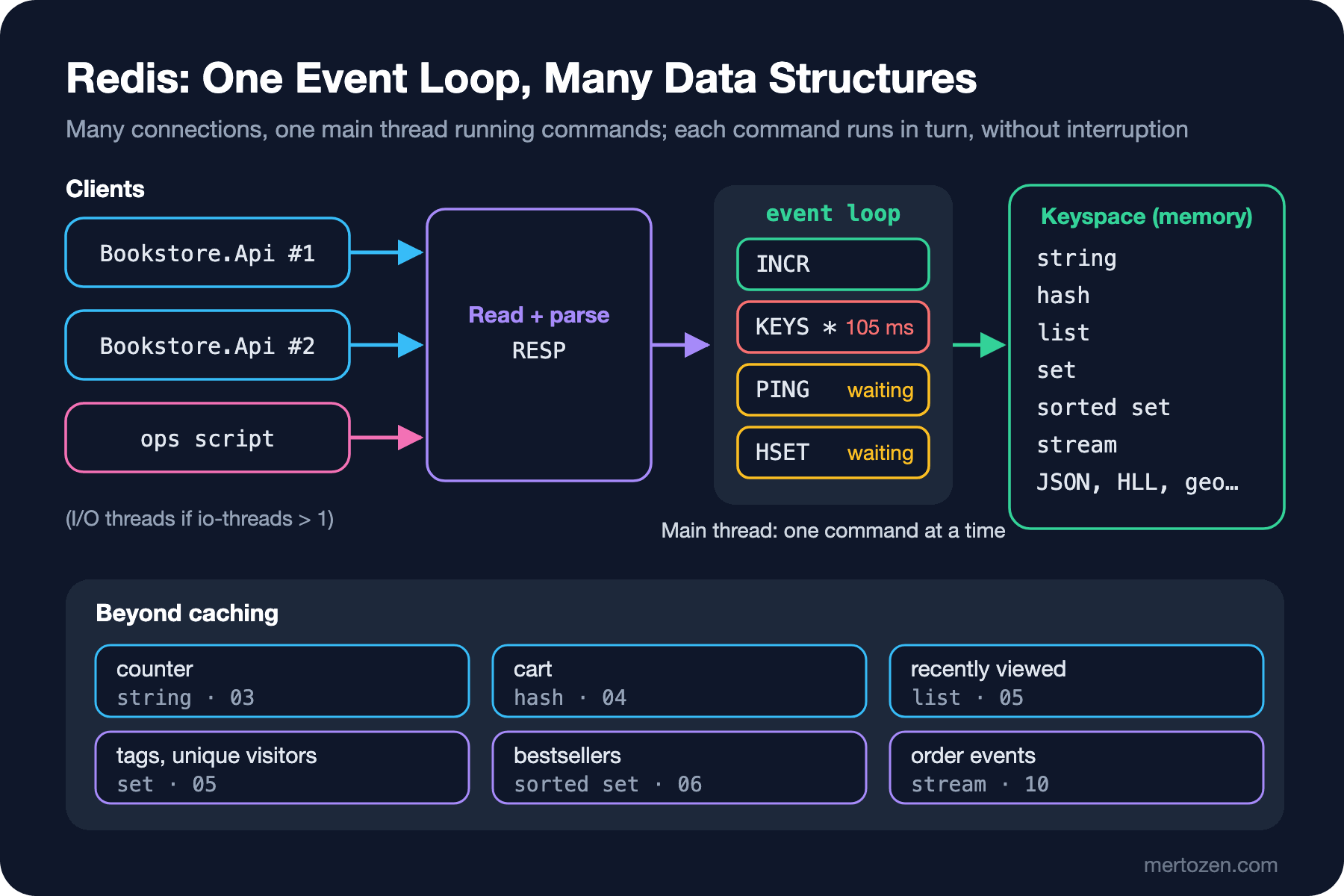
Redis handles thousands of connections with a single event loop: it reads data from the sockets, parses RESP messages, RESP being the Redis Serialization Protocol clients speak, and runs the commands one by one on the main thread. While one command is running, no other command can cut in. The 102 ms PING in Guess First is a direct consequence of this model.
"Redis is single-threaded" is no longer quite accurate. Some work, such as freeing large keys in the background with UNLINK and disk operations, happens on side threads. Since Redis 6 you can also hand socket reads, writes and protocol parsing to I/O threads. According to the comments in redis.conf this is off by default (io-threads 1) and recommended only on machines with at least 4 cores and a real CPU problem, for example 3 I/O threads on 4 cores. The Redis 8.4 release notes report a substantial throughput gain from I/O threading. In no case, however, do the commands themselves run in parallel: I/O threads only move and parse data, and the code that touches the keyspace is still one thread.
127.0.0.1:6379> CONFIG GET io-threads
1) "io-threads"
2) "1"
127.0.0.1:6379> INFO server
redis_version:8.10.3
redis_mode:standalone
multiplexing_api:epoll
io_threads_active:0
This design gives you two things. The good part: the data structures need no locks, there is no context switching cost, and every command is atomic on its own. The bad part: every long-running command makes everyone else wait. KEYS over a million keys, SMEMBERS on a set with ten million members, HGETALL on a huge hash, a long Lua script; they all block the same queue. The documentation lists the complexity of each command as O(1), O(N) or O(log N), and in Redis that is not trivia, it is part of capacity planning.
Atomicity: 100,000 INCRs Without a Lock
Let's measure the good side of the single thread. A hundred concurrent callers each increment the same counter 1,000 times. There is no lock on the client side:
const string key = "bookstore:book:42:views";
await db.KeyDeleteAsync(key);

// 100 concurrent callers, each increments 1,000 times; no lock on the client side
Task[] callers = [.. Enumerable.Range(0, 100).Select(_ => Task.Run(async () =>
{
    for (int i = 0; i < 1_000; i++)
    {
        await db.StringIncrementAsync(key);
    }
}))];
await Task.WhenAll(callers);

Console.WriteLine($"{key} = {await db.StringGetAsync(key)}");
bookstore:book:42:views = 100000It is 100,000 every time. INCR performs all of "read the value, add one, write it" inside a single command on the server, and since nothing else runs at that moment, two increments cannot overwrite each other. Had you done the same thing on the client with a GET followed by a SET, other callers' commands would slip in between the two and increments would be lost; post 03 shows that classic bug with real numbers.
Atomicity is limited to a single command. When logic with several steps, such as "decrement the stock if there is enough, otherwise refuse", does not fit into one command, you need MULTI/EXEC, a Lua script or Redis Functions; post 08 covers them. Still, this is why the Redis command set is so rich: commands such as SET … NX, HINCRBY, LMOVE and ZINCRBY exist to turn what would be two steps on the client into a single step on the server.
Where Does Latency Come From?
Redis has a reputation for being fast. But the time your application sees and the time Redis spends are very different things. INFO commandstats keeps the average time each command spends executing on the server. Let's send a small GET 10,000 times in a row to a Docker container on the same machine, then a GET for a 4 MB value 50 times, and compare both sides:
dotnet run --project src/Bookstore.RedisLab -- rttGET small (4 bytes) client: 176 us/call server (commandstats): 0.37 us/call
GET big (4 MB) client: 17742 us/call server (commandstats): 3.44 us/callThe small GET runs for 0.37 microseconds on the server; the application waits 176 microseconds. Almost all of the difference is the round trip: writing the request to the socket, passing through Docker's network layer, getting the reply back and processing it on the client. Between two machines in the same data centre this usually takes longer still. So when commands are awaited one at a time, the bottleneck is not Redis but the number of round trips. That is why pipelining, and StackExchange.Redis multiplexing everything over one connection, matter so much; we measure them in post 02.
With the 4 MB value the picture changes: the application waits 17.7 ms. usec_per_call stays at 3.44 µs, because it measures only the execution of the command; writing 4 MB to the socket is not part of it. That write still takes time from the event loop, or from the I/O threads if they are enabled, holds memory in the client output buffer and fills the network. This is why the cost of large values does not show up at first glance in the metrics. A practical rule: keep values in Redis small, and split large objects into pieces or into a more suitable structure. Post 12 shows how to find big and hot keys.
Redis Beyond Caching: a Use-Case Map
In the Caching series we used Redis behind IDistributedCache and HybridCache, that is, as a cache store. This series covers the rest. Here is what Redis can do for Bookstore beyond caching, and where each topic is covered:
| Job | Data type | Key commands | Post |
|---|---|---|---|
| Book view counter | string | INCR, EXPIRE … NX | 03 |
| One-time verification code, idempotency key | string | SET … NX EX, GETDEL | 03 |
| Customer cart | hash | HSET, HINCRBY, HGETALL | 04 |
| Last 10 viewed books, simple job queue | list | LPUSH, LTRIM, LMOVE | 05 |
| Book tags, daily unique visitors | set, HyperLogLog | SADD, SINTER, PFADD | 05, 07 |
| Bestsellers of the week, sliding window | sorted set | ZINCRBY, ZRANGE | 06 |
| Stock reservation | string + Lua/Functions | EVAL, FCALL | 08 |
| Announcing a price change to all instances | pub/sub | PUBLISH, SUBSCRIBE | 09 |
| Distributing order events to workers | stream | XADD, XREADGROUP, XACK | 10 |
| Filtered search in the catalogue | JSON + Query Engine | FT.CREATE, FT.SEARCH | 11 |
Two more jobs come up often. Rate limiting uses counters and sorted sets, but the design side was covered in the rate limiting post of the System Design series and in the ASP.NET Core Security series. Distributed locks use SET … NX PX; why that alone is not enough, and what fencing tokens are, is explained in "Distributed Locks, Leases and Fencing Tokens: Why a Lock Is Not Enough" in the Distributed Systems Fundamentals series. Here we look at the commands, not the theory again.
Where Redis Is a Poor Fit
Redis's speed has a price; weigh these before choosing it:
- All data lives in RAM. Putting Bookstore's million orders into Redis row by row is possible, but RAM costs far more per gigabyte than disk. Data in Redis should either be small and hot, or a use case you are knowingly paying for.
- Key design decides your queries. There are no JOINs and no ad hoc
WHERE. To answer a question like "orders over 500 TRY from Istanbul in November" you either shape the data for that question in advance or set up the Query Engine. Relational data and reporting belong in SQL Server or PostgreSQL. - Durability depends on configuration and is weak by default. Persistence is asynchronous, replication is asynchronous; there are scenarios where a write gets an "OK" and is then lost. The only copy of an order should not live in Redis. Details are in posts 12 and 13.
- Long commands and big values make everyone wait. Remember the 105 ms from Guess First.
In practice the healthiest setup is this: the durable, authoritative record lives in a relational database, and Redis runs next to it as a second data layer for counters, rankings, sessions, queues and fast reads.
Licensing, Valkey and the Rule for This Series
If you self-host Redis, the licence is an architectural decision. The short history: Redis 7.2 and earlier shipped under BSD. A decision announced in March 2024 moved Redis from 7.4 onwards to a choice between RSALv2 and SSPLv1, and Redis's own licensing page states that neither of them is an open source licence. Redis 8, released on 1 May 2025, added AGPLv3 as a third option, and the distribution was renamed Redis Open Source. We gave the licence table in the post "IDistributedCache and Running Redis as a Cache" in the Caching series, so it is not repeated here.
In response to the 2024 change, Valkey started under the Linux Foundation: a BSD-licensed fork of Redis 7.2.4. Valkey 9.0 shipped in October 2025 with hash field expiration, atomic slot migration and multiple databases in cluster mode; the current stable release at the time of writing is 9.1.3. Garnet from Microsoft Research is another option: written in .NET, MIT-licensed, and compatible with existing clients because it speaks RESP.
The managed landscape has changed too. Azure Cache for Redis is being retired: according to the FAQ on Microsoft Learn, the Basic, Standard and Premium tiers retire on 30 September 2028 and the Enterprise tiers on 31 March 2027, with Azure Managed Redis, which runs on the Redis Enterprise software, as the recommended replacement. Since Azure Managed Redis is clustered by default, the slot constraints on multi-key commands that we cover in post 13 become relevant. AWS has offered Valkey as an engine in ElastiCache and MemoryDB since October 2024, and Google Cloud has Memorystore for Valkey.
In this series we show commands on Redis 8 and flag the ones Valkey lacks. Running both servers side by side, the first difference shows up in the version field:
docker run -d --name bookstore-valkey -p 127.0.0.1:6380:6379 valkey/valkey:9
docker exec bookstore-valkey valkey-cli INFO server
redis_version:7.2.4
server_name:valkey
valkey_version:9.1.3
io_threads_active:0So that older clients keep working, Valkey reports the version it forked from, 7.2.4, in redis_version; the real version is in valkey_version. Code that enables features by looking at the version can therefore be fooled. StackExchange.Redis takes this into account: according to the 3.4.20 release notes, the client looks at the server field of the HELLO reply before treating version as the Redis API version; post 02 shows what IServer.Version reports against Valkey. The command sets are diverging as well: COMMAND COUNT returns 447 on Redis 8.10.3 and 257 on Valkey 9.1.3. Most of the gap is the commands of the modules bundled with Redis, but the core differs too:
docker exec bookstore-valkey valkey-cli DELEX k IFEQ v(error) ERR unknown command 'DELEX', with args beginning with: 'k' 'IFEQ' 'v'DELEX arrived in Redis 8.4; in Valkey a similar job is done by DELIFEQ. We will note such differences next to the command in every post.
In Production
Settle a few things before Redis goes to production. One: the memory budget. maxmemory and the eviction policy are set differently depending on whether Redis is a cache or a server holding data; in a Redis that holds queues and streams, keys being silently evicted is data loss. Post 12 covers this in detail. Two: discipline about long commands. Do not run O(N) commands on big keys from application code, use SCAN instead of KEYS, and watch everything slow with SLOWLOG. slowlog-log-slower-than defaults to 10,000 µs, that is 10 ms, which is why the KEYS in Guess First was recorded. Three: name your clients. Seeing ops-script in the SLOWLOG output showed within seconds where the offending command came from; in StackExchange.Redis that is the name= setting. Four: keep up with releases. In 2026, security releases published on the same day across all 8.x lines closed holes that could lead to remote code execution (8.4.3 and 8.6.3 in May 2026, for example); the 8.10.3 used in this post is itself a security release. Keeping Redis off the internet, ACLs and patch discipline are the subject of post 14.
Common Pitfalls
Treating Redis as a black box where everything is fast. Running O(N) commands on big keys without looking at their complexity lets a single request slow down every instance.
Reading performance only from server metrics. A low usec_per_call does not mean big values are cheap; the cost is in the network and the output buffer.
Expecting commands to run in parallel once I/O threads are on. Command execution is still a single thread; a long command makes everyone wait regardless of the number of I/O threads.
Making Redis the only record of an order. Keeping critical data only in Redis without understanding the persistence and replication settings means data loss at the first failover.
Assuming Valkey is an exact copy of Redis. The two projects have evolved separately since 2024; code that uses commands from Redis 8.4 onwards may get ERR unknown command on Valkey.
A Small Experiment
★☆☆ Run the keys-vs-ping experiment with 100,000 keys instead of a million. How do the duration in SLOWLOG and the longest PING from instance-a change? What happens if you use DBSIZE instead of KEYS?
★★☆ Repeat the rtt command with 64 KB and 1 MB values instead of 4 MB. How does the client-side time grow with the value size? Also look at INFO clients and the client-output-buffer-limit setting.
★★★ Run the INCR experiment against Valkey (BOOKSTORE_REDIS=localhost:6380). Is the result the same? Then try CONFIG SET io-threads 2 on both servers: which one lets you change this setting at runtime, and which one wants you to restart the container?
In the next post we make the lab permanent: redis:8 and valkey/valkey:9 side by side, redis-cli and Redis Insight, a single ConnectionMultiplexer in StackExchange.Redis, how multiplexing and pipelining actually work, and Bookstore's key naming rules.