

Replication, Sentinel and Cluster in Redis: Failover, Hash Slots, Hash Tags and CROSSSLOT
Because Redis replication is asynchronous, a write acknowledged to the client can be lost in a failover; WAIT does not prevent this, it only makes it visible. With real output: a lost order number, failover time with Sentinel and StackExchange.Redis, 16384 hash slots in Cluster, MOVED, CROSSSLOT and hash tags, Functions that must be loaded on every primary, node-local keyspace notifications, Redis 8.4's atomic slot migration and how Valkey 9 differs.
Version note: The examples in this post were run with Redis 8.10.3 (redis:8), Valkey 9.1.3, .NET 10 and StackExchange.Redis 3.4.35.
Guess First
Bookstore, the online bookstore used as the shared example across this site's series, takes its order numbers from a counter in Redis. The container in lab/sentinel runs a primary (6390), one replica of it (6391) and three Sentinels. The primary hands out two order numbers and each time asks with WAIT 1 1000: "has at least one replica received this write; wait 1 second". Before the second number the replica's connection drops (like a network problem), and after the second number the primary crashes and Sentinel promotes the replica to primary:
$ INCR bookstore:order:id-seq
1
$ WAIT 1 1000
1
replica stopped
ok
$ INFO replication (primary)
connected_slaves:0
$ INCR bookstore:order:id-seq
2
$ WAIT 1 1000
0
$ SHUTDOWN NOSAVE (primary)
replica resumed
failover after ~6s: primary is now 6391
The application confirmed order number 2 to the customer. What does GET bookstore:order:id-seq return on the new primary? Which number will the next INCR give?
$ GET bookstore:order:id-seq (new primary)
1
The new primary says 1: order number 2 never reached the replica and was lost with the primary. The next order will get number 2 again; two orders with the same number. Redis replication is asynchronous: the primary applies the write, answers the client, and sends it to the replica afterwards. This post covers the consequences: replication and WAIT, automatic failover with Sentinel, hash slots in Cluster, MOVED, CROSSSLOT and hash tags, pub/sub and Functions in a cluster, what the client sees during a failover, and the Valkey differences.
Replication: Asynchronous Copies, WAIT and the Lost Write
A replica connects to the primary and receives first the whole data set as an RDB file, then every write command as a stream. In Guess First I simulated the replica dropping off like this: on the primary I lowered the replica's output buffer limit to 1 MB (CONFIG SET client-output-buffer-limit "replica 1mb 0 0"), paused the replica process with kill -STOP and wrote an 8 MB report key. The primary's log shows the replica connection being closed with scheduled to be closed ASAP for overcoming of output buffer limits; the same mechanism that dropped the slow subscriber in post 09. The next write stayed on the primary only.
WAIT numreplicas timeout does not remove this risk, it makes it visible: it returns how many replicas acknowledged the last write. A return value of 0 does not mean the write was rolled back; it is on the primary, it just has no copy. For an important order you could retry before saying "saved" based on the WAIT result, or leave the durable record to SQL Server. On the primary, the min-replicas-to-write and min-replicas-max-lag settings can make it reject writes when there are not enough up-to-date replicas; that narrows the window of loss but does not close it. The general picture of leader-based replication is in the "Replication: Leader-Based, Multi-Leader, Leaderless and Quorums" post in the Distributed Systems Fundamentals series.
The expiration behaviour on replicas that we mentioned in post 03 also comes from this stream: a replica does not delete expired keys itself, it waits for the DEL the primary will send. I wrote 100,000 verification codes with a 1-second TTL on the primary (slowing active expiry down on the primary with hz 1) and looked at the replica 1.1 seconds later:
replica DBSIZE 1473, RANDOMKEY bookstore:verify:857, GET '', EXISTS 0, primary DBSIZE 1473
replica DBSIZE 0
The replica still counts 1,473 keys and RANDOMKEY returns one of them, but GET is empty and EXISTS is 0: since Redis 3.2 a replica ignores an expired key on reads. When the primary's DELs arrived, the count went to 0. A monitoring script that counts with DBSIZE or INFO keyspace on a replica can therefore see a different number than the primary.
Automatic Failover with Sentinel
Sentinels are separate processes that watch the primary. When a Sentinel cannot reach the primary for down-after-milliseconds (5000 in the lab), it considers it down in its own view (+sdown); when a quorum of Sentinels agrees (+odown), one of them promotes the replica and announces the new address to clients (+switch-master). The lab's single container holds two Redis instances and three Sentinels; in production each of them should be on a separate machine, otherwise the Sentinels go when the machine goes. The Sentinel log of the failover in Guess First:
26:X 14 Nov 2026 12:03:24.210 # +sdown master bookstore 127.0.0.1 6390
26:X 14 Nov 2026 12:03:25.316 # +odown master bookstore 127.0.0.1 6390 #quorum 3/2
26:X 14 Nov 2026 12:03:25.414 # +switch-master bookstore 127.0.0.1 6390 127.0.0.1 6391
To connect to Sentinel with StackExchange.Redis you give the connection string the Sentinel addresses and the name of the monitored service; the multiplexer learns the primary from Sentinel and switches to the new primary on +switch-master:
await using ConnectionMultiplexer mux = await ConnectionMultiplexer.ConnectAsync(
    "localhost:26379,localhost:26380,localhost:26381,serviceName=bookstore,abortConnect=false");
I started the lab from scratch, ran a loop sending an INCR every 100 ms, and shut the primary down with SHUTDOWN NOSAVE at the 5th second:
docker compose -f lab/sentinel/compose.yaml up -d
dotnet run --project src/Bookstore.RedisLab -- sentinel-failover 25
# in another terminal, 5 seconds later:
docker compose -f lab/sentinel/compose.yaml exec sentinel redis-cli -p 6390 SHUTDOWN NOSAVE
4.6s first failure: RedisConnectionException: SocketClosed on 127.0.0.1:6390/Interactive
4.6s event ConnectionFailed 127.0.0.1:6390 Interactive SocketClosed
4.6s event ConnectionFailed 127.0.0.1:6390 Subscription SocketClosed
10.0s event ConnectionFailed 127.0.0.1:6391 Interactive SocketClosed
10.0s event ConnectionFailed 127.0.0.1:6391 Subscription SocketClosed
10.0s event ConnectionRestored 127.0.0.1:6391 Interactive
10.0s event ConnectionRestored 127.0.0.1:6391 Subscription
10.1s writes succeed again (primary for slot of bookstore:order:id-seq: 127.0.0.1:6391)
25.1s done: 189 writes ok, 2 failedWrites stopped for 5.4 seconds, yet only 2 of them failed. While there is no connection, StackExchange.Redis keeps commands in a backlog and sends them when the connection comes back; the loop simply waited during that time. The one SocketClosed from 6391 is Sentinel's doing: according to the comment in the Redis source code, when Sentinel reconfigures an instance (including REPLICAOF NO ONE) it closes all client connections in the same transaction, so clients reconnect and learn the new role. This is what the application has to expect: a failover takes seconds, during which requests either wait or fail; timeout and retry settings should be chosen with that duration in mind (we read the timeout message in post 14).
Cluster: 16384 Hash Slots
Sentinel gives high availability, but the data still has to fit in the memory of a single primary. Cluster splits the data across primaries: the key space is divided into 16384 hash slots, each primary owns a range of slots, and each primary has a replica. The slot is the CRC16 checksum of the key modulo 16384; if the key contains curly braces, only the part inside the braces is hashed (a hash tag).
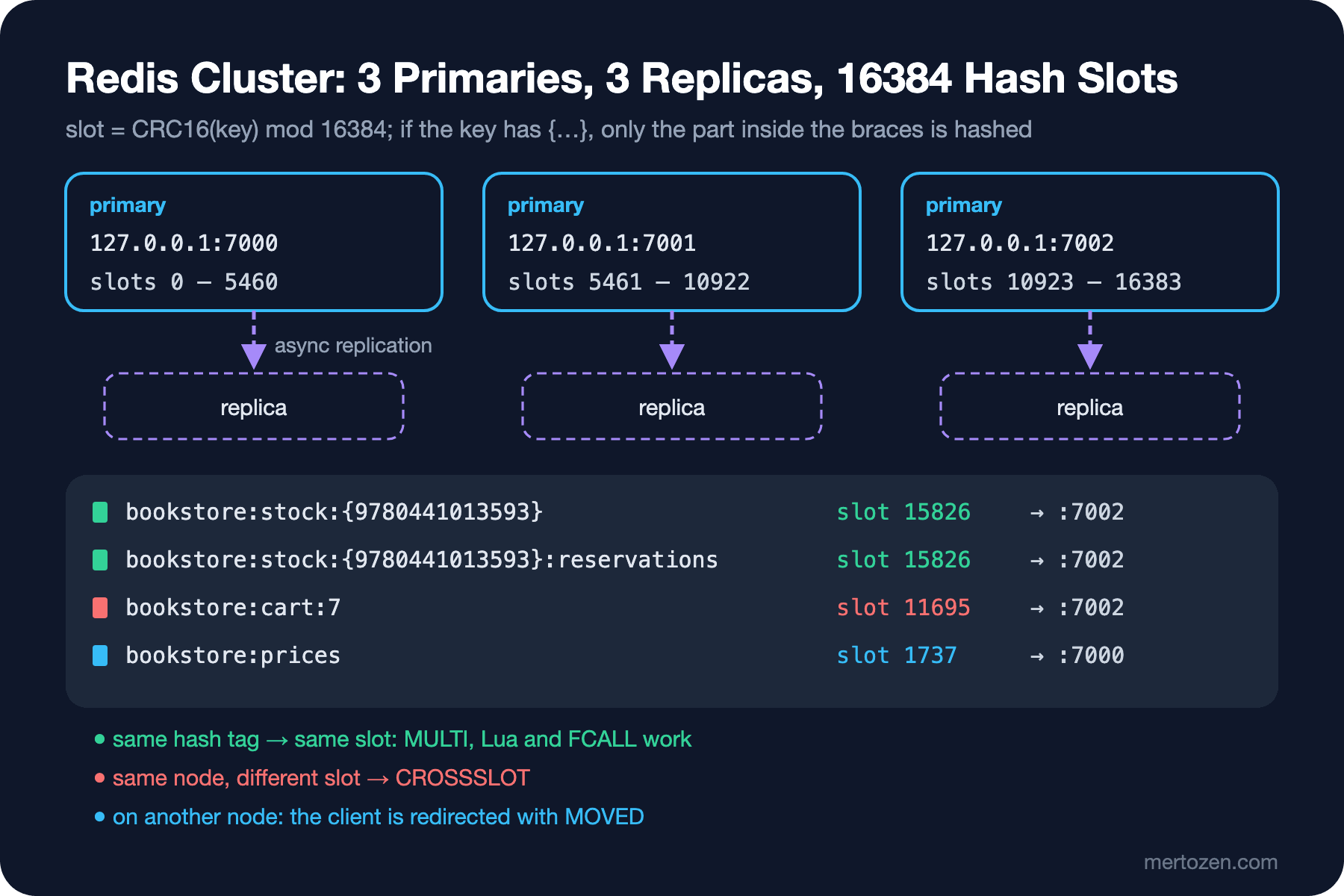
The container in lab/cluster starts six Redis processes and builds the cluster with redis-cli --cluster create … --cluster-replicas 1; the slots were split as 0–5460, 5461–10922 and 10923–16383. Because the lab's start.sh runs inside a Linux container, the script breaks if its line endings become CRLF when you clone on Windows; the repo's .gitattributes keeps *.sh files as LF.
MOVED, CROSSSLOT and Hash Tags
127.0.0.1:7000> CLUSTER KEYSLOT bookstore:stock:{9780441013593}
(integer) 15826
127.0.0.1:7000> CLUSTER KEYSLOT bookstore:stock:{9780441013593}:reservations
(integer) 15826
127.0.0.1:7000> CLUSTER KEYSLOT bookstore:cart:7
(integer) 11695
127.0.0.1:7000> SET bookstore:cart:7 x
(error) MOVED 11695 127.0.0.1:7002
127.0.0.1:7002> MSET bookstore:stock:{9780441013593} 5 bookstore:stock:{9780441013593}:note restock
OK
127.0.0.1:7002> MSET bookstore:stock:{9780441013593} 5 bookstore:cart:7 x
(error) CROSSSLOT Keys in request don't hash to the same slot
127.0.0.1:7002> SELECT 1
(error) ERR SELECT is not allowed in cluster mode
A node does not run a command for a slot it does not own; it names the right node with MOVED, and a cluster-aware client (or redis-cli -c) follows it. The real constraint is in multi-key operations: all keys of an MSET, a MULTI/EXEC, a Lua script or a function must be in the same slot. The stock key and the cart key are on the same node, but since they are in different slots we got CROSSSLOT. This is why the stock keys in post 08 had curly braces: thanks to {isbn} a book's stock and reservation keys are always in the same slot, and the reservation script runs unchanged in a cluster. A cluster has only database 0.
StackExchange.Redis makes the same check before sending the command:
dotnet run --project src/Bookstore.RedisLab -- cluster-keysbookstore:stock:{9780441013593} slot 15826 on 127.0.0.1:7002
bookstore:stock:{9780441013593}:reservations slot 15826 on 127.0.0.1:7002
bookstore:cart:7 slot 11695 on 127.0.0.1:7002
script on {9780441013593} keys: stock left 1
MSET stock + cart: RedisCommandException: Multi-key operations must involve a single slot; keys can use 'hash tags' to help this, i.e. '{/users/12345}/account' and '{/users/12345}/contacts' will always be in the same slot
EVAL stock + cart: RedisCommandException: Multi-key operations must involve a single slot; keys can use 'hash tags' to help this, i.e. '{/users/12345}/account' and '{/users/12345}/contacts' will always be in the same slotIn my first attempt I gave the multiplexer localhost:7000; because the cluster announces itself as 127.0.0.1, GetServers() listed every node twice and a CONFIG SET sent to the localhost entries timed out. The seed addresses should match the addresses the cluster announces. Putting a hash tag on everything is no solution either: if every key carries the same tag, they all land in one slot, so on one node, and the cluster becomes pointless. Give the tag to the smallest group that is processed together (a book, a customer's cart).
The Functions library from post 08 has a surprise too: FUNCTION LOAD loads it only on the node it was sent to.
$ redis-cli -c -p 7000 -x FUNCTION LOAD REPLACE < /lab/functions/bookstore.lua
bookstore
$ redis-cli -c -p 7000 FCALL reserve_stock 2 ...
ERR Function not found
$ sh -c 'for p in 7000 7001 7002; do redis-cli -p $p -x FUNCTION LOAD REPLACE < /lab/functions/bookstore.lua; done'
bookstore
bookstore
bookstore
$ redis-cli -c -p 7000 FCALL reserve_stock 2 ...
1
The library was loaded on 7000, but since the stock key's slot is on 7002, FCALL ran there and could not find the function. The deploy step has to load the library on every primary (replicas get it from their primaries) and must not forget nodes added to the cluster later.
Pub/Sub and Keyspace Notifications in a Cluster
The classic PUBLISH from post 09 is broadcast to every node in a cluster; sharded pub/sub (SPUBLISH/SSUBSCRIBE) instead binds the channel to a slot and keeps the message on that slot's node. Keyspace notifications are not broadcast at all: each node produces events only for its own keys. I enabled notify-keyspace-events Ex on the three primaries, subscribed to __keyevent@0__:expired with a single subscriber, and wrote 300 keys with a 500 ms TTL:
dotnet run --project src/Bookstore.RedisLab -- cluster-notifications300 keys expired (98 + 105 + 97 per primary), notifications received: 98The subscriber got only the 98 events of the node it was connected to. In a cluster, a job that relies on expiry events has to subscribe to every primary separately, and keeping that list current as the topology changes is extra work. In most cases writing an explicit event to the stream from post 10 is more robust.
Failover and Moving Slots
In a cluster the nodes themselves do the failover, not Sentinel. While a loop wrote to 50 different cart keys every 100 ms, I shut down 7002:
   4.9s first failure: RedisConnectionException: SocketClosed on 127.0.0.1:7002/Interactive
  17.1s writes succeed again (primary for slot of bookstore:cart:0: 127.0.0.1:7001)
  30.1s done: 8658 writes ok, 42 failed
According to the node logs, with cluster-node-timeout 5000 the node was marked FAIL after 8.2 seconds, and its replica won the election 0.6 seconds later. In between, every primary went to cluster_state:fail for 0.7 seconds: with the default cluster-require-full-coverage yes, when a slot range has no owner the cluster also refuses writes for the slots on the healthy nodes. On the client side, 12.2 seconds passed from the first failure until a whole round succeeded again; updating the topology in the client adds to this time. The release notes of StackExchange.Redis 3.4.0 list faster recovery from a cluster failover as an improvement; keeping the package up to date makes a difference here.
Moving slots from one node to another used to be done key by key with MIGRATE, and during the move clients got ASK redirections. Redis 8.4's atomic slot migration moves a slot as a whole; the command runs on the destination node:
$ redis-cli -p 7000 CLUSTER MIGRATION IMPORT 15826 15826
93fd0a67a41ecd0c5a7a12ba9c16d620fffe8c34
$ redis-cli -p 7002 GET bookstore:stock:{9780441013593}
MOVED 15826 127.0.0.1:7000
$ redis-cli -p 7000 HLEN bookstore:stock:{9780441013593}:reservations
20000
CLUSTER MIGRATION STATUS ALL showed the task as completed, taking 7 ms with a write_pause_ms of 0; the reservation hash with 20,000 fields came along with the slot. In Redis 8.10 redis-cli --cluster reshard uses this mechanism as well. Valkey 9's atomic slot migration does the same job with a different command, run on the source node: CLUSTER MIGRATESLOTS SLOTSRANGE 15826 15826 NODE <id>; when I tried it on Valkey 9.1.3 the slot moved, while CLUSTER MIGRATION was an unknown subcommand.
Valkey Differences and When to Use a Cluster
I ran the same lab on Valkey with CLUSTER_IMAGE=valkey/valkey:9. Valkey 9 supports multiple databases in a cluster, but not by default: cluster-databases defaults to 1, it is an immutable setting, and SELECT 1 returned DB index is out of range. Started in a separate container with --cluster-databases 16, a key written to database 1 was not visible in database 0. In Redis 8.10.3, SELECT is always rejected in a cluster; moving an application separated by databases to Redis Cluster means switching to key prefixes.
When is a single primary + replica + Sentinel enough? When the data fits comfortably in one machine's memory and the write load is something a single event loop can handle (a single Redis in the lab answered more than 238,000 HGETs per second sent by redis-benchmark over 20 connections). Choose a cluster when the data or the write load outgrows one node; the price is hash tag discipline for multi-key operations, loading Functions on every node, and node-local notifications. In a managed service this decision is a setting: Azure Managed Redis always runs sharded internally and offers three cluster policies. The OSS policy requires the client to speak the cluster protocol, and multi-key commands must be in the same slot; the Enterprise policy uses a proxy behind a single endpoint and allows only DEL, MSET, MGET, EXISTS, UNLINK and TOUCH across slots; the Non-clustered policy is for 25 GB and below. According to Microsoft's documentation the RediSearch module cannot be used with the OSS policy; the catalog search from post 11 needs Enterprise or Non-clustered. The decision to run Redis as a StatefulSet on Kubernetes is in the "Storage and Stateful Apps in Kubernetes: Volumes, PersistentVolumeClaims, StatefulSets and the Database Decision" post of the Kubernetes series.
In Production
Put the Sentinels on at least three separate machines and set the quorum to a majority. Values to watch in INFO replication: master_link_status, the difference between the replica's slave_repl_offset and the primary's master_repl_offset (replication lag), and connected_slaves. Leave the replica output buffer limit at its default (256 MB/64 MB/60 s); the 1 MB in Guess First was only to simulate the disconnect. Automatically restarting a primary with persistence turned off is dangerous: if it comes back empty, replicas can connect to it and wipe their own data too; the replication page of the documentation describes this scenario separately. In a cluster, design hash tags when the application is first written; changing key names later means a data migration. Measure the failover time on the client: in this post it was 5.4 seconds with Sentinel and 12.2 seconds with the cluster.
Common Pitfalls
Assuming a write is durable because WAIT returned 1, or that it was rolled back because WAIT returned 0.
Using replication as a backup: a FLUSHALL or a wrong DEL reaches the replica as well.
Putting the three Sentinels on the same machine: if the machine goes, nobody is left to do the failover.
Designing multi-key operations in a cluster without hash tags: even keys on the same node got CROSSSLOT.
Giving every key the same hash tag: the data piles up in a single slot.
Loading the Functions library on a single node: Function not found on the other slots.
Listening to keyspace notifications in a cluster over a single connection: 98 of 300 events arrived.
Giving the multiplexer seed addresses that differ from what the cluster announces.
A Small Experiment
★☆☆ In the Sentinel lab, set CONFIG SET min-replicas-to-write 1 and min-replicas-max-lag 5 on the primary, pause the replica with kill -STOP and send an INCR a few seconds later. Which error do you get?
★★☆ Run sentinel-failover again with syncTimeout=1000,asyncTimeout=1000 added to the connection string. How do the number of errors and the time writes are stalled change?
★★★ Point Bookstore.Api at the cluster (ConnectionStrings:Redis = 127.0.0.1:7000,127.0.0.1:7001,127.0.0.1:7002) and try every endpoint. Which one fails with CROSSSLOT (hint: the weekly bestseller snapshot from posts 06 and 08)? How would you change the key names?
In the next post we move on to running Redis in production: ACL users and command permissions, TLS, dangerous commands, the 2025–2026 Lua vulnerabilities and patch discipline, diagnosis with SLOWLOG and LATENCY DOCTOR, reading StackExchange.Redis's timeout message, OpenTelemetry, and integration testing with Testcontainers.