

Managing Jenkins as Code: Configuration as Code (JCasC), plugins.txt and Backups
You manage Jenkins as code with a Dockerfile, a pinned plugins.txt and JCasC YAML in Git, and back up only the state in JENKINS_HOME. The YAML's structure, the export's encrypted-secret trap, a manual change undone on reload, --available-updates, no bundled plugins in the war since 2.580.1, a 1.7 MB backup, a real restore test and the LTS upgrade flow.
Version note: The examples in this post were run with Jenkins 2.580.2 LTS (Long-Term Support), the Configuration as Code plugin 2147, the Job DSL (Domain-Specific Language) plugin 3732, jenkins-plugin-cli and Docker 29.
Guess First
You manage the controller with JCasC (Jenkins Configuration as Code), and the YAML (YAML Ain't Markup Language) says numExecutors: 0. One day an admin sets the controller's executor count to 2 from the script console or the UI (User Interface): "temporary, I will run one build quickly and undo it". Then forgets. A week later someone applies JCasC again. What happens to the executor count? And during that week, who knew the real configuration was not the same as the one in Git?
What Are We Managing as Code?
Throughout this series we never configured the controller by hand. Everything comes from four files: the Dockerfile describing the controller image, the version-pinned plugins.txt, casc/jenkins.yaml describing system settings and casc/jobs.groovy describing the jobs. These files live in a Git repository, and every change arrives through a PR (Pull Request). Secrets are not in the repository but in files mounted read-only into the container. JENKINS_HOME holds only state: build history, fingerprints, artifacts and encryption keys.
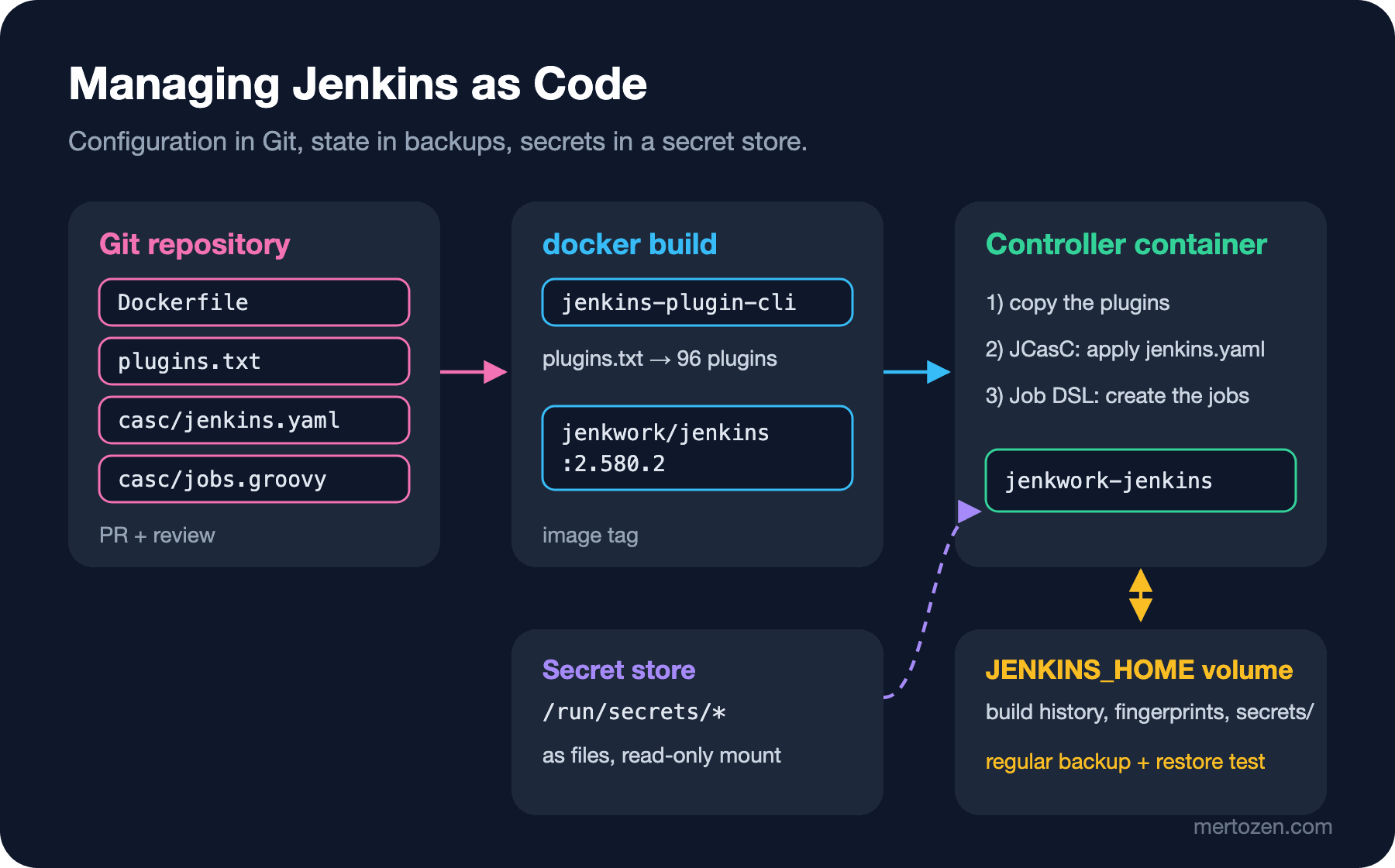
The payoff of this separation: if the controller's disk burns, the same Jenkins comes up within minutes on a new machine with the same image and the same YAML. The only thing lost is state that was not backed up.
Anatomy of the JCasC YAML
The jenkins.yaml in this series is 117 lines. The root keys are split by plugin: jenkins (core: security realm, authorization, nodes), credentials, unclassified (plugins' global settings: Jenkins URL (Uniform Resource Locator), Gitea server, global library) and jobs. We saw it piece by piece in the earlier posts; put together, its structure is this:
jenkins:
  systemMessage: "Bookstore CI - managed by JCasC, manual changes will be overwritten"
  numExecutors: 0
  securityRealm: ...
  authorizationStrategy: ...
  crumbIssuer: standard
  nodes: ...
credentials:
  system:
    domainCredentials: ...
unclassified:
  globalLibraries: ...
  location:
    url: http://jenkwork-jenkins:8080/
  giteaServers: ...
jobs:
  - file: /var/jenkins_casc/jobs.groovy
There are two most reliable ways to find the right key names. First, the controller's own schema documentation: /manage/configuration-as-code/reference, generated from the installed plugins. Second, exporting a running controller's current configuration (POST /manage/configuration-as-code/export). The start of our controller's export:
configuration-as-code:
  deprecated: "reject"
  restricted: "reject"
  unknown: "reject"
  version: "1"
unknown: "reject" explains why the controller did not start at all in the second post: an unrecognized field is an error, not a warning. The export has a trap too. The credentials section looks like this:
password: "{AQAAABAAAAAwBA8uGfqi9ezchmCFiUSAprkjFl+SWQSYDCVNSHP57lWkRk1rRmx2pbSz1p1VgFWhNKD2D0LMaDvX9AoBroHgyA==}"The value is encrypted, but encrypted with this controller's key. Putting the export into Git as is means putting secrets into the repository in a form anyone who knows the key can decrypt; and another controller cannot decrypt the value anyway. Use the export to learn the schema and to compare, not as a source. In the source YAML, secrets must always be a ${readFile:/run/secrets/...} or environment variable reference.
Drift: What Happens to a Manual Change?
I tried the opening question. I changed the executor count from the script console, then applied JCasC again:
numExecutors=2
reload HTTP 302
numExecutors=0
JCasC rewrites what is defined in the YAML on every apply; a manual change lives until the next reload or controller restart. That is a good thing: Git is the single source of truth. But for the week in between, the real state differed from Git and nobody saw it. So set two rules: do not change configuration from the UI (that is what the warning in systemMessage is for), and trigger the reload regularly from a pipeline so drift does not live long. One more warning: if a setting you did not define in the YAML is changed by hand, JCasC does not touch it; drift is corrected only for defined fields.
plugins.txt and the Image
Every line in plugins.txt is pinned in the form id:version. If you do not write a version, jenkins-plugin-cli takes the latest version on the day the image is built, and two images built two days apart come out with different plugins. A pinned list prevents that, but it also makes staying current your job. The tool itself helps with that:
$ jenkins-plugin-cli --plugin-file plugins.txt --available-updates --output txtThis command returns every plugin in the list with the most current version that can be written. In a small file where I wrote an old version (git:5.10.0), the output was git:5.11.0; for our plugins.txt every line came back the same, so all of them were current at the time of writing. Writing the output to a file and running diff is the simplest way to open a PR for plugin updates.
Baking plugins into the image has one more consequence: installing or updating plugins from the plugin manager in the Jenkins UI no longer makes sense, because it is lost with the next image. A plugin change is always a PR to plugins.txt.
What Changed in 2.580.1: Bundled Plugins
According to the LTS changelog, starting with 2.580.1 JUnit, Mailer, Matrix Authorization Strategy, Matrix Project, OWASP (Open Worldwide Application Security Project) Markup Formatter, Bouncy Castle API (Application Programming Interface), Instance Identity and a few more plugins no longer come bundled in jenkins.war. Jenkins used to install these "detached" plugins automatically on upgrades from very old versions; it no longer does, and the changelog says to install them through the plugin manager. I looked inside the war in the official image:
$ unzip -l /usr/share/jenkins/jenkins.war | grep -cE "\.(hpi|jpi)$"
0
There is not a single plugin archive in the war. The practical meaning: an installation that depends on junit or matrix-auth must list these plugins explicitly in plugins.txt. Both were in our list; otherwise the globalMatrix section in JCasC could not be applied and the controller would fail at startup.
Backups: What Is in JENKINS_HOME?
Our controller's JENKINS_HOME, from largest to smallest:
188M	plugins
66M	war
27M	.cache
5.5M	jobs
3.4M	updates
324K	fingerprints
300K	caches
88K	logs
44K	secrets
24K	nodes
20K	users
20K	.java
Most of the space is taken by things that need no backup: plugins and war come from the image, .cache and caches are recreated. What is really valuable is small: jobs (build history, logs, test results, archived artifacts), fingerprints, users and secrets. I took the backup from the controller's volume, leaving out the unnecessary parts:
tar -czf /backup/jenkins-home-20261108.tgz -C /src \
    --exclude=./war --exclude=./plugins --exclude=./workspace \
    --exclude=./caches --exclude=./.cache .
-rw-r--r-- 1 root root 1.7M Nov 8 04:59 jenkins-home-20261108.tgzCareful: the archive contains secrets/ and secret.key. As we saw in the fifth post, credentials are encrypted with these keys; so this backup is a decryptable copy of every credential. Store the backup like a secret: encrypted and with restricted access. Do not forget the reverse either: if you do not back up secrets/, the restored controller cannot decrypt its credentials.
A backup that cannot be restored is not a backup. I unpacked the archive into a new volume, started a second controller with the same image and the same JCasC (on port 18403), and asked the API:
{"_class":"org.jenkinsci.plugins.workflow.job.WorkflowJob","builds":[{"_class":"org.jenkinsci.plugins.workflow.job.WorkflowRun","number":5},{"_class":"org.jenkinsci.plugins.workflow.job.WorkflowRun","number":4},{"_class":"org.jenkinsci.plugins.workflow.job.WorkflowRun","number":3},{"_class":"org.jenkinsci.plugins.workflow.job.WorkflowRun","number":2},{"_class":"org.jenkinsci.plugins.workflow.job.WorkflowRun","number":1}],"lastBuild":{"_class":"org.jenkinsci.plugins.workflow.job.WorkflowRun","number":5,"result":"SUCCESS"}}
{"_class":"org.jenkinsci.plugins.workflow.job.WorkflowRun","artifacts":[{"relativePath":"bookstore-1.4.5.tgz"}]}
The build history and the artifact came back; the plugins folder, which never went into the backup, was refilled from the image (96 plugins). This restore test is also the foundation of the upgrade strategy in the next section.
LTS Upgrade Strategy
The LTS line brings fixes every four weeks and a new baseline every twelve. The flow I recommend:
- Read the changelog and the LTS upgrade guide; Java requirements, removed features and bundled plugin changes are written there.
- Change the tag in the
Dockerfile, updateplugins.txtwithjenkins-plugin-cli --available-updates, and send both in the same PR. - Build the image and start a test controller with production's latest backup: the same as the restore test above.
- Run a few real pipelines on the test controller (even without agents, with the linter and Replay); verify in the log that JCasC was applied without errors.
- Upgrade production in a maintenance window; your fallback plan is the old image tag and the latest backup.
Follow security advisories: the Jenkins project publishes advisories for the core and plugins on jenkins.io, and the controller shows a warning on the management page when an installed plugin has a known vulnerability. When an advisory arrives, what you do is the same flow, only faster.
In Production
Plugin hygiene: every plugin in the list should have an owner and a reason. Removing an unused plugin from plugins.txt makes the next upgrade and the next advisory smaller. Check plugins.jenkins.io for plugins whose maintainer has stepped away (up for adoption).
Test JCasC changes before they reach production. The simplest test is starting the image with the changed YAML once in CI (Continuous Integration) and waiting for /login to return 200; the boot error from the second post is exactly the kind of thing this test catches.
Monitor the controller itself too: disk, heap, queue length, offline agents. Managing it as code makes rebuilding the controller easy, but does not stop it from crashing.
Common Pitfalls
Putting the export into Git. The encrypted values in it are tied to that controller's key; it is both a leak risk and a non-portable file.
An unpinned plugins.txt. The same Dockerfile produces different Jenkins instances on different days.
Updating plugins from the UI. The change is lost with the next image build, and nobody understands why.
Never trying a restore. Missing secrets/, wrong permissions or a corrupt archive: all of these show up only during a restore.
Relying on bundled plugins. After 2.580.1 there are no plugins in the war; a plugin missing from the list looks as if it "disappeared" after the upgrade.
A Small Experiment
★☆☆ Export JCasC from your own controller and compare it with your own YAML. List the settings that are in the export but not in your YAML, that is, set by hand or by default.
★★☆ Move one plugin in plugins.txt to an old version on purpose, get the --available-updates output, and write a small script that shows only the changed line with diff.
★★★ Design a Jenkins job that runs weekly: it should back up JENKINS_HOME, unpack the backup into a new volume and start a temporary controller, verify it by querying the latest build through the API, and delete the temporary controller. Also decide where the backup will be stored encrypted.
We now have a Jenkins described in code, backed up and upgraded through testing. In the last post of the series we look the other way: how do you read an old Jenkins that grew by hand over the years, and how do you move it here? Freestyle to Pipeline, Blue Ocean to Pipeline Graph View, Java 17 to 21.