

What Is Jenkins? Controllers, Agents, Executors and When to Choose Jenkins Over GitHub Actions
Jenkins is a self-hosted CI/CD server made of a controller that plans the work and agents that run builds on their executors. Its history since Hudson, workspaces and labels, how an unmatched label leaves a build waiting in the queue, the price of the plugin ecosystem, Freestyle vs Pipeline, the LTS and weekly lines, and when Jenkins is the right choice over GitHub Actions.
Version note: The examples in this post were run with Jenkins 2.580.2 LTS (Long-Term Support), Java 21, Docker 29 and Gitea 28.
Guess First
In a Jenkins installation the controller has zero executors of its own, two agents provide three executors in total, and the agents carry the labels linux docker and linux ssh. Someone writes agent { label 'windows' } into a pipeline and starts a build. What happens? Does the build turn red immediately, does the controller think "I'm idle anyway" and take the job itself, or something else? We will see the answer halfway through the post, in a real build log.
Where Did Jenkins Come From?
The Jenkins story starts with Hudson. Kohsuke Kawaguchi, while working at Sun Microsystems, wrote a CI (Continuous Integration) server to scratch his own itch: a tool that compiled the code after every commit, ran the tests and showed everyone who broke the build. After Oracle acquired Sun in 2010, a dispute over the name followed, and in early 2011 the community decided to continue the project under the name Jenkins. Hudson lived on for a while, but the community and the plugins went with Jenkins.
The second turning point came in 2016 with Jenkins 2. Until then most jobs in Jenkins were Freestyle jobs assembled by clicking through the web UI (User Interface): a shell command in a textarea, a checkbox for "publish tests". Jenkins 2 put Pipeline, and the Jenkinsfile that defines it, at the center. The build recipe became a file that lives in the same repository as the application code, gets reviewed and has history. The rest of this series is built entirely on that idea.
The Skeleton: Controller, Agent, Executor, Workspace
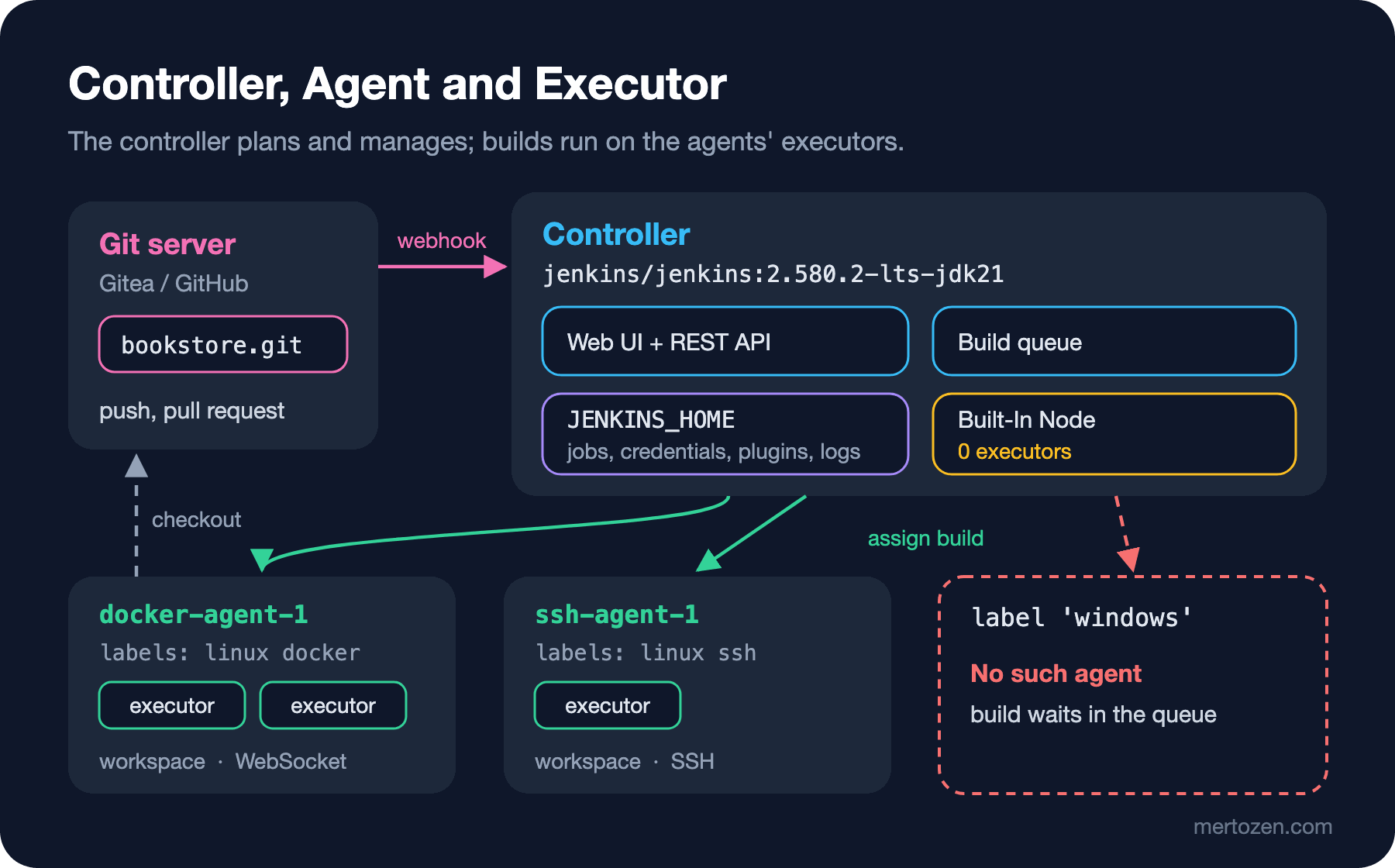
Four concepts are enough to understand Jenkins. The controller (formerly called master) is the brain: it serves the web UI and the REST (Representational State Transfer) API (Application Programming Interface), keeps job definitions, credentials, plugins and build history in the JENKINS_HOME folder, manages the build queue and decides where each job runs. An agent (formerly called slave) is the machine where the build actually runs: a physical server, a VM (Virtual Machine), a container or a Kubernetes pod. The agent connects to the controller over a channel called Remoting and runs the commands the controller sends.
An executor is the number of builds an agent can run at the same time; it is set as a number per agent. The workspace is the build's working folder on the agent: the code is checked out here and build outputs land here. In the environment I set up for this post, I asked the controller's REST API about its nodes:
curl -s -u "admin:$JENKINS_ADMIN_PASSWORD" \
  "http://localhost:18400/computer/api/json?tree=busyExecutors,totalExecutors,computer%5BdisplayName,numExecutors,offline%5D"
{
"_class": "hudson.model.ComputerSet",
"busyExecutors": 0,
"computer": [
{
"_class": "hudson.model.Hudson$MasterComputer",
"displayName": "Built-In Node",
"numExecutors": 0,
"offline": false
},
{
"_class": "hudson.slaves.SlaveComputer",
"displayName": "docker-agent-1",
"numExecutors": 2,
"offline": false
},
{
"_class": "hudson.slaves.SlaveComputer",
"displayName": "ssh-agent-1",
"numExecutors": 1,
"offline": false
}
],
"totalExecutors": 3
}You see three nodes. "Built-In Node" is the controller itself, and its executor count is zero on purpose: the controller does not run builds, it only manages. We will discuss why in the installation post; in short, a build running on the controller can touch JENKINS_HOME, meaning every secret and every job definition. The other two are agents: docker-agent-1 can run two builds at once, ssh-agent-1 one. The class names MasterComputer and SlaveComputer date from before Jenkins replaced the master/slave terminology with controller/agent; the Java API keeps the old names for backward compatibility.
Run the simplest possible pipeline and every one of these concepts shows up in the log:
pipeline {
    agent { label 'linux' }
    stages {
        stage('Hello') {
            steps {
                sh 'echo "Hello from $(hostname) as $(whoami)"'
            }
        }
    }
}
Started by user admin
[Pipeline] Start of Pipeline
[Pipeline] node
Running on docker-agent-1 in /home/jenkins/agent/workspace/hello
[Pipeline] {
[Pipeline] stage
[Pipeline] { (Hello)
[Pipeline] sh
+ hostname
+ whoami
+ echo Hello from 4248414140b8 as jenkins
Hello from 4248414140b8 as jenkins
[Pipeline] }
[Pipeline] // stage
[Pipeline] }
[Pipeline] // node
[Pipeline] End of Pipeline
Finished: SUCCESSlabel 'linux' matches both agents; the controller picked docker-agent-1, which had a free executor, and gave the build the workspace /home/jenkins/agent/workspace/hello. The sh step ran inside the agent container as the jenkins user. The pipeline itself, that is, the interpretation of the Groovy code, happened on the controller; only the sh command went to the agent. This split becomes important in the third post when we discuss CPS (Continuation-Passing Style) traps.
What If No Label Matches?
Here is the answer to the opening question. In the same environment I started a pipeline that asks for agent { label 'windows' }:
Started by user admin
[Pipeline] Start of Pipeline
[Pipeline] node
Still waiting to schedule task
There are no nodes with the label ‘windows’
The build neither turned red nor got picked up by the controller: it waited in the queue. The queue API says the same:
{"_class":"hudson.model.Queue","items":[{"_class":"hudson.model.Queue$BuildableItem","why":"There are no nodes with the label ‘windows’"}]}Jenkins has a point: an agent with that label might connect five minutes from now, and the build would run then. In practice, though, this means a build that waits forever. Even options { timeout(...) } in the pipeline will not save you, because in a declarative pipeline that timeout starts only after an agent has been found. I aborted the build by hand; the log ended with Finished: ABORTED. Mistyping a label is one of the traps newcomers to Jenkins fall into on day one.
The Plugin Ecosystem: Its Power and Its Price
The Jenkins core is surprisingly small. Checking out from Git, Pipeline itself, building inside Docker, credentials binding, test reports, coverage, GitHub integration: all plugins. The update center has well over a thousand plugins, and you will find one for almost every tool. That is why Jenkins has stayed relevant for nearly twenty years.
The price comes from the same place. In the controller image I prepared for this series I listed 17 plugins in plugins.txt; the number installed together with their dependencies:
$ docker exec jenkwork-jenkins sh -c 'ls /var/jenkins_home/plugins/*.jpi | wc -l'
96
I asked for 17 and got 96. Each one means a separate version, a separate maintainer and a separate security history. Most of the security advisories Jenkins publishes concern plugins rather than the core, and some plugins lost their maintainer's attention years ago. When you inherit a Jenkins, the first job is to look at the installed plugin list and ask "which of these do we actually use?" We will see how to pin plugins by version and manage the controller as code in the eleventh post.
Freestyle or Pipeline?
In an old Jenkins you will probably see hundreds of Freestyle jobs. A Freestyle job's recipe lives in config.xml on the controller; you do not know who changed what and when, copying the same job for another branch means pressing "Copy job", and the difference between two jobs is visible only through an XML (Extensible Markup Language) diff. With Pipeline the recipe lives in the Jenkinsfile: it is reviewed in a pull request, changes along with the branch and can be reverted.
Pipeline has two syntaxes. Declarative Pipeline (starting with pipeline { ... }) is a structured, constrained language; Jenkins can validate it before running it, and because its rules are fixed it is easy to read. Scripted Pipeline (starting with node { ... }) is plain Groovy; flexible but undisciplined. For new work the answer is almost always Declarative Pipeline; when you need flexibility you open a script { } block inside it. There is no reason to use Freestyle for new work today; we will cover migrating existing Freestyle jobs to Pipeline in the last post.
LTS or Weekly?
Jenkins ships on two release lines. The weekly line produces a new release every week (the latest weekly on Docker Hub as I write this is 2.589). On the LTS (Long-Term Support) line, every 12 weeks the community picks a recent weekly release as the baseline; on top of that baseline come .1, .2 and .3 fix releases roughly every four weeks. 2.580.2, which the examples in this post run on, is the second fix release of the 2.580 baseline and came out on 28 October 2026.
The rule for production is simple: use LTS. Weekly gets new features earlier, but something changes every week, and plugins can quickly come to depend on weekly's new APIs. The same split shows up in Docker image tags: jenkins/jenkins:lts-jdk21 follows the LTS line, jenkins/jenkins:latest follows weekly.
When Jenkins, and When Not?
This is the real question. If your code is on GitHub, your team is small and your builds run on a standard Linux machine, GitHub Actions almost always means less work: no server, no upgrades, no plugins, no backups, no disks. These are good reasons to choose Jenkins:
| Situation | Jenkins | GitHub Actions |
|---|---|---|
| Air-gapped network, source code kept in-house | Natural fit | Requires GitHub Enterprise Server and self-hosted runners |
| Mixed SCM (Bitbucket, GitLab, Azure Repos, in-house Git) | A plugin for each | GitHub-centric |
| Special hardware (GPU, signing device, test device) | Your own agent, your own label | Possible with a self-hosted runner |
| Regulation: logs and artifacts must stay in-house | Everything on your own disk | Needs extra configuration |
| Small team, code on GitHub | Too much maintenance | Usually the right choice |
Let me be clear about one thing: the cost of Jenkins is not a license, it is maintenance. Someone has to follow LTS upgrades, update plugins, clean agent disks and back up the controller. If a platform team already owns that work in a corporate environment, Jenkins is a very good tool; if nobody owns it, in two years it becomes a server nobody dares to touch. We will discuss the GitHub Actions side in detail in the upcoming GitHub Actions series, and tool-independent pipeline thinking in the upcoming CI/CD Fundamentals series.
The Environment in This Series
We really run everything in this series. The environment consists of five containers brought up by a single compose.yaml: the controller (an image based on jenkins/jenkins:2.580.2-lts-jdk21 with the plugins added), an inbound agent connecting over WebSocket, an agent connecting over SSH (Secure Shell), a separate Docker daemon (Docker-in-Docker) so agents can build inside Docker, and Gitea as a local Git server standing in for GitHub. The sample application is the site's familiar Bookstore: Bookstore.Api written with .NET 10 and bookstore-web written with Angular 22. In the ninth post two more servers running systemd are added as deploy targets. The installation itself is the topic of the next post.
In Production
The controller is a single point. The open source edition of Jenkins has no built-in high availability for the controller; when the controller goes down, the queue stops and webhooks are lost. Two things are therefore vital: a regular and tested backup of JENKINS_HOME, and a recipe that brings rebuilding the controller down to minutes (Configuration as Code plus plugins.txt).
Watch the controller's resources. Build logs, test reports and archived artifacts are written to the controller's disk; if you do not limit build history, the disk fills up one day. Because the Groovy part of a pipeline runs in the controller's JVM (Java Virtual Machine), doing heavy work in Groovy (large JSON (JavaScript Object Notation) parsing, long loops) slows down all of Jenkins; heavy work belongs on the agent inside sh.
Size executor counts by CPU (Central Processing Unit) and memory. Give a four-core agent eight executors and two .NET builds plus an Angular build run at the same time and all of them slow down. A common starting point is one executor per core or fewer; then tune by watching build times.
Common Pitfalls
First, running builds on the controller. In a default installation the Built-In Node has executors, and every job without a label runs there. That is both a security hole and a performance problem.
Second, mistyping a label or asking for one that does not exist. As you saw above, the build does not fail, it quietly waits in the queue. Part of the "Jenkins is slow" complaints are actually builds that never started.
Third, thinking plugins are cheap. Every plugin brings a dependency tree, an upgrade risk and an attack surface. Before saying "there is a plugin for that too", check whether you can do the same with one command inside sh.
Fourth, seeing Jenkins as "installed, done". The LTS line brings fixes every four weeks and a new baseline every twelve; the Java requirement changes too (Java 21 has been mandatory since 2.555.1). A controller nobody follows becomes impossible to upgrade within a few years.
A Small Experiment
★☆☆ On a Jenkins you have access to (or on the local environment you will set up in the next post), call /computer/api/json. How many executors does the Built-In Node have? If it is not zero, try to find which builds ran there in the last week.
★★☆ Export the installed plugin list (/pluginManager/api/json?depth=1) and separate the plugins you use directly from those that came in only as dependencies. How many plugins do you actually ask for?
★★★ Fill in the table above for your own team: where is your code, what hardware do your builds need, where must logs and artifacts stay, who will maintain Jenkins? Based on the answers, justify in one paragraph whether Jenkins or GitHub Actions makes more sense.
In the next post we build this environment from scratch: Jenkins LTS with Docker, Java 21, what the setup wizard does, the first admin user, choosing plugins and the doors to close before going to production.