

Git Submodules and Subtrees: Bringing Another Repo into Your Project, and Monorepo or Polyrepo?
A submodule stores no files in the superproject, only a commit hash (a gitlink), which is why cloning needs --recurse-submodules and updating means committing the pointer. We attach Bookstore's shared contract repo as a submodule and as a subtree, and compare the CI setup, sharing as a package and the monorepo decision.
Version note: The commands in this post were tested with Git 2.56.1. git subtree comes from Git's contrib folder; Git for Windows ships it, while some Linux distributions install it as a separate package.
Guess First
Bookstore, the online bookstore used as the shared example across this site's series, lives in three repos: bookstore-api for the API, bookstore-web for the Angular client and bookstore-contracts, which holds the OpenAPI contract both of them use. Instead of copying the contract into two repos, you attach it to bookstore-api as a submodule. In the examples the remote is a local Git HTTP server on 127.0.0.1; it stands in for the repos on GitHub.
$ git clone -q http://127.0.0.1:52030/git/bookstore-api.git
$ cd bookstore-api
$ git submodule add http://127.0.0.1:52030/git/bookstore-contracts.git contracts
Cloning into '/home/user/src/bookstore-api/contracts'...
The contracts folder contains two files: README.md and openapi/bookstore.yaml. When you run git status now, how many files do you see in the staging area? Two, three or four?
$ git status
On branch main
Your branch is up to date with 'origin/main'.

Changes to be committed:
  (use "git restore --staged <file>..." to unstage)
	new file:   .gitmodules
	new file:   contracts
Two. One is .gitmodules, the other is contracts itself; the files inside it do not show up at all. The rest of this post builds on understanding why these two lines look the way they do.
What Does a Submodule Actually Store?
.gitmodules is an ordinary text file; it records the submodule's path and where to clone it from:
$ cat .gitmodules
[submodule "contracts"]
	path = contracts
	url = http://127.0.0.1:52030/git/bookstore-contracts.git
$ git diff --cached contracts
diff --git a/contracts b/contracts
new file mode 160000
index 0000000..7a81215
--- /dev/null
+++ b/contracts
@@ -0,0 +1 @@
+Subproject commit 7a81215602efdc607e75b0ff8719d2878f89ef69
The diff for contracts is a single line: a commit hash. After committing, the tree shows the same thing:
$ git commit -q -m 'Add bookstore-contracts as a submodule'
$ git ls-tree HEAD
100644 blob 0581a423c99009afd16f2c189bdf39612b515f88	.gitmodules
100644 blob 276f89a62bfe39e9f41041d496592592cc9156ea	README.md
160000 commit 7a81215602efdc607e75b0ff8719d2878f89ef69	contracts
$ git -C contracts log --oneline -1
7a81215 Add books endpoint contract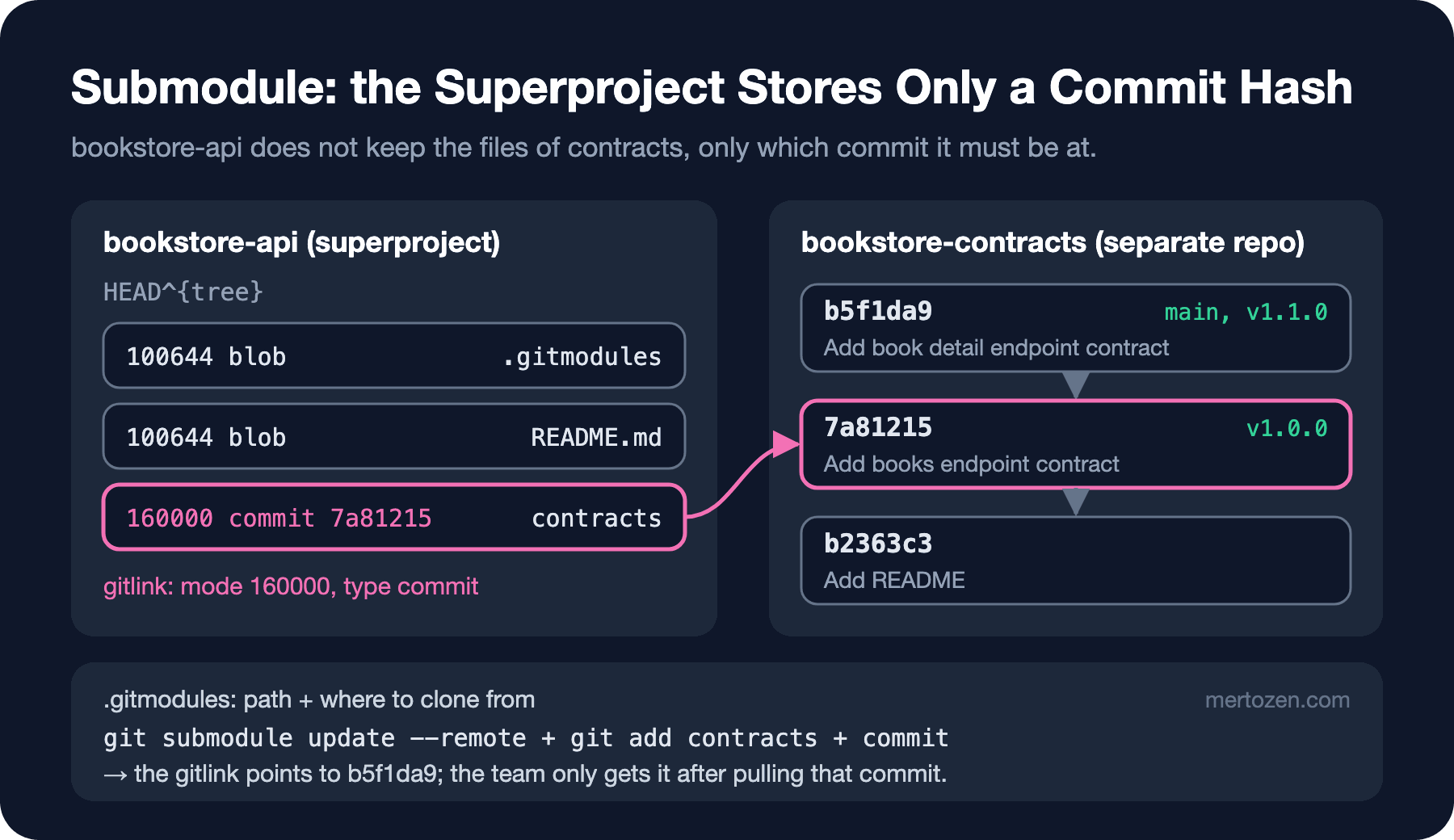
In the trees we looked at in the post on what is inside a commit, every line pointed to a blob or another tree. Here there is a third kind: an entry with mode 160000 and type commit. This is called a gitlink. The superproject does not store the files of bookstore-contracts; it only stores the fact that "in this commit, the contracts folder must be at that commit". The files live in a separate repo that contracts/.git points to (Git keeps it under .git/modules/contracts).
The consequence of this design: every commit of bookstore-api records exactly which version of bookstore-contracts it works with. Go back to a commit from six months ago and the contract goes back to its state on that day as well. The price is that you manage that pointer by hand.
Cloning: --recurse-submodules
Ada pushed the change, and Emre clones the repo as usual:
$ git clone -q http://127.0.0.1:52030/git/bookstore-api.git api-emre
$ cd api-emre
$ ls contracts
$ git submodule status
-7a81215602efdc607e75b0ff8719d2878f89ef69 contracts
$ git submodule update --init --recursive
Submodule 'contracts' (http://127.0.0.1:52030/git/bookstore-contracts.git) registered for path 'contracts'
Cloning into '/home/user/src/api-emre/contracts'...
Submodule path 'contracts': checked out '7a81215602efdc607e75b0ff8719d2878f89ef69'
$ git submodule status
 7a81215602efdc607e75b0ff8719d2878f89ef69 contracts (v1.0.0)
After a plain clone, contracts is an empty folder. The - at the start of the submodule status line means "this submodule has not been initialized yet". update --init first registers the URL from .gitmodules in .git/config, then clones the repo and checks out the commit in the gitlink. --recursive also brings in the submodule's own submodules, if it has any. If you remember it up front, it is a single step:
$ git clone --recurse-submodules http://127.0.0.1:52030/git/bookstore-api.git api-ayse
Cloning into 'api-ayse'...
Submodule 'contracts' (http://127.0.0.1:52030/git/bookstore-contracts.git) registered for path 'contracts'
Cloning into '/home/user/src/api-ayse/contracts'...
Submodule path 'contracts': checked out '7a81215602efdc607e75b0ff8719d2878f89ef69'
Why Does a Submodule Sit on a Detached HEAD?
Step into the submodule in Emre's clone:
$ cd contracts
$ git status
HEAD detached at 7a81215
nothing to commit, working tree clean
$ git branch -a
* (HEAD detached at 7a81215)
  main
  remotes/origin/HEAD -> origin/main
  remotes/origin/main
In the branch post we saw a detached HEAD as a warning sign. Here it is normal and deliberate: the superproject points to a commit, not to a branch. Even if main in bookstore-contracts moves on tomorrow, bookstore-api wants whatever its gitlink says. So Git puts the submodule on that commit and does not attach it to any branch.
An interesting detail: in Ada's repo, in the submodule that submodule add had just cloned, HEAD was still on main. The detached HEAD starts after the first submodule update. This difference is also the reason for the "lost commit" in the pitfalls section.
Updating the Submodule and Committing the Pointer
The contracts team added the book detail endpoint and pushed the v1.1.0 tag. Ada moves the API to that version:
$ git submodule update --remote contracts
From http://127.0.0.1:52030/git/bookstore-contracts
   7a81215..b5f1da9  main       -> origin/main
 * [new tag]         v1.1.0     -> v1.1.0
Submodule path 'contracts': checked out 'b5f1da9975344069cc14b2aaf4fab41144869dce'
$ git status
On branch main
Your branch is up to date with 'origin/main'.

Changes not staged for commit:
  (use "git add <file>..." to update what will be committed)
  (use "git restore <file>..." to discard changes in working directory)
	modified:   contracts (new commits)

no changes added to commit (use "git add" and/or "git commit -a")
$ git diff --submodule=log
Submodule contracts 7a81215..b5f1da9:
  > Add book detail endpoint contract
$ git add contracts
$ git commit -q -m 'Bump contracts to v1.1.0'
--remote takes the tip of the branch on the submodule's remote instead of the commit in the gitlink. By default the branch is the remote's HEAD; you can change it by adding a line like branch = release to .gitmodules. The important part: update --remote only moves the submodule in your own working folder. For the team to see it, git add contracts and a commit are required; the modified: contracts (new commits) line in git status is the reminder. --submodule=log turns the diff from a pair of hashes into a readable list of commits; if you do not want to type it every time, there is the diff.submodule log setting.
Emre pulls the next morning:
$ git pull -q
$ git status
On branch main
Your branch is up to date with 'origin/main'.

Changes not staged for commit:
  (use "git add <file>..." to update what will be committed)
  (use "git restore <file>..." to discard changes in working directory)
	modified:   contracts (new commits)

no changes added to commit (use "git add" and/or "git commit -a")
$ git submodule update
Submodule path 'contracts': checked out 'b5f1da9975344069cc14b2aaf4fab41144869dce'
$ git config set submodule.recurse true
The same line, this time with the opposite meaning. The pull updated the gitlink, but the submodule's working folder stayed on the old commit. If Emre runs git add contracts here, he undoes Ada's update. The right move is git submodule update. The submodule.recurse true setting adds --recurse-submodules by default to commands such as pull, switch and checkout; turning it on in a repo with submodules removes most of this mistake.
There is a safety net on the push side as well. If you make a new commit in the submodule and push the superproject that points to it without pushing the submodule, your teammates get a gitlink pointing to a commit that does not exist and submodule update fails. git push --recurse-submodules=check verifies that the submodule commits referenced by the commits being pushed are available on at least one remote of the submodule, and stops the push otherwise. push.recurseSubmodules check makes it the default. We did not run push in this lab, so this behaviour is taken from the git-push documentation.
Submodules in CI
In GitHub Actions, actions/checkout does not fetch submodules by default. If the build reads a contract file, the checkout step needs one more line:
steps:
  - uses: actions/checkout@v7
    with:
      # recursive: also fetches submodules of submodules
      submodules: recursive
  - run: git submodule status
The point that is often missed here is access. The workflow's default token can only reach the repo it runs in. If bookstore-contracts is a private repo, checkout cannot clone it; you have to pass a token that can read that repo to the token: input, or a deploy key to the ssh-key: input. We checked this file with actionlint; the full version is in the post's snapshot.
The Alternative: git subtree
All the difficulty of submodules comes from the "two separate repos, one pointer" model. git subtree takes a different route: it brings the external repo's files directly into your own history. Let's attach the same contract to the Angular client this way:
$ git clone -q http://127.0.0.1:52030/git/bookstore-web.git
$ cd bookstore-web
$ git subtree add --prefix=contracts http://127.0.0.1:52030/git/bookstore-contracts.git v1.0.0 --squash
git fetch http://127.0.0.1:52030/git/bookstore-contracts.git v1.0.0
From http://127.0.0.1:52030/git/bookstore-contracts
 * tag               v1.0.0     -> FETCH_HEAD
Added dir 'contracts'
$ git log --oneline --graph
*   5352fa9 Merge commit 'd1da7ffb66198d630898602fa6facdba01b0daea' as 'contracts'
|\
| * d1da7ff Squashed 'contracts/' content from commit 7a81215
* d437aa4 Add README
$ git log -1 --format=%B HEAD^2
Squashed 'contracts/' content from commit 7a81215

git-subtree-dir: contracts
git-subtree-split: 7a81215602efdc607e75b0ff8719d2878f89ef69
contracts is now an ordinary folder; whoever clones the repo runs no extra command and CI needs no setting. --squash adds a single "squashed" commit instead of the external repo's whole history. The git-subtree-split line in that commit's message records which upstream commit it came from; later updates use it:
$ git subtree pull --prefix=contracts http://127.0.0.1:52030/git/bookstore-contracts.git v1.1.0 --squash -m 'Update contracts to v1.1.0'
From http://127.0.0.1:52030/git/bookstore-contracts
 * tag               v1.1.0     -> FETCH_HEAD
Merge made by the 'ort' strategy.
 contracts/openapi/bookstore.yaml | 3 +++
 1 file changed, 3 insertions(+)
The other direction works too. While working in the client repo, Ayşe added an endpoint to the contract and wants to give it back to bookstore-contracts:
$ git commit -q -am 'Add create book contract'
$ git subtree split --prefix=contracts -b contracts-upstream
...
Created branch 'contracts-upstream'
4106b4438d81e64af14c878bae677eb7baa1483c
$ git log --oneline contracts-upstream -3
4106b44 Add create book contract
b5f1da9 Add book detail endpoint contract
7a81215 Add books endpoint contract
split picked out the commits that touch contracts/ and produced a new history that treats the folder as the root. Notice that the two hashes at the bottom are the same as the real commits in bookstore-contracts: thanks to the git-subtree-split lines in the squash commits, the new commit sits directly on top of upstream's tip. You can push this branch to bookstore-contracts and open a pull request from there. The price: split walks the whole history, which gets slow in big repos, and every subtree command asks for the prefix and the URL each time.
Submodule, Subtree, Package: Which One?
The third way to share common code is not to put it into a repo at all: publish the C# client generated from the contract as a NuGet package and the TypeScript types as an npm package. The NuGet and npm publishing posts in the Versioning and Release Management series cover this route in detail.
| Submodule | Subtree | NuGet/npm package | |
|---|---|---|---|
| What sits in the superproject? | A commit hash (gitlink) | The files themselves | A version number |
| What does a cloner do? | --recurse-submodules or update --init | Nothing | dotnet restore / npm ci |
| Version pinning | To a commit | To a squash commit | To a semver version |
| Contributing back | Branch, push and pull request in the submodule | subtree split and push | Pull request in the source repo, new version |
| CI setup | submodules: recursive and an access token | Not needed | Access to the package feed |
| Where it works best | Code owned by separate teams, changing at its own pace | Small shared code that rarely changes | A versioned library with several consumers |
The Bookstore Decision: Monorepo or Polyrepo?
Submodules and subtrees are really a symptom of a bigger question: why is the code in three repos? Keeping Bookstore in a single repo (a monorepo) makes every command in this post unnecessary. The contract, the API and the client change in the same commit; a pull request that changes an endpoint updates the client at the same time, and the question "which version of the API works with which version of the contract?" goes away. The advantage of a polyrepo setup, where each part lives in its own repo, is independence: different teams, different permissions, different release schedules, small and fast clones.
For the Bookstore team the decision came out like this: the API, the Angular client and the contract belong to the same team and most features touch all three, so they go into one repo. A monorepo needs path filters so that not everything is built on every change; that topic is in the .NET + Angular monorepo post of the GitHub Actions series. If the contract is later opened to institutional customers as a separate SDK, it gets published as a package at that point. Submodules still make sense in two cases: when you want to pin an upstream you do not control, a fork for example, to a specific commit, and when merging the repos is not possible for organizational reasons.
Common Pitfalls
The first is forgetting to commit the pointer. If you ignore the modified: contracts (new commits) line in git status after update --remote and commit only your own code, CI and the team build with the old contract. Code that works on your machine does not compile anywhere else.
The second is committing inside a submodule without a branch. Ada makes a small fix in the contract and does not notice that the submodule is on a detached HEAD:
$ cd contracts
$ git status -sb
## HEAD (no branch)
$ git commit -q -am 'Add changelog section'
$ git log --oneline -1
a0235d4 Add changelog section
$ cd ..
$ git submodule update
Submodule path 'contracts': checked out 'b5f1da9975344069cc14b2aaf4fab41144869dce'
$ git -C contracts log --oneline -1
b5f1da9 Add book detail endpoint contract
submodule update put the submodule back on the commit the gitlink points to, and no branch points to a0235d4. The commit is not lost, it is in the reflog; the method from the reflog post works here too:
$ git -C contracts reflog -3
b5f1da9 HEAD@{0}: checkout: moving from a0235d4b32a51f82cd20763acba3aeeaf32238ad to b5f1da9975344069cc14b2aaf4fab41144869dce
a0235d4 HEAD@{1}: commit: Add changelog section
b5f1da9 HEAD@{2}: checkout: moving from main to b5f1da9975344069cc14b2aaf4fab41144869dce
$ git -C contracts switch -c docs/changelog HEAD@{1}
Previous HEAD position was b5f1da9 Add book detail endpoint contract
Switched to a new branch 'docs/changelog'
Make it a habit: before changing anything in a submodule, create a branch with git switch -c <branch>.
The third is a private submodule that silently stays empty or fails to clone in CI. The checkout step runs with a token that only has access to its own repo; plan the access up front.
The fourth is writing an SSH URL into .gitmodules. A URL in the git@github.com:... form breaks the clone on every machine without an SSH key, CI included. Writing an HTTPS URL and letting those who prefer SSH rewrite it on their own machines with url.insteadOf is more flexible; we will see that setting in the git config post.
A Small Experiment
★☆☆ Create two local repos, add one to the other as a submodule and find the 160000 line in the output of git cat-file -p HEAD^{tree}. Then make a commit in the submodule and compare the output of git diff and git diff --submodule=log in the superproject.
★★☆ Clone a repo with submodules using a plain git clone and look at the - sign in the submodule status output. Then pull with submodule.recurse true and confirm that the submodule updates by itself.
★★★ Add the same shared folder to one repo as a submodule and to another with subtree add --squash. Make three commits in the shared repo, update both sides, then change something on the subtree side and give it back with subtree split. Note how many commands you ran and how many new commits were created with each method.
In this post we attached one repo to another. What happens when the repo itself grows? In the next post we move book covers to Git LFS, download only what we need with partial clone, sparse checkout and shallow clone, and remove a large file that was committed by mistake from the history.