

Git Branch: A Movable Pointer, HEAD and git switch
We see with real output that a branch is a 41-byte file holding a single commit hash, how HEAD works, listing, renaming and deleting with git branch, moving around with git switch and switch -c, getting into and out of detached HEAD, and the old use of git checkout.
Version note: The commands in this post were tested with Git 2.54; git switch has been available since Git 2.23.
Guess First
The bookstore repo has eight commits. You are about to create a new branch called wishlist. How much disk space do you think that takes? Does Git copy all the files somewhere, or does it duplicate the history? Think for a moment, then look at these two commands:
$ cat .git/refs/heads/main
5bcf046dbd24e20d7e3374f432be72472e31ac56
$ wc -c .git/refs/heads/main
      41 .git/refs/heads/main
The answer is 41 bytes: a 40-character hash and a newline. A branch is a small file with a single commit hash in it. It copies none of your files and duplicates no history. That is why creating a branch in Git is almost free, and why teams have no problem opening and closing dozens of branches a day.
A Branch Is Just a Pointer
The hash above is the full form of the commit main points to. You can get the same information by asking Git:
$ git rev-parse main
5bcf046dbd24e20d7e3374f432be72472e31ac56
$ git branch -v
  discount 86303f4 Add discount to cart total
* main     5bcf046 Add Snow Crash
git branch on its own lists the branch names; -v adds the commit each one points to and that commit's message. The asterisk shows which branch you are on right now.
Think of a branch as a bookmark in a book. The bookmark is not the page itself, just a marker that says "I am here". When you make a new commit, Git writes the new commit's hash into the file of the branch you are on; the bookmark moves one page forward. The commits stay where they are, only the pointer moves. This idea of a "movable pointer" is the foundation of everything ahead, from merge to rebase.
One note: in repos that store refs in the reftable format, you will not see these individual files under .git/refs/heads/. Reftable is planned to become the default in Git 3.0, but the logic does not change; a branch is still a name paired with a hash.
HEAD: Where Are You Right Now?
So how does Git know which branch you are on? The answer is in the .git/HEAD file:
$ cat .git/HEAD
ref: refs/heads/main
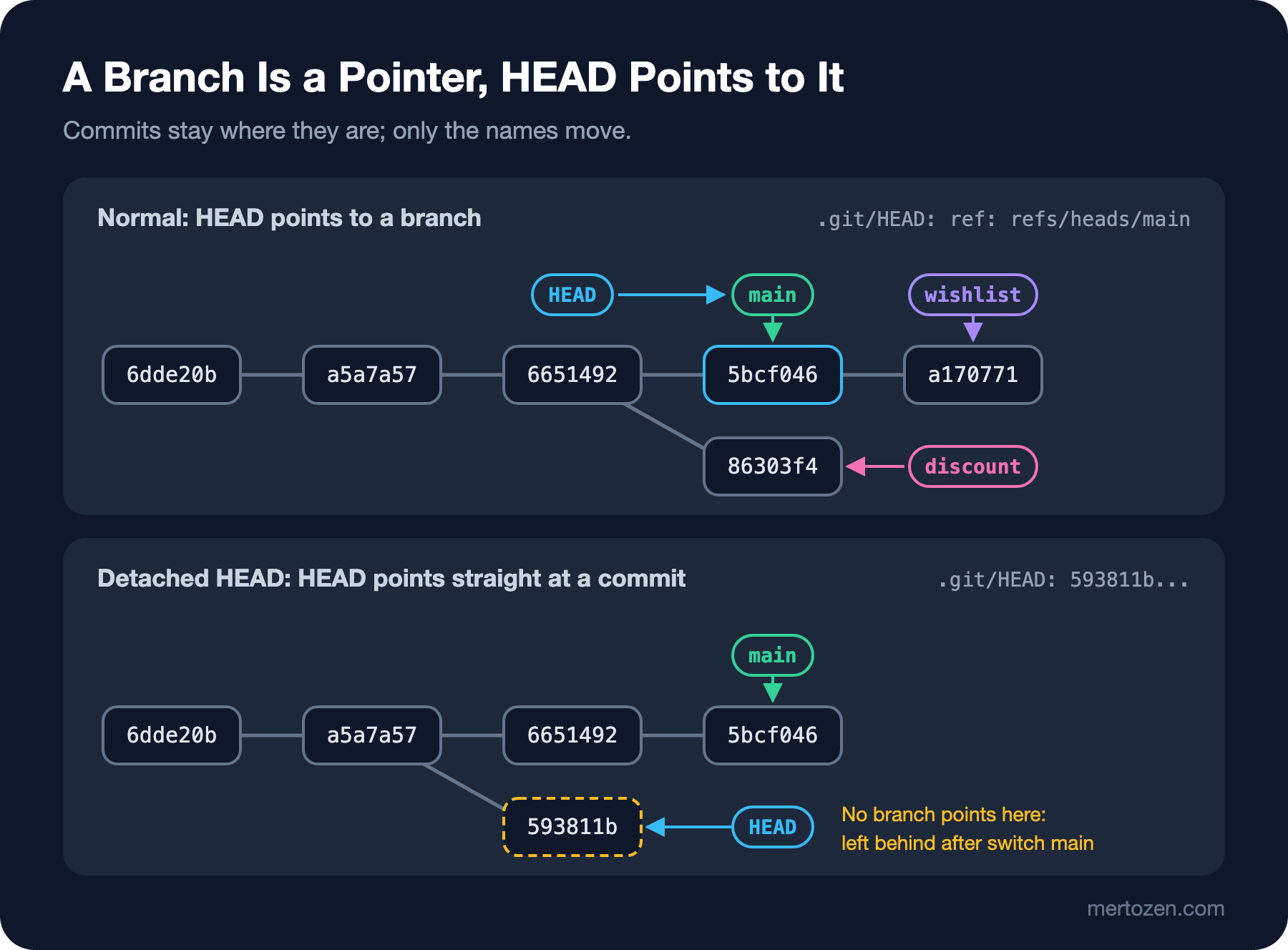
Normally HEAD points not to a commit but to a branch. It says "I am on main right now". When you commit, Git first looks at HEAD, finds the branch it points to and moves that branch to the new commit. So it is a pointer to a pointer. In map terms: branches are street names and HEAD is the "you are here" marker. The marker sits on one street and moves along with it as you walk.
Creating and Moving Between Branches
Let's create a branch for the wishlist feature:
$ git branch wishlist
$ git branch -v
  discount 86303f4 Add discount to cart total
* main     5bcf046 Add Snow Crash
  wishlist 5bcf046 Add Snow Crash
git branch wishlist only creates the pointer; it does not take you to that branch. The asterisk is still next to main, and both branches point to the same commit. To move over, you use git switch:
$ git switch wishlist
Switched to branch 'wishlist'
$ cat .git/HEAD
ref: refs/heads/wishlist
$ git add src/wishlist.js
$ git commit -m "Add wishlist"
[wishlist a170771] Add wishlist
 1 file changed, 9 insertions(+)
 create mode 100644 src/wishlist.js
$ git branch -v
  discount 86303f4 Add discount to cart total
  main     5bcf046 Add Snow Crash
* wishlist a170771 Add wishlist
HEAD now points to wishlist. With the new commit, wishlist moved one step forward and main stayed where it was. The [wishlist a170771] in the commit line also tells you which branch the commit was written to. In the graph it looks like this:
$ git log --oneline --graph --all
* a170771 Add wishlist
* 5bcf046 Add Snow Crash
| * 86303f4 Add discount to cart total
|/
* 6651492 Reword README
* a5a7a57 Update book prices
* 6dde20b Add cart total
* f9b9660 Add .gitignore
* 02ea975 Add book list
* 7ff0565 Add README
When you go back to main, the working tree goes back to that branch's snapshot too. src/wishlist.js disappears from disk because it is not in main's commit. It is not deleted; it comes back the moment you switch to wishlist:
$ git switch main
Switched to branch 'main'
$ ls src
books.js
cart.js
$ git switch -
Switched to branch 'wishlist'
$ git switch -
Switched to branch 'main'
git switch - goes back to the previous branch, like cd - in the terminal; it is very handy when you go back and forth between two branches. To create a branch and switch to it at once, you write git switch -c instead of two commands:
$ git switch -c search
Switched to a new branch 'search'
$ git add src/search.js
$ git commit -m "Add title search"
[search bd6dc8a] Add title search
 1 file changed, 7 insertions(+)
 create mode 100644 src/search.js
Renaming and Deleting
Don't like the branch name? Change it with -m. The pointer keeps pointing to the same commit, only the name of the file changes:
$ git branch -m search title-search
$ git branch
  discount
  main
* title-search
  wishlist
To delete, you use -d. But Git does not quietly delete a branch that has commits no other branch can reach:
$ git switch main
Switched to branch 'main'
$ git branch -d title-search
error: the branch 'title-search' is not fully merged
hint: If you are sure you want to delete it, run 'git branch -D title-search'
hint: Disable this message with "git config set advice.forceDeleteBranch false"
$ git branch -D title-search
Deleted branch title-search (was bd6dc8a).
-d is the safe delete: it deletes the branch if its commits have been merged somewhere, and stops if they have not. -D means "I know, delete it anyway". What gets deleted is, again, only the pointer. The bd6dc8a commit stays in the repo for a while, and if you noted the hash from the output you can bring the branch back with git branch title-search bd6dc8a. If you did not, there is the reflog; we will get to it in the recovery post.
git branch -a also lists remote-tracking branches. Since we have not added a remote yet, it currently gives the same output as git branch; in the remote post it will fill up with lines like remotes/origin/main.
Detached HEAD
What happens when you want to look at an old commit? If you give git switch a hash, it objects first:
$ git switch a5a7a57
fatal: a branch is expected, got commit 'a5a7a57'
hint: If you want to detach HEAD at the commit, try again with the --detach option.
$ git switch --detach a5a7a57
HEAD is now at a5a7a57 Update book prices
$ cat .git/HEAD
a5a7a57e162d35efad9ce807a3711ebc054faa00
$ git status
HEAD detached at a5a7a57
nothing to commit, working tree clean
Look at the contents of .git/HEAD. It is no longer a branch name but a hash directly. This is called detached HEAD: the "you are here" marker has been lifted off the street and left on an empty spot on the map. This state is not an error. It is a perfectly normal place to build and try an old version, or to check in which commit a bug started.
The trouble starts when you commit here. You can commit, but no branch points to the new commit:
$ git commit -am "Try a lower price"
[detached HEAD 593811b] Try a lower price
 1 file changed, 1 insertion(+), 1 deletion(-)
$ git switch main
Warning: you are leaving 1 commit behind, not connected to
any of your branches:

  593811b Try a lower price

If you want to keep it by creating a new branch, this may be a good time
to do so with:

 git branch <new-branch-name> 593811b

Switched to branch 'main'
Git is warning you: the moment you switch to main, nothing points to 593811b any more. It is like a street with no sign; the house is there, but nobody knows the way.
Getting Out of Detached HEAD
There are two ways out. If you want to keep the experiment you made in detached HEAD, you create a new branch right where you are with git switch -c price-test while you are still there. If you already switched to another branch after committing, you create the branch from the hash, as the warning suggests:
$ git branch price-test 593811b
$ git branch -v
  discount   86303f4 Add discount to cart total
* main       5bcf046 Add Snow Crash
  price-test 593811b Try a lower price
  wishlist   a170771 Add wishlist
If you do not want to keep the experiment, you do not need to do anything: you go back to a branch with git switch main or git switch -, and the orphaned commit gets cleaned up over time.
The Old Way: checkout
In older posts and StackOverflow answers you will always see git checkout for switching branches. git checkout main does the same job as git switch main; git checkout -b search the same as git switch -c search. Give it a hash and it goes into detached HEAD without asking, printing a long explanation:
$ git checkout 6dde20b
Note: switching to '6dde20b'.

You are in 'detached HEAD' state. You can look around, make experimental
changes and commit them, and you can discard any commits you make in this
state without impacting any branches by switching back to a branch.

If you want to create a new branch to retain commits you create, you may
do so (now or later) by using -c with the switch command. Example:

  git switch -c <new-branch-name>

Or undo this operation with:

  git switch -

Turn off this advice by setting config variable advice.detachedHead to false

HEAD is now at 6dde20b Add cart total
Notice that even the explanation recommends git switch. The problem was that checkout did two separate jobs in one command: switching branches and restoring files. git checkout -- src/books.js silently throws away your changes in that file. One use of the same command was harmless, the other destructive. Git 2.23 split these two jobs into git switch and git restore. Both were marked experimental for a long time, and that marker was dropped in Git 2.51. checkout is not being removed; it stays in the Git 3.0 plan as well. In this series we will use switch for branch work and restore for file work.
Common Pitfalls
The first is trying to switch branches with uncommitted changes. If your change is in a file that differs on the target branch, Git stops you:
$ git switch discount
error: Your local changes to the following files would be overwritten by checkout:
	src/books.js
Please commit your changes or stash them before you switch branches.
Aborting
This is a safeguard. You either commit, stash (we will cover stash in its own post), or drop the change with git restore. If the change is in a file that is identical on both branches, Git carries it along; that is the source of the "why is my change on the other branch too?" surprise. An uncommitted change belongs to no branch; it belongs to the working tree.
The second is typing git branch new-name and thinking you have moved to the new branch. That command only creates a pointer; the next commit still goes to the old branch. For new work, make git switch -c your habit.
The third is working in detached HEAD for hours and then switching branches. If you skip past the warning without reading it, your commits are left orphaned. If you see "HEAD detached" in the first line of git status, create a branch before committing.
The fourth is spaces or inconsistent formats in branch names. Git does not accept spaces; teams usually use prefixed names like feature/wishlist or fix/cart-total. These prefixes also pay off on the CI/CD side, for example running the deploy step only on branches that start with release/.
A Small Experiment
★☆☆ Create a new branch with git switch -c experiment and look at the contents of .git/HEAD and .git/refs/heads/experiment. Make a commit and check which of the two files changed.
★★☆ Go two commits back with git switch --detach HEAD~2, make a commit, and this time rescue it with git switch -c rescue before switching branches. Draw the result with git log --oneline --graph --all.
★★★ Make a change in src/books.js and, without committing, try switching first to wishlist and then to discount. Why does one allow it and the other refuse? Explain the answer using the contents of src/books.js on the two branches.
We now have branches that have moved apart: wishlist is just ahead of main, while discount has parted ways with main. In the next post we will see why these two cases behave differently in a merge, the difference between fast-forward and three-way merge, and what a merge commit is.