

What Is Full-Text Search? Inverted Indexes, Relevance and Where Elasticsearch Fits
Full-text search splits text into words ahead of time and keeps, in an inverted index, the documents each word appears in; unlike LIKE '%…%' it does not scan the table, handles suffixes and case through an analyzer and ranks results with BM25. With real output: LIKE's Index Scan over 200 thousand rows, a toy C# inverted index whose BM25 score matches Elasticsearch's _explain, the standard analyzer's Turkish gaps, shards, replicas and licensing.
Version note: The examples in this post were run with Elasticsearch 9.5.6 (Lucene 10.5.2, the official docker.elastic.co/elasticsearch/elasticsearch:9.5.6 image), SQL Server 2025 and .NET 10.
Guess First
Bookstore, the online bookstore used as the shared example across this site's series, keeps its catalog in SQL Server. The dbo.Books table holds 200,036 books: 36 real classics we prepared by hand (İnce Memed, Kürk Mantolu Madonna, Çalıkuşu, Dune, Emma…) and the rest deterministic generated English demo titles. Title has a nonclustered index and the column collation is Latin1_General_100_CI_AS. Today the search box runs these queries:
SET STATISTICS IO ON;

SELECT BookId, Title FROM dbo.Books WHERE Title LIKE N'İnce%';           -- 1
SELECT BookId, Title FROM dbo.Books WHERE Title LIKE N'ince%';           -- 2
SELECT BookId, Title FROM dbo.Books WHERE Title LIKE N'%memed%';         -- 3
SELECT BookId, Title FROM dbo.Books WHERE Title LIKE N'%kurk mantolu%';  -- 4
SELECT BookId, Title FROM dbo.Books WHERE Title LIKE N'%memed ince%';    -- 5
SELECT BookId, Title FROM dbo.Books WHERE Description LIKE N'%öğretmenler%'; -- 6
Which ones find İnce Memed or Kürk Mantolu Madonna? Which one reads a few index pages and stops, and which one walks the whole table? Çalıkuşu's description contains "öğretmen olarak" (Turkish for "as a teacher"); does the sixth query, which looks for the plural "öğretmenler", find it? Make a guess before reading on.
Why LIKE Is Not Enough
The script is sql/01-like.sql in the repo; dotnet run --project src/Bookstore.SearchLab -- seed-sql fills the table (it reads the connection string from the BOOKSTORE_SQL environment variable; an empty database is enough, it creates the tables itself from sql/schema.sql). I shortened the output and dropped the zero counters from the STATISTICS IO lines:
--- 1: prefix
1 İnce Memed
2 İnce Memed 2
Table 'Books'. Scan count 1, logical reads 3, read-ahead reads 0 ...
--- 2: prefix, lowercase
Table 'Books'. Scan count 1, logical reads 3, read-ahead reads 0 ...
--- 3: contains
1 İnce Memed
2 İnce Memed 2
Table 'Books'. Scan count 1, logical reads 2229, read-ahead reads 0 ...
--- 4: without Turkish characters
Table 'Books'. Scan count 1, logical reads 2229, read-ahead reads 0 ...
--- 5: words in a different order
Table 'Books'. Scan count 1, logical reads 2229, read-ahead reads 0 ...
--- 6: a different word form
Table 'Books'. Scan count 1, logical reads 5656, read-ahead reads 0 ...
Only two of the six queries found anything. The first one finished with 3 logical reads, because LIKE N'İnce%' can be turned into a range query. SHOWPLAN_TEXT shows it plainly:
|--Index Seek(OBJECT:([esseries_01].[dbo].[Books].[IX_Books_Title]), SEEK:([esseries_01].[dbo].[Books].[Title] >= N'İnce' AND [esseries_01].[dbo].[Books].[Title] < N'İncF'),  WHERE:([esseries_01].[dbo].[Books].[Title] like N'İnce%') ORDERED FORWARD)
|--Index Scan(OBJECT:([esseries_01].[dbo].[Books].[IX_Books_Title]),  WHERE:([esseries_01].[dbo].[Books].[Title] like N'%memed%'))
A leading % destroys that range. A B-tree index is a sorted list; values that "contain memed" can sit anywhere in it, so SQL Server reads all 2,229 pages of the index and compares characters on every row. The description column has no index; the sixth query scanned the table itself, 5,656 pages. On 200 thousand rows that takes milliseconds, but the cost grows linearly with the row count, and every concurrent search request repeats the same scan.
More important than performance are the books that were not found:
- Query two:
Latin1_General_100_CI_ASis case-insensitive, but "İ" and "i" are not a case pair in this collation. The same query withCOLLATE Turkish_100_CI_ASreturns 2 rows. - Query four: the user typed "kurk" instead of "kürk". The accent-insensitive
Latin1_General_100_CI_AIfinds it (1 row),Turkish_100_CI_AIdoes not (0 rows), because in Turkish ü and u are separate letters, not an accent difference. - Query five: the words are right, the order is not.
LIKElooks at character sequences, not words. - Query six: the text has "öğretmen", the search has "öğretmenler".
LIKEknows nothing about suffixes; if the text does not contain the searched string, there is no result.
There is one more problem we did not even see: LIKE does not rank what it finds. For the search "memed", which is more relevant, İnce Memed or İnce Memed 2? For LIKE the question does not exist; a row matches or it does not. The SQL Fundamentals series post "NULL and Predicates: Three-Valued Logic, LIKE, IN, BETWEEN and COALESCE" covers the rules of LIKE in detail; what matters here is that those rules were never designed for searching words.
Inverted Index: From Word to Document
Full-text search solves these problems by storing the data differently from the start. Instead of going from row to word, it goes from word to row: for every word (term) it keeps the list of documents that contain it. That list is a posting list, and the whole structure is an inverted index. To see the idea, I wrote the simplest version of what Lucene does in C#:
// term -> (document id -> occurrences of the term in that document)
SortedDictionary<string, SortedDictionary<int, int>> postings = new(StringComparer.Ordinal);
Dictionary<int, int> lengths = [];

foreach ((int docId, string title) in Titles)
{
    List<string> terms = Tokenize(title);
    lengths[docId] = terms.Count;
    foreach (string term in terms)
    {
        if (!postings.TryGetValue(term, out SortedDictionary<int, int>? docs))
        {
            docs = [];
            postings[term] = docs;
        }
        docs[docId] = docs.GetValueOrDefault(docId) + 1;
    }
}

// Lowercase with Turkish rules and split on anything that is not a letter or digit
private static List<string> Tokenize(string text)
{
    List<string> terms = [];
    StringBuilder current = new();
    foreach (char c in text.ToLower(Turkish))
    {
        if (char.IsLetterOrDigit(c))
        {
            current.Append(c);
        }
        else if (current.Length > 0)
        {
            terms.Add(current.ToString());
            current.Clear();
        }
    }
    if (current.Length > 0)
    {
        terms.Add(current.ToString());
    }
    return terms;
}
dotnet run --project src/Bookstore.SearchLab -- inverted-index memed builds this index from three titles:
Documents:
  1: İnce Memed (length 2)
  2: İnce Memed 2 (length 3)
  3: Kürk Mantolu Madonna (length 3)
Inverted index (term -> posting list):
  2        -> [2]
  ince     -> [1, 2]
  kürk     -> [3]
  madonna  -> [3]
  mantolu  -> [3]
  memed    -> [1, 2]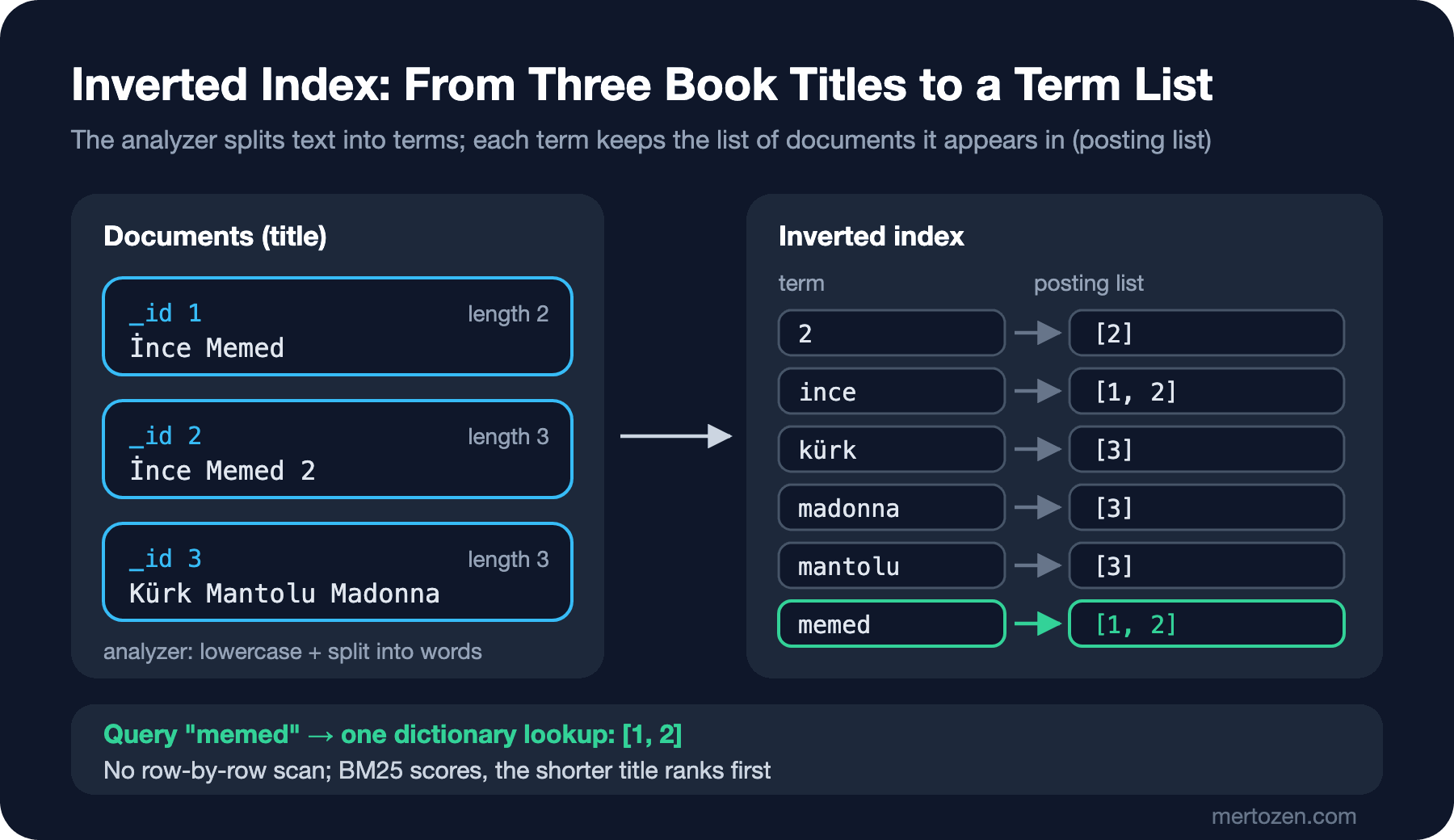
Searching for "memed" is now a dictionary lookup: go to the key memed and take the list [1, 2]. However many million documents there are, we do not walk the rows one by one. A multi-word search such as "memed ince" is the intersection or union of two lists; if word order does not matter, there is no problem either. Case, suffixes and Turkish characters depend on how we process the text before writing it to the index: in this example I used ToLower(tr-TR), so "İnce" and "ince" became the same term. That processing is called analysis, and the component that does it is an analyzer. Analyzers in Elasticsearch are chains of tokenizers and filters; we build them for Turkish in detail in post 4.
A real inverted index stores much more than this dictionary: each term's positions inside the document (for phrase search), compressed posting lists, field lengths. But the core idea is just this.
Relevance and BM25: Which Result Comes First?
The inverted index tells us which documents match. The user, though, looks at the first page; the real question is which one comes first. That is relevance, and Elasticsearch uses BM25 by default, a scoring function that looks at how often a term appears in a document, how rare it is in the collection and how long the field is. You do not need to memorise the formula; three intuitions are enough:
Rare terms are worth more: a word that appears in every book does not tell books apart. This part is the idf, the inverse document frequency.
Repetition helps but saturates: a word appearing three times beats appearing once, but thirty times is not ten times better. The k1 parameter sets how fast it saturates.
A match in a short field means more: "memed" in a two-word title is a stronger signal than in a long title. The b parameter weighs this.
Our toy index computes BM25 with Lucene's formula, using k1 = 1.2 and b = 0.75:
Query term 'memed': in 2 of 3 documents, idf = 0.4700
  doc 1: freq 1, length 2, avg length 2.6667, tf part 0.5063, score 0.5235
  doc 2: freq 1, length 3, avg length 2.6667, tf part 0.4324, score 0.4471
Ranking for "memed":
  0.5235  İnce Memed
  0.4471  İnce Memed 2
Let's put the same three titles into Elasticsearch and ask for the real score. First we start a one-off container; we turn security off only in this first post, only on your own machine and bound to 127.0.0.1. In post 2 we build a permanent lab with security on:
docker run -d --name bookstore-es -p 127.0.0.1:9200:9200 -e discovery.type=single-node -e xpack.security.enabled=false -e node.name=bookstore-es -e ES_JAVA_OPTS="-Xms512m -Xmx512m" docker.elastic.co/elasticsearch/elasticsearch:9.5.6I write requests in Kibana Dev Tools format (method, path, JSON body below). We install Kibana in post 2; for now you can send the same requests with curl, e.g. curl -s -H "Content-Type: application/json" "localhost:9200/title-demo/_search?pretty" -d '{"query":{"match":{"title":"memed"}}}'. On Windows, use curl.exe from PowerShell 7; Windows PowerShell 5.1 mangles the quotes in the body.
PUT /title-demo
{ "settings": { "number_of_replicas": 0 }, "mappings": { "properties": { "title": { "type": "text" } } } }

PUT /title-demo/_doc/1
{ "title": "İnce Memed" }

PUT /title-demo/_doc/2
{ "title": "İnce Memed 2" }

PUT /title-demo/_doc/3?refresh=true
{ "title": "Kürk Mantolu Madonna" }

GET /title-demo/_explain/1
{ "query": { "match": { "title": "memed" } } }
The heart of the _explain output:
"value" : 0.52354836,
"description" : "score(freq=1.0), computed as boost * idf * tf from:",
  "value" : 2.2,         "description" : "boost"
  "value" : 0.47000363,  "description" : "idf, computed as log(1 + (N - n + 0.5) / (n + 0.5)) from:"
      "value" : 2,       "description" : "n, number of documents containing term"
      "value" : 3,       "description" : "N, total number of documents with field"
  "value" : 0.50632906,  "description" : "tf, computed as freq / (freq + k1 * (1 - b + b * dl / avgdl)) from:"
      "value" : 1.0,     "description" : "freq, occurrences of term within document"
      "value" : 1.2,     "description" : "k1, term saturation parameter"
      "value" : 0.75,    "description" : "b, length normalization parameter"
      "value" : 2.0,     "description" : "dl, length of field"
      "value" : 2.6666667, "description" : "avgdl, average length of field"
The numbers match our calculation exactly: 2.2 × 0.4700 × 0.5063 = 0.5235. The boost of 2.2 is k1 + 1; Elasticsearch keeps that factor so scores stay comparable with older versions. A search for "kürk memed" puts Kürk Mantolu Madonna on top with 0.9331: "kürk" appears in only one document, so its idf is 0.9808 against 0.4700 for "memed". The user typed two words and the rare one decided the order.
Two measures come up all the time when you talk about relevance. Precision is how many of the results you return are actually relevant; recall is how many of the relevant ones you manage to return. With LIKE you cannot tune both: %word% raises recall but also finds "word" inside other words and lowers precision. In full-text search they are tuned with separate tools: the analyzer drives recall (suffixes, synonyms, Turkish characters), the query type and scoring drive precision (operators, phrases, boosts).
Elasticsearch Is Only as Good as Its Analyzer
Moving to Elasticsearch is not a fix by itself. Let's load the 36 books into a books index without giving any mapping (the file is data/books.ndjson in the repo, in Bulk API format):
curl -s -H "Content-Type: application/x-ndjson" -X POST "localhost:9200/books/_bulk?refresh=true" --data-binary "@data/books.ndjson"Since we gave no mapping, Elasticsearch assigned the standard analyzer to the text fields (details in post 3). A few searches:
GET /books/_search
{ "query": { "match": { "description": "memed" } } }
→ hits.total.value: 0

GET /books/_search
{ "query": { "match": { "description": "öğretmen" } } }
→ 1 hit: Çalıkuşu (3.4578454)

GET /books/_search
{ "query": { "match": { "description": "öğretmenler" } } }
→ hits.total.value: 0
The first search came back empty, even though İnce Memed's description starts with "Memed'in Çukurova'da…". _analyze shows why:
POST /_analyze
{ "analyzer": "standard", "text": "Memed'in Çukurova'da ağalara karşı başkaldırısını" }

memed'in | çukurova'da | ağalara | karşı | başkaldırısını
The standard analyzer treats the apostrophe as part of the word; the index has no term memed, it has memed'in. "öğretmenler" is empty for the same kind of reason: the analyzer does not reduce words to their stem. Let's put a number on recall. Nine books have the stem "roman" (Turkish for novel) in their description, but a match on "roman" finds only 6; the three ending in "aşkın romanı", "öncü romanı" and "distopya romanı" are left out. Recall is 6/9. On the precision side, here is the opposite case: searching titles for "the hobbit" returns 3 results (The Hobbit 5.65, Hobbit 3.49, The Lord of the Rings 2.76), because match joins words with OR by default. With "operator": "and" only one result is left. The ranking had already put the right book on top; how tight to make precision is a product decision.
So Elasticsearch gives you the tools to do what LIKE cannot, but for Turkish text you have to pick those tools yourself. In post 4 we will see how the turkish analyzer drops the apostrophe, how it reduces "öğretmenler" to "öğretmen", and where it cuts too much.
Where Elasticsearch Fits: Lucene, Index, Shard, Replica, Node
Elasticsearch is a distributed search engine with a REST interface, built on Lucene, the Java library that writes and queries the inverted index. Lucene manages an index in a single directory; Elasticsearch adds distribution across machines, replication, the JSON API, security and aggregations on top. The basic concepts:
- Document: the JSON record being indexed; a book for us. Every document has an
_id; we used the ISBN. - Index: where documents of the same kind are kept; somewhere between a table and a database in SQL Server terms. The mapping defines its field types.
- Shard: a part of an index; each shard is a Lucene index of its own. Since Elasticsearch 7, a new index gets 1 primary shard by default.
- Replica: a copy of a primary shard; both protection against losing a node and extra read capacity. The default is 1 replica.
- Node and cluster: each Elasticsearch process is a node; the nodes working together form a cluster.
GET /_cat/shards/books?v&h=index,shard,prirep,state,docs,node

index shard prirep state      docs node
books 0     p      STARTED      36 bookstore-es
books 0     r      UNASSIGNED
On a single node the replica cannot be assigned: putting a copy of a shard on the same node protects nothing, so Elasticsearch does not do it. That is why the index health is yellow. It is not an error; we come back to it when we read cluster health in post 2. There is also the near-real-time idea: a document you write does not show up in searches until the next refresh (by default once a second, if the index has received a search in the last 30 seconds). That is why I used ?refresh=true above; we discuss its cost in post 5.
Licensing, OpenSearch and Where Things Stand
When you choose Elasticsearch you need to know its licensing history, because the managed service options split along it:
Up to 7.10 the core code was licensed under Apache 2.0. In January 2021 Elastic moved the code, starting with 7.11, to a dual license of SSPL and the Elastic License.
AWS responded in April 2021 with OpenSearch, an Apache 2.0 fork of 7.10.2. In September 2024 the project moved to the OpenSearch Software Foundation under the Linux Foundation. The latest release on Docker Hub is 3.9.0.
At the end of August 2024 Elastic added AGPLv3 as a third option for the source code. Today the source can be used under a choice of AGPLv3, SSPL and ELv2; the ready-made binaries and Docker images Elastic distributes come under ELv2.
For a .NET team the decision usually comes down to this: if you run Bookstore on your own servers or in Kubernetes, using the official image under ELv2 as the back end of an application is generally fine; what ELv2 forbids is selling Elasticsearch to others as a managed service. If your legal team only accepts OSI-approved licenses, look at AGPLv3 or OpenSearch. In the cloud, Elastic Cloud (on AWS, Azure and Google Cloud) runs Elasticsearch, and Amazon OpenSearch Service runs OpenSearch. This series follows Elasticsearch 9.x; we note where OpenSearch diverges as we go and compare them in post 13.
When You Don't Need Elasticsearch
Elasticsearch means a second data store: a separate cluster, a copy that has to be kept in sync, a JVM to monitor. If the catalog is small and search is not central to the product, fewer moving parts may be enough:
SQL Server Full-Text Search: a separately installed component; one full-text index per table, scoring with CONTAINS/FREETEXT and CONTAINSTABLE. The data is already in SQL Server, so there is no sync problem. It is not installed in the SQL Server container used for this post, so I did not try it here.
PostgreSQL: the PostgreSQL series post "PostgreSQL Full-Text Search: tsvector, tsquery, the Turkish Configuration, unaccent and pg_trgm" covers Turkish stemming, searching without Turkish characters through unaccent and typo tolerance with pg_trgm, with real output.
MongoDB: the MongoDB series post "MongoDB Indexes: Compound Indexes and the ESR Rule, Multikey, Partial, TTL, Collation and explain" covers text indexes and MongoDB Search.
Redis: the Redis series post "Redis JSON and the Query Engine: JSON Documents, FT.CREATE, FT.SEARCH, FT.AGGREGATE and NRedisStack" shows an in-memory search option that is fast but limited.
The signals for moving to Elasticsearch tend to come together: tuning relevance (title matters more than description, best sellers first), separate analyzers for Turkish and English, synonyms, typo tolerance, autocomplete, faceted filters (category, price range, language) and growing data. Bookstore's "search books" page wants all of these; over the series we build the back end of that page. Vector search, semantic_text and hybrid search belong to the RAG series posts "Choosing a Vector Database: pgvector, SQL Server 2025, Qdrant, Azure AI Search and Elasticsearch" and "Hybrid Search and Reciprocal Rank Fusion: Combining Keyword and Vector Search".
In Production
Adding Elasticsearch does not change the system's source of truth. A book's price, stock and title live in SQL Server; Elasticsearch holds a searchable copy of them. How late that copy is updated (refresh and sync), how to rebuild it if it breaks (reindex) and which side to trust when they disagree should be designed from day one. Post 5 covers the sync, post 11 zero-downtime reindexing with aliases.
Measure the right thing. When comparing with LIKE, don't look only at time; the SQL Server numbers in this post are logical reads, not durations. The real quality measure for search is relevance: build a small "query → expected top results" set from real user searches and run it on every change. We use _rank_eval, Elasticsearch's API for this, in post 7.
Finally, an open Elasticsearch connected to the internet gets found within hours. The container without security in this post is bound to 127.0.0.1 only and is only for experiments; production settings (TLS, API keys, roles) come in posts 2 and 12.
Common Pitfalls
Trying to speed up a leading % with an index. A B-tree index is for sorted values; "contains" searches need a full-text index or some other structure.
Assuming Turkish search fixes itself once you move to Elasticsearch. The default standard analyzer stores "Memed'in" as a single term and knows nothing about suffixes; choosing the analyzer is your job.
Treating the score as an absolute value. A BM25 score exists to order the results of one query; comparing scores across queries or indices, or setting thresholds like "hide anything below 2", usually goes wrong.
Making Elasticsearch the primary database. There are no transactions, no constraints, and mappings cannot change afterwards; the system of record for orders and stock should stay in SQL Server.
Thinking about the license later. The choice of managed service (Elastic Cloud or Amazon OpenSearch Service) and the features you can use depend on the license; decide it together with the architecture.
A Small Experiment
★☆☆ Give the inverted-index command the query "ince memed 2". Which document comes out on top, and why? Run the same query with match on the title-demo index and compare the scores.
★★☆ Change the sixth query in 01-like.sql to Description LIKE N'%öğretmen%'. Is Çalıkuşu found, and how many logical reads does it take? Then add a nonclustered index on Description and try again: which warning does SQL Server give when creating the index, and why does the query still read the whole index even though the logical read count drops?
★★★ Add a fourth document titled "Memed Memed Memed" to title-demo and run the "memed" search again. How did freq, dl, avgdl and the idf change in the _explain output? Add the same document to the toy index and confirm that the C# calculation still gives the same result as Elasticsearch.
In the next post we drop this one-off container and build a permanent lab: what Elastic's start-local script does, bringing up Elasticsearch and Kibana with security on through Docker Compose, reading cluster health in Dev Tools, creating an API key, and the first connection from .NET with Elastic.Clients.Elasticsearch.