

Getting Data into Elasticsearch: the Bulk API, Refresh, Versioning and Syncing with SQL Server
You write data to Elasticsearch with the Bulk API, not one document at a time; but bulk is not atomic, a written document is not searchable until a refresh, and dual writes from SQL Server silently lose data. With real output: IndexAsync versus bulk, BulkAll and refresh_interval, per-item bulk failures, if_seq_no and external versions, a BackgroundService polling with rowversion, and MIN_ACTIVE_ROWVERSION so open transactions are not missed.
Version note: The examples in this post were run with Elasticsearch 9.5.6, SQL Server 2025, .NET 10, Elastic.Clients.Elasticsearch 9.5.3 and Microsoft.Data.SqlClient 7.1.2, in the lab we built in post 2. Timings were taken on a single development machine against a single-node lab; read them as ratios, not absolute values.
Guess First
It is time to load the catalog of Bookstore, the online bookstore used as the shared example across this site's series, into Elasticsearch. The bulk-compare command in the lab console writes the same generated books into an empty books-load index in two ways:
// 1) One request per book, 2,000 books
foreach (Book book in books.Take(2_000))
{
    IndexResponse response = await client.IndexAsync(book, i => i.Index(LoadIndex));
}

// 2) The Bulk API in batches of 1,000, 20,000 books
foreach (Book[] chunk in books.Chunk(1_000))
{
    BulkResponse response = await client.BulkAsync(b => b.Index(LoadIndex).IndexMany(chunk));
}
Does the second way, writing ten times as many books, take longer? Does a single bad document inside a bulk request bring down the whole request? And can you find the book you just wrote if you search for it right away?
The Bulk API: Thousands of Operations in One Request
dotnet run --project src/Bookstore.SearchLab -- create-index books-load --no-data
dotnet run --project src/Bookstore.SearchLab -- bulk-compare

IndexAsync x 2,000: 9,076 ms
BulkAsync 20 x 1,000: 1,226 ms
Writing one by one cost about 4.5 ms per book; with bulk, 20,000 books finished in 1.2 seconds. The difference does not come from Elasticsearch's write speed but from the fixed cost per request: the HTTP round trip, authentication, routing to the shard, writing to the translog. The Bulk API spreads that cost over a thousand operations. The request body is NDJSON: first a line naming the operation, then (where needed) the document itself. The books.ndjson we sent with curl in the first post had this format:
POST /_bulk
{ "index": { "_index": "books-load", "_id": "9781000000016" } }
{ "isbn": "9781000000016", "title": "İnce Memed", "price": 385.0 }
{ "create": { "_index": "books-load", "_id": "9781000000023" } }
{ "isbn": "9781000000023", "title": "İnce Memed 2", "price": 395.0 }
{ "update": { "_index": "books-load", "_id": "9781000000016" } }
{ "doc": { "price": 370.0 } }
{ "delete": { "_index": "books-load", "_id": "9781000000337" } }
There are four operations: index (create if missing, replace if present), create (create only if missing), update (partial change) and delete (no body). Elasticsearch 9.0 made the parsing of these lines stricter: a missing closing brace, extra keys after the operation, or data after the closing brace used to pass with a warning in 8.x and are now errors. If you have scripts that produce NDJSON by hand, check them before moving to 9.
There is no fixed right batch size. Elastic's advice is to start with 100 documents on a single node and a single shard, double until throughput stops improving, pick the smaller size on a tie, and keep a request under a couple of tens of megabytes. For small documents like books, between one and a few thousand is usually a good start.
For a big initial load, the client's BulkAll helper makes the job easier: it splits an IEnumerable into pages, sends the pages in parallel, and when it gets a 429 (Too Many Requests, the cluster saying it cannot keep up) it waits and retries:
BulkAllObservable<Book> bulkAll = client.BulkAll(SyntheticBooks.Generate(count), b => b
    .Index(LoadIndex)
    .Size(2_000)
    .MaxDegreeOfParallelism(2)
    .BackOffRetries(3)
    .BackOffTime(TimeSpan.FromSeconds(2))
    .DroppedDocumentCallback((item, book) => Console.WriteLine($"Dropped {book.Isbn}: {item.Error?.Reason}")));

int pages = 0;
bulkAll.Wait(TimeSpan.FromMinutes(10), response => pages++);
Console.WriteLine($"BulkAll: {count:N0} books in {pages} pages, {watch.ElapsedMilliseconds:N0} ms");
I ran the same load twice, each time into an empty index; the second time I turned refresh off for the duration of the load:
dotnet run --project src/Bookstore.SearchLab -- bulk-all 100000
BulkAll: 100,000 books in 50 pages, 3,853 ms

PUT /books-load/_settings
{ "index": { "refresh_interval": "-1" } }

dotnet run --project src/Bookstore.SearchLab -- bulk-all 100000
BulkAll: 100,000 books in 50 pages, 3,178 ms

PUT /books-load/_settings
{ "index": { "refresh_interval": null } }
POST /books-load/_refresh
With 100 thousand small documents the difference is around 20 percent; with millions of documents and a cluster with a few replicas it is much larger. Elastic's advice for an initial load is to do both: set refresh_interval to -1 and replicas to 0 during the load, and put both back when it finishes. Setting replicas to zero means losing data if a node dies during the load; since the source data is in SQL Server you can rerun the load. Passing null resets the setting to its default; if you forget to turn refresh back on, new books never show up in search.
Bulk Is Not Atomic: Handling Failures Item by Item
In a bulk request every operation succeeds or fails on its own; there is no transaction. The bulk-errors command sends four operations: a valid book, a document with a field that is not in the mapping (the index is "dynamic": "strict"), a create, and a second create with the same _id:
BulkRequest request = new(LoadIndex)
{
    Operations =
    [
        new BulkIndexOperation<Book>(books[0]) { Id = books[0].Isbn },
        // Not in the mapping, and the mapping is "dynamic": "strict"
        new BulkIndexOperation<object>(new { isbn = "9789999999991", title = "Draft", pageCount = 412 }) { Id = "9789999999991" },
        new BulkCreateOperation<Book>(books[1]) { Id = books[1].Isbn },
        new BulkCreateOperation<Book>(books[1]) { Id = books[1].Isbn }
    ]
};

BulkResponse response = await client.BulkAsync(request);
Console.WriteLine($"HTTP {response.ApiCallDetails.HttpStatusCode}, IsValidResponse {response.IsValidResponse}, errors {response.Errors}");
foreach (ResponseItem item in response.Items)
{
    Console.WriteLine(item.Error is null
        ? $"  {item.Operation} {item.Id}: {item.Status} {item.Result}"
        : $"  {item.Operation} {item.Id}: {item.Status} {item.Error.Type}: {item.Error.Reason}");
}
HTTP 200, IsValidResponse False, errors True
index 9781000000016: 201 created
index 9789999999991: 400 strict_dynamic_mapping_exception: [1:53] mapping set to strict, dynamic introduction of [pageCount] within [_doc] is not allowed
create 9781000000023: 201 created
create 9781000000023: 409 version_conflict_engine_exception: [9781000000023]: version conflict, document already exists (current version [1])The HTTP status is 200 because the request was processed as a whole. Two books were written and two operations were rejected. When the client sees errors: true it sets IsValidResponse to false, but which operation failed and why is in Items or ItemsWithErrors, in the same order as the operations you sent. There are two kinds of failure and they need different handling: transient ones like 429 (retry) and permanent ones like 400 or 409 (retrying will not help; log it, put it in an error table or a dead letter queue, and carry on with the rest). BulkAll's DroppedDocumentCallback is exactly for the second kind.
Near-Real-Time: the Cost of Refresh
A document written to Elasticsearch first goes to an in-memory buffer and, for durability, to the translog. To become searchable, the buffer has to turn into a new Lucene segment; that is called a refresh. The refresh command:
await client.IndexAsync(book, i => i.Index(LoadIndex));
Console.WriteLine($"After index:              {await CountAsync(client, book.Isbn)} hit(s)");

await Task.Delay(TimeSpan.FromSeconds(2));
Console.WriteLine($"Two seconds later:        {await CountAsync(client, book.Isbn)} hit(s)");

Book second = book with { Isbn = "9789999999977" };
Stopwatch watch = Stopwatch.StartNew();
await client.IndexAsync(second, i => i.Index(LoadIndex).Refresh(Refresh.WaitFor));
Console.WriteLine($"After refresh=wait_for:   {await CountAsync(client, second.Isbn)} hit(s), index call took {watch.ElapsedMilliseconds} ms");
After index: 0 hit(s)
Two seconds later: 1 hit(s)
After refresh=wait_for: 1 hit(s), index call took 532 msThe answer to the guess: no, you cannot find it right away. The default refresh is once a second, but only for indices that received a search in the last 30 seconds; an index that is never searched stops refreshing (search idle) and triggers a refresh on the first search. If you need to read what you wrote immediately, there are three options:
refresh=true: forces a refresh right then. Done on every write it creates many small segments and increases merge load; the most expensive option for bulk writes.refresh=wait_for: does not force a new refresh, waits for the next one. The call takes longer (532 ms here) but adds no extra load to the cluster.- Neither: in the user interface, show "saved" from the response to the write request, not from a search result. Search results can be a few seconds behind anyway.
Remember: as we saw in post 2, GET /books/_doc/{id} is real-time; reading a single book by its id needs no refresh.
Optimistic Concurrency and External Versions
If two processes read and change the same book, the second one overwrites the first one's change. Elasticsearch keeps a _seq_no and _primary_term for every document; when writing you can say "write only if it has not changed since I read it". The concurrency command simulates two writers:
// Two writers both read the same _seq_no and both try to write.
IndexResponse first = await client.IndexAsync(read.Source with { Price = 499.00m }, i => i
    .Index(LoadIndex).IfSeqNo(read.SeqNo!.Value).IfPrimaryTerm(read.PrimaryTerm!.Value));

IndexResponse second = await client.IndexAsync(read.Source with { Price = 450.00m }, i => i
    .Index(LoadIndex).IfSeqNo(read.SeqNo!.Value).IfPrimaryTerm(read.PrimaryTerm!.Value));

// External versioning: the version comes from the source system (SQL Server rowversion in the sync).
IndexResponse v10 = await client.IndexAsync(dune with { Price = 510.00m }, i => i
    .Index(LoadIndex).Id("external-demo").Version(10).VersionType(VersionType.External));
IndexResponse v9 = await client.IndexAsync(dune with { Price = 505.00m }, i => i
    .Index(LoadIndex).Id("external-demo").Version(9).VersionType(VersionType.External));
Read: price 520.0, _seq_no 22004, _primary_term 1
Writer A: 200 Updated, _seq_no 22005
Writer B: 409 version_conflict_engine_exception
[9781000000221]: version conflict, required seqNo [22004], primary term [1]. current document has seqNo [22005] and primary term [1]
External version 10: 201 Created
External version 9: 409 version_conflict_engine_exceptionB's write was rejected with 409; the right reaction is to read the document again and reapply the change. (The _seq_no of 22004 is the count of all writes to this index so far; a counter that increases per shard.) The second part matters for the real topic of this post: with version_type: external you supply the version, and Elasticsearch only accepts one greater than the current version. If the version comes from the source system, an old change arriving out of order cannot overwrite a newer one. SQL Server's rowversion is exactly such a number.
From SQL Server to Elasticsearch: the Options
In Bookstore the source of truth is SQL Server. When a book's price or stock changes, the search index has to be updated too. The first idea is to write to Elasticsearch in code right after writing to SQL Server (dual write). The problem is simple: the two writes are not one transaction. If SQL Server committed and the Elasticsearch request timed out, the index keeps the old price; do it in the other order and search shows a price that was never committed. If the application crashes between the two writes, nobody notices. The Messaging and Event-Driven Architecture series post "Transactional Outbox and Inbox: Understanding and Designing Around the Dual Write Problem" covers this problem in general. The realistic options for search:
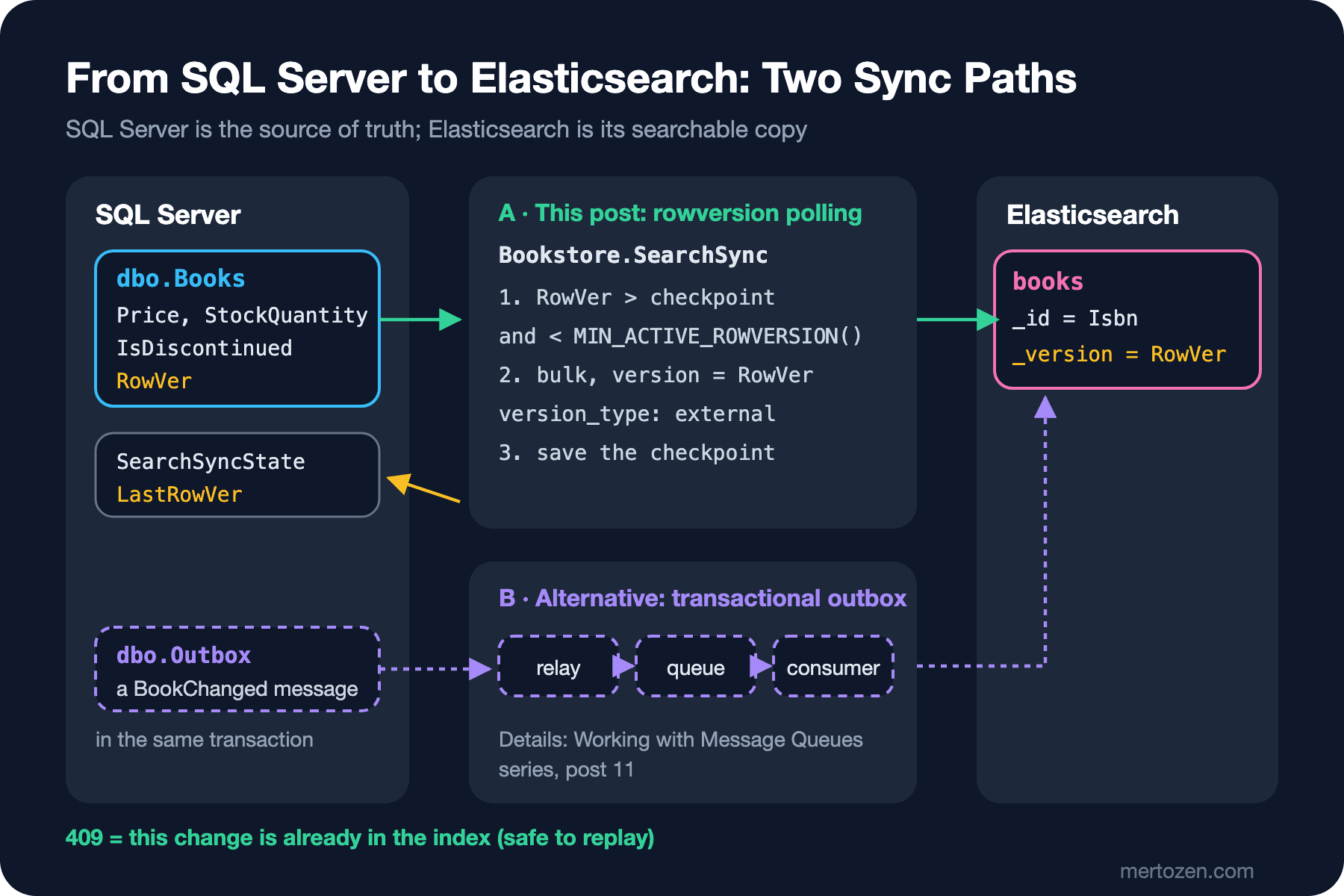
Transactional outbox: the transaction that updates the book adds a "BookChanged" record to an outbox table in the same database, a relay moves those records to a queue, and a consumer updates Elasticsearch. No change gets lost, and other consumers (a cache, a recommendation system) can listen to the same event; the price is the queue infrastructure and every piece of write code remembering to write to the outbox. The Working with Message Queues series post "Transactional Outbox in .NET: EF Core, a BackgroundService Relay and the MassTransit/Wolverine Outbox" builds it.
Reading the changes periodically (polling): add a rowversion column to the table and, at fixed intervals, read "what changed since I last read". No changes are needed in application code; a back office screen that writes straight to SQL Server or a bulk price update script is caught too. The price is a delay of a few seconds and a periodic query. SQL Server's Change Tracking and Change Data Capture features are versions of the same idea offered by the database itself.
Full reindex: write the whole catalog into a new index and switch the alias (post 11). Not a sync method on its own, but it should exist next to every method; it is the way back when the mapping changes or the index breaks.
There is also the idea of writing to Elasticsearch in an EF Core SaveChanges interceptor. It is a hidden form of dual write: whether the interceptor writes before or after the commit, the two systems are still in separate transactions, and bulk operations like ExecuteUpdate do not go through the change tracker, so they are never caught. For Bookstore we choose polling: search can live with a few seconds of delay, and every path that changes a price writes to the same table.
Bookstore.SearchSync: Polling with rowversion
Three things were added to sql/schema.sql: IsDiscontinued, set when a book is taken off sale instead of being deleted; RowVer, which SQL Server increments automatically every time the row changes; and the SearchSyncState table, which records where the sync left off:
    IsDiscontinued bit           NOT NULL CONSTRAINT DF_Books_IsDiscontinued DEFAULT 0,
    RowVer        rowversion     NOT NULL
);
CREATE INDEX IX_Books_Title ON dbo.Books (Title);
CREATE INDEX IX_Books_RowVer ON dbo.Books (RowVer);

CREATE TABLE dbo.SearchSyncState
(
    Name       varchar(50) NOT NULL CONSTRAINT PK_SearchSyncState PRIMARY KEY,
    LastRowVer binary(8)   NOT NULL,
    UpdatedAt  datetime2(3) NOT NULL
);
The query that reads the changes is the heart of the worker:
DECLARE @upper binary(8) = MIN_ACTIVE_ROWVERSION();
SELECT TOP (@batchSize) BookId, Isbn, Title, Language, Categories, Price, StockQuantity, PublishedOn,
       AverageRating, Description, IsDiscontinued, RowVer
FROM dbo.Books
WHERE RowVer > @last AND RowVer < @upper
ORDER BY RowVer;
RowVer > @last on its own is not enough. A rowversion value is assigned when the row is written, not when the transaction commits. A long transaction can take 0x5668 and, while it has not committed yet, a short transaction that comes after it can take 0x5669 and commit. If the worker reads 0x5669 and moves the checkpoint there, the first transaction's 0x5668 falls behind the checkpoint when it commits and is missed forever. MIN_ACTIVE_ROWVERSION() returns the lowest active (not yet committed) rowversion in the database, or the next value if there is no active transaction; every row below it is committed. Keeping reads below that limit closes the gap.
The worker's loop is short: read what comes after the checkpoint, apply it with bulk, and save the checkpoint only after Elasticsearch has accepted it:
ChangeBatch batch = await reader.ReadChangesAsync(checkpoint, settings.BatchSize, stoppingToken);
if (batch.Changes.Count > 0)
{
    await ApplyAsync(batch, stoppingToken);
    // Only after Elasticsearch accepted the batch: a crash before this line replays it.
    await reader.SaveCheckpointAsync(CheckpointName, batch.LastRowVer, stoppingToken);
    checkpoint = batch.LastRowVer;
}

if (batch.Changes.Count < settings.BatchSize)
{
    await Task.Delay(settings.PollInterval, stoppingToken);
}
private static IBulkOperation ToOperation(BookChange change) => change.IsDiscontinued
? new BulkDeleteOperation<Book>(change.Book.Isbn) { Version = change.Version, VersionType = VersionType.External }
: new BulkIndexOperation<Book>(change.Book) { Id = change.Book.Isbn, Version = change.Version, VersionType = VersionType.External };Version is the big-endian long value of the 8-byte RowVer (BinaryPrimitives.ReadInt64BigEndian). These two decisions together make the sync safe: because the checkpoint is saved afterwards there is an at-least-once delivery guarantee, and thanks to the external version, applying the same change twice is harmless. We classify every operation in the bulk response one by one; 409 means "this version or a newer one is already in the index" and counts as success. A permanent failure (such as a 400) stops the batch, the checkpoint does not move, and the problem shows up in the log.
To run it I created 20,036 books with seed-sql 20000 in an empty database and started the worker. The connection string and the API key are in user-secrets:
dotnet user-secrets set "ConnectionStrings:Bookstore" "<connection-string>" --project src/Bookstore.SearchSync
dotnet user-secrets set "Elasticsearch:ApiKey" "<encoded>" --project src/Bookstore.SearchSync
dotnet run --project src/Bookstore.SearchSync

info: Bookstore.SearchSync.SearchSyncWorker[0]
      Starting from RowVer 0x0000000000000000
info: Bookstore.SearchSync.SearchSyncWorker[0]
      Synced 1000 changes (1000 indexed, 0 deleted, 0 already up to date) up to RowVer 0x0000000000000BBC
...
info: Bookstore.SearchSync.SearchSyncWorker[0]
      Synced 36 changes (36 indexed, 0 deleted, 0 already up to date) up to RowVer 0x0000000000005664

GET /books/_count
{"count":20036, ...}
The initial load needed no separate code path: with the checkpoint at zero, "what changed" is the whole table. Now we change a price and a stock level, and take a book off sale (sql/05-changes.sql):
UPDATE dbo.Books SET Price = 545.00, StockQuantity = 12 WHERE Isbn = '9781000000221';
UPDATE dbo.Books SET IsDiscontinued = 1 WHERE Isbn = '9781000000337';

Isbn          Title     Price  StockQuantity IsDiscontinued RowVer
9781000000221 Dune      545.00 12            0              0x0000000000005666
9781000000337 Moby-Dick 270.00 8             1              0x0000000000005667

info: Bookstore.SearchSync.SearchSyncWorker[0]
      Synced 2 changes (1 indexed, 1 deleted, 0 already up to date) up to RowVer 0x0000000000005667

GET /books/_doc/9781000000221?filter_path=_version,_source.price,_source.stockQuantity
{"_version":22118,"_source":{"price":545.0,"stockQuantity":12}}

GET /books/_doc/9781000000337?filter_path=found
{"found":false}
Dune's _version is 22118, that is 0x5666; the version in Elasticsearch is directly the rowversion of the row in SQL Server. To see that replaying is safe, I moved the checkpoint back by hand (UPDATE dbo.SearchSyncState SET LastRowVer = 0x0000000000005640) and restarted the worker:
info: Bookstore.SearchSync.SearchSyncWorker[0]
      Starting from RowVer 0x0000000000005640
info: Bookstore.SearchSync.SearchSyncWorker[0]
      Synced 38 changes (0 indexed, 0 deleted, 38 already up to date) up to RowVer 0x0000000000005667
All 38 changes got 409, and no document was overwritten with an old value. Finally I watched the MIN_ACTIVE_ROWVERSION() guard. In one session I opened a transaction, changed the price of Kürk Mantolu Madonna and held it for 20 seconds without committing; meanwhile another session changed Çalıkuşu's stock and committed:
Session 1:
BEGIN TRANSACTION;
UPDATE dbo.Books SET Price = 199.00 WHERE Isbn = '9781000000030';
SELECT RowVer AS OpenTxRowVer FROM dbo.Books WHERE Isbn = '9781000000030';
WAITFOR DELAY '00:00:20';
COMMIT;

OpenTxRowVer
0x0000000000005668
Session 2, right after:
UPDATE dbo.Books SET StockQuantity = 64 WHERE Isbn = '9781000000061';
SELECT Isbn, RowVer, MIN_ACTIVE_ROWVERSION() AS MinActive FROM dbo.Books WHERE Isbn = '9781000000061';

Isbn          RowVer             MinActive
9781000000061 0x0000000000005669 0x0000000000005668
In the worker log nothing new appears while the transaction is open; after the commit:
info: Bookstore.SearchSync.SearchSyncWorker[0]
      Synced 2 changes (2 indexed, 0 deleted, 0 already up to date) up to RowVer 0x0000000000005669
Even though Çalıkuşu's change was committed, the worker held it back because a lower rowversion was still open; after the commit it picked up both together. Without the guard the checkpoint would have moved to 0x5669 and the new price of Kürk Mantolu Madonna would never have reached search.
This design has deliberate limits. A change in the BookAuthors table does not change Books.RowVer; code that corrects an author should also touch the book's row (for example by updating a column like UpdatedAt). A DELETE that physically removes a book is invisible to polling; that is why we take books off sale with IsDiscontinued. The EF Core series post "Global Query Filters in EF Core: Soft Delete, Multi-Tenancy and IgnoreQueryFilters" covers the application side of soft delete.
In Production
Measure the lag. How far the search index is behind SQL Server is the one metric that matters: the gap between SearchSyncState.UpdatedAt and the time of the last change, or between the RowVer the worker logs for each batch and MAX(RowVer). Tie it to an alert threshold; if the worker stops silently, users see old prices and nobody notices.
Run a single worker. If two instances read the same checkpoint, the external version keeps the data intact, but the work is done twice. If you deploy several instances, use leader election or a lock in the database (such as sp_getapplock).
Separate the big initial load from the sync. With 20 thousand books the initial load finished in a few seconds through the same loop; with millions of rows, loading a separate index with BulkAll, refresh off and replicas at zero, and then switching the alias, is faster and has no downtime (post 11). The sync then carries on from where it left off.
Tell failure types apart. 429s and connection errors should be retried; permanent failures like a mapping error should not make the batch retry forever. In a real system, writing a permanent failure to an error table and moving the checkpoint on keeps one broken book from stopping the whole sync.
Common Pitfalls
Refreshing after every record. Every write with refresh=true is a new small segment; in a bulk load it drags indexing speed down badly.
Leaving replicas and refresh on during a big initial load. Every document is written to the replica too and a new segment opens every second; and don't forget to restore the settings when the load is done.
Checking only the HTTP status of a bulk response. A bulk request that returns 200 may have half of its operations rejected; check errors and each operation's status.
Saving the checkpoint before writing to Elasticsearch. If something crashes in between, that batch was never applied but counts as "read"; the lost update is silent.
Settling for RowVer > @last. Rows that commit behind the checkpoint because of open transactions are missed; don't forget the MIN_ACTIVE_ROWVERSION() limit.
Accepting dual write because "it rarely fails anyway". Timeouts, restarts during deploys and network blips are not rare; each one means a book silently left stale in the index.
A Small Experiment
★☆☆ Change the batch size in bulk-compare to 100, 1,000 and 5,000 and compare the times. Use Elastic's "try by doubling" method to find the best size for this lab.
★★☆ While the worker is running, run UPDATE dbo.BookAuthors SET Name = N'Yaşar Kemal (düzeltme)' WHERE BookId = 1. Does the change reach the index? Write a correction that also touches the Books row and try again.
★★★ Run two copies of the worker at the same time and change the price of 1,000 books with a single UPDATE. How are the "already up to date" counts spread across the logs? Use sp_getapplock so that only one copy runs, and measure the difference.
In the next post the data is ready and it is the query's turn: the difference between match and term, the types of multi_match, must/should/filter in a bool query, the scoring and caching difference between query and filter context, the 10,000 limit of from/size, and deep pagination with search_after.