

Index Lifecycle: Zero-Downtime Reindex with Aliases, Index Templates, Shard Sizing and ILM
If the application talks to an alias instead of a real index name, a mapping change is not an outage but a new index from a template, a _reindex and one atomic _aliases request. With real output: remove_index on the first switch, a half-applied alias request and must_exist, version_type external, replaying changes that arrive during the reindex from a checkpoint, require_alias, choosing the shard count, ILM with a data stream, and snapshot/restore.
Version note: The examples in this post were run with Elasticsearch 9.5.6, .NET 10 and Elastic.Clients.Elasticsearch 9.5.3, in the lab we set up in post 2 and with the SQL Server sync from post 5.
Guess First
The search we have been building for Bookstore, the online bookstore used as the shared example across this site's series, has been tied to a single index since post 3: books. The API, the sync worker, the lab commands and the tests all use that name. In post 8 we added title.sayt and title.complete to try them out, but the API never used either; both just take up space in the index. Post 3 showed that a mapping cannot be changed in place, so the way forward is a new index. We created books-v2 from the template, copied the data, and now want an alias called books to point at the new index so that the application's name stays the same:
POST /_aliases
{
  "actions": [
    { "add": { "index": "books-v2", "alias": "books" } }
  ]
}
What does this request return? If it fails, is it safe to run DELETE /books first and add the alias afterwards? What happens if the sync worker writes a book to books between those two requests?
Aliases: the Application Should Not Know the Real Index Name
The answer:
{
  "error": {
    "type": "invalid_alias_name_exception",
    "reason": "Invalid alias name [books]: an index, data stream, ESQL view, or ESQL dataset exists with the same name as the alias"
  },
  "status": 400
}
An alias is a second name for one or more indices. Searches and writes go to the alias, and Elasticsearch routes them to the index behind it. But an alias and an index cannot share a name. Deleting books first leaves a gap between the two requests: a search arriving in that gap gets a 404, and a write does something worse. The application's API key has create_index on books*, and by default Elasticsearch creates an index on its own when a document is written to one that does not exist. I tried it with a typo:
PUT /books-typo/_doc/1
{ "title": "Dune", "price": "520.0" }

{"_index":"books-typo","_id":"1","_version":1,"result":"created", ...}

GET /books-typo/_mapping
{"books-typo":{"mappings":{"properties":{"price":{"type":"text","fields":{"keyword":{"type":"keyword","ignore_above":256}}},...}}}}
No analyzers, no dynamic: strict, and the price as text: exactly the dynamic mapping we escaped in post 3. The right way is to delete and add the alias in the same request. The remove_index action of the _aliases API exists for exactly this:
POST /_aliases
{
  "actions": [
    { "add": { "index": "books-v2", "alias": "books" } },
    { "remove_index": { "index": "books" } }
  ]
}

{"acknowledged":true,"errors":false}
According to the documentation, the actions in one request are applied together, and remove_index actions run first, regardless of their position in the array. I tested the limits of "together" with empty indices. If an index in the request does not exist, the whole request is rejected with a 404 and nothing changes. A missing alias in a remove action is different: HTTP 200, "errors": true, the add applied, the remove not, and the alias pointing to two indices at once. Writing to the alias in that state gives:
{
  "error": {
    "type": "illegal_argument_exception",
    "reason": "no write index is defined for alias [demo]. The write index may be explicitly disabled using is_write_index=false or the alias points to multiple indices without one being designated as a write index"
  },
  "status": 400
}
Reads return results from both indices (the same book twice) and writes stop. With "must_exist": true on the remove, the same request returns a 404 and none of it is applied; always use it in a switch. The documentation and the client also offer must_exist on remove_index, but 9.5.6 rejects it with [remove_index] unknown field [must_exist]; it is not needed there anyway, because a missing index already fails the whole request.
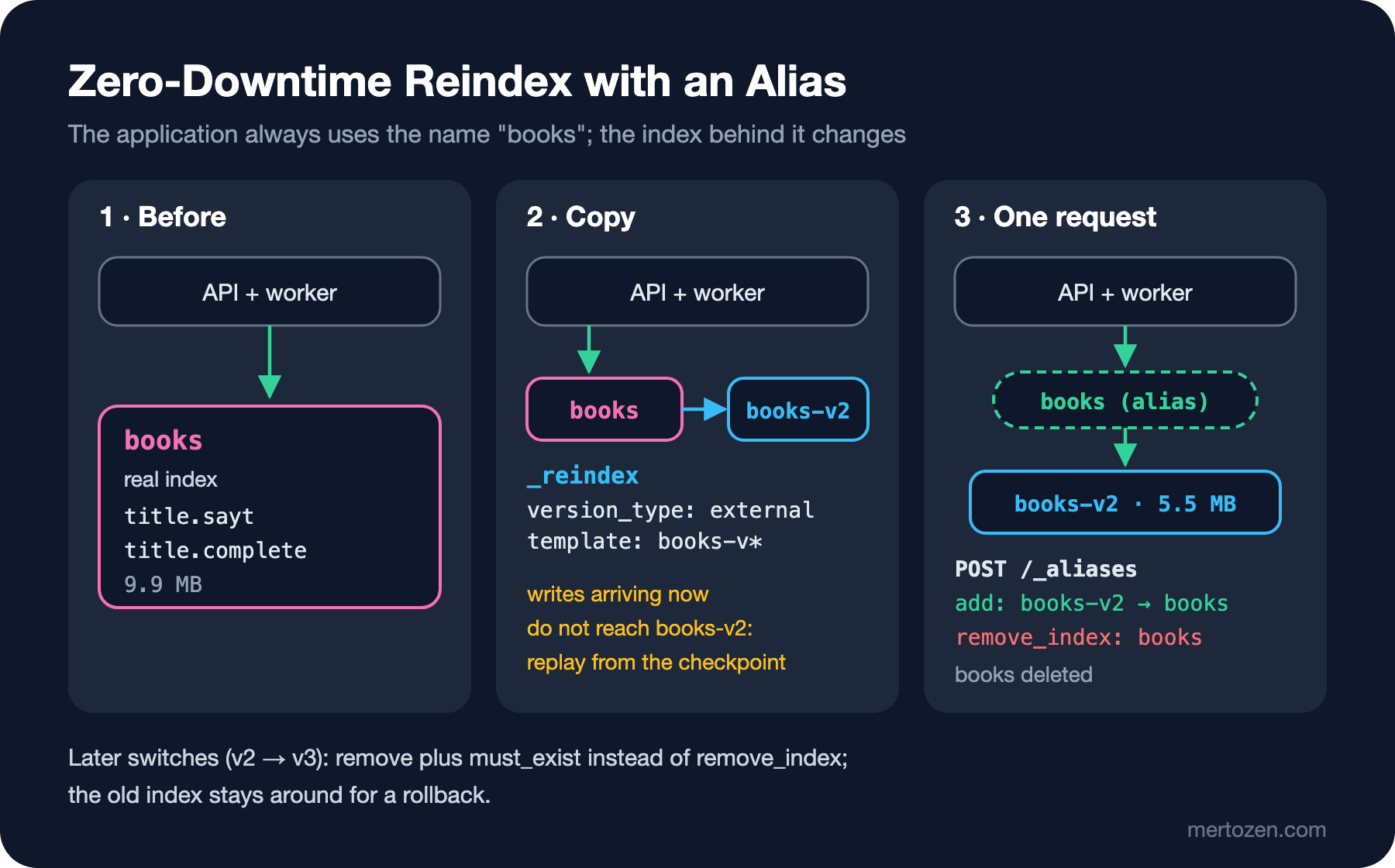
The idea is the same as in the Deployment Strategies series post "Blue-Green Deployment: Two Environments with Nginx, App Service Slots and Instant Switchback": prepare the new version next to the old one, switch traffic in one step, and keep the old one around for a rollback. Here the alias plays the role of the load balancer. The first switch is an exception: books is a real index, so we have to delete it and there is no old index left to roll back to. In later switches (books-v2 → books-v3) remove replaces remove_index and the old index stays where it is.
Index Templates and Component Templates
Instead of creating every new version by hand from the JSON file, we give Elasticsearch a pattern: every index whose name matches books-v* gets the same analysis and mapping. An index template is built from component templates, blocks of settings that several index templates can share. The lab gets a templates command:
// Shard and replica counts depend on the environment: they live in a component template of their own.
JsonObject environment = new()
{
    ["template"] = new JsonObject
    {
        ["settings"] = new JsonObject { ["number_of_shards"] = 1, ["number_of_replicas"] = replicas }
    },
    ["_meta"] = new JsonObject { ["description"] = "Shard and replica counts for this environment" }
};
await PutAsync(client, "/_component_template/bookstore-env", environment);

// The analysis and mapping come from the same file the tests use; only the environment settings are removed.
JsonObject definition = JsonNode.Parse(await File.ReadAllTextAsync(Path.Combine("search", "books.index.json")))!.AsObject();
JsonObject settings = definition["settings"]!.AsObject();
settings.Remove("number_of_shards");
settings.Remove("number_of_replicas");

JsonObject template = new()
{
    ["index_patterns"] = new JsonArray(IndexPattern),
    ["priority"] = 200,
    ["composed_of"] = new JsonArray("bookstore-env"),
    ["template"] = definition.DeepClone(),
    ["_meta"] = new JsonObject { ["source"] = "search/books.index.json" }
};
await PutAsync(client, $"/_index_template/{SearchClientFactory.BooksIndex}", template);
The single source for the mapping is still search/books.index.json: the Testcontainers tests from post 10 create their index from that file, and the template is generated from it too. In this post we removed title.sayt and title.complete from the file; in production a mapping change always arrives in this order: first the file and the tests, then the template, then the new index. Running the command:
dotnet run --project src/Bookstore.SearchLab -- templates
PUT /_component_template/bookstore-env: HTTP 200 {"acknowledged":true}
PUT /_index_template/books: HTTP 200 {"acknowledged":true}
Simulated books-v0: shards 1, replicas 0, title fields: autocomplete, en, folded, keyword, sort, tr
The last line comes from the _simulate_index API: it shows the settings an index called books-v0 would get, without creating it. Checking it once after changing a template answers most "why wasn't my mapping applied" questions up front.
A few rules. When several index templates match an index, only the one with the highest priority applies; Elasticsearch's own templates (such as logs-*-* and metrics-*-*) have priority 100, so do not let your patterns overlap with them. The component templates in composed_of are merged in order, a later one overriding an earlier one; the index template's own template block overrides them all; and a setting given in the create index request overrides the template. A template is applied only when an index is created; changing it does not touch existing indices. The pattern is deliberately books-v* and not books*: an accidental index such as books-typo should not get the template, and the alias name should not match the pattern.
Managing templates and aliases is not the application's job. Try it with the bookstore-api-dev key from post 2:
action [indices:admin/index_template/put] is unauthorized for API key id [<id>] of user [elastic], this action is granted by the cluster privileges [manage_index_templates,manage,all]

action [indices:admin/aliases] is unauthorized for API key id [<id>] of user [elastic] on indices [books-v2], this action is granted by the index privileges [manage,all]
The tool that runs the switch gets its own short-lived key; the lab commands read it from BOOKSTORE_ES_ADMIN_API_KEY:
POST /_security/api_key
{
  "name": "bookstore-search-admin-dev",
  "expiration": "1d",
  "role_descriptors": {
    "bookstore-search-admin": {
      "cluster": ["manage_index_templates", "monitor"],
      "indices": [
        { "names": ["books*"], "privileges": ["manage", "read", "write", "create_index"] }
      ]
    }
  }
}
books-v2: _reindex and an Atomic Switch
The whole switch lives in the migrate command. It first checks what books points to; GET /books answers for an alias and for a real index alike, and returns the real index name as the key:
GetIndexResponse current = await client.Indices.GetAsync(alias);
string source = current.Indices.Keys.Single();
bool isAlias = source != alias;

// The template (books-v*) supplies analysis, mapping, shards and replicas; no refresh during the load.
CreateIndexResponse created = await client.Indices.CreateAsync(new CreateIndexRequest(target)
{
    Settings = new IndexSettings { RefreshInterval = Duration.MinusOne }
});

// Copy in the background. External versions keep the RowVer versions from SQL Server (post 05).
ReindexResponse started = await client.ReindexAsync(new ReindexRequest
{
    Source = new Elastic.Clients.Elasticsearch.Core.Reindex.Source { Indices = source },
    Dest = new Elastic.Clients.Elasticsearch.Core.Reindex.Destination { Index = target, VersionType = VersionType.External },
    RequestsPerSecond = requestsPerSecond,
    WaitForCompletion = false
});

GetReindexResponse progress;
do
{
    await Task.Delay(TimeSpan.FromSeconds(2));
    progress = await client.GetReindexAsync(started.Task!);
    Console.WriteLine($"  {watch.Elapsed.TotalSeconds,4:F0} s: {progress.Status?.Created:N0} / {progress.Status?.Total:N0} created");
}
while (!progress.Completed);
Three details matter. _reindex does not copy mappings or settings, only documents; the target index must already exist with the right mapping, which is the template's job. Without version_type: external every book would start at _version 1 in the new index and the worker's RowVer-based versions would lose their meaning; post 8 showed how _update_by_query bumps versions. With WaitForCompletion = false the request returns a task id right away, and we follow the progress with GET /_reindex/<task_id>, added in 9.5.0 (GetReindexAsync in the client); in older versions the same information is in GET /_tasks/<task_id>.
When the copy is done, the refresh interval is turned back on, the book counts of both indices are compared, and if they match the alias is switched in one request:
UpdateAliasesResponse swapped = await client.Indices.UpdateAliasesAsync(new UpdateAliasesRequest
{
    Actions =
    [
        new AddAction { Index = target, Alias = alias },
        isAlias
            ? new RemoveAction { Index = source, Alias = alias, MustExist = true }
            // The first time "books" is a real index: it must go in the same request, or the alias name is taken.
            // No MustExist here: 9.5.6 rejects it on remove_index, and a missing index fails the whole request anyway.
            : new RemoveIndexAction { Index = source }
    ]
});AddAction, RemoveAction and RemoveIndexAction convert to IndexUpdateAliasesAction through implicit operators, the object initializer side of the containers we discussed in post 10. We compare counts with _count, not with docs.count from _cat/indices: that one counts the nested authors as separate documents too (40,078 for 20,036 books). Running it, with the worker and the API up:
dotnet run --project src/Bookstore.SearchLab -- migrate books-v2 --rps 2000
"books" -> books (a plain index, not an alias yet)
Created books-v2 from the template, refresh_interval -1
Reindex task <task-id> started, requests_per_second 2000
     2 s: 4,000 / 20,036 created
     4 s: 8,000 / 20,036 created
     6 s: 12,000 / 20,036 created
     8 s: 16,000 / 20,036 created
    10 s: 19,000 / 20,036 created
    12 s: 20,036 / 20,036 created
books-v2: 20,036 books, books: 20,036 books
"books" -> books-v2 (index books deleted), 12.2 s in total

GET /_cat/indices/books*?v&h=index,docs.count,store.size
index    docs.count store.size
books-v2      40078      5.5mb
The old index was 9.9 MB, the new one is 5.5 MB; most of the difference is the two fields we removed (in post 8 we measured title.sayt alone at 2.6 MB). --rps 2000 is the requests_per_second parameter: Elasticsearch pads the batches with waits so that it writes at most 2,000 documents per second, which is the 4,000 per two seconds in the output. Twenty thousand books do not need it, but when you copy an index with millions of documents on a live cluster, you share disk and CPU with user searches. You can change the rate of a running task with POST /_reindex/<task_id>/_rethrottle?requests_per_second=..., and for large indices slices: auto splits the copy into parallel jobs per shard.
After the alias switch we did not touch the API, the worker or the lab commands; they all go to books and now see books-v2. One thing broke. The rank-eval command from post 7, right after the switch:
dotnet run --project src/Bookstore.SearchLab -- rank-eval --tuned
nDCG@5 0.000
  0.000  ince memed                 top: 9781000000016(-), 9781000000023(-), 9781000000238(-)
  0.000  crime and punishment       top: 9781000000306(-), 9781000000245(-), 9781000000146(-)
The right books are still on top, but all of them are "unrated" ((-)). _rank_eval matches our ratings to hits by the pair _index and _id; the hits carry the real index name (books-v2), while the ratings said books. The fix is to put the index behind the alias into the ratings:
ElasticsearchClient client = LabClient.Create();
// Hits report the concrete index (books-v2), not the alias: the ratings must name the same index (post 11).
string index = (await client.Indices.GetAsync(SearchClientFactory.BooksIndex)).Indices.Keys.Single();
After that, nDCG@5 is back at 0.979. Any code that compares hit.Index with a constant breaks the same way during such a switch.
Changes That Arrive During the Reindex
The worker kept running during the switch. Five seconds after the reindex started, I changed two books in SQL Server:
UPDATE dbo.Books SET Price = 189.90 WHERE Isbn = '9781000000030';
UPDATE dbo.Books SET StockQuantity = 0 WHERE Isbn = '9781000000221';
Isbn Title Price StockQuantity RowVer
9781000000030 Kürk Mantolu Madonna 189.90 120 0x000000000000566B
9781000000221 Dune 520.00 0 0x000000000000566CThe worker wrote them within seconds (Synced 2 changes (2 indexed, 0 deleted, 0 already up to date) up to RowVer 0x000000000000566C), but after the switch:
GET /books/_doc/9781000000030?filter_path=_index,_version,_source.price
{"_index":"books-v2","_version":22121,"_source":{"price":165.0}}
Kürk Mantolu Madonna is in the new index with its old price. _reindex reads the source index as it was when it started; later writes went to the old index, and the old index was deleted in the last step of the switch. Version 22121 (0x5669) confirms it: the RowVer from before the change.
The fix is in the experiment from post 5 where we moved the checkpoint back: we can safely replay the sync because the versions are external and Elasticsearch rejects an older version. Before the switch I noted the checkpoint (SELECT LastRowVer FROM dbo.SearchSyncState → 0x000000000000566A); after the switch I stopped the worker, moved the checkpoint back and started it again:
UPDATE dbo.SearchSyncState SET LastRowVer = 0x000000000000566A WHERE Name = 'books';info: Bookstore.SearchSync.SearchSyncWorker[0]
Starting from RowVer 0x000000000000566A
info: Bookstore.SearchSync.SearchSyncWorker[0]
Synced 2 changes (2 indexed, 0 deleted, 0 already up to date) up to RowVer 0x000000000000566C
GET /books/_doc/9781000000030?filter_path=_index,_version,_source.price
{"_index":"books-v2","_version":22123,"_source":{"price":189.9}}If the reindex had already copied a change, the line would say "already up to date" (409); replaying does no harm. A simpler option is to stop the worker during the switch: the changes wait in SQL Server, and the worker continues from where it stopped once the alias has moved. The cost is that search results are stale for as long as the switch takes; no problem for 12 seconds, a real problem for a reindex that takes hours. Either way the key is the same: keep the index reproducible from the RowVer in SQL Server.
The worker got one more line:
BulkRequest request = new(SearchClientFactory.BooksIndex)
{
    // Post 11: "books" must be an alias. Without this, a write after a mistaken DELETE would
    // auto-create a plain "books" index with a dynamic mapping.
    RequireAlias = true,
    Operations = [.. batch.Changes.Select(ToOperation)]
};
PUT /books-typo/_doc/1?require_alias=true
{ "title": "Dune", "price": "520.0" }
{"error":{"type":"index_not_found_exception","reason":"no such index [books-typo] and [require_alias] request flag is [true] and [books-typo] is not an alias", ...},"status":404}This flag must be turned on after the switch; before the first switch books is a real index, and the worker would get this error on every batch.
Shard and Replica Counts
GET /_cat/shards/books*?v&h=index,shard,prirep,state,docs,store
index    shard prirep state    docs store
books-v2 0     p      STARTED 40078 5.5mb
The number of primary shards is fixed when an index is created and cannot be changed afterwards except with _split (to increase it), _shrink (to reduce it) or a reindex. Elastic's shard sizing guide recommends 10–50 GB per shard and fewer than 200 million documents. Bookstore's 5.5 MB index is thousands of times below that range, so a single shard is the right call. Splitting a small index into five shards "because it will grow" means every search goes to five pieces and merges the results; in post 9 we saw a terms aggregation return wrong numbers on a five-shard index. The cluster sets aside memory per shard and room in the cluster state on the master node; the default limit is 1,000 shards per node (cluster.max_shards_per_node, which I read in the lab with include_defaults). When the scale grows, a new books-vN is created with more shards and the alias is switched; in other words, the shard count is a decision you can undo.
The replica count, on the other hand, can be changed on a live index, which is why it is in the bookstore-env component template. The lab has a single node, so replicas are 0; in production they should be at least 1, otherwise losing a node means losing part of the index. In post 5 we suggested setting replicas to 0 temporarily for a large initial load and turning them on afterwards: the template holds the value for the environment, the load uses a temporary one.
A Short Look at ILM and Data Streams
A book catalog grows over time but does not age: every book can be updated, and the index is versioned with an alias. Time series data is different. Suppose Bookstore wants to record what users search for (to feed the judgment list from post 7): it is only ever appended, never updated, and it is worthless after 90 days. That is what Index Lifecycle Management, or ILM, and data streams are for:
PUT /_ilm/policy/search-queries
{
  "policy": {
    "phases": {
      "hot": { "actions": { "rollover": { "max_primary_shard_size": "50gb", "max_age": "7d" } } },
      "delete": { "min_age": "90d", "actions": { "delete": {} } }
    }
  }
}

PUT /_index_template/search-queries
{
  "index_patterns": ["search-queries*"],
  "data_stream": {},
  "priority": 200,
  "template": {
    "settings": { "index.lifecycle.name": "search-queries", "number_of_replicas": 0 },
    "mappings": {
      "properties": {
        "@timestamp": { "type": "date" },
        "query": { "type": "keyword" },
        "hits": { "type": "integer" }
      }
    }
  }
}

POST /search-queries/_doc
{ "@timestamp": "2026-11-14T17:10:00Z", "query": "kurk mantolu", "hits": 1 }

{"_index":".ds-search-queries-2026.11.14-000001", "result":"created", ...}
A data stream is also a name, with backing indices behind it; writes always go to the newest one. A rollover creates a new backing index when one of the conditions holds (the largest primary shard reaches 50 GB or the oldest document is 7 days old); the delete phase removes an index as a whole once it is 90 days old. Deleting a whole index is far cheaper than deleting documents one by one. A manual rollover:
POST /search-queries/_rollover
{"old_index":".ds-search-queries-2026.11.14-000001","new_index":".ds-search-queries-2026.11.14-000002","rolled_over":true, ...}
ILM checks its conditions periodically, not continuously (indices.lifecycle.poll_interval, 10 minutes by default); do not expect the rollover on the dot of day seven. A newer and simpler alternative is the data stream lifecycle, where you give only a retention period (data_retention) instead of phases. Using data streams for logs and metrics is the subject of the Observability series. Our search index does not need ILM; I deleted the demo.
Snapshot and Restore
Taking a backup of the old index before moving to a new version is a good habit. In Elasticsearch a backup is not a copy of the data folder but the snapshot API. The lab uses a shared file system repository: we added path.repo=/usr/share/elasticsearch/snapshots and a volume to compose.yaml. My first attempt to register the repository failed with access_denied_exception: the volume belonged to root, while Elasticsearch runs as its own user. Once the folder is created in the Dockerfile (RUN mkdir -p /usr/share/elasticsearch/snapshots), Docker creates the new volume with that folder's owner.
PUT /_snapshot/lab-backups
{ "type": "fs", "settings": { "location": "lab-backups" } }

PUT /_snapshot/lab-backups/books-2026.11.14?wait_for_completion=true
{ "indices": "books-v2", "include_global_state": false, "feature_states": ["synonyms"] }

{"snapshot":{"snapshot":"books-2026.11.14", "version":"9.5.6", "indices":["books-v2",".synonyms-2"], "state":"SUCCESS",
 "duration_in_millis":201, "shards":{"total":2,"failed":0,"successful":2},
 "feature_states":[{"feature_name":"synonyms","indices":[".synonyms-2"]}]}}
Note feature_states: the bookstore-synonyms set from post 4 lives in a system index (.synonyms-2), and the index mapping depends on it. If you back up only books-v2 and restore into an empty cluster, you first have to recreate the synonyms set; with the feature state it comes along. I tried the restore under a new name, without touching the existing index:
POST /_snapshot/lab-backups/books-2026.11.14/_restore?wait_for_completion=true
{ "indices": "books-v2", "rename_pattern": "books-(.+)", "rename_replacement": "restored-books-$1", "include_aliases": false }

GET /restored-books-v2/_count
{"count":20036, ...}
In production the repository is not a shared file system but an object store: S3, Azure Blob Storage or Google Cloud Storage; snapshots are incremental, so each snapshot writes only new segments. In post 12 we will measure how long regular snapshots take compared with "we'll just reindex from SQL Server".
In Production
Put the switch in a script; do not do it by hand in Dev Tools. The order in the migrate command (index from the template, load settings, reindex, restore the settings, compare counts, switch the alias) should be the same every time, and it should stop without touching the alias if the counts do not match. Besides the book count, running rank-eval from post 7 against the new index before switching the alias shows whether the mapping change hurt relevance.
Do not delete the old index right away. In later switches keep books-v2 for a day or one deployment cycle; if something goes wrong, rolling back is a single _aliases request. But remember that after a rollback you again need to replay the changes made in between from the checkpoint.
Plan for disk space. During the switch both indices exist; for a large index that means the disk temporarily fills up twice as much. We will look at the disk watermarks in post 12; once they are exceeded, Elasticsearch stops allocating new shards.
Keep the switch key separate from the application key. The rights to manage templates and aliases and to delete indices belong only to the tool that runs the switch; the application keeps read and write on books*. Give the admin key a short expiration.
Common Pitfalls
Binding the application to the real index name. Without an alias every mapping change means an outage or a code change. Start with books-v1 plus a books alias on day one.
Deleting first and adding the alias afterwards. In the gap, searches get a 404 and writes create an index with a dynamic mapping. Use remove_index in the same request, and require_alias in the application that writes.
Forgetting must_exist. A request that tries to remove an index that is not in the alias is applied halfway, and the alias ends up pointing to two indices.
Trying to change the mapping in place. Adding a new field or multi-field is possible (by closing the index, as in post 8, if it needs a new analyzer), but changing the type or analyzer of an existing field is not, and neither is removing a field from the mapping. The way forward is a new index and an alias.
Forgetting the writes that arrive during the reindex. _reindex copies the data as it was when it started; without a plan to replay from the checkpoint or to stop the worker, a switch loses data.
A Small Experiment
★☆☆ Run migrate books-v3. What changes in the output this time? Was books-v2 deleted? Then switch the books alias back to books-v2 in a single request and delete books-v3.
★★☆ In post 6 we left copy_to for searching author names at the root level to a reindex. Add "copy_to": "authorNames" to authors.name and an authorNames text field at the root, run templates and migrate books-v3, and try a match query on authorNames. Check that the tests still pass.
★★★ Make migrate safe for a large index: have it record the checkpoint in SQL Server before the reindex starts and, once the alias is switched, tell the worker "replay from this RowVer" (for example with a row in SearchSyncState). Run it with --rps 500 while changing data in SQL Server and show that no change is lost.
In the next post we move on to running Elasticsearch in production: TLS, a role and API key per application, heap and disk watermarks, the slow log and cluster health, diagnosing common errors, and how long restoring from a backup really takes.