

Transactional Outbox in .NET: EF Core, a BackgroundService Relay and the MassTransit/Wolverine Outbox
Write the message to an outbox table in the same transaction as the business data instead of to the broker, and let a BackgroundService relay pick rows with FOR UPDATE SKIP LOCKED and publish them with confirms. A real run of two instances publishing 200 messages exactly once and returning 201 while the broker is down; why the relay is at-least-once and unordered; MassTransit bus outbox, Wolverine and CDC.
Version note: The code in this post was built and run with .NET 10, EF (Entity Framework) Core 10.0.14, Npgsql.EntityFrameworkCore.PostgreSQL 10.0.3 (PostgreSQL 17), RabbitMQ 4.4, RabbitMQ.Client 7.2.2 and MassTransit 8.5.12.
Guess First
Two instances of the Order API (Application Programming Interface) are running. You stop RabbitMQ and the broker stays down for 11 seconds. Meanwhile 5 requests hit POST /orders. What does the client see: 201, 500 or 503? When the broker comes back, what happens to the OrderPlaced messages of those 5 orders, who sends them, and within how many seconds?
The scenario is the question underneath every post in this series: the order was written to the database but the message could not be published (or the other way round). The "dual write" problem, the impossibility of writing to two separate systems as one atomic operation, and the theory of the transactional outbox are in the "Transactional Outbox and Inbox" post of the Messaging and Event-Driven Architecture series. In this post we write the outbox ourselves with EF Core, PostgreSQL and a BackgroundService relay, test it with two instances and a stopped broker, and then look at MassTransit's built-in outbox.
The Outbox Table and the Same Transaction
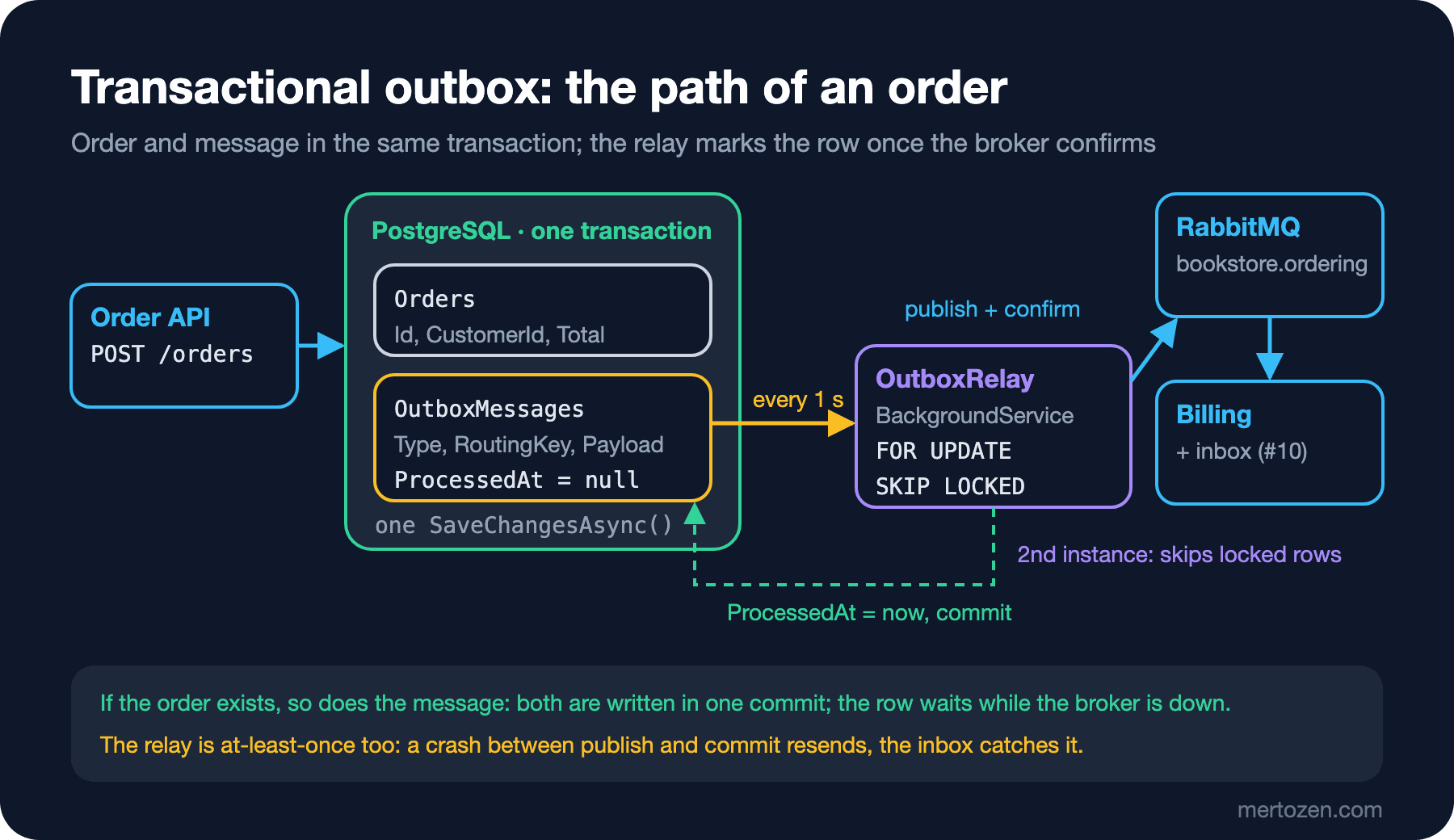
The idea is simple: write the message not to the broker but to a table in the same database as the business data, in the same transaction. If the order exists, so does its message; both are committed together or both disappear together.
public sealed class Order
{
    public Guid Id { get; init; } = Guid.CreateVersion7();
    public Guid CustomerId { get; init; }
    public decimal Total { get; init; }
    public required string Currency { get; init; }
    public DateTimeOffset PlacedAt { get; init; } = DateTimeOffset.UtcNow;
}

public sealed class OutboxMessage
{
    public Guid Id { get; init; } = Guid.CreateVersion7();
    public required string Type { get; init; }
    public required string RoutingKey { get; init; }
    public required string Payload { get; init; }
    public string? CorrelationId { get; init; }
    public DateTimeOffset OccurredAt { get; init; } = DateTimeOffset.UtcNow;
    public DateTimeOffset? ProcessedAt { get; set; }
}

public sealed class OrderingDbContext(DbContextOptions<OrderingDbContext> options) : DbContext(options)
{
    public DbSet<Order> Orders => Set<Order>();
    public DbSet<OutboxMessage> OutboxMessages => Set<OutboxMessage>();

    protected override void OnModelCreating(ModelBuilder modelBuilder)
    {
        modelBuilder.Entity<OutboxMessage>(b =>
        {
            b.Property(m => m.Payload).HasColumnType("jsonb");
            b.Property(m => m.Type).HasMaxLength(200);
            b.Property(m => m.RoutingKey).HasMaxLength(200);
            // the relay only scans unprocessed rows: partial index
            b.HasIndex(m => m.OccurredAt).HasFilter("\"ProcessedAt\" IS NULL");
        });
    }
}
OutboxMessage.Id will go to the broker as the MessageId; the row is created once and stays the same however many times the relay publishes it, which is what makes the inbox from the previous post work. Guid.CreateVersion7() is time-ordered, so it is index-friendly too. The partial index lets the query the relay runs every second search only the pending rows, not millions of processed ones. The endpoint:
app.MapPost("/orders", async (PlaceOrderRequest request, OrderingDbContext db, CancellationToken ct) =>
{
    var order = new Order
    {
        CustomerId = request.CustomerId,
        Total = request.Items.Sum(i => i.Quantity * i.UnitPrice),
        Currency = request.Currency
    };
    var @event = new OrderPlaced(order.Id, order.CustomerId, order.Total, order.Currency, order.PlacedAt,
        [.. request.Items.Select(i => new OrderPlacedItem(i.BookId, i.Quantity, i.UnitPrice))]);

    db.Orders.Add(order);
    db.OutboxMessages.Add(new OutboxMessage
    {
        Type = "bookstore.order-placed.v1",
        RoutingKey = "order.placed",
        Payload = JsonSerializer.Serialize(@event, JsonSerializerOptions.Web),
        CorrelationId = order.Id.ToString()
    });
    // one SaveChanges = one transaction: both are written or neither is
    await db.SaveChangesAsync(ct);
    return Results.Created($"/orders/{order.Id}", new { order.Id, order.Total });
});
There is not a single broker-related line in the endpoint; it works even when RabbitMQ is down. A single SaveChangesAsync call already runs inside a transaction in EF Core; no extra BeginTransactionAsync is needed. If you need more than one SaveChangesAsync, switch to an explicit transaction as in the "Transactions in EF Core" post of the EF Core series.
The Relay: BackgroundService and FOR UPDATE SKIP LOCKED
A BackgroundService running in the same application moves outbox rows to the broker:
public sealed class OutboxRelay(
    IServiceScopeFactory scopeFactory, IConnection connection, ILogger<OutboxRelay> logger) : BackgroundService
{
    private const int BatchSize = 50;

    protected override async Task ExecuteAsync(CancellationToken stoppingToken)
    {
        await using IChannel channel = await connection.CreateChannelAsync(
            new CreateChannelOptions(publisherConfirmationsEnabled: true, publisherConfirmationTrackingEnabled: true),
            stoppingToken);
        using var timer = new PeriodicTimer(TimeSpan.FromSeconds(1));
        do
        {
            try
            {
                int published;
                do
                {
                    published = await PublishBatchAsync(channel, stoppingToken);
                } while (published == BatchSize);
            }
            catch (Exception ex) when (ex is not OperationCanceledException || !stoppingToken.IsCancellationRequested)
            {
                // rows stay at ProcessedAt = null; retried on the next tick
                logger.LogWarning("Outbox relay batch failed: {Error}", ex.Message);
            }
        } while (await timer.WaitForNextTickAsync(stoppingToken));
    }

    private async Task<int> PublishBatchAsync(IChannel channel, CancellationToken ct)
    {
        await using AsyncServiceScope scope = scopeFactory.CreateAsyncScope();
        OrderingDbContext db = scope.ServiceProvider.GetRequiredService<OrderingDbContext>();
        await using var tx = await db.Database.BeginTransactionAsync(ct);

        // SKIP LOCKED: skip rows locked by another instance instead of waiting
        List<OutboxMessage> batch = await db.OutboxMessages
            .FromSql($"""
                SELECT * FROM "OutboxMessages"
                WHERE "ProcessedAt" IS NULL
                ORDER BY "OccurredAt"
                LIMIT {BatchSize}
                FOR UPDATE SKIP LOCKED
                """)
            .ToListAsync(ct);
        if (batch.Count == 0)
            return 0;

        using var timeout = CancellationTokenSource.CreateLinkedTokenSource(ct);
        timeout.CancelAfter(TimeSpan.FromSeconds(10));
        foreach (OutboxMessage message in batch)
        {
            var props = new BasicProperties
            {
                MessageId = message.Id.ToString(),
                CorrelationId = message.CorrelationId,
                Type = message.Type,
                ContentType = "application/json",
                Persistent = true
            };
            // confirm tracking is on: the await does not return until the broker confirms
            await channel.BasicPublishAsync("bookstore.ordering", message.RoutingKey, mandatory: true, props,
                Encoding.UTF8.GetBytes(message.Payload), timeout.Token);
            message.ProcessedAt = DateTimeOffset.UtcNow;
        }
        await db.SaveChangesAsync(ct);
        await tx.CommitAsync(ct);
        logger.LogInformation("Relay published {Count} outbox messages", batch.Count);
        return batch.Count;
    }
}
On every tick the relay opens a transaction and locks the 50 oldest pending rows with FOR UPDATE SKIP LOCKED. FOR UPDATE closes those rows to everyone else until this transaction ends; SKIP LOCKED makes it skip rows locked by another instance instead of waiting on them. That way two relays working on the same table neither block each other nor pick up the same row twice. Every message is sent with a publisher confirm; a row is not marked before the broker confirms. When the batch is done, ProcessedAt is written and the transaction commits. If one message fails (broker down, no confirm, the 10-second timeout), the exception cuts the batch short, the transaction rolls back, the locks are released and the rows are retried on the next tick. The {BatchSize} in FromSql becomes a parameter; this is not SQL (Structured Query Language) string concatenation.
This design is deliberately slow: it sends messages one by one and waits for each confirm. If you need more than a few thousand messages per second, you wait for confirms in bulk (turn tracking off and wait at the end of the batch) or move to a ready-made library. Also, PeriodicTimer is 1 second: you accept an average delay of about half a second between an order and its message.
Two Instances, One Publish
I started two copies of the API against the same database and the same broker and spread 200 orders across the two instances with 8 parallel requests at a time. The 200 requests finished in 0.4 seconds. The relay logs:
api1 (fail lines: 0)
05:47:04.097 info: Bookstore.OrderApi.OutboxRelay[0] Relay published 50 outbox messages
api2 (fail lines: 0)
05:47:03.913 info: Bookstore.OrderApi.OutboxRelay[0] Relay published 50 outbox messages
05:47:03.972 info: Bookstore.OrderApi.OutboxRelay[0] Relay published 50 outbox messages
05:47:04.028 info: Bookstore.OrderApi.OutboxRelay[0] Relay published 50 outbox messages
A small tool counting the messages in a check queue bound to order.#:
messages in lab11.audit: 200, distinct MessageId: 200The second instance published three batches, the first one batch; 200 in total, every MessageId unique. The split is not even and does not need to be: whichever relay ticks first takes the lock. What matters is that no row is ever taken by two relays together. This approach does not need the distributed lock from the Background Jobs series either; the lock is the database itself, at row level.
While the Broker Is Down
Now the opening question. I stopped RabbitMQ, sent five orders, and started the broker again 11 seconds later:
05:47:17 rabbit stopped
201 201 201 201 201
05:47:20 {"pending":5}
05:47:28 rabbit started
05:47:53 {"pending":0}
The relays' logs (each wrote 15 warnings in that time; I kept the first two lines and the last one and shortened the long lines):
api2:
05:47:17.807 warn: Bookstore.OrderApi.OutboxRelay[0] Outbox relay batch failed: Already closed: The AMQP operation was interrupted: AMQP close-reason, initiated by Peer, code=320, text='CONNECTION_FORCED - broker forced connection closure with reason 'shutdown'' ...
05:47:18.807 warn: Bookstore.OrderApi.OutboxRelay[0] Outbox relay batch failed: Already closed: The AMQP operation was interrupted: AMQP close-reason, initiated by Peer, code=320, text='CONNECTION_FORCED - broker forced connection closure with reason 'shutdown'' ...
05:47:32.833 info: Bookstore.OrderApi.OutboxRelay[0] Relay published 5 outbox messages
The client got 201 five times; the order was saved, and the broker's state is none of the client's business. The five messages waited in the outbox. The broker came up at 05:47:28, RabbitMQ.Client's automatic recovery rebuilt the connection and the channel in about 5 seconds, and at 05:47:32 the second instance's relay published all five. Without the outbox, the same five requests would have either returned 500 (the order saved but the client sees an error) or saved the order and silently lost the message.
What the Outbox Does Not Guarantee
The relay is at-least-once too. If the process crashes after BasicPublishAsync got its confirm but before CommitAsync, the rows remain at ProcessedAt = null and the next relay publishes them again. The outbox guarantees "the message is not lost"; it does not guarantee "the message goes exactly once". That is why the outbox and the inbox from the previous post are a pair: one covers loss, the other covers repetition. For the same reason, the larger the batch, the more messages are resent after a crash.
Ordering is not guaranteed either. With a single relay and a single channel, messages go out in OccurredAt order. With two relays, if the relay that took the first batch is slow, the second batch can reach the broker before it. If an order's OrderPlaced and OrderCancelled ended up in different batches, the consumer may see them in reverse order. If you need per-aggregate ordering, you either run a single relay, split the rows by aggregate id and give each partition to a single relay, or make the consumer order-independent (the state machine check from the previous post). The discussion in the "Message Ordering and Partitioning" post of the Messaging series applies here word for word.
The trace chain breaks. Because the relay sends the message from a separate background job, the trace context of the HTTP (Hypertext Transfer Protocol) request does not flow into the message by itself. I saw this first-hand: in the demo for the next post, messages published by this relay showed up at the consumer as brand-new traces with no parent. The fix is simple: write the traceparent into the outbox row as a column too and put it into a header in the relay; details in the twelfth post of the series.
Ready-Made Options: MassTransit, Wolverine and CDC
The "bus outbox" mode of MassTransit's EF Core outbox ties publishing directly to the DbContext. With the AddEntityFrameworkOutbox<BookstoreDbContext>(o => { o.UsePostgres(); o.UseBusOutbox(); }) setup from the previous post, the scoped IPublishEndpoint adds the message to the DbContext instead of sending it to the broker:
public sealed class OrderService(BookstoreDbContext db, IPublishEndpoint publishEndpoint)
{
    public async Task<Guid> PlaceOrderAsync(Guid customerId, decimal total, bool saveChanges)
    {
        var order = new Order { CustomerId = customerId, Total = total };
        db.Orders.Add(order);
        // bus outbox: Publish does not go to the broker, it is added to the DbContext as an OutboxMessage
        await publishEndpoint.Publish(new OrderPlaced(order.Id, customerId, total, "EUR", order.PlacedAt, []));
        if (saveChanges)
            await db.SaveChangesAsync();
        return order.Id;
    }
}
I placed two orders: SaveChangesAsync was called for one and not for the other:
05:45:04.333 info: Lab[0] Order 42d45070 saved, OutboxMessage rows: 1
05:45:04.335 info: Lab[0] Order 3c4e4650 published but SaveChanges NOT called
05:45:04.415 info: Bookstore.Billing.InvoiceConsumer[0] Invoice for order 42d45070, MessageId be8d0000
05:45:07.345 info: Lab[0] After delivery: OutboxMessage rows 0, invoices 1
Right after SaveChangesAsync, the saved order was sitting as a row in the OutboxMessage table; MassTransit's delivery service moved it to the broker about 80 ms later, Billing issued the invoice and the row was deleted. The Publish of the order without SaveChangesAsync went nowhere: no transaction, no message. All the decisions in our own relay (locking, batching, cleanup, single-instance coordination) come ready-made here. MassTransit v9 is commercially licensed; we discuss the decision to stay on v8 in the last post of the series.
Wolverine (MIT licensed, after the Massachusetts Institute of Technology license) does the same job under the name "durable outbox": it stores outgoing messages in the application's database in the same transaction as the business data, a background agent sends them, and if a node crashes the stored messages are reloaded and sent. It supports PostgreSQL and SQL Server and has an EF Core integration. Which one you pick depends on the decision table in the seventh post of the series.
There is also the CDC (Change Data Capture) route: a tool such as Debezium reads the database's transaction log (logical replication in PostgreSQL) and publishes rows inserted into the outbox table to Kafka. No relay code remains in the application and polling latency goes away, but you get a new piece of infrastructure to operate (Kafka Connect, the Debezium connector, replication slots). Setting it up belongs to the DevOps side.
Production Notes
The outbox table bloats. We mark processed rows with ProcessedAt; without a cleanup job the table grows by the number of orders every day. The batched cleanup with ExecuteDeleteAsync from the previous post applies here too; keeping processed rows for a few days answers the question "did this message really go out?".
Watch the pending rows. Two metrics are enough: the number of pending rows and the age of the oldest pending row. If the age goes beyond a few seconds, the relay is not running, cannot reach the broker or cannot keep up. That is the signal that comes before the user's "why has the invoice for my order not arrived?".
A poison row blocks the relay. A message the broker rejects every time (for example, routing to an exchange that does not exist) makes the batch fail from the start on every attempt, and the rows behind it never go out. Add an attempt counter and a last-error column to the row and set the row aside as "failed" after a certain number of attempts.
The same query on SQL Server. FOR UPDATE SKIP LOCKED is specific to PostgreSQL. On SQL Server the equivalent is SELECT TOP (50) ... WITH (UPDLOCK, READPAST, ROWLOCK) table hints inside a transaction; the logic is the same.
Notification instead of polling. 1-second polling is good enough for most systems. If you need lower latency, the endpoint can wake the relay through a Channel after the commit, or you can use PostgreSQL's LISTEN/NOTIFY; polling should still remain as a safety net.
Common Pitfalls
Publishing directly after the commit. Calling BasicPublishAsync right after SaveChangesAsync is the dual write itself: if the process crashes in between or the broker is down, the order exists and the message does not.
Forgetting SKIP LOCKED in the relay. With FOR UPDATE alone, the second instance waits for the first instance's lock; there is no double publish, but the relays run one after another. With no lock at all, two relays read the same rows and every message goes out twice.
Believing the outbox gives exactly-once. The relay is at-least-once; without an inbox or natural idempotency in the consumer, duplicates reach your business data.
Assuming the relay preserves ordering. With more than one relay, batches go out in parallel; if you need per-aggregate ordering, design for it explicitly.
Generating a new MessageId on every publish. If the relay sends a row twice, both copies must carry the same MessageId; generate the ID when the row is created, not in the relay.
Never deleting processed rows. The partial index keeps the query fast, but the table and the backups keep growing.
A Small Experiment
★☆☆ Add Attempts and LastError columns to the outbox table. Increment them per row when a publish fails, and after 5 attempts leave the row out of the relay query. Test it by routing to an exchange that does not exist.
★★☆ Write a health check that returns the age of the oldest pending row (now() - min("OccurredAt")) and returns Degraded above 10 seconds. Stop RabbitMQ and watch the value.
★★★ Run the relay with two instances and write OrderPlaced and right after it OrderCancelled for the same order. Log the arrival order in the consumer and try to catch a case where the order breaks (lowering the batch size to 1 and adding an artificial delay to the relay helps). Then build a solution that splits the rows into two partitions by CorrelationId and gives each partition to a single relay.
A message now leaves the API and travels through the outbox, the relay and the broker to Billing, and from there to Notification. To see how much time is spent where along that journey and which message is stuck where, in the next post we carry the trace context in message headers with OpenTelemetry and measure queue depth and consumer lag.