

Retry and Redelivery in Consumers: Immediate, Delayed and Exponential Backoff

Handle transient failures with a short in-memory retry and longer waits through the broker; never retry permanent failures, send them to the DLQ. Real output shows nack-requeue looping 8036 times in 5 seconds on RabbitMQ 4.4, TTL + DLX wait queues, the quorum queue's built-in delayed retry, scheduled retry in Service Bus, Kafka retry topics and MassTransit UseMessageRetry.
Version note: The code in this post was built and run with .NET 10, RabbitMQ 4.4, RabbitMQ.Client 7.2.2, Azure.Messaging.ServiceBus 7.21 (Service Bus emulator), Confluent.Kafka 2.16 (Kafka 4.2) and MassTransit 8.5.12.
Guess First
The payment provider is down and the Billing consumer throws on every message. The code catches the exception and hands the message back to the broker to "try again later". The queue is a quorum queue, the broker is RabbitMQ 4.4, and there is exactly one message in it. One of these two lines sits in the catch block:
await channel.BasicNackAsync(ea.DeliveryTag, multiple: false, requeue: true);
// or
await channel.BasicRejectAsync(ea.DeliveryTag, requeue: true);
How many times does that single message reach the consumer in 5 seconds? Do both lines behave the same? And where is the message after those 5 seconds?
In this post we build retry in code on three brokers and in MassTransit: which failures to retry immediately, which to retry after a wait, and which never to retry. What at-least-once delivery means, and why a repeated message is normal, is covered in the "Delivery Guarantees" post of the Messaging and Event-Driven Architecture series; here we talk about code, not the concept.
The Requeue Loop: Nack and Reject Are Not the Same
I ran the experiment on two separate quorum queues. The consumer receives each message and hands it straight back; the output shows the first few deliveries, deliveries 19 to 22 and every 5000th one. First with BasicNackAsync(requeue: true):
   0.0s delivery #1 redelivered=False x-delivery-count=-
   0.1s delivery #2 redelivered=True x-delivery-count=-
   0.1s delivery #3 redelivered=True x-delivery-count=-
   0.1s delivery #19 redelivered=True x-delivery-count=-
   0.1s delivery #20 redelivered=True x-delivery-count=-
   0.1s delivery #21 redelivered=True x-delivery-count=-
   0.1s delivery #22 redelivered=True x-delivery-count=-
   3.1s delivery #5000 redelivered=True x-delivery-count=-
   5.0s total deliveries in 5s: 8036, messages left in queue: 0
One message was delivered 8036 times in 5 seconds. That is not a retry, it is a loop: it burns CPU (Central Processing Unit), floods the log, would hit the payment provider hundreds of times a second in a real handler, and never stops on its own. "messages left in queue: 0" is misleading too; the message is still there, it is just sitting unacked in the consumer at that moment. The same experiment with BasicRejectAsync(requeue: true):
   0.0s delivery #1 redelivered=False x-delivery-count=-
   0.0s delivery #2 redelivered=True x-delivery-count=1
   0.0s delivery #3 redelivered=True x-delivery-count=2
   0.1s delivery #19 redelivered=True x-delivery-count=18
   0.1s delivery #20 redelivered=True x-delivery-count=19
   0.1s delivery #21 redelivered=True x-delivery-count=20
   5.0s total deliveries in 5s: 21, messages left in queue: 0
This time the loop stopped after 21 deliveries and the message really disappeared. The reason is the quorum queue delivery limit, which defaults to 20 since RabbitMQ 4.0. When the limit is exceeded the message is dead-lettered, or, if the queue has no DLX (Dead Letter Exchange) as in our experiment, dropped. So why was nack not counted? According to the quorum queue documentation, since 4.3 the limit is checked against delivery-count, which only counts "failed" deliveries. In AMQP (Advanced Message Queuing Protocol) 0-9-1, basic.reject and a lost consumer connection increment that counter; basic.nack does not. On 4.4, BasicNackAsync(requeue: true) is an infinite loop that never hits the delivery limit.
Two lessons follow. First: "retry immediately" via requeue is almost never the right retry, because a transient failure does not heal in a millisecond. Second: give every work queue a DLX, otherwise the delivery limit's protection turns into silent data loss. Managing the DLQ (Dead-Letter Queue) is the topic of the next post; every example in this one has a DLX.
Is the Failure Transient or Permanent?
The first question of retry is not "how many times" but "is it worth trying again". A 503 from the payment provider, a timeout or a database deadlock is transient: the same message will most likely succeed a few seconds later. Malformed JSON (JavaScript Object Notation), an unsupported currency or a missing required field is permanent: try it a thousand times and it fails a thousand times on the same line, holding up the healthy messages behind it on every attempt. We make this decision in one place in the consumer:
private static bool IsTransient(Exception ex) => ex is HttpRequestException or TimeoutException
    or TaskCanceledException { InnerException: TimeoutException };
The list is deliberately narrow. Treating an unknown exception as transient means a permanent failure circles through retry queues for minutes. The opposite mistake is cheaper: a message wrongly classified as permanent lands in the DLQ, an alert fires, you fix the cause and replay it. Throwing permanent failures as their own exception type in your code (for example PermanentMessageException) makes that decision readable.
Also look at where you retry. A retry of a few hundred milliseconds inside the outgoing call (Polly or Microsoft.Extensions.Http.Resilience) is a separate layer; we will cover it in the upcoming External Service Integration and Resilience series. What we discuss here is what happens to the message itself after that layer gives up. Attempt counts of the two layers multiply: 3 attempts in the HTTP (Hypertext Transfer Protocol) client and 4 in the consumer means 12 requests to the provider for one message.
The hidden cost of in-memory retry
The easiest retry is a loop around the handler: on failure wait 200 ms, call again. Meanwhile the message stays "unacked" in the consumer. In RabbitMQ that means one prefetch slot is occupied for the whole wait; with prefetch 10 and each message waiting 2 seconds three times, the whole consumer goes to sleep the moment the provider fails. In Azure Service Bus the message is received with PeekLock and must be completed within the lock duration (1 minute by default). ServiceBusProcessor renews the lock for up to 5 minutes by default; if your retry waits go beyond that, the lock is lost, the message goes to another consumer and you end up processing it in two places at once. Rule of thumb: keep in-memory retry short and few (a few seconds in total) and hand longer waits to the broker. The following sections describe that hand-off.
Delayed Retry in RabbitMQ
Wait queues with TTL + DLX
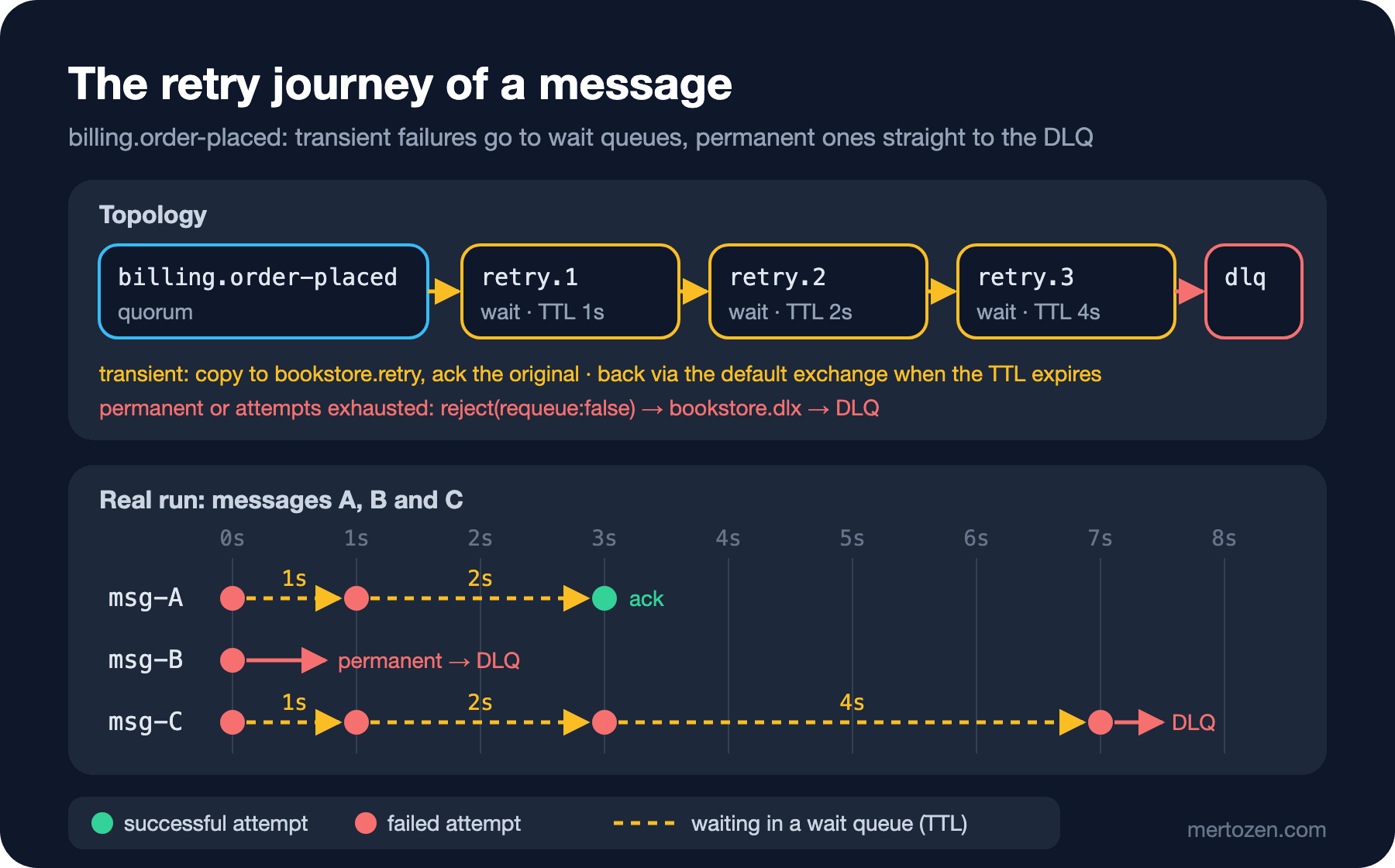
The classic approach that works on every RabbitMQ version is a set of "wait" queues with no consumers: the message is written there and, when its TTL (Time-To-Live) expires, returns to the main queue through the DLX mechanism. We build a three-level exponential wait: 1, 2 and 4 seconds (in real life something like 10 seconds, 1 minute, 10 minutes). The figure shows the journey of the three messages we will run through it:
public static class RetryTopology
{
    public const string RetryExchange = "bookstore.retry";

    public static readonly (string Queue, TimeSpan Delay)[] Levels =
    [
        ("billing.order-placed.retry.1", TimeSpan.FromSeconds(1)),
        ("billing.order-placed.retry.2", TimeSpan.FromSeconds(2)),
        ("billing.order-placed.retry.3", TimeSpan.FromSeconds(4))
    ];

    public static async Task DeclareAsync(IChannel channel)
    {
        await channel.ExchangeDeclareAsync("bookstore.ordering", ExchangeType.Topic, durable: true);
        await channel.ExchangeDeclareAsync("bookstore.dlx", ExchangeType.Direct, durable: true);
        await channel.ExchangeDeclareAsync(RetryExchange, ExchangeType.Direct, durable: true);

        // main queue: a message rejected with requeue:false goes to the DLQ via bookstore.dlx
        await channel.QueueDeclareAsync("billing.order-placed", durable: true, exclusive: false, autoDelete: false,
            arguments: new Dictionary<string, object?>
            {
                ["x-queue-type"] = "quorum",
                ["x-dead-letter-exchange"] = "bookstore.dlx",
                ["x-dead-letter-routing-key"] = "billing.order-placed"
            });
        await channel.QueueBindAsync("billing.order-placed", "bookstore.ordering", "order.placed");

        await channel.QueueDeclareAsync("billing.order-placed.dlq", durable: true, exclusive: false, autoDelete: false,
            arguments: new Dictionary<string, object?> { ["x-queue-type"] = "quorum" });
        await channel.QueueBindAsync("billing.order-placed.dlq", "bookstore.dlx", "billing.order-placed");

        // wait queues: no consumer; when the TTL expires the message goes through the default exchange
        // back to billing.order-placed only (Notification never sees a second copy)
        foreach ((string queue, TimeSpan delay) in Levels)
        {
            await channel.QueueDeclareAsync(queue, durable: true, exclusive: false, autoDelete: false,
                arguments: new Dictionary<string, object?>
                {
                    ["x-queue-type"] = "quorum",
                    ["x-message-ttl"] = (int)delay.TotalMilliseconds,
                    ["x-dead-letter-exchange"] = "",
                    ["x-dead-letter-routing-key"] = "billing.order-placed"
                });
            await channel.QueueBindAsync(queue, RetryExchange, queue);
        }
    }
}
Two design decisions are in there. A message coming back from a wait queue does not go to the bookstore.ordering topic exchange but straight to billing.order-placed through the default exchange (""). Had we republished to the topic exchange, Notification, which listens to the same routing key, would receive the message a second time; retry is the business of the consumer that failed. The second decision: a separate queue per wait duration, with TTL at queue level. If you put messages with different delays into one retry queue with a per-message expiration, RabbitMQ dead-letters an expired message only when it reaches the head of the queue; a 5-second message behind a 10-minute one waits 10 minutes.
The handler itself:
public sealed class OrderPlacedRetryHandler(IChannel channel, FlakyPaymentGateway payments, Stopwatch clock)
{
    private const string RetryCountHeader = "x-retry-count";
    private static readonly JsonSerializerOptions JsonOptions = new(JsonSerializerDefaults.Web);

    public async Task HandleAsync(BasicDeliverEventArgs ea)
    {
        int retryCount = ReadRetryCount(ea.BasicProperties);
        try
        {
            OrderPlaced message = JsonSerializer.Deserialize<OrderPlaced>(ea.Body.Span, JsonOptions)!;
            await payments.ChargeAsync(message);
            await channel.BasicAckAsync(ea.DeliveryTag, multiple: false);
            Log(ea, retryCount, "charged, ack");
        }
        catch (Exception ex) when (IsTransient(ex) && retryCount < RetryTopology.Levels.Length)
        {
            (string queue, TimeSpan delay) = RetryTopology.Levels[retryCount];
            var props = new BasicProperties(ea.BasicProperties)
            {
                Headers = new Dictionary<string, object?>(ea.BasicProperties.Headers ?? new Dictionary<string, object?>())
                {
                    [RetryCountHeader] = retryCount + 1
                }
            };
            // write the copy to the wait queue first (waits for the confirm), then ack the original
            await channel.BasicPublishAsync(RetryTopology.RetryExchange, queue, mandatory: true, props, ea.Body);
            await channel.BasicAckAsync(ea.DeliveryTag, multiple: false);
            Log(ea, retryCount, $"{ex.GetType().Name}, retry in {delay.TotalSeconds}s via {queue}");
        }
        catch (Exception ex)
        {
            // permanent failure or attempts exhausted: no requeue, the DLX takes over
            await channel.BasicRejectAsync(ea.DeliveryTag, requeue: false);
            Log(ea, retryCount, $"{ex.GetType().Name}, dead-lettered");
        }
    }

    // IsTransient is shown above; ReadRetryCount reads the header as an int, Log writes one line
}
Because the channel was opened with publisherConfirmationTrackingEnabled: true, BasicPublishAsync does not return until the broker has accepted the copy; only then is the original acked. If the process crashes in between, the message exists both in the wait queue and in the main queue, so one copy is processed twice. That is at-least-once in code, and it requires an idempotent handler (the tenth post of the series). We carry the attempt count in our own header. The broker's x-death header looks tempting, but since 3.13 headers starting with x- belong to the broker, and an x-death republished by the client does not advance the count; we will see that with real output in the next post.
I sent three messages: A gets a 503 on its first two attempts, B has an invalid currency, and for C the provider never recovers:
  0.0s msg-A attempt 1: HttpRequestException, retry in 1s via billing.order-placed.retry.1
  0.0s msg-B attempt 1: InvalidOperationException, dead-lettered
  0.0s msg-C attempt 1: HttpRequestException, retry in 1s via billing.order-placed.retry.1
  1.0s msg-A attempt 2: HttpRequestException, retry in 2s via billing.order-placed.retry.2
  1.0s msg-C attempt 2: HttpRequestException, retry in 2s via billing.order-placed.retry.2
  3.0s msg-A attempt 3: charged, ack
  3.0s msg-C attempt 3: HttpRequestException, retry in 4s via billing.order-placed.retry.3
  7.0s msg-C attempt 4: HttpRequestException, dead-lettered
 11.0s billing.order-placed.dlq message count: 2
B went to the DLQ without any wait, A succeeded on the third attempt, and C landed in the DLQ at second 7 after four attempts. During the waits the consumer was free for other messages; no prefetch slot was asleep.
RabbitMQ 4.3+: the quorum queue's own delayed retry
RabbitMQ 4.3 added built-in delayed retry to quorum queues; no extra queue, no extra exchange and no republishing. It is configured with a queue argument (or a policy):
await channel.QueueDeclareAsync(q, durable: true, exclusive: false, autoDelete: false,
    arguments: new Dictionary<string, object?>
    {
        ["x-queue-type"] = "quorum",
        ["x-delivery-limit"] = 4,
        ["x-delayed-retry-type"] = "failed",
        ["x-delayed-retry-min"] = 1000,
        ["x-delayed-retry-max"] = 30000
    });
The failed type delays only messages whose delivery-count was incremented, that is, rejected ones. The wait grows linearly as min(min × delivery-count, max). The consumer calls BasicRejectAsync(requeue: true) on every delivery:
   0.0s delivery x-delivery-count=- -> reject(requeue)
   1.0s delivery x-delivery-count=1 -> reject(requeue)
   3.0s delivery x-delivery-count=2 -> reject(requeue)
   6.0s delivery x-delivery-count=3 -> reject(requeue)
  10.1s delivery x-delivery-count=4 -> reject(requeue)
  15.0s messages left in queue: 0
The waits are 1, 2, 3 and 4 seconds; after the fifth delivery the delivery limit (4) was exceeded. This demo queue had no DLX, so the message was dropped; a real queue would send it to the DLQ. A waiting message does not hold up the ones behind it: with prefetch 1, one poison message and three healthy ones, the three healthy messages were processed within the same second while the poison one came back at seconds 1 and 3. The limits are clear too: it works only on quorum queues, only on 4.3 and later, and the curve is linear, not exponential. 4.4 added per-message scheduling next to it: write a Unix epoch time in milliseconds into the x-opt-delivery-time header and the message enters the queue immediately but reaches a consumer only at that time. That is how you build your own exponential curve without TTL queues:
long due = DateTimeOffset.UtcNow.AddSeconds(4).ToUnixTimeMilliseconds();
var props = new BasicProperties
{
    MessageId = "m-delayed",
    Persistent = true,
    Headers = new Dictionary<string, object?> { ["x-opt-delivery-time"] = due }
};
await channel.BasicPublishAsync("", q, mandatory: true, props, "{}"u8.ToArray());
0.0s published with x-opt-delivery-time = now + 4s
4.0s received m-delayedA note: the old "delayed message exchange" plugin is now an archived, unmaintained project, and it keeps delayed messages on a single node without replication. Do not lean on it in a new system.
Azure Service Bus: Abandon, MaxDeliveryCount and Scheduled Retry
In Service Bus, "hand it back" is called abandon. The lock is released, DeliveryCount goes up by one and the message is redelivered immediately. The orders queue in the emulator has MaxDeliveryCount 3 (the Azure default is 10):
  2.6s msg-A DeliveryCount=1 -> abandon
  2.7s msg-A DeliveryCount=2 -> abandon
  2.7s msg-A DeliveryCount=3 -> abandon
DLQ msg-A DeliveryCount=3 DeadLetterSource=-
    DeadLetterReason=MaxDeliveryCountExceeded
    DeadLetterErrorDescription=Message could not be consumed after 3 delivery attempts.
Three deliveries were over in 100 milliseconds and the message went to the DLQ. It is a bounded version of RabbitMQ's nack loop: the counter saves you from infinity but puts no wait in between. To wait, we schedule a copy of the message for a later time and complete the original:
processor.ProcessMessageAsync += async args =>
{
    ServiceBusReceivedMessage message = args.Message;
    int attempt = message.ApplicationProperties.TryGetValue("retry-attempt", out object? value) ? (int)value : 0;
    if (attempt >= 2)
    {
        Console.WriteLine($"{T()} {message.MessageId} attempt {attempt + 1}: charged, complete");
        await args.CompleteMessageAsync(message);
        return;
    }
    // transient failure: schedule a copy for later, complete the original
    var retry = new ServiceBusMessage(message);
    retry.ApplicationProperties["retry-attempt"] = attempt + 1;
    TimeSpan delay = TimeSpan.FromSeconds(2 * Math.Pow(2, attempt));
    await sender.ScheduleMessageAsync(retry, DateTimeOffset.UtcNow.Add(delay));
    await args.CompleteMessageAsync(message);
    Console.WriteLine($"{T()} {message.MessageId} attempt {attempt + 1}: 503, scheduled retry in {delay.TotalSeconds}s");
};
2.2s msg-A attempt 1: 503, scheduled retry in 2s
4.3s msg-A attempt 2: 503, scheduled retry in 4s
8.3s msg-A attempt 3: charged, completenew ServiceBusMessage(received) copies the body, the MessageId and the application properties; DeliveryCount, however, starts from scratch on the new message, so we carry the attempt number in our own property. Scheduling and completing are two separate calls. If the process crashes in between, both the scheduled copy and the original survive and the message is processed twice; the answer is again an idempotent consumer. When attempts run out, sending the message to the DLQ with DeadLetterMessageAsync and your own reason code leaves a far more readable trail than waiting for MaxDeliveryCount.
Kafka: Retry Topics
Kafka has no per-message ack; a consumer commits an offset and cannot say "give me this message again later". Waiting on one message in a partition means waiting on every message behind it. The common answer is therefore to write the failed message to a separate retry topic and move on in the main partition. The router carries the attempt number and the "not before" time in headers:
public sealed class BillingRetryRouter(
    IProducer<string, byte[]> producer, string retryTopic, string deadLetterTopic, int maxAttempts, TimeSpan baseDelay)
{
    public string Route(ConsumeResult<string, byte[]> result, Exception ex)
    {
        int attempt = ReadInt(result.Message.Headers, "retry-attempt") + 1;
        string target = attempt < maxAttempts ? retryTopic : deadLetterTopic;
        var headers = new Headers();
        foreach (IHeader h in result.Message.Headers)
        {
            if (h.Key is not ("retry-attempt" or "retry-not-before"))
                headers.Add(h.Key, h.GetValueBytes());
        }
        headers.Add("retry-attempt", Encoding.UTF8.GetBytes(attempt.ToString()));
        if (attempt == 1)
        {
            // position at the first failure: answers "where did this come from" in the DLT at the end of the chain
            headers.Add("original-topic-partition-offset", Encoding.UTF8.GetBytes(result.TopicPartitionOffset.ToString()));
        }
        if (target == retryTopic)
        {
            // 2s, 4s, 8s... exponential wait; the timestamp travels in a header
            TimeSpan delay = baseDelay * Math.Pow(2, attempt - 1);
            long notBefore = DateTimeOffset.UtcNow.Add(delay).ToUnixTimeMilliseconds();
            headers.Add("retry-not-before", Encoding.UTF8.GetBytes(notBefore.ToString()));
        }
        else
        {
            headers.Add("dlt-exception-type", Encoding.UTF8.GetBytes(ex.GetType().FullName!));
            headers.Add("dlt-exception-message", Encoding.UTF8.GetBytes(ex.Message));
        }
        // same key: messages of the same order land in the same partition of the retry topic too
        producer.Produce(target, new Message<string, byte[]>
        {
            Key = result.Message.Key,
            Value = result.Message.Value,
            Headers = headers
        });
        producer.Flush(TimeSpan.FromSeconds(5));
        return target;
    }

    public void WaitUntilDue(Headers headers, CancellationToken token)
    {
        long notBefore = ReadLong(headers, "retry-not-before");
        TimeSpan wait = DateTimeOffset.FromUnixTimeMilliseconds(notBefore) - DateTimeOffset.UtcNow;
        if (notBefore > 0 && wait > TimeSpan.Zero)
            token.WaitHandle.WaitOne(wait); // the Consume loop is synchronous: block the thread in a cancellable way
    }

    // ReadInt/ReadLong: parse the UTF-8 number in the header, 0 if missing
}
The main consumer (group billing) and the retry consumer (group billing-retry) run the same loop: WaitUntilDue, process, on failure Route, then StoreOffset in every case. For order B the payment always returns 503:
  4.0s [billing] msg-A charged
  4.1s [billing] msg-B HttpRequestException -> bookstore.orders.billing.retry
  6.1s [billing-retry] msg-B HttpRequestException -> bookstore.orders.billing.retry
 10.1s [billing-retry] msg-B HttpRequestException -> bookstore.orders.billing.dlt
The main partition never stopped; B went to the DLT (dead-letter topic) after waits of 2 and 4 seconds. This simple version has two limits. WaitUntilDue blocks the consumer thread; if the wait exceeds max.poll.interval.ms (300000 ms by default) the consumer is kicked out of the group and a rebalance follows. And with a single retry topic for different delays, a 4-second message holds up a 2-second message behind it. For long waits you use one topic per delay (retry-10s, retry-5m) and Pause/Resume instead of blocking. The limit that really matters, though, is ordering: while B sits in the retry topic, later messages with the same key (say OrderCancelled) keep being processed from the main topic. In a consumer that relies on per-key ordering, a retry topic means breaking that ordering yourself; there you either hold the partition in place or park the later messages of that key as well. The concept itself is in the "Message Ordering and Partitioning" post of the Messaging series.
MassTransit: UseMessageRetry and UseDelayedRedelivery
MassTransit gives you these layers ready-made. UseMessageRetry is in-memory retry, UseDelayedRedelivery waits through the broker. The Billing endpoint:
cfg.ReceiveEndpoint("billing-order-placed", e =>
{
    if (mode == "redelivery")
    {
        e.UseDelayedRedelivery(r => r.Intervals(TimeSpan.FromSeconds(5), TimeSpan.FromSeconds(30)));
    }
    e.UseMessageRetry(r =>
    {
        r.Exponential(retryLimit: 3, minInterval: TimeSpan.FromMilliseconds(200),
            maxInterval: TimeSpan.FromSeconds(2), intervalDelta: TimeSpan.FromMilliseconds(300));
        r.Ignore<InvalidOperationException>();
    });
    e.ConfigureConsumer<OrderPlacedConsumer>(context);
});
The consumer logs context.GetRetryAttempt() and context.GetRedeliveryCount() on every call. I published two orders: one in EUR (the provider returns 503 on the first three calls) and one in XXX:
05:01:29.547 info: Bookstore.Billing.OrderPlacedConsumer[0] Order 7259cf10 retry attempt 0, redelivery 0
05:01:29.547 info: Bookstore.Billing.OrderPlacedConsumer[0] Order 58147d8d retry attempt 0, redelivery 0
05:01:29.559 warn: MassTransit.ReceiveTransport[0] R-RETRY rabbitmq://localhost:17301/billing-order-placed 6c0a0000-0000-0000-379a-08df3d3c3452 MassTransit.RetryPolicies.RetryConsumeContext<Bookstore.Contracts.OrderPlaced> System.Net.Http.HttpRequestException: 503 Service Unavailable from payment provider
05:01:29.576 fail: MassTransit.ReceiveTransport[0] R-FAULT rabbitmq://localhost:17301/billing-order-placed 6c0a0000-0000-0000-43d4-08df3d3c3457 Bookstore.Contracts.OrderPlaced Bookstore.Billing.OrderPlacedConsumer(00:00:00.0049625) System.InvalidOperationException: Unsupported currency XXX
05:01:29.991 info: Bookstore.Billing.OrderPlacedConsumer[0] Order 7259cf10 retry attempt 1, redelivery 0
05:01:31.072 info: Bookstore.Billing.OrderPlacedConsumer[0] Order 7259cf10 retry attempt 2, redelivery 0
05:01:32.386 info: Bookstore.Billing.OrderPlacedConsumer[0] Order 7259cf10 retry attempt 3, redelivery 0
(I trimmed the stack traces in the log lines.) Thanks to Ignore, the XXX order went straight to the _error queue with R-FAULT without a single retry; the EUR order succeeded on the third retry (the fourth call). The whole time, the message waited unacked in the consumer; this is in-memory retry too, and the cost rule above applies here as well.
For longer waits there is UseDelayedRedelivery, and the order matters: as in the documentation's example, redelivery is configured first and retry second; every redelivery round runs the in-memory retry again from the start. However, MassTransit 8 needs the delayed exchange plugin for this on RabbitMQ. Running the same code on a RabbitMQ 4.4 without the plugin:
05:01:42.574 fail: MassTransit.ReceiveTransport[0] S-FAULT rabbitmq://localhost:17301/billing-order-placed d20a0000-0000-0000-d22e-08df3d3c3c16 Bookstore.Contracts.OrderPlaced RabbitMQ.Client.Exceptions.OperationInterruptedException: The AMQP operation was interrupted: AMQP close-reason, initiated by Peer, code=406, text='PRECONDITION_FAILED - unknown exchange type 'x-delayed-message'', classId=40The failure path of redelivery itself blew up. One more detail: since Ignore<InvalidOperationException> is defined only on the retry filter, the XXX order tried to enter redelivery too; redelivery's own filter has to be written separately. MassTransit 9.1 introduced UseQueueBasedDelayedRedelivery for RabbitMQ, which uses TTL + DLX and needs no plugin; v9 is commercially licensed, and we cover the licensing side in the last post of the series. If you stay on v8, the cleanest way to handle long waits is your own TTL + DLX topology above or the quorum queue's delayed retry.
Production Notes
Measure retry. The number of attempts, the share of messages that go to retry and the share that end up in the DLQ should be separate metrics; a sudden jump in the retry rate tells you the provider is down minutes before the DLQ alert does. We will collect them with OpenTelemetry in the twelfth post of the series.
Tie the total retry window to a business rule. 1 + 2 + 4 seconds is fine for a demo; in a real system, if there is a rule like "cancel the order if payment cannot be taken within 30 minutes", the retry chain must finish inside it. If the message's own TTL is shorter than the retry window, the message silently expires while it waits in a retry queue.
Do not let everyone come back at once. When the provider is down for 10 minutes, thousands of messages enter the wait queue with the same TTL and all of them return in the very second the provider comes back. Adding a little randomness (jitter) to the waits, or limiting concurrency on the consumer side, spreads that wave. Fixed-TTL queues have no jitter; with 4.4's x-opt-delivery-time you can give each message a randomized time.
Retry requires idempotency. Every retry mechanism can deliver the same message at least once more: between confirm and ack, between schedule and complete, between produce and offset commit in Kafka. For work with side effects such as payments, send an idempotency key (for example OrderId) to the provider and build the consumer as in the tenth post of the series.
Put limits on wait queues. Retry queues consume memory and disk too. A wait queue without x-max-length and an overflow setting can trigger the broker's disk alarm during a long outage.
Common Pitfalls
Retrying with BasicNackAsync(requeue: true). As you saw above: 8036 deliveries in 5 seconds and, on a 4.3+ quorum queue, a loop that never hits the delivery limit. Use requeue only for cases like "this consumer is shutting down, let someone else take the message".
A delivery limit without a DLX. You built a loop bounded by reject, good; but without a DLX the message is dropped on delivery 21 and nobody notices.
Retrying permanent failures. Trying malformed JSON four times produces both latency and noise, and makes the real transient failures harder to find. Write the exception classification explicitly.
Retry in a non-idempotent handler. Retrying a handler that charged the customer and then failed while saving the invoice means charging the customer twice. Make the side effect repeatable first, then add retry.
Publishing the retry copy to the topic exchange. The message comes back with the same routing key and Notification, which never failed, processes it a second time. Route retries only to the queue that failed.
Different delays in one retry queue. In a single queue built on per-message expiration, short-delay messages wait behind the long-delay one.
Forgetting that a Kafka retry topic breaks ordering. The cancellation of an order can be processed before its creation message that is still in retry.
A Small Experiment
★☆☆ Add x-dead-letter-exchange to the queue in the requeue loop experiment and run it again with BasicRejectAsync(requeue: true). Check that the message lands in the DLQ after the 21st delivery and what the x-first-death-reason header says.
★★☆ Remove the TTL + DLX topology and rewrite the same handler with the quorum queue's x-delayed-retry-type setting. Which lines of code disappeared? How did the wait curve change, and is a linear wait good enough for your scenario?
★★★ In the Kafka example, produce OrderPlaced and right after it OrderCancelled with the same key, and make the first one fail once. Log the processing order. Then build a solution that preserves ordering: while a key has messages in retry, park new messages of that key from the main topic into the retry chain as well.
However well you build retry, some messages will reach the end of the road and land in the DLQ, like B and C. The next post continues from there: monitoring the DLQ, reading why a message ended up there, and safely reprocessing it after the fix.