

Getting Started with Message Queues in .NET: RabbitMQ, Azure Service Bus and Kafka Clients, Which One When
RabbitMQ for flexible routing and per-message ack/retry, Azure Service Bus for a managed service on Azure, Kafka for high volume and replay; the series starts with raw clients and moves on to abstractions. The three brokers' models, a practical comparison table, a program sending and reading the same OrderPlaced with three clients, the Docker Compose environment and a note on Amazon SQS/SNS.
Version note: The code in this post was built and run with .NET 10, RabbitMQ 4.4 and RabbitMQ.Client 7.2.2, Apache Kafka 4.2.1 and Confluent.Kafka 2.16.0, and the Azure Service Bus emulator with Azure.Messaging.ServiceBus 7.21.0.
Guess First
Three brokers are running on the same machine: RabbitMQ, the Azure Service Bus emulator and Kafka. A small console application sends the same 355-byte OrderPlaced message to each, immediately reads the same message back with a consumer, and measures the elapsed time. Which of the three is the slowest, and why? Is the broker itself slow, or are we measuring something else?
The answer is in the middle of the post, with real output. A hint: the slowest broker becomes one of the fastest on the second message.
The Concepts Are in Another Series, the Code Is Here
Concepts such as the difference between a queue and a topic, at-least-once delivery, the idempotent consumer, the outbox and the saga were covered in the Messaging and Event-Driven Architecture series in the Software Architecture category. This series does not explain those concepts again; each post points to the relevant post by name. The question here is a different one: "I know these concepts, so how do I write correct code in .NET?"
The answer hides in details that vary by broker. In RabbitMQ, keeping the connection a singleton and not sharing a channel across threads; in Azure Service Bus, balancing the lock duration against the duration of the work; in Kafka, marking the offset after processing. The concept is the same, the place where things go wrong is different. The first block of the series (2–6) covers the .NET clients of the three brokers and message contracts, the second block (7–13) covers abstractions such as MassTransit, retry, dead-lettering, the idempotent consumer, the outbox, observability and testing, and the last post covers client version migrations.
Raw Client or Abstraction?
There are two ways to talk to a broker in .NET. The first is the broker's own client: RabbitMQ.Client for RabbitMQ, Azure.Messaging.ServiceBus for Azure Service Bus, Confluent.Kafka for Kafka. These give direct access to every feature of the broker, but connection management, the consumer loop, serialization, error handling and topology are your job. The second is a library that takes over this infrastructure: MassTransit, Wolverine, Rebus, NServiceBus, Brighter. You write a handler, and the library does the rest.
The series deliberately starts with the raw client. The reason is simple: you cannot debug what an abstraction hides without knowing what it hides. Once you have seen with your own eyes that a consumer without prefetch pulls the entire queue into memory, that auto commit skips a half-processed message, that a message whose lock expired is processed a second time, you also understand why MassTransit or Wolverine configures that setting the way it does. We move to abstractions in the seventh post of the series; with MassTransit v9 moving to a commercial licence in January 2026, that choice is now a cost decision too.
Three Brokers, Three Models
Bookstore's example flow is the same throughout the series: the Order API (Application Programming Interface) receives an order and publishes the OrderPlaced event; Billing issues an invoice, Notification sends the customer an e-mail. The same flow on three brokers:
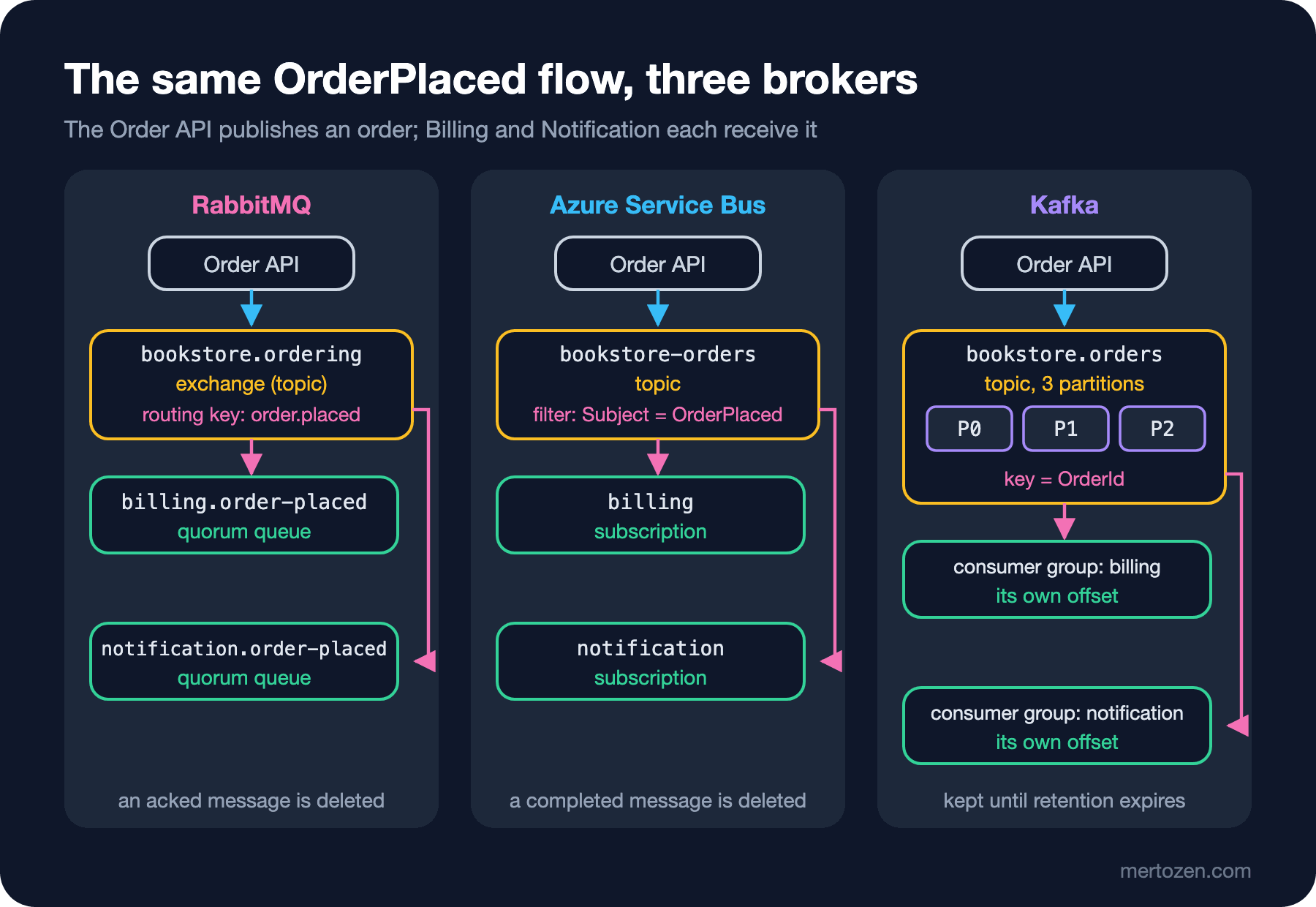
In RabbitMQ the producer writes to an exchange; the exchange looks at the routing key and puts a copy of the message into the bound queues. Each consumer reads its own queue, acks the message it processed, and the message is deleted. This is the model with the most routing flexibility: with topic, direct, fanout and headers exchanges you can distribute a message by almost any rule.
In Azure Service Bus the producer writes to a topic; each subscription keeps its own copy of the topic's messages and selects which messages it receives with rules (correlation or SQL (Structured Query Language) filters). The consumer receives the message by locking it, completes it when the work is done, and the message is deleted. Sessions, scheduled messages, duplicate detection and the dead-letter queue come built in; Microsoft operates the infrastructure.
In Kafka the producer writes to a topic, but a topic is not a queue; it is a log split into partitions. A message is not deleted when it is read; it stays for the retention period. Each consumer group keeps its own offset; anyone can read history from the beginning. Ordering is within a partition, parallelism is as high as the number of partitions.
A Practical Comparison
Which broker you choose is usually decided more by existing infrastructure, team experience and operating cost than by a feature list. Still, for a .NET developer's everyday questions the differences look like this:
| Question | RabbitMQ | Azure Service Bus | Kafka |
|---|---|---|---|
| When a message is processed | Deleted on ack | Deleted on complete | Stays, the offset moves |
| Routing | Very flexible (exchange types, bindings) | Topic + subscription filters | Topic and key; filtering in the consumer |
| Ordering | Within a queue, with a single consumer | Within a session | Within a partition (per key) |
| Replay | With a stream queue | No (resend from the dead-letter queue) | Natural: move the offset back |
| Retry and dead-lettering | Nack, DLX (Dead Letter Exchange), delivery-limit | MaxDeliveryCount, built-in DLQ (Dead Letter Queue) | None; you build retry/DLT topics |
| Managed service | Your own installation or third-party services | Yes, Azure only | Confluent Cloud, Amazon MSK (Managed Streaming for Apache Kafka), Azure Event Hubs' Kafka-compatible endpoint |
| Local development | One container | Emulator: two containers with SQL Server | One container (KRaft) |
Roughly: if you want to distribute business messages with flexible routing and per-message ack/retry, RabbitMQ; if you are on Azure and do not want to operate infrastructure, Azure Service Bus; if you want high-volume event streams, replay and several independent readers, Kafka. The split is not absolute; RabbitMQ streams offer replay, and Kafka is widely used for business messages too. But writing code against your broker's model is always more expensive than writing code with it.
The Same Message, Three Clients
To see the shape of the three clients, here is a small program that sends the same OrderPlaced to the three brokers and reads it back. This code is for experimentation; it does everything in one method. The correct lifecycle and error handling are the subject of the next three posts:
OrderPlaced order = new(Guid.CreateVersion7(), Guid.NewGuid(), 1220.50m, "TRY", DateTimeOffset.UtcNow,
    [new OrderPlacedItem(Guid.NewGuid(), 2, 450.00m), new OrderPlacedItem(Guid.NewGuid(), 1, 320.50m)]);
byte[] body = JsonSerializer.SerializeToUtf8Bytes(order, MessageJson.Options);
Console.WriteLine($"OrderPlaced {order.OrderId}, {body.Length} bytes of JSON");

// RabbitMQ: exchange + routing key, the broker pushes the message to the consumer
{
    ConnectionFactory factory = new() { Uri = new Uri("amqp://guest:guest@localhost:17201/") };
    await using IConnection connection = await factory.CreateConnectionAsync();
    await using IChannel channel = await connection.CreateChannelAsync(new CreateChannelOptions(
        publisherConfirmationsEnabled: true, publisherConfirmationTrackingEnabled: true));
    await channel.ExchangeDeclareAsync("bookstore.ordering", ExchangeType.Topic, durable: true);
    await channel.QueueDeclareAsync("billing.order-placed", durable: true, exclusive: false, autoDelete: false,
        arguments: new Dictionary<string, object?> { ["x-queue-type"] = "quorum" });
    await channel.QueueBindAsync("billing.order-placed", "bookstore.ordering", "order.placed");

    TaskCompletionSource<string> received = new();
    AsyncEventingBasicConsumer consumer = new(channel);
    consumer.ReceivedAsync += async (_, ea) =>
    {
        await channel.BasicAckAsync(ea.DeliveryTag, false);
        received.TrySetResult(ea.BasicProperties.Type ?? "");
    };
    await channel.BasicConsumeAsync("billing.order-placed", autoAck: false, consumer);

    Stopwatch sw = Stopwatch.StartNew();
    await channel.BasicPublishAsync("bookstore.ordering", "order.placed", mandatory: true,
        new BasicProperties { Type = OrderPlaced.MessageType, MessageId = Guid.NewGuid().ToString() }, body);
    string type = await received.Task;
    Console.WriteLine($"RabbitMQ    : published + confirmed + consumed ({type}) in {sw.ElapsedMilliseconds} ms");
}

// Azure Service Bus: topic + subscription, the processor/receiver takes the message with a lock
{
    await using ServiceBusClient client = new(
        "Endpoint=sb://localhost:17220;SharedAccessKeyName=RootManageSharedAccessKey;SharedAccessKey=SAS_KEY_VALUE;UseDevelopmentEmulator=true;");
    await using ServiceBusSender sender = client.CreateSender("bookstore-orders");
    await using ServiceBusReceiver receiver = client.CreateReceiver("bookstore-orders", "billing");

    Stopwatch sw = Stopwatch.StartNew();
    await sender.SendMessageAsync(new ServiceBusMessage(body) { Subject = "OrderPlaced", ContentType = "application/json" });
    ServiceBusReceivedMessage message = await receiver.ReceiveMessageAsync(TimeSpan.FromSeconds(10));
    await receiver.CompleteMessageAsync(message);
    Console.WriteLine($"Service Bus : sent + received + completed (seq {message.SequenceNumber}) in {sw.ElapsedMilliseconds} ms");
}

// Kafka: topic + partition, the consumer manages its own offset
{
    using IProducer<string, byte[]> producer = new ProducerBuilder<string, byte[]>(
        new ProducerConfig { BootstrapServers = "localhost:17210", Acks = Acks.All, EnableIdempotence = true }).Build();
    using IConsumer<string, byte[]> consumer = new ConsumerBuilder<string, byte[]>(new ConsumerConfig
    {
        BootstrapServers = "localhost:17210", GroupId = "billing-intro", AutoOffsetReset = AutoOffsetReset.Earliest
    }).Build();
    consumer.Subscribe("bookstore.orders");

    Stopwatch sw = Stopwatch.StartNew();
    DeliveryResult<string, byte[]> delivery = await producer.ProduceAsync("bookstore.orders",
        new Message<string, byte[]> { Key = order.OrderId.ToString(), Value = body });
    ConsumeResult<string, byte[]> result;
    do
    {
        result = consumer.Consume(TimeSpan.FromSeconds(10));
    } while (result.Message.Key != order.OrderId.ToString());
    Console.WriteLine($"Kafka       : produced to partition {delivery.Partition.Value} offset {delivery.Offset.Value}, consumed in {sw.ElapsedMilliseconds} ms (includes joining the group)");

    // a second message, after joining the group
    sw.Restart();
    await producer.ProduceAsync("bookstore.orders", new Message<string, byte[]> { Key = order.OrderId.ToString(), Value = body });
    consumer.Consume(TimeSpan.FromSeconds(10));
    Console.WriteLine($"Kafka       : second message produced + consumed in {sw.ElapsedMilliseconds} ms");
    consumer.Close();
}
OrderPlaced 01a1b90d-afb1-721e-8a7d-e95a9c60a58b, 355 bytes of JSON
RabbitMQ : published + confirmed + consumed (bookstore.order-placed.v1) in 5 ms
Service Bus : sent + received + completed (seq 5) in 133 ms
Kafka : produced to partition 2 offset 2, consumed in 3081 ms (includes joining the group)
Kafka : second message produced + consumed in 9 msThe answer to the first question: Kafka is by far the slowest at 3 seconds, but almost all of that time has nothing to do with the message. After the Subscribe call the consumer joins the group, the group coordinator distributes the partitions, and only then does it start reading. The second message, after joining the group, took 9 ms. The 133 ms on Service Bus is the emulator's own cost; real latency in Azure depends on the network, the tier and the region, so do not draw conclusions from this number. What micro-measurements like this teach is not the speed of the brokers but the difference between the models: a RabbitMQ consumer receives messages as soon as it subscribes, while a Kafka consumer first has to become a member of a group. This difference also explains why restarting every instance during a deploy can turn into a rebalance storm in Kafka.
The shape of the code is worth a look too. In RabbitMQ we declared the exchange, queue and binding in code; in Service Bus the topic and subscription were defined up front (in the emulator's config file); in Kafka we created the topic once from the command line, and the consumer's group came into being on its first connection. Who owns the topology is an invisible part of choosing a broker.
The Sample Application and the Local Environment
The projects we will use throughout the series: Bookstore.Contracts (message records only), Bookstore.OrderApi (a minimal API that takes orders), Bookstore.Billing and Bookstore.Notification (consumers). The shared contract:
namespace Bookstore.Contracts;

public sealed record OrderPlaced(
    Guid OrderId,
    Guid CustomerId,
    decimal Total,
    string Currency,
    DateTimeOffset PlacedAt,
    IReadOnlyList<OrderPlacedItem> Items)
{
    public const string MessageType = "bookstore.order-placed.v1";
}

public sealed record OrderPlacedItem(Guid BookId, int Quantity, decimal UnitPrice);
The local environment is a single Docker Compose file. We deliberately chose ports away from the defaults so they do not clash with another RabbitMQ or Kafka running on your machine: 17201 for RabbitMQ AMQP (Advanced Message Queuing Protocol), 17202 for its management UI (user interface); 17210 for Kafka; 17220 for the Service Bus emulator's AMQP and 17221 for its management port.
name: bookstore-messaging

services:
  rabbitmq:
    image: rabbitmq:4.4-management
    ports:
      - "17201:5672"
      - "17202:15672"
  kafka:
    image: apache/kafka:4.2.1
    ports:
      - "17210:9092"
    environment:
      KAFKA_NODE_ID: 1
      KAFKA_PROCESS_ROLES: broker,controller
      KAFKA_LISTENERS: PLAINTEXT://:9092,INTERNAL://:19092,CONTROLLER://:9093
      KAFKA_ADVERTISED_LISTENERS: PLAINTEXT://localhost:17210,INTERNAL://kafka:19092
      KAFKA_INTER_BROKER_LISTENER_NAME: INTERNAL
      KAFKA_CONTROLLER_LISTENER_NAMES: CONTROLLER
      KAFKA_LISTENER_SECURITY_PROTOCOL_MAP: CONTROLLER:PLAINTEXT,PLAINTEXT:PLAINTEXT,INTERNAL:PLAINTEXT
      KAFKA_CONTROLLER_QUORUM_VOTERS: 1@localhost:9093
      KAFKA_OFFSETS_TOPIC_REPLICATION_FACTOR: 1
      KAFKA_TRANSACTION_STATE_LOG_REPLICATION_FACTOR: 1
      KAFKA_TRANSACTION_STATE_LOG_MIN_ISR: 1
      KAFKA_NUM_PARTITIONS: 3
  mssql:
    image: mcr.microsoft.com/mssql/server:2022-latest
    environment:
      ACCEPT_EULA: "Y"
      MSSQL_SA_PASSWORD: ${SQL_PASSWORD}
  servicebus:
    image: mcr.microsoft.com/azure-messaging/servicebus-emulator:latest
    ports:
      - "17220:5672"
      - "17221:5300"
    environment:
      SQL_SERVER: mssql
      MSSQL_SA_PASSWORD: ${SQL_PASSWORD}
      ACCEPT_EULA: "Y"
    volumes:
      - ./sbemu/Config.json:/ServiceBus_Emulator/ConfigFiles/Config.json
    depends_on:
      - mssql
Kafka has two listeners: PLAINTEXT advertises localhost:17210 for .NET applications on the machine, and INTERNAL advertises kafka:19092 for container-to-container traffic (and later for side services such as Schema Registry). Kafka containers set up with a single listener often get stuck with a "Node may not be available" warning, because tools run inside the container, such as kafka-topics.sh, cannot reach the address advertised to the outside; we ran into this on the first try ourselves. There is no ZooKeeper: Kafka 4 runs only in KRaft mode. The Service Bus emulator keeps its data in a SQL Server container; instead of writing the password into a file, we pass it through the SQL_PASSWORD environment variable. After docker compose up -d:
mqwork1-kafka-1	apache/kafka:4.2.1	Up Less than a second
mqwork1-mssql-1	mcr.microsoft.com/mssql/server:2022-latest	Up Less than a second
mqwork1-rabbitmq-1	rabbitmq:4.4-management	Up Less than a second
mqwork1-servicebus-1	mcr.microsoft.com/azure-messaging/servicebus-emulator:latest	Up Less than a second
The emulator is ready to use some time after the container is "Up"; wait for the Emulator Service is Successfully Up! line in the log. On an Apple Silicon Mac the SQL Server image is amd64, so it runs under emulation and starts slowly.
Amazon SQS/SNS and Others
There is no separate post in the series for Amazon SQS (Simple Queue Service) and SNS (Simple Notification Service), but their models will look familiar. SQS is a queue service: standard queues deliver at-least-once and do not guarantee order, FIFO (First In, First Out) queues offer ordering per message group and deduplication. SNS is a pub/sub topic, and in a typical setup each subscriber reads its own SQS queue subscribed to the SNS topic; that is the counterpart of the topic and subscription pair in Azure Service Bus. The visibility timeout is the counterpart of Service Bus's lock duration, and SQS's redrive policy the counterpart of MaxDeliveryCount and the DLQ. The consumer rules in this series (manual confirmation, idempotent processing, watching the lock duration) apply to SQS as well. NATS (a lightweight open-source messaging system), Redis Streams and Apache Pulsar are also options; this series focuses on the trio that is common in the .NET world: RabbitMQ, Azure Service Bus and Kafka.
Things to Watch When Choosing
Do not choose a broker for a single feature. A team that picks Kafka because "we might need replay" has to write per-message retry and delayed redelivery itself. A team that picks RabbitMQ because "routing should be flexible" also takes on operating the cluster. Write down your real needs (ordering, volume, replay, team experience, cloud provider) and choose the broker accordingly.
Using more than one broker in the same system is possible and sometimes right: business messages on RabbitMQ or Service Bus, high-volume analytics events on Kafka. But every broker means a separate operational burden, a separate monitoring dashboard and a separate failure model.
Know how well the local environment represents production. On a single-node RabbitMQ, a quorum queue does not replicate; the Service Bus emulator does not support partitioned entities, large messages or persistence; on a single-broker Kafka the replication factor is 1. Test behaviour locally, and scale and resilience in the real environment.
Common Pitfalls
Writing an interface that abstracts the broker from day one. A single method like IMessageBus.PublishAsync cannot hide the different models (ack, lock, offset) of three brokers; it either sinks to the lowest common denominator or leaks. Use one broker well first; if you need an abstraction, choose a mature library.
Using Kafka as a queue. There is no per-message ack, no delayed redelivery and no "delete when processed"; if you want those, you are using the wrong tool.
Taking latency measured on the emulator as a production expectation. The 133 ms above says nothing about Azure Service Bus performance.
Mistaking a consumer's startup cost for message latency when measuring. The 3 seconds on Kafka is the typical example.
Changing the contract per broker. OrderPlaced is the same on all three brokers; only the place where metadata travels changes (property, application property, header).
A Small Experiment
★☆☆ Bring up the compose file and open the RabbitMQ management UI (http://localhost:17202). After running the program above, find the bookstore.ordering exchange and the billing.order-placed queue in the UI.
★★☆ Change the program so the Kafka consumer's GroupId is different on every run, and measure whether the "joining the group" time changes. Then repeat the measurement with GroupProtocol = GroupProtocol.Consumer.
★★★ Add a second consumer for Notification: the notification.order-placed queue in RabbitMQ, the notification subscription in Service Bus, the notification group in Kafka. Show on each of the three brokers that the same message reaches both consumers.
We have seen the three brokers side by side; now we go deep, one at a time. In the next post we write the first real producer and consumer with RabbitMQ.Client 7: the async API, the lifecycle of connections and channels, publisher confirmations, prefetch, manual ack, and what happens when the connection drops.