

Streaming with Claude: CreateStreaming, Events and Server-Sent Events in ASP.NET Core
To stream a Claude answer you handle the events from client.Messages.CreateStreaming; the usage in message_delta is cumulative and the CancellationToken must be passed to the SDK. Event order, text/thinking/input_json deltas, errors inside the stream, the Bookstore assistant with .NET 10 TypedResults.ServerSentEvents, tests with the documented events and validating partial JSON with eager_input_streaming.
Version note: The code in this post was built with .NET 10 (ASP.NET Core 10), Anthropic C# SDK 13.8.0 and Claude API version 2026-10-21, and its unit tests were run. The event order, delta types and error behavior were taken on 15 November 2026 from the streaming, thinking and fine-grained tool streaming pages on platform.claude.com; the SSE output in this post is the documentation's sample events passed through our mapper and captured with curl from a local ASP.NET Core app. This post is based on the official documentation.
Guess First
A shopping assistant is being added to the Angular client of Bookstore, the online bookstore used as the shared example across this site's series. In the first version the user types a question and looks at an empty screen until the answer arrives; for long recommendations the wait gets long enough for users to reload the page. Emre moves to streaming. Now the text flows, but the output token counts in the log come out several times higher than on the bill, and when the user closes the tab, the Claude request on the server keeps going until the end.
What is your guess? Why do the token counts inflate, and why does the request not stop when the tab closes? In this post we look at the order of Claude's stream events, the SDK's CreateStreaming method, and carrying these events to the browser with ASP.NET Core 10's Server-Sent Events support. We covered the general logic of streaming in the seventh post of the LLM Fundamentals series and SSE in ASP.NET Core in the fourth post of the AI with .NET series; here we focus on Claude's events and how to map them.
Why Streaming?
There are two reasons. The first is perceived speed: the first word of the answer reaches the screen in a few seconds, and the rest flows as it is written. The second is a technical necessity. The streaming page says the SDK requires streaming for large max_tokens values to avoid HTTP timeouts; the Errors page also recommends streaming or Message Batches for requests that can exceed 10 minutes, and reminds you that some networks drop connections that stay idle for long. For Sonnet 5.5 the effort page recommends setting max_tokens to 128,000, the model's maximum, for agentic coding and streaming the response.
If you do not need to handle events one by one, the SDK can do the work for you; it opens the stream, collects all the events and returns a normal Message:
// If you do not need the events one by one: the SDK collects the stream into a Message.
Message message = await claude.Messages.CreateStreaming(parameters, cancellationToken).Aggregate();
That is enough for background work such as Bookstore's bulk summary generation. For an answer the user is waiting for, we will handle the events ourselves.
The Event Order
In the basic example on the streaming page, the raw SSE stream for a "Hello" request looks like this (the sample response from the documentation):
event: message_start
data: {"type": "message_start", "message": {"id": "msg_1nZdL29xx5MUA1yADyHTEsnR8uuvGzszyY", "type": "message", "role": "assistant", "content": [], "model": "claude-opus-5-5", "stop_reason": null, "stop_sequence": null, "usage": {"input_tokens": 25, "output_tokens": 1}}}

event: content_block_start
data: {"type": "content_block_start", "index": 0, "content_block": {"type": "text", "text": ""}}

event: ping
data: {"type": "ping"}

event: content_block_delta
data: {"type": "content_block_delta", "index": 0, "delta": {"type": "text_delta", "text": "Hello"}}

event: content_block_delta
data: {"type": "content_block_delta", "index": 0, "delta": {"type": "text_delta", "text": "!"}}

event: content_block_stop
data: {"type": "content_block_stop", "index": 0}

event: message_delta
data: {"type": "message_delta", "delta": {"stop_reason": "end_turn", "stop_sequence":null}, "usage": {"output_tokens": 15}}

event: message_stop
data: {"type": "message_stop"}
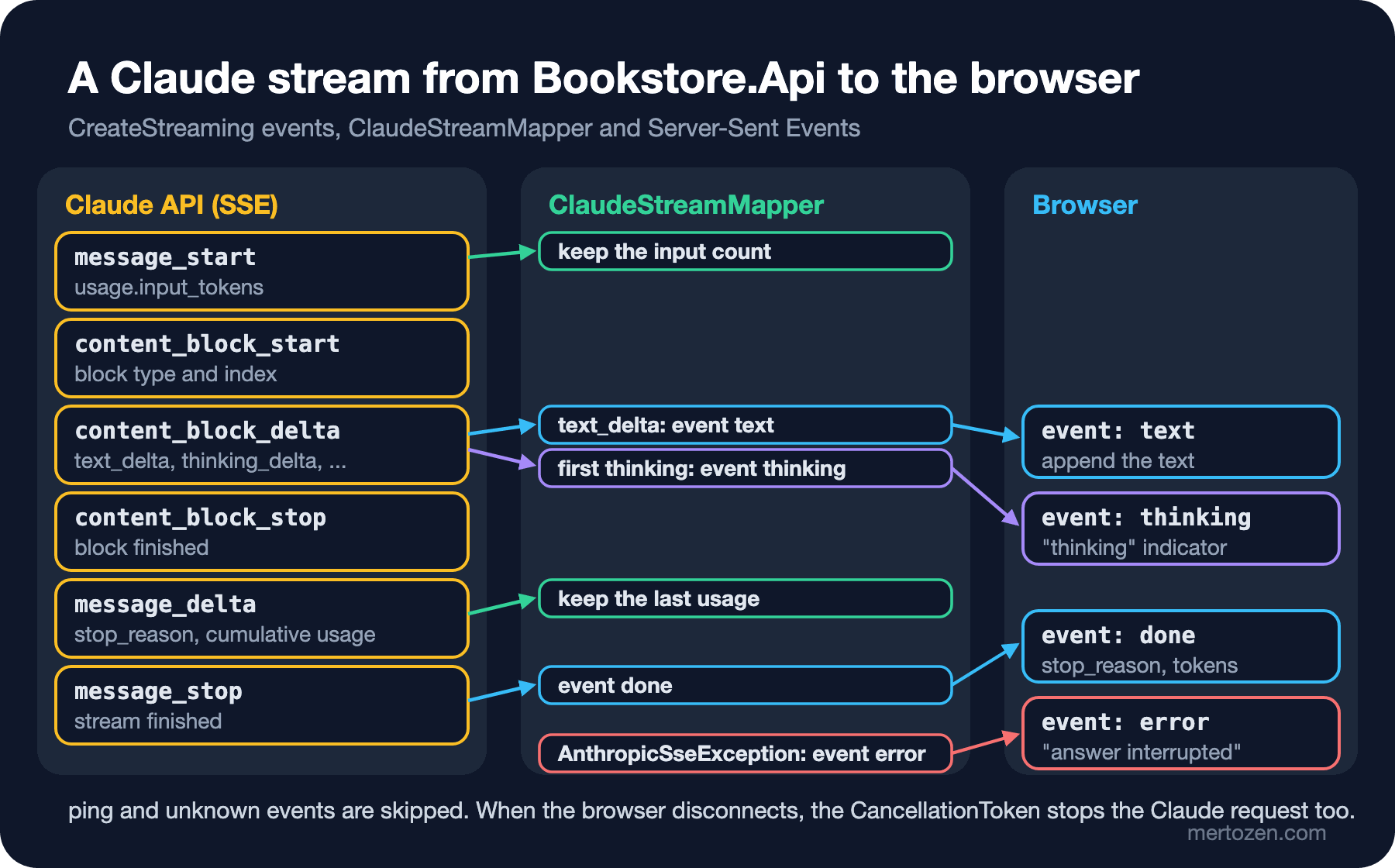
The stream always has the same skeleton. First comes message_start; it holds a Message with empty content and the input token count. Then for each content block a content_block_start, zero or more content_block_delta events and a content_block_stop. Each block has an index, and that index matches its position in the content array of the final Message. Then one or more message_delta events come; stop_reason and the current usage are here. Last is message_stop. Any number of ping events can come in between.
The explanation for Emre's inflated token counts is in message_delta. The documentation warns about it explicitly: the usage counts in this event are cumulative. If you add up the output_tokens of every message_delta, you count the same tokens more than once; you need to take the last value. This is not a measurement glitch, it means computing the billed number wrongly.
Delta types depend on the block type. Text blocks get text_delta, tool_use blocks get input_json_delta with partial JSON, thinking blocks get thinking_delta and a single signature_delta just before the block closes. Because thinking's display value is omitted by default on current models, the thinking block opens, an empty thinking_delta arrives, then the signature, and the block closes; the text stream starts right after. Some blocks arrive whole without any deltas: redacted_thinking and server tool results such as a web search result.
There are two more cases. Under heavy load an error event can come inside the stream; according to the documentation this can be an overloaded_error, which outside a stream would be an HTTP 529. Because the HTTP status has already come back as 200, you have to catch this error inside the stream, not from the status code. And under the versioning policy new event types can be added; your code should not crash on an event it does not know but skip it.
CreateStreaming and RawMessageStreamEvent
In the SDK, the name of a streaming method ends in Streaming, and it returns an IAsyncEnumerable. client.Messages.CreateStreaming gives a RawMessageStreamEvent for each event. It is a union: you pick which event it is with methods such as TryPickStart, TryPickContentBlockDelta, TryPickDelta and TryPickStop. The delta itself is a union too: TryPickText, TryPickThinking, TryPickInputJson. We keep the payload sent to the browser small:
using System.Text.Json.Serialization;

namespace Bookstore.Api.Assistant;

// What the browser receives: one small JSON object per SSE event; null fields are left out.
public sealed record AssistantChunk(
    [property: JsonIgnore(Condition = JsonIgnoreCondition.WhenWritingNull)] string? Text = null,
    [property: JsonIgnore(Condition = JsonIgnoreCondition.WhenWritingNull)] string? StopReason = null,
    [property: JsonIgnore(Condition = JsonIgnoreCondition.WhenWritingNull)] long? InputTokens = null,
    [property: JsonIgnore(Condition = JsonIgnoreCondition.WhenWritingNull)] long? OutputTokens = null,
    [property: JsonIgnore(Condition = JsonIgnoreCondition.WhenWritingNull)] string? Error = null);
The mapper reduces Claude's events to four SSE events: text, thinking once on the first thinking delta, done at the end, and error on failure.
using System.Net.ServerSentEvents;
using System.Runtime.CompilerServices;
using Anthropic.Exceptions;
using Anthropic.Models.Messages;

namespace Bookstore.Api.Assistant;

public static class ClaudeStreamMapper
{
    public const string TextEvent = "text";
    public const string ThinkingEvent = "thinking";
    public const string DoneEvent = "done";
    public const string ErrorEvent = "error";

    public static async IAsyncEnumerable<SseItem<AssistantChunk>> MapAsync(
        IAsyncEnumerable<RawMessageStreamEvent> events,
        [EnumeratorCancellation] CancellationToken cancellationToken = default)
    {
        long inputTokens = 0;
        long outputTokens = 0;
        string? stopReason = null;
        bool thinkingAnnounced = false;

        await using IAsyncEnumerator<RawMessageStreamEvent> enumerator = events.GetAsyncEnumerator(cancellationToken);
        while (true)
        {
            bool hasNext;
            bool interrupted = false;
            try
            {
                hasNext = await enumerator.MoveNextAsync();
            }
            catch (Exception ex) when (ex is AnthropicSseException or AnthropicIOException)
            {
                // HTTP status was 200; the error came inside the stream (overloaded_error) or the connection dropped.
                hasNext = false;
                interrupted = true;
            }

            if (interrupted)
            {
                yield return new SseItem<AssistantChunk>(new AssistantChunk(Error: "The answer was interrupted."), ErrorEvent);
                yield break;
            }

            if (!hasNext)
            {
                break;
            }

            RawMessageStreamEvent current = enumerator.Current;
            if (current.TryPickStart(out RawMessageStartEvent? start))
            {
                inputTokens = start.Message.Usage.InputTokens;
            }
            else if (current.TryPickContentBlockDelta(out RawContentBlockDeltaEvent? delta))
            {
                if (delta.Delta.TryPickText(out TextDelta? text))
                {
                    yield return new SseItem<AssistantChunk>(new AssistantChunk(Text: text.Text), TextEvent);
                }
                else if (delta.Delta.TryPickThinking(out ThinkingDelta? _) && !thinkingAnnounced)
                {
                    // The thinking text is not forwarded; the UI only shows a "thinking" indicator once.
                    thinkingAnnounced = true;
                    yield return new SseItem<AssistantChunk>(new AssistantChunk(), ThinkingEvent);
                }
            }
            else if (current.TryPickDelta(out RawMessageDeltaEvent? messageDelta))
            {
                // Usage in message_delta is cumulative: keep the last value, do not add them up.
                outputTokens = messageDelta.Usage.OutputTokens;
                stopReason = messageDelta.Delta.StopReason?.Raw();
            }
            else if (current.TryPickStop(out RawMessageStopEvent? _))
            {
                yield return new SseItem<AssistantChunk>(
                    new AssistantChunk(StopReason: stopReason, InputTokens: inputTokens, OutputTokens: outputTokens), DoneEvent);
            }

            // ping and event types this SDK version does not know are skipped.
        }
    }
}
Three places in this code deserve attention. The error handling is around the MoveNextAsync call, because in C# you cannot yield return from inside a catch; we write the error to a flag and send the error event outside the try block. According to the C# SDK page, AnthropicSseException represents errors in the SSE stream after the HTTP response has started successfully; network drops come as AnthropicIOException. OperationCanceledException is deliberately not caught: if the browser is gone, there is nothing to do. The second is message_delta: we overwrite the output token count rather than add to it. The third is thinking: we do not send the thinking text to the browser, only one event for a "thinking" indicator.
/api/assistant/stream in Bookstore.Api
The assistant puts the books in the catalog into the system prompt and streams the question:
using System.Net.ServerSentEvents;
using Anthropic;
using Anthropic.Models.Messages;
using Bookstore.Api.Ai;
using Bookstore.Api.Catalog;
using Microsoft.Extensions.Options;

namespace Bookstore.Api.Assistant;

public sealed class ShoppingAssistant(IAnthropicClient claude, IBookRepository books, IOptions<ClaudeOptions> options)
{
    public MessageCreateParams BuildRequest(string question) => new()
    {
        Model = options.Value.Model,
        MaxTokens = 4096,
        System = $"""
            You are the shopping assistant of Bookstore, an online bookstore. Answer in the customer's language.
            Recommend only books from this catalog, with their prices in TRY:
            {string.Join("\n", books.Search(string.Empty, null).Select(b => $"- {b.Title} by {b.Author}, {b.Price} TRY"))}
            """,
        Messages = [new UserMessageParam { Content = question }],
    };

    public IAsyncEnumerable<SseItem<AssistantChunk>> StreamAsync(string question, CancellationToken cancellationToken) =>
        ClaudeStreamMapper.MapAsync(claude.Messages.CreateStreaming(BuildRequest(question), cancellationToken), cancellationToken);
}
The endpoint uses .NET 10's TypedResults.ServerSentEvents result:
namespace Bookstore.Api.Assistant;

public static class AssistantEndpoints
{
    public sealed record AssistantQuestion(string Question);

    public static IEndpointRouteBuilder MapAssistantEndpoints(this IEndpointRouteBuilder app)
    {
        // The request's CancellationToken fires when the browser disconnects; the Claude stream stops with it.
        app.MapPost("/api/assistant/stream", (AssistantQuestion body, ShoppingAssistant assistant, CancellationToken ct) =>
            TypedResults.ServerSentEvents(assistant.StreamAsync(body.Question, ct)));

        return app;
    }
}
The CancellationToken does two jobs at once. In a minimal API this parameter is bound to the request's RequestAborted token; it fires when the browser closes the connection. Because the same token goes into CreateStreaming, the HTTP request to Claude is cancelled too. That was Emre's second problem: code that does not pass the token to the SDK keeps reading tokens that are generated and billed after the user has left.
We made the endpoint a POST because we do not want to put the question in the URL; URLs end up in access logs. That has a consequence: the browser's EventSource API supports only GET, so on the Angular side the stream has to be read with fetch. The details of the Angular side belong to the planned AI Interfaces with Angular series.
Trying the Stream Without the API
We test the mapper with the sample events from the documentation. The events are deserialized from JSON into RawMessageStreamEvent and given to the mapper through a fake IAsyncEnumerable:
using System.Net.ServerSentEvents;
using System.Text.Json;
using Anthropic.Exceptions;
using Anthropic.Models.Messages;
using Bookstore.Api.Assistant;

namespace Bookstore.Api.Tests;

public sealed class ClaudeStreamMapperTests
{
    // The "Basic streaming request" response from the streaming page (ping left out).
    private static readonly string[] DocumentedEvents =
    [
        """{"type": "message_start", "message": {"id": "msg_1nZdL29xx5MUA1yADyHTEsnR8uuvGzszyY", "type": "message", "role": "assistant", "content": [], "model": "claude-opus-5-5", "stop_reason": null, "stop_sequence": null, "usage": {"input_tokens": 25, "output_tokens": 1}}}""",
        """{"type": "content_block_start", "index": 0, "content_block": {"type": "text", "text": ""}}""",
        """{"type": "content_block_delta", "index": 0, "delta": {"type": "text_delta", "text": "Hello"}}""",
        """{"type": "content_block_delta", "index": 0, "delta": {"type": "text_delta", "text": "!"}}""",
        """{"type": "content_block_stop", "index": 0}""",
        """{"type": "message_delta", "delta": {"stop_reason": "end_turn", "stop_sequence":null}, "usage": {"output_tokens": 15}}""",
        """{"type": "message_stop"}""",
    ];

    private static async IAsyncEnumerable<RawMessageStreamEvent> Replay(IEnumerable<string> lines, Exception? failAtEnd = null)
    {
        foreach (string line in lines)
        {
            await Task.Yield();
            yield return JsonSerializer.Deserialize<RawMessageStreamEvent>(line)!;
        }

        if (failAtEnd is not null)
        {
            throw failAtEnd;
        }
    }

    [Fact]
    public async Task MapAsync_DocumentedStream_YieldsTextThenDone()
    {
        List<SseItem<AssistantChunk>> items = [];
        await foreach (SseItem<AssistantChunk> item in ClaudeStreamMapper.MapAsync(Replay(DocumentedEvents)))
        {
            items.Add(item);
        }

        Assert.Equal(["text", "text", "done"], items.Select(i => i.EventType));
        Assert.Equal("Hello!", string.Concat(items.Select(i => i.Data.Text)));
        AssistantChunk done = items[^1].Data;
        Assert.Equal("end_turn", done.StopReason);
        Assert.Equal(25, done.InputTokens);
        Assert.Equal(15, done.OutputTokens);
    }

    [Fact]
    public async Task MapAsync_ErrorInsideTheStream_YieldsAnErrorEvent()
    {
        List<SseItem<AssistantChunk>> items = [];
        await foreach (SseItem<AssistantChunk> item in ClaudeStreamMapper.MapAsync(
            Replay(DocumentedEvents[..3], new AnthropicSseException("overloaded_error"))))
        {
            items.Add(item);
        }

        Assert.Equal(["text", "error"], items.Select(i => i.EventType));
    }
}
Passed! - Failed: 0, Passed: 18, Skipped: 0, Total: 18, Duration: 44 ms - Bookstore.Api.Tests.dll (net10.0)To see what the browser will receive, we also built a small local app. It feeds the same events to the mapper 50 ms apart and serves the result with the real TypedResults.ServerSentEvents on 127.0.0.1:
using System.Text.Json;
using Anthropic.Models.Messages;
using Bookstore.Api.Assistant;

// Replays the documented "Basic streaming request" events through ClaudeStreamMapper; no API call.
string[] lines = File.ReadAllLines(Path.Combine(AppContext.BaseDirectory, "events.jsonl"));
WebApplication app = WebApplication.CreateBuilder(args).Build();
app.MapPost("/api/assistant/stream", (CancellationToken ct) =>
    TypedResults.ServerSentEvents(ClaudeStreamMapper.MapAsync(Replay(lines), ct)));
app.Run("http://127.0.0.1:52304");

static async IAsyncEnumerable<RawMessageStreamEvent> Replay(string[] lines)
{
    foreach (string line in lines)
    {
        await Task.Delay(50);
        yield return JsonSerializer.Deserialize<RawMessageStreamEvent>(line)!;
    }
}
curl -N -i -X POST http://127.0.0.1:52304/api/assistant/streamHTTP/1.1 200 OK
Content-Type: text/event-stream
Server: Kestrel
Cache-Control: no-cache,no-store
Content-Encoding: identity
Pragma: no-cache
Transfer-Encoding: chunked
event: text
data: {"text":"Hello"}
event: text
data: {"text":"!"}
event: done
data: {"stopReason":"end_turn","inputTokens":25,"outputTokens":15}Two things in the output help us. The payloads are small: null fields are not written thanks to JsonIgnore. And ASP.NET Core's SSE result adds its own headers: Content-Type: text/event-stream, Cache-Control: no-cache,no-store and Content-Encoding: identity. The last header keeps the response compression middleware from trying to compress this response.
Streaming with Tool Use: eager_input_streaming
We will add tools in the fifth post; there is one detail you need to know on the streaming side. The input of a tool call arrives through input_json_delta events as partial JSON strings. According to the documentation, by default the API buffers and validates each key and value until it is complete, then sends it in fragments. If you set eager_input_streaming: true on a tool definition (Tool.EagerInputStreaming in the SDK), fine-grained tool streaming turns on: fragments arrive as the model writes them, but the API neither buffers nor validates them. The documentation says plainly that you may then get invalid JSON, and that a response cut off by max_tokens can split a parameter in the middle.
The rule is simple: collect the fragments per block index, parse when content_block_stop comes, and skip the tool if the input does not parse.
using System.Text;
using System.Text.Json;

namespace Bookstore.Api.Assistant;

// Collects input_json_delta fragments per content block index and parses them once the block stops.
public sealed class ToolInputAccumulator
{
    private readonly Dictionary<long, StringBuilder> _buffers = [];

    public void Append(long index, string partialJson)
    {
        if (!_buffers.TryGetValue(index, out StringBuilder? buffer))
        {
            buffer = new StringBuilder();
            _buffers[index] = buffer;
        }

        buffer.Append(partialJson);
    }

    // Never run a tool with input that did not parse: with eager_input_streaming the API does not validate it.
    public bool TryComplete(long index, out JsonElement input)
    {
        input = default;
        if (!_buffers.Remove(index, out StringBuilder? buffer))
        {
            return false;
        }

        try
        {
            using JsonDocument document = JsonDocument.Parse(buffer.ToString());
            input = document.RootElement.Clone();
            return input.ValueKind == JsonValueKind.Object;
        }
        catch (JsonException)
        {
            return false;
        }
    }
}
The test we wrote with the sample fragments from the documentation ({"location": "San Fra and ncisco, CA"}) confirms the joined input, and TryComplete returns false on input that was cut off. Showing partial JSON on screen is one thing; running a tool that cancels an order with it is another.
In Production
Buffering in the layers in between. For the stream to reach the browser piece by piece, every layer in between has to pass the response through without buffering. ASP.NET Core's SSE result takes care of its own side; if there is a reverse proxy in front of it, you also need to check its settings (proxy_buffering or the X-Accel-Buffering: no header in nginx, response buffering and dynamic compression settings on IIS and Azure). The symptom is always the same: text that flows in development arrives in one piece in production.
A stream cut off halfway. If the network drops or an error event comes, you are holding half an answer. The streaming page describes the way for Claude 4.6 and later models: keep the part you received, give it in a new user message and ask the model to continue from where it left off. Tool use and thinking blocks cannot be partially recovered; you can only continue from the last text block. We do not do this in the Bookstore assistant: we show the user "answer interrupted" and let them ask again.
A refusal in the middle of the stream. According to the streaming refusals page, the stream ends with stop_reason: "refusal" and stop_details arrives with message_delta. The text streamed up to that point should be treated as incomplete and discarded, as the refusals page describes; the output streamed until then is also billed. Our done event carries stopReason; if the client sees refusal, it should remove the partial text on the screen.
Read usage at the end. The correct output token count is known only when the last message_delta arrives. According to the documentation, the thinking token breakdown is also only on the final message_delta event. Write the cost log at done, not on the deltas.
Common Pitfalls
Adding up the message_delta usage. The counts are cumulative; adding them up logs a number larger than the bill.
Re-rendering the UI on every delta. The model can send many small deltas per second. Appending the text to a buffer on the client and updating the screen at intervals is much cheaper than re-rendering the whole chat on every delta.
Reading usage before the stream ends. The output count in message_start is a starting value, not the real one.
Not passing the CancellationToken to the SDK. Claude keeps generating the answer, and you keep paying, after the user has left.
Throwing on an unknown event. New event types can be added; skip the ones you do not know.
Using partial tool input without validating it. With eager_input_streaming on, the JSON can be invalid; no tool should run before it parses.
A Small Experiment
★☆☆ Add an event with the thinking delta sample from the documentation ("type": "thinking_delta") to the tests and confirm that the mapper produces exactly one thinking event.
★★☆ Add an option to the mapper that joins small text deltas and sends them at most every 100 ms. Lower the delay between events in the replay app to 10 ms and see how the number of events in the output changes.
★★★ Add stop_details.category to the done event when stopReason == "refusal" (RawMessageDeltaEvent.Delta.StopDetails). Build a stream fixture from the refusal sample in the documentation and write its test.
For now the assistant knows only the four books in its system prompt and cannot see any order. In the fifth post we move to tool use: the search_books and get_order_status tools, the tool loop, strict mode, parallel tool calls and server tools such as web search.