

.NET + Angular CI with Azure Pipelines: UseDotNet, NuGet Cache, Test Results, Coverage and Pipeline Artifacts
.NET and Angular CI in Azure Pipelines is built with Cache@2 keyed on lock files, PublishTestResults@2 for TRX and JUnit, PublishCodeCoverageResults@2 for Cobertura and PublishPipelineArtifact@1 between jobs. We add these to Bookstore's templates and cover DotNetCoreCLI@2 appending --report-trx under Microsoft.Testing.Platform, --locked-mode, and a job that combines the api and web output into one release package.
Version note: The examples in this post were run locally with .NET 10 (SDK 10.0.404), Microsoft.Testing.Extensions.TrxReport 2.5.3, Microsoft.Testing.Extensions.CodeCoverage 18.12.0, Angular 22, Vitest 5.1 and Node.js 24; the pipeline and template files were parsed and checked with yq 4.54. How the cache, test result, coverage and artifact tasks behave inside Azure Pipelines is based on the official documentation on Microsoft Learn (November 2026 versions).
Guess First
Emre wants to write the test step in the pipeline of Bookstore, the online bookstore used as the shared example across this site's series, with the ready-made task instead of a plain script:
- task: DotNetCoreCLI@2
  displayName: Test
  inputs:
    command: test
    arguments: --solution Bookstore.slnx --no-build -c Release
The repository's global.json selects Microsoft.Testing.Platform as the test runner, and the test project only has the xUnit v3 package. The task's publishTestResults input is not written. All tests would pass. Does the step finish green?
The answer: it finishes red and not a single test runs. According to the DotNetCoreCLI@2 documentation, publishTestResults defaults to true, and when it sees Microsoft.Testing.Platform in global.json it appends --report-trx --results-directory $(Agent.TempDirectory) to the command. But the --report-trx option lives in a separate package, Microsoft.Testing.Extensions.TrxReport. Running the same command with the option the task adds, locally in the same repository, gives this (paths shortened):
$ dotnet test --project tests/Bookstore.Api.Tests --no-build -c Release --report-trx --results-directory …/tr
Test run summary: Failed!
  total: 0
  failed: 0
  succeeded: 0
  skipped: 0
  duration: 73ms
Test run completed with non-success exit code: 5 (see: https://aka.ms/testingplatform/exitcodes)

Handshake failures:
  …/tests/Bookstore.Api.Tests/bin/Release/net10.0/Bookstore.Api.Tests.dll (net10.0)
Exit code: 5
  Standard output: Unknown option '--report-trx'
  Option '--report-trx' is provided by the 'Microsoft.Testing.Extensions.TrxReport' extension. Add a package reference to use it.
The error message also tells you the fix. In this post we add that package and put test results, coverage, caching and pipeline artifacts into Bookstore's shared templates.
DotNetCoreCLI@2 or a Plain dotnet Command
We pin the SDK and Node.js versions as in the earlier posts: UseDotNet@2 with useGlobalJson: true installs what global.json asks for, and UseNode@1 with version: 24.x installs Node.js 24. The real decision is whether to run commands through a task or a script. DotNetCoreCLI@2 does some things on its own: it produces and publishes test results as TRX, finds several projects with a glob, and can pass feed credentials to restore. The price is that part of the command is assembled where you cannot see it; the opening error is exactly that. A plain script: dotnet ... is the same command you type locally: the log shows exactly what ran, it reproduces one to one on your machine, and publishing test results takes a separate task.
For Bookstore we chose plain commands and left publishing to separate tasks. The prerequisite is that the tests can produce reports and coverage, so we added two Microsoft.Testing.Platform extensions to the test project (versions in Directory.Packages.props):
<ItemGroup>
    <PackageReference Include="Microsoft.AspNetCore.Mvc.Testing" />
    <PackageReference Include="xunit.v3" />
    <PackageReference Include="Microsoft.Testing.Extensions.TrxReport" />
    <PackageReference Include="Microsoft.Testing.Extensions.CodeCoverage" />
</ItemGroup>
Once the packages are in, the test application's help output shows the new options:
$ dotnet test --project tests/Bookstore.Api.Tests --no-build -c Release --help
…
  --coverage                        Collect the code coverage using dotnet-coverage tool.
  --coverage-output                 The output of the generated code coverage report.
  --coverage-output-format          Output file format. Supported values: 'coverage', 'xml' and 'cobertura'
…
  --report-trx                      Enable generating TRX report.
  --report-trx-filename             The name of the generated TRX report. May include a relative or absolute path; relative paths are resolved against the test results directory and missing directories are created.
Cache@2 for NuGet and npm
Because every job on a Microsoft-hosted agent starts on a clean VM, every restore downloads all NuGet packages again and every npm ci downloads all npm packages again. Cache@2 stores a folder under a key and restores it on later runs. The key should change exactly when dependencies change, and lock files say that best. npm already has package-lock.json. On the NuGet side, to turn on lock files we added <RestorePackagesWithLockFile>true</RestorePackagesWithLockFile> to Directory.Build.props; the first restore produces a packages.lock.json per project:
{
  "version": 2,
  "dependencies": {
    "net10.0": {
      "Microsoft.AspNetCore.Mvc.Testing": {
        "type": "Direct",
        "requested": "[10.0.15, )",
        "resolved": "10.0.15",
        "contentHash": "qwZzLn60Ish1cTZoNDcbS/P8zjUjLGtZUye18KwB8n05eea5WGBgYO/HAxZWLRcFVkSD2ZXY496e1YX7Go4ndQ==",
The shared step template now restores the cache and runs restore in locked mode:
# Installs the SDK from global.json, restores the NuGet cache and restores the solution in locked mode.
parameters:
  - name: solution
    type: string

steps:
  - task: UseDotNet@2
    displayName: Install .NET SDK from global.json
    inputs:
      packageType: sdk
      useGlobalJson: true

  - task: Cache@2
    displayName: Cache NuGet packages
    inputs:
      key: 'nuget | "$(Agent.OS)" | $(Build.SourcesDirectory)/**/packages.lock.json'
      restoreKeys: |
        nuget | "$(Agent.OS)"
      path: $(NUGET_PACKAGES)

  - script: dotnet restore ${{ parameters.solution }} --locked-mode
    displayName: Restore (locked)
The key has three parts: a fixed string, the agent's operating system and a hash of the lock files' contents. According to the documentation, a part given as a file path is hashed from the contents of all matching files. restoreKeys gives prefixes to try when there is no exact match; if a lock file changed, the latest cache for the same operating system is restored and restore only downloads the difference. The NUGET_PACKAGES variable decides where the cache lives; we added NUGET_PACKAGES: $(Pipeline.Workspace)/.nuget/packages and npm_config_cache: $(Pipeline.Workspace)/.npm to the shared variable template, and both reach steps as environment variables. Saving happens at the end of the job in the "Post-job: Cache" step that Azure Pipelines adds on its own, and only if the job succeeded.
--locked-mode stops restore when the lock file and the project file disagree. Reproducing locally the case where a developer changes a version in Directory.Packages.props and forgets to commit the lock file (path shortened):
$ dotnet restore Bookstore.slnx --locked-mode
  Determining projects to restore...
…/tests/Bookstore.Api.Tests/Bookstore.Api.Tests.csproj : error NU1004: The package reference xunit.v3 version has changed from [4.0.3, ) to [4.0.2, ).The packages lock file is inconsistent with the project dependencies so restore can't be run in locked mode. Disable the RestoreLockedMode MSBuild property or pass an explicit --force-evaluate option to run restore to update the lock file. […]
  Failed to restore …/tests/Bookstore.Api.Tests/Bookstore.Api.Tests.csproj (in 24 ms).
That error is what we want: CI resolves no package outside what the lock file says, and the cache key always represents the packages actually in use.
Three rules from the documentation define how safe the cache is. Caches are immutable: content written once under a key is never updated, and changing the content means changing the key. You cannot delete a cache by hand; adding a string such as version2 to the key is the way to retire the old one. Caches are kept in separate scopes per pipeline and branch: pull request runs can read the target branch's cache but cannot write to it, so a pull request cannot poison main's cache. A cache unused for seven days expires.
Test Results: TRX and JUnit
The test step in dotnet-ci.yml now produces report and coverage files, and two tasks then attach them to the run:
          - script: >-
              dotnet test --solution ${{ parameters.solution }} --no-build -c ${{ parameters.buildConfiguration }}
              --results-directory $(testResultsDir)
              --report-trx --report-trx-filename api-tests.trx
              --coverage --coverage-output-format cobertura --coverage-output api.cobertura.xml
            displayName: Test
            env:
              ConnectionStrings__BookstoreDb: $(TestDbConnection)

          - task: PublishTestResults@2
            displayName: Publish test results
            condition: succeededOrFailed()
            inputs:
              testResultsFormat: VSTest
              testResultsFiles: '*.trx'
              searchFolder: $(testResultsDir)
              testRunTitle: API tests

          - task: PublishCodeCoverageResults@2
            displayName: Publish code coverage
            condition: succeededOrFailed()
            inputs:
              summaryFileLocation: $(testResultsDir)/api.cobertura.xml
testResultsDir is defined at job level as $(Agent.TempDirectory)/TestResults. >- is YAML's folded block style: the lines are joined into a single command line but stay readable in the file. The most important line is condition: succeededOrFailed(). When the test step fails, later steps are skipped by default; the task that publishes test results needs to run precisely in that case, otherwise you can only read which test failed from the log.
We can see locally that reports are produced even when tests fail. We ran the same command on purpose without a database; every test fails, but both files are still written:
$ dotnet test --solution Bookstore.slnx --no-build -c Release --results-directory …/TestResults --report-trx --report-trx-filename bookstore-api.trx --coverage --coverage-output-format cobertura --coverage-output bookstore-api.cobertura.xml
…
  In process file artifacts produced:
    - …/TestResults/bookstore-api.cobertura.xml
    - …/TestResults/bookstore-api.trx
Test run summary: Failed!
  total: 10
  failed: 10
  succeeded: 0
  skipped: 0
  duration: 674ms
PublishTestResults@2 uses the VSTest format for TRX and JUnit for JUnit; published results appear on the run's Tests tab per test, compared with earlier runs. The failTaskOnFailedTests input defaults to false: the task just reports that tests failed, and the test step itself is what turns the run red.
On the Angular side we use Vitest's JUnit reporter. The command got long, so we added a test:ci script to package.json:
"test:ci": "ng test --watch=false --reporters=default --reporters=junit --output-file=test-results/junit.xml --coverage --coverage-reporters=cobertura --coverage-reporters=text-summary"$ npm run test:ci
…
RUN v5.1.0 …/web/bookstore-web
Coverage enabled with v8
✓ |bookstore-web| src/app/app.spec.ts (1 test) 29ms
Test Files 1 passed (1)
Tests 1 passed (1)
JUNIT report written to …/web/bookstore-web/test-results/junit.xml
% Coverage report from v8
=============================== Coverage summary ===============================
Statements : 51.61% ( 32/62 )
Branches : 56.25% ( 18/32 )
Functions : 36.36% ( 4/11 )
Lines : 40.81% ( 20/49 )
================================================================================The PublishTestResults@2 step in angular-ci.yml publishes this file with testResultsFormat: JUnit. On the Tests tab the API and web tests then sit side by side as two separate test runs.
Coverage: Cobertura and PublishCodeCoverageResults@2
The current way to publish coverage is PublishCodeCoverageResults@2. The documentation for the old v1 task says v2 should be used and v1 will be deprecated. The differences show up in YAML right away: the codeCoverageTool: Cobertura | JaCoCo input that v1 required and reportDirectory do not exist in v2; v2 only takes summaryFileLocation, an optional pathToSources and failIfCoverageEmpty. Besides Cobertura, v2 can read .coverage, .lcov and various XML formats, merges several summary files into one report, and can compute diff coverage, the coverage of only the changed lines, on pull requests. One prerequisite in the documentation stands out: UseDotNet@2 must have run in the same job before the v2 task. Our API job already has it.
For Angular coverage, Vitest's coverage provider is installed separately. Running tests with --coverage while the package is missing gives a clear error:
$ npx ng test --watch=false --coverage --coverage-reporters=cobertura --coverage-reporters=text-summary
The following packages are required but were not found:
  - Code coverage requires either "@vitest/coverage-v8" or "@vitest/coverage-istanbul" to be installed.
Please install the missing packages and rerun the test command.
We added it with npm install --save-dev @vitest/coverage-v8@5.1.0, matching Vitest's own version. Angular coverage stays limited to the summary in the log for now; merging both jobs' Cobertura files in a later job into a single coverage tab is one of the experiments at the end of this post.
Parallel Jobs and One Release Package with Pipeline Artifacts
The skeleton's Build stage now has five jobs:
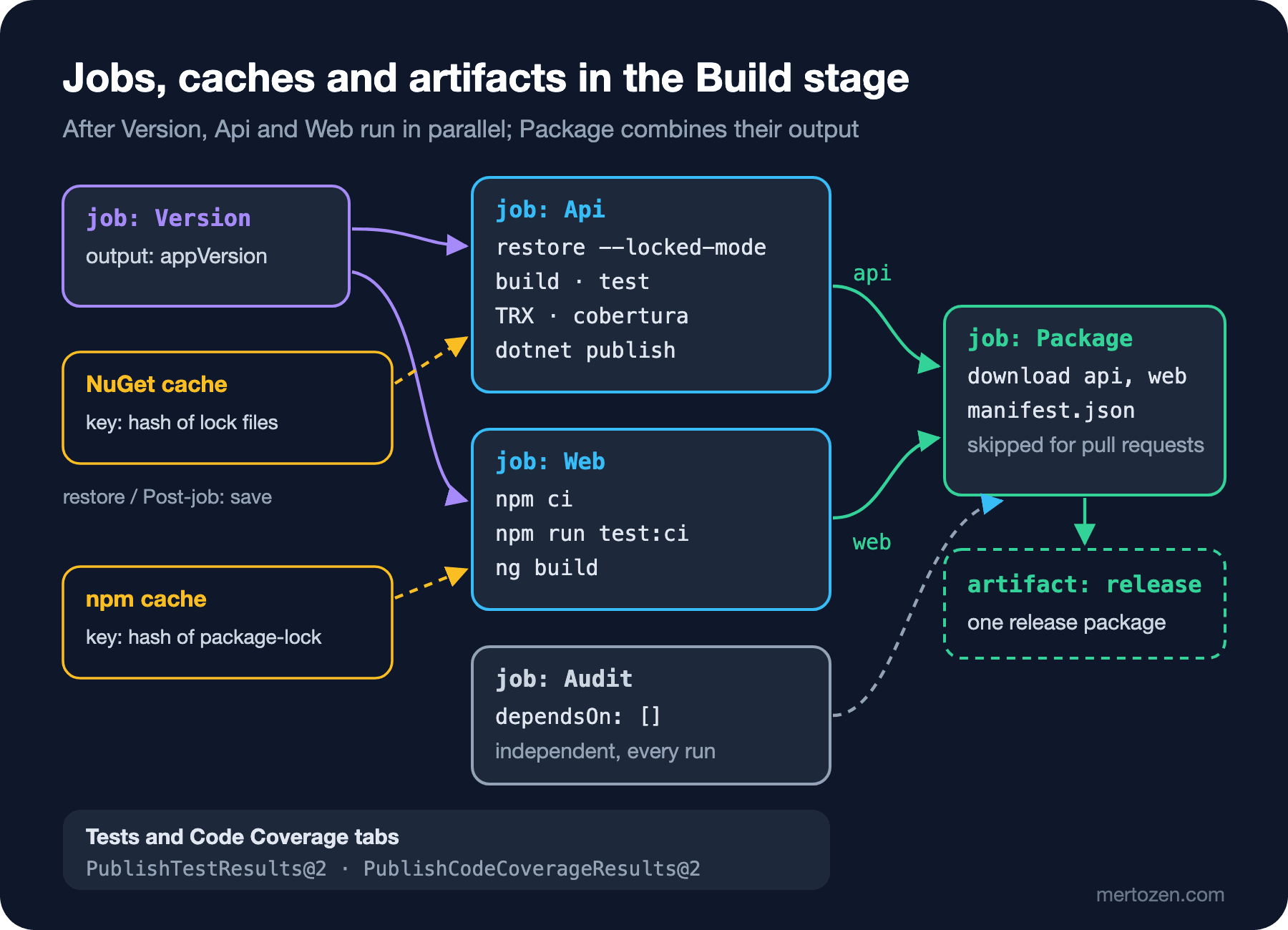
Api and Web depend only on Version, not on each other; if the organization has two free parallel jobs, they run at the same time. Each uploads its output as a pipeline artifact with PublishPipelineArtifact@1: the dotnet publish output as api, Angular's dist/bookstore-web/browser folder as web. Don't confuse caches with artifacts; the documentation draws the line clearly: an artifact is for files one job produces and another job needs in order to work, a cache is only for speed, and the work must still go through without it.
The Package job depends on all four jobs and combines the output of two of them into a single release artifact:
# Combines the api and web artifacts of the same run into one release artifact with a manifest.
parameters:
  - name: manifestScript
    type: string
    default: scripts/write-release-manifest.sh

jobs:
  - job: Package
    displayName: Package release
    dependsOn:
      - Version
      - Api
      - Web
      - Audit
    condition: and(succeeded(), ne(variables['Build.Reason'], 'PullRequest'))
    variables:
      appVersion: $[ dependencies.Version.outputs['setVersion.appVersion'] ]
    steps:
      - checkout: self
        fetchDepth: 1

      - download: current
        artifact: api

      - download: current
        artifact: web

      - script: |
          mkdir -p $(Build.ArtifactStagingDirectory)/release
          cp -R $(Pipeline.Workspace)/api $(Build.ArtifactStagingDirectory)/release/api
          cp -R $(Pipeline.Workspace)/web $(Build.ArtifactStagingDirectory)/release/web
          bash ${{ parameters.manifestScript }} $(Build.ArtifactStagingDirectory)/release
        displayName: Assemble release folder
        env:
          APP_VERSION: $(appVersion)

      - task: PublishPipelineArtifact@1
        displayName: Upload release artifact
        inputs:
          targetPath: $(Build.ArtifactStagingDirectory)/release
          artifact: release
download: current downloads an artifact uploaded in the same run into $(Pipeline.Workspace)/<artifact-name>. According to the documentation, artifacts are downloaded automatically only in deployment jobs; in a normal job you have to write this step explicitly. The condition skips packaging for pull request validation; we applied the rule from the second post and kept succeeded() inside the condition. The manifest script gathers what the package carries into one file. Running it locally against real dotnet publish and ng build output, with sample values:
$ APP_VERSION=1.0.0-main.1287 BUILD_SOURCEVERSION=3f9c2e1a7b4d5e6f8091a2b3c4d5e6f708192a3b BUILD_BUILDNUMBER=main-20261115.3 bash scripts/write-release-manifest.sh rel
{
  "version": "1.0.0-main.1287",
  "commit": "3f9c2e1a7b4d5e6f8091a2b3c4d5e6f708192a3b",
  "run": "main-20261115.3",
  "createdUtc": "2026-11-15T09:00:34Z",
  "api": { "files": 59 },
  "web": { "files": 4 }
}
That is what "build once, deploy many" means for this series: the deploy stages in the sixth post will not rebuild the code; they will download this release artifact and carry it from environment to environment. The concept itself was covered in the CI/CD Fundamentals post "Build Once, Deploy Many: Artifacts, Versioning and Immutable Packages".
The Run Number
In the run list, each run is named $(Date:yyyyMMdd).$(Rev:r) by default. We added a name: line to the top of the application pipeline:
name: $(SourceBranchName)-$(Date:yyyyMMdd).$(Rev:r)The run list now shows names like main-20261115.3 that tell you the branch and the day. $(Rev:r) only works in this field and starts again from 1 when the rest of the name changes; the counter resets when the day changes or for another branch. The run name is read from the Build.BuildNumber variable, and that is the value written into the manifest. The application version is separate: appVersion comes from the script in the second post. If you want to merge the two, the script can emit a ##vso[build.updatebuildnumber] logging command.
In Production
Caching does not always pay off. The cache task downloads and unpacks an archive at the start of the run and, if there is a new key, packs and uploads the folder at the end of the job. In a two-project solution like Bookstore where NuGet restore already takes a few seconds, downloading and uploading the archive can take longer than that. The only way to decide is to measure: compare step durations of a few runs with and without the cache on the run summary. On the npm side the documentation recommends caching npm's own cache folder rather than node_modules, because npm ci deletes node_modules and installs from scratch every time.
Parallelism is limited by the number of parallel jobs you have. In an organization with one parallel job, Api, Web and Audit run one after the other; splitting jobs does not shorten total time in that case, it lengthens it because of VM start-ups. The duration you measure is "queue + VM start-up + work"; the timeline on the run summary shows which part is large.
According to the documentation, pipeline caching and pipeline artifacts are available at no extra cost in all tiers, but how long you keep artifacts depends on run retention settings. A package that goes to production should not disappear when its run is deleted; for versions you keep for a long time, retention rules and package feeds come into play. Feeds are the topic of the next post.
Common Pitfalls
Adding continueOnError: true to the test step. When someone who does not want a red test to stop the pipeline adds it, the job ends as "SucceededWithIssues". According to the documentation, succeeded() at job level counts partially successful jobs as successful; so the Package job runs and a release package is produced from code with failing tests. If you want to see test results, the right tool is not continueOnError but succeededOrFailed() on the publishing tasks.
Moving the coverage task from v1 to v2 with its inputs. The codeCoverageTool and reportDirectory lines in an older pipeline have no counterpart in v2; when you change a task version, check its input list in the documentation again.
Leaving the operating system out of the cache key. If the same pipeline has Linux and Windows jobs, without $(Agent.OS) in the key one operating system's package folder can be restored onto the other. Every example in the documentation includes that part.
Not committing the lock file. With RestorePackagesWithLockFile on, if the lock file is not in the repository, --locked-mode in CI either fails on the first run or every run produces a different key. Lock files are part of the code; their diffs should be read in pull requests too.
Producing an artifact in one job and looking for it on the file system in another. Every job is on a separate VM; the Api job's $(Build.ArtifactStagingDirectory) does not exist in the Package job. The way to move files between jobs is always upload and download.
A Small Experiment
★☆☆ Compare the "Restore (locked)" and "npm ci" step durations of a run with the cache and one without. Note how much the cache saves for Bookstore.
★★☆ Upload the Web job's coverage/bookstore-web/cobertura-coverage.xml and the Api job's Cobertura file as separate artifacts; in the Package job download both and publish them with a single PublishCodeCoverageResults@2.
★★★ Add an .artifactignore to the release artifact that leaves out *.pdb files, and write a line into the manifest with the SHA-256 digest of every file. Think about which question at deploy time this makes easier to answer.
The API and Angular output now travel as one package. But some parts of Bookstore are libraries other teams will use too, such as the contracts for order events. In the next post we publish them as NuGet packages to an Azure Artifacts feed, connect nuget.org and npmjs as upstream sources and use views for promotion.