

Doing Soft Delete Right: IsDeleted, DeletedAt, Filtered Unique Indexes and Archive Tables

To do soft delete right, filter unique indexes with WHERE DeletedAt IS NULL, link records deleted in the same operation with a DeletionId, and answer KVKK/GDPR erasure requests with anonymization rather than soft delete. If restore isn't a real requirement, an archive table or hard delete plus audit is the simpler choice.
Version note: The C# code in this post was tested with .NET 10 and Entity Framework Core (EF Core) 10, and the SQL (Structured Query Language) examples with SQL Server 2025.
Guess First: What Happens When Ada Comes Back?
Ada Lovelace left the company at the end of March. In HR (human resources) Portal, the HR specialist "deleted" her, but the system didn't really delete the row; it set the IsDeleted flag. Eight months later Ada rejoins the same company and HR wants to open a new employee record with the same email address. The table and index look like this:
CREATE TABLE dbo.Employees
(
    Id        int IDENTITY PRIMARY KEY,
    CompanyId int           NOT NULL,
    Email     nvarchar(200) NOT NULL,
    FullName  nvarchar(200) NOT NULL,
    IsDeleted bit           NOT NULL DEFAULT 0
);
CREATE UNIQUE INDEX UX_Employees_Email ON dbo.Employees (CompanyId, Email);

INSERT dbo.Employees (CompanyId, Email, FullName) VALUES (1, N'ada@hrportal.test', N'Ada Lovelace');
UPDATE dbo.Employees SET IsDeleted = 1 WHERE Email = N'ada@hrportal.test';
INSERT dbo.Employees (CompanyId, Email, FullName) VALUES (1, N'ada@hrportal.test', N'Ada Lovelace');
Does the last INSERT succeed? If not, whose fault is it: the index's or the soft delete decision's? And one more: if six months later Ada files a request under KVKK (Turkey's data protection law) asking you to delete her data, does an IsDeleted = 1 row satisfy that request?
Context and Problem
HR Portal is a SaaS serving 120 companies. The Employees table has 380 thousand rows, and roughly 18 percent of them are employees who have left. Physically deleting a departed employee isn't possible, because LeaveRequest, PurchaseOrder and payroll records point to them; leave reports and purchase approvals from previous years still have to answer "who opened this request?". So in the first sprint a developer added IsDeleted to every table and everyone thought the topic was closed.
Three months later three separate complaints arrived. HR can't register a returning employee. Finance's monthly "active employee count" report shows 68 more people than the product screen. And the legal team is asking how a deletion request was handled. All three share one root: soft delete doesn't end with adding a column, it's a data lifecycle decision. Unique rules, reporting paths, related records and the legal obligation to erase are all part of that decision.
Symptoms
You'll recognize the problem by these signs. A deleted record's email, tax number or employee number can't be reused, and the support team invents a workaround like "append _old to the old record's email". The same question gets two different numbers from two screens, because one queries through EF Core and the other through Dapper or plain SQL. Active employees still appear under a deleted department. The "Undo" button brings the employee back but the pending leave requests deleted with them are gone, or the reverse happens and records deleted separately years ago come back too. The last symptom is the most dangerous: nobody knows which columns were actually cleared for a deletion request.
The Naive Solution: IsDeleted and a Plain Unique Index
Running the opening script on SQL Server 2025, the last line fails with:
Msg 2601, Level 14, State 1, Server b8be943222fa, Line 15
Cannot insert duplicate key row in object 'dbo.Employees' with unique index 'UX_Employees_Email'. The duplicate key value is (1, ada@hrportal.test).
The statement has been terminated.
The index is right. We told it "the same email can't appear twice in a company"; it counted the deleted row too. The real rule is "there can't be two active employees with the same email", and that rule never made it into the index definition. The code side is no different: you have to remember WHERE IsDeleted = 0 in every query. In EF Core a global query filter lets you define it once in the model, but the report queries reading the same database, the quick endpoints written with Dapper and the data team's views know nothing about that filter.
The naive solution breaks in three places. The first is unique rules. The second is relationships: an FK (foreign key) to a department with IsDeleted = 1 is still valid, so the database happily lets a new employee be attached to a "deleted" record. The third is legal erasure. The Turkish regulation on the deletion, destruction or anonymization of personal data defines deletion as making the data inaccessible and unusable in any way for the relevant users. A row that can be restored with one click from a trash screen doesn't fit that definition. Soft delete is a business decision ("this employee should no longer show up in lists"), not legal erasure.
Options
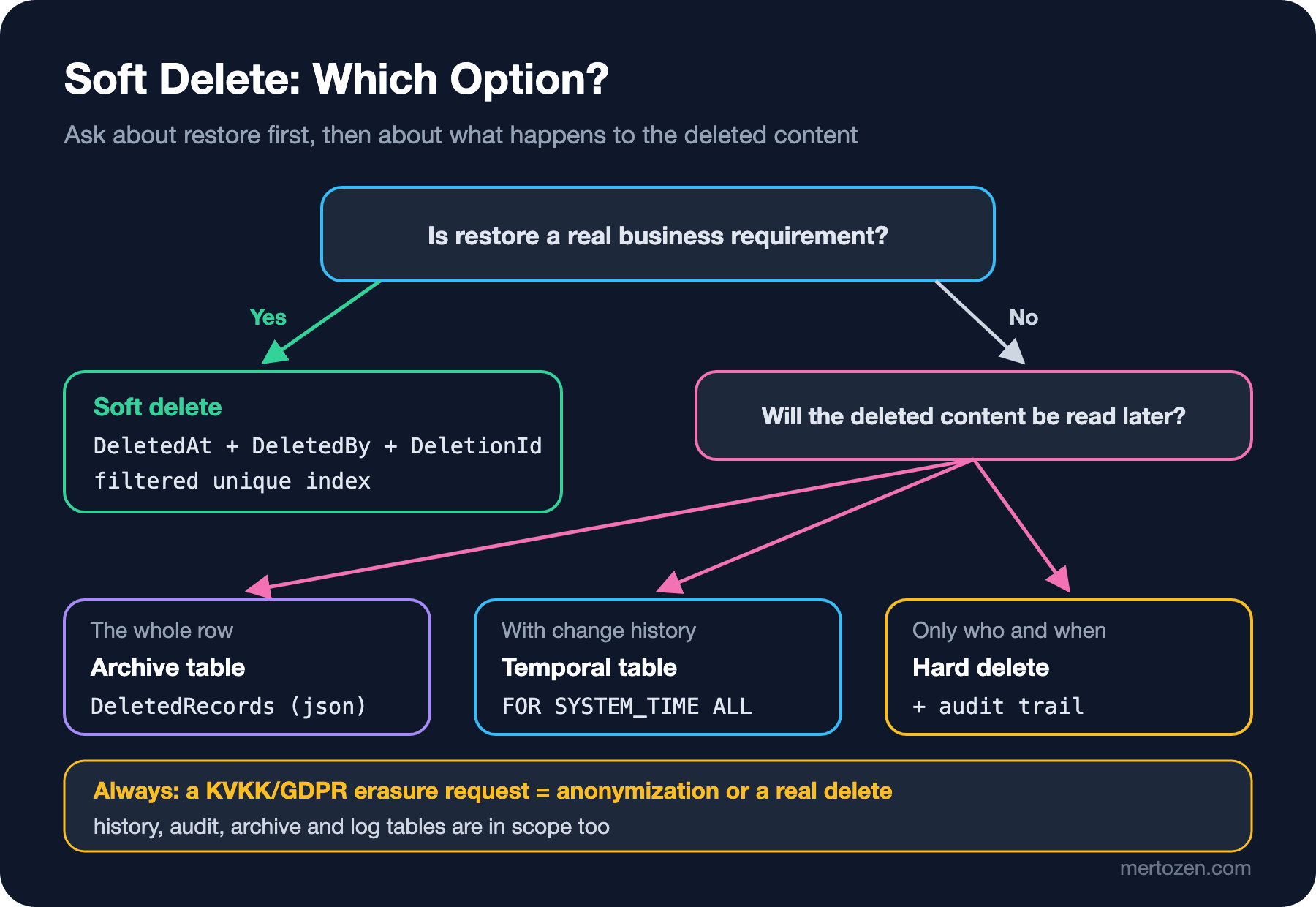
The decision tree below narrows down the option for a given table with two or three questions. Let's look at the options one by one.
IsDeleted Flag and a Filtered Unique Index
The simplest option is to keep the flag and apply the unique index only to active rows. SQL Server calls this a filtered index: you add a WHERE clause to the index and it only contains rows matching that condition.
CREATE UNIQUE INDEX UX_Employees_Email_Active
    ON dbo.Employees (CompanyId, Email)
    WHERE IsDeleted = 0;
Now there can be any number of deleted rows with the same email, but at most one active one. What's missing: when, and by whom? The flag only says "deleted". When a report asks "how many people left in March", you have to collect that from somewhere else.
DeletedAt and DeletedBy
Instead of a separate flag, use the deletion time as the flag: DeletedAt IS NULL means active. Put the deleting user next to it. The filtered index works the same way:
CREATE TABLE dbo.Employees
(
    Id        int IDENTITY PRIMARY KEY,
    CompanyId int           NOT NULL,
    Email     nvarchar(200) NOT NULL,
    FullName  nvarchar(200) NOT NULL,
    DeletedAt datetime2(0)  NULL,
    DeletedBy nvarchar(100) NULL
);
CREATE UNIQUE INDEX UX_Employees_Email_Active
    ON dbo.Employees (CompanyId, Email)
    WHERE DeletedAt IS NULL;

INSERT dbo.Employees (CompanyId, Email, FullName) VALUES (1, N'ada@hrportal.test', N'Ada Lovelace');
UPDATE dbo.Employees SET DeletedAt = '2026-03-31', DeletedBy = N'grace' WHERE Email = N'ada@hrportal.test';
INSERT dbo.Employees (CompanyId, Email, FullName) VALUES (1, N'ada@hrportal.test', N'Ada Lovelace');
SELECT Id, Email, DeletedAt FROM dbo.Employees;
Id|Email|DeletedAt
--|-----|---------
1|ada@hrportal.test|2026-03-31 00:00:00
2|ada@hrportal.test|NULLAda has two rows: the old record stays with its history, the new one is active. This option avoids keeping one fact in two columns (a flag and a timestamp can disagree) and answers "who and when" for free. It doesn't replace a full audit trail; we'll cover the complete change history in the next post.
Archive Table: Moving the Row
Brandur Leach's "Soft Deletion Probably Isn't Worth It" suggests the opposite direction: really delete the row, but first write a copy of it as JSON (JavaScript Object Notation) into a separate DeletedRecords table. Main tables never know about filters, FKs keep their real meaning, and pruning old records is a single DELETE ... WHERE DeletedAt < .... The built-in json type in SQL Server 2025 fits this table well. Instead of PostgreSQL's DELETE ... RETURNING, we use an AFTER DELETE trigger here. In the example the Suppliers table has two suppliers and we delete one:
CREATE TABLE dbo.DeletedRecords
(
    Id            bigint IDENTITY PRIMARY KEY,
    OriginalTable sysname      NOT NULL,
    OriginalId    int          NOT NULL,
    DeletedAt     datetime2(0) NOT NULL DEFAULT SYSUTCDATETIME(),
    DeletedBy     nvarchar(100) NULL,
    Data          json         NOT NULL
);
GO
CREATE TRIGGER dbo.TR_Suppliers_Archive ON dbo.Suppliers AFTER DELETE
AS
BEGIN
    SET NOCOUNT ON;
    INSERT dbo.DeletedRecords (OriginalTable, OriginalId, DeletedBy, Data)
    SELECT N'Suppliers', d.Id,
           CAST(SESSION_CONTEXT(N'UserName') AS nvarchar(100)),
           (SELECT d.* FOR JSON PATH, WITHOUT_ARRAY_WRAPPER)
    FROM deleted AS d;
END;
GO
EXEC sys.sp_set_session_context @key = N'UserName', @value = N'grace';
DELETE dbo.Suppliers WHERE TaxNumber = '1234567890';
SELECT OriginalTable, OriginalId, DeletedBy, CONVERT(nvarchar(max), Data) AS Data FROM dbo.DeletedRecords;
OriginalTable|OriginalId|DeletedBy|Data
-------------|----------|---------|----
Suppliers|1|grace|{"Id":1,"CompanyId":1,"TaxNumber":"1234567890","Name":"Acme Office Supplies"}The price is paid at restore time. Restoring is no longer an UPDATE but rebuilding the row from JSON, and schema changes in between (such as a new required column) make that harder. That's why Brandur's observation matters: in the teams he worked with at Heroku and Stripe, undeletes almost never happened. For tables like Supplier, where restore is rare, this option is very clean.
Temporal Table or Hard Delete Plus Audit
Another option is to really delete the row and leave its history to a SQL Server system-versioned temporal table: the deleted row stays visible in the history table through FOR SYSTEM_TIME ALL. We'll build that mechanism in detail in the temporal data post. Or you hard delete entirely and leave who-deleted-it-and-when to the audit trail. Either way the main table doesn't know about filters; but history and audit tables keep holding personal data, so a KVKK request has to account for them too.
Implementation: DeletedAt, a Deletion Id and Restore for Employees
For Employee we choose DeletedAt/DeletedBy and a filtered unique index. The chance of an employee returning is real, HR wants a trash screen, and historical records point to the row. We add two small things: a DeletionId that links the records deleted in the same operation, and EF Core 10's named query filters.
public interface ISoftDeletable
{
    DateTimeOffset? DeletedAt { get; set; }
    string? DeletedBy { get; set; }
    Guid? DeletionId { get; set; }
}

public class Employee : ISoftDeletable
{
    public int Id { get; set; }
    public int CompanyId { get; set; }
    public int DepartmentId { get; set; }
    public string Email { get; set; } = "";
    public string FullName { get; set; } = "";
    public string? NationalId { get; set; }
    public DateTimeOffset? DeletedAt { get; set; }
    public string? DeletedBy { get; set; }
    public Guid? DeletionId { get; set; }
    public List<LeaveRequest> LeaveRequests { get; set; } = [];
}
In the model configuration we define the unique index with its filter and add two separately named filters:
modelBuilder.Entity<Employee>(e =>
{
    e.HasIndex(x => new { x.CompanyId, x.Email })
        .IsUnique()
        .HasDatabaseName("UX_Employees_Email_Active")
        .HasFilter("[DeletedAt] IS NULL");
    e.HasIndex(x => x.DeletionId);
    e.HasQueryFilter(SoftDeleteFilter, x => x.DeletedAt == null);
    e.HasQueryFilter(TenantFilter, x => x.CompanyId == companyId);
});
The DDL (Data Definition Language) EF Core generates:
CREATE UNIQUE INDEX [UX_Employees_Email_Active] ON [Employees] ([CompanyId], [Email]) WHERE [DeletedAt] IS NULL;Naming the filters is an important part of this design. As we saw in the EF Core series post on Global Query Filters, the old IgnoreQueryFilters() is all or nothing; when the trash screen turns off the soft delete filter it also turns off the tenant filter, and an HR specialist from one company sees another company's deleted employees. With the Named Query Filter from the What's New in EF Core 10 post we can turn off just one.
Deleting: One Transaction, One Deletion Id
When an employee is deleted, their pending leave requests become meaningless too; approved leaves, however, are payroll history, so we leave them alone. We write this "cascade soft delete" rule explicitly in a domain service:
public async Task<Guid> SoftDeleteAsync(int employeeId, string deletedBy, CancellationToken ct = default)
{
    Guid deletionId = Guid.CreateVersion7();
    DateTimeOffset now = clock.GetUtcNow();

    await using IDbContextTransaction tx = await db.Database.BeginTransactionAsync(ct);

    int employees = await db.Employees
        .Where(e => e.Id == employeeId)
        .ExecuteUpdateAsync(s => s
            .SetProperty(e => e.DeletedAt, now)
            .SetProperty(e => e.DeletedBy, deletedBy)
            .SetProperty(e => e.DeletionId, deletionId), ct);
    if (employees == 0)
    {
        throw new InvalidOperationException($"Employee {employeeId} not found.");
    }

    // Only pending leaves go with the employee; approved leave is payroll history and stays
    await db.LeaveRequests
        .Where(l => l.EmployeeId == employeeId && l.Status == LeaveStatus.Pending)
        .ExecuteUpdateAsync(s => s
            .SetProperty(l => l.DeletedAt, now)
            .SetProperty(l => l.DeletedBy, deletedBy)
            .SetProperty(l => l.DeletionId, deletionId), ct);

    await tx.CommitAsync(ct);
    return deletionId;
}
DeletionId makes restore precise. Saying "restore everything related to this employee whose DeletedAt is set" would also revive a leave request deleted separately two years ago. Rows carrying the same id are exactly the ones deleted in this operation. A warning: ExecuteUpdateAsync bypasses the change tracker and SaveChanges interceptors. If you audit with an interceptor, this method has to write its own audit entry; we'll deal with that in the next post.
Restore and Conflicts
public async Task<RestoreResult> RestoreAsync(Guid deletionId, CancellationToken ct = default)
{
    await using IDbContextTransaction tx = await db.Database.BeginTransactionAsync(ct);
    try
    {
        int employees = await db.Employees
            .IgnoreQueryFilters([HrPortalDbContext.SoftDeleteFilter])
            .Where(e => e.DeletionId == deletionId)
            .ExecuteUpdateAsync(s => s
                .SetProperty(e => e.DeletedAt, (DateTimeOffset?)null)
                .SetProperty(e => e.DeletedBy, (string?)null)
                .SetProperty(e => e.DeletionId, (Guid?)null), ct);
        if (employees == 0)
        {
            return RestoreResult.NotFound;
        }

        await db.LeaveRequests
            .IgnoreQueryFilters([HrPortalDbContext.SoftDeleteFilter])
            .Where(l => l.DeletionId == deletionId)
            .ExecuteUpdateAsync(s => s
                .SetProperty(l => l.DeletedAt, (DateTimeOffset?)null)
                .SetProperty(l => l.DeletedBy, (string?)null)
                .SetProperty(l => l.DeletionId, (Guid?)null), ct);

        await tx.CommitAsync(ct);
        return RestoreResult.Restored;
    }
    catch (SqlException ex) when (ex.Number is 2601 or 2627)
    {
        // Filtered unique index: an active record with the same email already exists
        await tx.RollbackAsync(ct);
        return RestoreResult.EmailInUse;
    }
}
The demo runs in this order: delete Ada, list the trash, rehire Ada with the same email, then try to restore the old record. The real output:
Soft deleted, deletion id: 01a1b72b-41ea-7d9c-9366-1c1286cb4411
DECLARE @ef_filter__companyId int = 1;

SELECT [e].[Id], [e].[CompanyId], [e].[DeletedAt], [e].[DeletedBy], [e].[DeletionId], [e].[DepartmentId], [e].[Email], [e].[FullName], [e].[NationalId]
FROM [Employees] AS [e]
WHERE [e].[CompanyId] = @ef_filter__companyId AND [e].[DeletedAt] IS NOT NULL
Trash: Ada Lovelace deleted 2026-03-31 17:00 by grace
Visible leave requests: 1
Rehired with the same email: OK
Restore: EmailInUse
The trash query has no soft delete condition but keeps the tenant condition; exactly what we want. Of Ada's two leaves only the approved one is visible. The restore attempt hits the filtered unique index, and the service recognizes error 2601 and returns EmailInUse. The API (Application Programming Interface) carries that to the client as 409 Conflict with ProblemDetails, and the Angular trash screen shows "An active employee with this email exists, merge them first". That screen lists only deleted records, with the deletion time and the deleting user, and its "Restore" button sends the deletionId. The API, not the client, enforces the rule.
Paths That Bypass the Filter
A query filter only works in EF Core LINQ (Language Integrated Query) queries. Raw SQL going to the same database doesn't know about it:
int active = await db.Employees.CountAsync();
int raw = await db.Database.SqlQuery<int>($"SELECT COUNT(*) AS [Value] FROM dbo.Employees").SingleAsync();
int view = await db.Database.SqlQuery<int>($"SELECT COUNT(*) AS [Value] FROM dbo.ActiveEmployees").SingleAsync();
Console.WriteLine($"EF: {active}, raw SQL on table: {raw}, raw SQL on view: {view}");
EF: 1, raw SQL on table: 3, raw SQL on view: 2EF says 1 (only Alan). Raw SQL against the table says 3: it also counted the deleted Ada and Grace, an employee of another company. The dbo.ActiveEmployees view, which contains the DeletedAt IS NULL condition, says 2; it solved soft delete but doesn't know about tenants. A practical rule: grant Dapper queries and report users access to views like this, not to tables; for tenant isolation a view isn't enough, and in the multi-tenancy post we'll build a second line of defense with row-level security.
The filtered index has a trap of its own. A session writing to a table with such an index must have certain SET options right, such as QUOTED_IDENTIFIER. An old stored procedure, or a sqlcmd script run without the -I switch, gets this error:
Msg 1934, Level 16, State 1, Server b8be943222fa, Line 1
INSERT failed because the following SET options have incorrect settings: 'QUOTED_IDENTIFIER'. Verify that SET options are correct for use with indexed views and/or indexes on computed columns and/or filtered indexes and/or query notifications and/or XML data type methods and/or spatial index operations.
The application won't see this, since SqlClient's defaults are correct; but a nightly import job can stop one morning with this error. Before adding a filtered index, list every path that writes to that table.
A KVKK Request: Anonymization, Not Soft Delete
When a deletion request arrives we keep the row, because FKs and historical payroll totals depend on it; but we don't keep any personal data:
public async Task EraseAsync(int employeeId, CancellationToken ct = default)
{
    // KVKK/GDPR erasure request: the row stays (for FKs and payroll totals), personal data does not
    await db.Employees
        .IgnoreQueryFilters([HrPortalDbContext.SoftDeleteFilter])
        .Where(e => e.Id == employeeId)
        .ExecuteUpdateAsync(s => s
            .SetProperty(e => e.FullName, "Erased Employee")
            .SetProperty(e => e.Email, e => "erased-" + e.Id + "@invalid")
            .SetProperty(e => e.NationalId, (string?)null), ct);
}
Erased: Erased Employee, erased-1@invalid, NationalId=NULLInstead of setting the email to NULL we wrote a unique value derived from the id, so neither the NOT NULL rule nor the unique index breaks. The real work is outside this method: temporal history tables, audit entries, DeletedRecords JSON, logs and backups may carry the same personal data. The regulation requires deletion operations to be recorded, those records to be kept for at least three years, and a request to be concluded within thirty days at the latest. So the "erase" operation itself should be written to the audit trail, but without the erased values.
Trade-off Table
| Criterion | IsDeleted + filtered index | DeletedAt/DeletedBy + DeletionId | Archive table | Temporal or hard delete + audit |
|---|---|---|---|---|
| Data integrity | Unique is correct, FKs can attach to a deleted row | Unique is correct, FKs need a business rule | FKs keep their real meaning | FKs keep their real meaning |
| Query complexity | Every path needs the filter | Every path needs the filter, views reduce it | No filter on the main table | No filter on the main table |
| Performance | Deleted rows stay in the table and statistics | Same, small extra index cost | Main table stays small, trigger cost on delete | History table grows |
| Reversibility | Easy, but ambiguous for bulk restore | Easy and precise (DeletionId) | Hard, rebuild from JSON | Hard, copy from history |
| Team cognitive load | Starts low, grows with reports | Medium | Low (normal tables) | Medium, needs temporal query knowledge |
| KVKK/GDPR | Not erasure, anonymization needed | Not erasure, anonymization needed | JSON must be cleaned too | History and audit must be cleaned too |
When Not to Use It
Don't use soft delete if restore isn't a real business need. Every flag added "just in case" adds a condition to every query and every report forever. Really delete records such as logs, sessions, notifications and temporary import rows. If all you need about a deleted record is "who deleted it and when", the audit trail is enough; there's no need to keep the row in the table. If volume is high and the deletion rate is large (say, draft orders where 40 percent are discarded every month), the active table bloats for nothing; an archive table is the better fit. Finally, don't use soft delete as the answer to a legal erasure requirement; the answer to that is anonymization or a real delete.
Checklist
- For each table answer "do we really need restore?"; if not, choose hard delete or an archive table.
- Redefine unique indexes with a
WHERE DeletedAt IS NULLfilter and check the SET options of the jobs writing to that table. - Define the soft delete and tenant filters under separate names in EF Core 10; in the trash screen turn off only the soft delete filter.
- Write the cascade soft delete rule explicitly in a domain service and link rows from the same operation with a
DeletionId. - Catch unique conflicts during restore and return a meaningful 409.
- Point raw SQL, Dapper and report users to active-record views instead of tables.
- Write a separate anonymization flow for KVKK requests; put history, audit, archive and logs on the list too.
Related Patterns and Sources
This post uses the mechanics from the EF Core series posts Global Query Filters in EF Core: Soft Delete, Multi-Tenancy and IgnoreQueryFilters, and What's New in EF Core 10: Named Query Filters, LeftJoin and Complex Types in JSON; the required navigation trap and Find being caught by the filter are covered there. For a full record of who performed a deletion see the next post in this series, Audit Trail: Who Changed What, When and Why?; for the temporal table option, Temporal Data: Effective-Dated Records, Price History and the Bitemporal Model; and for tenant isolation and row-level security, the Data Isolation in Multi-Tenancy post. Sources: Brandur Leach, Soft Deletion Probably Isn't Worth It (2022); Microsoft Learn, Create Filtered Indexes and CREATE INDEX (required SET options); Microsoft Learn, Global Query Filters (EF Core); KVKK, the Regulation on the Deletion, Destruction or Anonymization of Personal Data (articles 7, 8, 10, 12); GDPR (General Data Protection Regulation) article 17 (right to erasure). For the unauthorized access angle, the OWASP (Open Worldwide Application Security Project) A01: Broken Access Control (1) post in the OWASP Top 10 series.
A Small Experiment
★☆☆ Add ISoftDeletable to Department as well and write the rule "a department with active employees can't be deleted" in the domain service. Think about what the API should return for a request that breaks the rule.
★★☆ Build the archive table approach for Supplier with EF Core: instead of a trigger, try a flow inside the DbContext that writes the JSON before deleting, and compare the two against ExecuteDeleteAsync. Which one can't be bypassed?
★★★ Ada's restore request came back with EmailInUse. Design a "merge" operation that joins the old and new records (moving leave history to the new employee and deleting the old row again). Which records should move, and which should stay with the old identity?
In the next post we build an audit trail that records who changed what, when and why for every change, deletions included; there we'll also measure how ExecuteUpdateAsync bypasses the interceptor.