

Data Isolation in Multi-Tenancy: Database per Tenant, Shared Schema and Row-Level Security
For most SaaS products the best balance is shared tables with a TenantId column, a named tenant query filter in EF Core and, behind it, SQL Server row-level security fed by SESSION_CONTEXT. The post compares database per tenant, schema per tenant and shared tables, and shows tenant resolution, background jobs and automated isolation tests with real output.
Version note: The C# code in this post was tested with .NET 10 and EF Core 10, and the SQL examples with SQL Server 2025.
Guess First: How Many Rows Does the Report Return When There's a Filter?
The HR Portal's DbContext has a tenant query filter on Employees, and so far no LINQ query has ever returned another company's employee. A developer on the reporting team, wanting to be quick, writes this line and runs it in Acme's session:
List<string> raw = await acme.Database
    .SqlQueryRaw<string>("SELECT Email AS Value FROM dbo.Employees")
    .ToListAsync();
The database has 3 employees for Acme and 2 for Globex. How many e-mail addresses does the report return? If you say 3 because the filter runs "on every query", the output you're about to see will make you uncomfortable. The real question is: is there a second lock that would catch this mistake?
Context and Problem
The HR Portal started with three customers; today it has 120 tenants. Each tenant is a customer company with its own employees, leave requests, payslips and purchase orders. One customer's data becoming visible to another is the most serious bug this product can have. A payroll leak is both a KVKK (Turkey's data protection law) violation and a lost customer; it's the purest form, in a multi-tenant application, of Broken Access Control, the first item of the OWASP Top 10:2025.
The tenants aren't homogeneous: 110 of them are SMEs with 20 to 300 employees, 8 are companies with a few thousand people, and two are large holdings whose contracts say "our data must live in a separate database, in our own region". The design has to answer two questions: how the data is physically laid out, and how the answer to "which tenant is this request for?" is carried safely to every layer of the application on every request.
Symptoms
You know this design is incomplete when the tenant id arrives in a query string or header and the server trusts it blindly. Half of the repository methods take a tenantId parameter and half don't. Report queries written with Dapper carry the WHERE TenantId = @tenantId line around by copy and paste. Background jobs running at night fail with "tenant not found", or worse, process every tenant's data without failing. A consultant working for two different companies with the same e-mail address can't be added, because the unique index is on Email alone. When the support team says "I need to look at this tenant's data", they connect to the production database without any filter.
The Naive Solution and Why It Breaks
In the first version the filter was written by hand in every query:
public class EmployeeReports(NaiveDbContext db)
{
    public Task<List<string>> ListAsync(int tenantId) =>
        db.Employees.Where(e => e.TenantId == tenantId).Select(e => e.Email).ToListAsync();

    public Task<int> CountAsync(int tenantId) =>
        db.Employees.CountAsync();
}
CountAsync has a tenantId parameter but doesn't use it; the code review missed it. Running it for Acme:
naive list(1): ada@acme.test, alan@acme.test, grace@consultants.test
naive count(1): 5
The list is right, the count is wrong: Acme's dashboard says "5 employees", and two of them belong to Globex. The break in this code is a single forgotten line; the real problem is that security depends on everyone who writes hundreds of queries remembering it every time. EF Core's global query filter moves that burden into the model, but the opening question shows that the filter has a boundary too. It's applied only to the LINQ queries EF Core generates; the output of the report written with SqlQueryRaw:
raw SQL, filter only: ada@acme.test, alan@acme.test, grace@consultants.test, grace@consultants.test, linus@globex.testFive rows. Dapper queries, stored procedures, a reporting tool's direct connection and an IgnoreQueryFilters() call are in the same category: they all stay outside the filter.
Options
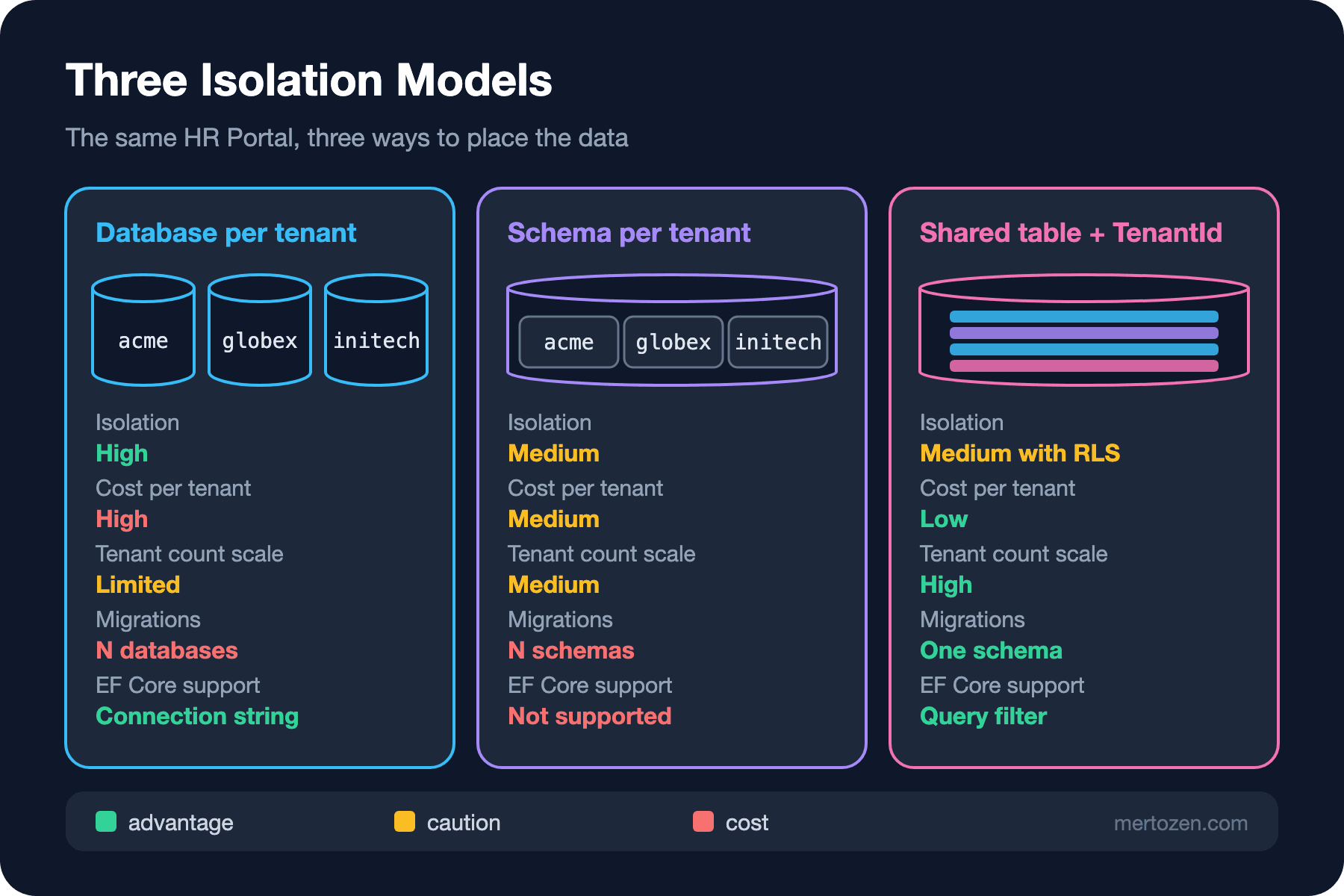
A) Database per Tenant
Each tenant has its own database; the application finds the connection string in a tenant catalog. Isolation is physical, in its strongest form: a wrong query can at worst go to the wrong database, which is the right tenant's database. Backup, restore and "delete my data" requests become easier per tenant, and you can move a large customer to its own server or region. The cost is operations: applying migrations to 120 databases, 120 connection pools, and a separate warehouse for cross-tenant reports. On the EF Core side, the work amounts to choosing the connection string:
Dictionary<int, string> databases = new() { [1] = "HrPortal_acme", [2] = "HrPortal_globex" };
foreach (int tenantId in databases.Keys)
{
    SqlConnectionStringBuilder csb = new("Server=localhost;Trusted_Connection=True;TrustServerCertificate=True")
    {
        InitialCatalog = databases[tenantId]
    };
    Console.WriteLine($"tenant {tenantId} -> {csb.InitialCatalog}");
}
tenant 1 -> HrPortal_acme
tenant 2 -> HrPortal_globexMigrations need a deploy step that walks the catalog instead of a single connection string: open a DbContext per tenant and call MigrateAsync(), or run the EF Core migration bundle against each database. The thing to watch is that a deployment that stops halfway can leave tenants on different schema versions; keeping each tenant's schema version in the catalog makes that visible.
B) Schema per Tenant
One schema per tenant in the same database: acme.Employees, globex.Employees. On paper it sits between A and C. The EF Core docs explicitly mark this approach as "not directly supported by EF Core and not a recommended solution": the model is cached along with the schema name, and migrations assume a single schema. Unless you already have a multi-schema database, don't pick it.
C) Shared Table + TenantId + Query Filter
All tenants in the same tables, with a TenantId on every row. Lowest cost, highest scale: there's no schema difference between 120 tenants and 12,000. Isolation depends entirely on the application; with EF Core 10's named query filters you can manage the tenant filter separately from other filters such as soft delete. The mechanics are covered in the EF Core series posts "Global Query Filters in EF Core: Soft Delete, Multi-Tenancy and IgnoreQueryFilters" and "What's New in EF Core 10: Named Query Filters, LeftJoin and Complex Types in JSON".
D) Row-Level Security on Top of C
SQL Server's row-level security (RLS) adds filter and block predicates to tables at the database level through a security policy. When the application opens a connection it writes the tenant id into SESSION_CONTEXT, and the policy filters rows by that value. This isn't an alternative but a second lock on top of C: even if the application makes a mistake, the database won't return another tenant's row.
Hybrid
In practice the HR Portal's answer is hybrid: 118 tenants live in the shared database with C+D, and the two holdings whose contracts require a separate database get A. So that the same code works in both models, the tenant catalog also stores a connection string per tenant; shared tenants point to the same connection string.
Implementation: Resolving the Tenant and Carrying It to Every Layer
Everything rests on one question: which tenant is this request for? The answer lives in a scoped TenantContext. Rather than keep going with an unknown tenant, it throws an exception; the default behavior is "closed":
public sealed class TenantContext : ITenantContext
{
    private int? _tenantId;

    public int TenantId => _tenantId
        ?? throw new InvalidOperationException("Tenant is not resolved for this scope.");

    public void Set(int tenantId)
    {
        if (_tenantId is not null && _tenantId != tenantId)
            throw new InvalidOperationException("Tenant cannot change within a scope.");
        _tenantId = tenantId;
    }
}
We resolve the tenant from the subdomain (acme.hrportal.test). It could also come from a header or query string, but whichever you choose, you have to compare it with the tenant claim in the user's token; otherwise users can switch tenants just by changing the host:
public sealed class TenantResolutionMiddleware(RequestDelegate next)
{
    public async Task InvokeAsync(HttpContext http, ITenantCatalog catalog, TenantContext tenant)
    {
        string subdomain = http.Request.Host.Host.Split('.')[0];
        TenantInfo? info = catalog.FindBySubdomain(subdomain);
        if (info is null)
        {
            http.Response.StatusCode = StatusCodes.Status404NotFound;
            return;
        }

        // The tenant in the user's token must match the tenant from the host
        string? claim = http.User.FindFirst("tenant_id")?.Value;
        if (http.User.Identity?.IsAuthenticated == true && claim != info.Id.ToString())
        {
            http.Response.StatusCode = StatusCodes.Status403Forbidden;
            return;
        }

        tenant.Set(info.Id);
        await next(http);
    }
}
The DbContext takes the tenant through its constructor, defines the filter by name and stamps TenantId on new records itself. No code is allowed to assign TenantId = ...; an attempt to change it throws:
public class HrPortalDbContext(DbContextOptions<HrPortalDbContext> options, ITenantContext tenant) : DbContext(options)
{
    public const string TenantFilter = "Tenant";

    public DbSet<Employee> Employees => Set<Employee>();
    public DbSet<LeaveRequest> LeaveRequests => Set<LeaveRequest>();
    public DbSet<Payslip> Payslips => Set<Payslip>();

    protected override void OnModelCreating(ModelBuilder modelBuilder)
    {
        modelBuilder.Entity<Employee>(b =>
        {
            b.Property(e => e.Email).HasMaxLength(200);
            b.HasIndex(e => new { e.TenantId, e.Email }).IsUnique();
            b.HasQueryFilter(TenantFilter, e => e.TenantId == tenant.TenantId);
        });
        modelBuilder.Entity<LeaveRequest>()
            .HasQueryFilter(TenantFilter, l => l.TenantId == tenant.TenantId);
        modelBuilder.Entity<Payslip>().Property(p => p.NetAmount).HasPrecision(19, 4);
    }

    public override Task<int> SaveChangesAsync(CancellationToken cancellationToken = default)
    {
        foreach (var entry in ChangeTracker.Entries<ITenantOwned>())
        {
            if (entry.State == EntityState.Added)
                entry.Entity.TenantId = tenant.TenantId;
            else if (entry.State == EntityState.Modified && entry.Property(e => e.TenantId).IsModified)
                throw new InvalidOperationException("TenantId cannot be changed.");
        }
        return base.SaveChangesAsync(cancellationToken);
    }
}
Note the unique index: not Email but (TenantId, Email). A cross-tenant unique constraint leaks the existence of one tenant's data to another (a "this e-mail is already registered" message gives away a record in another company) and makes it impossible to add a consultant who works for two companies. In this example Grace Hopper is registered in both tenants.
Did you notice that Payslip has no filter? We left it out on purpose; a test will catch it shortly. Registration, and a request with three different hosts:
builder.Services.AddSingleton<ITenantCatalog, InMemoryTenantCatalog>();
builder.Services.AddScoped<TenantContext>();
builder.Services.AddScoped<ITenantContext>(sp => sp.GetRequiredService<TenantContext>());
builder.Services.AddScoped<TenantSessionContextInterceptor>();
builder.Services.AddDbContext<HrPortalDbContext>((sp, o) => o
    .UseSqlServer(connectionString)
    .AddInterceptors(sp.GetRequiredService<TenantSessionContextInterceptor>()));

app.UseMiddleware<TenantResolutionMiddleware>();
app.MapGet("/api/employees", async (HrPortalDbContext db, CancellationToken ct) =>
    await db.Employees.OrderBy(e => e.Id).Select(e => new { e.Id, e.Email }).ToListAsync(ct));
acme.hrportal.test -> 200 [{"id":1,"email":"ada@acme.test"},{"id":2,"email":"alan@acme.test"},{"id":3,"email":"grace@consultants.test"}]
globex.hrportal.test -> 200 [{"id":4,"email":"linus@globex.test"},{"id":5,"email":"grace@consultants.test"}]
initech.hrportal.test -> 404 A note on lifetimes: the DbContext is scoped and takes the tenant through its constructor, so each request sees its own tenant. If you use AddDbContextPool, contexts are reused across requests and you can't pass a scoped service to the constructor; then you need a factory that sets the tenant when a context is rented. The EF Core series post "EF Core in ASP.NET Core: AddDbContext, Scoped Lifetime, Factory and Pooling" explains that difference.
Implementation: A Second Lock with Row-Level Security
The predicate function and the security policy live in a separate Security schema, as Microsoft's RLS docs also recommend. The filter predicate blocks reading, and the block predicates block writing on behalf of another tenant and moving a row to another tenant:
CREATE SCHEMA Security;
GO
CREATE FUNCTION Security.fn_TenantPredicate(@TenantId int)
    RETURNS TABLE
    WITH SCHEMABINDING
AS
    RETURN SELECT 1 AS Allowed
    WHERE @TenantId = CAST(SESSION_CONTEXT(N'TenantId') AS int);
GO
CREATE SECURITY POLICY Security.TenantIsolation
    ADD FILTER PREDICATE Security.fn_TenantPredicate(TenantId) ON dbo.Employees,
    ADD BLOCK PREDICATE Security.fn_TenantPredicate(TenantId) ON dbo.Employees AFTER INSERT,
    ADD BLOCK PREDICATE Security.fn_TenantPredicate(TenantId) ON dbo.Employees AFTER UPDATE,
    ADD FILTER PREDICATE Security.fn_TenantPredicate(TenantId) ON dbo.LeaveRequests,
    ADD BLOCK PREDICATE Security.fn_TenantPredicate(TenantId) ON dbo.LeaveRequests AFTER INSERT,
    ADD BLOCK PREDICATE Security.fn_TenantPredicate(TenantId) ON dbo.LeaveRequests AFTER UPDATE
    WITH (STATE = ON);
A DbConnectionInterceptor fills SESSION_CONTEXT every time a connection opens. @read_only = 1 prevents the value from being changed later on the same connection; even an injected SQL statement can't switch the tenant:
public sealed class TenantSessionContextInterceptor(ITenantContext tenant) : DbConnectionInterceptor
{
    public override async Task ConnectionOpenedAsync(
        DbConnection connection, ConnectionEndEventData eventData, CancellationToken cancellationToken = default)
    {
        await using DbCommand cmd = connection.CreateCommand();
        cmd.CommandText = "EXEC sp_set_session_context @key = N'TenantId', @value = @tenantId, @read_only = 1;";
        cmd.Parameters.Add(new SqlParameter("@tenantId", tenant.TenantId));
        await cmd.ExecuteNonQueryAsync(cancellationToken);
    }
}
The response to a command that tries to change the value in the same session:
Msg 15664, Level 16, State 1, Procedure sp_set_session_context, Line 1
Cannot set key 'TenantId' in the session context. The key has been set as read_only for this session.
Now let's try the opening report and the other escape routes again. In order: raw SQL in Acme's session, IgnoreQueryFilters in Acme's session, the same two queries on a connection without session context, and an INSERT on behalf of Globex from Acme's session:
raw SQL, acme session: ada@acme.test, alan@acme.test, grace@consultants.test
IgnoreQueryFilters count (RLS on): 3
IgnoreQueryFilters count (no session context): 0
filtered count (no session context): 0
SqlException 33504: The attempted operation failed because the target object 'HrPortal.dbo.Employees' has a block predicate that conflicts with this operation. If the operation is performed on a view, the block predicate might be enforced on the underlying table. Modify the operation to target only the rows that are allowed by the block predicate.
The answer to the opening question: the filter alone returned 5, with RLS it returns 3. A connection that forgets the session context sees nothing; the failure is an empty screen rather than a silent leak. We ran these tests as sa and the result didn't change: according to the docs, a security policy applies to everyone, including dbo and db_owner. If the support team needs to see all tenants, you have to write that into the predicate explicitly; "I'll connect with the admin account" isn't a solution.
Do the connection pool and read_only cause problems together? A test where the same physical connection is reused across different tenants:
tenant 1: spid 78, employees 3
tenant 2: spid 78, employees 2
tenant 1: spid 78, employees 3
All three contexts used the same SQL Server session (@@SPID 78), and each saw its own tenant. When the connection returns to the pool the session is reset and SESSION_CONTEXT is cleared; the example in the RLS docs also says the read_only value holds until the connection is returned to the pool.
Tenants in Background Jobs
Where there's no HttpContext, nobody resolves the tenant. The nightly leave accrual job opens a new DI scope per tenant and sets the tenant explicitly:
public static class NightlyLeaveAccrualJob
{
    public static async Task RunAsync(IServiceScopeFactory scopes, int[] tenantIds, CancellationToken ct = default)
    {
        foreach (int tenantId in tenantIds)
        {
            await using AsyncServiceScope scope = scopes.CreateAsyncScope();
            scope.ServiceProvider.GetRequiredService<TenantContext>().Set(tenantId);

            HrPortalDbContext db = scope.ServiceProvider.GetRequiredService<HrPortalDbContext>();
            int employees = await db.Employees.CountAsync(ct);
            Console.WriteLine($"job tenant {tenantId}: {employees} employees");
        }
    }
}
job tenant 1: 3 employees
job tenant 2: 2 employees
job without tenant: Tenant is not resolved for this scope.The last line is the result of a scope opened without setting the tenant: an exception before the query runs. Running jobs in a separate scope per tenant also makes it easier to keep a failure in one tenant from stopping the others; retries and locking are topics for the planned Background Jobs series.
Testing Isolation Automatically
Remember Payslip? A test that checks the model to make sure every ITenantOwned entity has a filter named Tenant catches what the code review missed:
foreach (IEntityType et in db.Model.GetEntityTypes().Where(t => typeof(ITenantOwned).IsAssignableFrom(t.ClrType)))
{
    bool ok = et.FindDeclaredQueryFilter(HrPortalDbContext.TenantFilter) is not null;
    Console.WriteLine($"{et.ClrType.Name,-14} tenant filter: {(ok ? "OK" : "MISSING")}");
}
Employee tenant filter: OK
LeaveRequest tenant filter: OK
Payslip tenant filter: MISSINGDo the same check on the database side: tables that have a TenantId column but no filter predicate.
SELECT t.name AS UnprotectedTable
FROM sys.tables AS t
JOIN sys.columns AS c ON c.object_id = t.object_id AND c.name = N'TenantId'
WHERE NOT EXISTS (
    SELECT 1 FROM sys.security_predicates AS p
    WHERE p.target_object_id = t.object_id AND p.predicate_type_desc = N'FILTER');
UnprotectedTable
----------------
PayslipsPut both checks in an integration test (with the setup from the ASP.NET Core Web API series post "Integration Testing an ASP.NET Core Web API: End-to-End Tests with WebApplicationFactory") and add a scenario that calls every endpoint with two tenants and verifies that one tenant's data never shows up in the other. Whoever adds a new table can't forget isolation without breaking the test.
Trade-off Table
| Criterion | A) Database per tenant | B) Schema per tenant | C) Shared table + filter | C + D) Shared table + RLS |
|---|---|---|---|---|
| Data integrity and isolation | Physical; strongest | Medium, via schema permissions | Application code only | Application + database |
| Query complexity | Low; cross-tenant reports are hard | High; dynamic schema names | Low | Low; session context is mandatory |
| Performance | Predictable per tenant; no noisy neighbor | Plan cache multiplies per schema | TenantId must be the first index column | Predicate on every query; small with the right index |
| Cost and scale | High per tenant; operational load at hundreds of tenants | Medium | Low; thousands of tenants | Low |
| Reversibility | Going back to shared requires merging data | Hard | Moving a large tenant to A is possible | The policy can be switched off and on |
| Team cognitive load | High on the deploy and migration side | High; no EF Core support | Medium; filter and test discipline | Medium; need to know RLS and pooling behavior |
When Not to Use It
Don't choose database per tenant just because it's "safer"; a database, migrations and backups for each of hundreds of small tenants is an operational load most teams can't carry. Choose it when a contract or regulation demands physical separation, or when one tenant's load affects the others. And don't use RLS as the only lock: a wrongly written predicate or a policy left switched off gives no warning on the application side; the query filter and the tests must stay in place. If the application is installed and run for a single customer (on-premises), don't build multi-tenancy infrastructure; even if it will become SaaS in the future, adding a TenantId column today is enough. Don't pick schema per tenant with EF Core in a new project.
Checklist
- The tenant is resolved in one place and validated against the tenant claim in the user's token.
- If the tenant is unknown, code doesn't run:
TenantContextthrows, RLS returns an empty result. TenantIdis stamped on new records insideSaveChangesand can't be changed.- Unique indexes start with
(TenantId, ...); there is no cross-tenant unique constraint. - Raw SQL, Dapper and reporting connections are protected by RLS and
SESSION_CONTEXT. IgnoreQueryFiltersis used only with named filters, never including the tenant filter.- Background jobs open a separate scope per tenant and set the tenant explicitly.
- There's an automated test that catches tables missing a filter or security predicate; cache keys include the tenant id.
Related Patterns and Sources
This post ties the mechanics from the EF Core series posts "Global Query Filters in EF Core: Soft Delete, Multi-Tenancy and IgnoreQueryFilters" and "EF Core Interceptors and Events: Audit Fields and Slow Query Logging" to an architectural decision. The security side should be read together with the Web Security series post "OWASP A01: Broken Access Control (1) — IDOR, Admin Endpoints and Authorization in ASP.NET Core": tenant isolation is a subset of resource-based authorization. Adding the tenant to cache keys will be covered in the planned Caching series, and the tenant loop of nightly jobs in the Background Jobs series. The next post in this series covers tenant-specific settings. Sources: on Microsoft Learn, the EF Core "Multi-tenancy" doc (the approach table and the schema-per-tenant warning), "Global Query Filters", SQL Server "Row-Level Security" (filter and block predicates, the SESSION_CONTEXT example for middle-tier applications, applying to everyone including dbo, the side-channel warning), the "SESSION_CONTEXT" and "sp_set_session_context" references, and the "Multitenant SaaS database tenancy patterns" article in the Azure SQL Database docs (database per tenant with a catalog, noisy neighbors and the RLS discussion).
A Small Experiment
★☆☆ Add the tenant filter for Payslip and its predicates in the security policy, and watch both checks come out clean.
★★☆ Design a "view a tenant" mode for the support team: add a second key such as SESSION_CONTEXT(N'SupportUser') to the predicate, and show that this mode is read-only and that every use is written to the audit trail.
★★★ Build the hybrid model: give two tenants separate connection strings in the catalog, pick the connection string from ITenantContext with the (sp, o) overload of AddDbContext, and verify with an integration test that the same endpoint works in both models.
Every request now knows its tenant. In the next post we'll use that knowledge for a different problem: how to store settings that can be overridden at the global, tenant and user level, such as "invoice due date defaults to 30 days, 45 for Acme, notifications off for this user".