

What Is Static Analysis, What Does It Find and Miss? Linters, Analyzers, Type Checkers and SAST
Static analysis catches bug patterns and rule violations without running the code, but it cannot see business rules that are not written in the code. In a Bookstore price import pull request, the .NET 10 defaults found 2 problems and Recommended mode 7 diagnostics; even with a clean build, a negative price and a bug reading 329,90 as 32990 still reached the database. The post covers the tool spectrum, severity, the layers from IDE to dashboard and the ratchet strategy.
Version note: The code in this post was built and run with .NET 10 (SDK 10.0.402), EF Core 10.0.15 and SQL Server 2025.
Guess First
In Bookstore, the online bookstore used as the shared example across this site's series, the back-office team is tired of changing prices one by one. Emre opens a small pull request: an endpoint that reads plain text from the admin screen line by line and updates book prices in bulk. Each line holds an ISBN and the new price, separated by a semicolon:
using Bookstore.Data;
using Microsoft.AspNetCore.Http.HttpResults;
using Microsoft.EntityFrameworkCore;

namespace Bookstore.Catalog;

public sealed record PriceImportResult(int Updated, IReadOnlyList<string> UnknownIsbns);

public static class PriceImportModule
{
    public static IEndpointRouteBuilder MapPriceImportEndpoints(this IEndpointRouteBuilder app)
    {
        app.MapPost("/api/admin/prices", ImportPrices).WithTags("Catalog");
        return app;
    }

    // Body: one "isbn;price" pair per line, e.g. "9780441172719;459.90"
    private static async Task<Ok<PriceImportResult>> ImportPrices(
        HttpRequest request, BookstoreContext db, ILogger<PriceImportResult> logger, CancellationToken ct)
    {
        using StreamReader reader = new(request.Body);
        string body = await reader.ReadToEndAsync(ct);

        int updated = 0;
        List<string> unknown = [];
        foreach (string line in body.Split('\n', StringSplitOptions.RemoveEmptyEntries | StringSplitOptions.TrimEntries))
        {
            string[] parts = line.Split(';');
            string isbn = parts[0];
            decimal price = decimal.Parse(parts[1]);

            Book? book = await db.Books
                .FromSqlRaw($"SELECT * FROM catalog.Books WHERE Isbn = '{isbn}'")
                .FirstOrDefaultAsync();
            if (book is null)
            {
                unknown.Add(isbn);
            }
            book.Price = price;
            updated++;
        }

        await db.SaveChangesAsync(ct);
        logger.LogInformation($"Price import finished: {updated} updated, {unknown.Count} unknown");
        return TypedResults.Ok(new PriceImportResult(updated, unknown));
    }
}
Bookstore's Directory.Build.props turns on TreatWarningsAsErrors, and nobody has touched the analyzer settings, so the .NET 10 SDK defaults apply. How many problems do you see in this code? How many of them does dotnet build catch? And even if the build comes out completely clean, how many bugs still reach production?
What Is Static Analysis?
Static analysis is any tool that says something about code without running it, by looking only at the source (or its compiled form). The compiler saying "this variable might be null" is static analysis, so is ESLint saying "this promise is not awaited", and so is SonarQube saying "this method has a cognitive complexity of 31". What they have in common is that they reason about the paths the code can take, and they do it without needing a test input. Tests are dynamic: they run the code with specific inputs and only see the paths those inputs take.
"Static analysis" is not one tool but a spectrum. Knowing which problem lives in which tool ends the "the linter should have caught this" argument early:
| Kind | Question it asks | Bookstore, .NET side | Bookstore, Angular side |
|---|---|---|---|
| Format and style | Does the code follow the team's writing rules? | .editorconfig, IDExxxx, dotnet format | Prettier, ESLint convention rules |
| Type checker | Are the types consistent, where can null leak in? | The C# compiler, nullable reference types (CS86xx) | The TypeScript compiler, strict |
| Correctness (bug patterns) | Is this code likely to behave wrongly? | .NET analyzers (CAxxxx), the EF Core analyzer | typescript-eslint, angular-eslint |
| Maintainability | Is the code readable and changeable? | Complexity, duplication (SonarQube) | The same metrics (SonarQube) |
| Security (SAST) | Does user input reach a dangerous call? | CodeQL, Semgrep, CA5xxx | CodeQL, Semgrep |
This series focuses on the middle three rows: correctness, maintainability, and the configuration of the tools that produce them. The first row, enforcing code style and formatting with tools, belongs to the Coding Conventions and Team Standards series; its post "Encoding C# Conventions in .editorconfig" covers the IDExxxx rules. The last row, SAST, is in the DevSecOps series, in "SAST: Finding Vulnerabilities in Source Code with CodeQL, Semgrep and .NET Security Analyzers". We won't cover the type checker row separately either; nullable reference types have their own post in the Advanced C# series, "Nullable Reference Types in C# in Depth". All you need here is this: the compiler is also a static analysis tool, and for most teams it is the first and cheapest one.
The Bookstore Pull Request: What Do the Defaults Show?
The first answer to the guess. Without changing any setting:
$ dotnet build src/Bookstore.Api
src/Bookstore.Api/Catalog/PriceImportModule.cs(33,18): error EF1002: Method 'FromSqlRaw' inserts interpolated strings directly into the SQL, without any protection against SQL injection. Consider using 'FromSql' instead, which protects against SQL injection, or make sure that the value is sanitized and suppress the warning.
src/Bookstore.Api/Catalog/PriceImportModule.cs(39,13): error CS8602: Dereference of a possibly null reference.
    0 Warning(s)
    2 Error(s)
Two errors, both produced as warnings and turned into errors by TreatWarningsAsErrors. One comes from the compiler's nullable analysis: the book is null branch is missing a continue, so the code will throw a NullReferenceException on an unknown ISBN. The other comes not from the SDK but from an analyzer shipped inside the EF Core package: an interpolated string was passed to FromSqlRaw, which is classic SQL injection.
But there is more in this code. The default analysis mode of the .NET 10 SDK turns only a small set of rules into build warnings; some of the remaining rules show up in the IDE only as suggestions (the three-dot underline), and most don't run at all. Let's build the same code with the wider set Microsoft recommends (the topic of the next post):
$ dotnet build src/Bookstore.Api -p:AnalysisMode=Recommended -p:TreatWarningsAsErrors=false
PriceImportModule.cs(30,29): warning CA1305: The behavior of 'decimal.Parse(string)' could vary based on the current user's locale settings. Replace this call in 'PriceImportModule.ImportPrices(HttpRequest, BookstoreContext, ILogger<PriceImportResult>, CancellationToken)' with a call to 'decimal.Parse(string, IFormatProvider)'.
PriceImportModule.cs(32,32): warning CA2016: Forward the 'ct' parameter to the 'FirstOrDefaultAsync' method or pass in 'CancellationToken.None' explicitly to indicate intentionally not propagating the token
PriceImportModule.cs(33,18): warning EF1002: Method 'FromSqlRaw' inserts interpolated strings directly into the SQL, without any protection against SQL injection. ...
PriceImportModule.cs(39,13): warning CS8602: Dereference of a possibly null reference.
PriceImportModule.cs(44,31): warning CA1873: Evaluation of this argument may be expensive and unnecessary if logging is disabled
PriceImportModule.cs(44,31): warning CA2254: The logging message template should not vary between calls to 'LoggerExtensions.LogInformation(ILogger, string?, params object?[])'
PriceImportModule.cs(44,9): warning CA1848: For improved performance, use the LoggerMessage delegates instead of calling 'LoggerExtensions.LogInformation(ILogger, string?, params object?[])'
Seven diagnostics, five separate problems. CA2016 says that a cancelled request cannot stop the database query. The last three lines are all about the same log line: the interpolated string produces a different message template on every call, structured logging fields such as {Updated} are lost, and the string is built every time even when the log level is off. The most interesting one is CA1305. The rule talks about "culture-dependent behavior", but for a team running servers in Türkiye it is not an abstract warning:
en-US: decimal.Parse("459.90") =     459.90
tr-TR: decimal.Parse("459.90") =   45990,00
de-DE: decimal.Parse("459.90") =   45990,00
If the server culture is tr-TR, Dune costs 45,990 TRY instead of 459.90 TRY. With the default settings this line produced no warning at all.
What Can't It Find?
Emre fixes the seven diagnostics: decimal.Parse(parts[1], CultureInfo.InvariantCulture), LINQ with FirstOrDefaultAsync(b => b.Isbn == isbn, ct), a continue, and a log call with a message template. The build is clean. We run the app against its own SQL Server container and send a file the back office could realistically send:
$ cat prices.txt
9780441172719;459.90
9780141439518;-45.00
9780261102217;329,90
9780000000000;99.00
$ curl -X POST --data-binary @prices.txt -H "Content-Type: text/plain" http://localhost:5080/api/admin/prices
{"updated":3,"unknownIsbns":["9780000000000"]}
HTTP 200
Dune 459.9
Pride and Prejudice -45.0
The Hobbit 32990.0Pride and Prejudice now costs minus 45 TRY. That breaks a business rule: a price must be greater than zero. No analyzer can know this, because the rule is not written in the code; it is written in Selin's head and in the story. The Hobbit went to 32,990 TRY: "329,90", exported from Excel with Turkish settings, was read as 32990 because InvariantCulture treats the comma as a thousands separator. Fixing CA1305 forced us to make a decision, but it can't tell us whether the decision is right. The contract of the file format (dot or comma, what happens to a bad line) is a requirement.
There is a theoretical reason too. By Rice's theorem, every non-trivial question about a program's behavior is undecidable in the general case. In practice this means every static analysis tool either misses some real bugs (false negatives) or flags some correct code as wrong (false positives), and most do both. Tools strike this balance differently. The compiler's nullable analysis can't see some paths, so it leaves escape hatches such as null!; a security tool, on the other hand, prefers more false positives so as not to miss anything. Static analysis does not replace tests, code review or observing production; it is the cheap filter in front of them. The distinction from the first post of the Code Review series holds here too: leave repetitive, mechanical checks to tools and spend human attention on design and behavior.
False Positives, Severity and the Cost of a Warning
Every warning has a cost: it has to be read, understood, fixed or suppressed. If a rule creates more work than it is worth, people stop reading warnings and real findings get lost too. To measure this, we built Bookstore's reference application, as it was before the pull request, in three analysis modes:
$ dotnet build Bookstore.slnx --no-incremental -p:AnalysisMode=Default -p:TreatWarningsAsErrors=false
    0 Warning(s)
$ dotnet build Bookstore.slnx --no-incremental -p:AnalysisMode=Recommended -p:TreatWarningsAsErrors=false
    13 Warning(s)
$ dotnet build Bookstore.slnx --no-incremental -p:AnalysisMode=All -p:TreatWarningsAsErrors=false
    126 Warning(s)
The breakdown of the 126 warnings in All mode is instructive. 40 are CA2007 (call ConfigureAwait on the awaited task); ASP.NET Core has no SynchronizationContext, so this rule adds no value in application code. 39 are CA1515 (make public types internal); meaningful for a library, but debatable for Minimal API endpoint types and the test project. 8 are CA1707: underscores in test method names, a deliberate convention of the team. What remains are a few findings worth discussing, for example CA1849 suggesting the async counterpart of app.Run() in Program.cs, and CA1308 suggesting ToUpperInvariant instead of ToLowerInvariant when normalizing a customer's e-mail. So "turn everything on" means hiding a few valuable lines inside a 126-line list.
Severity is the tool for striking this balance. Every Roslyn analyzer rule can be set to error, warning, suggestion, silent or none; suggestion shows only in the IDE and does not affect the build. ESLint's equivalents are error, warn and off. A good rule set answers two questions: how often does this rule catch a real bug in our code, and how much effort is it to suppress when it gives a false positive? CA2016 and CA1305 answer both well in Bookstore. CA2007 does not.
Where It Runs: From the IDE to the Dashboard
The same rule can run in different places, and each place has a different feedback time, audience and power to enforce.
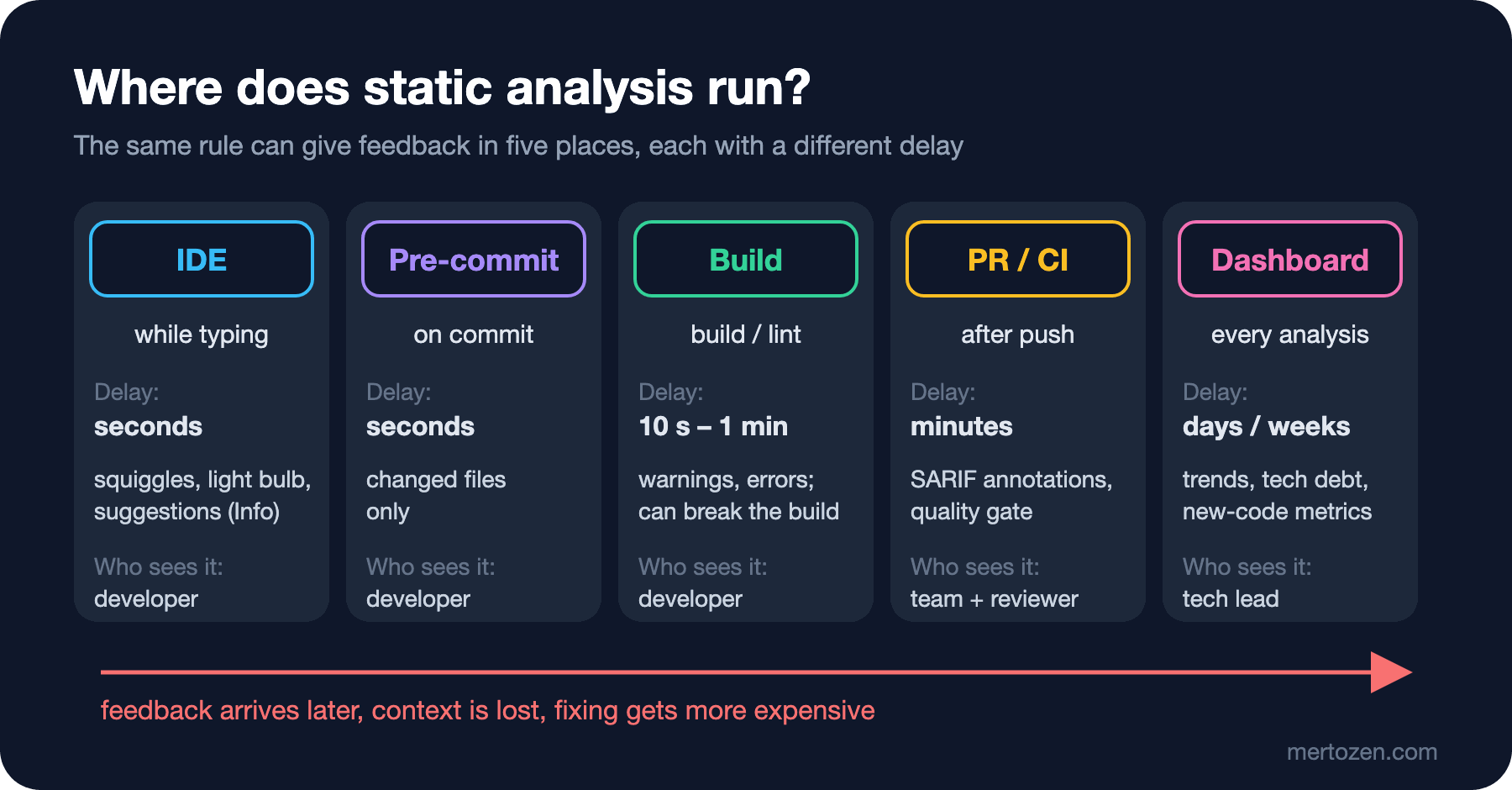
The IDE is the fastest layer. Visual Studio, Rider or C# Dev Kit in VS Code run Roslyn analyzers while you type; in the default mode, suggestion-level rules such as CA2016 appear here but not in the build. The problem is that an IDE warning is visible only to the person looking at that file at that moment, and it stops nobody. A pre-commit hook quickly checks only the changed files; but it can be skipped with --no-verify, so it is not a gate. We covered this in detail in "Automating the Rules" in the Coding Conventions series.
The build layer is the first place where rules are enforced. Since TreatWarningsAsErrors is on in Bookstore, the two findings above broke the build; the IDE and CI give the same result. CI runs the same build for everyone on the pull request, and if it exports the results as SARIF, GitHub can show them as annotations next to the lines in the pull request. The dashboard layer is a server such as SonarQube: it looks not at a single pull request but at time. Which module is accumulating technical debt, how many issues were opened in new code, where coverage is heading. In this layer the Bookstore pull request appears not as individual lines but as the number of issues opened in new code and whether the quality gate passed; we set it up and configure the gate in the fifth post.
A practical rule: the further right a finding is caught, the more the person fixing it has lost the context. That is why the rule set in the IDE and in CI must be exactly the same; code that passes cleanly on a developer's machine and breaks in CI is the fastest way for a team to lose trust in the tool. On the .NET side we achieve this by putting the rules in project files and config files in the repo, not in IDE settings on someone's machine.
Adding It to a Legacy Project: Baseline and Ratchet
Bookstore's reference application is small and clean. In real life static analysis is usually added to a ten-year-old solution with 400,000 lines, and the first build produces thousands of warnings. Teams react in one of three ways. The first is trying to clean everything up in one sprint: big, risky, unreviewable pull requests and "fixes" that change behavior. The second is switching warnings off wholesale: a long list in NoWarn, or dotnet_analyzer_diagnostic.severity = none. New code then keeps making the same mistakes freely. The third, the one that works, is a ratchet.
The idea of a ratchet is simple: record today's state as a baseline, apply zero tolerance to new code, clean up the old code gradually, and never let a cleaned area get dirty again. There are three ways to apply it. By rule: first turn a few rules that really catch bugs (such as CA2016 and CA1305) into warnings across the whole solution, clean up the violations, then move on to the next rule. By path: use .editorconfig to give stricter severities in the folders of new modules and looser ones in old folders. By diff: the tool analyzes all the code, but only new findings on changed lines break the pull request. SonarQube's "new code" concept does exactly this; on the .NET side you can get the same effect by comparing the SARIF output against a baseline file. We apply the rule-based approach to Bookstore in the second post and the diff-based approach in the fifth.
Whichever you choose, the baseline needs an owner and a trend. If nobody can answer "is the number of old warnings going down every sprint?", the baseline quietly becomes permanent.
In Production
Measure analysis time. Analyzers run together with the compiler, and in large solutions some of them can noticeably lengthen the build. In the third post we measure how long each analyzer takes with -p:ReportAnalyzer=true. On the TypeScript side, type-aware lint rules raise the same question; that is the topic of the fourth post.
Treat an SDK upgrade as a rule change. The default value of AnalysisLevel is latest; so when you upgrade the .NET SDK, new rules turn on by themselves, and in a project with TreatWarningsAsErrors they break CI. Pinning the level and doing the upgrade in a separate pull request is covered in the second post.
Let everyone see the result in the same place. Warnings that live only in the build log are warnings nobody reads. Without pull request annotations or a dashboard, static analysis becomes an invisible check for the team.
Common Pitfalls
Assuming the defaults are enough. In .NET 10 the default mode did not show five of the seven diagnostics in the Bookstore pull request. "Analyzers are already on" is true but misleading: what is on is a small set.
Turning everything on and leaving it as warnings. Nobody reads a build log with 126 warnings. Either a rule is worth breaking the build for, or it is off; hundreds of warnings in between hide the new and important finding.
Silencing a warning without changing the code. #pragma warning disable or a SuppressMessage without a justification does not remove the finding, it only makes it invisible. Suppression is a decision and should be written down with its reason; how to do that is in the second post.
Using static analysis instead of tests. After the build came out clean, the Bookstore pull request produced a book with a negative price and a 32,990 TRY copy of The Hobbit. An integration test or a reviewer catches these two bugs; an analyzer doesn't.
A Small Experiment
★☆☆ Run dotnet build -p:AnalysisMode=Recommended -p:TreatWarningsAsErrors=false on your own project and count the warnings by rule ID (grep -o "warning CA[0-9]*" | sort | uniq -c). Read the documentation of the top three rules: do they point to real bugs in your code, or to a preference?
★★☆ Fix the decimal.Parse line in the Bookstore pull request with CultureInfo.InvariantCulture, then write a validation that rejects the "329,90" input: the bad line should be listed in the endpoint's response. Which tool can enforce this validation, and which can't?
★★★ Build your team's largest solution in All mode and split the warnings into three groups: "real bug", "against our convention" and "meaningless for us". Make a list of rules for each group. That list will be the first draft of the .globalconfig file in the next post.
In this post we saw what static analysis finds, what it can't find and where it runs. In the next post we actually manage the .NET analyzers: AnalysisLevel and AnalysisMode values, the difference between .globalconfig and .editorconfig, targeted WarningsAsErrors, suppression rules, and a set of rules chosen for Bookstore.