

The Definition of Workflow and Board Design: When Work Starts and When It Finishes
What turns a board into Kanban is the Definition of Workflow behind it: the work item definition, started/finished points, states, WIP control, explicit policies and an SLE. We build the Bookstore team's board from these six parts, separate queue and active states, show how tying Done to the production deploy instead of the merge changes cycle time, and cover common board design mistakes.
Version note: This post is based on version 2025.5 of The Kanban Guide (ProKanban.org, May 2025).
Guess First
The Bookstore team has a bug titled Fix VAT rounding on invoice PDF. The VAT (value-added tax) rounding on the invoice PDF is off by a cent. A developer picks it up on Monday morning, opens the PR (pull request) on Tuesday evening, the review finishes on Wednesday, the tester signs off on Thursday and the PR is merged into the main branch on Friday afternoon. The team deploys to production only on Tuesdays and Thursdays; the fix reaches customers the following Tuesday.
One person on the team says this item took a week, another says eight days. Both are looking at the board. Who is right? More importantly: from the customer's point of view, when was the bug fixed, and which moment does the team have to tie the word "done" to for its cycle time to tell the truth?
The Definition of Workflow: The Six Parts the Guide Asks For
In the previous post we said a board on its own is not Kanban; it needs a Definition of Workflow (DoW) behind it. The Kanban Guide describes the DoW as the team's shared understanding of how work flows through its system and asks for at least six parts: the definition of the unit of value the team tracks, the work item; when work counts as started and when as finished; the states an item passes through between those two points; how WIP (Work in Progress) is controlled; explicit policies that say how items move between states; and an SLE (Service Level Expectation).
The Guide does not care in which order these parts are set up; what matters is that all of them are in place. In version 2025.5 the SLE also moved into this list, so it is no longer an add-on you can "look at later" but part of the DoW. Here is what the Bookstore team decided for each part:
| DoW part | Bookstore decision |
|---|---|
| Work item | A change that can go to production on its own: a bug, a support request or a small feature; not an epic |
| Started | The moment a developer pulls the item from Ready into In Dev |
| Finished | The moment the change is deployed to production and passes the smoke test (Done) |
| States | In Dev, Code Review, Test, Ready to Deploy |
| WIP control | At first at most 14 items in total; from September In Dev 5, Code Review 3, Test 3, 12 in total |
| Policies | Pull rules, the blocked rule, Code Review time, the expedite rule (below) |
| SLE | At first a guess: 10 days; once data accumulated, 14 days with 85% probability |
Work Item: What Are We Counting?
The first decision looks the easiest: what does a card on the board represent? The Bookstore team defined it as "a change that can go to production on its own." That definition has two consequences. First, an epic that will take weeks, such as "Gift card support," does not enter the board as a single card; it is first split into pieces that can go to production separately. Second, tasks that are part of an item, such as "write unit tests" or "review the PR," are not separate cards; they are the states the item passes through.
Why does this matter? Because all four flow metrics count items. Throughput is the question "how many items finished this week"; if three epics and thirty subtasks finished in a week are measured in the same unit, the number says nothing. Items do not have to be exactly the same size, but they do have to be roughly the same kind. We will discuss how size differences affect forecasts in post 05.
Started and Finished: Where Do We Draw the Line?
The answer to the opening question depends on these two decisions. The Bookstore team set the "started" point to the moment a developer pulls the item from Ready into In Dev. The Ready column is the list of work the team has said "we will do" but nobody has touched yet; the time an item waits there comes before the team's commitment, so it does not count toward cycle time. The moment the record was opened in Jira (created) is not a start at all; a bug can sit in the backlog for months before anyone starts it. We will see with real numbers how that distorts measurement in post 04.
The "finished" point is more contentious. Counting the merge as the finish is tempting, because that is where the developer's work feels done. But from the customer's point of view the VAT bug is not fixed until the fix reaches production. That is why the Bookstore team set the finished point to the production deploy followed by a passing smoke test. With this decision, the opening item's cycle time runs from Monday to the following Tuesday, which is 9 days using the finish - start + 1 convention; counting the merge as the finish would give 5 days. The 4 days in between don't disappear; they just drop out of the measurement. Those 4 days are exactly the cost of deploying twice a week, and they can only be discussed if they are measured.
The Guide does not say where these points should go; it leaves that to the team. The only thing it says is that they must be explicit. What matters here is drawing the line where value reaches the customer and, once drawn, using the same line for every item.
States: Separating Queue from Active
The states between start and finish should reflect how the team actually works. Here is the Bookstore team's board:
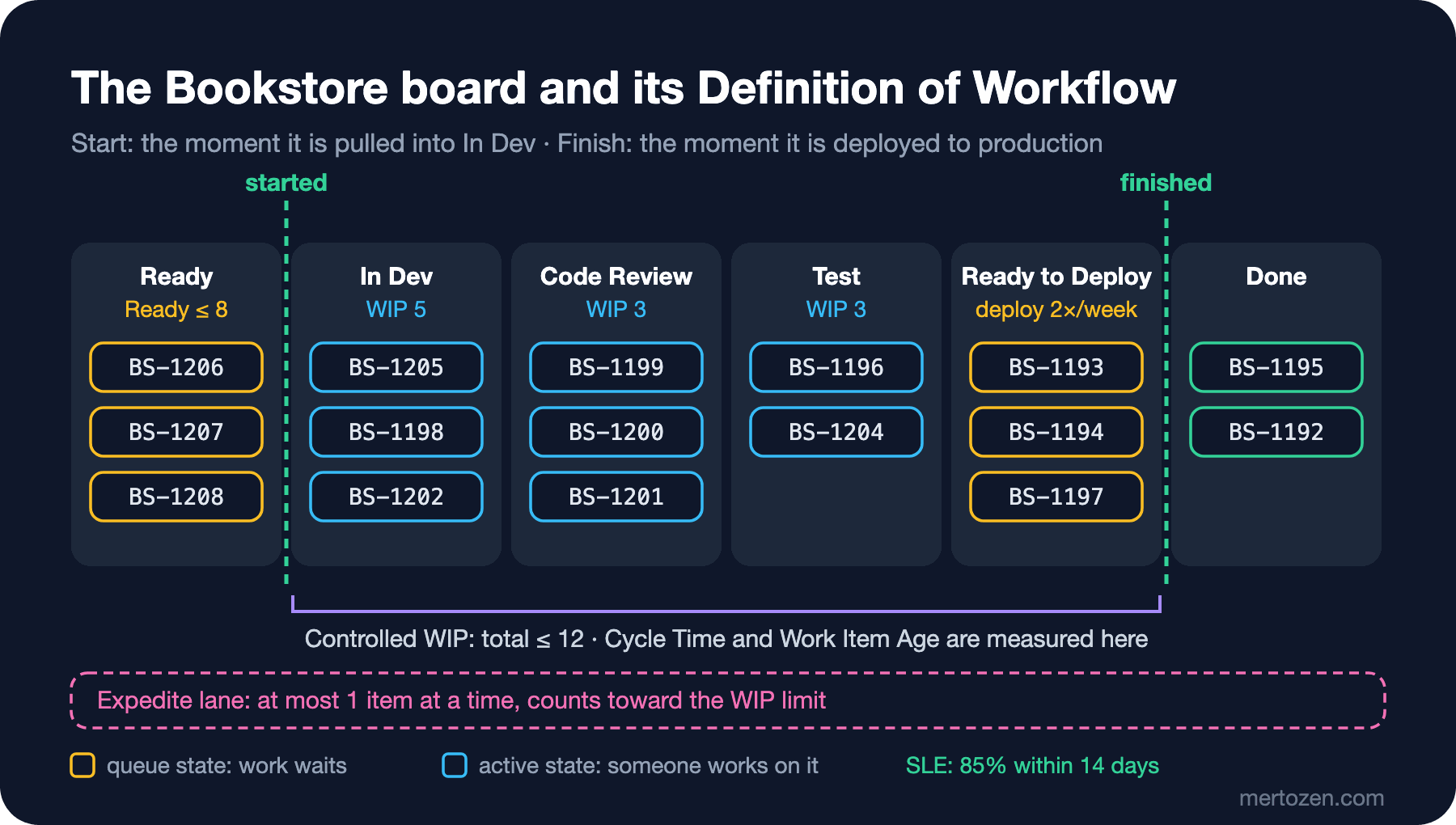
The board in the figure is how it looked at the end of October. The columns come in two kinds. In active states someone is working on the item: code is written in In Dev, the PR is read in Code Review, the tester runs scenarios in Test. In queue states the work only waits: an item in Ready waits for someone to pull it, an item in Ready to Deploy waits for the Tuesday or Thursday deploy. Seeing this distinction clearly on the board matters, because waiting time piles up in queue states and most teams never notice. Most of the cycle time is often not the time someone is working but the time the work is waiting.
The Code Review column is an interesting example: it holds both PRs "waiting for review" and PRs "being reviewed." The team kept it as a single column at first. In post 06, when we discuss the waiting problem in Code Review with data, we will talk about when it makes sense to split this column into "Waiting for Review" and "In Review." The rule is simple: make a state its own column only if it contains a wait or a piece of work you want to measure.
WIP Control: A Number, a Lane or Something Else
The Guide asks for WIP to be controlled explicitly, but version 2025.5 is more flexible about the form: you don't have to write a number per column. Avatars per person, a total limit or a shared limit for a group of columns also work; the requirement is that the control is visible on the board and that exceptions are written in the DoW.
When the Bookstore team set up the board in May it set no column limits; it only wrote a limit of 14 for the total between started and finished. That number was not arbitrary: on the old board from before the move to Kanban, the one at the start of post 01, an average of 13–14 cards sat in the In Progress column; the team chose to start from where it was. In practice this limit almost never kicked in, and between June and August work piled up in the Code Review column. In September the team tightened the limits: In Dev 5, Code Review 3, Test 3 and 12 in total. We will see the reasoning behind that decision with Little's Law in post 03, and its outcome with data in post 06.
The pink lane under the board is the expedite lane: for work that has to be solved the same day, like "card payments are failing at checkout." This lane has its own rule, and that rule is part of the DoW too.
Explicit Policies: On the Board, Not in Someone's Head
A policy is a rule that says how an item moves from one state to the next. Being "explicit" means it is written down and visible to everyone. The policies the Bookstore team wrote in the board description:
- Pull: When you have capacity, look at the columns on the right first; if you can help an item that is close to done, don't pull new work. If you do pull new work, take the top item in Ready.
- Code Review: A PR waits in Code Review for at most 1 working day; if the column is full, whoever takes the oldest PR does not start new work that day.
- Test: An item moves to Test only when its PR is merged and the CI (Continuous Integration) pipeline is green.
- Blocked: An item stopped for an external reason gets a blocked label and the reason; a blocked item stays in its column and keeps counting toward WIP.
- Expedite: At most 1 expedite item at a time, counted in total WIP; the first person who frees up takes it.
- Done: The change is in production, the smoke test passed and the related support ticket has been answered.
Two things in this list are worth noticing. First, the policies describe behavior; there is no wish like "work fast." Second, labeling a blocked item in its own column instead of moving it to a separate "Blocked" column is a deliberate choice: so the item doesn't lose which state it got stuck in and doesn't drop out of WIP. If a blocked item drops out of WIP, the team starts new work in its place and the board starts hiding stuck work.
SLE: A Guess on Day One, Data Later
An SLE states how long an item is expected to take from start to finish, as a duration and a probability: "85% of items finish within 14 days." The Guide asks for the SLE to be computed from historical cycle time data, but also says a reasonable guess is acceptable while there isn't enough data. The Bookstore team started in May with a guess of "10 days with 85% probability." Six months of data showed the number to be 14 days; we will see how it is calculated in posts 04 and 05.
An SLE is not a promise but an expectation. The team uses it every morning when looking at the board: an item whose age is approaching the SLE needs attention even though it is not finished yet. That is exactly the Guide's practice of "keeping items from aging unnecessarily."
In Production
Writing the DoW on paper is not enough; the tool has to follow it too. In Jira each board column maps to one or more statuses; if the "Code Review" column is not mapped to the "In Review" status, the card never moves when developers open a PR and state transition dates are recorded wrongly. In GitHub Projects the values of the "Status" field must also match the board columns one to one. After setting up the board, follow a few cards by hand and check that transition dates are recorded correctly.
The second point is that changing the DoW changes the measurement. On the day you move the finished point from merge to deploy, cycle time jumps; that does not mean the team slowed down. Write down the date of such a change and read the metrics on either side of it separately when comparing.
The third is multiple DoWs. Version 2025.5 puts no lower or upper bound on how many DoWs a team or organization keeps; a DoW can be set up wherever flow needs to be connected to value. At Bookstore, alongside the team-level board, a second board that tracks epics across several teams is a separate DoW with its own started/finished points and its own SLE. Adding the items of both into one throughput number means adding two different units.
Common Pitfalls
The first pitfall is turning every intermediate step into a column. When QA (Quality Assurance) and UAT (User Acceptance Testing) steps, waiting states and release notes each get a column, you end up with a board that stretches through "Unit Test", "Integration Test", "Waiting for Code Review", "Code Review", "Waiting for QA", "QA", "UAT", "Staging", "Release Notes"; it turns into a map nobody can read, and managing a WIP limit per column becomes impossible. A column is earned only if it contains a wait or a piece of work the team wants to talk about.
The second is an ambiguous Done. If a developer counts the merge, the tester counts the test sign-off and the product owner counts production as "done," the team looks at the same board and talks about three different cycle times. Write Done as a single sentence and put that sentence on the rightmost column of the board.
The third is a "Blocked" column. Moving stuck work to a separate column feels like it makes it visible, but it loses two pieces of information at once: which state the item got stuck in, and the fact that it still occupies a WIP slot. A label and a reason say more than a column.
The fourth is counting Ready as WIP or, the other way around, not counting Ready to Deploy. Everything between started and finished is WIP; if you don't count the queue states in between, you leave out of the measurement exactly the places where work waits the most.
A Small Experiment
★☆☆ Write "queue" or "active" next to each column on your own board. How many columns contain both? In which of them are you curious about the waiting time?
★★☆ Ask your team members one by one "when does a piece of work count as done?" and put the answers side by side. If they differ, take the merge date and the production deploy date for the last five completed items; what is the average gap in days?
★★★ Write a DoW table for your team like the one in this post and a policy list of at most six items. Make sure each policy describes a behavior and can be measured; "at most 1 working day" instead of "fast review."
The board is ready, but we haven't yet shown why a WIP limit works. In the next post we will look at Little's Law and, with a small simulation written in C#, see how cycle time grows when the same team raises WIP from 3 to 10.