

Organizing C# Code: Namespaces, global using, Solutions and NuGet
Why do you get CS0117 when you reach an internal member from another project? The project and assembly boundary, file-scoped namespaces, global using and the generated implicit usings file, the .slnx solution of the .NET 10 SDK, references between projects, and adding a NuGet package.
Version note: The code in this post uses C# 10 and the .NET 6 APIs; it was built and run with the .NET 10 SDK.
Guess First
We moved Bookstore's price calculations into a separate project called Bookstore.Core. Since we do not want to expose the VAT rate, we made it internal:
namespace Bookstore.Core.Pricing;

public static class PriceCalculator
{
    internal const decimal VatRate = 0.10m;

    public static decimal ApplyDiscount(decimal price, int percent)
    {
        return Math.Round(price * (100 - percent) / 100m, 2);
    }

    public static decimal WithVat(decimal price)
    {
        return Math.Round(price * (1 + VatRate), 2);
    }
}
The console application Bookstore.App references this project and writes this:
using Bookstore.Core.Pricing;

Console.WriteLine(PriceCalculator.WithVat(100m));
Console.WriteLine(PriceCalculator.VatRate);
Does this code compile? If not, what do you think the compiler says: "no access", or something else?
Projects, Assemblies and internal
The code does not compile, and the error message is not what most people expect:
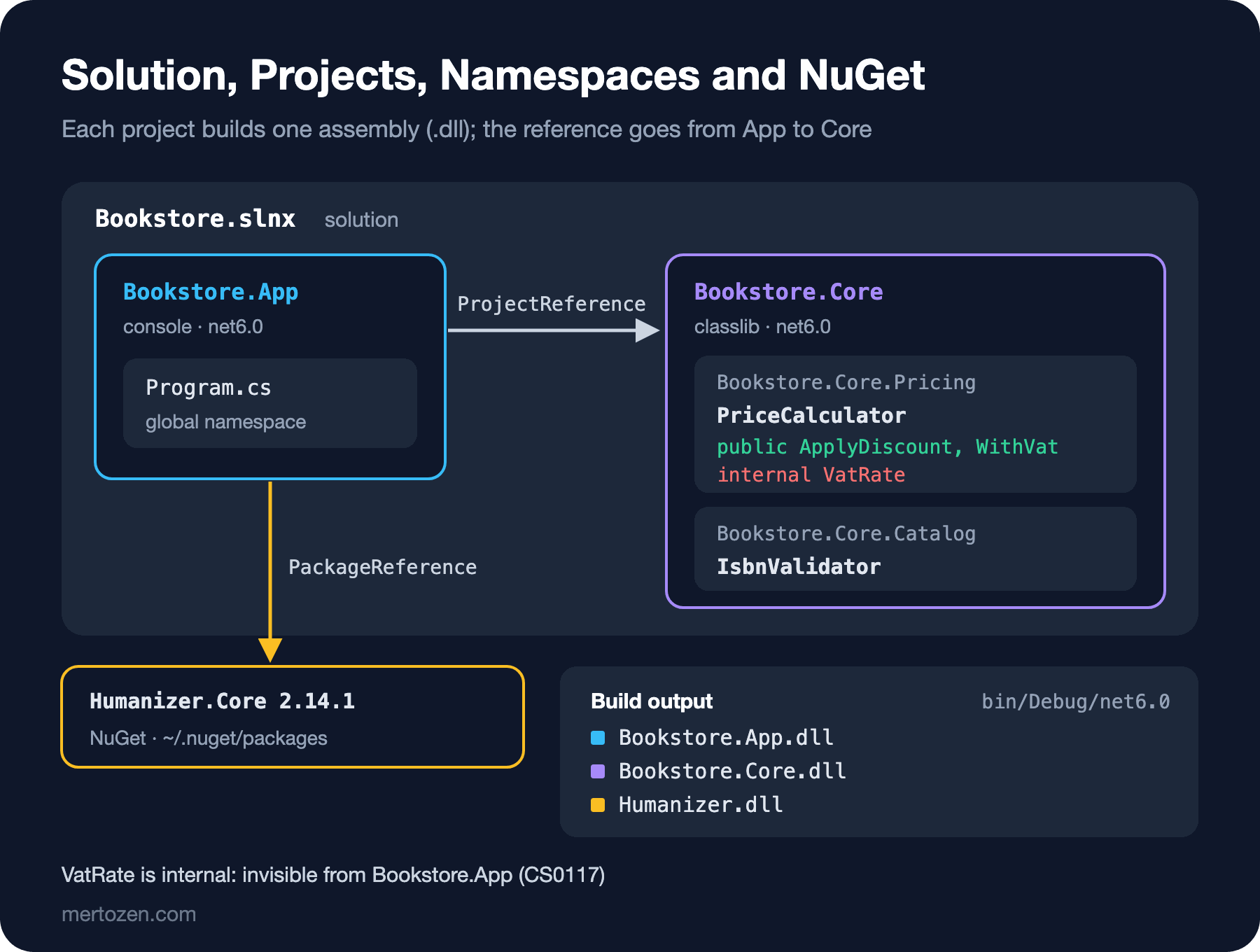
src/Bookstore.App/Program.cs(4,35): error CS0117: 'PriceCalculator' does not contain a definition for 'VatRate'The compiler does not say "you cannot access this"; it says "there is no such thing". The reason is that the boundary of internal is the project. Every project produces a single assembly, a .dll file, when it is built. An internal member is open to everyone inside its own assembly and completely invisible from outside. While compiling Bookstore.App, the compiler looking at Bookstore.Core.dll ignores VatRate, and answers you as if it never found it.
These boundaries are exactly what this post is about. Namespaces organize code by naming it, while projects separate code physically and decide what is exposed to the outside. As a program grows, you will need both. We will look at the access modifiers other than public and internal in detail in the encapsulation post of the OOP series; what matters here is that when you write a class library, everything that is public is its outer surface.
Namespaces: The Surname of a Type
A namespace is part of a type's full name. The full name of PriceCalculator is Bookstore.Core.Pricing.PriceCalculator. Two classes with the same name do not clash as long as they are in different namespaces, just as you tell apart two people called "Ali" in the same office by their surnames.
The first line of the file above is the file-scoped namespace syntax that came with C# 10: a single line ending with a semicolon puts everything in the file into that namespace. The older syntax opens a block with braces and pushes the whole file one level in:
namespace Bookstore.Core.Catalog
{
    public static class IsbnValidator
    {
        public static bool IsValid(string isbn)
        {
            string digits = isbn.Replace("-", "");
            if (digits.Length != 13 || !digits.All(char.IsDigit))
            {
                return false;
            }

            int sum = 0;
            for (int i = 0; i < 12; i++)
            {
                int digit = digits[i] - '0';
                sum += i % 2 == 0 ? digit : digit * 3;
            }

            int check = (10 - sum % 10) % 10;
            return check == digits[12] - '0';
        }
    }
}
Both give the same result. Since a file almost always has a single namespace, use the file-scoped syntax in new code; you gain one level of indentation. You will see the block syntax in older projects. You cannot mix the two in one file: error CS8955: Source file can not contain both file-scoped and normal namespace declarations.
The compiler does not enforce any link between namespaces and folders; you can write any namespace in a file under the Catalog folder. The established convention, though, is that the namespace is the project name plus the folder path: Bookstore.Core/Pricing/PriceCalculator.cs → Bookstore.Core.Pricing. IDEs create new files following this rule, and in a project that follows it you do not need to search to find a type. The code in a Program.cs that uses top-level statements does not belong to any namespace; it lives in the global namespace.
using Directives and global using
To avoid writing the full name every time, you add a using at the top of the file: with using Bookstore.Core.Pricing; you use the types in that namespace by their short names. A using in a file affects only that file. As a project grows, you start repeating the same usings at the top of every file.
C# 10 brought global using for this. A global using written once in a project applies to all files. A common practice is to gather them in a separate file:
global using System.Globalization;
global using Bookstore.Core.Catalog;
global using Bookstore.Core.Pricing;
You can do the same from the csproj file. A Using item adds a global using, and Remove takes out an existing one:
<ItemGroup>
  <Using Include="Humanizer" />
  <Using Remove="System.Net.Http" />
</ItemGroup>
So how did Console, File and List<T> work so far without a single using? The answer is the <ImplicitUsings>enable</ImplicitUsings> line in the csproj. During the build, the SDK generates a file of global usings in the obj folder. After adding the two lines above, obj/Debug/net6.0/Bookstore.App.GlobalUsings.g.cs looked like this:
// <auto-generated/>
global using Humanizer;
global using System;
global using System.Collections.Generic;
global using System.IO;
global using System.Linq;
global using System.Threading;
global using System.Threading.Tasks;
Humanizer joined the list and System.Net.Http left it. System.Globalization is not here, because we wrote it in our own GlobalUsings.cs. When you cannot figure out "where a type comes from", this file is the first place to look.
Use it in moderation. Global usings make it harder to see a file's dependencies when you read it. They are good for a few namespaces used in almost every file of the project; a namespace needed in a single file should stay in that file's own using. There is also the alias syntax: with using Pricing = Bookstore.Core.Pricing; you can give a long namespace a short name, or tell apart two types with the same name.
Solutions: Keeping Projects Together
A solution is a list of projects developed together. It contains no code itself; it tells the IDE and dotnet build "these projects belong together". Let's split Bookstore into two projects: the console application that talks to the user, and the class library that holds the business rules.
dotnet new sln -n Bookstore
dotnet new console -o src/Bookstore.App
dotnet new classlib -o src/Bookstore.Core
dotnet sln add src/Bookstore.App src/Bookstore.Core
With the .NET 10 SDK, dotnet new sln produces a file in the new XML-based .slnx format instead of the old .sln. If you want the old format, pass --format sln; you may need to do that on a team using the .NET 6 or 8 SDK, because older SDKs do not recognize .slnx. The generated file is readable:
<Solution>
  <Folder Name="/src/">
    <Project Path="src/Bookstore.App/Bookstore.App.csproj" />
    <Project Path="src/Bookstore.Core/Bookstore.Core.csproj" />
  </Folder>
</Solution>
One more detail: the .NET 10 SDK templates target net10.0, and the -f option does not accept net6.0. To fit this series' setup, I changed TargetFramework to net6.0 in both csproj files and added <LangVersion>10</LangVersion>. I deleted the empty Class1.cs created by the classlib template and put the two files above into the Pricing and Catalog folders.
Gathering the folder structure under src is a convention; when you later add test projects in a tests folder, the layout stays tidy. When you run dotnet build in the solution's root folder, all of its projects are built in the right order.
References Between Projects
Even when two projects are in the same solution, they do not see each other. For the console application to use the library, it has to reference it:
$ dotnet add src/Bookstore.App reference src/Bookstore.Core
Reference `..\Bookstore.Core\Bookstore.Core.csproj` added to the project.
This command adds a ProjectReference to Bookstore.App.csproj. If you forget or remove the reference, you get this error on the using line:
src/Bookstore.App/Program.cs(2,7): error CS0246: The type or namespace name 'Bookstore' could not be found (are you missing a using directive or an assembly reference?)Memorize the two possibilities at the end of the message: either the using is missing or the reference is. If the using is right, the problem is almost always in the csproj.
The direction of the reference matters. Bookstore.App depends on Bookstore.Core, not the other way around. Core does not know who uses it; tomorrow you can connect the same library to a Web API project as well. Two projects are not allowed to reference each other. When I tried, the build stopped with this error: error MSB4006: There is a circular dependency in the target dependency graph. If such a need comes up, it is a sign that you should move the shared code into a third project.
Adding a NuGet Package
You add code written by others to your project as a NuGet package. As an example, let's add Humanizer, which turns text into human language:
dotnet add src/Bookstore.App package Humanizer.Core --version 2.14.1The command downloads the package and writes a PackageReference to the csproj. After the two commands, these two blocks had been added to Bookstore.App.csproj:
<ItemGroup>
  <ProjectReference Include="..\Bookstore.Core\Bookstore.Core.csproj" />
</ItemGroup>

<ItemGroup>
  <PackageReference Include="Humanizer.Core" Version="2.14.1" />
</ItemGroup>
Now we can put everything together. Thanks to the global usings, there is not a single using line in Program.cs:
decimal price = PriceCalculator.ApplyDiscount(450m, 15);
Console.WriteLine(price.ToString(CultureInfo.InvariantCulture));                          // 382.5
Console.WriteLine(PriceCalculator.WithVat(price).ToString(CultureInfo.InvariantCulture)); // 420.75
Console.WriteLine(IsbnValidator.IsValid("978-0441172719")); // True
Console.WriteLine(IsbnValidator.IsValid("978-0441172710")); // False
Console.WriteLine("book".ToQuantity(3));                    // 3 books
Console.WriteLine("OrderStatusPending".Humanize());         // Order status pending
After the build, the bin/Debug/net6.0 folder had three dlls: Bookstore.App.dll, Bookstore.Core.dll and Humanizer.dll. The package itself is not copied into every project; it is downloaded once into the machine's shared NuGet cache (~/.nuget/packages), and the build takes it from there. You can see which packages a project has with dotnet list package.
Do not rush when choosing a package. Every package is a dependency you have to keep up to date and a potential security hole. On nuget.org, look at the last update date, the download count, the license and the frameworks it targets. Always write the version explicitly; a project set up with "whatever is latest" can behave differently two months later with the same code.
Common Pitfalls
Making every helper in a library public. Everything public is a contract that anyone using the library can come to depend on. Make internal your default and mark what really needs to be outside as public explicitly.
Starting to change code when you see CS0117 or CS0246. Check first: is the type public, is the using right, does the project have the reference? These three explain most of these errors.
Giving a namespace and a class inside it the same name. If there is a class called Pricing in the Bookstore.Core.Pricing namespace, then in code that uses it the name Pricing sometimes resolves to the namespace and sometimes to the class, and you often end up writing the full name. Give namespaces plural or area names (Pricing, Catalog), and give classes names that do work (PriceCalculator).
Moving everything into global usings. It becomes harder to read what a file depends on, and types with the same name start to clash. Limit global usings to a few namespaces that really are used in every file.
Creating a .slnx with the .NET 10 SDK and sending it to a teammate on an older SDK. Until everyone on the team moves to the same SDK, use --format sln or put a global.json that pins the SDK version in the root folder.
A Small Experiment
★☆☆ Convert IsbnValidator.cs to the file-scoped namespace syntax and see how the indentation changes. Then add a second block namespace to the same file and produce the CS8955 error yourself.
★★☆ Add a public Normalize function to Bookstore.Core in the Catalog namespace that strips the dashes from an ISBN and returns it. Call the function from Bookstore.App; then make it internal and note what the error message is.
★★★ Add a second console project called src/Bookstore.Reports to the solution. Have it reference Bookstore.Core as well and print a price list with PriceCalculator. Watch a single dotnet build in the solution root build all three projects.
We split the code into projects and namespaces, and learned a little about reading the compiler's errors. But not every piece of code that compiles works correctly. In the next post we move on to debugging: breakpoints, watches, the call stack, Debug.WriteLine and Debug.Assert, and reading the warnings dotnet build gives you.