

C# Versions: A Short History from 1.0 to 10
The signature features, release dates and .NET pairings of every version from C# 1.0 to C# 10; compiling the same code with different LangVersion values to see how the compiler tells you which feature came from which version.
Version note: This post covers the history of the language from C# 1.0 to C# 10; the examples were compiled with the .NET 10 SDK against net6.0 using different LangVersion values.
Guess First
The file below compiles without complaint in any .NET 6 project today. Here is the question: what is the oldest C# version that can compile it? I set LangVersion in the project file to 9, 8, 7.3 and 6 and tried each one. Before you read on, make a guess for each line.
using System;
using System.Collections.Generic;

public class Book
{
    public string Title { get; set; }
    public decimal Price { get; set; }
}

public static class Program
{
    public static void Main()
    {
        var books = new List<Book>
        {
            new() { Title = "Clean Code", Price = 42.5m },
            new() { Title = "Refactoring", Price = 38m }
        };

        if (int.TryParse("3", out var stock))
            Console.WriteLine($"{books[0].Title}: {stock} in stock");

        string label = books[^1].Price switch
        {
            > 40m => "expensive",
            _ => "fine"
        };

        Dictionary<string, int> cache = null;
        cache ??= new Dictionary<string, int>();

        Console.WriteLine(label);
    }
}
The Compiler Knows the Answer
The answer is C# 9. With LangVersion set to 9 the code compiles and prints:
Clean Code: 3 in stock
fine
Go one step lower and the compiler tells you, line by line, what won't compile and why. With C# 8:
Program.cs(16,13): error CS8400: Feature 'target-typed object creation' is not available in C# 8.0. Please use language version 9.0 or greater.
Program.cs(17,13): error CS8400: Feature 'target-typed object creation' is not available in C# 8.0. Please use language version 9.0 or greater.
Program.cs(25,13): error CS8400: Feature 'relational pattern' is not available in C# 8.0. Please use language version 9.0 or greater.
With C# 7.3 the list gets longer:
Program.cs(16,13): error CS8370: Feature 'target-typed object creation' is not available in C# 7.3. Please use language version 9.0 or greater.
Program.cs(17,13): error CS8370: Feature 'target-typed object creation' is not available in C# 7.3. Please use language version 9.0 or greater.
Program.cs(23,40): error CS8370: Feature 'recursive patterns' is not available in C# 7.3. Please use language version 8.0 or greater.
Program.cs(23,30): error CS8370: Feature 'index operator' is not available in C# 7.3. Please use language version 8.0 or greater.
Program.cs(23,24): error CS8370: Feature 'index operator' is not available in C# 7.3. Please use language version 8.0 or greater.
Program.cs(25,13): error CS8370: Feature 'relational pattern' is not available in C# 7.3. Please use language version 9.0 or greater.
Program.cs(26,13): error CS8370: Feature 'recursive patterns' is not available in C# 7.3. Please use language version 8.0 or greater.
Program.cs(30,15): error CS8370: Feature 'coalescing assignment' is not available in C# 7.3. Please use language version 8.0 or greater.
Drop to C# 6 and one more line joins them: Feature 'out variable declaration' is not available in C# 6. Please use language version 7.0 or greater. So a single file carries traces of four different eras. String interpolation is from C# 6, out var from C# 7.0, the ^1 index, the switch expression and ??= from C# 8, and new() plus a relational pattern like > 40m from C# 9.
Two details are worth knowing. First, the error code changes with the version but the message pattern never does: CS8059 for C# 6, CS8370 for 7.3, CS8400 for 8.0, CS8773 for 9.0, CS8936 for 10.0. The message gives both the feature name and the lowest version that has it. Second, the compiler's name isn't always the one in the documentation. The switch expression error comes as "recursive patterns"; that is the name of the feature group in the C# 8 language design documents. Throughout this series we'll answer "which version is this line from?" the same way: instead of guessing, we'll ask the compiler.
Who Decides the Language Version
If your project doesn't set LangVersion, the target framework decides the language version. The quickest way to see it is to put a single #error version line in a file and build. With net6.0 as the target the message is:
Program.cs(1,8): error CS8304: Compiler version: '5.9.0-1.26505.111 (a8dd0577c5c13f43a2f57fe33b4ff11b90f6371e)'. Language version: 10.0. Compiler path: '/usr/local/share/dotnet/sdk/10.0.402/Roslyn/bincore/Microsoft.CodeAnalysis.CSharp.dll'.The compiler is the one from the .NET 10 SDK, but the language version is 10.0. Changing only TargetFramework in the same project gave 11.0 for net7.0, 12.0 for net8.0, 13.0 for net9.0 and 14.0 for net10.0. In other words, installing a new SDK doesn't raise the language version of your old projects by itself. If you want to pin the version, you write it in the project file:
<PropertyGroup>
  <TargetFramework>net6.0</TargetFramework>
  <LangVersion>7.3</LangVersion>
</PropertyGroup>
This choice arrived with C# 7.1; it was the language's first point release, and point releases meant you needed a way to pick which features were on. Microsoft's advice is clear: don't set LangVersion to latest, and don't pick a version newer than the framework's default, because that combination isn't supported. Picking a lower version, as in the experiment above, is perfectly legitimate.
2002–2005: C# 1.0 and C# 2.0
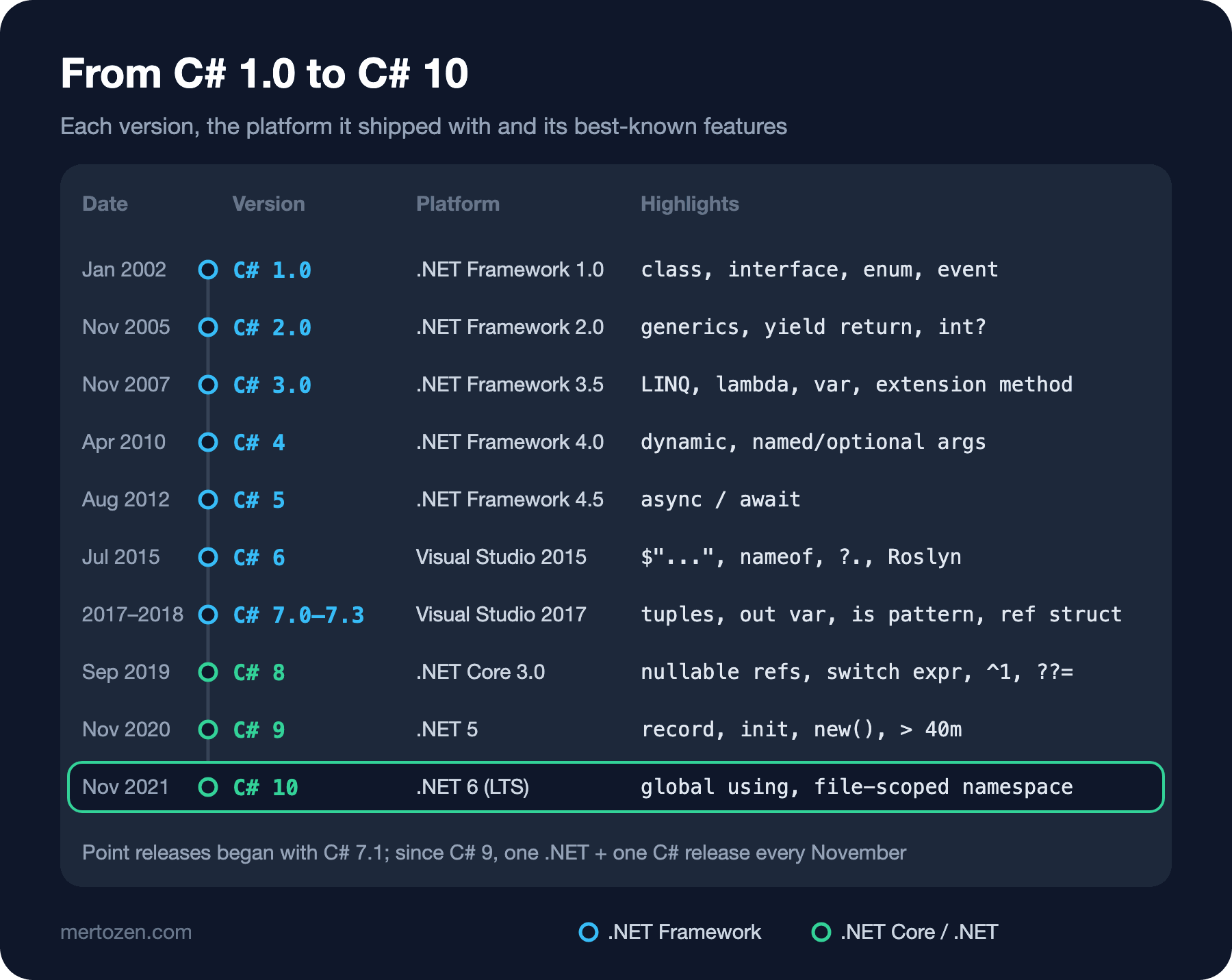
C# 1.0 shipped in January 2002 with .NET Framework 1.0 and Visual Studio .NET 2002. In April 2003 a small point release, C# 1.2, came with Visual Studio .NET 2003. To get a feel for the first version I compiled a small slice of the Bookstore with LangVersion set to ISO-1:
using System;
using System.Collections;

public delegate void StockChanged(string isbn, int stock);

public interface IPriced
{
    decimal Price { get; }
}

public enum Format { Paperback, Hardcover, Ebook }

public class Book : IPriced
{
    private decimal price;
    private int stock;
    public event StockChanged Changed;

    public Book(decimal price, int stock) { this.price = price; this.stock = stock; }

    public decimal Price { get { return price; } }

    public void Sell()
    {
        stock--;
        if (Changed != null) Changed("978-0132350884", stock);
    }
}

public class Program
{
    static void OnChanged(string isbn, int stock)
    {
        Console.WriteLine(isbn + ": " + stock);
    }

    public static void Main()
    {
        ArrayList books = new ArrayList();
        Book book = new Book(42.5m, 3);
        book.Changed += new StockChanged(OnChanged);
        books.Add(book);
        foreach (Book b in books)
        {
            b.Sell();
        }
        Book first = (Book)books[0];
        Console.WriteLine(first.Price.ToString(System.Globalization.CultureInfo.InvariantCulture) + " " + Format.Hardcover);
    }
}
978-0132350884: 2
42.5 HardcoverClasses, interfaces, enums, properties, delegates, events and foreach have been there since day one. What's missing is type safety: ArrayList holds everything as object, and the (Book) cast on the way out is your responsibility. The first attempt also produced an interesting error. A small attribute file that the SDK adds to every project uses global::, and C# 1 doesn't know it: Feature 'namespace alias qualifier' is not available in C# 1. Please use language version 2 or greater. I ran the experiment with GenerateTargetFrameworkAttribute=false to switch that file off.
C# 2.0, released in November 2005 with .NET Framework 2.0 and Visual Studio 2005, changed the direction of the language. Generics take the lead: write List<Book> and the C# 1 compiler says Feature 'generics' is not available in C# 1. Please use language version 2 or greater. The same release brought other pieces too. I compiled this file with C# 1 again:
using System;
using System.Collections;

public class Program
{
    static IEnumerable Countdown(int from)
    {
        for (int i = from; i > 0; i--)
            yield return i;
    }

    public static void Main()
    {
        int? stock = null;
        EventHandler log = delegate { Console.WriteLine("stock changed"); };
    }
}
Program.cs(9,13): error CS8022: Feature 'iterators' is not available in C# 1. Please use language version 2 or greater.
Program.cs(14,12): error CS8022: Feature 'nullable types' is not available in C# 1. Please use language version 2 or greater.
Program.cs(15,28): error CS8022: Feature 'anonymous methods' is not available in C# 1. Please use language version 2 or greater.Iterators with yield return, nullable value types with int?, and anonymous methods as nameless methods. Partial types and static classes also came with C# 2. In the first post of the C# Collections and Generics series we measure why generics matter so much by moving from ArrayList to List<T>.
2007: C# 3.0 and LINQ
C# 3.0 shipped in November 2007 with .NET Framework 3.5 and Visual Studio 2008. Nearly every feature in this release served one goal: LINQ. Compile the file below with C# 2 and you see how much arrived at once:
using System;
using System.Collections.Generic;
using System.Linq;

public class Book
{
    private string title;
    private decimal price;
    public string Title { get { return title; } set { title = value; } }
    public decimal Price { get { return price; } set { price = value; } }
}

public class Program
{
    static decimal Discount(decimal price, decimal rate) { return price * (1 - rate); }

    public static void Main()
    {
        List<Book> books = new List<Book>();
        var cheap = from b in books where b.Price < 40m select new { b.Title };
        Func<Book, bool> expensive = b => b.Price > 40m;
        Book first = new Book { Title = "Clean Code" };
        dynamic anything = 42;
        decimal total = Discount(price: 50m, rate: 0.2m);
    }
}
Program.cs(20,9): error CS8023: Feature 'implicitly typed local variable' is not available in C# 2. Please use language version 3 or greater.
Program.cs(20,21): error CS8023: Feature 'query expression' is not available in C# 2. Please use language version 3 or greater.
Program.cs(20,64): error CS8023: Feature 'anonymous types' is not available in C# 2. Please use language version 3 or greater.
Program.cs(21,40): error CS8023: Feature 'lambda expression' is not available in C# 2. Please use language version 3 or greater.
Program.cs(22,31): error CS8023: Feature 'object initializer' is not available in C# 2. Please use language version 3 or greater.
Program.cs(23,9): error CS0246: The type or namespace name 'dynamic' could not be found (are you missing a using directive or an assembly reference?)
Program.cs(24,34): error CS8023: Feature 'named argument' is not available in C# 2. Please use language version 4 or greater.
Program.cs(24,46): error CS8023: Feature 'named argument' is not available in C# 2. Please use language version 4 or greater.A single query line needs var, a query expression and an anonymous type all at once. Lambdas, object initializers, auto-implemented properties and extension methods come from the same release. They all fit together: Where is an extension method, the filter it takes is a lambda, and select new { b.Title } is an anonymous type. Expression trees also came with C# 3; they are what lets EF Core turn a C# query into SQL. The LINQ series starts from exactly this foundation.
2010–2012: C# 4 and C# 5
The last two lines belong to another era. Compile the same file with C# 3 and only they remain:
Program.cs(23,9): error CS0246: The type or namespace name 'dynamic' could not be found (are you missing a using directive or an assembly reference?)
Program.cs(24,34): error CS8024: Feature 'named argument' is not available in C# 3. Please use language version 4 or greater.
Program.cs(24,46): error CS8024: Feature 'named argument' is not available in C# 3. Please use language version 4 or greater.
C# 4 arrived in April 2010 with .NET Framework 4.0 and Visual Studio 2010. dynamic, named arguments, optional parameters and generic covariance/contravariance (IEnumerable<out T>) belong to this release. Notice why the dynamic error looks different: dynamic is a contextual keyword. The C# 3 compiler doesn't recognize it as a keyword, so it looks for a type named dynamic and can't find one. For optional parameters the message is clear too: Feature 'optional parameter' is not available in C# 3. Please use language version 4 or greater.
C# 5, which came in August 2012 with .NET Framework 4.5 and Visual Studio 2012, has one big story: async and await. Try to compile an async method with C# 4 and you get Feature 'async function' is not available in C# 4. Please use language version 5 or greater. Much of the backend code we write today stands on these two words; we open up how they work in the C# Asynchronous Programming series.
2015–2018: C# 6 and C# 7.x
C# 6, released in July 2015 with Visual Studio 2015, changed the compiler as much as the language: Roslyn, which exposes the compiler as a service through an API, came with this release. The language additions are small but the kind you use every day: string interpolation ($"..."), nameof, the null-conditional operator (?.), expression-bodied members, auto-property initializers, catch ... when exception filters, using static and await inside catch/finally.
With C# 7.0 in March 2017 the language moved to a rhythm of several point releases a year. 7.0 brought out variables, tuples and deconstruction, the first pattern matching with is, local functions, discards (_), ref returns and throw expressions. 7.1 in August 2017 added async Main and the default literal. 7.2 in November 2017 turned to performance: in parameters, readonly struct, ref struct and private protected. 7.3 in May 2018 brought the unmanaged, System.Enum and System.Delegate constraints and == comparison for tuples. We'll look at ref struct, the language foundation under Span<T>, in the C# Advanced series.
2019–2021: C# 8, 9 and 10
C# 8, which arrived in September 2019 with .NET Core 3.0, was the first release aimed at .NET Core. Some of its features need new runtime or library support. Default interface members need runtime support, and ^1 and 1..3 use the System.Index and System.Range types under the hood. Nullable reference types, async streams (IAsyncEnumerable<T> and await foreach), the switch expression with property and positional patterns, ??= and using var declarations also belong to this release.
C# 9, which came in November 2020 with .NET 5, brought records, init setters, top-level statements, relational and logical patterns (> 40m, and, or, not) and target-typed new(). Since then a .NET release and a C# release have shipped together every November.
C# 10, which came in November 2021 with .NET 6 LTS, is the version this family's core series stand on. record struct, global using, file-scoped namespaces (namespace Bookstore;), extended property patterns ({ Author.Name: "Ada" }), natural types for lambdas (var f = () => 1;), constant interpolated strings and CallerArgumentExpression are in this release. Add a namespace Bookstore; line to the file from the opening question, compile it with C# 9, and you get error CS8773: Feature 'file-scoped namespace' is not available in C# 9.0. Please use language version 10.0 or greater. Generic attributes and static abstract members in interfaces existed in C# 10 only as previews; they shipped for real in C# 11.
Common Pitfalls
Confusing the language version with the SDK version. Having the .NET 10 SDK on your machine doesn't mean a project that targets net6.0 is compiled with C# 14. In the #error version output above the compiler came from the 10 SDK while the language version was 10.0. If you're not sure, add that single line and look.
Assuming every new syntax depends only on the compiler. Most features really are compiler-only and run on older runtimes too. But as we saw with C# 8, some need a type or a capability on the runtime or library side. That's why in the next post we'll see generic math fail to compile on .NET 6.
Setting LangVersion to latest and moving on. This setting silently changes the project's language version whenever the SDK on the machine changes, and leads to two developers compiling the same code under different rules. Using whatever the framework defaults to is the safest path.
Searching the documentation for the exact feature name in the error message. Names like "recursive patterns" or "coalescing assignment" are the compiler's internal names; if you can't find what you're looking for, go to the "What's new in C# 8" page using the version number instead.
A Small Experiment
★☆☆ Put the file from the opening question in your own project, set LangVersion to 7.3 and make it compile with as few changes as possible. How many lines did you have to touch?
★★☆ Add the #error version line to an empty console project and set TargetFramework to net6.0, net8.0 and net10.0 to see for yourself how the language version changes.
★★★ Write a single method that uses nameof, ?. and string interpolation, and compile it with LangVersion set to 5. Which feature names does the compiler use, and how many errors do you get?
We've made it to C# 10, and that is exactly the language of the core series. In the next post we take the first step: the raw string literals, required members, list patterns and generic math that came with C# 11, each placed side by side with how you wrote it in C# 10.