

Exception Handling in C#: try/catch/finally, throw and Your Own Exception
Exception handling in C#: try, catch and their order, cleanup with finally and using, how throw and throw ex differ in the stack trace, the when filter, writing your own exception type and using InnerException, and when to use an exception and when TryXxx.
Version note: The code in this post uses C# 10 and the .NET 6 APIs; it was built and run with the .NET 10 SDK.
Guess First
A method that loads the catalog returns from inside a try block, and below it there is a finally block. Doesn't return end the method right away? Which lines get printed, and in what order?
Console.WriteLine(LoadCatalog());

static string LoadCatalog()
{
    try
    {
        Console.WriteLine("try");
        return "catalog loaded";
    }
    finally
    {
        Console.WriteLine("finally");
    }
}
try
finally
catalog loadedfinally ran after the return, but before the value reached the caller. Whichever way you leave a try block (normal flow, return, break or an exception), finally runs. That guarantee is the most valuable part of exception handling: even when something goes wrong, you can close the file you opened and release the resource you took. In the earlier posts we saw our programs crash with exceptions again and again; in this post we talk about catching those exceptions, throwing them correctly, and when not to use them at all. One note: the code targets net6.0 and ran on the .NET 8 runtime through roll-forward; the text of exception messages can differ slightly between runtime versions.
try and catch
You put the code that may fail into a try block and the code that handles the failure into a catch block. Let's convert a quantity entered by the user into a number:
string[] inputs = { "3", "abc", "99999999999", "" };

foreach (string input in inputs)
{
    try
    {
        int quantity = int.Parse(input);
        Console.WriteLine($"Quantity: {quantity}");
    }
    catch (FormatException ex)
    {
        Console.WriteLine($"Not a number: '{input}' ({ex.GetType().Name})");
    }
    catch (OverflowException)
    {
        Console.WriteLine($"Too large: '{input}'");
    }
}
Quantity: 3
Not a number: 'abc' (FormatException)
Too large: '99999999999'
Not a number: '' (FormatException)int.Parse throws a FormatException for text that is not a number and an OverflowException for a number that does not fit in an int. Each catch catches one exception type and runs only for that type (or types derived from it). When an exception is caught, the program does not crash; the loop carried on with the next input. catch (FormatException ex) lets you use the exception object under the name ex; if you do not need it, you can write it without a name, like catch (OverflowException).
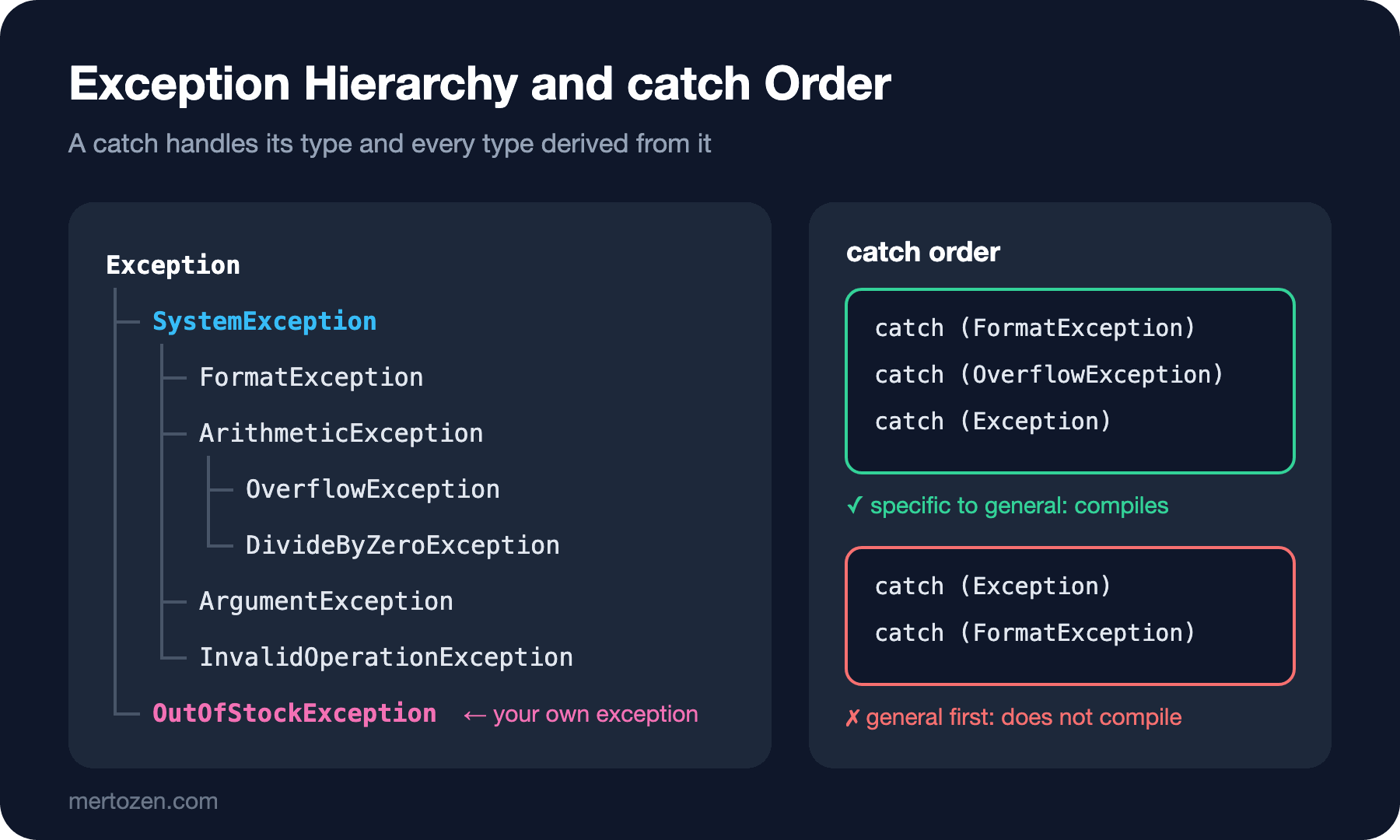
All exceptions derive from the System.Exception class:
try
{
    int.Parse("abc");
}
catch (FormatException ex)
{
    Console.WriteLine(ex.Message);
    Console.WriteLine(ex.GetType().FullName);
    Console.WriteLine(ex is SystemException);
    Console.WriteLine(ex is Exception);
}
The input string 'abc' was not in a correct format.
System.FormatException
True
TrueMessage gives a description for a human to read; StackTrace, InnerException and the type itself are the other pieces of information you will look at most. FormatException is part of a hierarchy that connects to Exception through SystemException; catch matches according to this hierarchy.
The Order of catch Blocks
If a try has more than one catch, they are tried from top to bottom and the first match wins. If you put a wide type at the top, the ones below can never run; the compiler does not allow it:
try
{
    int.Parse("abc");
}
catch (Exception)
{
    Console.WriteLine("Something failed");
}
catch (FormatException)
{
    Console.WriteLine("Not a number");
}
Program.cs(9,8): error CS0160: A previous catch clause already catches all exceptions of this or of a super type ('Exception')The rule is the same as with the switch arms in the conditions post: from specific to general. FormatException first, Exception last.
finally and using
The real job of finally is cleanup. If you opened a file or a connection, you have to close it whether the operation succeeded or blew up:
var reader = new StreamReader(new MemoryStream());
try
{
    Console.WriteLine("Reading orders");
    throw new InvalidDataException("Bad line 42");
}
catch (InvalidDataException ex)
{
    Console.WriteLine($"Error: {ex.Message}");
}
finally
{
    reader.Dispose();
    Console.WriteLine("Reader closed");
}

using (var writer = new StringWriter())
{
    writer.Write("order 1");
    Console.WriteLine(writer.ToString());
}

using var log = new StringWriter();
log.Write("order 2");
Console.WriteLine(log.ToString());
Reading orders
Error: Bad line 42
Reader closed
order 1
order 2The exception was thrown, catch caught it, and then finally closed the reader. But writing this pattern by hand every time is long and easy to forget. For types that implement IDisposable, C# gives you the using statement: Dispose() is called automatically when the block ends or when an exception is thrown inside it. The compiler turns a using block into exactly a try/finally behind the scenes. The using var form from C# 8 is even shorter: the variable is disposed when the scope it lives in ends. We will use this a lot when working with files and streams; we will look at object lifetime and IDisposable in detail in the OOP series.
The Difference Between throw and throw ex
Catching an exception, logging it and then throwing it up again is a common need. There are two ways to write that, and one of them loses information:
try
{
    Checkout();
}
catch (Exception ex)
{
    Console.WriteLine(ex.StackTrace);
}

static void Checkout()
{
    try
    {
        ReserveStock();
    }
    catch (InvalidOperationException ex)
    {
        Console.WriteLine($"Logging: {ex.Message}");
        throw ex;
    }
}

static void ReserveStock()
{
    throw new InvalidOperationException("Out of stock");
}
Program.cs(19,9): warning CA2200: Re-throwing caught exception changes stack information (https://learn.microsoft.com/dotnet/fundamentals/code-analysis/quality-rules/ca2200)
Logging: Out of stock
at Program.<<Main>$>g__Checkout|0_0() in /src/Bookstore/Program.cs:line 19
at Program.<Main>$(String[] args) in /src/Bookstore/Program.cs:line 3The stack trace says the error happened in Checkout on line 19, which is the throw ex; line. ReserveStock, where the real error happened, has been wiped from the trace. throw ex makes the exception look as if it was thrown fresh from that point. The .NET analyzer caught this too, with the CA2200 warning. The correct form is throw;:
try
{
    Checkout();
}
catch (Exception ex)
{
    Console.WriteLine(ex.StackTrace);
}

static void Checkout()
{
    try
    {
        ReserveStock();
    }
    catch (InvalidOperationException ex)
    {
        Console.WriteLine($"Logging: {ex.Message}");
        throw;
    }
}

static void ReserveStock()
{
    throw new InvalidOperationException("Out of stock");
}
Logging: Out of stock
at Program.<<Main>$>g__ReserveStock|0_1() in /src/Bookstore/Program.cs:line 25
at Program.<<Main>$>g__Checkout|0_0() in /src/Bookstore/Program.cs:line 14
at Program.<Main>$(String[] args) in /src/Bookstore/Program.cs:line 3Now the trace shows that the exception was really born in ReserveStock on line 25. When you are hunting a production bug at midnight, that line saves you hours. The rule is simple: if you are going to rethrow an exception you caught, write only throw;.
The when Filter
Exception filters, which came with C# 6, let you add an extra condition to a catch. A payment API saying "I am busy" and actually failing should be handled differently:
int[] statusCodes = { 404, 503, 500 };

foreach (int status in statusCodes)
{
    try
    {
        CallPaymentApi(status);
    }
    catch (HttpRequestException ex) when (ex.StatusCode == System.Net.HttpStatusCode.ServiceUnavailable)
    {
        Console.WriteLine("Payment service busy, will retry");
    }
    catch (HttpRequestException ex)
    {
        Console.WriteLine($"Payment failed: {(int?)ex.StatusCode}");
    }
}

static void CallPaymentApi(int status)
{
    throw new HttpRequestException("Payment API error", null, (System.Net.HttpStatusCode)status);
}
Payment failed: 404
Payment service busy, will retry
Payment failed: 500For 503 the first catch ran; the other codes could not pass the when condition and fell to the second catch. The difference from writing an if inside the catch and doing throw; when it does not match is this: if the when condition is false, the exception counts as never caught, and the stack stays as it is. The readability is a bonus.
Your Own Exception
.NET's built-in exceptions (ArgumentException, InvalidOperationException, FormatException…) cover most cases. But if the caller needs to catch an error specific to a business rule separately, you write your own type:
try
{
    var inventory = new Inventory();
    inventory.Reserve("978-0441013593", 5);
}
catch (OutOfStockException ex)
{
    Console.WriteLine(ex.Message);
    Console.WriteLine($"{ex.Isbn}: requested {ex.Requested}, available {ex.Available}");
}

class Inventory
{
    private readonly Dictionary<string, int> stock = new() { ["978-0441013593"] = 3 };

    public void Reserve(string isbn, int quantity)
    {
        int available = stock[isbn];
        if (quantity > available)
        {
            throw new OutOfStockException(isbn, quantity, available);
        }
        stock[isbn] = available - quantity;
    }
}

class OutOfStockException : Exception
{
    public OutOfStockException(string isbn, int requested, int available)
        : base($"Not enough stock for {isbn}.")
    {
        Isbn = isbn;
        Requested = requested;
        Available = available;
    }

    public string Isbn { get; }
    public int Requested { get; }
    public int Available { get; }
}
Not enough stock for 978-0441013593.
978-0441013593: requested 5, available 3Its name ends with Exception, it derives from Exception, and it passes the message to the base class with base(...). Its real value is in the extra properties: the caller can find out which ISBN is short and by how many copies without parsing the message. We will look at classes, constructors and inheritance in detail in the OOP series; for now it is enough to recognize this pattern.
When you wrap an exception from a lower layer in a more meaningful one, do not lose the original exception. InnerException is there for that:
try
{
    LoadSettings("missing.json");
}
catch (InvalidOperationException ex)
{
    Console.WriteLine(ex.Message);
    Console.WriteLine(ex.InnerException?.GetType().Name);
}

static void LoadSettings(string path)
{
    try
    {
        File.ReadAllText(path);
    }
    catch (FileNotFoundException ex)
    {
        throw new InvalidOperationException($"Settings file '{path}' could not be loaded.", ex);
    }
}
Settings file 'missing.json' could not be loaded.
FileNotFoundExceptionSomeone looking from outside sees the message "the settings could not be loaded", while the person investigating the error can reach the real cause, the missing file, through InnerException.
Exception or TryXxx?
Exceptions are for exceptional situations. A user typing letters into a form is not exceptional; it is a perfectly ordinary situation. For expected failures like this, .NET offers the "Try" pattern:
string[] inputs = { "3", "abc", "" };

foreach (string input in inputs)
{
    if (int.TryParse(input, out int quantity))
    {
        Console.WriteLine($"Quantity: {quantity}");
    }
    else
    {
        Console.WriteLine($"Please enter a number, not '{input}'");
    }
}
Quantity: 3
Please enter a number, not 'abc'
Please enter a number, not ''TryParse does not throw; it returns success as a bool. The code is both more readable and faster; throwing an exception is a much more expensive operation than an ordinary if, for reasons such as collecting the stack trace. My rule is this: if the failure is an expected input situation (user input, a record that is not found), use TryXxx or a return value; if the failure means the method's contract has been broken, use an exception.
And when the contract is broken, do not stay quiet; fail loudly:
Console.WriteLine("Starting checkout");
Checkout(-1);
Console.WriteLine("Never printed");

static void Checkout(int quantity)
{
    if (quantity <= 0)
    {
        throw new ArgumentOutOfRangeException(nameof(quantity), quantity, "Quantity must be positive.");
    }
}
Starting checkout
Unhandled exception. System.ArgumentOutOfRangeException: Quantity must be positive. (Parameter 'quantity')
Actual value was -1.
at Program.<<Main>$>g__Checkout|0_0(Int32 quantity) in /src/Bookstore/Program.cs:line 9
at Program.<Main>$(String[] args) in /src/Bookstore/Program.cs:line 2Since nobody caught it, the exception terminated the program and the last line never ran. Ordering a negative quantity is a programming error; hiding it behind a bool moves the bug to a place where it is much harder to find later.
Common Pitfalls
Swallowing exceptions. An empty catch block does not make the error go away; it only makes it invisible:
decimal total = 0m;
try
{
    total = Calculate();
}
catch
{
}
Console.WriteLine(total);

static decimal Calculate() => throw new DivideByZeroException();0The total came out as 0, and nobody knows why. A wrong total is much more dangerous than a crashed program, because it goes unnoticed. If you catch an exception, do something with it: log it, show the user a meaningful message, deliberately fall back to a default value, or rethrow it.
catch (Exception) everywhere. Wrapping every method in try/catch (Exception) means also catching errors you do not know how to handle. Catch an exception only where you can do something meaningful with it; let the rest rise to the top layer of the application. In ASP.NET Core, that top layer is the exception handling middleware; it is covered in detail in the global error handling post of the .NET Core Web API series.
Writing throw ex. As you saw above, it wipes the stack trace; use throw;.
Driving control flow with exceptions. Do not throw an exception to leave a loop or to say "no record". Exceptions are, as the name says, for exceptional cases.
Forgetting InnerException when wrapping. If you write throw new InvalidOperationException("...") without passing the original exception, the real cause of the error is lost.
A Small Experiment
★☆☆ Write a program that reads a price from the user and converts it with decimal.Parse. Catch FormatException and OverflowException in separate catch blocks, then rewrite the same program with decimal.TryParse.
★★☆ Add a separate branch to the OutOfStockException example with catch (OutOfStockException ex) when (ex.Available == 0) and show a different message when the stock is completely gone.
★★★ Throw an exception from a method and catch it three layers up. In one of the layers in between, use throw ex first and then throw;, and compare the two stack traces. Then wrap the exception in an InvalidOperationException and look at how the inner exception appears in the output of ex.ToString().
In this post we compared HTTP status codes with numbers and used named constants like HttpStatusCode.ServiceUnavailable. Those named constants are an enum. In the next post we take on enums: declaring them and the underlying type, [Flags], Enum.Parse and TryParse, using them with switch, and the quiet pitfalls of enums.