

Why Async Exists in C#: Blocking, I/O and Scale
The same 100 stock queries finish in one second with async and in 8-9 seconds with code that blocks the thread. The difference between I/O-bound and CPU-bound work, what blocking costs in a UI and on a server, thread pool starvation, why async buys capacity rather than speed, and the fake async trap.
Version note: The code in this post uses C# 10 and the .NET 6 APIs; it was built and run with the .NET 10 SDK.
Guess First
The Bookstore order screen asks the stock service about every book, and the service takes one second to answer each time. The program below does the same job twice: first it sends 100 queries through an async method, then it sends the same 100 queries through a classic method that makes the thread wait. On both sides every query waits exactly one second. Do you expect both lines to print "about 1000 ms"? If there is a difference, how big is it?
using System.Diagnostics;

const int requestCount = 100;

Stopwatch watch = Stopwatch.StartNew();
Task<int>[] asyncCalls = new Task<int>[requestCount];
for (int i = 0; i < requestCount; i++)
{
    asyncCalls[i] = GetStockAsync("978-0441172719");
}
await Task.WhenAll(asyncCalls);
Console.WriteLine($"Async:    {watch.ElapsedMilliseconds} ms, pool threads: {ThreadPool.ThreadCount}");

watch.Restart();
Task<int>[] blockingCalls = new Task<int>[requestCount];
for (int i = 0; i < requestCount; i++)
{
    blockingCalls[i] = Task.Run(() => GetStock("978-0441172719"));
}
await Task.WhenAll(blockingCalls);
Console.WriteLine($"Blocking: {watch.ElapsedMilliseconds} ms, pool threads: {ThreadPool.ThreadCount}");

static int GetStock(string isbn)
{
    Thread.Sleep(1000); // as if waiting for the stock service
    return 5;
}

static async Task<int> GetStockAsync(string isbn)
{
    await Task.Delay(1000); // the same wait, but releasing the thread
    return 5;
}
We will look at Task.WhenAll in detail later in this series; for now, read it as "wait until every job in the list is done".
The Answer: A Waiting Thread Is a Light Left On
One of the runs on my machine (Apple M5, 10 cores, .NET 8 runtime) printed this. Timings change from machine to machine and from run to run; your numbers will be different, but the gap stays the same:
Async:    1005 ms, pool threads: 10
Blocking: 9014 ms, pool threads: 13
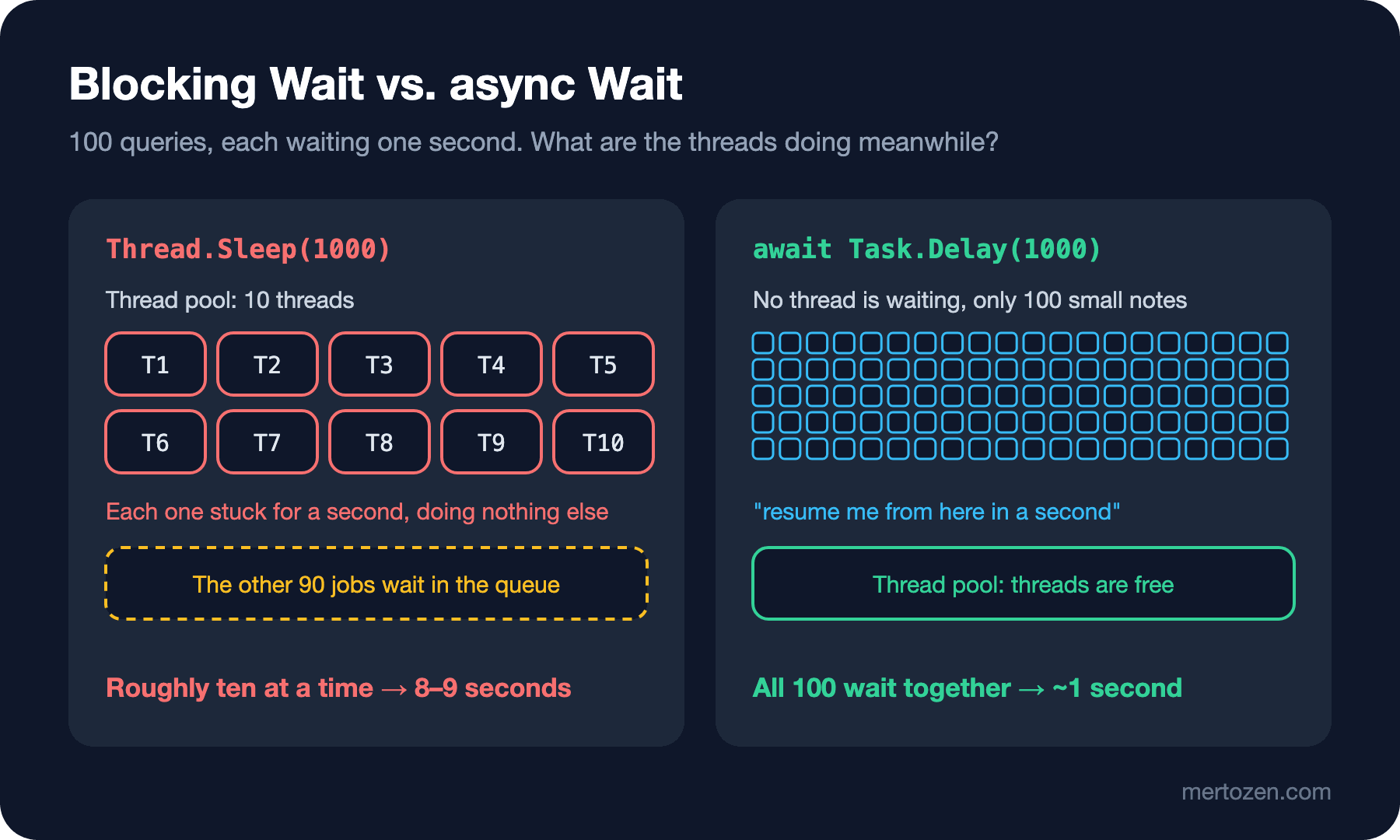
The async side finished 100 queries in one second. The classic side finished the same work in nine seconds; across four runs that number moved between 8 and 9 seconds. On neither side is the computer calculating anything; it is only waiting. The difference is what happens to the thread while it waits.
When Thread.Sleep(1000) runs, that thread is stuck for a full second. It cannot do any other work, yet it keeps occupying memory and a seat in the thread pool. Task.Run hands the jobs to the thread pool. On this machine the pool starts with 10 threads, and there are 100 jobs in the queue. The first 10 jobs lock 10 threads for a second, and the other 90 wait in line. The pool notices it is starved and adds threads, but it does so slowly and cautiously: when I measured, it added one thread every half second and stopped at 12-13. The result: 100 jobs, roughly ten at a time, 8-9 seconds.
await Task.Delay(1000) does not lock the thread. The method leaves a note saying "resume me from here in a second" and releases the thread. When the second is up, the runtime hands the rest of the work to an idle thread. All 100 queries wait at the same time, but no thread is waiting; only 100 small notes are.
Think of a restaurant waiter. The synchronous waiter passes the order to the kitchen and stands at the counter until the food comes out. With ten waiters, only ten tables are served at once, and the eleventh table waits. The async waiter drops the order at the kitchen, moves on to other tables and comes back when the bell rings. The kitchen cooks just as fast, but the same number of waiters looks after far more tables.
Two Kinds of Work: I/O-bound and CPU-bound
To see what async actually solves, split work into two kinds. In I/O-bound work the program waits for something else to answer: a database query, an HTTP request, a disk read, a message queue. The CPU is idle meanwhile; the work is happening in the network card, on the disk or on the remote server. In CPU-bound work there is nobody to wait for; the CPU is computing: invoice totals, resizing images, encryption, sorting a large list.
Async/await exists mainly for I/O-bound work. Making CPU-bound work async does not make it faster, because the thing doing the work is still a CPU core:
using System.Diagnostics;
using System.Security.Cryptography;
using System.Text;

Stopwatch watch = Stopwatch.StartNew();
string direct = HashCatalog(200_000);
Console.WriteLine($"Direct:   {watch.ElapsedMilliseconds} ms");

watch.Restart();
string awaited = await Task.Run(() => HashCatalog(200_000));
Console.WriteLine($"Task.Run: {watch.ElapsedMilliseconds} ms");
Console.WriteLine(direct == awaited);

static string HashCatalog(int rounds)
{
    byte[] data = Encoding.UTF8.GetBytes("978-0441172719");
    for (int i = 0; i < rounds; i++)
    {
        data = SHA256.HashData(data); // pure CPU work
    }
    return Convert.ToHexString(data)[..8];
}
Direct: 27 ms
Task.Run: 24 ms
TrueThe two timings are the same. Task.Run moved the work to another thread, and that is all. That move has its uses: in a desktop application you use it to take a heavy calculation off the thread that draws the screen, so the window does not freeze. But the calculation does not get shorter. The way to really speed up CPU-bound work is to split it and spread it over several cores; that is parallelism, not async, and it shows up later in this series with Parallel.ForEach and PLINQ.
What Blocking Means
Blocking a thread means leaving it unable to do anything else while it waits for a result. Thread.Sleep, a synchronous File.ReadAllText, a synchronous database query, trying to get a task's result with .Result: all of them freeze the calling thread until the result arrives.
A single block hurts nobody. The problem is that a thread is not cheap. Every thread is a real resource managed by the operating system; memory is reserved for its stack (1 MB by default on Windows), the operating system spends time switching between threads, and the .NET thread pool is deliberately stingy about adding new ones. Every blocked thread is that expensive resource waiting and doing nothing.
The cost of blocking looks different depending on where you are. A desktop application has a single UI thread; if you send a synchronous HTTP request when a button is clicked, the window freezes until the request finishes and "Not Responding" shows up in the title bar. On a web server every request is handled by a thread from the pool. If requests wait on the database synchronously, the threads run out, new requests pile up in the queue, and response times climb to seconds while the CPU sits at five percent. This is called thread pool starvation, and it is one of the hardest problems to diagnose in production, because the server looks "idle" in the metrics.
What Async Really Buys You
Async does not make a single request faster. Let's time one stock query both ways:
using System.Diagnostics;

Stopwatch watch = Stopwatch.StartNew();
int stock = GetStock("978-0441172719");
Console.WriteLine($"Sync:  {stock} in {watch.ElapsedMilliseconds} ms");

watch.Restart();
int asyncStock = await GetStockAsync("978-0441172719");
Console.WriteLine($"Async: {asyncStock} in {watch.ElapsedMilliseconds} ms");

static int GetStock(string isbn)
{
    Thread.Sleep(1000);
    return 5;
}

static async Task<int> GetStockAsync(string isbn)
{
    await Task.Delay(1000);
    return 5;
}
Sync: 5 in 1011 ms
Async: 5 in 1004 msBoth take one second. If the service answers in one second, you get the answer in one second whatever you do. What async buys you is not time but capacity: because the thread is free while waiting, the same number of threads can carry far more work at once. In the experiment at the top, 8-9 seconds dropped to one not because individual queries got faster but because all 100 queries could wait at the same time.
That is why the biggest win from async shows up on the server. When you write your ASP.NET Core controllers as async, a request that is waiting on the database releases its thread, and that thread serves another request meanwhile. The same machine handles many more concurrent requests. This is why we wrote controllers and EF Core queries as async from the start in the .NET Core Web API series.
Our First async Method
Let's take a quick look at the syntax; we will open up how it works step by step in later posts. Here is a method that fetches a price from the Bookstore price service:
using System.Globalization;

CultureInfo.CurrentCulture = CultureInfo.InvariantCulture;

Console.WriteLine($"Before await: thread {Environment.CurrentManagedThreadId}");
decimal price = await GetPriceAsync("978-0441172719");
Console.WriteLine($"Price: {price}");
Console.WriteLine($"After await:  thread {Environment.CurrentManagedThreadId}");

static async Task<decimal> GetPriceAsync(string isbn)
{
    await Task.Delay(500); // as if calling the price service
    return 12.99m;
}
Before await: thread 1
Price: 12.99
After await: thread 5Notice four things. The method starts with async; that tells the compiler you are going to use await inside. The return type is Task<decimal>, not decimal; the method immediately returns a promise of "I will give you a decimal later". Inside, you write return 12.99m, and the compiler keeps that promise for you. The name ends with Async; that is an established convention in .NET for methods that return a Task.
The fourth is in the output: before the await the code was on thread 1, and afterwards it continued on thread 5. The number may differ on your machine, but most of the time it changes. Thread 1 was released during the wait; when the wait ended, an idle thread from the thread pool picked up the rest. That is how a console application behaves; in desktop applications the continuation goes back to the same UI thread. We will talk about why that distinction matters in the deadlock post.
Real I/O: .NET Already Speaks Async
In real life you will not write Task.Delay; almost every .NET API that does I/O has an async counterpart: File.ReadAllTextAsync, Stream.ReadAsync, HttpClient.GetStringAsync, ExecuteReaderAsync in ADO.NET, ToListAsync in EF Core. These methods use the operating system's asynchronous I/O mechanisms; none of your threads waits while the read is in progress.
string path = Path.Combine(Path.GetTempPath(), "books.csv");
string[] lines =
{
    "978-0441172719;Dune;12.99",
    "978-0553293357;Foundation;9.50"
};

await File.WriteAllLinesAsync(path, lines);
string[] read = await File.ReadAllLinesAsync(path);

foreach (string line in read)
{
    string[] parts = line.Split(';');
    Console.WriteLine($"{parts[1]} costs {parts[2]}");
}

File.Delete(path);
Dune costs 12.99
Foundation costs 9.50The rule is simple: if an API has both a synchronous and an async version and your code is already inside an async flow, pick the async one. There is one exception: wrapping an I/O operation that has no async version in Task.Run does not make it async. We will see that in the next section.
Common Pitfalls
Mistaking async for speed. Async does not make a single operation faster; it releases the thread during the wait. Making a slow query async does not speed it up; you have to fix the query.
Wrapping synchronous code in Task.Run and calling it async. In the experiment at the top we wrapped GetStock as Task.Run(() => GetStock(isbn)) and the result was 8-9 seconds. From the outside it returns a Task and can be awaited, but inside, a pool thread is still locked for a second. This is called fake async. In a desktop application it helps rescue the UI thread; on a web server it buys you nothing and adds a thread hop on top.
Leaving async halfway. Calling an async method and getting its result with .Result or .Wait() gives back everything async gained: the calling thread is locked again. Worse, in some environments it locks the program forever. The right way is "async all the way": the method that calls an async method is itself async and uses await. We will see in detail why this chain must not be broken in the deadlock post.
Trying to solve CPU-bound work with async. For a heavy calculation, what you need is not async but either moving the work off the UI thread or spreading it over several cores. Those need different tools.
A Small Experiment
★☆☆ In the program at the top, change requestCount first to 10 and then to 1000. Does the async side's timing change? How long does the blocking side take with 1000 queries? Remember that the numbers will be different on your machine.
★★☆ In the same program, add ThreadPool.SetMinThreads(100, 100); right below the using line and run it again. Why did the blocking side get faster? Thinking about the cost per thread, explain why this setting is not a real fix on a web server.
★★★ Rewrite the code from the "Real I/O" section synchronously with File.ReadAllLines and compare the output of the two versions. Then ask yourself: if a web server read this file a thousand times a second, how many threads would each version keep busy?
We have seen why async exists: not to waste a thread while waiting. In the next post we take a step back and look at the thread itself: the Thread class, how the thread pool works and the solutions .NET found for this problem over a decade, a short history from APM, EAP and TPL to async/await.