

C# Deadlocks, SynchronizationContext and ConfigureAwait
We reproduce the .Result deadlock for real with our own single-threaded SynchronizationContext and stop it with a watchdog. How await captures the context and Posts to it, why it does not hang in a console app or ASP.NET Core but risks thread pool starvation, async all the way, ConfigureAwait(false) in library code, the thread that does not change on a completed task, and the price of wrapping with Task.Run.
Version note: The code in this post uses C# 10 and the .NET 6 APIs; it was built and run with the .NET 10 SDK.
Guess First
We call the same async method with .Result from two places. First from inside a plain console application, then from inside a single "UI thread" that we set up with UiThread.Run. That thread behaves like the UI thread in WinForms or WPF; we will see how we built it in a moment. The console line prints the stock value. What does the same line do on the UI thread?
Console.WriteLine($"Console context: {SynchronizationContext.Current?.GetType().Name ?? "null"}");
Console.WriteLine($"Console .Result: {GetStockAsync().Result}");

UiThread.Run("1) .Result on the UI thread", () =>
{
    int stock = GetStockAsync().Result;
    Console.WriteLine($"   stock: {stock}");
});
static async Task<int> GetStockAsync()
{
await Task.Delay(200); // round trip to the stock service
return 4;
}The Hang
The first part of the output:
Console context: null
Console .Result: 4
1) .Result on the UI thread
   [context] Post from a thread pool thread
   DEADLOCK: the handler did not finish in 2 s
The console got 4. On the UI thread, however, the handler never finished. To avoid leaving the demo hanging forever, we set up a 2-second watchdog; when the time ran out it printed "DEADLOCK" and moved on to the next scenario. Without the watchdog, the program would have stayed there forever. In a real desktop application this means a frozen window and Windows' "not responding" warning.
There is one more line in between: [context] Post from a thread pool thread. The whole story of the deadlock is in that line. To understand it, we first need to open up SynchronizationContext.
What Is a SynchronizationContext
In desktop applications, only the thread that created the controls on screen may touch them. That thread runs the work in a queue one item at a time inside a loop: a click, a repaint, a timer. When another thread needs to update the screen, it does not do the work directly; it drops it into this queue. SynchronizationContext is the abstraction of this "drop the work in the right place" mechanism. Its most important method is Post: it queues the given work onto the context's thread.
The context in our demo is its smallest form: a queue and a single thread that walks it. All the pieces in this post live in a single Program.cs; for BlockingCollection there is a using System.Collections.Concurrent; line at the top of the file.
sealed class SingleThreadSynchronizationContext : SynchronizationContext
{
    private readonly BlockingCollection<(SendOrPostCallback Callback, object? State)> _queue = new();

    public override void Post(SendOrPostCallback d, object? state)
    {
        Console.WriteLine($"   [context] Post from {(Thread.CurrentThread.IsThreadPoolThread ? "a thread pool thread" : Thread.CurrentThread.Name)}");
        _queue.Add((d, state));
    }

    public void Run(Action firstWork)
    {
        SetSynchronizationContext(this);
        firstWork();
        foreach ((SendOrPostCallback callback, object? state) in _queue.GetConsumingEnumerable())
        {
            callback(state);
        }
    }

    public void Complete() => _queue.CompleteAdding();
}
await uses this mechanism on its own. While waiting on a task that has not completed, it captures the current SynchronizationContext.Current. When the task finishes, it does not run the rest of the method (the continuation) directly; it Posts it to the captured context. That is why, in UI applications, the line after await runs on the UI thread again, so you can write stockLabel.Text = .... In a console application Current is null, so the continuation runs on the thread pool.
Here is the helper class that drives the demo. It runs the handler on a new "UI" thread and waits at most 2 seconds:
static class UiThread
{
    public static void Run(string title, Action handler) =>
        Run(title, () => { handler(); return Task.CompletedTask; });

    public static void Run(string title, Func<Task> handler)
    {
        Console.WriteLine(title);
        SingleThreadSynchronizationContext context = new();
        ManualResetEventSlim done = new();

        Thread ui = new(() => context.Run(() => handler().ContinueWith(_ => done.Set(), TaskScheduler.Default)))
        {
            Name = "UI",
            IsBackground = true, // a stuck thread must not keep the process alive
        };
        ui.Start();

        if (done.Wait(TimeSpan.FromSeconds(2)))
        {
            context.Complete();
        }
        else
        {
            Console.WriteLine("   DEADLOCK: the handler did not finish in 2 s");
        }
    }
}
We made the UI thread a background thread. A deadlocked thread never frees itself; being a background thread, at least it does not keep the process alive. The program finishes all the scenarios and exits on its own, leaving no hung process behind.
The Deadlock Step by Step
Let's write down what happens in the first scenario, in order:
The UI thread calls GetStockAsync(). The method reaches Task.Delay(200); since that task has not finished, await captures the UI context and returns an incomplete task to the caller. The UI thread reaches .Result on that task and blocks until the task finishes. After 200 ms the timer fires on a thread pool thread; it Posts the continuation, that is the return 4; line, to the UI context. That is the line in the output. But the only thread that processes that queue is the UI thread, and it is waiting in .Result. The task cannot finish without the continuation running; the continuation cannot run until the UI thread is free; and the UI thread is not free until the task finishes. The loop is closed.
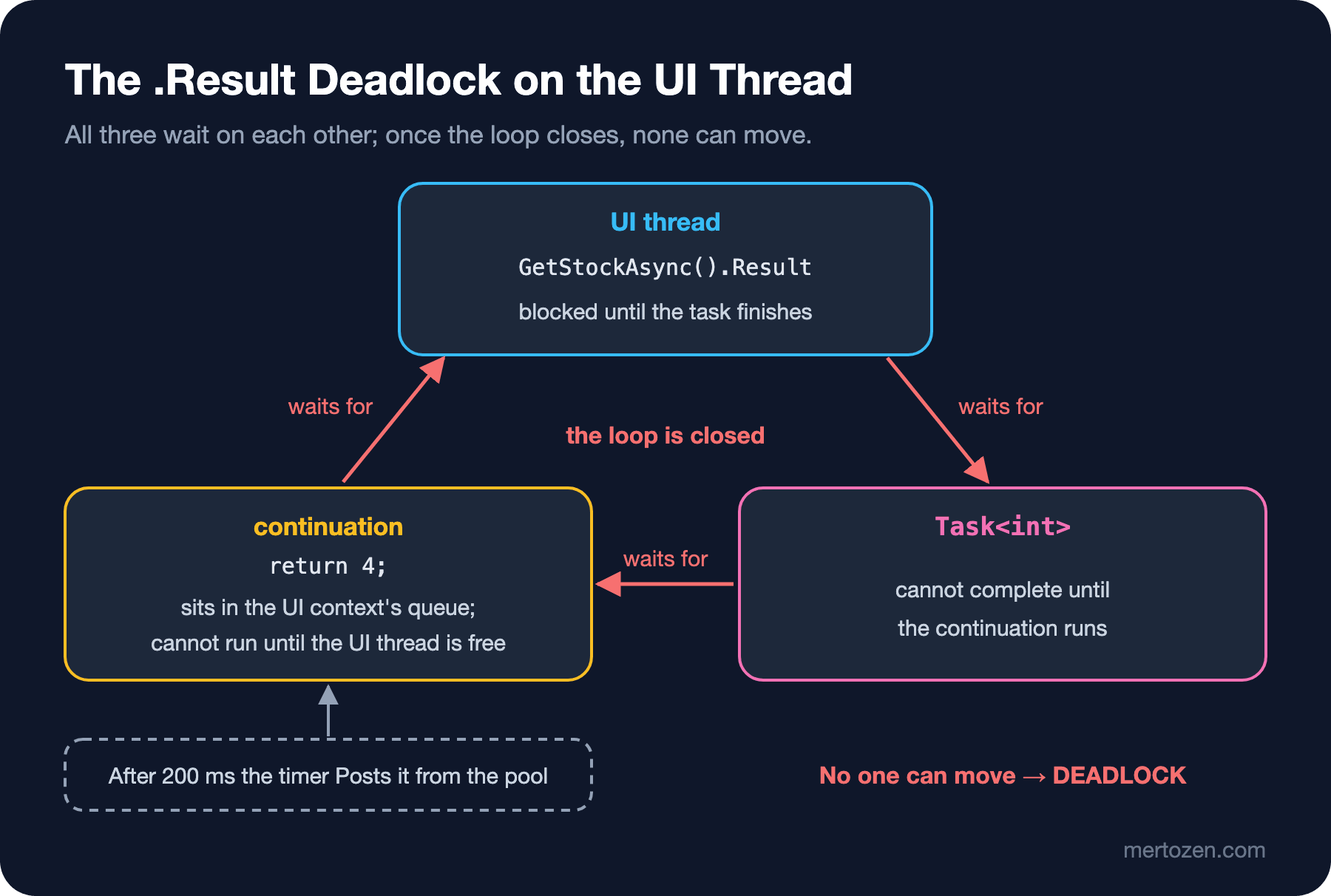
Imagine calling a call center. The agent says, "I'll check and call you back at this number." So as not to miss the answer, you stay on the line without hanging up. When the agent calls you, the line is busy. You are waiting to be called back, and the callback is waiting for you to free the line. Both of you are waiting for something reasonable, and nothing happens.
.Wait() and .GetAwaiter().GetResult() deadlock in exactly the same way; we tried, and both printed "DEADLOCK" after 2 seconds. The only difference is how they pass on exceptions. Every wait that blocks the thread falls into this trap.
Why It Does Not Hang in a Console App or ASP.NET Core
The reason the console line works is in the first line of the output: Console context: null. There was no context to capture, so the continuation ran on the thread pool and did not need the blocked main thread. That is why code containing .Result that was tried in a console app and declared "working" blows up when moved into a UI application.
ASP.NET Core does not use a SynchronizationContext either. We checked with a small minimal API:
var builder = WebApplication.CreateBuilder(args);
var app = builder.Build();

app.MapGet("/context", async () =>
{
    string before = SynchronizationContext.Current?.GetType().Name ?? "null";
    await Task.Delay(100);
    string after = SynchronizationContext.Current?.GetType().Name ?? "null";
    return $"before await: {before}, after await: {after}";
});

app.Run();
$ curl http://127.0.0.1:5291/context
before await: null, after await: nullThere is no context inside the request, nor after the await. Classic ASP.NET on .NET Framework, on the other hand, had its own context, and you would fall into this deadlock there just the same; that is why the .Result calls you find when reading an old project are dangerous.
The absence of a context does not make .Result harmless in ASP.NET Core. Every blocking wait holds a thread pool thread without doing any work. Under light traffic you do not notice. When the load rises, the threads in the pool fill up with blocked requests, new work waits in line, and the application slows down without reporting a single error. This is called thread pool starvation; it is not as loud as a deadlock, but it is much harder to diagnose.
Fix 1: Async All the Way
The real fix is not to wait on async code by blocking. You make the handler async as well and wait with await:
UiThread.Run("2) ConfigureAwait(false) in the library", () =>
{
    int stock = GetStockNoContextAsync().Result;
    Console.WriteLine($"   stock: {stock}");
});

UiThread.Run("3) async all the way", async () =>
{
    Console.WriteLine($"   before await: {Thread.CurrentThread.Name}");
    int stock = await GetStockAsync();
    Console.WriteLine($"   after await: {Thread.CurrentThread.Name}, stock: {stock}");
});
2) ConfigureAwait(false) in the library
stock: 4
3) async all the way
before await: UI
[context] Post from a thread pool thread
after await: UI, stock: 4Look at the third scenario. During the await, the UI thread was not blocked; it went back to the queue and kept looking at other work. When the delay ended, the continuation was Posted again, and this time the idle UI thread ran it right away. after await: UI: the code resumed where it left off, on the same thread. That is what the context is for; the problem is not the context, it is blocking it.
This is what the "async all the way" rule means: if one link of the chain is async, the link that calls it must be async too, all the way up to the top-level event handler or controller action. The moment you turn the chain synchronous in the middle with a .Result, everything needed to close the loop you saw above is in place.
Fix 2: ConfigureAwait(false)
The only difference in the method we call in the second scenario is ConfigureAwait(false):
static async Task<int> GetStockNoContextAsync()
{
    await Task.Delay(200).ConfigureAwait(false);
    return 4;
}
This tells await, "do not capture the context; run the rest wherever it happens to be." The continuation ran on the thread pool, the task finished, and .Result on the UI thread returned. There is no Post line in the output either, because the context was never visited.
Sprinkling this everywhere like a deadlock cure would be wrong. The rule is: in library code, that is code that does not know which application it will run in and does not touch the UI, use ConfigureAwait(false). You both reduce the risk of a deadlock caused by a caller's .Result and avoid the needless cost of moving every continuation onto the UI thread. In application code, meaning an event handler or code that touches the screen after await, do not use it. Getting back to the context is exactly what you want there.
There is also the question of guarantees. ConfigureAwait(false) only affects the await it is written on, and only helps if the task is actually waited on:
static async Task<int> GetStockFirstAwaitOnlyAsync()
{
    await Task.CompletedTask.ConfigureAwait(false); // already completed, the thread does not change
    await Task.Delay(200);
    return 4;
}
4) ConfigureAwait(false) only on the first await
[context] Post from a thread pool thread
DEADLOCK: the handler did not finish in 2 sThe task given to the first await had already completed. Awaiting a completed task does not wait; the code continues synchronously on the same thread. So the thread did not change, we are still on the UI thread, and the context is still Current. The second await has no ConfigureAwait(false), so it captured the context and the deadlock came back. In practice this happens with a call that returns immediately from a cache. The conclusion: if you use ConfigureAwait(false) in a library, write it on every await, not just the first.
Wrapping with Task.Run: The Last Resort
There is one more pattern you see when an old codebase has to call an async API from a synchronous place:
UiThread.Run("5) Task.Run(...).Result", () =>
{
    int stock = Task.Run(() => GetStockAsync()).Result; // the async code runs on a pool thread without a context
    Console.WriteLine($"   stock: {stock}");
});
5) Task.Run(...).Result
stock: 4It works, because Task.Run starts the async method on a thread pool thread that has no context. But it has a price: the UI thread was still blocked for 200 ms, so the window was frozen for that long. On top of that you spent a pool thread. This is a temporary patch for a place where you cannot move to async yet, not a design.
Common Pitfalls
Waiting on an async method with .Result, .Wait() or .GetAwaiter().GetResult(). A deadlock in every environment that has a context, and a risk of thread pool starvation where there is none.
Concluding "it does not deadlock" after trying the code in a console app or ASP.NET Core. There is no context there; the same code hangs in WinForms, WPF, MAUI or classic ASP.NET.
Writing ConfigureAwait(false) only on the first await. With a completed task the thread does not change, and the next await captures the context again.
Using ConfigureAwait(false) in application code. If you update a control after await in a UI handler, the code runs on a pool thread and the framework throws a "wrong thread" error.
Writing .Result to do async work in a constructor or a property getter. They have no async counterpart; the fix is to move the work into an async factory method or a separate InitializeAsync method.
A Small Experiment
★☆☆ Run the demo and use .Wait() instead of .Result in the first scenario. What changes in the output, and what does not?
★★☆ Add a line to SingleThreadSynchronizationContext.Post that prints the current queue length. Use more than one await in the third scenario and check whether you see a Post for each of them.
★★★ Write your own library method: a GetStockAsync that returns immediately if the value is in a cache and otherwise imitates the service with Task.Delay. First put ConfigureAwait(false) only on the first await and reproduce the deadlock with a full and an empty cache, then fix it properly.
The source of the deadlock was waiting synchronously on async work. The mistake in the opposite direction is at least as common: never waiting on async work at all. In the next post we see why async void can crash the process, and when and how to do fire-and-forget safely.