

A Catalog of Built-in Middleware: Response Compression, Request Decompression, Request Timeouts, Status Code Pages, URL Rewrite and Header Propagation

Added in the right order, ASP.NET Core's built-in middleware (response compression, request decompression, request timeouts, status code pages, URL rewrite, host filtering, header propagation) gives every API response a consistent shape. We add each one to the Bookstore API, show its effect with curl and see how a middleware that answers before CORS breaks the preflight.
Version note: The code in this post was built and run with .NET 10 (SDK 10.0.404) and Microsoft.AspNetCore.HeaderPropagation 10.0.15.
Guess First
The Angular client of Bookstore, the online bookstore used as the shared example across this site's series, runs on http://localhost:4200. We added a CORS policy to the API and set up the pipeline like this:
builder.Services.AddCors(options => options.AddDefaultPolicy(policy =>
    policy.WithOrigins("http://localhost:4200").AllowAnyHeader().AllowAnyMethod()));

// ...

app.UseMiddleware<TenantMiddleware>();
app.UseRouting();
app.UseCors();
app.UseAuthentication();
app.UseAuthorization();
The institutional portal sends POST /api/institution/orders with the X-Tenant-Id and Content-Type: application/json headers. The browser first sends a preflight OPTIONS request. What does that preflight get back, and is the order created?
In the middleware post, number 04, we met the pipeline and the recommended order; there was room for only one section on built-in middleware. In this post we extend that list: response compression, request decompression, request timeouts, status code pages, URL rewrite, host filtering and header propagation. For each one I look at what it does, when to add it, where it sits in the pipeline and what its defaults are, and show its effect with curl. Rate limiting and output caching only appear in the ordering; their details are in the rate limiting post of the ASP.NET Core Security series and the output cache post of the Caching series.
Response Compression
It compresses responses with Brotli or gzip. It reads which algorithm the client accepts from the Accept-Encoding header:
builder.Services.AddResponseCompression(options =>
{
    // We assessed the BREACH risk: responses never mix secrets with user input
    options.EnableForHttps = true;
    options.Providers.Add<BrotliCompressionProvider>();
    options.Providers.Add<GzipCompressionProvider>();
});
builder.Services.Configure<BrotliCompressionProviderOptions>(options => options.Level = System.IO.Compression.CompressionLevel.Fastest);

// ...

app.UseResponseCompression();
$ curl -s -D - -o /dev/null localhost:5238/api/books/export -H "Accept-Encoding: br"
HTTP/1.1 200 OK
Content-Type: application/json; charset=utf-8
Content-Encoding: br
Vary: Accept-EncodingVary: Accept-Encoding matters: it tells caches along the way to keep the compressed and uncompressed versions of the same URL apart. In .NET 10 this header is added only when the response is compressed; as we saw in the .NET 11 post, .NET 11 adds it to every response and Zstandard joined the list. The header's role in HTTP caching is covered in the HTTP caching post of the Caching series.
Because the middleware compresses the body as it is written, it must come before anything that writes a body. The default MIME list includes application/json and text/* types. I measured sizes on the 30,760-byte OpenAPI document: at the default Fastest level Brotli returned 5,977 bytes and gzip 4,611. Yes, at that level Brotli came out larger than gzip. With Brotli at Optimal it was 2,929 bytes, at SmallestSize 2,186. On the time side, after the first request the total time measured by curl was 3–4 ms for Fastest and Optimal and 24 ms for SmallestSize. This document is small; for large, frequently requested responses, measure the level with your own data. When the client sent gzip, br, Brotli was chosen because it was added to the providers list first.
Two decisions are yours. The first is EnableForHttps. It defaults to false because compression over HTTPS can open the door to the CRIME and BREACH attacks. The risk appears when a secret (a CSRF token, for example) and input the attacker can influence sit in the same response; if you turn it on, do it knowingly. The second is which layer does the compressing. If Nginx, YARP or a CDN sits in front of you, compressing there is usually more efficient; Learn also notes that server-side modules will be faster than this middleware. In that case turn it off in the app.
Request Decompression
This middleware, added in .NET 7, works in the opposite direction: it unpacks a request body that carries a Content-Encoding header. The warehouse team sends stock updates in bulk and compressed:
builder.Services.AddRequestDecompression();

// ...

app.UseRequestDecompression();

// Bulk stock file from the warehouse; the client gzips it before sending
routes.MapPost("/api/inventory/stock-import", (List<StockLine> lines) =>
    TypedResults.Ok(new { Imported = lines.Count, TotalCopies = lines.Sum(l => l.Quantity) }))
    .RequireAuthorization(policy => policy.RequireRole("StoreStaff"));
$ gzip -k stock.json
$ ls -l stock.json stock.json.gz
17201 stock.json
147 stock.json.gz
$ curl -i -X POST localhost:5238/api/inventory/stock-import -H "Authorization: Bearer $STAFF_TOKEN" -H "Content-Type: application/json" -H "Content-Encoding: gzip" --data-binary @stock.json.gz
HTTP/1.1 200 OK
Content-Type: application/json; charset=utf-8
{"imported":400,"totalCopies":1200}When I removed the middleware, the same request returned 400; the JSON reader saw gzip's signature in the first byte: '0x1F' is an invalid start of a value. The supported encodings are Brotli, Deflate and gzip by default. It must come before anything that reads the body, that is, before the body-logging middleware from the earlier posts and before the endpoints. A warning: a 147-byte body became 17 KB once unpacked. Compressed bodies can turn a small request into a big memory load; Kestrel's body limit also applies to the decompressed body, so think about it together with the limits in the Kestrel post of the Web Servers and Hosting series.
Request Timeouts
This middleware, added in .NET 8, puts a time limit on endpoints. Unlike Kestrel's connection-level timeouts, it looks at how long the request takes to process:
builder.Services.AddRequestTimeouts(options =>
{
    options.DefaultPolicy = new RequestTimeoutPolicy { Timeout = TimeSpan.FromSeconds(10) };
    options.AddPolicy("reports", TimeSpan.FromSeconds(2));
});

// ...

app.UseRequestTimeouts();

routes.MapGet("/api/reports/sales", async (CancellationToken cancellationToken) =>
{
    // Simulates a slow report query
    await Task.Delay(TimeSpan.FromSeconds(5), cancellationToken);
    return TypedResults.Ok(new { Total = 125_000m });
}).WithRequestTimeout("reports");
$ curl -i -w "time=%{time_total}\n" localhost:5238/api/reports/sales
HTTP/1.1 504 Gateway Timeout
Content-Type: application/problem+json
{"type":"https://tools.ietf.org/html/rfc9110#section-15.6.5","title":"Gateway Timeout","status":504,"traceId":"00-a3a2e7307749d25a543786938f7c0333-af955a22ce6dd4e2-00"}time=2.013107warn: Microsoft.AspNetCore.Http.Timeouts.RequestTimeoutsMiddleware[1]
Timeout exception handled.The middleware doesn't kill the request; when time runs out it cancels HttpContext.RequestAborted. The CancellationToken in the handler is tied to it, so Task.Delay was cancelled, and the middleware caught the exception and wrote a 504. If you didn't carry the token all the way to the database, as described in the async and CancellationToken post, the work keeps running in the background and the limit exists only on paper. You can change the status code with TimeoutStatusCode in the policy and the response with WriteTimeoutResponse. In controllers the same job is done with the [RequestTimeout("reports")] attribute, and an endpoint that wants no timeout at all uses DisableRequestTimeout(). The middleware must come after routing so it can see the endpoint's metadata.
Status Code Pages and the Exception Handler
In post 39 we saw that binding errors in Production return a 400 without a body. Together with the exception handler from post 04, the status code pages middleware closes that gap:
builder.Services.AddProblemDetails();
builder.Services.Configure<ExceptionHandlerOptions>(options =>
    // In Development binding errors arrive as exceptions; don't turn the 400 into a 500
    options.StatusCodeSelector = exception =>
        exception is BadHttpRequestException badRequest ? badRequest.StatusCode : StatusCodes.Status500InternalServerError);

// ...

app.UseExceptionHandler();
app.UseStatusCodePages();
$ curl -i localhost:5238/api/nope
HTTP/1.1 404 Not Found
Content-Type: application/problem+json
{"type":"https://tools.ietf.org/html/rfc9110#section-15.5.5","title":"Not Found","status":404,"traceId":"00-9cb4bd56f64ef644d95e12d2692d0dc0-276f186703e377f0-00"}
$ curl -i -X DELETE localhost:5238/api/books
HTTP/1.1 405 Method Not Allowed
Content-Type: application/problem+json
Allow: GET
{"type":"https://tools.ietf.org/html/rfc9110#section-15.5.6","title":"Method Not Allowed","status":405,"traceId":"00-9591b0780679a1ecf57e3c863991f82a-17bc9a1e30b235e8-00"}
$ curl -i "localhost:5238/api/books?sort=price"
HTTP/1.1 400 Bad Request
Content-Type: application/problem+json
{"type":"https://tools.ietf.org/html/rfc9110#section-15.5.1","title":"Bad Request","status":400,"traceId":"00-ad33dded4c448d1ebf4c795dae5355c2-38437f875617a987-00"}UseStatusCodePages() touches only responses without a body that end in the 400–599 range; when AddProblemDetails() is registered it writes the body as ProblemDetails. If the endpoint wrote its own body, it does nothing. The reason I added a StatusCodeSelector to the exception handler was a real surprise. In Development ThrowOnBadRequest is true, so binding errors are thrown as BadHttpRequestException. Once I put UseExceptionHandler() in the pipeline, it caught that exception before the developer exception page did, and the request I sent with a gzipped body and no middleware returned 500 in Development. StatusCodeSelector, which we saw in the .NET 9 post, keeps the exception's own status code. This also has a cost: because the exception handler is added unconditionally, in Development you see ProblemDetails instead of the detailed exception page. That's why the templates wrap it in if (!app.Environment.IsDevelopment()); we left it unconditional because we prefer the API to return the same error body in every environment.
URL Rewrite and Host Filtering
The rewrite middleware does two separate jobs. A redirect tells the client the new address and the client sends a second request; a rewrite changes the URL inside the server, and the client never sees the difference. To move the /api/v1/books/... addresses left over from versioning post 25 permanently, and to quietly connect the /catalog/... address used by an old catalog integration to the new endpoint:
app.UseRewriter(new RewriteOptions()
    .AddRedirect("^api/v1/books/(.*)$", "api/books/$1", StatusCodes.Status301MovedPermanently)
    .AddRewrite("^catalog/(.*)$", "api/books/$1", skipRemainingRules: true));
$ curl -i localhost:5238/api/v1/books/9780441013593
HTTP/1.1 301 Moved Permanently
Content-Length: 0
Location: /api/books/9780441013593
$ curl localhost:5238/catalog/9780441013593
{"id":1,"isbn":"978-0441013593","title":"Dune","price":450,"category":"science-fiction","series":"Dune Chronicles"}Rules are regular expressions written without the leading /. Because the rewriter changes the URL, it must come before routing. Browsers and proxies may cache a 301; know that it is hard to take back, and if you're not sure, start with a 302.
You don't need to add host filtering: WebApplication sets it up by default and reads the AllowedHosts setting. The template's "AllowedHosts": "*" accepts every host. In Bookstore we narrowed the list:
"AllowedHosts": "localhost;bookstore.example.com"$ curl -i localhost:5238/api/books -H "Host: evil.example.com"
HTTP/1.1 400 Bad Request
Content-Type: text/html
<!DOCTYPE HTML PUBLIC "-//W3C//DTD HTML 4.01//EN""http://www.w3.org/TR/html4/strict.dtd">
...
<BODY><h2>Bad Request - Invalid Hostname</h2>The same request with Host: bookstore.example.com returned 200; localhost:5238 was accepted too, although the port isn't in the list. This setting stops code that builds links from the Host header (a password reset email, the Location of CreatedAtRoute) from using a domain supplied by an attacker. It matters when Kestrel faces the internet directly; if the proxy in front already checks the host, it's a second line of defense.
Header Propagation
In the order flow the Angular client puts an X-Correlation-Id on every request. The API gets stock information from a separate inventory service, and we want the same id to travel there too so we can join the logs of both services. Instead of copying the header by hand on every HttpClient call:
builder.Services.AddHeaderPropagation(options => options.Headers.Add("X-Correlation-Id"));
builder.Services.AddHttpClient("inventory", client =>
        client.BaseAddress = new Uri(builder.Configuration["Inventory:BaseUrl"]!))
    .AddHeaderPropagation();

// ...

app.UseHeaderPropagation();

routes.MapGet("/api/books/{isbn}/stock", async (Isbn isbn, IHttpClientFactory clients, CancellationToken cancellationToken) =>
{
    HttpClient inventory = clients.CreateClient("inventory");
    StockLine? stock = await inventory.GetFromJsonAsync<StockLine>($"/internal/inventory/{isbn}", cancellationToken);
    return TypedResults.Ok(stock);
});
To try it, I simulated the inventory service in the same app with an /internal/inventory/{isbn} endpoint that logs the incoming header:
$ curl localhost:5238/api/books/978-0441013593/stock -H "X-Correlation-Id: ord-7f3a2c"
{"isbn":"9780441013593","quantity":12}
info: Bookstore.Api.Inventory.StockLine[0]
Inventory lookup for 9780441013593, X-Correlation-Id: ord-7f3a2cWithout the header, the value on the inventory side stayed empty. This is a separate NuGet package, not part of the shared framework. The middleware records the incoming headers at the start of the request, and HttpClients with AddHeaderPropagation() put them on outgoing requests; that's why the middleware must come before the endpoint that makes the call. If you use W3C trace context and OpenTelemetry instead of carrying your own correlation id, traceparent already travels; the difference between the two is explained in the "Correlation IDs and Trace Context" post of the Logging in .NET series. Header propagation makes more sense for business headers outside tracing (tenant, language, channel).
Ordering and the Answer
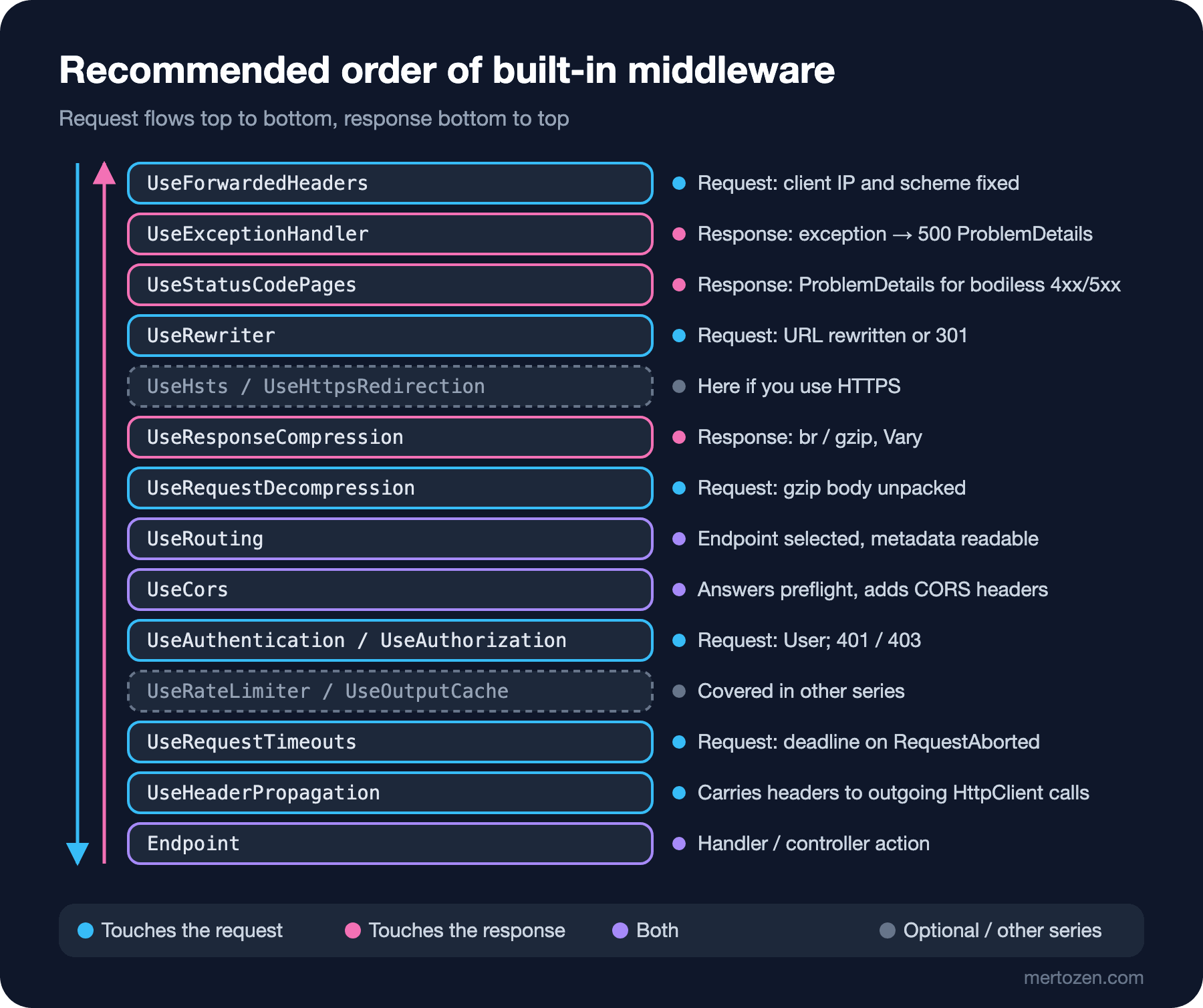
The answer to the guess: the preflight returned 400 and had no CORS header.
$ curl -i -X OPTIONS localhost:5238/api/institution/orders -H "Origin: http://localhost:4200" -H "Access-Control-Request-Method: POST" -H "Access-Control-Request-Headers: content-type,x-tenant-id"
HTTP/1.1 400 Bad Request
Content-Type: application/json; charset=utf-8

{"error":"Missing or unknown X-Tenant-Id header."}
In a preflight the browser doesn't send the values of custom headers, it only asks about their names. Since TenantMiddleware sat before UseCors, it took the preflight for an ordinary request, didn't find the header and returned 400. The CORS middleware never ran, so the response had no Access-Control-Allow-Origin either; in the browser console you see a CORS error rather than the real one, and the order is never sent. Once I moved our own short-circuiting middleware after UseCors, UseAuthentication and UseAuthorization, the preflight got a 204, and an ordinary request without a tenant returned its 400 together with the CORS header. For the 500s produced by the exception handler, the CORS header was kept; whether I put UseCors before or after the exception handler, the response carried Access-Control-Allow-Origin. So what usually loses the CORS header isn't the exception handler but a middleware that answers before CORS. Bookstore's final pipeline:
app.UseForwardedHeaders();
app.UseExceptionHandler();
app.UseStatusCodePages();
app.UseRewriter(new RewriteOptions()
    .AddRedirect("^api/v1/books/(.*)$", "api/books/$1", StatusCodes.Status301MovedPermanently)
    .AddRewrite("^catalog/(.*)$", "api/books/$1", skipRemainingRules: true));
app.UseResponseCompression();
app.UseRequestDecompression();
app.UseMiddleware<ResponseTimeMiddleware>();
app.UseMiddleware<RequestBodyLoggingMiddleware>();
app.UseRouting();
app.UseCors();
app.UseAuthentication();
app.UseAuthorization();
app.UseMiddleware<TenantMiddleware>();
app.UseAntiforgery();
app.UseRequestTimeouts();
app.UseHeaderPropagation();
The rules in Learn's table explain this order: forwarded headers before anything that uses the fields it fixes; the exception handler before anything that can produce errors; rewrite before anything that uses the URL; decompression before anything that reads the body; UseCors, UseAuthentication and UseAuthorization in that order; antiforgery after authentication and authorization; request timeouts after the exception handler and routing. If you use HTTPS, UseHsts and UseHttpsRedirection go, according to Learn's table, after forwarded headers and rewrite, which modify the request, and before middleware that uses the URL; rate limiting and output caching go after routing and CORS. Middleware that needs to see everything, such as HTTP logging, sits near the very start.
Common Pitfalls
First, enabling compression both in the reverse proxy and in the app. The same response isn't compressed twice, but it becomes unclear which layer compresses which types at which level, and CPU can be spent in two places. Pick one layer; if the proxy does it, don't add AddResponseCompression to the app at all.
Second, not knowing that timeouts don't work under the debugger. Learn says it plainly: with a debugger attached the timeout middleware doesn't trigger, just like Kestrel's timeouts. Don't spend hours in Visual Studio with F5 thinking "the timeout doesn't work"; try with Ctrl+F5 or dotnet run.
Third, putting your own short-circuiting middleware before CORS. We saw it in the guess: the preflight breaks and error responses carry no CORS header. The rule is simple: every middleware that can answer the client must come after UseCors.
Fourth, thinking UseStatusCodePages() will overwrite your own body. It doesn't touch a 404 that has a body; conversely, if a response you expected to have a body turns into ProblemDetails, the handler isn't writing anything.
A Small Experiment
★☆☆ Set the level of GzipCompressionProviderOptions to SmallestSize and compare the gzip size of /openapi/v1.json with Brotli's three levels. Repeat the results on the three largest responses of your own app.
★★☆ Add WriteTimeoutResponse to the reports policy and return a 503 with a Retry-After: 30 header instead of 504. See what happens if you forget to pass the CancellationToken to Task.Delay in the handler.
★★★ Move TenantMiddleware back before UseCors and send an institutional order from the Angular client, or with fetch from the browser console. Compare the error message in the console with the curl output, then think about why adding an HttpMethods.IsOptions check to the middleware isn't a sufficient fix.
With the built-in middleware every API response now has a consistent shape, but all of it is in English. In the next post we move on to localization: Accept-Language, request culture, localized validation and ProblemDetails messages, and which fields must never be localized.