

What Is Aspire and What Isn't It? AppHost, the App Model and How It Differs from Docker Compose and Kubernetes
Aspire is a local orchestration and observability layer that describes the parts of a multi-service app and their connections in code in an AppHost, runs them with one command and collects their telemetry in a dashboard; it isn't a production orchestrator or a service mesh. The post adds an AppHost to Bookstore with aspire init and shows the DCP proxy, the environment variables Aspire provides and why there are no traces without ServiceDefaults, with real output.
Version note: The code in this post was built and run with .NET 10, Aspire 13.6 (Aspire CLI 13.6.5) and Angular 22.
Guess First
The launch profile of Bookstore.Api says http://localhost:5080. By the end of this post we will add the API to an Aspire AppHost and start it with aspire run. Which port does the API process listen on at that point: 5080 or some other port? Where does the Angular dev server learn the API's address from? And if logs show up in the dashboard but traces don't, what could be the reason? We'll see all three answers in the output of a real run.
What Is Scattered in Bookstore?
The example in this series is Bookstore, the online bookstore used as the shared example across this site's series. Its starting point is small: an ASP.NET Core API that lists books (Bookstore.Api) and an Angular app that calls it (bookstore-web). Before Aspire, the development loop looked like this: dotnet run --project src/Bookstore.Api in one terminal, npm start in a second one, and on the Angular side a proxy file that knows the API's address:
// Forwards /api calls from the Angular dev server to Bookstore.Api
const target = process.env.BOOKSTORE_API_URL ?? 'http://localhost:5080';

module.exports = {
  '/api': { target, secure: false, changeOrigin: true },
};
With two processes, this setup is manageable. The problem is that every new piece of the system makes you write the same facts in more places. Add SQL Server and a connection string goes into appsettings.Development.json; add Redis and there's another one; add a second API and the first API's address goes into yet another config file. Ports have to be the same on every machine in the team, and if someone already uses 5080 for something else, everything shifts. The start order lives in the README as a bullet point: "start the containers, run the migration, then start the API". Logs are spread across four terminals, and to see how a request travels from the API to the database and on to another service you need to set up a separate telemetry stack.
Aspire's answer is to describe all of this in one place, in code: which pieces exist, which one depends on which, which one waits for which. The rest (choosing ports, handing out addresses and connection strings as environment variables, starting processes and containers, collecting telemetry) is Aspire's job.
The Parts of Aspire: AppHost, Integrations, Dashboard and Deployment
On its introduction page Aspire describes itself as "a code-first orchestration and observability layer for distributed applications" (What is Aspire, aspire.dev, 2026). Two words in that sentence, orchestration and observability, are the product's two main jobs. These are the parts:
AppHost. A small program that describes the system. You write it in C# (a project or a single file) or TypeScript; this series uses C#. Each thing you describe in the AppHost is called a resource: a .NET project, a container, a Node.js app, a database, a parameter. The graph you get from resources plus the relationships between them, such as WithReference and WaitFor, is called the app model. The AppHost runs in two modes: in run mode (aspire run) it brings the model up on your machine, in publish/deploy mode it produces deployment output from the same model.
Integrations. NuGet packages that make it easy to add components such as SQL Server, Redis, RabbitMQ, PostgreSQL or Keycloak to the model. They have two sides: the hosting integration on the AppHost side (Aspire.Hosting.SqlServer describes the container and its connection string) and the client integration on the service side (Aspire.Microsoft.EntityFrameworkCore.SqlServer reads that connection string and registers the DbContext with health checks, retries and telemetry). Details in 05.
Dashboard. A web UI that shows the running resources, console logs, structured logs, traces and metrics. Services send their telemetry to the dashboard over OTLP. Post 04 is all about the dashboard.
Deployment. The app model isn't only for local runs: aspire publish produces artifacts from the model, such as a Docker Compose file, a Helm chart for Kubernetes or Azure resources, and aspire deploy applies them. That's the topic of 07.
Your code doesn't change in this model. Aspire doesn't force a library or a base class on your services; it starts them, gives them the addresses they need as environment variables and collects the telemetry they send. A service's only dependency on Aspire is ServiceDefaults, which we'll add shortly and which lives entirely in your own repo.
What Aspire Isn't
Aspire isn't a production orchestrator. You don't run the AppHost in production; the component that starts processes and containers on the local side, DCP, the Developer Control Plane, is built for a developer's machine. In production, containers are run by Kubernetes, Azure Container Apps or Docker Compose, and Aspire at most generates their manifests. It isn't a service mesh either: it doesn't put sidecars in the traffic between services or enforce mTLS or traffic policies. And it isn't a mandatory framework: delete the AppHost and your services still run as ordinary ASP.NET Core and Angular apps.
Here is how it differs from the tools it's most often compared with:
| Tool | What it does | How it differs from Aspire |
|---|---|---|
| Docker Compose | Describes containers and their networks in YAML and runs them | Only knows containers; it doesn't run a .NET project or an npm script directly and doesn't collect telemetry. Aspire can generate a Compose file (07). |
| Kubernetes | Schedules, scales and heals containers in production | A target platform; Aspire doesn't replace it, it generates manifests for it. |
| Project Tye | Microsoft's experimental orchestration tool | Considered Aspire's predecessor; its GitHub repository has been archived since 2023. |
| Dapr | A runtime that provides APIs such as state, pub/sub and service invocation through a sidecar | A runtime that also runs in production. Aspire can add Dapr sidecars to the model through a Community Toolkit integration; they aren't alternatives to each other. |
In short, it can take Compose's place for local development and doesn't take Kubernetes' place anywhere. Docker and Compose basics are in the Docker and Docker Compose series, Kubernetes resources in the Kubernetes series; we don't repeat them here.
From ".NET Aspire" to "Aspire": the 13.x Releases
With 13.0, released on November 11, 2025, the product's name changed from ".NET Aspire" to "Aspire" and the documentation moved from learn.microsoft.com to aspire.dev. The reason for the new name is a wider scope: since 13.0, Python and JavaScript apps (AddPythonApp, AddJavaScriptApp, AddViteApp) are supported on the same level as .NET projects, and you can write the AppHost in TypeScript. Another requirement of 13.0 is the .NET 10 SDK: building the AppHost needs .NET 10, while your services' target framework is your decision. That's also why we named the series "Aspire ile Dağıtık Uygulamalar".
Since then Aspire has shipped a minor release roughly every two months; on the day of writing the latest is patch 13.6.5 of 13.6, released on September 29, 2026. We use this version throughout the series. We cover the features that arrived along the way (the TypeScript AppHost, persistent telemetry storage in the dashboard, Kubernetes deployment) in the relevant posts, and the full release history and migrating an old project in 08. If an example you find through a search engine uses AddNpmApp or Aspire.Hosting.NodeJs, it predates 13: in 13.0 AddNpmApp became obsolete and the package was renamed to Aspire.Hosting.JavaScript.
Aspire is also the local orchestrator in the .NET ile Mikroservis Uygulaması series. That series only uses Aspire and explains how Bookstore is split into services; this series covers Aspire itself in depth. Both series use the same Aspire version (13.6.5).
Installation: the Aspire CLI, the .NET 10 SDK and a Container Runtime
You need three things: the .NET 10 SDK, a container runtime (Docker Desktop or Podman; Aspire uses Docker by default and switches to Podman with ASPIRE_CONTAINER_RUNTIME=podman) and the Aspire CLI. On Windows you install the CLI from PowerShell with the official script; installing it as a .NET global tool is another option:
irm https://aspire.dev/install.ps1 | iex

# alternative: .NET global tool
dotnet tool install -g Aspire.Cli

aspire --version
13.6.5+b33d222049f1ecc3bc7257ec07b622fe550b2580
aspire update --self updates the CLI, aspire update updates the Aspire packages in your project. To check your environment, aspire doctor tries the container runtime, the SDK and the HTTPS development certificate one by one. The relevant part of the output on our machine:
aspire doctor

Container Runtime
  ✅ Docker v29.2.1: running (auto-detected (default)) ← active

Environment
  ⚠️ No HTTPS development certificate found
       Run 'aspire certs trust' to trust the HTTPS development certificate.

Summary: 5 passed, 2 warnings, 0 failed
The certificate warning matters: the AppHost's default https launch profile opens the dashboard over HTTPS and wants a trusted development certificate. On Windows you run aspire certs trust once and that's it. We took the outputs in this post with the http profile; for the AppHost to allow plain HTTP in that profile it needs ASPIRE_ALLOW_UNSECURED_TRANSPORT=true, which we'll add to the launch settings in a moment.
If you start from scratch, aspire new lets you pick one of the templates (aspire-starter: ASP.NET Core API + Blazor, aspire-ts-cs-starter: C# AppHost + React, aspire-py-starter: FastAPI + React and so on). Bookstore already has an API and an Angular app, though; for an existing repo the command is aspire init.
aspire init on the Existing Bookstore
We ran aspire init --language csharp at the repo root. On the first attempt the command asked a question: "which solution file?" The repo has a single Bookstore.slnx, but while looking for solutions init also found a .sln file inside an npm package under web/bookstore-web/node_modules. In an interactive terminal you just pick the right file; with --non-interactive in CI the command stops with "This prompt requires interactive input". On the second attempt init produced this:
Bookstore.AppHost/
    AppHost.cs
    Bookstore.AppHost.csproj
    aspire.config.json
    appsettings.json
    appsettings.Development.json
    Properties/launchSettings.json
The documentation says that in a C# repo with a solution, init adds the AppHost to the solution and writes AddProject lines for the existing projects. That's not what happened in our try with 13.6.5: the AppHost landed in a folder at the repo root, it wasn't added to Bookstore.slnx, AppHost.cs came empty (only CreateBuilder and Build().Run()) and no ServiceDefaults project was created. We filled the gaps by hand:
mv Bookstore.AppHost src/
dotnet sln add src/Bookstore.AppHost
dotnet add src/Bookstore.AppHost reference src/Bookstore.Api
dotnet add src/Bookstore.AppHost package Aspire.Hosting.JavaScript
The AppHost's project file looks like an ordinary console app; the difference is the SDK line:
<Project Sdk="Aspire.AppHost.Sdk/13.6.5">

  <ItemGroup>
    <ProjectReference Include="..\Bookstore.Api\Bookstore.Api.csproj" />
  </ItemGroup>

  <ItemGroup>
    <PackageReference Include="Aspire.Hosting.JavaScript" />
  </ItemGroup>

  <PropertyGroup>
    <OutputType>Exe</OutputType>
    <TargetFramework>net10.0</TargetFramework>
    <ImplicitUsings>enable</ImplicitUsings>
    <Nullable>enable</Nullable>
    <AspireUseCliBundle>true</AspireUseCliBundle>
    <UserSecretsId>6f54b2e6-158b-4fd3-8de9-6373025aee8d</UserSecretsId>
  </PropertyGroup>

</Project>
Aspire.AppHost.Sdk adds the Aspire.Hosting.AppHost package implicitly and generates a type for every project the AppHost references: Projects.Bookstore_Api for Bookstore.Api. The reference doesn't mean the AppHost calls the API's code; the AppHost only learns the project's path and launch profile. AspireUseCliBundle makes the dashboard and DCP come from the Aspire CLI's own files instead of a NuGet package. Because Central Package Management is on in the repo, the package version lives in Directory.Packages.props. aspire.config.json tells the CLI where the AppHost is:
{
  "appHost": {
    "path": "Bookstore.AppHost.csproj"
  }
}
Now let's write the model. Two resources and one relationship between them:
IDistributedApplicationBuilder builder = DistributedApplication.CreateBuilder(args);

IResourceBuilder<ProjectResource> catalog = builder.AddProject<Projects.Bookstore_Api>("catalog");

builder.AddJavaScriptApp("web", "../../web/bookstore-web", "start")
    .WithHttpEndpoint(env: "PORT")
    .WithReference(catalog)
    .WaitFor(catalog);

builder.Build().Run();
Note the resource name: we added Bookstore.Api as "catalog" because its job today is serving the book catalog. The name isn't just a label in the dashboard; it's the name used by the environment variables we'll see shortly and by service discovery in 03. AddJavaScriptApp starts the Angular app with npm run start, and WithHttpEndpoint(env: "PORT") passes the port Aspire picks in the PORT variable. WithReference(catalog) gives web the catalog's address, and WaitFor(catalog) keeps web from starting before catalog is up. The details of these lines are in 02.
On the Angular side, the proxy file now reads the variable Aspire provides instead of a fixed port:
// Forwards /api calls from the Angular dev server to the catalog API.
// Under Aspire, WithReference(catalog) sets CATALOG_HTTPS / CATALOG_HTTP.
const target = process.env.CATALOG_HTTPS ?? process.env.CATALOG_HTTP ?? 'http://localhost:5080';

module.exports = {
  '/api': { target, secure: false, changeOrigin: true },
};
Finally we added "ASPIRE_ALLOW_UNSECURED_TRANSPORT": "true" to the http profile in the AppHost's Properties/launchSettings.json and turned launchBrowser off. The ports init generated (15278 for the dashboard, 19010 for OTLP) stayed as they were.
The First aspire run: Processes, Ports and Environment Variables
aspire run -lp http

Finding AppHosts...
src/Bookstore.AppHost/Bookstore.AppHost.csproj
🛠️ Building AppHost... src/Bookstore.AppHost/Bookstore.AppHost.csproj
Connecting to AppHost...
Starting dashboard...
     AppHost:  src/Bookstore.AppHost/Bookstore.AppHost.csproj
   Dashboard:  http://localhost:15278/login?t=<token>
               Press CTRL+C to stop the AppHost and exit.
The t parameter in the dashboard URL is a one-time browser token; it proves that whoever opens the dashboard is someone who can see the terminal. You can also look from the CLI without opening the dashboard. aspire describe finds the running AppHost and lists its resources:
aspire describe

┌───────────────┬────────────┬──────────┬─────────┬────────────────────────┐
│ Name          │ Type       │ State    │ Health  │ URLs                   │
├───────────────┼────────────┼──────────┼─────────┼────────────────────────┤
│ catalog       │ Project    │ Running  │ Healthy │ http://localhost:5080  │
│ web           │ Executable │ Running  │ Healthy │ http://localhost:58321 │
│ web-installer │ Executable │ Finished │ -       │ -                      │
└───────────────┴────────────┴──────────┴─────────┴────────────────────────┘
We described two resources but there are three rows. Aspire added web-installer: a short-lived resource that runs npm install before Angular starts. "Finished" means it did its job and exited with code 0; web waits for it. Thanks to this, someone who has just cloned the repo can say aspire run without installing node_modules first.
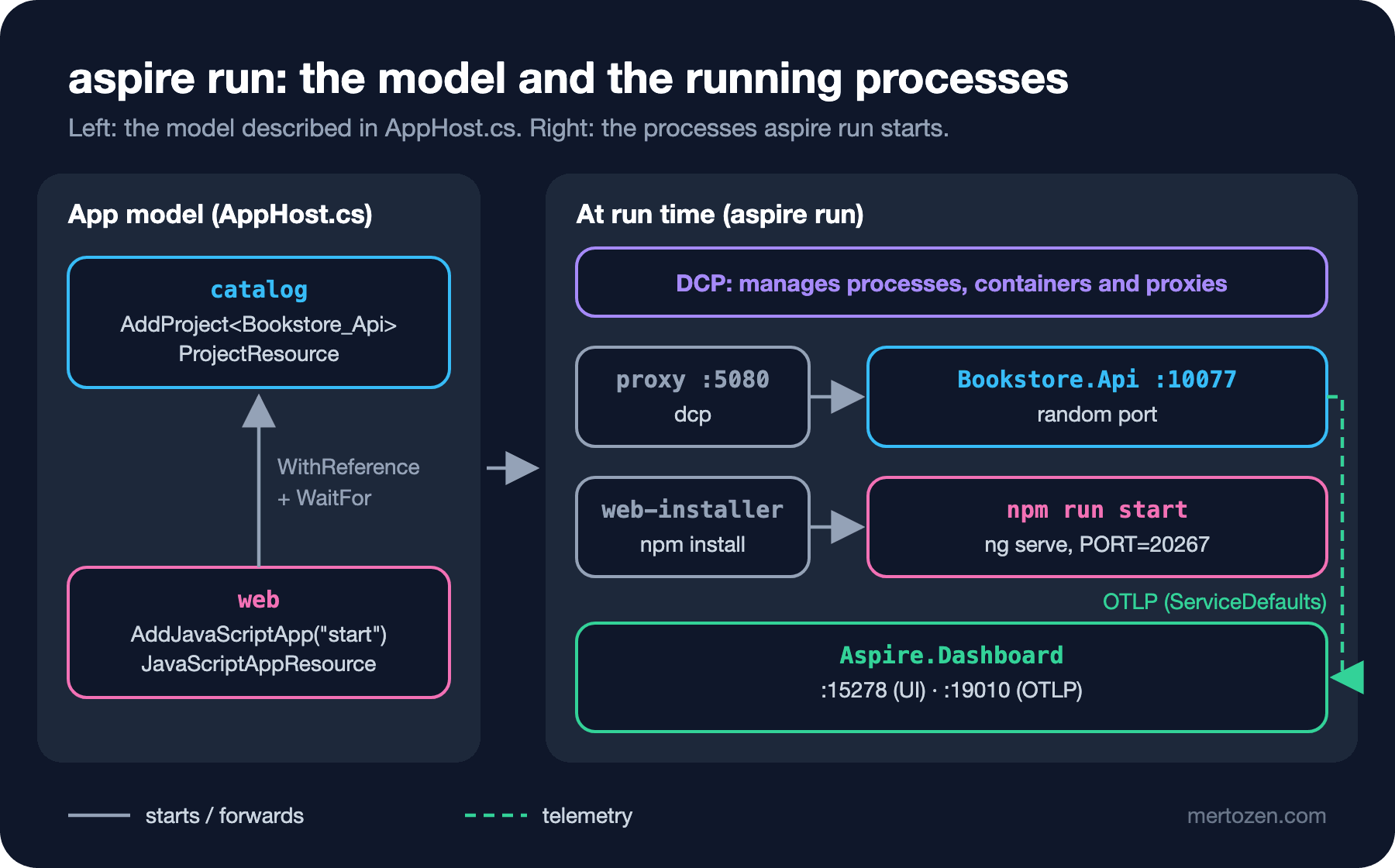
The answer to the first question from Guess First is in the URLs column and in the process's environment variables. We looked at what catalog was given with aspire describe catalog --format Json (OTLP API key hidden):
ASPNETCORE_URLS = http://localhost:20270
DOTNET_LAUNCH_PROFILE = http
OTEL_EXPORTER_OTLP_ENDPOINT = http://localhost:19010
OTEL_EXPORTER_OTLP_HEADERS = x-otlp-api-key=<key>
OTEL_EXPORTER_OTLP_PROTOCOL = grpc
OTEL_SERVICE_NAME = catalog
OTEL_TRACES_SAMPLER = always_on
The API process doesn't listen on 5080 but on 20270, a port Aspire picked; on the next run the same process logged Now listening on: http://localhost:10077. Port 5080 is held by DCP's proxy, which forwards incoming connections to whatever the real port is at that moment. That's why you don't lose the port from your launch profile: in the browser, in Postman and in other resources' configuration the address is always 5080, even though the port behind it changes on every run. The proxy has a side effect too: 5080 keeps listening even when the process is stopped, a detail we'll run into in 03.
The answer to the second question is in web's variables:
CATALOG_HTTP = http://localhost:5080
services__catalog__http__0 = http://localhost:5080
PORT = 20267
NODE_ENV = development
OTEL_SERVICE_NAME = web
WithReference(catalog) provides the catalog's address in two forms. services__catalog__http__0 is the form .NET's service discovery library reads (the double underscore stands for : in .NET configuration; more in 03). CATALOG_HTTP is a short form made of the resource name and the endpoint name, easy to read for non-.NET apps; proxy.conf.js reads this one. Angular CLI 22 recognizes the PORT variable by itself; web's log contains the line Environment variable "PORT" detected. Using port 20267. So we didn't have to touch the start script in package.json. We checked the proxy by going to the API through web's address:
curl -i http://localhost:58321/api/books/9780547928227

HTTP/1.1 200 OK
content-type: application/json; charset=utf-8
server: Kestrel

{"isbn":"9780547928227","title":"The Hobbit","author":"J. R. R. Tolkien","price":340.00,"currency":"TRY"}
No Traces Without ServiceDefaults
The third question. In this state the dashboard's Console tab shows catalog's output, but the Traces and Structured Logs tabs are empty. The CLI says the same:
aspire otel traces catalog

❌ Resource 'catalog' not found.
The reason is simple: Aspire gave catalog OTEL_EXPORTER_OTLP_ENDPOINT, but the API has no OpenTelemetry code that reads this variable and sends telemetry. Aspire reads console logs from the process's standard output; traces and structured logs are data the app itself has to send. For this, Aspire suggests a small library called ServiceDefaults that lives in your repo. We added it from the template:
dotnet new aspire-servicedefaults -o src/Bookstore.ServiceDefaults -n Bookstore.ServiceDefaults
dotnet sln add src/Bookstore.ServiceDefaults
dotnet add src/Bookstore.Api reference src/Bookstore.ServiceDefaults
The template writes package versions into the .csproj (OpenTelemetry 1.17, Microsoft.Extensions.Http.Resilience and ServiceDiscovery 10.10). We moved them to Directory.Packages.props and upgraded to the current versions on NuGet (OpenTelemetry 1.21.0, Microsoft.Extensions.* 10.11.0). On the API side the change is two lines:
using Bookstore.Api.Books;

WebApplicationBuilder builder = WebApplication.CreateBuilder(args);

builder.AddServiceDefaults();

builder.Services.AddSingleton<BookCatalog>();

WebApplication app = builder.Build();

app.MapDefaultEndpoints();
app.MapBookEndpoints();

app.Run();
After restarting the AppHost and sending two requests:
aspire otel traces catalog

┌──────────────┬──────────────────────────────────────────┬───────┬──────────┬────────┐
│ Timestamp    │ Name                                     │ Spans │ Duration │ Status │
├──────────────┼──────────────────────────────────────────┼───────┼──────────┼────────┤
│ 18:03:34.252 │ catalog: GET /api/books/ 9909a2c         │ 1     │ 34.82ms  │ OK     │
│ 18:03:34.293 │ catalog: GET /api/books/{isbn} e00a1d4   │ 1     │ 1.35ms   │ OK     │
└──────────────┴──────────────────────────────────────────┴───────┴──────────┴────────┘
Showing 2 of 2 traces
The trace names contain the route template (/api/books/{isbn}) rather than the URL; that's how the ASP.NET Core instrumentation behaves, and it makes grouping traces easier. Besides OpenTelemetry, AddServiceDefaults() adds health checks, service discovery and a standard resilience handler on every HttpClient; MapDefaultEndpoints() maps the /health and /alive endpoints. In 03 we'll read what's inside line by line, including why /health is only mapped in Development.
In Production
The AppHost is a development tool and doesn't get deployed. Two things from Aspire remain in production: the ServiceDefaults code inside your services and (if you use it) the deployment output of aspire publish. The OpenTelemetry code in ServiceDefaults runs in production too; if OTEL_EXPORTER_OTLP_ENDPOINT isn't set the exporter isn't added at all, and if it is set, telemetry goes to that address, for example an OpenTelemetry Collector. Using the dashboard as a production monitoring tool isn't right; we explain why in 04, and production telemetry backends are the topic of the Observability series.
Don't rely on the ports you see locally. Outside the AppHost you should never write a real port such as 20270 anywhere; it changes on the next run. The addresses meant to stay fixed are the port in the launch profile (5080) and the resource name (catalog).
Keep the Aspire CLI and the packages on the same version. The CLI 13.6.5, Aspire.AppHost.Sdk/13.6.5 and the Aspire.Hosting.* packages carry the same version number and should be updated together; having everyone on the team use the same CLI version avoids surprises. aspire update updates the Aspire packages in the project with one command, and reviewing the change in a single pull request is enough. One more security note: the browser token in the dashboard URL and the OTLP API key given to services are the keys of your local environment; hide them when you share your screen or paste logs.
Common Pitfalls
Assuming init does everything. In our try, init only produced an empty AppHost. Check whether it was added to the solution, check the references and ServiceDefaults; if dotnet build doesn't build the AppHost, it isn't in the solution.
Writing a port into Angular's proxy. If you put http://localhost:20270 into proxy.conf.js, it breaks on the next run. Read the CATALOG_HTTP/CATALOG_HTTPS variable Aspire provides, and keep a default for running without Aspire.
Blaming Aspire when the dashboard has no traces. Aspire doesn't collect telemetry, it only receives it. If the service has no OpenTelemetry (ServiceDefaults not added or AddServiceDefaults() not called), the Console tab is full and the Traces tab stays empty.
Choosing resource names carelessly. The name doesn't only show up in the dashboard; it spreads into environment variables such as CATALOG_HTTP and into service discovery addresses, so changing it later means touching all of those places.
Planning to use Aspire in production in place of Docker Compose. Running the AppHost on a server with aspire run is neither supported nor sensible; the road to production is aspire publish/deploy.
A Small Experiment
★☆☆ While the AppHost is running, note catalog's ASPNETCORE_URLS value with aspire describe catalog --format Json, stop and restart the AppHost and look again. Did it change? Does curl http://localhost:5080/api/books answer in both runs?
★★☆ Delete the .WithReference(catalog) line from AppHost.cs and restart web. Does the CATALOG_HTTP variable disappear? Does the Angular page still show the books, and if it does, why (think about the default in the proxy file)?
★★★ Create a single-file AppHost (apphost.cs) in an empty folder with aspire init --file-based --language csharp. Look at the #:sdk and #:package lines; can you move Bookstore's two resources into this file and get the same result as with the project-based AppHost?
Bookstore now starts with one command, but it has no database yet and the books live in memory. In the next post we add SQL Server, Redis and a migration worker to the AppHost: resource types, the connection strings WithReference produces, the difference between WaitFor and WaitForCompletion, secret parameters and persistent containers that survive the AppHost shutting down.