

Deploying with Aspire: publish, deploy and do; Docker Compose, Kubernetes and Azure Targets
aspire publish turns the AppHost into artifacts with placeholders (a Compose file, a Helm chart), aspire deploy resolves values, builds images and applies them, and aspire do runs a single pipeline step. Deploying Bookstore to Docker Compose, the post fixes a gateway that wasn't exposed, seed data leaking into production, a non-https Keycloak Authority and Angular's output folder, and covers the Helm chart, the registry requirement and Azure targets.
Version note: The code in this post was built and run with .NET 10, Aspire 13.6 (Aspire.Hosting.Docker 13.6.5, Aspire.Hosting.Kubernetes 13.6.5-preview), Helm 4.3 and kind 0.33. The Azure targets are described from the documentation and were not run.
Guess First
In 02 we gave the Angular app (web) WithExternalHttpEndpoints() and said that at deploy time this means "this endpoint will be reachable from outside". In 03 we explained that on publish Angular's build output is copied into the gateway image and there's no separate web server. Put the two together: when we publish Bookstore for Docker Compose, which service can we reach from outside? Web is no longer a separate service, and the gateway was never marked "external". We'll see the answer in the first publish output.
publish, deploy and do: Three Commands, One Pipeline
In Aspire 13, deployment is a pipeline: the resources in the AppHost and the target environment add the steps to run themselves. The three commands go to different points of this pipeline:
aspire publish: writes the artifacts the target understands (a Compose file, a Helm chart, Bicep) to disk. Parameters stay as placeholders; nothing is built and nothing is applied anywhere.aspire deploy: resolves parameter values, builds the images, sends them to a registry if needed and applies everything to the target. It doesn't use previously published files; it generates them itself every time.aspire do <step>: runs a single step with its dependencies;aspire do buildonly produces the images.aspire destroyremoves what was deployed.
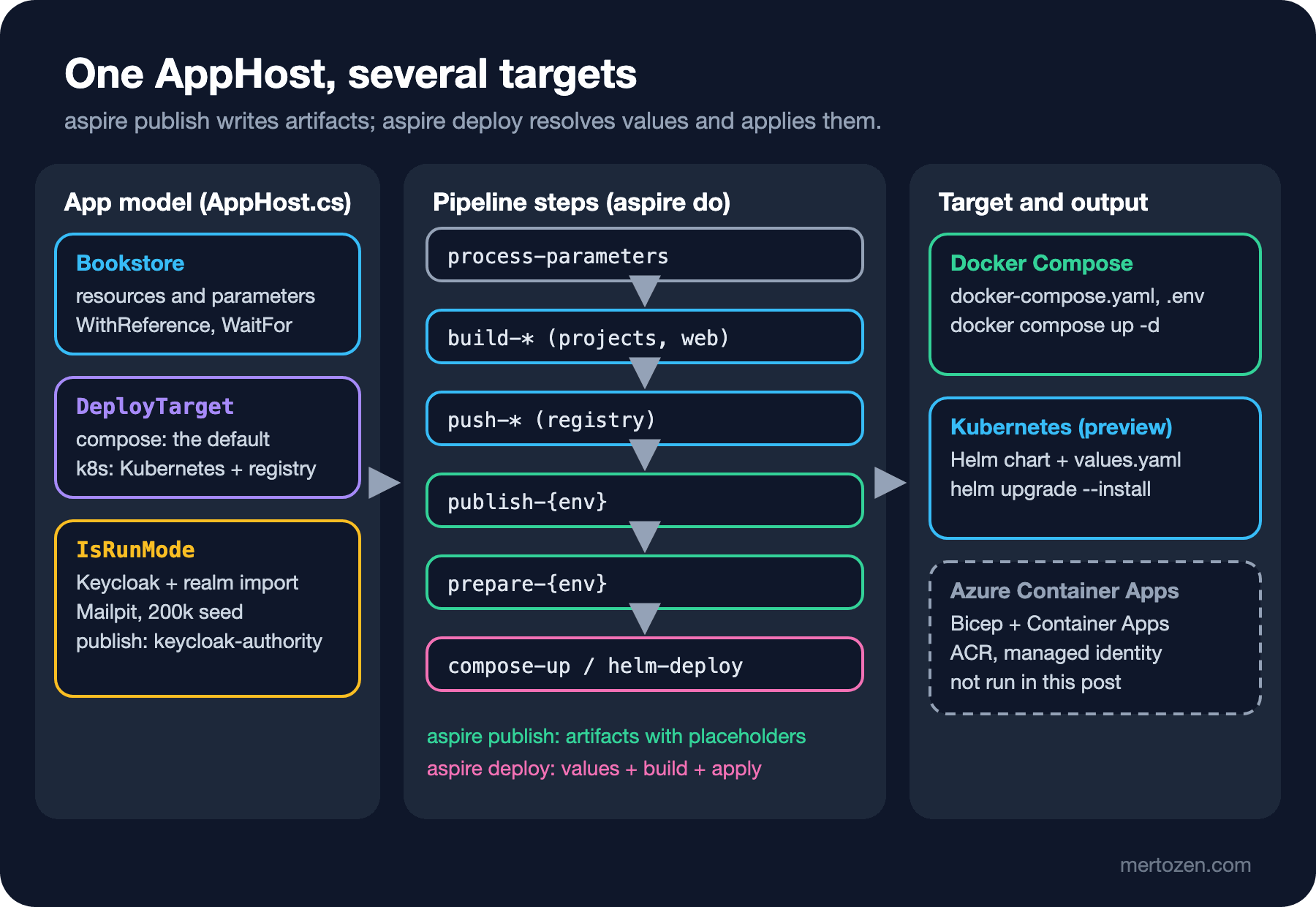
--list-steps shows the steps; Bookstore's Compose deploy has 25 steps, here are some of the last ones:
aspire do deploy --list-steps

17. prepare-compose
   └─ Depends on: validate-compute-environments, publish, build
...
24. docker-compose-up-compose
   ├─ Depends on: prepare-compose, push-migrations, push-catalog, push-ordering, push-inventory,
   │              push-gateway, build-migrations, build-catalog, build-ordering, build-inventory,
   │              build-gateway, build-web
   └─ Tags: docker-compose-up

25. deploy
   └─ Depends on: docker-compose-up-compose, build-migrations, build-catalog, build-ordering,
                  build-inventory, build-gateway, build-web
The pipeline APIs arrived as a preview in 13.0; the commands' behavior has settled in 13.6, but if you write your own step (WithPipelineStepFactory), expect the API to change.
Compute Environments: Choosing the Target in the AppHost
A compute environment resource says where a resource goes. For Docker Compose it's the Aspire.Hosting.Docker package and builder.AddDockerComposeEnvironment("compose"); for Kubernetes, Aspire.Hosting.Kubernetes and builder.AddKubernetesEnvironment("k8s"). The Docker Compose target has been stable since 13.2; the Kubernetes package still ships with a -preview version suffix in 13.6.5. We added both and published:
Step 'validate-compute-environments' failed: Compute resource(s) 'sql', 'redis', 'messaging', 'keycloak', 'migrations',
'catalog', 'ordering', 'inventory', 'gateway', 'mailpit', 'web' are not assigned to a compute environment, but the model
contains multiple compute environments ('compose', 'k8s'). Specify which environment each resource should target by
calling 'WithComputeEnvironment' on the resource builder.
Several environments make sense when different parts of the app go to different places: say, the APIs to Container Apps and a batch job to Kubernetes. Then each resource gets WithComputeEnvironment(...). What we want is to ship the same app sometimes to Compose and sometimes to Kubernetes. We chose with a value read from configuration:
// Deployment target: Docker Compose by default, Kubernetes with "-- --DeployTarget=k8s"
if (builder.Configuration["DeployTarget"] == "k8s")
{
    // The cluster pulls images from a registry; its address is a deploy-time parameter (APIs in preview)
#pragma warning disable ASPIRECOMPUTE003
    IResourceBuilder<ContainerRegistryResource> registry = builder.AddContainerRegistry("registry", builder.AddParameter("registry-endpoint"));
    builder.AddKubernetesEnvironment("k8s").WithContainerRegistry(registry);
#pragma warning restore ASPIRECOMPUTE003
}
else
{
    builder.AddDockerComposeEnvironment("compose");
}
With aspire publish -- --DeployTarget=k8s, the arguments after -- go to the AppHost. We'll come back to the registry part in the Kubernetes section.
The First Publish: Local Settings Leak into Production
When we first published Bookstore, the online bookstore used as the shared example across this site's series, with aspire publish -o deploy/compose, the pipeline succeeded, but the output had three problems. The first is the answer to Guess First:
  gateway:
    image: "${GATEWAY_IMAGE}"
    ...
    expose:
      - "${GATEWAY_PORT}"
The gateway is only exposed, which means reachable from inside the Compose network; there's no ports line opening it to the host. And web, the only resource marked external, isn't a separate service in publish; it goes into the gateway. Result: nothing is reachable from outside. The fix is to move the flag to the resource that actually receives the traffic: .WithExternalHttpEndpoints() on the gateway. The second is the migration worker's environment:
  migrations:
    environment:
      Seed__GeneratedBooks: "200000"
The 200,000 fake books we added in 04 for a performance experiment would have been written to the production database too. The third was a warning:
[WRN] Resource 'keycloak' has a bind mount with host-specific source path '.../Bookstore.AppHost/Realms'.
The source has been replaced with an environment variable placeholder 'KEYCLOAK_BINDMOUNT_0' which may make
the application less portable across different machines.
As we noted in 05, WithRealmImport is for local development. The three problems share a cause: we wrote the AppHost for running locally, and some lines only make sense there. Aspire offers builder.ExecutionContext.IsRunMode for this:
if (builder.ExecutionContext.IsRunMode)
{
    // 200,000 generated books are for local performance work only
    migrations.WithEnvironment("Seed__GeneratedBooks", "200000");

    IResourceBuilder<ParameterResource> backofficeSecret = builder.AddParameter("backoffice-client-secret", secret: true);

    // Realm import is for local development only; it is not part of publish/deploy
    IResourceBuilder<KeycloakResource> keycloak = builder.AddKeycloak("keycloak", 8080)
        .WithContainerName("aspire-keycloak")
        .WithRealmImport("./Realms")
        .WithEnvironment("BOOKSTORE_BACKOFFICE_SECRET", backofficeSecret);
    catalog.WithReference(keycloak);

    // Catches order e-mails locally; started from the dashboard only when needed
    builder.AddMailpit("mailpit")
        .WithContainerName("aspire-mailpit")
        .WithExplicitStart();
}
else
{
    // Deployed environments use an existing Keycloak; its https Authority is a deploy-time parameter
    catalog.WithEnvironment("Keycloak__Authority", builder.AddParameter("keycloak-authority"));
}
On the Angular side comes the step we promised in 03: gateway.PublishWithContainerFiles(web, "./wwwroot");. During publish Aspire builds Angular inside a container and copies its output into the gateway image's wwwroot folder. Copying isn't enough; the gateway has to serve those files:
// In the published image wwwroot holds Angular's build output; locally the folder doesn't exist
app.UseDefaultFiles();
app.UseStaticFiles();

app.MapDefaultEndpoints();
app.MapReverseProxy();
app.MapFallbackToFile("index.html");
After the fixes, the published .env file lists everything to be filled at deploy time; parameters are empty placeholders, as we said in 02:
CATALOG_IMAGE=
CATALOG_PORT=
GATEWAY_IMAGE=
GATEWAY_PORT=
INVENTORY_IMAGE=
KEYCLOAK_AUTHORITY=
MESSAGING_PASSWORD=
MIGRATIONS_IMAGE=
ORDERING_IMAGE=
ORDERING_PORT=
REDIS_PASSWORD=
SQL_PASSWORD=
The Compose file also has a compose-dashboard service we didn't add: the Aspire dashboard's container (mcr.microsoft.com/dotnet/nightly/aspire-dashboard:13.6), and every service's OTEL_EXPORTER_OTLP_ENDPOINT points to it. The gateway's ports line is now in place too.
Deploying to Docker Compose
The first aspire deploy attempt built the images and then stopped:
(prepare-compose) ✗ Parameter resource could not be used because configuration key 'Parameters:sql-password'
is missing and the Parameter has no default value.
The password was in user secrets, but deploy runs in the Production environment by default, and user secrets are only read in Development. The Redis and RabbitMQ passwords caused no trouble: they're parameters Aspire generates, and deploy generated them and saved them to its deployment state. We passed our own parameters as environment variables (that's also the way in CI):
Parameters__sql-password=<password> \
Parameters__keycloak-authority=https://identity.example.com/realms/bookstore \
aspire deploy -o deploy/compose-out --non-interactive

(build-catalog) ✓ build-catalog completed successfully
(push-catalog) ✓ Successfully tagged catalog as catalog:aspire-deploy-20261114172233
...
(docker-compose-up-compose) → Running compose up for compose using Docker
(print-gateway-summary) i [INF] Successfully deployed gateway to http://localhost:32770.
(print-compose-dashboard-summary) i [INF] Successfully deployed compose-dashboard to http://localhost:32769.
✓ 39/39 steps succeeded • Total time: 38.16s
We didn't write a Dockerfile for any project: Aspire builds the .NET projects' images with the .NET SDK's container support and Angular's with a build definition it generates itself. The images get an aspire-deploy-<time> tag and, since Compose doesn't need a registry, stay local. The running containers:
NAMES                                         IMAGE                                                    STATUS
aspire-compose-09eb12ae-ordering-1            ordering:<tag>                                           Up 27 seconds
aspire-compose-09eb12ae-catalog-1             catalog:<tag>                                            Up 27 seconds
aspire-compose-09eb12ae-gateway-1             gateway:<tag>                                            Up 34 seconds
aspire-compose-09eb12ae-migrations-1          migrations:<tag>                                         Exited (0) 27 seconds ago
aspire-compose-09eb12ae-inventory-1           inventory:<tag>                                          Up 35 seconds
aspire-rabbitmq                               rabbitmq:4.3-management                                  Up 2 minutes
aspire-redis                                  redis:8.6                                                Up 2 minutes
aspire-compose-09eb12ae-compose-dashboard-1   mcr.microsoft.com/dotnet/nightly/aspire-dashboard:13.6   Up 2 minutes
aspire-sql                                    mcr.microsoft.com/mssql/server:2025-latest               Up 2 minutes
The migration worker is Exited (0): in the Compose file, Catalog's depends_on is condition: "service_completed_successfully"; that's how WaitForCompletion from 02 translates to Compose. But getting to this output took two more attempts. In the first successful deploy, the book list returned 500 and the home page 404. Catalog's log:
System.InvalidOperationException: The MetadataAddress or Authority must use HTTPS unless disabled for development
by setting RequireHttpsMetadata=false.
AddKeycloakJwtBearer builds the Authority from the service discovery address (https+http://keycloak/...); that isn't an https address, and in production RequireHttpsMetadata is on. The JWT handler throws while building its options on the first request, and that takes down every request, anonymous endpoints included. As the Keycloak documentation also recommends, we set the Authority explicitly in production:
// Deployed environments pass the real https Authority; locally it comes from service discovery over http
if (builder.Configuration["Keycloak:Authority"] is { Length: > 0 } authority)
{
    options.Authority = authority;
}
else if (builder.Environment.IsDevelopment())
{
    options.RequireHttpsMetadata = false;
}
The 404 came from Angular's default output folder: dist/bookstore-web/browser. Since Aspire copies dist, the files had landed under wwwroot/bookstore-web/browser in the gateway. With "outputPath": { "base": "dist", "browser": "" } in angular.json we put the files directly into dist. After the third deploy, through the gateway:
GET  /api/books?page=1   200  [{"isbn":"9780060934347","title":"Don Quixote",...
GET  /                   200  <!doctype html> ... <title>BookstoreWeb</title>
GET  /catalog            200  <!doctype html>
POST /api/orders/        201
GET  /api/orders/{id}    200  ..."status":"Confirmed"}
POST /api/books/         401
The list shows only the seeded classics, not 200,000 fake books; paths with no matching file (like /catalog) fall back to index.html, so Angular routes also work after a page refresh; the order is confirmed over RabbitMQ. Adding a book without a token gives 401: the Authority is now a valid https address, but since we didn't connect to a real Keycloak, we didn't try the path with a token in this environment.
Two warnings. Deploy writes the values it resolved to deploy/compose-out/.env.Production, and the SQL, Redis and RabbitMQ passwords sit there in plain text; this folder must not get into the repo. The OTLP endpoint of the dashboard in Compose is unprotected (the container log has an OTLP server is unsecured warning); don't open the dashboard's port to the internet.
To remove it, aspire destroy --yes: it removed the containers and the network ("Compose shutdown complete", 1 minute 7 seconds in total). According to the documentation, volumes are deleted too; in our run SQL Server's named volume (aspire-compose-09eb12ae_aspire-sql-data) stayed. That's good for the data, but don't assume "everything is gone"; check with docker volume ls.
Kubernetes: a Helm Chart and kind
aspire publish -o deploy/k8s -- --DeployTarget=k8s produces a Helm chart:
Chart.yaml
values.yaml
templates/catalog/config.yaml
templates/catalog/deployment.yaml
templates/catalog/secrets.yaml
templates/catalog/service.yaml
...
templates/k8s-dashboard/deployment.yaml
templates/migrations/deployment.yaml
templates/sql/statefulset.yaml
helm lint passed cleanly, and helm template produced 7 ConfigMaps, 6 Deployments, 7 Secrets, 7 Services and 3 StatefulSets. Projects become Deployments, SQL Server, Redis and RabbitMQ become StatefulSets, and environment variables become ConfigMaps and Secrets; the secrets section in values.yaml is empty and gets filled at deploy time. Two things caught our eye while reading the chart. The gateway's Service is type: "ClusterIP": on Kubernetes WithExternalHttpEndpoints doesn't open a way out of the cluster by itself; that takes Ingress or Gateway API settings (preview in 13.x). Second, the migration worker is a Deployment: Kubernetes restarts a container even when its work is done, and the chart has no init container that makes Catalog wait for the migration. The reasons to run a migration as a Job are in the Job, CronJob and Workers post of the Kubernetes series.
aspire deploy installs the chart into the current kubectl context. The first attempt asked for a registry:
Step 'push-prereq' failed: Resource 'migrations' requires image push but no container registry is available.With Compose the images could stay local; a cluster's nodes, however, have to pull the image from a registry. That's why the AddContainerRegistry lines above exist (the APIs are in preview, and we turned off the ASPIRECOMPUTE003 warning on purpose). We started a local kind cluster with a registry container next to it and tried again with Parameters__registry-endpoint=localhost:5001:
(push-catalog) ✓ Successfully pushed catalog to localhost:5001/catalog:aspire-deploy-20261114172920
...
(helm-deploy-k8s) → Deploying k8s to Kubernetes namespace default as Helm release production
The release name is the environment's name (production), and Aspire runs helm upgrade --install waiting for the pods to become ready. The Catalog, Ordering, Inventory, Redis, RabbitMQ and dashboard pods reached Running. The SQL Server pod, however, didn't run stably in the kind cluster on our test machine and kept restarting; Helm's 5-minute wait ran out with context deadline exceeded. So we couldn't verify the Kubernetes target end to end: chart generation, image push and the Helm install worked, but the app taking orders in the cluster wasn't tried.
Azure Targets
Deploying to Azure requires an Azure subscription, so we didn't run this section; we're quoting the aspire.dev documentation. For Azure Container Apps it's the Aspire.Hosting.Azure.AppContainers package and builder.AddAzureContainerAppEnvironment("aca-env"). aspire deploy creates the Container Apps environment, an Azure Container Registry and a managed identity for pulling images, and builds and pushes the images. Here the meaning of WithExternalHttpEndpoints is explicit: an external HTTP endpoint becomes public ingress, and the others become internal ingress that stays inside the environment. Customizations such as scaling settings are done with PublishAsAzureContainerApp(...). There are similar environment resources for App Service and AKS; AKS delegates the Helm install to the Kubernetes environment above. One important difference: on Azure aspire destroy deletes the whole resource group, even if it contains resources Aspire didn't create. Azure's services and cost model are the subject of the Cloud Temelleri series.
Deploying from CI
CI has two rules: commands should run with --non-interactive (fail on a missing parameter instead of asking), and parameters should come as Parameters__<name> environment variables whose values come from the CI's secret store. Producing artifacts with placeholders needs no secrets at all; a job that does it on every push:
name: Publish Docker Compose artifacts

on:
  push:
    branches: [main]

jobs:
  publish:
    runs-on: ubuntu-latest
    timeout-minutes: 15
    steps:
      - uses: actions/checkout@v7
      - uses: actions/setup-dotnet@v6
        with:
          global-json-file: global.json
      - name: Install the Aspire CLI
        run: dotnet tool install --global Aspire.Cli --version 13.6.5
      # Placeholders only: no secret is needed to publish
      - name: Publish
        run: aspire publish --apphost src/Bookstore.AppHost -o aspire-output --non-interactive
      - uses: actions/upload-artifact@v7
        with:
          name: compose
          path: aspire-output
          include-hidden-files: true
We validated the workflow with actionlint and didn't run it on GitHub. The include-hidden-files line is for the .env file: upload-artifact skips files starting with a dot by default. A real deploy job adds aspire deploy --non-interactive to the same steps, with parameters from secrets; for an Azure target, authentication is done with OIDC, covered in detail in the GitHub Actions series.
In Production
Don't go to production without reading the artifacts Aspire generates. In this post we saw every problem in the publish output: a port that doesn't open, test data heading to production, a bind mount tied to a local folder, a Deployment instead of a Job. Running aspire publish in CI and reviewing the output in the pull request is an easy way to catch these before a deploy.
You usually want the production database and identity provider as managed services, not as containers Aspire models. The IsRunMode split we did for Keycloak is an example; you can do the same for SQL Server with a connection string parameter.
When shouldn't you use Aspire deploy? If the team already has a working pipeline with Helm charts, Kustomize overlays or GitOps (such as Argo CD), take the publish output as a starting point and move it into your own pipeline instead of applying Aspire's chart directly. The Kustomize post of the Kubernetes series covers that side. Aspire deploy is most useful for small teams without a separate platform team and for simple targets such as Compose or Container Apps.
The Kubernetes integration and the registry APIs are in preview. On version upgrades, compare the generated chart (the helm template output).
Common Pitfalls
Putting WithExternalHttpEndpoints on a resource that disappears in publish. Mark the resource that receives the traffic; on Kubernetes you also need Ingress or Gateway settings.
Not separating local settings with IsRunMode. Tools like seed data, realm import and Mailpit end up in the publish output too.
Assuming deploy reads user secrets. Deploy runs in Production; provide parameters as environment variables or through the interactive prompt.
Using the service discovery address as the production Authority. The JWT handler requires https, and the failure takes down every request, anonymous ones included.
Committing the deploy output. .env.Production holds passwords in plain text.
A Small Experiment
★☆☆ Remove WithExternalHttpEndpoints() from the gateway, publish again and compare the ports and expose lines in the Compose file.
★★☆ Produce only the images with aspire do build and look at the docker images output. How much does the Angular build add to the gateway image's size?
★★★ Turn the migration worker into a Job for the Kubernetes target: publish the chart, rewrite migrations/deployment.yaml as a Job and add an init container to Catalog that waits for the migration. Think about how you would keep this change across Aspire's next publish.
We've completed Aspire's path from running locally to deploying. In the last post of the series we look back: which APIs changed from .NET Aspire 8 to 13.6, the move from workloads to the Aspire CLI and from the manifest to aspire do, and migrating an old project with aspire update on a real migration.