

The xUnit Test Lifecycle: Constructors, IAsyncLifetime, Fixtures and Full Parallelism in 4.0

xUnit creates a new instance of the test class for every test; expensive, read-only setup is done once in a class, collection or assembly fixture. In 4.0, ParallelMode.All cut an 8-test example from 1.06 to 0.55 seconds, but two tests sharing a static fake failed in 16 of 20 runs. IAsyncLifetime, opt-out levels, ITestOutputHelper and TestContext attachments.
Version note: The code in this post was built and run with .NET 10 and xUnit.net v3 4.0.2.
Predict First
The test class below has three tests. The class uses an IClassFixture, and there is also a fixture defined at assembly level; both implement IAsyncLifetime. Every step writes to a log with a sequence number:
[assembly: AssemblyFixture<Bookstore.Lifecycle.Tests.PriceListFixture>]

namespace Bookstore.Lifecycle.Tests;

// Once for the whole assembly: e.g. a read-only price list
public sealed class PriceListFixture : IAsyncLifetime
{
    public IReadOnlyDictionary<string, decimal> Prices { get; private set; } = new Dictionary<string, decimal>();

    public ValueTask InitializeAsync()
    {
        Log.Write("PriceListFixture.InitializeAsync");
        Prices = new Dictionary<string, decimal> { ["978-0321125217"] = 55m, ["978-0134757599"] = 48m };
        return ValueTask.CompletedTask;
    }

    public ValueTask DisposeAsync()
    {
        Log.Write("PriceListFixture.DisposeAsync");
        foreach (string line in Log.Lines)
        {
            Console.WriteLine(line);
        }
        return ValueTask.CompletedTask;
    }
}

// Once for the tests in this class
public sealed class CatalogFixture : IAsyncLifetime
{
    public List<string> Isbns { get; } = [];

    public ValueTask InitializeAsync()
    {
        Log.Write("CatalogFixture.InitializeAsync");
        Isbns.AddRange(["978-0321125217", "978-0134757599"]);
        return ValueTask.CompletedTask;
    }

    public ValueTask DisposeAsync()
    {
        Log.Write("CatalogFixture.DisposeAsync");
        return ValueTask.CompletedTask;
    }
}

public sealed class CatalogTests : IClassFixture<CatalogFixture>, IAsyncLifetime
{
    private readonly CatalogFixture catalog;
    private readonly PriceListFixture prices;
    private readonly List<string> cart = [];

    public CatalogTests(CatalogFixture catalog, PriceListFixture prices)
    {
        this.catalog = catalog;
        this.prices = prices;
        Log.Write($"CatalogTests.ctor #{GetHashCode():x8}");
    }

    public ValueTask InitializeAsync()
    {
        Log.Write("CatalogTests.InitializeAsync");
        return ValueTask.CompletedTask;
    }

    [Fact]
    public void Cart_starts_empty()
    {
        Log.Write("Test: Cart_starts_empty");
        Assert.Empty(cart);
    }

    [Fact]
    public void Adding_a_book_puts_one_item_in_the_cart()
    {
        Log.Write("Test: Adding_a_book_puts_one_item_in_the_cart");
        cart.Add(catalog.Isbns[0]);
        Assert.Single(cart);
    }

    [Fact]
    public void Catalog_books_have_a_price()
    {
        Log.Write("Test: Catalog_books_have_a_price");
        Assert.All(catalog.Isbns, isbn => Assert.True(prices.Prices.ContainsKey(isbn)));
    }

    public ValueTask DisposeAsync()
    {
        Log.Write("CatalogTests.DisposeAsync");
        return ValueTask.CompletedTask;
    }
}
Log is a small static class that writes to a thread-safe ConcurrentQueue, prefixing a number incremented with Interlocked. How many lines does the log have when you run dotnet run? How many times does the CatalogTests constructor run, and how many times CatalogFixture.InitializeAsync? Do the tests run in source order? If Adding_a_book_puts_one_item_in_the_cart runs before Cart_starts_empty, does the second one fail?
The Answer: A New Instance for Every Test
01 PriceListFixture.InitializeAsync
02 CatalogFixture.InitializeAsync
03 CatalogTests.ctor #00a2e605
04 CatalogTests.InitializeAsync
05 Test: Catalog_books_have_a_price
06 CatalogTests.DisposeAsync
07 CatalogTests.ctor #02e1ec34
08 CatalogTests.InitializeAsync
09 Test: Cart_starts_empty
10 CatalogTests.DisposeAsync
11 CatalogTests.ctor #00c75fa2
12 CatalogTests.InitializeAsync
13 Test: Adding_a_book_puts_one_item_in_the_cart
14 CatalogTests.DisposeAsync
15 CatalogFixture.DisposeAsync
16 PriceListFixture.DisposeAsync
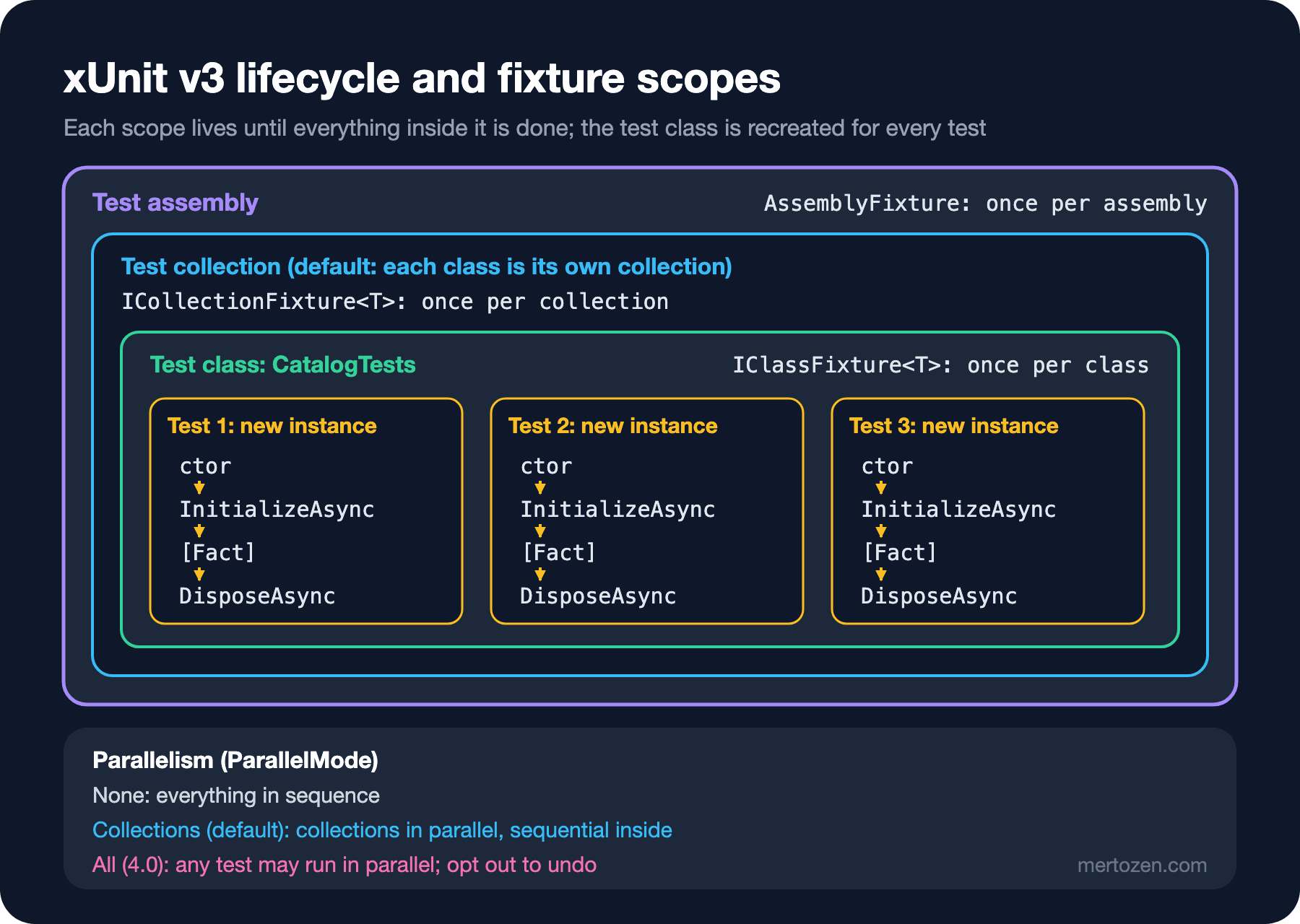
Sixteen lines. The constructor ran three times and created three different instances (the hashes differ). CatalogFixture, on the other hand, was set up once, and all three tests received the same instance. The test order is not the source order: xUnit deliberately keeps test order unspecified (in v3 the order is stable from run to run, but it is not the order you wrote). Because cart is a new List for every test, Cart_starts_empty is not affected by the other test adding a book to the cart. The rest of this post explains what each line of this table means and how it combines with parallelism.
Constructor, Dispose and IAsyncLifetime
xUnit's most important design decision is creating a new instance of the test class for every test. The counterpart of NUnit's [SetUp]/[TearDown] here is C#'s own mechanisms: preparation in the constructor, cleanup in Dispose or DisposeAsync. Everything held in fields (like cart) starts from scratch for each test; state leaking between tests through instance fields is therefore impossible.
Because a constructor cannot be async, async preparation is done with IAsyncLifetime: InitializeAsync runs right after the constructor and DisposeAsync after the test. In v3 both methods return ValueTask, and IAsyncLifetime derives from IAsyncDisposable; code with the Task signatures of v2 does not compile when moving to v3, and we will come back to this migration in post 13. If a class implements both IDisposable and IAsyncDisposable, xUnit calls only the async one; there is no need to put the same cleanup in both.
When the constructor, when a fixture? If preparation is cheap (creating a few objects), keep it in the constructor; each test starts with a clean world and reads on its own. If preparation is expensive (loading a large data set, starting a process) and the tests do not modify it, move it to a fixture. The second case is rare in unit tests; expensive preparation is often a sign that the test is actually an integration test.
Class, Collection and Assembly Fixtures
There are three levels, and they correspond to the nested boxes in the figure.
Class fixture: created once for all tests of the class that implements IClassFixture<T> and disposed after the last test. The test class receives the fixture as a constructor parameter. CatalogFixture above is one.
Collection fixture: for several test classes sharing the same fixture. First a collection definition is declared, then the classes are bound to that collection. In v3, on .NET 8 and later, a generic attribute binds them without a string name:
// Expensive but read-only: a 10,000-book catalog is built once
public sealed class LargeCatalogFixture
{
    public IReadOnlyList<string> Isbns { get; } =
        Enumerable.Range(0, 10_000).Select(i => $"978-{i:D10}").ToArray();
}

[CollectionDefinition]
public sealed class LargeCatalogCollection : ICollectionFixture<LargeCatalogFixture>;

[Collection<LargeCatalogCollection>]
public sealed class SearchTests(LargeCatalogFixture catalog)
{
    [Fact]
    public void Isbn_prefix_search_finds_ten_books() =>
        Assert.Equal(10, catalog.Isbns.Count(i => i.StartsWith("978-000000999", StringComparison.Ordinal)));
}

[Collection<LargeCatalogCollection>]
public sealed class PagingTests(LargeCatalogFixture catalog)
{
    [Fact]
    public void Last_page_of_50_has_50_books() =>
        Assert.Equal(50, catalog.Isbns.Chunk(50).Last().Length);
}
Collections have a side effect that is often forgotten: tests in the same collection do not run in parallel. SearchTests and PagingTests now run in sequence. When you use a collection fixture only for sharing, you lose parallelism without noticing.
Assembly fixture: the widest level, introduced in v3. It is declared with [assembly: AssemblyFixture(typeof(...))], and 4.0 also has a generic AssemblyFixture<T>. It is created once for the whole assembly and can be injected into the constructor of any test class; above, CatalogTests received PriceListFixture this way. The difference from a collection fixture is that it does not put the tests into the same collection: parallelism is preserved. That is why the state in an assembly fixture must be either read-only or thread-safe.
Parallelism in 4.0: None, Collections and All
For a long time the unit of parallelism in xUnit was the collection: each class is its own collection by default, collections run in parallel, and inside a collection tests run in sequence. 4.0 added a new level: with ParallelMode.All, all tests can run in parallel regardless of collection and class. To measure the effect, I wrote four classes with two tests each that wait 500 ms (8 tests in total) and ran them in three modes with dotnet run -- -parallelMode ...:
== none
   Bookstore.Parallel.Tests  Total: 8, Errors: 0, Failed: 0, Skipped: 0, Not Run: 0, Time: 4.064s
== collections
   Bookstore.Parallel.Tests  Total: 8, Errors: 0, Failed: 0, Skipped: 0, Not Run: 0, Time: 1.061s
== all
   Bookstore.Parallel.Tests  Total: 8, Errors: 0, Failed: 0, Skipped: 0, Not Run: 0, Time: 0.550s
Sequential: 4 seconds; in collection mode the four classes run in parallel but each class's two tests run in sequence: 1 second; with All, all eight tests together: half a second. The default is still Collections. The mode is changed with an assembly attribute or with the "parallelMode" key in xunit.runner.json ("none", "collections", "all"). The attribute's two types live in different namespaces: ParallelizationAttribute in Xunit.v3, the ParallelMode enum in Xunit.Sdk:
using Xunit.Sdk;
using Xunit.v3;

[assembly: Parallelization(Mode = ParallelMode.All)]

namespace Bookstore.Parallel.Tests;

[CollectionDefinition("Stock ledger", DisableParallelization = true)]
public sealed class StockLedgerCollection;

[Collection("Stock ledger")]
public sealed class StockLedgerTests
{
    [Fact]
    public Task A() => Task.Delay(500, TestContext.Current.CancellationToken);
}

public sealed class OptOutMethodTests
{
    [Fact(DisableParallelization = true)]
    public Task Serial() => Task.Delay(500, TestContext.Current.CancellationToken);
}
In All mode you can step back: parallelism can be switched off at the collection, class, method, theory data source and individual data row level. Once you switch it off at one level, you cannot switch it back on at a lower level. After adding these two opt-outs to the same project, the total time went from 0.55 seconds to 1.56 seconds (10 tests): non-parallel tests do not run alongside the parallel ones but separately. Opting out is not free; use it where there is a reason.
With 4.0, the DisableTestParallelization, MaxParallelThreads and ParallelAlgorithm properties of the CollectionBehavior attribute became obsolete; the Mode, MaxThreads and Algorithm properties of the Parallelization attribute replaced them. The default algorithm is Conservative: it starts at most MaxThreads tests at a time (by default the number of CPU (Central Processing Unit) threads), which keeps [Fact(Timeout = ...)] reliable. The same release brought test orderers at the collection, class, method and test case level; tests that need ordering are a smell, but this can help in migration scenarios.
Output with ITestOutputHelper and TestContext
In unit tests, Console.WriteLine is not tied to the test result by default; in v3 you have to turn on console capture with [assembly: CaptureConsole]. For output associated with a test, you take ITestOutputHelper from the constructor. TestContext offers file attachments and a key-value storage shared between tests:
public sealed class InvoiceOutputTests(ITestOutputHelper output)
{
    [Fact]
    public void Invoice_total_matches_line_sum()
    {
        decimal[] lines = [55m, 48m, 12.5m];
        string invoiceJson = """{ "number": "INV-2026-0042", "total": 115.00 }""";

        output.WriteLine($"Lines: {string.Join(", ", lines)}");
        TestContext.Current.AddAttachment("invoice.json", invoiceJson);
        TestContext.Current.KeyValueStorage["invoice"] = "INV-2026-0042";

        Assert.Equal(115.00m, lines.Sum());
    }
}
failed Bookstore.Lifecycle.Tests.InvoiceOutputTests.Invoice_total_matches_line_sum (9ms)
Assert.Equal() Failure: Values differ
Expected: 115.00
Actual: 115.5
Standard output
Lines: 55, 48, 12.5
In process file artifacts produced:
- For test 'Bookstore.Lifecycle.Tests.InvoiceOutputTests.Invoice_total_matches_line_sum': …/p05/TestResults/e79df539…/invoice.json.txtIn the invoice JSON (JavaScript Object Notation), the total is 115; the sum of the lines is 115.5. The line list in the output shows the difference comes from the 12.5 line, and the JSON saved as an attachment shows the invoice itself. Since 4.0, attachments are written to the results folder given with --results-directory. KeyValueStorage is a dictionary shared across tests, intended for an extension or a fixture to leave information during the run. Do not use it to pass data from one test to another; that opens the door to the pitfall below.
In Production
Look for shared state before switching to All. Upgrading to 4.0 does not change the mode; the default stays Collections. But when you see the time savings and switch to All, problems that stayed hidden for years because tests in the same class ran in sequence come to light. Before switching, search the test project for static mutable fields, singletons, and tests that change process-wide settings such as Environment.SetEnvironmentVariable or CultureInfo.CurrentCulture.
A good share of tests that pass locally and fail in CI (Continuous Integration) are caused by parallelism. When the CI machine has a different number of cores, the timing of tests overlapping changes too. If a test fails intermittently, running it a few times with -parallelMode none quickly shows whether parallelism is the cause. How to manage flaky tests in the pipeline is the topic of the CI/CD Temelleri (CI/CD Fundamentals) series.
Do not count on fixtures being disposed. When the test process crashes or is cut off by a timeout, DisposeAsync may not run. Unit test fixtures should not hold external resources (files, ports, processes); if they do, that is a sign of an integration test.
Common Pitfalls
Static or shared mutable state. These two tests, written for this post, share a single static outbox on the grounds that "creating a new fake for every test is slow":
// A static fake the tests share "to be fast"
public static class SharedEmailOutbox
{
    public static List<string> Sent { get; } = [];
}

public sealed class OrderEmailTests
{
    [Fact]
    public async Task Placing_an_order_sends_one_confirmation()
    {
        SharedEmailOutbox.Sent.Clear();
        await Task.Delay(10, TestContext.Current.CancellationToken);
        SharedEmailOutbox.Sent.Add("ada@example.com: Order confirmed");

        Assert.Single(SharedEmailOutbox.Sent);
    }

    [Fact]
    public async Task Cancelling_an_order_sends_one_cancellation()
    {
        SharedEmailOutbox.Sent.Clear();
        await Task.Delay(10, TestContext.Current.CancellationToken);
        SharedEmailOutbox.Sent.Add("ada@example.com: Order cancelled");

        Assert.Single(SharedEmailOutbox.Sent);
    }
}
I ran them 20 times in each mode. Collections: 20 passed, 0 failed. All: 4 passed, 16 failed. The message of the failing runs:
Assert.Single() Failure: The collection contained 2 items
Collection: ["ada@example.com: Order cancelled", "ada@example.com: Order confirmed"]
In collection mode the two tests are in the same class, so they run in sequence and the problem stays hidden; the tests were never really independent. The fix is a new fake for every test: an object created in an instance field or in the constructor. Creating a fake takes microseconds; there is nothing to gain from sharing it.
Making the fixture "the place I put everything". A TestFixture class gradually collects all the mocks, test data and helper methods; every test class takes it, and which test needs what becomes invisible. Worse, because the fixture is shared, one test changing a list in the fixture affects the others. Keep only expensive, read-only things in fixtures; a test's own data should be built inside the test or with the builders of post 10.
Relying on test order. A "first the create test, then the update test" setup is already fragile because xUnit keeps the order unspecified; in All mode it collapses entirely. Every test must set up its own preconditions.
A Small Experiment
★☆☆ Add a fourth test to CatalogTests and regenerate the log. How many times did CatalogFixture.InitializeAsync run? When you make cart static, which test fails, and in which order?
★★☆ Fix OrderEmailTests so that it uses a new FakeEmailSender for every test instead of the static outbox, and run it 20 times with -parallelMode all. How many runs failed?
★★★ Add [assembly: Parallelization(Mode = ParallelMode.All)] to your own test project, run the suite 10 times and list the tests that fail intermittently. For each one, find the source of the shared state: a static field, a singleton, an environment variable or the culture.
In the next post we pin down what the "fake" we mentioned in this post actually is: the difference between dummy, stub, spy, mock and fake, hand-written test doubles, and FakeTimeProvider and FakeLogger.