

Why We Write Tests: Unit, Integration, Contract, E2E, Smoke and Other Test Types
The real return on tests is confidence against regressions, speed of change and living documentation; the price is writing, maintenance, duration and flakiness. We separate test types by scope (unit, component, integration, contract, E2E) and by purpose (smoke, regression, acceptance, exploratory), and show with six real Bookstore tests and measured durations that Google's small/medium/large classification is independent of scope.
Version note: The code in this post was built and run with .NET 10 (SDK 10.0.402), xUnit.net v3 4.0.2, Angular 22.2, Vitest 5.1 and Playwright 1.65.
Guess First
The Bookstore has six tests: one that checks the discount rule, one that reads a price list from a CSV (Comma-Separated Values) file on disk, one that renders the Angular cart component, one that calls the POST /api/orders endpoint against an in-memory database, one that places a real order in a browser, and a script that sends requests to two addresses after a deploy. Three questions: Which of these is a "unit test"? Which one is a "small" test by Google's definition? The browser test passes on the first run and fails on the second, with no code change in between. Why? The answers are in the real outputs below.
What a Test Buys You and What It Costs
The usual first answer to "why do we write tests?" is "to find bugs." That answer is incomplete. Most tests never find a new bug; they say, over and over on every commit, that a behavior that already worked still works. What you actually buy is three things.
The first is confidence against regressions. You learn that a pull request changing the order discount did not break the stock deduction code, without waiting for someone to notice in production. The second is the speed at which you can change things. In untested code everyone is afraid to touch anything; refactoring gets postponed and the code rots. A good test suite turns the fear of "what breaks if I change this?" into a command that takes a few seconds. The third is living documentation: a test named Gold_customer_over_threshold_gets_fifteen_percent cannot go stale the way a wiki page does; if it goes stale, it turns red.
The bill has four lines too. Writing cost: writing the test often takes as long as writing the code. Maintenance cost: every test that breaks because the implementation changed while the behavior did not is a tax on the team. Duration: if a suite takes ten minutes, developers move on to something else instead of waiting, and the feedback loses its value. The last line is distrust: a test that fails now and then for no reason, a flaky test, erodes faith in the whole suite. Chapter 11 of Software Engineering at Google (Titus Winters, Tom Manshreck and Hyrum Wright, O'Reilly, 2020) puts this threshold at about 1 percent; as the flaky rate approaches it, engineers stop reacting to red builds.
That is why a test strategy does not mean "more tests." It means balancing these four costs against the confidence each test brings. This series gives you the vocabulary for that balance; in this post we first put the terms in order.
By Scope: Unit, Component, Integration, Contract, E2E
The first axis is how much code a test verifies: its scope. At the narrow end is the unit test. The Bookstore's discount rule is a pure function, with no database, network or clock:
[Trait("Size", "Small")]
public class DiscountPolicyTests
{
    [Fact]
    public void Gold_customer_over_threshold_gets_fifteen_percent()
    {
        OrderLine[] lines = [new("978-0134494166", 320m, 2)];

        decimal total = DiscountPolicy.TotalFor(lines, CustomerTier.Gold);

        Assert.Equal(544m, total);
    }
}
A 640 TL cart crosses the 500 TL threshold, so it gets 10 percent off, plus another 5 percent because the customer is Gold: 544 TL. Whether a "unit" is a method, a class or a behavior is a separate debate; the first post of the upcoming Unit Test series covers it in detail. What matters here is that the test verifies a single piece of logic in isolation from the outside world.
One step up is the component test. In the definition of Martin Fowler (chief scientist at Thoughtworks, author of Refactoring), a component test limits itself to one part of the system and deliberately leaves the rest out. On the frontend this usually means rendering a single UI (User Interface) component and checking what it shows:
describe('Cart', () => {
  it('shows the total and does not exceed stock', async () => {
    const store = TestBed.inject(CartStore);
    const book = { id: 2, title: 'Domain-Driven Design', price: 450, stock: 2 };
    store.add(book);
    store.add(book);
    store.add(book);

    const fixture = TestBed.createComponent(Cart);
    await fixture.whenStable();
    const text = (fixture.nativeElement as HTMLElement).textContent;

    expect(text).toContain('Domain-Driven Design x 2');
    expect(text).toContain('Total: 900.00');
  });
});
With two books in stock, clicking "Add" three times should leave two books in the cart. The test exercises the template, the signal and the pipe together, but there is no HTTP (Hypertext Transfer Protocol) and no API (Application Programming Interface). How Angular component tests are set up is the subject of the upcoming Frontend Testing series.
An integration test verifies that several parts work correctly together. In the Bookstore this means calling the endpoint with real routing, real model binding and real Entity Framework Core (EF Core) queries, but with an in-memory SQLite database and a fake email service:
[Trait("Size", "Medium")]
public class OrdersApiTests
{
    [Fact]
    public async Task Placing_an_order_lowers_stock_and_sends_confirmation()
    {
        await using BookstoreApiFactory factory = new();
        HttpClient client = factory.CreateClient();

        HttpResponseMessage response = await client.PostAsJsonAsync("/api/orders",
            new { customerEmail = "ada@example.com", tier = "Gold", items = new[] { new { bookId = 1, quantity = 2 } } },
            TestContext.Current.CancellationToken);

        Assert.Equal(HttpStatusCode.Created, response.StatusCode);
        List<Book>? books = await client.GetFromJsonAsync<List<Book>>("/api/books", TestContext.Current.CancellationToken);
        Assert.Equal(3, books![0].Stock);
        Assert.Equal(["ada@example.com: Order #1 confirmed"], factory.Emails.Sent);
    }
}
What goes on inside BookstoreApiFactory is not this post's topic; post 30 of the ASP.NET Core Web API series explains WebApplicationFactory, and the upcoming Integration and E2E (End-to-End) Testing series goes deeper. What to notice is that this single test catches things a unit test cannot see: the "Gold" string in the JSON (JavaScript Object Notation) being converted to an enum, the stock decrease really being written to the database, the email being sent after the commit.
A contract test verifies that two sides, for example the Angular client and the API, agree on the contract between them. In the consumer-driven contract approach the client writes an expectation such as "POST /api/orders must return these fields for me"; a tool like Pact writes that expectation to a file, and the API side verifies the file in its own pipeline. Each side learns whether it broke the contract without having to start the other. The 2018 article "The Practical Test Pyramid" by Ham Vocke (a Thoughtworks consultant) covers this in detail; we will put it into practice in the Integration and E2E Testing series.
At the broad end is the E2E test: a real browser, a real Angular build, a real API, a real database:
test('a gold customer buys two books and sees the confirmation', async ({ page }) => {
  await page.goto('/');
  await page.getByRole('button', { name: 'Add Clean Architecture' }).click();
  await page.getByRole('button', { name: 'Add Clean Architecture' }).click();
  await expect(page.getByTestId('cart-total')).toHaveText('Total: 640.00');

  await page.getByRole('button', { name: 'Place order' }).click();

  await expect(page.getByRole('status')).toHaveText('Order #1 confirmed, paid 544');
});
This is the test that most resembles what a user does. It also has the most moving parts: Playwright has to start two separate processes (the API and ng serve), the CORS (Cross-Origin Resource Sharing) setup has to be right, and a browser has to launch.
By Purpose: Smoke, Regression, Acceptance, Exploratory
The second axis is why a test runs. These names are independent of scope; a smoke test can be a unit test or an E2E test.
A smoke test is a shallow check that takes seconds and asks "did the application start, does its most basic path work?" It runs right after a deploy:
#!/usr/bin/env bash
set -euo pipefail
base_url="${1:?usage: smoke.sh <base-url>}"

for path in /health /api/books; do
  code=$(curl -s -o /dev/null -w '%{http_code}' --max-time 5 "$base_url$path")
  echo "$path -> $code"
  [ "$code" = "200" ] || exit 1
done
echo "smoke OK"
$ time ./deploy/smoke.sh http://localhost:19903
/health -> 200
/api/books -> 200
smoke OK
./deploy/smoke.sh http://localhost:19903 0.01s user 0.01s system 5% cpu 0.226 totalWhen we stopped the API and ran the same script again, it exited with code 7 without printing a single line; that is curl's "couldn't connect" code, and thanks to set -e the pipeline stops there. A smoke test's job is not to verify behavior but to answer, in a quarter of a second, "is this build worth testing any further?"
A regression test is not a separate kind but a role: any test that verifies a previously working behavior still works is a regression test. When you fix a bug, first writing a test that reproduces it is the cheapest regression test there is, guaranteeing that bug never comes back. An acceptance test verifies that a requirement is met in the language of the business: "A Gold customer sees 15 percent off on orders over 500 TL." It is usually written at the E2E or API level and read together with the business side. Exploratory testing is not automated: it is the way of working named in 1984 by Cem Kaner (software testing expert, author of Testing Computer Software), where a person designs and runs tests while learning the system at the same time. The questions automated tests never think of, such as "what happens if you add 0 copies to the cart?", are usually found in these sessions, and those findings later become regression tests.
Non-Functional Tests
Everything above asked "does it give the right result?" Three kinds of tests ask "how does it give it?" Performance and load testing measures how many milliseconds POST /api/orders takes at the 99th percentile under 200 requests per second; it is the subject of the upcoming Performance and Load Testing series. Security testing looks for the vulnerabilities in the OWASP (Open Worldwide Application Security Project) Top 10: viewing someone else's order by changing an ID, SQL (Structured Query Language) injection, missing authorization. The Web Security (OWASP Top 10) series covers those vulnerabilities one by one. Accessibility testing checks that the cart screen is usable with a screen reader and keyboard alone and meets the WCAG (Web Content Accessibility Guidelines) criteria. What the three have in common is that they can quietly degrade while the functional tests stay green; unless you measure them separately, nobody notices.
Google's Size Classification: Small, Medium, Large
The scope axis alone leaves a question open: is an "integration test" slow, is it flaky, can it run on every commit in CI (Continuous Integration)? Google answers this with a second axis: the test's size, meaning what it is allowed to access. According to Software Engineering at Google, a small test runs in a single process and cannot sleep or do disk or network I/O (Input/Output). A medium test may use several processes, but network access only to localhost; it cannot leave the machine. A large test lifts that restriction and may span several machines.
The book's point is that size and scope are independent. Placing the Bookstore's six tests on both axes makes this obvious:
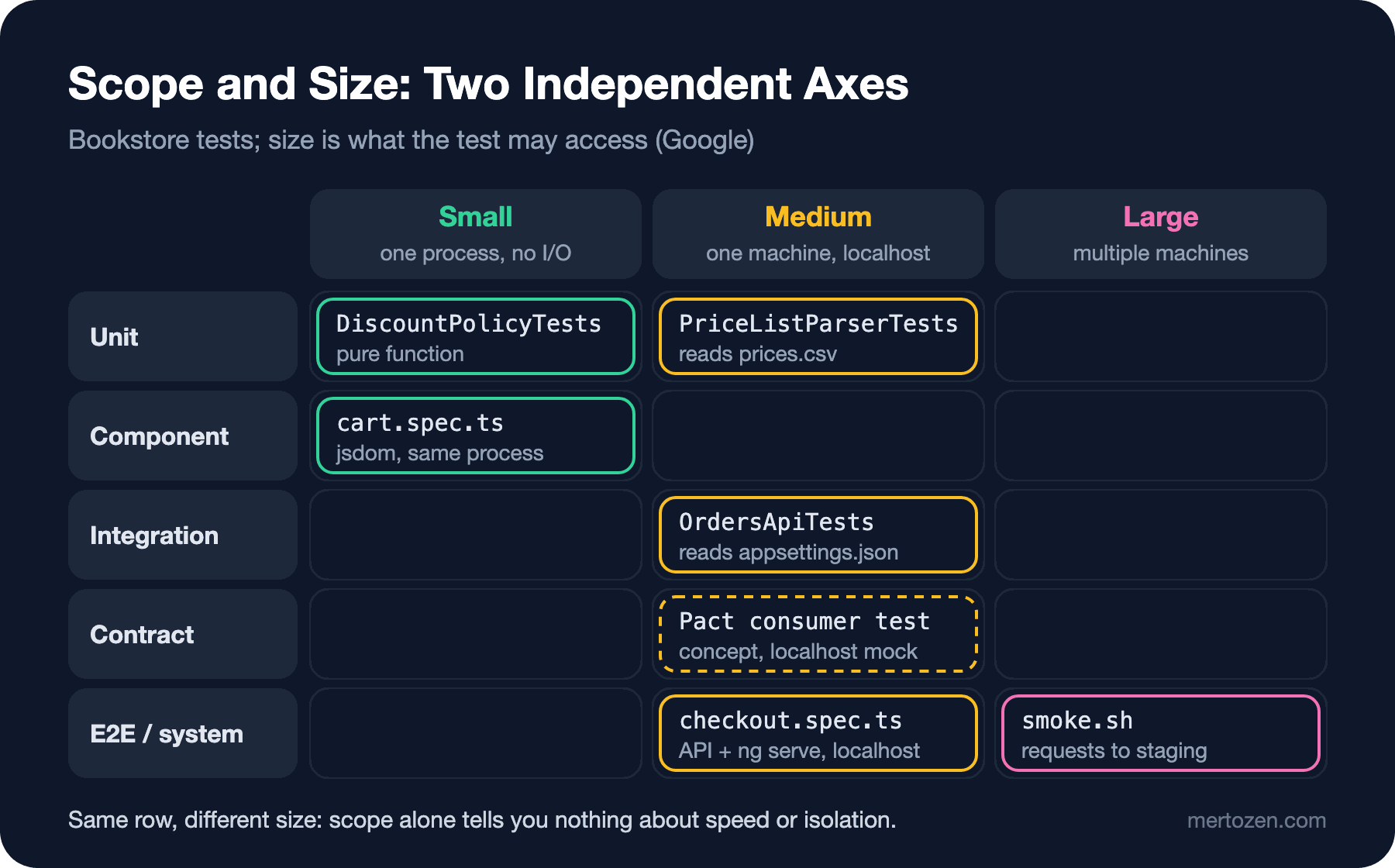
The price list test is a unit test by scope: it verifies a single static method. But because it reads prices.csv from disk, it is not small by Google's definition; it is medium. The cart component test runs in jsdom instead of a real browser; the test and the code under test run in the same process with no network or disk, so it is small. OrdersApiTests runs in one process without a network, but while the host starts it reads appsettings.json from the content root, so under a strict reading it is medium. The Playwright test, despite being E2E, is not large: both processes are on the same machine, on localhost. The smoke script, run against staging, leaves the machine and is large. The dashed box in the contract row is a conceptual example we did not run in this post: a Pact consumer test opens a mock server on localhost, so it counts as medium.
Putting this distinction into code is easy. Add a trait to your tests and run only the small ones on every commit in the pipeline. The first time we tried it in Microsoft Testing Platform (MTP) mode we got this output:
$ dotnet test --filter-trait "Size=Small"
Running tests from tests/Bookstore.Api.Tests/bin/Debug/net10.0/Bookstore.Api.Tests.dll (net10.0|arm64)
Running tests from tests/Bookstore.Domain.Tests/bin/Debug/net10.0/Bookstore.Domain.Tests.dll (net10.0|arm64)
tests/Bookstore.Api.Tests/bin/Debug/net10.0/Bookstore.Api.Tests.dll (net10.0|arm64) Zero tests ran (92ms)
Exit code: 8
tests/Bookstore.Domain.Tests/bin/Debug/net10.0/Bookstore.Domain.Tests.dll (net10.0|arm64) passed (131ms)

Test run summary: Failed!
  tests/Bookstore.Domain.Tests/bin/Debug/net10.0/Bookstore.Domain.Tests.dll (net10.0|arm64) passed (131ms)
  tests/Bookstore.Api.Tests/bin/Debug/net10.0/Bookstore.Api.Tests.dll (net10.0|arm64) Zero tests ran (92ms)

  error: 1

  total: 2
  failed: 0
  succeeded: 2
  skipped: 0
  duration: 273ms
Test run completed with non-success exit code: 8 (see: https://aka.ms/testingplatform/exitcodes)
Two tests passed, yet the run ended with "Failed!". The reason: the API test project has no test tagged small, and MTP ends a test application that ran zero tests with exit code 8. If you split categories with filters, you have to ignore that code on purpose: dotnet test --filter-trait "Size=Small" --ignore-exit-code 8. Otherwise the first "small" job in your pipeline goes red with all its tests green.
All of Them Side by Side in the Bookstore
We ran the six tests on the same machine (an Apple Silicon laptop, warm build). The durations come from xUnit's verbose report and from Vitest's and Playwright's own summaries:
| Test | Scope | Size | Tool | Measured duration |
|---|---|---|---|---|
DiscountPolicyTests | Unit | Small | xUnit.net v3 | 0–6 ms per test |
PriceListParserTests | Unit | Medium | xUnit.net v3 | 6 ms |
cart.spec.ts | Component | Small | Vitest + jsdom | 509 ms (4 percent of it the test itself) |
OrdersApiTests | Integration | Medium | xUnit.net v3 + WebApplicationFactory | 524 ms |
checkout.spec.ts | E2E | Medium | Playwright | 406–508 ms test, 4.6–4.7 s total |
smoke.sh | System | Large (on staging) | curl | 0.23 s |
Two lessons come out of the numbers. First, the cost is not in the test but in its environment. Vitest's output splits the time as "environment 71%, setup 19%, transform 6%, tests 4%"; the Playwright test takes half a second, but starting the two servers takes four. That is why, for integration and E2E tests, sharing the environment between tests matters more than the number of tests. Second, these are the numbers of a small application. In a real project the E2E suite means an Angular production build, real database migrations and dozens of pages; it takes minutes. Small tests, on the other hand, stay in milliseconds no matter how big the project grows.
In Production
Keep a written test glossary for the team. "Integration test" is, in Fowler's words, a blurred term: to some it is a narrow test against a single external dependency, to others a broad test with every service running. In the glossary, write one line per test type with its scope, size, tool and when it runs. In the third post of this series we will turn this into a one-page test strategy document.
Distribute tests across the pipeline by size. Small tests on every commit, medium tests on the pull request, large tests after the deploy. Test ordering in the pipeline, the time budget and flaky test management are covered in the CI/CD Fundamentals series post "Testing in the Pipeline: Fast Feedback, Quality Gates and Flaky Tests".
Measure durations, don't guess them. The table above is an afternoon's work; yet sentences like "E2E is too slow" or "integration tests are fast" are usually built on impressions rather than measurements. Collecting each test project's total duration somewhere in CI shows early where the suite is bloating.
Watch the flaky rate. Google's example says it well: for a team running 10,000 tests a day, a flaky rate of 0.1 percent means 10 false reds to investigate every day.
Common Pitfalls
E2E tests depending on shared data. Our Playwright test passed on the first run and failed on the second with no code change:
  1) e2e/checkout.spec.ts:3:1 › a gold customer buys two books and sees the confirmation

    Error: expect(locator).toHaveText(expected) failed

    Locator:  getByRole('status')
    Expected: "Order #1 confirmed, paid 544"
    Received: "Order #2 confirmed, paid 544"
    Timeout:  5000ms
The API used the same e2e.db file on every run; the first run's order and the lowered stock stayed there. That is the answer to the third opening question. On a third run the stock would be down to 1, the second "Add" click would do nothing, and the total would not match either. The fix is to give every run a clean database:
{
  command: 'dotnet run --project ../../src/Bookstore.Api --urls http://localhost:19901',
  url: 'http://localhost:19901/health',
  // a new database on every run: tests don't depend on stock left over by the previous run
  env: { ConnectionStrings__Bookstore: `Data Source=e2e-${Date.now()}.db`, WebOrigin: 'http://localhost:19902' },
},
After this change two consecutive runs both passed (406 ms and 508 ms).
Taking a term for a definition. When a teammate says "I wrote the integration tests," you cannot know which stage of the pipeline to put them in without asking what they mean. The observation in "The Testing Trophy and Testing Classifications" by Kent C. Dodds (JavaScript educator, author of Testing Library) is on point: most arguments among testers come from different definitions, not different goals.
Taking scope for size. "Unit tests are fast" is only true if the test is small. A unit test that writes to disk, uses Thread.Sleep or reads the real clock can be slow and flaky despite its narrow scope.
Seeing exploratory testing as "manual testing until automation catches up." Automated tests answer the questions you thought of. Exploratory sessions find the ones you didn't; neither replaces the other.
A Small Experiment
★☆☆ List the test projects in your own codebase and write down the scope and size of each. In how many of them do the two differ?
★★☆ Redesign PriceListParserTests to make it small: push the file reading out of the test and test Parse(IEnumerable<string>) directly. How many tests are left verifying the file reading code, and at what size?
★★★ Write a one-page test glossary for your project: for each test type, its scope, size, tool, when it runs and who owns it. Have two people on the team read it separately and see whether they agree on the "integration test" line.
We have put the types and the two axes in place. But the question "how much of each?" is still open. In the next post we put the test pyramid, the testing trophy and the honeycomb side by side and look at which shape fits which system.