

Documenting Architecture: arc42, Docs as Code and Keeping C4 Diagrams Next to ADRs
To keep architecture documentation alive, arc42 provides the structure, C4 views the diagrams and ADRs the decisions, all in one repository, and CI checks on every PR that the diagrams match the model. In Bookstore's docs folder: mapping arc42 sections to ADRs and C4 views, Structurizr's !docs and !adrs directives, inspect and a staleness check, and which diagram to show to which reader.
Version note: The code in this post was built and run with C# 14 and .NET 10.
Guess First
Bookstore's architecture documentation now lives inside the repository, in the same pull request flow as the code. The structure of the docs/ folder:
docs/
  workspace.dsl
  arc42/
    01-introduction-and-goals.md
    02-constraints.md
    03-context-and-scope.md
    ...
    09-architecture-decisions.md
    10-quality-requirements.md
    11-risks-and-technical-debt.md
    12-glossary.md
  decisions/
    0003-start-with-a-modular-monolith.md
    0004-order-email-through-an-in-process-queue.md
    0007-use-postgresql-instead-of-sql-server.md
    0011-order-events-through-a-transactional-outbox.md
  diagrams/
    structurizr-Context.mmd
    structurizr-Containers.mmd
tools/
  check-docs.sh
The product team approved the mobile app, and Alan opened a PR (pull request) that adds the mobile app to the C4 (Context, Container, Component, Code) model. The three lines added to workspace.dsl:
+            mobile = container "Mobile App" "Catalog and orders on the phone." "iOS, Android" "Mobile"
+        customer -> bookstore.mobile "Orders books on the phone" "HTTPS"
+        bookstore.mobile -> bookstore.api "Calls" "JSON/HTTPS"
Alan forgot to regenerate the diagrams. The check script in CI (Continuous Integration) runs three steps: validate, which validates the model; inspect, which checks the model against rules; and a comparison that looks at whether the committed diagrams are current. Which one turns red? And one more: customers now reach the system in two ways; does the System Context diagram change?
Documenting Is a Decision Too
Up to this post in the series we have classified, recorded, weighed and debated decisions. But someone new to a system cannot understand it by reading the list of ADRs (Architecture Decision Records); ADRs describe individual decisions, not the picture of the whole. For the picture of the whole you need two things: a structure (which information lives where?) and diagrams (what does the system look like?). In this post we use arc42 for the structure, the C4 (Context, Container, Component, Code) model for the diagrams, and the docs as code approach to keep both in the same place as the ADRs.
C4 itself, its four levels, its notation rules and the "a container is not a Docker container" warning, was covered in the post "The C4 Model: Context, Container, Component, Code and Notation Rules" of the UML (Unified Modeling Language) and Modeling series in the Software Design category. The model and view split of Structurizr DSL (Domain-Specific Language) was shown in the "Mermaid and Structurizr DSL" post of the same series, together with its validate and export commands. We do not repeat the notation or the tool here; the question is: how do these diagrams, the arc42 document and the ADRs become one living whole?
The Twelve Sections of arc42
arc42 is an architecture documentation template by Peter Hruschka and Gernot Starke, licensed under Creative Commons Attribution-ShareAlike 4.0. It gives structure, not content: it splits the questions every architecture document should ask into twelve sections. Introduction and Goals (key requirements and the most important quality goals), Constraints, Context and Scope (external systems and interfaces), Solution Strategy (the fundamental ideas), Building Block View (static structure, level by level), Runtime View (how the parts interact in important scenarios), Deployment View (infrastructure and where the software runs), Crosscutting Concepts, Architecture Decisions, Quality Requirements (quality tree and scenarios), Risks and Technical Debt, and Glossary.
The nice thing about the template is that most sections map one to one onto what this series and the Introduction to Architecture series produce. The figure below shows where the content of each section in Bookstore's docs/ folder comes from:
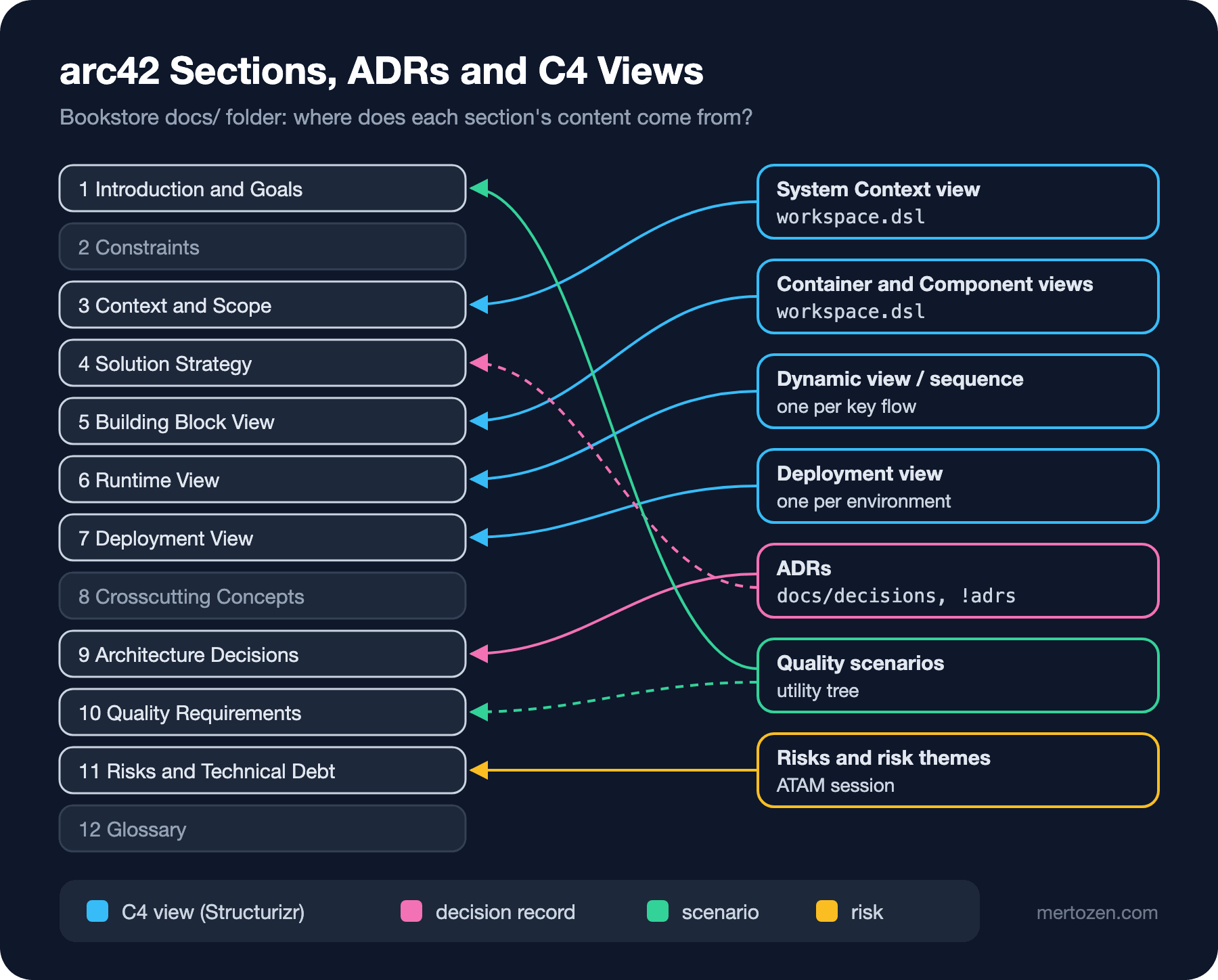
C4's System Context view is the diagram of arc42's Context and Scope section; the Container and Component views are the first and second level of the Building Block View; dynamic views or UML sequence diagrams are the Runtime View; deployment views are the Deployment View. The ADRs fill the Architecture Decisions section, while Solution Strategy summarizes the few most important ADRs and links to them (the dashed arrow in the figure). The utility tree and scenarios from the third Introduction to Architecture post feed the quality goals in Introduction and Goals and the Quality Requirements section, and the risks and risk themes from the ATAM (Architecture Tradeoff Analysis Method) session in an earlier post feed Risks and Technical Debt. The grey sections (Constraints, Crosscutting Concepts, Glossary) are written by hand.
There is an important detail in arc42's own definition of the ninth section: important decisions, unless they are described elsewhere. So if you keep your ADRs separately, this section does not copy them, it points to them. At Bookstore the whole section is three sentences:
## Architecture Decisions

Decisions are recorded as MADR files in `docs/decisions` and imported with
`!adrs`. This section only links the decisions that shaped the structure:
ADR-0003 (modular monolith) and ADR-0011 (outbox).
Docs as Code: Model, Documents and Decisions in One Repository
Docs as code means treating documentation like code: plain text (Markdown, AsciiDoc, DSL), the same repository as the code, the same branches, review through pull requests and automated checks in CI (Continuous Integration). The benefits are the benefits of code: you can diff it, who changed what and why is known, and the documentation can be updated in the same PR as the code change that could make it stale.
Two Structurizr directives take this approach to the model level. !docs attaches the Markdown files in a folder to the workspace as documentation, and !adrs does the same for ADRs. Bookstore's workspace.dsl:
workspace "Bookstore" "Online bookstore: catalog, ordering, payment, shipping." {

    !identifiers hierarchical

    model {
        customer = person "Customer" "Searches books and places orders."
        support = person "Support Agent" "Looks up orders and resends e-mails."

        paymentProvider = softwareSystem "Payment Provider" "Authorizes and captures card payments." "External"
        emailProvider = softwareSystem "E-mail Provider" "Delivers transactional e-mail." "External"
        carrier = softwareSystem "Carrier API" "Creates shipping labels and tracking numbers." "External"

        bookstore = softwareSystem "Bookstore" "Sells books online." {
            !docs arc42
            !adrs decisions madr

            spa = container "Web App" "Catalog, cart and checkout UI." "Angular 22" "Browser"
            api = container "Bookstore.Web" "Modular monolith: Catalog, Ordering, Inventory, Payment, Shipping, Notification." "ASP.NET Core, .NET 10"
            db = container "Bookstore Database" "One schema per module." "SQL Server" "Database"
        }

        customer -> bookstore.spa "Searches and orders books" "HTTPS"
        support -> bookstore.spa "Finds orders" "HTTPS"
        bookstore.spa -> bookstore.api "Calls" "JSON/HTTPS"
        bookstore.api -> bookstore.db "Reads from and writes to" "EF Core"
        bookstore.api -> paymentProvider "Captures payments" "HTTPS"
        bookstore.api -> emailProvider "Sends order e-mails" "HTTPS"
        bookstore.api -> carrier "Creates shipments" "HTTPS"
    }

    views {
        systemContext bookstore "Context" {
            include *
            autolayout lr
        }

        container bookstore "Containers" {
            include *
            autolayout lr
        }

        styles {
            element "External" {
                background #999999
            }
            element "Database" {
                shape cylinder
            }
            element "Browser" {
                shape webbrowser
            }
        }
    }

    configuration {
        scope softwaresystem
    }
}
Three details are worth noticing. First, the directives are attached not to the workspace but to the bookstore software system, and the configuration block defines the workspace's scope as a single software system. In our first attempt we had put the directives at the workspace level; the inspect command reported that as an error. With no directives at all, the output was:
ERROR  | model.softwaresystem.documentation | The software system "Bookstore" has containers, but is missing documentation.
ERROR  | model.softwaresystem.decisions     | The software system "Bookstore" has containers, but is missing decisions.
exit code: 1
Second, !adrs only accepts a path in the folder of the DSL file or below it. To keep the docs/decisions path recommended by MADR (Markdown Architectural Decision Records), we put workspace.dsl at the root of docs/. The directive's second parameter selects the importer; the madr importer reads the status and date fields from the front matter. When we export the workspace as JSON (JavaScript Object Notation) and look at the decisions:
11  accepted  Order events through a transactional outbox
3  accepted  Start with a modular monolith
4  superseded by ADR-0011  Order e-mail through an in-process queue
7  rejected  Use PostgreSQL instead of SQL Server
A pitfall: the MADR 4.0 template suggests writing the status value in quotes in YAML (YAML Ain't Markup Language). When we wrote the same ADR as status: "superseded by ADR-0011", Structurizr took the quotes as part of the status and showed the decision with a quoted value. At Bookstore we write the status without quotes; for YAML both are a valid string.
Third, the arc42 sections do not copy diagrams, they embed them. The Context and Scope section:
## Context and Scope
Customers and support agents use the web app; Bookstore depends on three
external systems. Interfaces and owners are listed below the diagram.

| Partner | Interface | Owner |
|------------------|-------------------|------------------|
| Payment Provider | HTTPS, card API | Ordering & Payment |
| E-mail Provider | HTTPS | Customer Experience |
| Carrier API | HTTPS | Fulfillment | is an extension Structurizr adds to Markdown: it draws the view with the key Context live inside the document. Because the diagram is generated from the model, when a container's name changes the document changes too. This extension works in Structurizr's own UI; it is not visible when the file is opened as Markdown on GitHub. For those readers we use the Mermaid output generated in the section below.
Which Diagram for Which Reader
One reason Simon Brown split C4 into four levels is different readers. At Bookstore we wrote down who starts with which document:
| Reader | Where they look first | Why |
|---|---|---|
| New developer | Context and Container views, arc42 4 and 5, the decision log index | The parts of the system, the fundamental ideas and answers to "why is it like this?" |
| Ops | Deployment view, arc42 7, 8 and 11 | What runs where, shared concerns (logging, backups), known risks |
| Product and management | Context view, arc42 1, 10 and 11 | The system boundary, quality goals and risks from a business point of view |
| Another team | Context view, the API (Application Programming Interface) contract, the relevant ADRs | How to talk to our system and which decisions bind them |
The important detail in the table is that nobody reads all twelve sections. The Component view is read almost only by developers working in that module; we never draw the Code level, the IDE (Integrated Development Environment) already shows it. Before drawing a diagram, ask "who will read this, to answer which question?"; if there is no answer, the diagram is not needed either.
Preventing Staleness: Rendering in CI and Ownership
The most common problem with architecture diagrams is not that they are wrong but that they were right once. A PNG (Portable Network Graphics) file in the wiki was correct on the day it was drawn; then the system changed and the drawing did not. Docs as code does not solve this by itself, but it makes it checkable. Bookstore's CI script:
#!/usr/bin/env bash
# Architecture docs in CI: is the model valid, are inspections clean, are the committed diagrams current?
set -euo pipefail
run() { docker run --rm -v "$PWD/docs:/usr/local/structurizr" structurizr/structurizr "$@" -w /usr/local/structurizr/workspace.dsl; }

run validate
run inspect
run export -f mermaid -o /usr/local/structurizr/diagrams > /dev/null

if ! git diff --quiet -- docs/diagrams || [[ -n "$(git ls-files --others --exclude-standard docs/diagrams)" ]]; then
  echo "::error::docs/diagrams is out of date; run tools/check-docs.sh locally and commit the result"
  git status --short -- docs/diagrams
  exit 1
fi
echo "architecture docs are up to date"
The script validates the model, runs the inspections (inspect exits with exit code 1 when it finds errors), exports the diagrams as Mermaid into docs/diagrams and compares them with git. The committed Mermaid files can be diffed: the PR shows line by line what changed in the diagram. Mermaid is also a format GitHub renders inside Markdown; someone without access to Structurizr can still see the diagram. On the first run the diagrams did not exist yet:
::error::docs/diagrams is out of date; run tools/check-docs.sh locally and commit the result
?? docs/diagrams/
exit code: 1
After committing the generated files:
architecture docs are up to date
exit code: 0
The opening question: Alan's PR. validate and inspect pass, because the model is valid and follows the rules; what turns red is the comparison:
::error::docs/diagrams is out of date; run tools/check-docs.sh locally and commit the result
 M docs/diagrams/structurizr-Containers.mmd
exit code: 1
 docs/diagrams/structurizr-Containers.mmd | 24 ++++++++++++++----------
 1 file changed, 14 insertions(+), 10 deletions(-)
Only the Containers diagram changed. The Context diagram stayed the same, because Structurizr collapses the relationships from the customer to the system into a single arrow at context level, and that arrow already existed. This is correct behaviour, but it tells you something: the fact that "customers now come from their phones too" is not visible in the Context diagram. If you want it to be visible, you have to change the relationship's description; CI can only check that the model and the diagrams are consistent, not whether what the model says is enough.
The workflow that runs the script on every PR is short; we ran the script and the scenarios locally, and did not run the workflow on GitHub for this post:
name: architecture-docs
on:
  pull_request:
    paths: ["docs/**"]

jobs:
  docs:
    runs-on: ubuntu-latest
    steps:
      - uses: actions/checkout@v7
      - run: ./tools/check-docs.sh
Beyond the automated check, an ownership rule is needed too. Bookstore has three rules. A PR that adds or removes a container, or introduces a new relationship between two containers, also changes workspace.dsl; the review asks about it. The docs/ folder falls under the CODEOWNERS rule from the second post. In the monthly architecture review (the topic of the last post) the Context and Container views get five minutes: "is this still true?"
How Much Documentation Is Enough?
arc42's own FAQ (Frequently Asked Questions) also advises against filling in everything, and suggests writing only the sections stakeholders really need, asking them one by one. For a team of three developers our minimum is: the Context and Container views, the decision log, and sections 1, 3, 4, 9, 10 and 11 of arc42. A few pages in total. The Deployment View is written when there are two environments; the Runtime View when a flow appears that nobody can explain alone.
Documentation has a cost too, and the cost is maintenance. Every diagram and every section is something that has to be updated as the system changes. A section without readers turns into a section without maintenance, and from there into a wrong section. Little but current is always better than much but stale.
Common Pitfalls
Drawing diagrams by hand instead of from a model. The same container ends up with two different names in two separate drawings and nobody knows which is right. Define the element once, generate the views from the model.
Copying decisions into arc42. If the ninth section becomes a copy of the ADRs, then when an ADR is superseded two places have to be updated and one gets forgotten. Link, do not copy.
Not committing or not checking generated diagrams. A diagram generated only in CI and put into an artifact is not visible in the PR; a diagram that is committed but never checked goes stale. Do both.
Trusting a diagram because CI is green. The staleness check says the model and the outputs are consistent; not that the model describes the real system. In the mobile app example the Context diagram was consistent but told an incomplete story.
Giving every reader the same document. Sending the Component view to management and all of arc42 to a new developer pushes both to not read the document at all.
Getting stuck on tooling. arc42 can live in Word and C4 on a whiteboard. Docs as code is not a goal, it is a way to make staleness checkable.
A Small Experiment
★☆☆ Do the mapping in the figure for your own project: for each of arc42's twelve sections, where does its content live today (wiki, people's heads, code, nowhere)? Which is the most important section that lives nowhere?
★★☆ Add a deployment view to Bookstore's workspace.dsl (the production environment, two application instances and SQL (Structured Query Language) Server). Run check-docs.sh; is a new Mermaid file created, and does the script catch it as staleness?
★★★ Solve the problem of the Context diagram not showing "customers also come from their phones": which model change makes it visible? Then add a step to check-docs.sh that checks that every ADR in docs/decisions is mentioned in at least one of arc42's sections 4 or 9, or in another ADR.
The diagrams and the documentation are now checked together with the model. But the ADRs themselves are still left to human attention: who checks a decision that says "no breaking changes in the public API"? In the next post we turn MADR's Confirmation section into automated checks: OpenAPI diff, Angular budgets, migration reversibility, and a manual checklist for decisions that cannot be checked automatically.