

Span<T> and Memory<T> in C#: Allocation-Free Parsing, stackalloc and ref struct Rules
Copy-free slicing and allocation-free parsing with Span<T>, a measured allocation difference, stackalloc and its safe pattern, ref struct restrictions, and Memory<T> for async code.
Version note: The code in this post uses C# 10 and the .NET 6 APIs; it was built and run with the .NET 10 SDK.
Guess First
We have the stock counts of four books. We take the first two elements in two different ways: one with a range on the array, the other with a range on AsSpan(). Then we change one element in each. What do the two lines print?
int[] stock = { 5, 3, 8, 1 };

int[] copy = stock[..2];
copy[0] = 42;

Span<int> view = stock.AsSpan()[..2];
view[1] = 99;

Console.WriteLine(string.Join(", ", stock));
Console.WriteLine(string.Join(", ", copy));
Span<T>: A Window onto Memory
Output:
5, 99, 8, 1
42, 3
The two ranges look the same but do very different things. stock[..2] on the array creates a new array and copies two elements into it; copy[0] = 42 doesn't touch the original. stock.AsSpan()[..2] copies nothing. It gives you a window onto the first two elements of the same memory; view[1] = 99 changed the second element of stock directly.
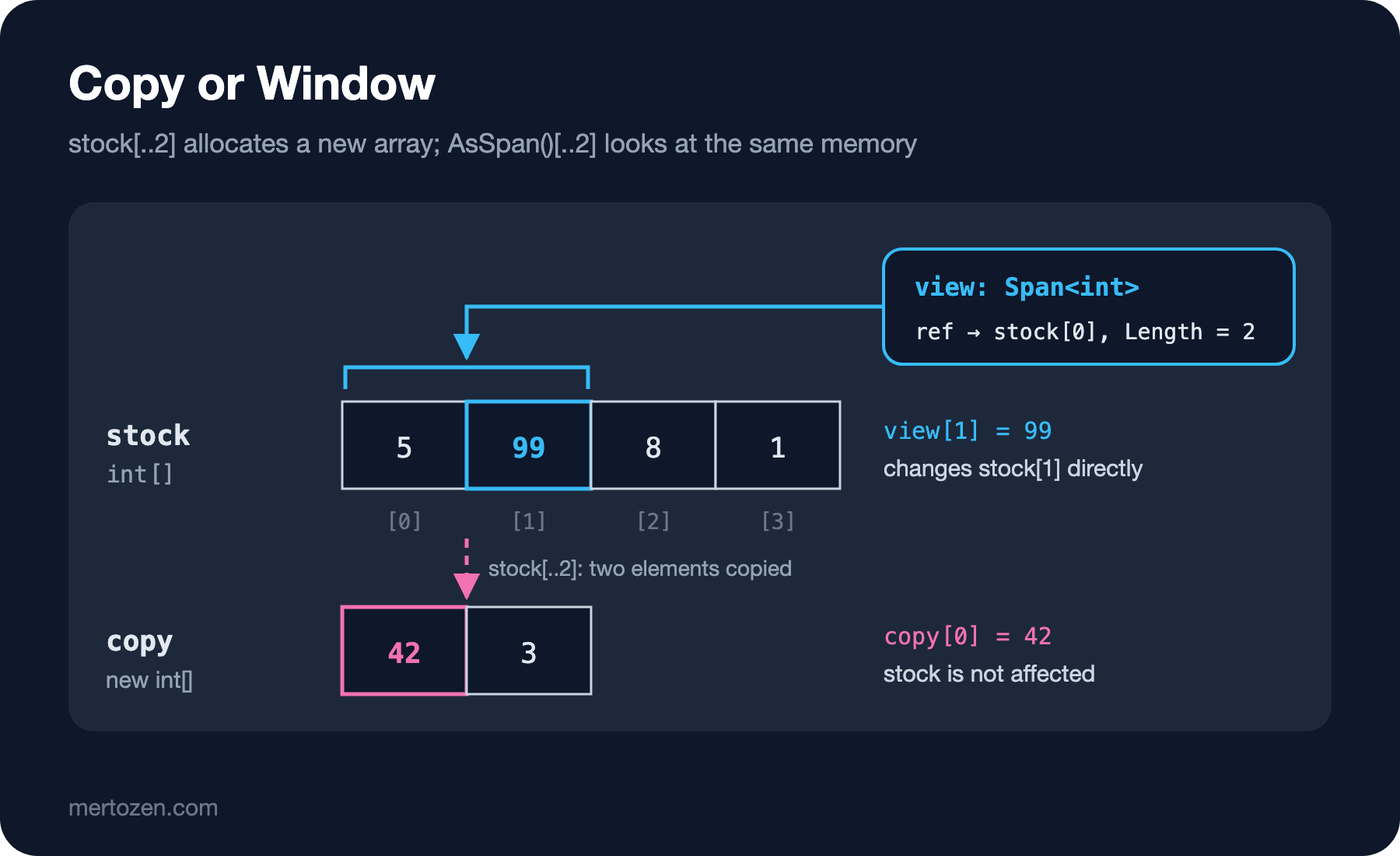
That is exactly what Span<T> is: a reference to a contiguous region of memory plus a length. Behind the window there can be a managed array, an area allocated on the stack with stackalloc, or native memory; the span doesn't care, and you reach all of them through the same API. The indexer, Slice, ranges, foreach, CopyTo, Fill and IndexOf all work without making copies. The read-only version is ReadOnlySpan<T>, and a string converts straight to ReadOnlySpan<char>.
An analogy: an array is a bookshelf. Substring or an array range photocopies some of the books and lines the copies up on a new shelf. A span is a ruler laid against part of the shelf. You can slide the ruler as much as you like and the photocopier never runs.
Splitting a String Without Copying
Parsing is where spans show up most. You want to split a line that came from a file or the network into its fields. The classic way is Split or Substring, and both produce a new string for every piece. Let's do the same job with ReadOnlySpan<char>:
using System.Globalization;

const string line = "978-0441013593;Dune;9.99;12";

ReadOnlySpan<char> rest = line;

int sep = rest.IndexOf(';');
ReadOnlySpan<char> isbn = rest[..sep];
rest = rest[(sep + 1)..];

sep = rest.IndexOf(';');
ReadOnlySpan<char> title = rest[..sep];
rest = rest[(sep + 1)..];

sep = rest.IndexOf(';');
decimal price = decimal.Parse(rest[..sep], NumberStyles.Number, CultureInfo.InvariantCulture);
int stock = int.Parse(rest[(sep + 1)..]);

Console.WriteLine($"isbn={isbn.ToString()} title={title.ToString()} price={price.ToString(CultureInfo.InvariantCulture)} stock={stock}");
Console.WriteLine(isbn.StartsWith("978"));
isbn=978-0441013593 title=Dune price=9.99 stock=12
Truerest is a window onto the rest of the line. At each step we find the separator with IndexOf and slide the window; isbn and title aren't new strings either, they are spans looking at parts of the original line. In .NET 6, methods like int.Parse, decimal.Parse, Guid.Parse and DateTime.Parse have overloads that take a ReadOnlySpan<char>; they read the number straight from the window without an intermediate string. Helpers like StartsWith, Trim and Contains come to spans as extension methods through MemoryExtensions.
Watch the ToString() calls: that is the one thing that turns a span into a string, and it allocates a new string every time. We only used it here to print. In real code the goal is to stay with spans until the last moment you actually need a string.
How Much Allocation Did We Save?
Saying "it doesn't copy" is easy; let's measure. We parse the same line a hundred thousand times both ways and count the bytes the thread allocated:
using System.Globalization;

const string line = "978-0441013593;Dune;9.99;12";
const int iterations = 100_000;

decimal total = 0;
ParseWithSplit(line);
ParseWithSpan(line);

long before = GC.GetAllocatedBytesForCurrentThread();
for (int i = 0; i < iterations; i++)
    total += ParseWithSplit(line);
long splitBytes = GC.GetAllocatedBytesForCurrentThread() - before;

before = GC.GetAllocatedBytesForCurrentThread();
for (int i = 0; i < iterations; i++)
    total += ParseWithSpan(line);
long spanBytes = GC.GetAllocatedBytesForCurrentThread() - before;

Console.WriteLine($"Split: {splitBytes / iterations} bytes per line");
Console.WriteLine($"Span:  {spanBytes / iterations} bytes per line");
Console.WriteLine(total.ToString(CultureInfo.InvariantCulture));

static decimal ParseWithSplit(string text)
{
    string[] parts = text.Split(';');
    decimal price = decimal.Parse(parts[2], CultureInfo.InvariantCulture);
    int stock = int.Parse(parts[3]);
    return price * stock;
}

static decimal ParseWithSpan(string text)
{
    ReadOnlySpan<char> rest = text.AsSpan();
    for (int skip = 0; skip < 2; skip++)
        rest = rest[(rest.IndexOf(';') + 1)..];

    int sep = rest.IndexOf(';');
    decimal price = decimal.Parse(rest[..sep], provider: CultureInfo.InvariantCulture);
    int stock = int.Parse(rest[(sep + 1)..]);
    return price * stock;
}
Split: 208 bytes per line
Span: 0 bytes per line
23976000.00Split allocated 208 bytes per line: a four-element string array and four new strings. The span version allocated zero. These numbers come from a program built with the .NET 10 SDK and run on the .NET 8.0.25 runtime with DOTNET_ROLL_FORWARD=Major (this machine has no .NET 6 runtime); the byte count can shift a little between runtimes, but zero stays zero. The two calls before the loops are a warm-up, so one-time allocations by the JIT and the culture data don't leak into the measurement.
208 bytes looks small. In an import job that processes tens of thousands of lines a second, or in middleware that parses a header on every request, it means the garbage collector runs all the time. The less you allocate, the less often the GC kicks in and the fewer latency spikes you get. Timing is a separate dimension; we'll do that with BenchmarkDotNet in this series' performance post.
stackalloc: Never Touching the Heap
Sometimes you need a small, temporary buffer: to format a number, to compute a checksum. stackalloc allocates that buffer on the stack instead of the heap; it disappears by itself when the method ends and the GC never hears about it. Since C# 7.2 you can assign the result directly to a Span<T>, with no unsafe needed:
using System.Globalization;

decimal[] prices = { 9.99m, 124.5m, 1250m };
Span<char> buffer = stackalloc char[32];

foreach (decimal price in prices)
{
    if (price.TryFormat(buffer, out int written, "F2", CultureInfo.InvariantCulture))
    {
        ReadOnlySpan<char> text = buffer[..written];
        Console.WriteLine($"{text.ToString()} ({written} chars)");
    }
}

Console.WriteLine(Checksum(10));
Console.WriteLine(Checksum(10_000));

static int Checksum(int length)
{
    const int StackLimit = 256;
    Span<byte> data = length <= StackLimit
        ? stackalloc byte[StackLimit]
        : new byte[length];
    data = data[..length];

    for (int i = 0; i < data.Length; i++)
        data[i] = (byte)(i % 7);

    int sum = 0;
    foreach (byte b in data)
        sum += b;
    return sum;
}
9.99 (4 chars)
124.50 (6 chars)
1250.00 (7 chars)
24
29994TryFormat writes the number into the given buffer without creating a string and returns the number of characters written through out. Most primitive types have it (int, decimal, DateTime, Guid); if the buffer is too small it returns false instead of throwing.
The pattern in Checksum matters. The stack is a limited area (usually a few megabytes; it depends on the operating system and the thread), and if it overflows the process dies with a StackOverflowException you can't catch. So when the size is only known at run time, you set a cap: small goes on the stack, large goes on the heap. Both branches give you a Span<byte>, so the rest of the code doesn't know the difference. You'll see this pattern a lot in .NET's own source code; for large buffers that are needed over and over, renting an array from ArrayPool<T>.Shared and using it as a span is a common alternative.
The Price of Being a ref struct
Span<T> is a ref struct. That means it can only live on the stack; it can't be put anywhere it might end up on the heap. Imagine a span pointing at a stack buffer still sitting in a class field after the method returned: it would point at memory that is no longer valid. The compiler forbids this up front:
var parser = new LineParser();
Console.WriteLine(parser);

public sealed class LineParser
{
    private ReadOnlySpan<char> _current;
}
Program.cs(6,13): error CS8345: Field or auto-implemented property cannot be of type 'ReadOnlySpan<char>' unless it is an instance member of a ref struct.For the same reason you can't capture a span in a lambda (a closure moves captured variables into a class on the heap), you can't convert it to object (boxing means heap), and in C# 10 you can't declare a span local in an async method (an async method's locals can also go to the heap with the state machine):
var reader = new IsbnReader();
await reader.ReadAsync();

public sealed class IsbnReader
{
    public async Task ReadAsync()
    {
        Span<char> local = stackalloc char[16];
        await Task.Delay(10);
        Console.WriteLine(local.Length);
    }

    public Func<int> Capture()
    {
        Span<char> local = stackalloc char[16];
        return () => local.Length;
    }

    public object Box()
    {
        Span<char> local = stackalloc char[16];
        return local;
    }
}
Program.cs(8,9): error CS8936: Feature 'ref and unsafe in async and iterator methods' is not available in C# 10.0. Please use language version 13.0 or greater.
Program.cs(16,22): error CS8175: Cannot use ref local 'local' inside an anonymous method, lambda expression, or query expression
Program.cs(22,16): error CS0029: Cannot implicitly convert type 'System.Span<char>' to 'object'The third error is interesting: the compiler says this restriction is relaxed in C# 13. With C# 13 you can declare a span local in an async method, but it can't be carried across an await. When I compiled the same code with C# 13, the error became CS4007: Instance of type 'System.Span<char>' cannot be preserved across 'await' or 'yield' boundary. We'll look at that detail in the C# Versions series; in C# 10 the rule is simple: no spans in async code.
Memory<T>: Span for the Async World
So what if you want to hand a buffer to an async method, or keep a slice of it in a class? That's what Memory<T> and ReadOnlyMemory<T> are for. They do what a span does (a reference to a region plus a length, slicing without copies), but they aren't ref structs, just ordinary structs; they can sit in a field, be a parameter of an async method and survive an await:
using System.Text;

var catalog = new MemoryStream(Encoding.UTF8.GetBytes("978-0441013593\n978-0141439518\n"));
var cache = new TitleCache();

byte[] buffer = new byte[64];
int read = await ReadChunkAsync(catalog, buffer);
Console.WriteLine($"read {read} bytes");

ReadOnlyMemory<byte> data = buffer.AsMemory(0, read);
cache.Remember(data[..14]);
Console.WriteLine(Encoding.UTF8.GetString(cache.First.Span));

static async Task<int> ReadChunkAsync(Stream stream, Memory<byte> destination)
{
    int total = 0;
    while (total < destination.Length)
    {
        int n = await stream.ReadAsync(destination[total..]);
        if (n == 0)
            break;
        total += n;
    }
    return total;
}

public sealed class TitleCache
{
    public ReadOnlyMemory<byte> First { get; private set; }

    public void Remember(ReadOnlyMemory<byte> isbn) => First = isbn;
}
read 30 bytes
978-0441013593The Stream.ReadAsync(Memory<byte>) overload takes the buffer as memory instead of a span, because the read lasts across an await. TitleCache keeps a ReadOnlyMemory<byte> in a property; we couldn't write that with a span. When it's time to do the real work, you switch to a span in a synchronous section through the .Span property. Memory is a bit heavier (it holds an object reference, a start index and a length) and has no indexer; to reach the elements you always go down to .Span.
Which One When
A short set of rules, both for your own code and for the APIs you write:
If a synchronous method reads a region, make the parameter type ReadOnlySpan<T>; if it writes, Span<T>. Then callers can pass an array, a string, a stackalloc buffer or a slice of another span to the same method. A method that takes string accepts only strings; a method that takes ReadOnlySpan<char> accepts all of them.
If the buffer has to cross an await or be stored in a field, use Memory<T> / ReadOnlyMemory<T>. Switch to .Span the moment you do the work inside.
Don't sprinkle spans all over your application code. A readable Split is perfectly fine in a place that runs a few times a second. Spans pay off on hot paths: parsers, serializers, code that runs on every request. Measure first, then optimize.
The UTF-8 literals that came with C# 11 ("abc"u8), list patterns on spans, and C# 14's implicit conversions that treat spans like first-class types in the language make this picture even more comfortable; we'll cover them in the C# Versions series.
Common Pitfalls
stackalloc inside a loop. Space allocated on the stack isn't given back until the method returns, not on every pass of the loop. In a loop with a hundred thousand passes, even a 32-character buffer can fill the stack. The analyzer catches it:
using System.Globalization;

decimal[] prices = { 9.99m, 124.5m, 1250m };

foreach (decimal price in prices)
{
    Span<char> buffer = stackalloc char[32];
    if (price.TryFormat(buffer, out int written, "F2", CultureInfo.InvariantCulture))
        Console.WriteLine(buffer[..written].ToString());
}
9.99
124.50
1250.00The fix is what the earlier example does: allocate the buffer once outside the loop and reuse it on every pass.
Changing the memory behind a stored window. Memory and spans are views, not copies. If you reuse the buffer behind them, the stored slice changes too:
using System.Text;

byte[] buffer = Encoding.UTF8.GetBytes("978-0441013593");
ReadOnlyMemory<byte> remembered = buffer.AsMemory(0, 3);
Console.WriteLine(Encoding.UTF8.GetString(remembered.Span));

Encoding.UTF8.GetBytes("979").CopyTo(buffer, 0);
Console.WriteLine(Encoding.UTF8.GetString(remembered.Span));

string a = "Dune";
string b = string.Concat("Du", "ne");
Console.WriteLine(a.AsSpan() == b.AsSpan());
Console.WriteLine(a.AsSpan().SequenceEqual(b));
Console.WriteLine(a.AsSpan()[..2] == a.AsSpan()[..2]);
978
979
False
True
TrueThe first two lines show that remembered "sees" the change in the buffer. If you store a slice of a buffer rented from ArrayPool and return the buffer, the same thing happens, with another request's data. If you need to keep it, copy it (ToArray()).
The last three lines are the second pitfall: on spans, == doesn't compare contents; it checks whether both point to the same memory with the same length. a and b have the same content but are different strings, hence False. To compare contents, use SequenceEqual (or the Equals overload that takes a StringComparison).
Calling ToString() without noticing. If you parse with spans and then put every field into a DTO with ToString(), you're allocating close to what Split allocated anyway. The gain comes from fields that never need to be strings at all (numbers, dates, comparisons).
A Small Experiment
★☆☆ Add a step to ParseWithSpan that checks whether the ISBN starts with "978". Repeat the measurement; does the bytes-per-line number change?
★★☆ Write static decimal SumPrices(ReadOnlySpan<char> text), which sums a comma-separated price list ("9.99,12.50,7.25") without allocating a single string. Prove it allocates nothing with GC.GetAllocatedBytesForCurrentThread().
★★★ Write a method that reads lines from a Stream and collects the first field of each line (the ISBN) as a ReadOnlyMemory<char> in a list. Then remember the example in the pitfalls section: what do you see in the list when you reuse the buffer? Where does the correct solution need a copy?
We've seen how a span gives copy-free access to parts of a region. The language features underneath it, returning and passing a reference to a value instead of copying it, are the topic of the next post: ref returns, ref locals, in parameters, readonly refs and ref struct itself.