

Correlation IDs and Trace Context: Linking Every Log of a Request from the API to the Queue
The way to link every log of a request is to write the TraceId from the W3C traceparent on every log line. ASP.NET Core and HttpClient do it on their own; across a queue and a BackgroundService the chain breaks and must be carried manually with DistributedContextPropagator. ActivityTrackingOptions, Serilog, baggage, X-Correlation-ID, a support code on the error screen and one Seq query, with real output.
Version note: The code in this post was built and run with .NET 10, Serilog.AspNetCore 10.0, Serilog.Sinks.Seq 9.1, Seq.Extensions.Logging 9.0 and Seq 2026.1; the Angular interceptor was type-checked with Angular 22.2 and TypeScript 6.0.
Guess First
In Bookstore, one order produces logs in three places: Bookstore.Api, which receives the order; the Bookstore.Billing service, which issues the invoice; and a BackgroundService fed from a queue, which schedules shipping. Without writing any extra code, with only the default ASP.NET Core and HttpClient settings, do you see a shared value in the logs of these three places? If you do, which ones are linked and which one is left out? And if the client sends its own traceparent header, does the API (Application Programming Interface) use it or generate a new id?
Activity, TraceId and SpanId
The foundation of distributed tracing in .NET is System.Diagnostics.Activity. An Activity represents the duration of a piece of work and carries two identities: a 16-byte TraceId that stays the same for the whole journey, and an 8-byte SpanId that belongs to each step. A step's ParentId is the SpanId of the step that started it. ASP.NET Core starts an Activity for every incoming request; during that request Activity.Current points to it.
These identities travel between services in the traceparent header of the W3C (World Wide Web Consortium) Trace Context standard. Its format is 00-{trace-id}-{parent-id}-{flags}: version, a 32-hex-character trace id, a 16-hex-character parent span id and the sampling flag. What matters for logging is this: if every log line carries the TraceId, you can gather every log of a request across every service with one query. Span and metric design, meaning the trace itself, is the subject of the upcoming DevOps › Observability series. Here we use trace context only to link logs together.
Adding the TraceId to Logs: ActivityTrackingOptions
The logging setup of Bookstore.Api:
WebApplicationBuilder builder = WebApplication.CreateBuilder(args);
builder.Logging.ClearProviders();
builder.Logging.AddSimpleConsole(o => o.IncludeScopes = true);
builder.Logging.Configure(o => o.ActivityTrackingOptions =
    ActivityTrackingOptions.TraceId | ActivityTrackingOptions.SpanId |
    ActivityTrackingOptions.ParentId | ActivityTrackingOptions.Baggage);
builder.Logging.AddFilter("System.Net.Http.HttpClient", LogLevel.Warning);
builder.Logging.AddSeq("http://localhost:17481");
ActivityTrackingOptions tells the logger factory "add these pieces of the current Activity to every log as a scope". The WebApplication builder already turns on TraceId, SpanId and ParentId by default; in my first run, without configuring anything, those three fields were in the Scopes array of the JSON (JavaScript Object Notation) console output. I wrote the list explicitly to add Baggage. Because the values arrive as scopes, IncludeScopes must be on for the console. The real output of an order request:
info: Bookstore.Api.Orders[0]
      => SpanId:470b9d1fa575bdc7, TraceId:fcee41938107cef33c87cce0271e3c46, ParentId:0000000000000000 => correlation.id:web-7f3c2a91 => ConnectionId:0HNPT7IDJRVON => RequestPath:/orders RequestId:0HNPT7IDJRVON:00000001
      Order 01a1b8e6-493e-7b1b-8995-fffa3c82477f placed for customer 42
A ParentId of all zeros says this request is the first link of a chain: the client didn't send a traceparent, so the API generated the TraceId. correlation.id comes from baggage; we'll get back to it shortly.
Let me also explain the System.Net.Http.HttpClient filter. With the default settings, IHttpClientFactory writes four Information lines for every outgoing call ("Start processing", "Sending", "Received headers", "End processing"). Since the TraceId is already on every line, those four lines are mostly noise in production.
Continuing an Incoming traceparent
Now the client sends its own trace context:
curl -i -H 'Content-Type: application/json' \
  -H 'traceparent: 00-4bf92f3577b34da6a3ce929d0e0e4736-00f067aa0ba902b7-01' \
  -d '{"customerId":42,"isbn":"978-0135957059","quantity":1}' http://localhost:17430/orders

HTTP/1.1 201 Created
X-Trace-Id: 4bf92f3577b34da6a3ce929d0e0e4736
info: Bookstore.Api.Orders[0]
=> SpanId:ddc57f680e1ee066, TraceId:4bf92f3577b34da6a3ce929d0e0e4736, ParentId:00f067aa0ba902b7 => ConnectionId:0HNPT7IDJRVOO => RequestPath:/orders RequestId:0HNPT7IDJRVOO:00000001
Order 01a1b8e6-4971-7a93-b510-926197590279 placed for customer 42ASP.NET Core read the header, took over the TraceId as is, made the client's span the ParentId and generated its own new SpanId. We didn't write a single line of code for that. That's the answer to the second question: if a valid traceparent arrives, the API doesn't start a new trace; it continues the existing one.
There's a security side to this. Any request from the internet can choose your TraceId. That's usually fine, but you shouldn't use the TraceId as an authorization or uniqueness key; it's for correlation only.
Carrying It to Another Service with HttpClient
Bookstore.Billing uses Serilog. Serilog 4 takes the TraceId and SpanId from Activity.Current itself when it creates the log event; writing them into the output template is enough:
Log.Logger = new LoggerConfiguration()
    .MinimumLevel.Information()
    .MinimumLevel.Override("Microsoft.AspNetCore", Serilog.Events.LogEventLevel.Warning)
    .WriteTo.Console(outputTemplate: "[{Timestamp:HH:mm:ss} {Level:u3}] {TraceId} {SpanId} {Message:lj}{NewLine}{Exception}")
    .WriteTo.Seq("http://localhost:17481")
    .CreateLogger();
The endpoint also logs the incoming headers so we can see what was carried:
app.MapPost("/invoices", (InvoiceRequest request, HttpRequest http, ILoggerFactory loggerFactory) =>
{
    Microsoft.Extensions.Logging.ILogger logger = loggerFactory.CreateLogger("Bookstore.Billing.Invoices");
    logger.LogInformation("Incoming traceparent {TraceParent}, baggage {Baggage}",
        http.Headers.TraceParent.ToString(), http.Headers.Baggage.ToString());
    if (request.Amount > 1000)
    {
        throw new InvalidOperationException($"Invoice limit exceeded for order {request.OrderId}");
    }
    logger.LogInformation("Invoice created for order {OrderId}, amount {Amount}", request.OrderId, request.Amount);
    return Results.Ok();
});
The API's BillingClient is an ordinary typed HttpClient; there's nothing trace-related in it. Billing's console:
[05:04:22 INF] fcee41938107cef33c87cce0271e3c46 9036081b143eab36 Incoming traceparent 00-fcee41938107cef33c87cce0271e3c46-3105afa4d82a1e36-00, baggage correlation.id = web-7f3c2a91
[05:04:22 INF] fcee41938107cef33c87cce0271e3c46 9036081b143eab36 Invoice created for order 01a1b8e6-493e-7b1b-8995-fffa3c82477f, amount 91.0
The TraceId is the same as in the API. One notable detail: the parent id in the incoming traceparent is 3105afa4d82a1e36, not the API's SpanId 470b9d1fa575bdc7. That's because HttpClient opens its own Activity for the outgoing request and writes that Activity's SpanId into the header. The chain is API → HttpClient → Billing, three links.
Baggage is a set of key-value pairs carried along with the trace. In .NET 10 the default of DistributedContextPropagator.Current became the W3C propagator; baggage now travels in the W3C baggage header instead of the non-standard Correlation-Context. If a service that talks to older versions can't read the baggage, this change may be the reason; you can return to the old behavior with DistributedContextPropagator.CreatePreW3CPropagator().
Carrying It into a Queue and a BackgroundService
In an HTTP (HyperText Transfer Protocol) call this happens on its own, but when a message is written to a queue the chain breaks: the consumer has neither an incoming request nor an Activity.Current. In this example I use an in-process Channel<OrderMessage> instead of a queue; the logic is the same with RabbitMQ or Kafka, where the message headers are the carrier. We'll see it with real brokers in the upcoming Message Queue series.
On the producer side we do what HttpClient does:
// we do for the message what HttpClient does: traceparent and baggage go into the headers
Dictionary<string, string> headers = [];
DistributedContextPropagator.Current.Inject(Activity.Current, headers,
    static (carrier, name, value) => ((Dictionary<string, string>)carrier!)[name] = value);
await shippingQueue.Writer.WriteAsync(new OrderMessage(orderId, headers), ct);
On the consumer side we read the headers and attach a new Activity to that parent:
public sealed class ShippingWorker(Channel<OrderMessage> queue, ILogger<ShippingWorker> logger) : BackgroundService
{
    protected override async Task ExecuteAsync(CancellationToken stoppingToken)
    {
        await foreach (OrderMessage message in queue.Reader.ReadAllAsync(stoppingToken))
        {
            DistributedContextPropagator propagator = DistributedContextPropagator.Current;
            propagator.ExtractTraceIdAndState(message.Headers, ReadHeader, out string? traceParent, out string? traceState);

            using Activity activity = new("Shipping.Process");
            if (traceParent is not null)
            {
                activity.SetParentId(traceParent);
                activity.TraceStateString = traceState;
            }
            foreach ((string key, string? value) in propagator.ExtractBaggage(message.Headers, ReadHeader) ?? [])
            {
                activity.AddBaggage(key, value);
            }
            activity.Start();

            logger.LogInformation("Shipment scheduled for order {OrderId}", message.OrderId);
        }
    }

    private static void ReadHeader(object? carrier, string name, out string? value, out IEnumerable<string>? values)
    {
        values = null;
        ((Dictionary<string, string>)carrier!).TryGetValue(name, out value);
    }
}
I used new Activity(...) here instead of ActivitySource.StartActivity. The reason: ActivitySource returns null when no listener is subscribed to it (that is, when nothing like OpenTelemetry is set up), and then no TraceId reaches the log. If OpenTelemetry tracing is on in your project, use ActivitySource with ActivityKind.Consumer; if not, a manually created Activity is enough for log correlation. The worker's output:
info: Bookstore.Api.ShippingWorker[0]
      => SpanId:038e75be855957b0, TraceId:fcee41938107cef33c87cce0271e3c46, ParentId:470b9d1fa575bdc7 => correlation.id:web-7f3c2a91
      Shipment scheduled for order 01a1b8e6-493e-7b1b-8995-fffa3c82477f
Same TraceId, the ParentId is the API request's SpanId, and the correlation.id in baggage arrived with the message too. Here's the answer to the first question: had we done nothing, the API and Billing would be linked, but the worker's log would have no TraceId at all, because there's no Activity around a message read from the Channel.
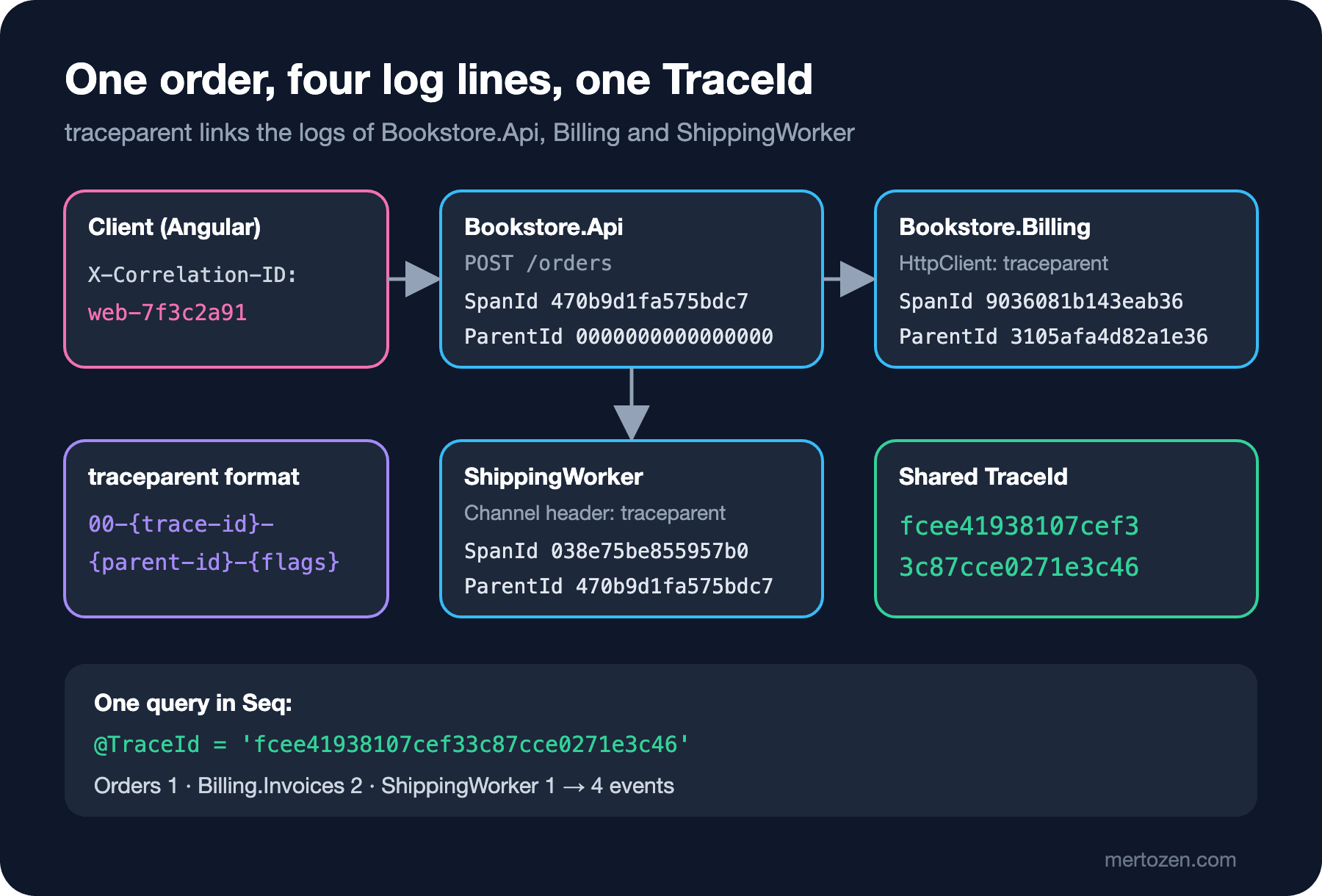
Since both apps write to Seq, I can see the whole chain with one query. The query I sent to Seq's HTTP API and its real result:
select count(*) from stream where @TraceId = 'fcee41938107cef33c87cce0271e3c46' group by SourceContext

{"Columns":["SourceContext","count(*)"],"ColumnMetadata":{},"Rows":[["Bookstore.Api.Orders",1],["Bookstore.Billing.Invoices",2],["Bookstore.Api.ShippingWorker",1]],"Statistics":{"ElapsedMilliseconds":1.0147}}
Two different logging libraries (Microsoft.Extensions.Logging on one side, Serilog on the other), two processes and a queue; four events, one TraceId. The details of Seq's query language are in this series' "Reading Structured Logs with Seq" post.
X-Correlation-ID or traceparent?
Many projects have an X-Correlation-ID header written before the W3C standard. Do the two do the same job? Partly. traceparent builds a technical chain: who called whom, which step is the child of which. A correlation id is more of a business-side label: "this click by the user on this screen". One user action may produce several HTTP requests; each request gets its own trace, but they can all carry the same correlation id.
My recommendation: in new systems use traceparent as the identity and don't invent your own header. If an old client or an external partner sends X-Correlation-ID, don't lose it; put it into baggage:
app.Use(async (context, next) =>
{
    string? correlationId = context.Request.Headers["X-Correlation-ID"];
    if (correlationId is { Length: > 0 and <= 64 } && correlationId.All(c => char.IsAsciiLetterOrDigit(c) || c == '-'))
    {
        // baggage travels to the next service through HttpClient on its own
        Activity.Current?.AddBaggage("correlation.id", correlationId);
    }

    context.Response.OnStarting(() =>
    {
        context.Response.Headers["X-Trace-Id"] = Activity.Current?.TraceId.ToString();
        return Task.CompletedTask;
    });
    await next();
});
The header comes from outside, so I check its length and characters. An unchecked value enters the log, goes to Billing as baggage, and a 10 KB header can be copied into every log line. Don't forget the log injection risk either: a value with a newline character can look like a fake line in a plain-text log file. Use baggage only for correlation; don't put personal data or authorization information into it, because it travels to every next service in plain text.
Showing the Error Code to the User
Correlation pays off most when a user calls support saying "I can't place an order". The response the API returns when Billing exceeds the invoice limit:
HTTP/1.1 500 Internal Server Error
Content-Type: application/problem+json
X-Trace-Id: 99b632033749266ba7154b5b4654ab5a

{"type":"https://tools.ietf.org/html/rfc9110#section-15.6.1","title":"An error occurred while processing your request.","status":500,"traceId":"00-99b632033749266ba7154b5b4654ab5a-157e997fe467c64a-00"}
AddProblemDetails already adds a traceId to the response, but in the full traceparent format. The X-Trace-Id my middleware adds is only the TraceId; it's exactly the value the support team pastes into Seq. If the error screen shows "Support code: 99b632033749266ba7154b5b4654ab5a", the phone call turns from "I got an error last night" into a single query. Global error handling itself is in the ASP.NET Core Web API series post "Global Error Handling: Exception Middleware and ProblemDetails".
On the client side, Angular's functional interceptor adds a correlation id to every API request and reads the support code when something fails:
import { HttpErrorResponse, HttpInterceptorFn } from '@angular/common/http';
import { catchError, throwError } from 'rxjs';

export const correlationIdInterceptor: HttpInterceptorFn = (req, next) => {
  if (!req.url.startsWith('/api/')) {
    return next(req);
  }

  const correlationId = `web-${crypto.randomUUID().slice(0, 8)}`;
  return next(req.clone({ setHeaders: { 'X-Correlation-ID': correlationId } })).pipe(
    catchError((error: HttpErrorResponse) => {
      const traceId = error.headers?.get('X-Trace-Id') ?? 'unknown';
      console.error(`Request failed. Support code: ${traceId} (correlation ${correlationId})`);
      return throwError(() => error);
    })
  );
};
The interceptor is registered with provideHttpClient(withInterceptors([correlationIdInterceptor])). I ran this code through tsc --noEmit with Angular 22.2 and TypeScript 6.0, but didn't run it in a browser; the web-7f3c2a91 value above was sent with curl in the same format. If the frontend is on a different origin, two settings are required: the CORS (Cross-Origin Resource Sharing) policy must allow the X-Correlation-ID request header and expose X-Trace-Id with WithExposedHeaders; otherwise the browser doesn't show the header to JavaScript. CORS setup itself is in the Web API series post "CORS and Security".
In Production
The cost of putting the TraceId on every log is very low; scopes are created on every log call anyway. The real cost is the size of the log line: in the simple console output above, the scope line is longer than the message itself. In JSON output the Scopes array repeats on every event. If you use an output that carries the TraceId as a separate field, such as Serilog or OTLP (OpenTelemetry Protocol), that repetition disappears; we'll see that in this series' "Serilog Sinks" post.
Watch the sampling flag: the last two characters of traceparent (-00 or -01) say whether the trace is recorded. If you use trace-based sampling for logs (in this series' "Log Levels and Cost" post), the logs of requests whose flag is 00 can be dropped too. Blindly trusting the flag the client sends is therefore a cost decision.
In long-running batch jobs, thousands of logs can attach to a single TraceId. Opening a new Activity per record or per batch keeps both the query and the trace view readable.
Common Pitfalls
First, assuming work started with Task.Run or fire-and-forget carries the request's Activity. Activity.Current is an AsyncLocal; Task.Run copies it, but when the request ends that Activity has been stopped, and hours later the work still logs with the old TraceId. Carry trace context into background work explicitly, like a message.
Second, generating your own correlation id and ignoring traceparent. You end up with two separate identity systems; one shows up in the logs, the other in the tracing tool, and you need a separate table to map them.
Third, writing the incoming traceparent in the consumer only as a log property instead of an Activity. Then the consumer's own logs and the HTTP calls it makes continue with a new TraceId; the chain breaks again one step later.
Fourth, using baggage as a data channel. It travels to every service, on every request, in plain text; as it grows, every call gets slower.
A Small Experiment
★☆☆ Remove the ActivityTrackingOptions line entirely and run the app again. Which fields still show up in the console, and which one disappeared? Then add the Tags option and see what changes.
★★☆ Remove the extract code from ShippingWorker and leave only new Activity("Shipping.Process").Start(). Run the same @TraceId query in Seq and count how many events come back.
★★★ Add a second HTTP call from the worker to Billing (for example a shipping-fee invoice). Verify that the TraceId stays the same in Billing's log and that the parent id in traceparent is not the worker's SpanId but the SpanId of the HttpClient Activity inside the worker.
Our logs are now linked, but we haven't yet looked at what's inside them. In the next post we look at the dangerous side: passwords, tokens, emails and card data that end up in logs; data classification with Microsoft.Extensions.Compliance.Redaction, redaction with [LogProperties], values masked by the HMAC (Hash-based Message Authentication Code) redactor that still allow correlation, and a test that verifies there's no email in the log.