

Caching Strategy: What to Cache, at Which Layer and for How Long
A caching decision starts with measurement: in Bookstore the category menu, with 2 queries per request and a 19.9 ms p95, was the only real candidate, and HybridCache cut p95 to 3.2 ms and 4,000 queries to 0, while the cheap, per-user cart should not be cached. TTL is derived from freshness requirements, and each layer's invalidation owner is decided up front.
Version note: The code in this post was built and run with .NET 10; the examples ran with Entity Framework Core (EF Core) 10.0.14 (SQLite) and Microsoft.Extensions.Caching.Hybrid 10.11.0.
Guess First
Bookstore's storefront API (Application Programming Interface) has three endpoints: the category menu at the top of every page, a category's book list, and the signed-in user's cart. The team says "we're slow, let's add a cache" and plans to put Redis in front of all three. They don't have a single measurement yet.
Two questions. First: which of these three endpoints actually benefits from caching, and which one only adds risk? Second: we cached the menu with HybridCache and the app has just started, so the cache is empty. 2,000 requests arrive over 50 concurrent connections. How many SQL (Structured Query Language) commands reach the database?
Where This Series Starts
This series is about the .NET side of caching: which API to use, with which settings, and which cost you accept knowingly. The basics are already covered elsewhere. In the ASP.NET Core Web API series, "Caching in ASP.NET Core Web API: IMemoryCache, Redis and Response Caching" covered absolute and sliding expiration, delete-on-write and a first look at Redis; "What's New in ASP.NET Core with .NET 7: MapGroup, TypedResults, Rate Limiting and Output Caching" introduced output cache, and "What's New in .NET 9: Built-in OpenAPI, Scalar and HybridCache in ASP.NET Core" introduced HybridCache. The strategy side, that is the cache-aside, write-through and write-behind comparison, the relationship between TTL (Time to Live) and eviction, and the theory of stampedes, was covered library-independently in the System Design series post "Caching Strategies: Cache-Aside, Write-Through, Write-Behind and Cache Stampede". We won't repeat them here; this post sets up the decision framework we'll use throughout the series.
Every layer where a cache can sit on a request's path has a .NET counterpart and an "invalidation owner":
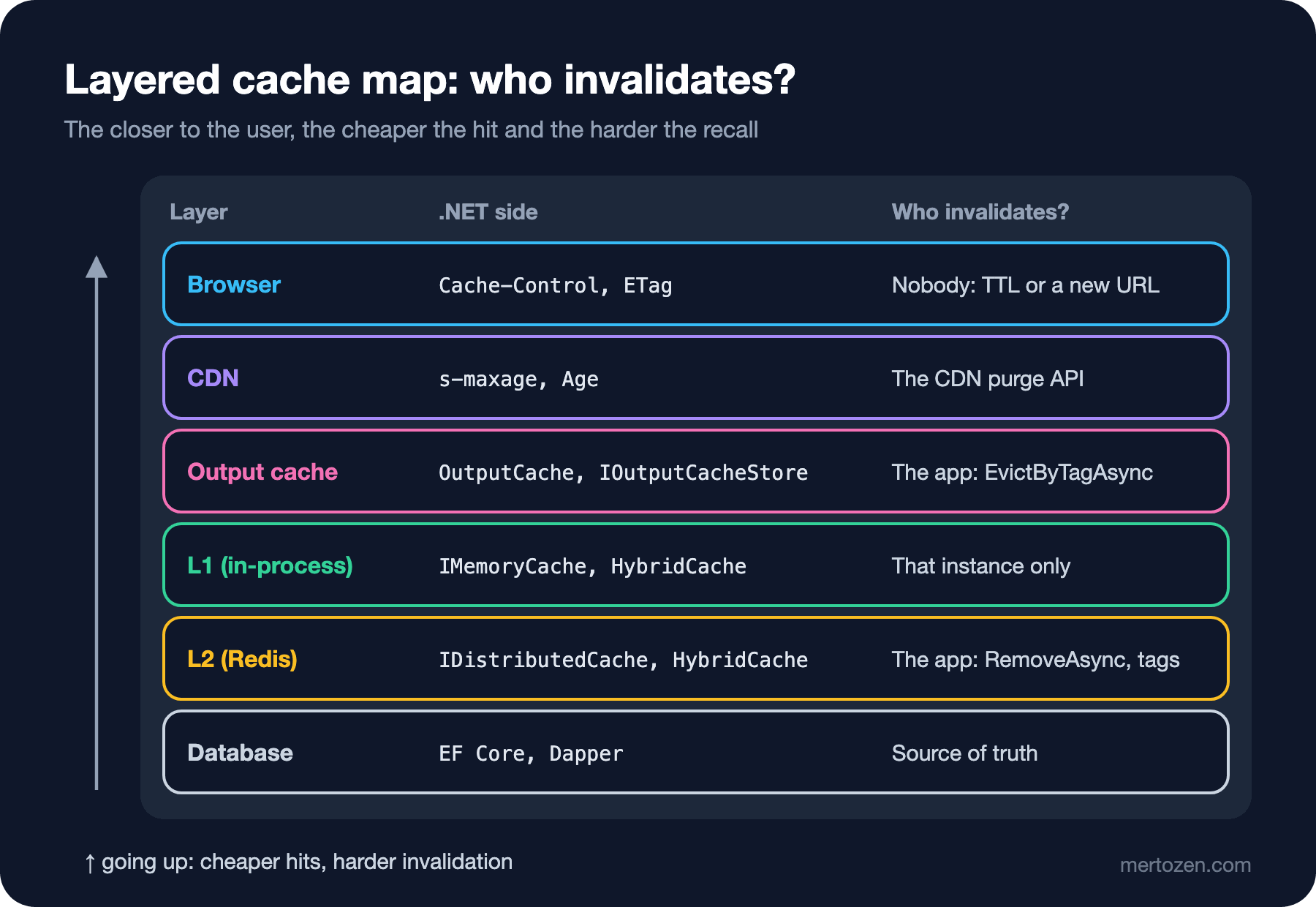
The most important column on the map is the last one. You can't recall a copy in the browser from the server; either it expires or you change the URL (Uniform Resource Locator). You remove a copy from a CDN (Content Delivery Network) only through the CDN's purge API, which belongs to the upcoming Domain, DNS (Domain Name System) and CDN series in the DevOps category. Your app clears the output cache and the L2 (level 2, the shared out-of-process cache) in Redis itself. L1 (level 1, the in-process cache) is the sneaky one: a key you remove on one instance lives on in the memory of the other instances. So when deciding which layer a piece of data goes into, first ask "who removes it when it changes?" If the answer is "nobody", the TTL is your consistency promise.
Measure First: p95 and Query Count
A caching decision starts with two numbers, not a guess: the endpoint's latency distribution (p50 and p95) and the number of commands each request sends to the database. For the second one an EF Core interceptor is enough:
// counts every SQL command; all you need to "measure first"
public sealed class QueryCounter : DbCommandInterceptor
{
    private int _count;
    public int Count => Volatile.Read(ref _count);
    public void Reset() => Interlocked.Exchange(ref _count, 0);

    public override ValueTask<DbDataReader> ReaderExecutedAsync(
        DbCommand command, CommandExecutedEventData eventData, DbDataReader result,
        CancellationToken cancellationToken = default)
    {
        Interlocked.Increment(ref _count);
        return base.ReaderExecutedAsync(command, eventData, result, cancellationToken);
    }
}
QueryCounter counter = new();
builder.Services.AddSingleton(counter);
builder.Services.AddDbContext<CatalogDb>(o => o
.UseSqlite("Data Source=bookstore.db")
.AddInterceptors(counter));Interceptors are covered in detail in the EF Core series post "EF Core Interceptors and Events: Audit Fields and Slow Query Logging". We read the counter from a /stats endpoint. A small console app generates the load: 50 concurrent workers send 2,000 requests in total, time each request with Stopwatch.GetTimestamp, then sort and print the percentiles. The database holds 80 categories, 50,000 books and the carts of 1,000 customers. The three uncached endpoints after a warm-up round:
/api/categories/menu             req=2000 rps=  4254 p50=  10.5ms p95=  19.9ms queries=4000
/api/books?category={cat}&page=1 req=2000 rps= 19078 p50=   2.5ms p95=   4.3ms queries=2000
/api/carts/{n}                   req=2000 rps= 21783 p50=   2.1ms p95=   4.1ms queries=2000
The table almost makes the decision for you. The menu runs two queries per request (the categories, plus a GROUP BY for the book count per category), its p95 is five times the others, and it is called on every page view. The book list and the cart come back in about 4 ms with a single indexed query. In real production you'd get these numbers from an APM (Application Performance Monitoring) tool or from OpenTelemetry metrics; in the ninth post of the series we'll measure the cache itself too. What matters is the order: measure first, then cache the most expensive and most frequently called thing, then measure again.
What to Cache, and What Never To
Four questions decide whether a piece of data is a good cache candidate: How much more often is it read than written? How expensive is it to produce? How many distinct keys does it generate? Who gets hurt, and how badly, by seeing an old version?
The category menu answers all four well: it's read on every page, changes a few times a month, is a single key, and a few minutes of staleness hurts nobody. The book list sits in the middle: 72 subcategories and dozens of pages, so thousands of keys, and the query is already cheap. Caching that list would take up memory without a measurable gain; if you really see slowness in the list, you fix the query first (the EF Core series post "EF Core Performance Basics: N+1, Projection, AsNoTracking and Compiled Queries") and think about caching later.
The cart is the textbook example of what not to cache. A separate key per customer, content that changes on every "add to cart" click, and a 4 ms query. If you cache it you must invalidate on every write; the day you forget one, a customer sees a book that isn't in their cart. The same logic applies to balances, stock and payment status: wherever the cost of a wrong value is higher than the cost of a slow value, there's no cache. Per-user and frequently changing data, a cheap query, a value that needs strong consistency: if any of these applies, think twice about caching.
Deriving TTL from Freshness Requirements
Don't pick a TTL because "10 minutes sounds fine". For each piece of data, ask the product owner: "After this value changes, for how long at most may a user see the old one?" The answer is the TTL's upper bound; invalidation is an extra mechanism that shortens it. The table that comes out for Bookstore:
| Data | Acceptable staleness | TTL | Invalidation |
|---|---|---|---|
| Category menu | Hours; immediately when an admin changes it | 30 min | By tag, in the admin endpoint |
| Book detail (title, description) | Minutes | 10 min | Delete on write |
| Price | Seconds during a campaign | 30–60 s | Price change event |
| Bestseller list | One hour | 15 min | None; refreshed in the background every 5 min |
| Stock, cart, payment status | Zero | No cache | Not needed |
The table has a side effect: the team ends up writing down the sentence "a price is at most 60 seconds stale". That sentence acts like an SLO (Service Level Objective); marketing plans the campaign start around it, and support knows the answer to "why is the price old?". TTL also has a memory side, but that's the next post's job, together with IMemoryCache's SizeLimit and eviction.
The .NET Counterparts of the Patterns
Knowing which code a strategy name turns into in .NET keeps the discussion concrete. The most common is cache-aside; HybridCache.GetOrCreateAsync does it in a single call and merges concurrent requests for the same key into a single factory call. The cached version of the menu:
app.MapGet("/api/categories/menu-cached", (CatalogDb db, HybridCache cache, CancellationToken ct) =>
    cache.GetOrCreateAsync(
        "v1:category-menu",
        async token => await MenuQuery.LoadAsync(db, token),
        new HybridCacheEntryOptions { Expiration = TimeSpan.FromMinutes(30), LocalCacheExpiration = TimeSpan.FromMinutes(30) },
        tags: ["category-menu"],
        cancellationToken: ct));
We restarted the app and sent the same load to the empty cache, then once more with the cache warm:
/api/categories/menu-cached      req=2000 rps=  8398 p50=   4.6ms p95=   8.2ms queries=2
/api/categories/menu-cached      req=2000 rps= 24814 p50=   1.9ms p95=   3.2ms queries=0
The answer to the guess: 2. All 2,000 requests that hit the empty cache asked for the same key, HybridCache ran the factory once, and that single run produced two SQL commands. With a warm cache, p95 dropped from 19.9 ms to 3.2 ms and the query count from 4,000 to 0. Had you done the same with IMemoryCache.GetOrCreateAsync, on an empty cache the factory would have run separately for every concurrent call that missed; Microsoft Learn states plainly that these two methods aren't atomic. Why, and how to fix it, is in the next post.
Refresh-ahead in .NET is a BackgroundService: the data is recomputed in the background and written to the cache before it expires, so a request never waits for the factory. The bestseller list fits, because it's expensive to compute and everybody sees the same list:
// refresh-ahead: the list is recomputed in the background before it expires, requests never wait
public sealed class BestsellerRefresher(IServiceScopeFactory scopes, HybridCache cache, ILogger<BestsellerRefresher> logger)
    : BackgroundService
{
    private static readonly HybridCacheEntryOptions Options = new()
    {
        Expiration = TimeSpan.FromMinutes(15),
        LocalCacheExpiration = TimeSpan.FromMinutes(15)
    };

    protected override async Task ExecuteAsync(CancellationToken stoppingToken)
    {
        using PeriodicTimer timer = new(TimeSpan.FromMinutes(5));
        do
        {
            try
            {
                using IServiceScope scope = scopes.CreateScope();
                CatalogDb db = scope.ServiceProvider.GetRequiredService<CatalogDb>();
                List<BookSummary> top = await db.Books.AsNoTracking()
                    .OrderByDescending(b => b.Sold).Take(10)
                    .Select(b => new BookSummary(b.Id, b.Title, b.Price))
                    .ToListAsync(stoppingToken);
                await cache.SetAsync("v1:bestsellers", top, Options, cancellationToken: stoppingToken);
                logger.LogInformation("Bestsellers refreshed: {Count} books, first {Title}", top.Count, top[0].Title);
            }
            catch (Exception ex) when (ex is not OperationCanceledException)
            {
                // if the refresh fails, the old list is served for another 15 minutes
                logger.LogError(ex, "Bestseller refresh failed");
            }
        } while (await timer.WaitForNextTickAsync(stoppingToken));
    }
}
info: BestsellerRefresher[0]
Bestsellers refreshed: 10 books, first Book 6943Making the expiration (15 min) three times the refresh interval (5 min) is deliberate: even if two refreshes fail in a row, the list keeps being served. Because DbContext is scoped, the singleton hosted service can't inject it directly; we open a new scope on each round. In a three-instance deployment this service runs on every instance and computes the same list three times; the distributed lock needed to run it on a single instance belongs to the upcoming Background Jobs series.
Write-through in .NET means putting the new value into the cache with SetAsync after writing to the database; write-behind means writing to the cache first and to the database later through a Channel or a queue. Both carry exactly the costs described in the System Design post, and neither beats cache-aside for any of Bookstore's data; we'll rarely see them in this series.
Deciding Who Owns Invalidation
Having a single path that changes the menu is the cheapest way to keep invalidation simple. The admin endpoint both updates the database and invalidates the menu's tag:
// this endpoint is the only path that changes the menu; invalidation lives here too
app.MapPut("/api/admin/categories/{id:int}", async (int id, RenameCategory body, CatalogDb db, HybridCache cache, CancellationToken ct) =>
{
    int updated = await db.Categories.Where(c => c.Id == id)
        .ExecuteUpdateAsync(s => s.SetProperty(c => c.Name, body.Name), ct);
    if (updated == 0) return Results.NotFound();
    await cache.RemoveByTagAsync("category-menu", ct);
    return Results.NoContent();
});
$ curl -s localhost:17501/api/categories/menu-cached | head -c 60
[{"id":1,"name":"Root 1","bookCount":6272,"children":[{"id":
$ curl -s -X PUT localhost:17501/api/admin/categories/1 -H 'Content-Type: application/json' -d '{"name":"Fiction"}' -w "%{http_code}\n"
204
$ curl -s localhost:17501/api/categories/menu-cached | head -c 60
[{"id":1,"name":"Fiction","bookCount":6272,"children":[{"id"The v1: prefix in the key is an invalidation tool too: when the menu's JSON (JavaScript Object Notation) shape changes, the new version uses the key v2:category-menu, the old keys die on their own through TTL, and during a deployment old and new code never interpret the same key differently. This solution has a limit: RemoveByTagAsync affects the current instance's L1 and the shared L2, but it doesn't touch the copy in other servers' memory. For the menu that means up to 30 minutes of inconsistency; in the fourth post we'll measure it with two instances and see why a short L1 lifetime alone isn't enough.
In Production
The day you add a cache, add its measurements. Hit ratio, factory call count and database query count should sit side by side on a dashboard; these numbers also tell you when a cache should be removed. A key running at a 20 percent hit ratio spends memory, carries a consistency risk and gains almost nothing.
A cache going down must not take the app down. Microsoft Learn's in-memory caching page puts it clearly: an app should never depend on cached data. That's the beauty of cache-aside; without Redis you get slower, but you still give the right answer. This requires short Redis timeouts and catching the error to fall back to the database; details in the third and eighth posts.
Don't forget scale: the menu is a single key, but a key scheme like "category × page × sort × language" produces hundreds of thousands of entries in no time. Calculate the key count before deciding to cache.
Common Pitfalls
Caching without measuring. The source of slowness is often a single missing index or an N+1 query; a cache hides it, and the problem comes back the first time the cache empties.
Caching per-user data under a shared key. Forget to put the user's identity in the key and one user's cart shows up for another; that isn't a performance bug, it's a data leak.
Giving every piece of data the same TTL. A TTL is a freshness promise; the menu and the price can't share the same promise.
Not deciding who owns invalidation. If every path that changes the data (the admin panel, an import job, a hand-written SQL) is unaware of the cache, delete-on-write isn't enough; either route these paths through a single service or shorten the TTL to the acceptable staleness.
Writing refresh-ahead without error handling. An unhandled exception in the background loop stops the BackgroundService, and with the default behavior since .NET 6 it shuts down the host too; don't let the refresh die silently.
A Small Experiment
★☆☆ Run the measurement tool with 200 concurrent connections. How do the uncached menu's p95 and requests per second change? Why is the change much smaller for the cached menu?
★★☆ Cache the book list with HybridCache using a 1-minute TTL and repeat the same measurement. Is there a gain in p95? Calculate how many keys are created and decide whether the gain is worth the memory cost.
★★★ Change BestsellerRefresher's query to throw an exception on every call. After the first refresh, does the list keep being served for 15 minutes? What do you see in the logs, and how would you wire this error to an alert?
In this post we built the skeleton of the decision: measure first, pick the candidate with four questions, derive TTL from freshness, decide who owns invalidation. In the next post we go down to the lowest layer: IMemoryCache's SizeLimit, eviction and compaction rules, group invalidation with change tokens, and the hidden stampede in GetOrCreateAsync.