

Bounded Context: Same Word, Different Meanings, and Model Boundaries
A bounded context is an explicitly drawn boundary within which a model and its language apply; because a "book" is a work on sale in Catalog, physical copies in Inventory, a purchased line in Ordering, and a box in Shipping, you need four models instead of one giant Book class. Evans's definition, CS0104 with .NET's Timers, how a bounded context differs from a subdomain and a microservice, sizing, a Bounded Context Canvas for Ordering, and one schema per context with EF Core.
Version note: The code in this post was built and run with C# 14 and .NET 10.
Guess First
This is the Book class written in Bookstore's early years. The catalog screen, the warehouse screen, the order flow, and the carrier integration all use and change it:
namespace Bookstore.Legacy;

// One Book for everyone: Catalog, Inventory, Ordering, and Shipping all change this class
public class Book
{
    public int Id { get; set; }
    public string Isbn { get; set; } = "";
    public string Title { get; set; } = "";
    public string Author { get; set; } = "";
    public string Description { get; set; } = "";
    public decimal Price { get; set; }            // list price or the price in the order?
    public decimal? DiscountedPrice { get; set; }
    public int Stock { get; set; }                // on hand or available?
    public int ReservedStock { get; set; }
    public string? ShelfCode { get; set; }
    public decimal WeightKg { get; set; }
    public bool IsFragile { get; set; }
    public bool IsActive { get; set; }            // on sale? in stock? not discontinued?
    public DateTime? LastShippedAt { get; set; }
}
Three questions. When the warehouse lead says "we have 5 copies of Dune", is Stock 5, or 3 if 2 of them are reserved for an order? When the campaign manager takes a book off sale, IsActive becomes false; but if the warehouse sets the same property to false for a book that has run out, does the book automatically go back on sale when stock comes in again? And how many different teams or people asked for the last ten changes to this class? Guess your answers.
The Collapse of the One Giant Book Class
The honest answer to all three: nobody is sure. The warehouse screen reads Stock as "copies on hand", while checkout reads it as "copies available to sell". IsActive carries three different meanings, each set on a different screen; a book the campaign manager closed can be reopened by the warehouse screen during a stock intake. Is Price the catalog's list price, or the price in an order placed last week? When the price changes, does the total of old orders change too?
This class is not the product of bad intent; every team added what it needed in the nearest place. The problem is that the word "book" means different things in different corners of Bookstore. In his 2014 BoundedContext article, Martin Fowler describes the same situation with an example from an electricity utility: the word "meter" meant the connection between the grid and a location in one unit, the connection between the grid and a customer in another, and the physical device that could be replaced in yet another. Fowler calls such words polysemes; in conversation context sorts them out, but in software, which demands precision, they cause confusion.
The cost of insisting on one model grows over time. Every new need adds another property, every property leaks one team's rule into another's, and one team's change breaks another team's flow. Evans's DDD (Domain-Driven Design) Reference says it plainly: multiple models are inevitable on large projects, but when code based on distinct models is combined, software becomes buggy, unreliable, and hard to understand.
Evans's Definition: The Boundary Where a Model Applies
The definition in the Reference is short: a bounded context is a description of a boundary (typically a subsystem, or the work of a particular team) within which a particular model is defined and applicable. The pattern's advice has three parts. Explicitly define the context within which a model applies. Explicitly set boundaries on three planes: team organization, usage within specific parts of the application, and physical manifestations such as code bases and database schemas. Keep model concepts and terms strictly consistent within these bounds, but don't be distracted by issues outside.
That last part is often missed. A bounded context also grants permission: the Catalog team does not have to model a book's weight, and the Shipping team does not have to model its description. Each context builds just enough model for its own questions and gives up the goal of "one model that knows everything." The Evans sentence quoted in Fowler's article says the same: total unification of the domain model for a large system is neither feasible nor cost-effective.
The Four Faces of a "Book" at Bookstore
Let's split the giant class into four models, each shaped by its own context's questions:
namespace Bookstore.Catalog
{
    // Catalog: the book as it is presented and sold
    public sealed record Book(Guid Id, string Isbn, string Title, string Author, decimal ListPrice, string Description);
}

namespace Bookstore.Inventory
{
    // Inventory: physical copies of one ISBN in the warehouse
    public sealed class StockItem(string isbn, int onHand)
    {
        public string Isbn { get; } = isbn;
        public int OnHand { get; private set; } = onHand;
        public int Reserved { get; private set; }
        public int Available => OnHand - Reserved;

        public bool Reserve(int quantity)
        {
            if (quantity > Available) return false;
            Reserved += quantity;
            return true;
        }
    }
}

namespace Bookstore.Ordering
{
    // Ordering: what the customer bought, with the price at that moment
    public sealed record OrderItem(Guid BookId, string Title, decimal UnitPrice, int Quantity);
}

namespace Bookstore.Shipping
{
    // Shipping: a box with a weight; the title does not matter here
    public sealed record Parcel(string OrderReference, int Books, decimal WeightKg);
}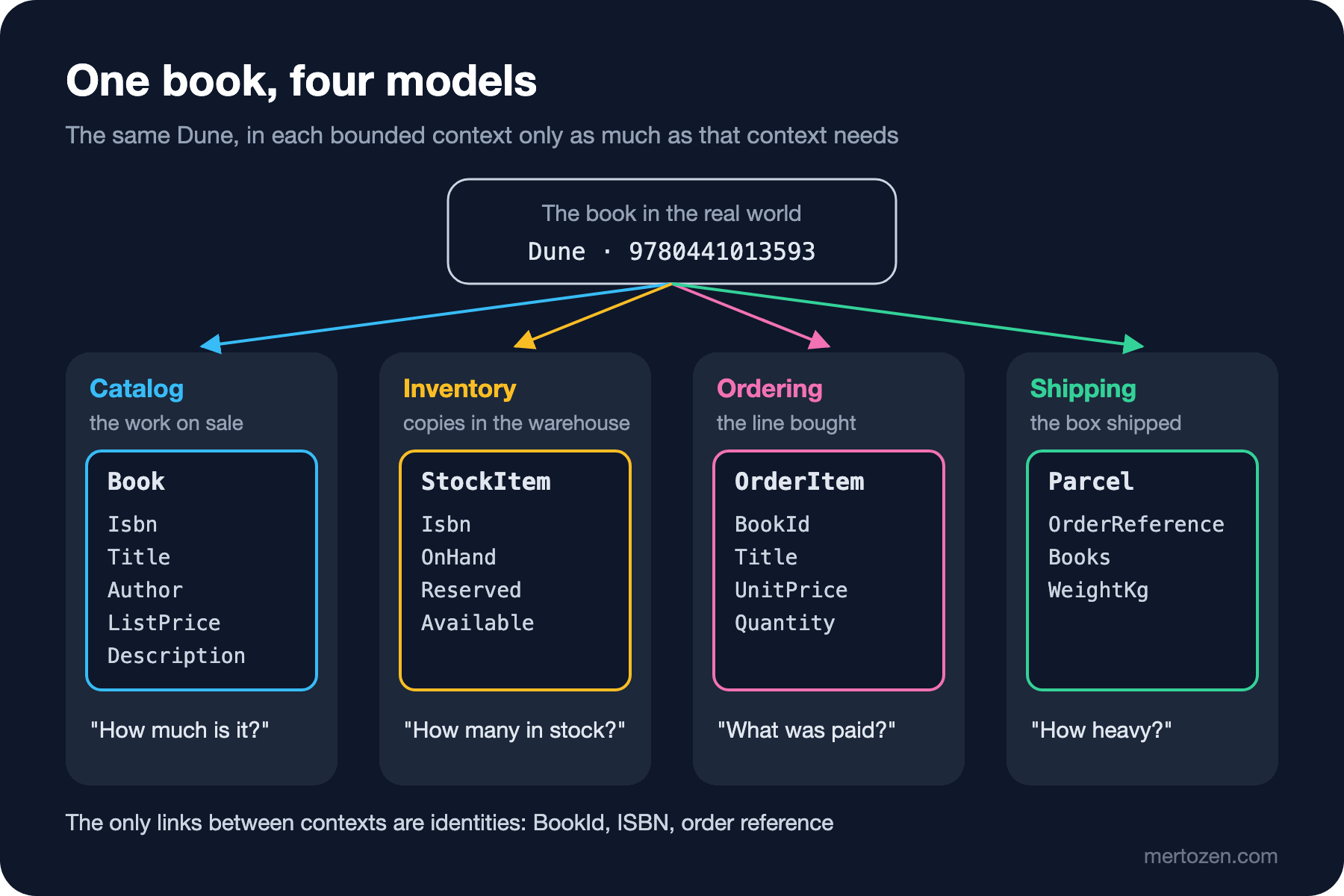
Each model answers a different question. Catalog answers "what is this book, and what does it sell for?" and calls its price the list price. Inventory cares about copies: how many are on hand, how many are reserved, how many can be sold. The ambiguous Stock turns into three separate names here: OnHand, Reserved, and Available. OrderItem in Ordering copies the unit price and title at the moment the order was placed; if the price changes in Catalog, last week's order does not. Shipping does not know the book's title at all; what matters to it is the number of books in the box and the weight.
What links the contexts is not a shared class but identities: BookId, ISBN (International Standard Book Number), and the order reference. That is enough to follow the same book across contexts. Let's run it:
using System.Globalization;
using Bookstore.Persistence;
using Microsoft.EntityFrameworkCore;
using Catalog = Bookstore.Catalog;
using Inventory = Bookstore.Inventory;
using Ordering = Bookstore.Ordering;
using Shipping = Bookstore.Shipping;

CultureInfo.CurrentCulture = CultureInfo.InvariantCulture;

// The same "Dune" in four contexts
Catalog.Book dune = new(Guid.CreateVersion7(), "9780441013593", "Dune", "Frank Herbert", 20.00m, "Desert planet, spice, politics.");
Inventory.StockItem stock = new(dune.Isbn, onHand: 5);
Ordering.OrderItem item = new(dune.Id, dune.Title, UnitPrice: 18.00m, Quantity: 2);
Shipping.Parcel parcel = new("ORD-1001", Books: item.Quantity, WeightKg: 0.45m * item.Quantity);

stock.Reserve(item.Quantity);
Console.WriteLine($"Catalog   {dune.Title} by {dune.Author}, list price {dune.ListPrice:0.00}");
Console.WriteLine($"Inventory {stock.Isbn}: on hand {stock.OnHand}, reserved {stock.Reserved}, available {stock.Available}");
Console.WriteLine($"Ordering  {item.Quantity} x {item.Title} at {item.UnitPrice:0.00}");
Console.WriteLine($"Shipping  parcel for {parcel.OrderReference}: {parcel.Books} books, {parcel.WeightKg:0.00} kg");
Console.WriteLine();

// One database, one schema per bounded context
const string connection = "Server=localhost;Database=Bookstore;Trusted_Connection=True";
using CatalogDbContext catalogDb = new(new DbContextOptionsBuilder<CatalogDbContext>().UseSqlServer(connection).Options);
using InventoryDbContext inventoryDb = new(new DbContextOptionsBuilder<InventoryDbContext>().UseSqlServer(connection).Options);
Console.WriteLine(catalogDb.Database.GenerateCreateScript());
Console.WriteLine(inventoryDb.Database.GenerateCreateScript());
Catalog Dune by Frank Herbert, list price 20.00
Inventory 9780441013593: on hand 5, reserved 2, available 3
Ordering 2 x Dune at 18.00
Shipping parcel for ORD-1001: 2 books, 0.90 kg
IF SCHEMA_ID(N'catalog') IS NULL EXEC(N'CREATE SCHEMA [catalog];');
GO
CREATE TABLE [catalog].[Books] (
[Id] uniqueidentifier NOT NULL,
[Isbn] nvarchar(13) NOT NULL,
[Title] nvarchar(200) NOT NULL,
[Author] nvarchar(200) NOT NULL,
[ListPrice] decimal(10,2) NOT NULL,
[Description] nvarchar(max) NOT NULL,
CONSTRAINT [PK_Books] PRIMARY KEY ([Id])
);
GO
IF SCHEMA_ID(N'inventory') IS NULL EXEC(N'CREATE SCHEMA [inventory];');
GO
CREATE TABLE [inventory].[StockItems] (
[Isbn] nvarchar(13) NOT NULL,
[OnHand] int NOT NULL,
[Reserved] int NOT NULL,
CONSTRAINT [PK_StockItems] PRIMARY KEY ([Isbn])
);
GOThe first four lines of the output are four faces of the same book. We will come back to the script part shortly, when we make the boundary concrete in .NET.
Same Name, Different Model: .NET's Timers
.NET itself uses the same word with different models in different namespaces. System.Threading.Timer is a lightweight timer that runs a callback periodically on the thread pool; System.Timers.Timer is a different model from the component world, with an Elapsed event and properties such as AutoReset. Windows Forms has a third Timer that runs on the UI (User Interface) thread. Same word, different meaning and behavior. Open two of them in the same file and the compiler reminds you of the boundary:
using System.Threading;
using System.Timers;

Timer timer = new(1000);
Program.cs(4,1): error CS0104: 'Timer' is an ambiguous reference between 'System.Timers.Timer' and 'System.Threading.Timer'The namespace acts as a boundary here, and C# asks you to be explicit when crossing it. Aliases like using Catalog = Bookstore.Catalog; in the Program.cs above do the same job: you state explicitly in code which context's model you are using. The dotnet/eShop app we mentioned in the first post shows a similar picture: the basket's BasketItem calls the amount Quantity, while the order's OrderItem calls it Units; each service carries its own model. eShop's CatalogItem, on the other hand, also holds stock information such as AvailableStock and RestockThreshold, so catalog and stock share one model there. That is a reasonable simplification for a reference app, but this kind of merge is exactly where the problems in Bookstore's guessing question started.
Bounded Context, Subdomain, and Microservice
These three concepts are often confused because they frequently carry the same names:
| Concept | Which space | What it determines | Example at Bookstore |
|---|---|---|---|
| Subdomain | Problem space | A part of the business and its investment priority | Campaign pricing (core) |
| Bounded context | Solution space, model | The boundary within which a model and its language apply | Ordering: the order and campaign model |
| Microservice | Solution space, deployment | A unit deployed independently | None today; Bookstore is a single monolith |
You can think of the relationships like this. A bounded context can solve one or more subdomains: Ordering hosts both the order process and campaign pricing. A microservice, however, should not span more than one bounded context; otherwise you put models you want to keep apart into the same deployment unit. Vlad Khononov also stresses in Learning Domain-Driven Design that every microservice is a bounded context, but not every bounded context has to be a microservice. Bookstore has six bounded contexts, all inside one application; the boundaries live at the namespace, project, and database schema level. Turning these boundaries into modules or services is the topic of the upcoming Modular Monolith and Microservices series.
Sizing and Team Ownership
How big should a bounded context be? There is no single right answer, but there is a cost in both directions. In a context that is too big you cannot keep the language consistent; "book" starts meaning three things again and the giant class comes back. With contexts that are too small, every workflow crosses several boundaries and translating between them costs more than the work itself. Evans mentions this balance in the Reference's Continuous Integration pattern: breaking a system into ever-smaller contexts eventually loses a valuable level of integration and coherency.
In practice three hints help. First, language: if a word means the same thing, you are probably in the same context; where it starts meaning something else, there is a boundary. Second, change: rules that change together should stay in the same context; if changing a campaign rule also changes the order total, separating them splits every change across two places. Third, ownership: a bounded context should have a single owning team, but one team can own several contexts. Today Bookstore is a single team of 3 looking after all six contexts. When the four stream-aligned teams from the Conway's Law post in the Introduction to Architecture series are formed, ownership will spread out: Ordering and Payment in one team, Inventory and Shipping in another.
Ordering on the Bounded Context Canvas
The DDD Crew community's Bounded Context Canvas is a template for describing a context on a single page; it is currently at version 5. Here it is filled in for Ordering:
| Field | Ordering |
|---|---|
| Name | Ordering |
| Purpose | Turn the customer's cart into an order, apply campaign pricing, and handle cancellations and return requests according to the rules |
| Strategic Classification | Domain: core · Business model: revenue generator · Evolution: custom built |
| Domain Roles | Execution context: enforces the order workflow |
| Inbound Communication | PlaceOrder, CancelOrder, RequestReturn from the customer; StockReserved, OutOfStock from Inventory; PaymentCaptured, PaymentFailed from Payment |
| Outbound Communication | OrderPlaced, OrderCancelled, ReturnRequested; a book information query to Catalog |
| Ubiquitous Language | order (Order), order line (OrderItem), cancellation, return request (ReturnRequest), promotion (Promotion), unit price |
| Business Decisions | Promotions never stack; a shipped order cannot be cancelled; the unit price is fixed when the order is placed |
| Assumptions | Pricing is not a separate context because campaign rules touch the order total directly |
| Verification Metrics | How many changes in Ordering also touch another context |
| Open Questions | If the campaign rules grow, when should Pricing be split out? |
The most valuable fields on the canvas are Assumptions and Open Questions. They write down why the boundary is where it is and under which condition it will move; six months later, when someone asks "why is Pricing inside Ordering?", the answer is ready. The Inbound and Outbound fields are the raw material for the next post's context map.
Making the Boundary Concrete in .NET
The cheapest way to make a bounded context visible in code is namespaces and projects. At Bookstore each context has its own namespace (Bookstore.Catalog, Bookstore.Ordering…), and as they grow each one can move into its own project. The benefit of a separate project is that the compiler starts guarding the boundary: if the Ordering project does not reference Inventory, Ordering code cannot touch StockItem.
The same idea applies to the database. Staying in a single SQL (Structured Query Language) Server database while giving each context its own schema and its own DbContext is a good intermediate step before moving to separate databases. In the code above, CatalogDbContext only knows the catalog schema and InventoryDbContext only knows the inventory schema; the output of Entity Framework Core's (EF Core) GenerateCreateScript shows this. Generating the script does not require a database connection; EF Core translates the model to SQL on its own.
The rule of this structure is simple: a context does not query another context's tables directly and does not link to another context's entities through navigation properties. When Ordering needs book information, it asks Catalog and translates the answer into its own model (the title and price copied into OrderItem). How that asking and translating is done, that is, the relationships between contexts, is the topic of the next post. Deeper implementation details, such as deploying modules separately or removing foreign keys between schemas, are in the upcoming Modular Monolith series.
Common Pitfalls
Searching for one canonical model. The goal "the company should have one correct Customer model" brings back the giant class and a meeting for every change. Different models in different contexts are not a shortcoming but a design decision.
Equating a bounded context with a microservice. Six contexts do not mean six services. Draw the model boundaries right first; deployment is a separate decision, and for most teams it starts inside a monolith.
Opening a bounded context per entity. One context for Book, one for Author, one for Category: the language is the same and the rules change together, but every change crosses three boundaries. That is fragmentation, not boundaries.
Breaking the boundary with a shared table. Separating contexts in code while letting everyone read and write the same Books table recreates the giant class, this time in the database.
Not writing the boundary down. If which context uses which word in which sense, and which team owns what, is not written anywhere, the boundary quietly disappears at the first urgent change. A canvas or a short README is enough for this.
A Small Experiment
★☆☆ Find the three entities with the most properties in your own project. Group each property by the screen or team that changes it most. How many groups did you get?
★★☆ Add "fragile" information to Shipping.Parcel in the example. Should it live in Catalog's Book or in Shipping? How does Shipping get it? Write your decision into the Inbound Communication field of the Bounded Context Canvas.
★★★ Fill in the Bounded Context Canvas for one context in your own project. Do not leave Assumptions and Open Questions empty; then show the canvas to a domain expert and see whether they object to the Purpose and Ubiquitous Language fields.
In this post we drew the boundaries and gave each context its own model. But boundaries do not live alone: Ordering gets book information from Catalog, Shipping connects to an old carrier system, and Notification listens to everyone's events. In the next post we name these relationships with context mapping: upstream and downstream, Shared Kernel, Customer/Supplier, Conformist, and an anti-corruption layer we will write against the carrier's old SOAP (Simple Object Access Protocol) service.