

A Separate Read Model: Materialized Views, Synchronization, and Living with Eventual Consistency
A separate read model stores the screen's row precomputed from domain events; updated in the same transaction it stays immediately consistent, updated asynchronously in a separate database you have to live with eventual consistency. Inline projections, PostgreSQL materialized views, an asynchronous projector with a checkpoint, waiting on a position for read-your-own-writes, idempotent updates and a full rebuild, with real output.
Version note: The code in this post was built and run with C# 14, .NET 10, Entity Framework Core (EF Core) 10, Npgsql 10, Dapper 2.1 and PostgreSQL 17.
Guess First
Campaign week is approaching, and the three correlated subqueries that the "My Orders" screen runs on every open have climbed to the top of the profiler. The team decided to move the computation from read time to write time: the screen now reads from a ready-made table in a separate database, and a projector running in the background fills that table. The first test goes like this:
        PlaceOrderResult placed = await place.HandleAsync(new PlaceOrder(Setup.Ada, [(Setup.Dune, 1), (Setup.Emma, 2)]), default);
        CustomerOrdersPage now = await list.HandleAsync(Setup.Ada, minPosition: null, TimeSpan.Zero, default);
        Console.WriteLine($"async: position={placed.Position}, rows right after the command={now.Rows.Count}");
async: position=1, rows right after the command=0Ada placed her order, got 201 Created, was redirected to "My Orders", and her list is empty. Is this a bug? If not, what would you do so that Ada doesn't get the feeling that her order disappeared? And think about this too: what happens if the projector processes the same event twice, or if you accidentally delete the read model table?
Moving the Computation to Write Time: A Denormalized Read Model
At level 1 in the previous post, the list was recomputed from the tables on every read. At levels 2 and 3 the screen's row is stored precomputed; reading comes down to a single-table, join-free, indexed SELECT. Microsoft Learn describes this idea as a pattern of its own too: the Materialized View pattern keeps the data a query needs in prepopulated views and stresses that, because they can be entirely rebuilt from the source data, these views are disposable, a specialized cache. Bookstore's read model table:
CREATE SCHEMA read;

CREATE TABLE read.customer_order_summaries (
    order_id     uuid PRIMARY KEY,
    customer_id  uuid NOT NULL,
    placed_at    timestamptz NOT NULL,
    status       text NOT NULL,
    item_count   int NOT NULL,
    total        numeric(10, 2) NOT NULL,
    first_title  text NOT NULL,
    last_version int NOT NULL
);
CREATE INDEX ON read.customer_order_summaries (customer_id, placed_at DESC);

CREATE TABLE read.projection_checkpoints (name text PRIMARY KEY, position bigint NOT NULL);
INSERT INTO read.projection_checkpoints VALUES ('customer_order_summaries', 0);
last_version and projection_checkpoints will come in handy shortly. The real question is what feeds the table. The answer is the domain events we added to Order in the DDD (Domain-Driven Design) series post "Domain Events: Raise, Collect, and Dispatch on SaveChanges". Here we add the aggregate's version at that moment (Version) to each event:
// Domain events: past tense, immutable; Version is the aggregate's version at that moment
public interface IOrderEvent
{
    OrderId OrderId { get; }
    int Version { get; }
    DateTimeOffset At { get; }
}

public sealed record OrderedBook(BookId BookId, string Title, int Quantity);
public sealed record OrderPlaced(OrderId OrderId, CustomerId CustomerId, IReadOnlyList<OrderedBook> Books, decimal Total, DateTimeOffset At, int Version) : IOrderEvent;
public sealed record OrderCancelled(OrderId OrderId, CancellationReason Reason, DateTimeOffset At, int Version) : IOrderEvent;
public sealed record OrderShipped(OrderId OrderId, DateTimeOffset At, int Version) : IOrderEvent;Order.Place, Cancel and MarkShipped add these events to their own list. The events carry the information the read model needs (book titles, quantities, total), so the projector does not have to go back and query the orders table.
Option 1: Projection in the Same Transaction
The simplest way is to keep the read model table in the write database and update it inside the command's transaction. In the DDD series we dispatched domain events with a SaveChangesInterceptor; to keep things short, a SaveChangesAsync override does the same job here. The events are first written to an event log table (ordering.order_events), and then the registered inline projections run in the same transaction:
    public override async Task<int> SaveChangesAsync(bool acceptAllChangesOnSuccess, CancellationToken ct = default)
    {
        Order[] changed = [.. ChangeTracker.Entries<Order>().Select(e => e.Entity).Where(o => o.Events.Count > 0)];
        IOrderEvent[] events = [.. changed.SelectMany(o => o.Events)];
        StoredEvent[] stored = [.. events.Select(StoredEvent.From)];
        OrderEvents.AddRange(stored);

        // Order rows, the event log and any inline projection in one transaction
        await using IDbContextTransaction tx = await Database.BeginTransactionAsync(ct);
        int written = await base.SaveChangesAsync(acceptAllChangesOnSuccess, ct);
        foreach (IOrderEvent e in events)
            foreach (IInlineProjection projection in inlineProjections)
                await projection.ApplyAsync(Database.GetDbConnection(), tx.GetDbTransaction(), e, ct);
        await tx.CommitAsync(ct);

        foreach (Order order in changed)
            order.ClearEvents();
        LastAppendedPosition = stored.Length > 0 ? stored.Max(s => s.Position) : null;
        return written;
    }
The projection itself is a small class that turns each event into a SQL (Structured Query Language) command:
using System.Data.Common;
using Bookstore.Infrastructure;
using Bookstore.Ordering;
using Dapper;

namespace Bookstore.ReadModel;

// Applies one event to read.customer_order_summaries; applying the same event twice has no effect
public sealed class OrderSummaryProjection : IInlineProjection
{
    public Task<int> ApplyAsync(DbConnection connection, DbTransaction transaction, IOrderEvent e, CancellationToken ct) => e switch
    {
        OrderPlaced placed => connection.ExecuteAsync(new CommandDefinition("""
            INSERT INTO read.customer_order_summaries
                (order_id, customer_id, placed_at, status, item_count, total, first_title, last_version)
            VALUES (@OrderId, @CustomerId, @PlacedAt, 'Placed', @ItemCount, @Total, @FirstTitle, @Version)
            ON CONFLICT (order_id) DO NOTHING
            """,
            new
            {
                OrderId = placed.OrderId.Value, CustomerId = placed.CustomerId.Value, PlacedAt = placed.At,
                ItemCount = placed.Books.Sum(b => b.Quantity), placed.Total, FirstTitle = placed.Books[0].Title, placed.Version
            }, transaction, cancellationToken: ct)),
        OrderCancelled cancelled => SetStatus(connection, transaction, cancelled, "Cancelled", ct),
        OrderShipped shipped => SetStatus(connection, transaction, shipped, "Shipped", ct),
        _ => Task.FromResult(0)
    };

    // last_version guard: a repeated or older event does not change the row
    private static Task<int> SetStatus(DbConnection connection, DbTransaction transaction, IOrderEvent e, string status, CancellationToken ct) =>
        connection.ExecuteAsync(new CommandDefinition("""
            UPDATE read.customer_order_summaries
            SET status = @Status, last_version = @Version
            WHERE order_id = @OrderId AND last_version < @Version
            """,
            new { Status = status, e.Version, OrderId = e.OrderId.Value }, transaction, cancellationToken: ct));
}
Which mode it runs in depends on the DI (dependency injection) registration:
if (mode == "inline")
    // Level 2: the projection runs inside the command's transaction
    builder.Services.AddSingleton<IInlineProjection>(sp => sp.GetRequiredService<OrderSummaryProjection>());
else
    // Separate read DB: the projection runs in the background, fed from the event log
    builder.Services.AddHostedService<ProjectorWorker>();
inline: position=1, rows right after the command=1
Placed qty=3 32.30 EUR DuneThe row is there as soon as the command returns. This is level 2: there is a separate read model, but consistency is still immediate because the order rows, the event log and the read model go to disk in the same commit. The cost is hidden in the same sentence. Every order save now updates one more table; write latency grows, and concurrent commands updating a popular read model row can compete for the same row lock. An error in the projection (a constraint violation, a SQL error) also rolls back the order itself: a read-side problem stops the write side. And the read model stays tied to the write database's scale and technology.
PostgreSQL's Ready-Made Answer: Materialized Views
There is another way to reach level 2 without writing projection code. For an aggregate view like the daily sales report, a PostgreSQL materialized view stores the query's result on disk:
CREATE MATERIALIZED VIEW read.daily_sales AS
SELECT (o.placed_at AT TIME ZONE 'UTC')::date AS day,
       count(DISTINCT o.id)                   AS orders,
       sum(i.unit_price * i.quantity)         AS revenue
FROM ordering.orders o
JOIN ordering.order_items i ON i.order_id = o.id
WHERE o.status <> 'Cancelled'
GROUP BY 1;
orders in view before refresh: 1
55000 cannot refresh materialized view "read.daily_sales" concurrently / Create a unique index with no WHERE clause on one or more columns of the materialized view.
orders in view after refresh: 2An order placed after the view was created does not appear until REFRESH MATERIALIZED VIEW runs. The CONCURRENTLY option does not block reads during the refresh, but it requires a unique index without a WHERE clause on the view; the error message says so plainly. The freshness of a materialized view is entirely up to you: a scheduled job might refresh it every minute. For a report screen that is often enough; for a screen where a customer looks for her own order, it is not. The SQL Server counterpart is the indexed view, which is updated synchronously on every change but comes with many restrictions.
Option 2: A Separate Read Store and an Asynchronous Projector
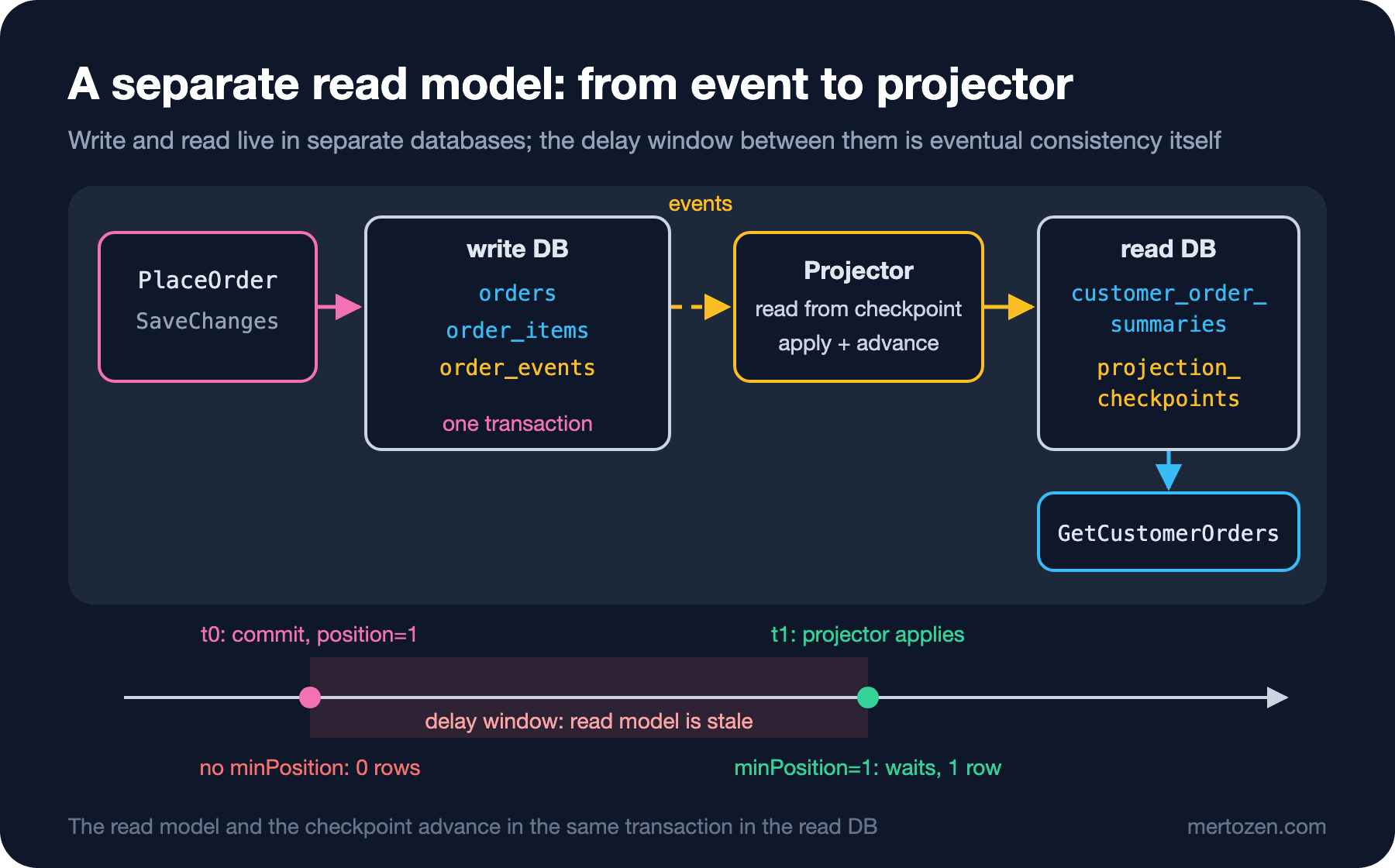
At level 3 the read model lives in a separate database and leaves the command's transaction entirely. The write side writes only its own tables and the event log; a projector reads the event log at its own pace and updates the read store.
// Reads the write DB's event log from the checkpoint and applies it to the separate read DB
public sealed class OrderSummaryProjector(WriteDatabase write, ReadDatabase read, OrderSummaryProjection projection)
{
    private const string Name = "customer_order_summaries";

    public async Task<int> RunOnceAsync(int batchSize, CancellationToken ct)
    {
        await using NpgsqlConnection readConnection = await read.Source.OpenConnectionAsync(ct);
        await using NpgsqlTransaction tx = await readConnection.BeginTransactionAsync(ct);
        long checkpoint = await readConnection.ExecuteScalarAsync<long>(
            "SELECT position FROM read.projection_checkpoints WHERE name = @Name FOR UPDATE", new { Name }, tx);

        await using NpgsqlConnection writeConnection = await write.Source.OpenConnectionAsync(ct);
        (long Position, string Type, string Data)[] batch = [.. await writeConnection.QueryAsync<(long, string, string)>(
            "SELECT position, type, data::text FROM ordering.order_events WHERE position > @checkpoint ORDER BY position LIMIT @batchSize",
            new { checkpoint, batchSize })];
        if (batch.Length == 0)
            return 0;

        foreach ((long _, string type, string data) in batch)
            await projection.ApplyAsync(readConnection, tx, StoredEvent.Deserialize(type, data), ct);

        // Read model and checkpoint in the same transaction: both advance or neither does
        await readConnection.ExecuteAsync(
            "UPDATE read.projection_checkpoints SET position = @Position WHERE name = @Name",
            new { batch[^1].Position, Name }, tx);
        await tx.CommitAsync(ct);
        return batch.Length;
    }

    public async Task<long> CheckpointAsync(CancellationToken ct)
    {
        await using NpgsqlConnection connection = await read.Source.OpenConnectionAsync(ct);
        return await connection.ExecuteScalarAsync<long>(
            "SELECT position FROM read.projection_checkpoints WHERE name = @Name", new { Name });
    }
}

public sealed class ProjectorWorker(OrderSummaryProjector projector, ILogger<ProjectorWorker> logger) : BackgroundService
{
    public static TimeSpan PollInterval { get; set; } = TimeSpan.FromMilliseconds(500);

    protected override async Task ExecuteAsync(CancellationToken ct)
    {
        while (!ct.IsCancellationRequested)
        {
            try
            {
                if (await projector.RunOnceAsync(batchSize: 100, ct) == 0)
                    await Task.Delay(PollInterval, ct);
            }
            catch (Exception ex) when (ex is not OperationCanceledException)
            {
                // A projection error must not kill the worker; log, wait, retry from the same checkpoint
                logger.LogError(ex, "Projection failed; retrying");
                await Task.Delay(PollInterval, ct);
            }
        }
    }
}
Three decisions deserve attention. First, the event log is written on the write side in the same transaction as the order; there is no intermediate state where "the order was saved but the event was lost". That is the core idea of the transactional outbox. The relay that carries events to a message broker, delivery guarantees and broker-side details are the subject of the "Transactional Outbox and Inbox" post in the upcoming Messaging and Event-Driven Architecture series; here the projector reads the log directly. Second, the read model update and the checkpoint advance in the same read DB (database) transaction: if the projector crashes in the middle of a batch, both roll back together and it restarts from the same point. Third, the worker doesn't die on an error; it logs and retries from the same checkpoint. If it can never process an event (corrupt data, say) this loop runs forever; a real system needs a mechanism that sets that event aside and raises an alert.
The read side no longer knows the write database at all. The read store does not have to be a PostgreSQL table either: the same projector could write the row to a document database, a table with a jsonb column, or a search index. The CQRS (Command Query Responsibility Segregation) pattern page on Microsoft Learn also gives a document database as an example of a read store.
Read-Your-Own-Writes
The empty list in the opening is not a bug; it is eventual consistency itself: there is a window between the commit and the moment the projector applies the event, about 200 milliseconds in this run; its upper bound is set by the projector's 500-millisecond polling interval. The problem is not that the window exists, but that the user doesn't see her own change inside it. This is called the read-your-own-writes problem, and it has a few well-known solutions.
The first is for the command to return a position and for the query to wait for it. PlaceOrderResult returns the event log Position alongside the order id; the query handler waits, up to a limit, until the checkpoint reaches that point:
public sealed record CustomerOrderRow(Guid OrderId, DateTime PlacedAt, string Status, int ItemCount, decimal Total, string FirstTitle);
public sealed record CustomerOrdersPage(IReadOnlyList<CustomerOrderRow> Rows, bool MayBeStale);

public sealed class GetCustomerOrdersHandler(ReadDatabase read, OrderSummaryProjector projector, TimeProvider clock)
{
    // With minPosition, waits up to timeout for the read model to reach that point
    public async Task<CustomerOrdersPage> HandleAsync(Guid customerId, long? minPosition, TimeSpan timeout, CancellationToken ct)
    {
        bool caughtUp = minPosition is null;
        long deadline = clock.GetTimestamp() + (long)(timeout.TotalSeconds * clock.TimestampFrequency);
        while (!caughtUp && clock.GetTimestamp() < deadline)
        {
            caughtUp = await projector.CheckpointAsync(ct) >= minPosition;
            if (!caughtUp)
                await Task.Delay(50, ct);
        }

        await using NpgsqlConnection connection = await read.Source.OpenConnectionAsync(ct);
        IEnumerable<CustomerOrderRow> rows = await connection.QueryAsync<CustomerOrderRow>("""
            SELECT order_id, placed_at, status, item_count, total, first_title
            FROM read.customer_order_summaries
            WHERE customer_id = @customerId
            ORDER BY placed_at DESC
            LIMIT 20
            """, new { customerId });
        return new CustomerOrdersPage([.. rows], MayBeStale: !caughtUp);
    }
}
with minPosition=1: rows=1, stale=False, waited ~200 ms
Cancelled qty=3 32.30 EUR DuneIf the time runs out, the handler still answers but raises the MayBeStale flag; the screen can say "your list will update in a few seconds". On the HTTP (Hypertext Transfer Protocol) side the position travels as a header or a query string parameter. For a single order's detail screen, the per-order Version does the same job instead of the global position.
The other strategies are:
- Optimistic UI (user interface): when the command succeeds, the client adds the order to the list itself and shows it with a "processing" label. On the Angular side this means adding a temporary row to the signal that holds the component's list, and replacing it with the one from the server once the read model catches up.
- Reading from the write side: for the single record the user has just created (such as the order confirmation page), read from the table where the aggregate was saved instead of the read model. Reasonable for a single record, not for a list.
- Redesigning the screen: an "Order received" confirmation page usually lasts longer than the window; by the time the user returns to the list, the projector has long caught up. Sometimes the cheapest solution is on the UX (user experience) side.
Idempotent Updates and Rebuilds
Two things are certain in a projector's life: one day it will see the same event a second time, and one day the read model will have to be rebuilt from scratch. Our projector runs at least once: if it applies a batch and crashes before committing the checkpoint, the same events come again. Let's apply all of the same order's events a second time:
replayed OrderPlaced: rows affected=0
replayed OrderCancelled: rows affected=0
ON CONFLICT DO NOTHING for OrderPlaced and the last_version < @Version condition for status changes make the repetition harmless. An incrementing update like item_count = item_count + 1 would corrupt the count on every repeat; that is why it matters to write projections as "write the latest value", guarded by a version.
A rebuild is the read model's biggest advantage: as long as the event log is kept, the read model is a disposable cache. After 300 orders and 100 cancellations we empty the table and reset the checkpoint:
        await using NpgsqlConnection connection = await read.Source.OpenConnectionAsync();
        const string Snapshot = "SELECT string_agg(order_id || status || total || last_version, ',' ORDER BY order_id) FROM read.customer_order_summaries";
        string before = await connection.ExecuteScalarAsync<string>(Snapshot) ?? "";

        // Rebuild: empty the read model, reset the checkpoint, let the projector replay from the start
        Stopwatch watch = Stopwatch.StartNew();
        await connection.ExecuteAsync("""
            TRUNCATE read.customer_order_summaries;
            UPDATE read.projection_checkpoints SET position = 0 WHERE name = 'customer_order_summaries';
            """);
        while (await projector.CheckpointAsync(default) < last)
            await Task.Delay(20);
        watch.Stop();

        string after = await connection.ExecuteScalarAsync<string>(Snapshot) ?? "";
        long rows = await connection.ExecuteScalarAsync<long>("SELECT count(*) FROM read.customer_order_summaries");
        Console.WriteLine($"rebuild: events={last}, rows={rows}, identical={before == after}, took ~{watch.ElapsedMilliseconds / 100 * 100} ms");
rebuild: events=402, rows=301, identical=True, took ~500 ms301 rows were regenerated from 402 events, and the content is identical to what it was before the rebuild. Changing the shape of the read model (a new column, a different ordering) goes the same way: create the new table, replay the projector from the start, and switch the screen to the new table once it is ready. In this demo it took about half a second; with millions of events it can take hours, and the screen has to keep reading from the old table in the meantime.
Common Pitfalls
Making the read model another service's source of truth
customer_order_summaries is a delayed copy built for one screen. If Shipping or Payments start reading it as "the order's status", they make wrong decisions inside the delay window, and changing the read model's shape becomes breaking an integration contract. If another context needs the data, give it its own event or API (Application Programming Interface).
Assuming commit order equals position order
position comes from a sequence; the value is taken at insert time, but the row becomes visible only when the transaction commits. If, of two concurrent transactions, the one with position 6 commits first, the projector processes 6 and advances the checkpoint; when 5 commits a millisecond later it is already behind the checkpoint and is never processed. This didn't happen in the demo because it runs with a single writer. In a real system you either serialize the writes (with an advisory lock, for example) or make the projector read only up to the point where no gaps can remain. In the Marten posts of this series we will see how the async daemon handles this problem with a mechanism it calls the "high water mark".
Calling external services from a projection
A projector that sends e-mails or calls the payment provider means the same e-mails go out again on a rebuild. A projection only updates the read model; side effects are a separate consumer's job.
Not measuring rebuild time and lag
Publish how far behind the projector is (the difference between the last event position and the checkpoint) as a metric. If lag grows from seconds to minutes at the campaign peak, you should learn it from a dashboard, not from a customer complaint.
When Not to Use It
The projection from the previous post is enough unless you have a measured performance problem. The cost of level 2 is one more table on the write side and extra work in the same transaction; the cost of level 3 is a second database, a worker, a lag metric, a rebuild procedure and a read-your-own-writes decision on every screen. At Bookstore's ~800 orders a day, the "My Orders" screen runs comfortably at level 1; level 2 comes up if a measured problem appears at the campaign peak of ~120 orders a minute. Level 3 makes sense when the read side really needs a different technology (such as full-text search) or independent scaling. In flows where the user must see her change immediately and with certainty (payment confirmation, stock reservation), don't rely on an eventually consistent read model.
A Small Experiment
★☆☆ Raise ProjectorWorker.PollInterval to 5 seconds and run the demo again. What does the query with minPosition return at its 2-second limit? What would you show on screen when MayBeStale comes back true?
★★☆ Write a test for the projection of OrderShipped: what should the row's status be when the same event is applied twice, and then an OrderCancelled one version older? Then remove the last_version < @Version condition from SetStatus and watch the test fail.
★★★ Set up a load test that places orders from two separate processes at the same time, and show that the positions in ordering.order_events are not in commit order. Write each row's transaction id (pg_current_xact_id()) into the event log and change the projector to read only the events of transactions smaller than pg_snapshot_xmin(pg_current_snapshot()).
So far we have used events only to feed the read model; the write side's real data is still the latest state in the orders table. In the next post we turn the question around: what if the events themselves were the real data and state were derived from them? We will start Event Sourcing with the one place in Bookstore that is a genuine candidate for it, the stock ledger.