

API4 Unrestricted Resource Consumption: Page Size, Query Complexity, Timeouts, Quotas and Costly External Calls
Against API4 you put an upper bound on every parameter, every endpoint and every external call that costs money, and guard it with tests. Starting from an unbounded list measured with 200,000 orders, we build page size, offset and sort allowlists, bulk and body limits, request timeouts with CancellationToken, and tenant- and plan-based report and SMS quotas with 429 and Retry-After.
Version note: The code in this post was built and run with .NET 10 and EF (Entity Framework) Core 10.0.14; measurements were taken on an Apple Silicon machine with SQLite and 200,000 orders of lab data.
Guess First
Since the first post, the lab's GET /orders endpoint has returned all orders in one go. With Alan having three orders, that didn't matter. Now think of Alan as a corporate customer who placed 200,000 orders over two years. How many megabytes does a single request return, and how much does the server's memory swell? And what if the same request comes a hundred times a minute?
There is a money side too. When the support team presses the "notify the order status by SMS (Short Message Service)" button, we pay an SMS provider. If a tenant on the free plan puts this endpoint in a loop, who pays the bill?
This post is about API4 (Unrestricted Resource Consumption in the OWASP API (Application Programming Interface) Security Top 10 2023). We saw the basics of pagination in the pagination, filtering and sorting post of the ASP.NET Core Web API series, and an introduction to rate limiting in the A06 Insecure Design post of the Web Security (OWASP Top 10) series. Here we look at them as defences: an upper bound for every parameter, every endpoint and every external call, plus tests that guard those bounds.
What Does API4 Cover?
The API4 page of OWASP's (Open Worldwide Application Security Project) API (Application Programming Interface) list enumerates the resources that need limits: execution time, allocatable memory, file descriptors and number of processes, upload file size, the number of operations in a single request, the number of records per page and the spending limit with third-party providers. If you look closely, they all lead to the same question: how much of a resource we pay for can a client consume, with one request or with many?
That question isn't answered in a single layer. The figure below shows the limits a request passes in the lab by the end of this post, and the status code each one rejects with:
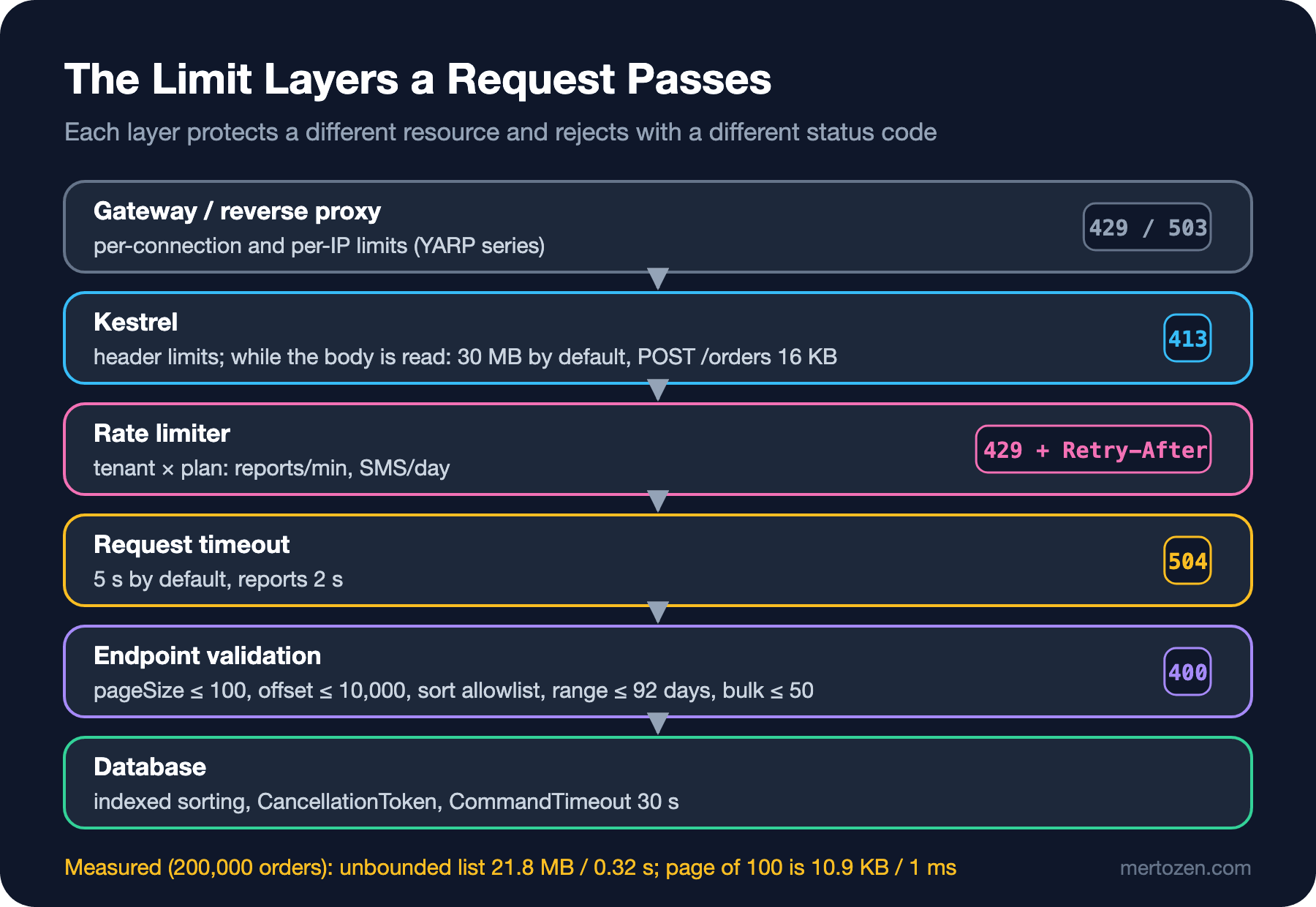
I leave the gateway layer to the upcoming API Gateway and YARP (Yet Another Reverse Proxy) series, and Kestrel's header and connection limits to the Kestrel post of the upcoming ASP.NET Core Security series. This post focuses on the layers inside the application: endpoint validation, request timeouts, and tenant- and plan-based quotas.
Measure First: The Unbounded List
I ran the previous post's API against a database with 200,000 orders. All of them belong to Alan, spread over the last two years. The list endpoint is still unbounded:
$ curl -s -o /dev/null -w "%{http_code} %{size_download} bytes %{time_total}s\n" http://localhost:19514/orders -H "Authorization: Bearer $ALAN"
200 21800110 bytes 0.404194s
200 21800110 bytes 0.319672s
A single request returned 21.8 MB of JSON (JavaScript Object Notation) and took about 0.3 seconds. After the second request the process's RSS (Resident Set Size) was around 340 MB. Since SQLite is on the local disk these numbers are optimistic; with a database over the network, a mobile client or twenty concurrent requests, the picture looks much worse. The point is this: the client chooses this cost, not the server.
Bounding the List Parameters
The first defence is an upper bound and an allowlist for every parameter the client can choose. The new list endpoint:
// Sort orders the client may choose; each relies on an indexed column and a stable secondary key
private static readonly Dictionary<string, Func<IQueryable<Order>, IOrderedQueryable<Order>>> OrderSorts =
    new(StringComparer.Ordinal)
    {
        ["createdAt"] = q => q.OrderBy(o => o.CreatedAt).ThenBy(o => o.Id),
        ["-createdAt"] = q => q.OrderByDescending(o => o.CreatedAt).ThenByDescending(o => o.Id),
        ["status"] = q => q.OrderBy(o => o.Status).ThenBy(o => o.Id)
    };
// No filter here: the DbContext adds tenant and customer scope; page size and sort are on an allowlist
orders.MapGet("/", async ([AsParameters] OrderListQuery query, OrdersDbContext db, CancellationToken ct) =>
{
int page = query.Page ?? 1;
int pageSize = query.PageSize ?? ResourceLimits.DefaultPageSize;
string sort = query.Sort ?? "-createdAt";
Dictionary<string, string[]> errors = [];
if (pageSize is < 1 or > ResourceLimits.MaxPageSize)
{
errors["pageSize"] = [$"Must be between 1 and {ResourceLimits.MaxPageSize}."];
}
if (page < 1 || (long)(page - 1) * pageSize > ResourceLimits.MaxOffset)
{
errors["page"] = [$"Offset must not exceed {ResourceLimits.MaxOffset}; narrow the filter instead."];
}
if (!OrderSorts.TryGetValue(sort, out Func<IQueryable<Order>, IOrderedQueryable<Order>>? applySort))
{
errors["sort"] = [$"Allowed values: {string.Join(", ", OrderSorts.Keys)}."];
}
if (errors.Count > 0)
{
return Results.ValidationProblem(errors);
}
IQueryable<Order> filtered = query.Status is { } status ? db.Orders.Where(o => o.Status == status) : db.Orders;
// Read one extra row to find HasMore; no expensive COUNT(*)
List<OrderSummary> items = await applySort!(filtered)
.Skip((page - 1) * pageSize)
.Take(pageSize + 1)
.Select(o => new OrderSummary(o.Id, o.Status.ToString(), o.Total, o.CreatedAt))
.ToListAsync(ct);
return Results.Ok(new PagedResult<OrderSummary>(items.Take(pageSize).ToList(), page, pageSize,
items.Count > pageSize));
});There are four decisions here. Instead of silently clamping the page size to 100 we return 400: clamping produces clients that draw the wrong conclusion, "I asked for 10,000, got 100, so there must be 100 records". We also put a ceiling on the offset, because Skip(100000) means the database reads and discards that many rows; if deep paging is needed, the answer is keyset pagination or a narrower filter. Sorting is only possible with keys from a dictionary; the string the client sends never turns into a column name or a dynamic LINQ (Language Integrated Query) expression. I added (TenantId, CreatedAt) and (TenantId, Status) indexes for the sorts; every key on the allowlist having an index is the rule itself. Finally, we don't return a total count: running COUNT(*) for every page on a 200,000-row table can cost more than the list itself. Reading one extra row and returning HasMore is enough to answer the client's "is there a next page?" question.
The new endpoint against the same database:
$ curl -s -o /dev/null -w "%{http_code} %{size_download} bytes %{time_total}s\n" "http://localhost:19515/orders" -H "Authorization: Bearer $ALAN"
200 2229 bytes 0.085426s
200 2229 bytes 0.019689s
$ curl -s -o /dev/null -w "%{http_code} %{size_download} bytes %{time_total}s\n" "http://localhost:19515/orders?pageSize=100&sort=-createdAt" -H "Authorization: Bearer $ALAN"
200 10950 bytes 0.003492s
200 10950 bytes 0.001193s
$ curl -s "http://localhost:19515/orders?pageSize=5000&sort=internalCost" -H "Authorization: Bearer $ALAN"
{"type":"https://tools.ietf.org/html/rfc9110#section-15.5.1","title":"One or more validation errors occurred.","status":400,"errors":{"pageSize":["Must be between 1 and 100."],"sort":["Allowed values: createdAt, -createdAt, status."]},"traceId":"00-e9434e325cb2bf12386aa296d3ccd51b-786f2774e599ddbd-00"}
$ curl -s "http://localhost:19515/orders?page=600&pageSize=100" -H "Authorization: Bearer $ALAN"
{"type":"https://tools.ietf.org/html/rfc9110#section-15.5.1","title":"One or more validation errors occurred.","status":400,"errors":{"page":["Offset must not exceed 10000; narrow the filter instead."]},"traceId":"00-add53b493eb13d5c1a553d2920e1f7f5-b1b108920f22a44d-00"}
A page of 100 records is 10.9 KB and about 1 millisecond on a warm call. The same logic applies to parameters that expand related data, such as include or expand: a list of allowed values and a depth limit. The lab doesn't have that parameter, but if it did, a chain like expand=items.book.author.books would have to be rejected.
Bulk Operations and Body Size
The bulk cancel endpoint we wrote in the second post takes a list of ids from the client. The list size is a resource too: 100,000 ids means an IN query with 100,000 parameters. We added an upper bound:
Guid[] ids = request.OrderIds.Distinct().ToArray();
if (ids.Length is 0 or > ResourceLimits.MaxBulkIds)
{
    return Results.ValidationProblem(new Dictionary<string, string[]>
    {
        ["orderIds"] = [$"Send between 1 and {ResourceLimits.MaxBulkIds} ids."]
    });
}
The body itself must be bounded as well. Kestrel's default request body limit is about 30 MB; for an order creation request that's far too much. In Minimal APIs we give the limit per endpoint as metadata:
})
.RequireAuthorization(LabPolicies.Customer)
// An order body is small: anything over 16 KB is cut off by Kestrel with 413
.WithMetadata(new RequestSizeLimitAttribute(16 * 1024));
$ curl -s -o /dev/null -w "%{http_code}\n" -X POST http://localhost:19515/orders -H "Authorization: Bearer $ALAN" -H "Content-Type: application/json" --data-binary @big.json
413Here I fell into a testing trap. When I wrote the same scenario with WebApplicationFactory, the test got 201 instead of 413: the TestServer used in integration tests doesn't apply Kestrel's body size limit. The log in the test output says so plainly:
warn: Microsoft.AspNetCore.Routing.EndpointRoutingMiddleware[9]
      A request body size limit could not be applied. This server does not support the IHttpMaxRequestBodySizeFeature.
That's why the test checks the endpoint's metadata rather than the behaviour; I showed the behaviour itself with the curl above against real Kestrel. Cases where a test seems to prove something but actually doesn't are the most dangerous ones in security testing.
Request Timeouts and CancellationToken
Even bounded parameters can produce an expensive query. The reporting endpoint returns daily sales grouped over a date range. We put an upper bound on the range (92 days), but there is a time limit too. ASP.NET Core's request timeout middleware lets you define this as a policy per endpoint:
services.AddRequestTimeouts(options =>
{
    // A default ceiling for every endpoint; reports use their own policy
    options.DefaultPolicy = new RequestTimeoutPolicy { Timeout = TimeSpan.FromSeconds(5) };
    options.AddPolicy(ReportsPolicy, configuration.GetValue("Limits:ReportTimeout", TimeSpan.FromSeconds(2)));
});
app.MapGet("/reports/daily-sales", async (DateOnly from, DateOnly to, OrdersDbContext db,
CancellationToken ct) =>
{
// The date range is a resource limit too: a wide range means an expensive query
if (to < from || to.DayNumber - from.DayNumber + 1 > ResourceLimits.MaxReportDays)
{
return Results.ValidationProblem(new Dictionary<string, string[]>
{
["to"] = [$"The range must be between 1 and {ResourceLimits.MaxReportDays} days."]
});
}
DateTime start = from.ToDateTime(TimeOnly.MinValue, DateTimeKind.Utc);
DateTime end = to.AddDays(1).ToDateTime(TimeOnly.MinValue, DateTimeKind.Utc);
List<DailySales> rows = await db.Orders
.Where(o => o.CreatedAt >= start && o.CreatedAt < end)
.GroupBy(o => o.CreatedAt.Date)
.Select(g => new DailySales(DateOnly.FromDateTime(g.Key), g.Count(), g.Sum(o => o.Total)))
.ToListAsync(ct);
return Results.Ok(rows.OrderBy(r => r.Day));
})
.RequireAuthorization(LabPolicies.Staff)
.RequireRateLimiting(ResourceLimits.ReportsPolicy)
.WithRequestTimeout(ResourceLimits.ReportsPolicy);Knowing how the middleware works matters: when the time is up it doesn't kill the request, it only cancels the HttpContext.RequestAborted token. If the endpoint doesn't observe that token, the query runs to the end and a response is still returned. In Minimal APIs the CancellationToken parameter is bound to this token and we pass it to ToListAsync(ct). To see the behaviour, I lowered the report policy to 10 milliseconds and asked for the 92-day report:
$ Limits__ReportTimeout=00:00:00.010 dotnet bin/Debug/net10.0/Bookstore.Orders.Api.dll --urls http://localhost:19515
$ curl -s -o /dev/null -w "%{http_code} %{time_total}s\n" "http://localhost:19515/reports/daily-sales?from=2026-08-01&to=2026-10-31" -H "Authorization: Bearer $MARGARET"
504 0.121207s
504 0.022781s
warn: Microsoft.AspNetCore.Http.Timeouts.RequestTimeoutsMiddleware[1]
Timeout exception handled.With the normal setting (2 seconds) the same report returns 200 in 22 milliseconds on a warm call; a range wider than 92 days gets 400 without reaching the query at all. According to Microsoft's documentation the middleware doesn't trigger when the app runs under the debugger, so don't test the timeout in a debug session and conclude "it doesn't work".
Expensive Endpoints and Calls That Cost Money: Plan-Based Quotas
The report query isn't cheap even with valid parameters, and SMS is money directly. For both we want a limit per tenant that varies by plan: North on the paid plan gets 10 reports per minute and 500 SMS per day, South on the free plan gets 2 reports per minute and 3 SMS per day. The plan values live in configuration:
"Plans": {
  "free": { "SmsPerDay": 3, "ReportsPerMinute": 2 },
  "paid": { "SmsPerDay": 500, "ReportsPerMinute": 10 }
}
The rate limiter policies use the tenant as the partition key and take limit values from the tenant's plan:
// Expensive report query: as many requests per minute per tenant as the plan allows
options.AddPolicy(ReportsPolicy, context =>
{
    (string tenant, PlanLimits limits) = Tenant(context);
    return RateLimitPartition.GetTokenBucketLimiter($"reports:{tenant}", _ => new TokenBucketRateLimiterOptions
    {
        TokenLimit = limits.ReportsPerMinute,
        TokensPerPeriod = limits.ReportsPerMinute,
        ReplenishmentPeriod = TimeSpan.FromMinutes(1),
        QueueLimit = 0
    });
});

// A call that costs money: a daily SMS quota per tenant, by plan
options.AddPolicy(SmsPolicy, context =>
{
    (string tenant, PlanLimits limits) = Tenant(context);
    return RateLimitPartition.GetFixedWindowLimiter($"sms:{tenant}", _ => new FixedWindowRateLimiterOptions
    {
        PermitLimit = limits.SmsPerDay,
        Window = TimeSpan.FromDays(1),
        QueueLimit = 0
    });
});
Partition selection is a synchronous function; we can't go to the database from inside it. So a small singleton called TenantPlans reads the tenants' plans once at startup. The tenant comes from a claim, so the rate limiter middleware must run after authentication; since WebApplication adds the authentication middleware at the start of the pipeline, app.UseRateLimiter() already ensures that. For rejected requests we write the Retry-After header in OnRejected, from the limiter's metadata.
$ for i in 1 2 3; do curl -s -o /dev/null -w "%{http_code} " -X POST http://localhost:19515/orders/0197f001-0000-7000-8000-000000000003/sms-notifications -H "Authorization: Bearer $BARBARA"; done
202 202 202
$ curl -i -X POST http://localhost:19515/orders/0197f001-0000-7000-8000-000000000003/sms-notifications -H "Authorization: Bearer $BARBARA"
HTTP/1.1 429 Too Many Requests
Content-Length: 0
Date: Sun, 08 Nov 2026 05:55:40 GMT
Server: Kestrel
Retry-After: 86400

$ for i in 1 2 3; do curl -s -o /dev/null -w "%{http_code} " "http://localhost:19515/reports/daily-sales?from=2026-10-01&to=2026-10-31" -H "Authorization: Bearer $BARBARA"; done
200 200 429
Note the value Retry-After: 86400: even though the quota ran out a few seconds ago, the fixed window limiter reports the whole window, i.e. one day. The ASP.NET Core 11 release notes say FixedWindowRateLimiter now correctly reports the time remaining until the next window boundary; on .NET 10 it's good to know this before showing the value to customers as is. For the token bucket the value is 60 seconds, i.e. the next replenishment.
The tests guard each limit separately: a seven-row Theory for the list parameters, the bulk ceiling, the report range, the two tenants' different quotas, and that every endpoint has a timeout policy.
passed ResourceLimitTests.Free_plan_gets_three_sms_per_day_then_429_with_retry_after (11ms)
passed ResourceLimitTests.List_parameters_are_bounded(url: "/orders?sort=internalCost", expected: 400) (1ms)
passed ResourceLimitTests.List_parameters_are_bounded(url: "/orders?page=502&pageSize=20", expected: 400) (0ms)
passed ResourceLimitTests.Report_quota_is_per_tenant_and_per_plan (1ms)
passed ResourceLimitTests.Every_endpoint_has_a_request_timeout (0ms)
passed ResourceLimitTests.Create_order_declares_a_small_body_limit (1ms)
Test run summary: Passed!
  total: 94
  failed: 0
  succeeded: 94
  skipped: 0
  duration: 1s 445ms
Production Notes
ASP.NET Core's rate limiter runs in memory: in an API with three instances, each instance keeps its own counter and a daily quota of 3 SMS effectively becomes 9; when the app restarts, the counter resets. For per-minute rate limits that's an acceptable approximation. Not for quotas that cost money: the daily SMS budget must be kept in the database or Redis with an atomic increment and see the same number as the billing system. We'll cover the multi-instance side of rate limiting in the rate limiting post of the upcoming ASP.NET Core Security series.
Turn on the external provider's own spending limit too. Most SMS, email or LLM (Large Language Model) APIs have account-level budgets and alert settings. If the in-app quota is disabled by a bug, that's the last line of defence.
Measure limits, don't guess them. The lab's page limit of 100 records and report range of 92 days aren't arbitrary; they were chosen from the needs of real screens and the measurements above. If a limit keeps pushing real users into 429, it's set wrong; tracking the rejection rate per tenant shows that. We'll connect the telemetry side in the tenth post of the series.
Think of timeouts as a chain. The client's timeout, the gateway's timeout, the request timeout and the database command timeout (30 seconds by default in EF Core, visible in logs as CommandTimeout='30') should shrink from the outside in. Otherwise the server keeps working for minutes after the client gave up.
Common Pitfalls
The first pitfall is a single global rate limit for the whole API. A rule like "100 requests per minute per IP (Internet Protocol) address" restricts cheap endpoints for no reason and doesn't protect the expensive report endpoint enough. The limit should be chosen by the endpoint's cost and by who pays.
The second is leaving the page size to the client and never testing pageSize=int.MaxValue. Or setting that limit but forgetting the sort and filter parameters: sorting by a column without an index means a full table scan even for a small page.
The third is taking a CancellationToken in the endpoint and not passing it down. The timeout middleware cancels the token, but a query that doesn't observe it keeps running and resource consumption doesn't drop.
The fourth is keeping quotas only per user. If a free tenant opens a hundred users, a per-user quota grows a hundredfold. For resources that cost money, the budget should be kept against whoever pays the bill, i.e. per tenant and plan.
A Small Experiment
★☆☆ Start the lab with Lab__BulkOrders=200000 and compare the durations of GET /orders?sort=status and GET /orders?sort=-createdAt. Drop the index and measure again.
★★☆ Add keyset pagination to the list endpoint: an after parameter takes the last seen (CreatedAt, Id) pair, and the offset ceiling doesn't apply in this mode. Compare the duration of page 2000 with both methods.
★★★ Keep the daily SMS quota in the database instead of the rate limiter: a counter table per tenant and day and an atomic UPDATE ... SET Count = Count + 1 WHERE Count < @limit. Connect two instances to the same database and show the quota isn't exceeded.
In the next post we move to API5 (Broken Function Level Authorization): a test that lists every endpoint in the application with EndpointDataSource, verifies that each carries an authorization decision and breaks the build before a new endpoint enters the matrix, and moving admin APIs to a separate host and port.