

API Gateway and Backend for Frontend: What Belongs at the Edge and What Doesn't
An API Gateway does the edge work that's the same for every client (routing, TLS termination, token validation, rate limiting); aggregation, response shaping and token handling specific to one user experience belong in a Backend for Frontend owned by that experience's team, and business rules go in neither. A real BFF endpoint that calls three services in parallel for the book detail page and survives an Inventory outage, RFC 10017's BFF recommendation, and the god gateway trap.
Version note: The code in this post was built and run with C# 14 and .NET 10.
Guess First
The book detail page in Bookstore's Angular storefront shows three things: the book's title, author and price (Catalog), the stock status (Inventory) and a "you've bought this book before" badge (Ordering). In the first release after the services were split, the Angular app goes straight to these three services from the browser: three different hosts, three CORS (Cross-Origin Resource Sharing) setups, an access token kept in the browser, and token validation code written separately in every service.
The mobile app wants the same page, but on a mobile network every round trip costs hundreds of milliseconds, and the mobile team uses three of the 40 fields in Catalog's book JSON (JavaScript Object Notation). One day Inventory slows down and the detail page doesn't open at all. How many of the problems in this picture does an API (Application Programming Interface) Gateway solve, and how many need something else? And where should the rule behind the "you've bought this book before" badge (do returned orders count?) live: in the gateway or in a service?
When Clients Talk to Services Directly
Microsoft's API gateway guide in the Azure Architecture Center lists the costs of clients talking to services directly: client code gets complex because it handles several endpoints and each one's failures; the client knows how the services are split, so changing a service boundary breaks the client; a single screen needs several network round trips; every public service does authentication, TLS (Transport Layer Security) and rate limiting on its own; the attack surface grows. All of these are in the Guess First picture.
These problems come in two kinds. Some are edge work that's the same for every client: TLS, checking who is calling, rate limiting, which service a request goes to. Others are specific to one user experience: which three calls the detail page combines, which fields mobile wants, what the page shows when Inventory is down. The first kind is the API Gateway's job, the second is the Backend for Frontend's (BFF). Piling both into one component is the source of most of the pitfalls at the end of this post.
API Gateway: What the Edge Is Responsible For
An API Gateway is a reverse proxy standing between clients and services. Microsoft's pattern catalog describes it with three patterns. Gateway Routing: the client goes to a single host and the gateway sends the request to the right service with layer-7 routing; /catalog/* to Catalog, /orders/* to Ordering. The client doesn't know the service topology; when a service is split in two, only a route changes. Gateway Offloading: edge work every service would otherwise repeat is done in one place; TLS termination, mTLS (mutual TLS), token validation, IP (Internet Protocol) allow lists, rate limiting, a WAF (Web Application Firewall), response compression. Gateway Aggregation: several service calls are combined into one request; I'll object to this third one shortly.
The limit of authentication offloading needs drawing carefully. The gateway can answer "is this token valid, is the signature right, has it expired?" and keep invalid requests away from services entirely. But "may Ada cancel this order?" is Ordering's question, not the gateway's, because the answer depends on Ordering's data. Coarse-grained authentication at the edge, fine-grained authorization in the service; the details are in this series' security post. Rate limiting has a similar split: the gateway limits a client's total request count (with ASP.NET Core's built-in AddRateLimiter middleware or the gateway product's own feature), while a business rule such as "a coupon can be tried once a minute" stays in the service.
In the .NET world two paths stand out for the gateway: a ready-made product (Nginx, Envoy, your cloud's managed gateway or a Kubernetes ingress controller), or building your own gateway on ASP.NET Core with YARP (Yet Another Reverse Proxy), Microsoft's open-source reverse proxy library. YARP's configuration, route and cluster definitions and transforms are the topic of the upcoming "API Gateway and YARP" series in the Backend category; we'll use YARP briefly for the strangler fig in this series' last post.
Backend for Frontend: One Backend per Experience
In his 2015 article "Backends For Frontends", Sam Newman credits the name of the pattern to Phil Calçado, who worked at SoundCloud. The idea is simple: instead of one general-purpose API serving everyone, a separate backend for each user experience. A Web BFF for Angular web, a Mobile BFF for the mobile app. Newman's observation is that a general-purpose API bloats over time with every client's special needs, turns into a deployment bottleneck as many teams change the same artifact, and often gives birth to a separate "API team" in between. A BFF is owned by the team building that experience: the Angular team writes and deploys the Web BFF, the mobile team its own BFF. That way a change like "let's add a field to the detail page" starts and ends in one team. It's the edge-side version of the idea in the Introduction to Architecture series post "Conway's Law: How Team Structure Shapes Architecture": team structure decides how many BFFs there are.
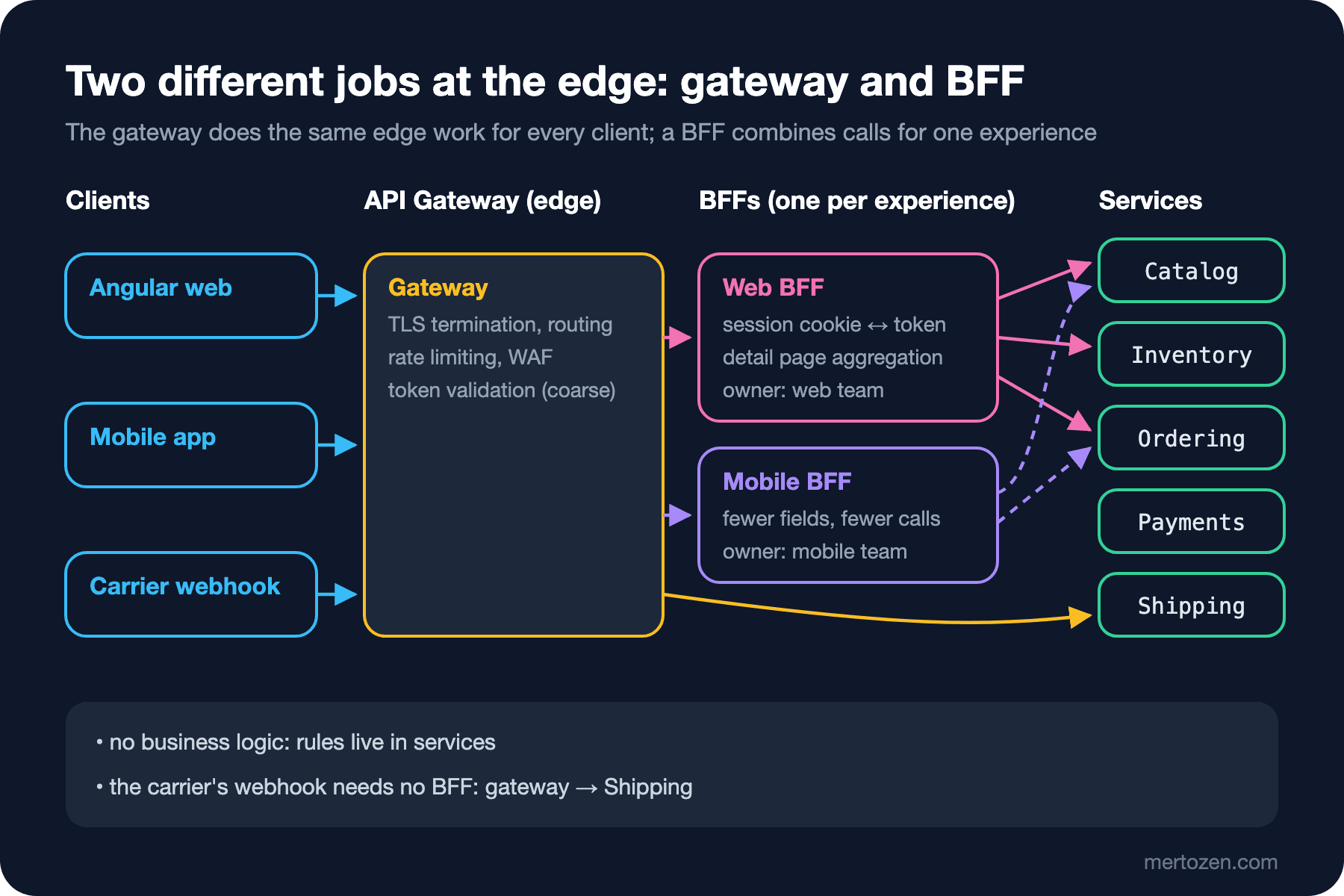
The layout in the figure is a common setup today: work shared by everyone, such as TLS, rate limiting and coarse token validation, in the gateway at the edge, experience-specific combining in the BFFs, business rules in the services. Traffic with no user experience behind it, such as the carrier's webhook to Shipping, skips the BFFs and goes from the gateway straight to the service. In a small system the gateway and the BFF can be the same process; the Web BFF itself sits at the edge and terminates TLS too. The split is about responsibilities, not physical boxes.
Aggregation in the BFF: The Book Detail Page
The Web BFF's detail page endpoint calls the three services in parallel and returns a single response shaped for the page. I built the example in one console application: Catalog, Inventory and Ordering are stubs (answering with 120, 80 and 100 ms of delay respectively), and the BFF is a separate Kestrel host:
// One endpoint for the web storefront's book detail page
bff.MapGet("/bff/web/books/{id:guid}", async (Guid id, IHttpClientFactory http, CancellationToken ct) =>
{
    string customerId = "ada"; // in reality this comes from the BFF's session cookie
    Task<CatalogBook?> book = http.CreateClient("catalog").GetFromJsonAsync<CatalogBook>($"/api/books/{id}", ct);
    Task<int?> stock = TryGetAvailableAsync(http.CreateClient("inventory"), id, ct);
    Task<Purchase?> purchase = http.CreateClient("ordering")
        .GetFromJsonAsync<Purchase>($"/api/customers/{customerId}/purchases/{id}", ct);

    await Task.WhenAll(book, stock, purchase);
    if (book.Result is not { } b)
        return Results.NotFound();

    return Results.Ok(new BookDetailsView(
        b.Title,
        b.Author,
        $"{b.ListPrice.Amount:0.00} {b.ListPrice.Currency}",
        stock.Result switch { null => "unknown", 0 => "out-of-stock", < 5 => "few-left", _ => "in-stock" },
        purchase.Result?.PurchasedBefore ?? false));
});

static async Task<int?> TryGetAvailableAsync(HttpClient inventory, Guid bookId, CancellationToken ct)
{
    // Stock isn't essential to the page: show "unknown" if it fails
    try
    {
        StockLevel? level = await inventory.GetFromJsonAsync<StockLevel>($"/api/stock/{bookId}", ct);
        return level?.Available;
    }
    catch (HttpRequestException)
    {
        return null;
    }
}
// View model shaped for what the Angular page needs
public sealed record BookDetailsView(string Title, string Author, string Price, string Availability, bool PurchasedBefore);Sending the same request first with Inventory up and then with Inventory returning 503:
inventory up=True, 122 ms: {"title":"Dune","author":"Frank Herbert","price":"14.90 EUR","availability":"few-left","purchasedBefore":true}
inventory up=False, 122 ms: {"title":"Dune","author":"Frank Herbert","price":"14.90 EUR","availability":"unknown","purchasedBefore":true}
There are three decisions in this short code. The first is parallelism: the three calls don't depend on each other, and with Task.WhenAll the total time approaches the slowest call (Catalog's 120 ms); awaited one after another it would be at least 120 + 80 + 100 = 300 ms. One call from the browser instead of three makes the difference even bigger on a mobile network, because the network between the BFF and the services is inside the data centre and fast.
The second is a deliberate decision about partial failure. It's the example in Newman's BFF article too: if the stock service is down, drop the stock information from the page, not the page. Without Catalog the page means nothing, so a Catalog failure is a page failure; without Inventory the page is still useful, hence "unknown". This is a product decision, not a technical one, and the team that owns the experience makes it; that's one more reason the BFF belongs to that team. Note that the duration didn't change in the example because Inventory returned 503 quickly. Had Inventory hung without answering, the BFF would have hung too; every downstream call needs a timeout. What timeouts, retries and circuit breakers mean at the service level is in this series' "Microservices in Production" post, and the Polly code is in the upcoming "External Service Integration and Resilience" series in the Backend category.
The third is what the BFF doesn't do. Ordering answers "have you bought this before?"; whether returned orders count is Ordering's rule. The BFF only takes PurchasedBefore and puts it on the page. Turning the stock count into a label like "few-left" is a presentation decision: the web team picked 5 as the threshold, the mobile team can pick another in its own BFF. The line is this: if two clients getting different answers to the same question would be a business inconsistency, the rule belongs in the service; if only the presentation differs, it belongs in the BFF.
The BFF and Token Handling
The BFF's second big job is about security. If an application running entirely in the browser, like Angular, keeps the access token, usually a JWT (JSON Web Token), in the browser, any XSS (Cross-Site Scripting) hole in the page can steal it. "OAuth 2.0 for Browser-Based Applications", developed for years as a draft by the OAuth working group of the IETF (Internet Engineering Task Force), was published in August 2026 as RFC (Request for Comments) 10017 with best current practice status, and it compares architectural options for browser-based apps. The option it recommends most strongly is the BFF: the OAuth client is the BFF, not the browser; the BFF runs the authorization code flow on the server side and keeps the tokens on its side, bound to the user's session. Only a session cookie with HttpOnly, Secure, SameSite=Strict and the __Host- prefix goes to the browser. The Angular app comes to the BFF with the cookie, and the BFF swaps the cookie for the token and sends the request downstream with an access token.
This arrangement has a price too: the BFF is now a stateful component that holds sessions and has to share them when it scales; because it relies on cookies, it also takes on CSRF (Cross-Site Request Forgery) protection. We covered cookie flags and CSRF in detail in the OWASP (Open Worldwide Application Security Project) series post "OWASP A07: Authentication Failures (2) — Cookie Flags, JWT Validation and CSRF". But the gain is large: since the token never reaches the browser, stealing it through XSS is largely taken off the table. Which token the BFF carries downstream (the user's token or an exchanged one) is the topic of this series' security post.
Gateway, BFF, or Both?
| Question | API Gateway | BFF |
|---|---|---|
| Whom does it serve? | All clients the same way | A single user experience |
| Typical work | Routing, TLS, token validation, rate limiting, WAF | Aggregation, response shaping, session and token handling |
| Owner | Platform team | The experience's team (web, mobile) |
| Code or configuration? | Mostly configuration | Application code |
| How often it changes | Rarely | As often as the UI (user interface) |
| What must not be in it | Business rules, client-specific combining | Business rules, other experiences' needs |
I said I'd object to the Gateway Aggregation pattern; this table is why. Aggregation is client-specific work, and when client-specific work goes into the shared gateway owned by the platform team, every UI change lands in the platform team's backlog. Newman, in the "Implementing Microservice Communication" chapter of Building Microservices (2nd edition, 2021), recommends keeping the gateway's behaviour generic and keeping call aggregation and protocol rewriting out of it; in the "User Interfaces" chapter he explains that gathering aggregation into one central gateway breeds a separate team that owns it and a bottleneck, and leaves that work to BFFs.
Common Pitfalls
The god gateway
Adding business rules to the gateway because "every request passes through it anyway": validating order totals in the gateway, calculating campaign prices in the gateway, reshaping responses in the gateway. A few months later the gateway is a single component that knows everything all the services know; today's version of the 2000s ESBs (Enterprise Service Bus) that had business logic buried in them and turned into a bottleneck everyone depended on.
The single-team bottleneck
If the gateway's route table or aggregation code is in the hands of one platform team, every new endpoint means a ticket and a wait. Routes and policies should be configuration that service teams can open pull requests against, validated automatically.
Turning a BFF into a new general-purpose API
Sharing the Web BFF because "mobile can use this endpoint too" removes the BFF's reason to exist: once again a single API bloating with two experiences' needs. If two experiences really are very similar, Newman allows a single BFF; but that should be a conscious decision, not a habit.
BFF-to-BFF calls
The Mobile BFF getting some data from the Web BFF creates a new coupling between experiences. If there's a shared need, that data belongs to a service, and both BFFs call that service.
Treating every downstream call as mandatory
An aggregation with no decision about partial failure turns the availability of the most fragile service into the availability of the whole page. Write down, page by page, which parts are essential.
When Not to Use It
If there's a single Angular application, a single team and a modular monolith, a separate gateway and BFF layer only adds a network hop and one more component to deploy; the monolith already is the experience's backend. The gateway's value starts the moment more than one service is exposed to the outside: you don't want to repeat TLS and token validation in every service. The BFF's value shows up when there are several experiences with clearly diverging needs and separate teams owning them. Bookstore's 18-month plan includes a mobile app and a second country; until then a single Web BFF (or a gateway that lets the browser see only a single host) is enough.
A Small Experiment
★☆☆ In the example's Inventory stub, replace the 503 with await Task.Delay(5000) and measure the BFF's duration. Then add a 300 ms timeout to the Inventory call (CancellationTokenSource.CancelAfter) and try again. What does the page show?
★★☆ Design a Mobile BFF endpoint for the same three services: the mobile detail screen shows only the title, price and "in stock / out of stock". Which call disappears entirely, which fields does the response contain, and who decides the threshold?
★★★ Write Bookstore's first gateway route table: which path goes to which service or BFF, which routes have rate limiting, how is the carrier's webhook authenticated? Does any row in the table look like a business rule?
The client now knows a single address. But the BFF itself still talks to fixed addresses like http://localhost:5301; what happens to those addresses when Inventory scales to three instances or restarts in Kubernetes? In the next post we'll look at service discovery.