

LINQ Join and GroupJoin: Inner Join, Composite Keys and the Left Join Pattern

How Join, as an inner join, drops unmatched rows and multiplies multiple matches, and its documented order. The direction of equals in query syntax and CS1937/CS1938, composite keys and CS1941, hierarchical results with GroupJoin, the left join pattern with GroupJoin + DefaultIfEmpty and its null trap, multiple joins, and how Join runs in n + m with a lookup.
Version note: The code in this post uses C# 10 and the .NET 6 APIs; it was built and run with the .NET 10 SDK.
Guess First
In this post the bookstore has customers, orders and order lines. As if they came from a real database, the tables are linked to each other by ids. Put the file below next to Program.cs as Data.cs:
record Customer(int Id, string Name, string City);
record Order(int Id, int CustomerId, DateOnly Date);
record OrderItem(int OrderId, string Isbn, int Quantity, decimal UnitPrice);
record ReturnRequest(int OrderId, string Isbn, string Reason);
record Book(string Isbn, string Title, string Author);

static class Store
{
    public static List<Customer> Customers { get; } = new()
    {
        new(1, "Ada", "London"),
        new(2, "Alan", "Manchester"),
        new(3, "Grace", "New York"),
        new(4, "Linus", "Helsinki"),
    };

    public static List<Order> Orders { get; } = new()
    {
        new(101, 1, new DateOnly(2026, 10, 3)),
        new(102, 2, new DateOnly(2026, 10, 5)),
        new(103, 1, new DateOnly(2026, 10, 9)),
        new(104, 9, new DateOnly(2026, 10, 12)), // there is no customer 9
        new(105, 3, new DateOnly(2026, 10, 20)),
    };

    public static List<OrderItem> OrderItems { get; } = new()
    {
        new(101, "978-0441172719", 1, 12.99m),
        new(101, "978-0451524935", 2, 8.99m),
        new(102, "978-0261102217", 1, 10.99m),
        new(103, "978-0441172719", 1, 12.99m),
        new(104, "978-0553293357", 3, 9.99m),
        new(105, "978-0451524935", 1, 8.99m),
        new(105, "978-0553382563", 2, 7.99m),
    };

    public static List<ReturnRequest> Returns { get; } = new()
    {
        new(101, "978-0451524935", "Damaged cover"),
        new(105, "978-0553382563", "Wrong edition"),
    };

    public static List<Book> Books { get; } = new()
    {
        new("978-0441172719", "Dune", "Frank Herbert"),
        new("978-0553293357", "Foundation", "Isaac Asimov"),
        new("978-0451524935", "1984", "George Orwell"),
        new("978-0261102217", "The Hobbit", "J.R.R. Tolkien"),
        new("978-0553382563", "I, Robot", "Isaac Asimov"),
    };
}
There are four customers and five orders. We match the customers with their orders. How many lines does this code print, and in what order?
IEnumerable<string> rows = Store.Customers.Join(
    Store.Orders,
    c => c.Id,
    o => o.CustomerId,
    (c, o) => $"{c.Name} #{o.Id}");

foreach (string row in rows)
{
    Console.WriteLine(row);
}

Console.WriteLine($"Rows: {rows.Count()}, customers: {Store.Customers.Count}, orders: {Store.Orders.Count}");
Inner Join: Unmatched Rows Drop, Multiple Matches Multiply
Output:
Ada #101
Ada #103
Alan #102
Grace #105
Rows: 4, customers: 4, orders: 5
Four customers and five orders gave four rows, but those four rows are neither "every customer" nor "every order". Ada showed up twice because she has two orders. Linus didn't show up at all because he has no orders. Order 104 also dropped out because it belongs to customer 9, who doesn't exist. Join is the counterpart of SQL's INNER JOIN: only elements that have a partner on both sides make it into the result, and one row is produced for each matching pair.
The order is documented behavior too: Join preserves the order of the first sequence (outer), and for each outer element it yields the matching elements of the second sequence (inner) in their own order. That's why Ada's two orders came next to each other, followed by Alan and Grace. The order of the parameters follows the same structure: first the inner sequence, then the outer key selector, then the inner key selector, and finally the result selector that produces a result from the two matching elements.
Query Syntax and the Direction of equals
A join is one of the rare places where query syntax reads better than method syntax:
IEnumerable<string> rows =
    from c in Store.Customers
    join o in Store.Orders on c.Id equals o.CustomerId
    where o.Date.Day < 10
    select $"{c.Name} #{o.Id} {o.Date:yyyy-MM-dd}";

Console.WriteLine(string.Join(" | ", rows));
Ada #101 2026-10-03 | Ada #103 2026-10-09 | Alan #102 2026-10-05There are two things to watch. First, the comparison is written with the equals keyword, not ==; that's because this isn't a general condition but an equality match on keys (an equijoin). Second, the left side of equals must have the outer range variable (c) and the right side the inner range variable (o). Swap the sides and the compiler stops you:
IEnumerable<string> rows =
    from c in Store.Customers
    join o in Store.Orders on o.CustomerId equals c.Id
    select $"{c.Name} #{o.Id}";
Program.cs(3,31): error CS1937: The name 'o' is not in scope on the left side of 'equals'. Consider swapping the expressions on either side of 'equals'.
Program.cs(3,51): error CS1938: The name 'c' is not in scope on the right side of 'equals'. Consider swapping the expressions on either side of 'equals'.This time the compiler says clearly what's wrong and even suggests the fix: swap the expressions. The reason for the rule is that query syntax is translated directly into a Join call: the left side goes to the outer key selector, the right side to the inner key selector, and each lambda sees only its own side's variable.
Joining on a Composite Key
Return requests are tied to order lines, and neither the order number nor the ISBN identifies a line on its own; the two together do. You use an anonymous type as the key:
IEnumerable<string> returned =
    from i in Store.OrderItems
    join r in Store.Returns on new { i.OrderId, i.Isbn } equals new { r.OrderId, r.Isbn }
    select $"#{i.OrderId} {i.Isbn} x{i.Quantity}: {r.Reason}";

Console.WriteLine(string.Join(Environment.NewLine, returned));
#101 978-0451524935 x2: Damaged cover
#105 978-0553382563 x2: Wrong editionFor two anonymous types to count as equal, their property names, types and order must match; only then does the compiler see them as the same type. Give the property a different name on the returns side and you get an error:
IEnumerable<string> returned =
    from i in Store.OrderItems
    join r in Store.Returns on new { i.OrderId, i.Isbn } equals new { r.OrderId, BookIsbn = r.Isbn }
    select r.Reason;
Program.cs(3,5): error CS1941: The type of one of the expressions in the join clause is incorrect. Type inference failed in the call to 'Join'.This message is much less helpful than CS1937. It says "type inference failed" but doesn't say which type. The reason is that the keys on the two sides are now two different anonymous types; since Join has a single TKey, the compiler can't find a common type. If you see CS1941 in a join with a composite key, the first thing to do is put the property names of the two sides next to each other and compare them. The same error shows up with single-field keys when the types don't match, for example when one side has an int id and the other a string one. (int and long, on the other hand, cause no trouble; the compiler picks long as the common type.)
GroupJoin: Each Customer with Their Orders
Join produces a flat table. Sometimes what you want is hierarchical: each customer and their list of orders. GroupJoin yields each outer element once, together with all of its matching inner elements:
IEnumerable<string> summary = Store.Customers.GroupJoin(
    Store.Orders,
    c => c.Id,
    o => o.CustomerId,
    (c, orders) => $"{c.Name}: [{string.Join(", ", orders.Select(o => o.Id))}], count: {orders.Count()}");

Console.WriteLine(string.Join(Environment.NewLine, summary));
Ada: [101, 103], count: 2
Alan: [102], count: 1
Grace: [105], count: 1
Linus: [], count: 0Ada showed up once, with her two orders. The real difference is Linus: even though he has no orders, he's in the result, with an empty order list. The documentation says this explicitly: if there's no match for an outer element, its sequence of matches is empty but the element still appears in the result. It may look similar to the GroupBy we saw in an earlier post, but the logic differs: GroupBy splits a single sequence by its own key, while GroupJoin attaches a group from a second sequence to each element of the outer sequence.
The Left Join Pattern: GroupJoin and DefaultIfEmpty
A LEFT JOIN in SQL produces flat rows and also keeps the left rows that have no partner. .NET 6 has no ready-made operator for it; the documentation also says a left outer join can be done with GroupJoin. The pattern has three parts:
var methodRows = Store.Customers
    .GroupJoin(Store.Orders, c => c.Id, o => o.CustomerId, (c, orders) => new { Customer = c, Orders = orders })
    .SelectMany(x => x.Orders.DefaultIfEmpty(), (x, o) => new { x.Customer.Name, OrderId = o?.Id }); // o is null when there is no match

Console.WriteLine(string.Join(" | ", methodRows.Select(r => $"{r.Name} {r.OrderId?.ToString() ?? "-"}")));

IEnumerable<string> queryRows =
    from c in Store.Customers
    join o in Store.Orders on c.Id equals o.CustomerId into customerOrders
    from o in customerOrders.DefaultIfEmpty()
    select $"{c.Name} {(o is null ? "no orders" : $"#{o.Id}")}";

Console.WriteLine(string.Join(" | ", queryRows));

IEnumerable<int> orphanOrders = Store.Orders
    .ExceptBy(Store.Customers.Select(c => c.Id), o => o.CustomerId)
    .Select(o => o.Id);
Console.WriteLine($"Orders without a customer: {string.Join(", ", orphanOrders)}");
Ada 101 | Ada 103 | Alan 102 | Grace 105 | Linus -
Ada #101 | Ada #103 | Alan #102 | Grace #105 | Linus no orders
Orders without a customer: 104GroupJoin attaches each customer's orders. DefaultIfEmpty() turns an empty order list into a one-element list, and that single element is the default value, which is null for a reference type. SelectMany then opens the groups back up into flat rows. In the end, each customer with orders showed up once per order, and Linus showed up once with a null order. That's why a o?.Id or an o is null check is mandatory when selecting the result. Don't count on the compiler: when I wrote the same query in query syntax as select o.Id, there was no warning even with nullable reference types on, and the program threw a NullReferenceException when it reached Linus.
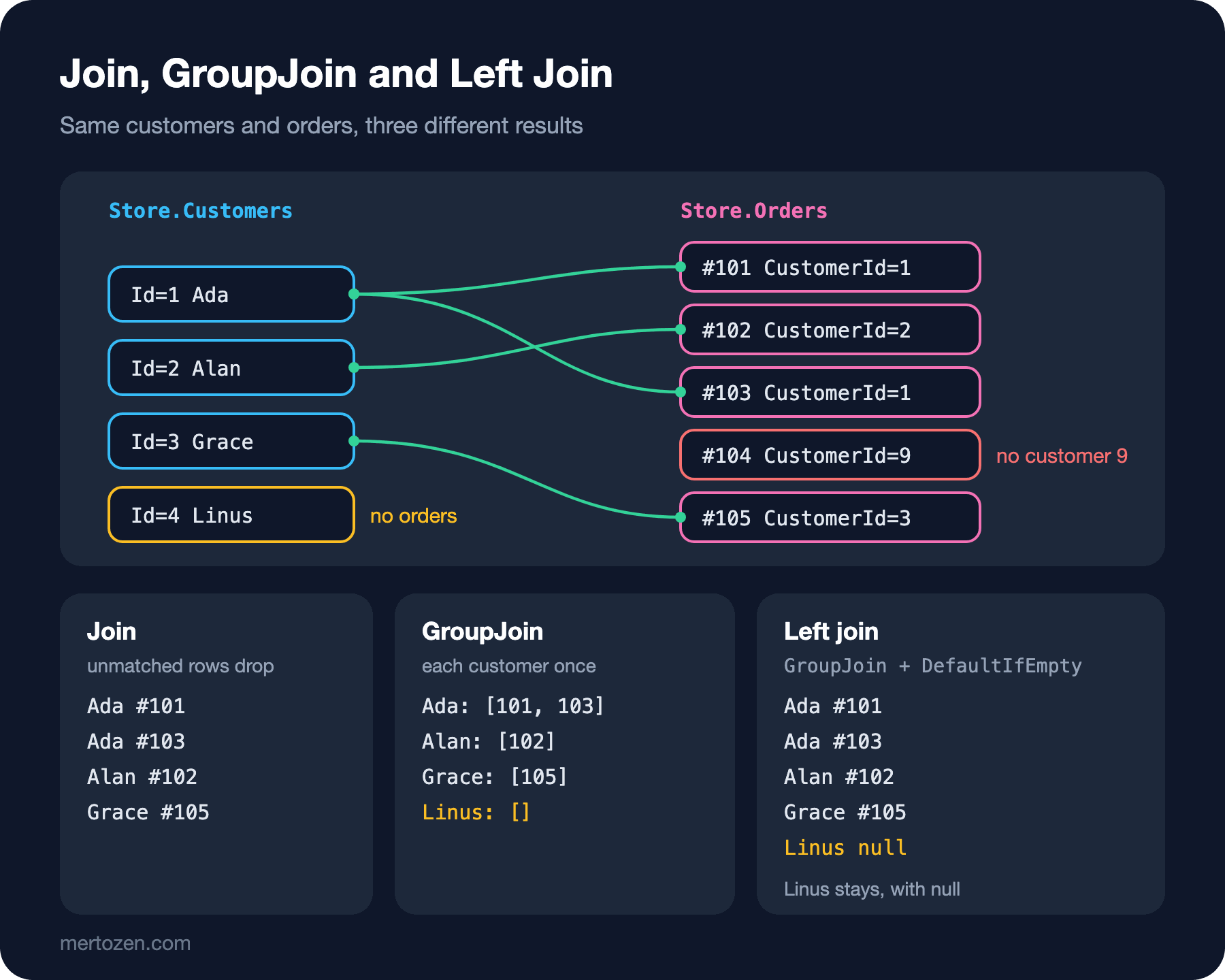
In query syntax the same pattern is written with join ... into followed by from o in customerOrders.DefaultIfEmpty(), and most people find it more readable. The last line covers the reverse direction: it finds the orders without a customer using ExceptBy from the previous post; the unmatched side of a right join can be obtained the same way. .NET 10 brought the LeftJoin and RightJoin operators, which reduce this three-step pattern to a single call; we'll see them in the .NET 10 post of the LINQ series.
More Than One Join
Real reports usually combine more than two tables. Let's find each customer's total spending and the books they bought:
using System.Globalization;

CultureInfo.CurrentCulture = CultureInfo.InvariantCulture;

var revenue =
    from c in Store.Customers
    join o in Store.Orders on c.Id equals o.CustomerId
    join i in Store.OrderItems on o.Id equals i.OrderId
    join b in Store.Books on i.Isbn equals b.Isbn
    group new { b.Title, Amount = i.Quantity * i.UnitPrice } by c.Name into g
    orderby g.Sum(x => x.Amount) descending
    select new
    {
        Customer = g.Key,
        Total = g.Sum(x => x.Amount),
        Titles = string.Join(" / ", g.Select(x => x.Title).Distinct()),
    };

foreach (var r in revenue)
{
    Console.WriteLine($"{r.Customer}: {r.Total} ({r.Titles})");
}
Ada: 43.96 (Dune / 1984)
Grace: 24.97 (1984 / I, Robot)
Alan: 10.99 (The Hobbit)The joins chain: customer to order, order to lines, line to book. Each join can see all the range variables of the previous steps, which is why c, i and b could all be used in the final group clause. In a chain of inner joins, anything without a match silently drops: Linus didn't make it into the report because he has no orders, order 104 because it has no customer. If the report says "all customers", you need to turn the first step into a left join. Written in method syntax, this query needs intermediate anonymous types for each join; with multiple joins, query syntax really makes a difference.
How Join Works
You could also write Join as a nested loop: a Where over all the orders for each customer. The result is the same, but the work done isn't:
using System.Globalization;

CultureInfo.CurrentCulture = CultureInfo.InvariantCulture;

List<Customer> customers = Enumerable.Range(1, 1_000).Select(id => new Customer(id, $"Customer {id}", "London")).ToList();
List<Order> orders = Enumerable.Range(1, 10_000).Select(id => new Order(id, id % 1_000 + 1, new DateOnly(2026, 10, 1))).ToList();

int joinCalls = 0;
int joined = customers.Join(
    orders,
    c => { joinCalls++; return c.Id; },
    o => { joinCalls++; return o.CustomerId; },
    (c, o) => o.Id).Count();

int nestedCalls = 0;
int nested = customers.SelectMany(c => orders.Where(o =>
{
    nestedCalls++;
    return o.CustomerId == c.Id;
})).Count();

Console.WriteLine($"Join:  {joined} rows, {joinCalls:N0} key selector calls");
Console.WriteLine($"Where: {nested} rows, {nestedCalls:N0} predicate calls");
Join: 10000 rows, 11,000 key selector calls
Where: 10000 rows, 10,000,000 predicate callsWith a thousand customers and ten thousand orders, both approaches found the same 10,000 rows. The nested Where looked at all ten thousand orders for every customer: ten million comparisons. Join, when first enumerated, walks the inner sequence once and builds a lookup by its keys, then does a single hash lookup in it for each element of the outer. The key selectors were called 11,000 times in total. That's the difference between n × m and n + m, and it turns into a chasm as the data grows. So when matching two lists in memory, use Join instead of a nested loop or Where. Since the lookup is built for the inner side, putting the smaller list on the inner side is more economical in terms of memory.
In a database things are different again. EF Core translates Join into a SQL JOIN, but there you rarely need to write a join by hand: if you've defined the relationships as navigation properties, writing order.Customer.Name is enough and EF Core generates the join itself. The details are in the relationships and LINQ queries posts of the EF Core series.
Common Pitfalls
Expecting Join to keep unmatched rows. It's an inner join; unmatched elements on both sides silently drop. If a report is missing customers, this is the first place to look.
Forgetting that multiple matches multiply rows. If a customer has three orders, the customer shows up three times; take that into account when computing a per-customer total, or use GroupJoin.
Mixing up the sides of equals in query syntax. The left side is outer, the right side is inner; CS1937 and CS1938 tell you so.
Writing property names differently in composite keys. The two anonymous types don't count as the same type and you get CS1941. Match the names, the types and the order.
Forgetting null in a left join. The element coming from DefaultIfEmpty() can be null; write o?.Id instead of o.Id.
Matching large in-memory lists with nested Where. It does n × m comparisons; Join or a ToLookup finishes in n + m.
A Small Experiment
★☆☆ Join the order lines with the books and print each line as "book title, quantity, line total". Add an ISBN that isn't in the book list and see that line drop out.
★★☆ Print each customer's order count and total spending so that customers without orders show up with 0. Solve it first with the left join pattern, then in a single step with GroupJoin.
★★★ Write a left join with a composite key for the return requests: each order line should show up with the reason if it was returned, and with "-" if it wasn't. Then produce the same result without a join, through an index you build with ToLookup, and check that the two results are the same with SequenceEqual.
We combined different sources with joins. In the next post we move on to Any, All, Contains and SequenceEqual, which ask yes/no questions about sequences, and to ToList, ToArray, ToDictionary, ToHashSet, Cast and OfType, which turn query results into concrete collections.